Audio Normalization Techniques: Peak vs. Loudness


Free Download Mp4Gain
picture

Audio Normalization Techniques: Peak vs. Loudness

Audio Normalization Techniques

As an audio optimization expert, I’m often asked about the best techniques for normalizing audio levels. In this article, I will explore two popular approaches: peak normalization and loudness normalization. These techniques, peak vs. loudness normalization, have their own unique advantages and considerations. Let’s dive in and uncover the secrets of achieving balanced and consistent audio!

Peak Normalization: Unleashing the Power of Dynamics

When it comes to peak normalization, it’s all about preserving the dynamics of your audio. Imagine a breathtaking symphony where the crescendos and diminuendos transport you to a different realm. With peak normalization, you ensure that the highest peaks of your audio reach their full potential without clipping or distortion. It’s like giving your audio the freedom to express itself with intensity and impact.

Loudness Normalization: The Harmony of Consistency

Now, let’s turn our attention to the world of loudness normalization. Have you ever experienced the frustration of constantly adjusting the volume while switching between songs or TV shows? Loudness normalization comes to the rescue! By analyzing the perceived loudness of your audio, it ensures a consistent listening experience across different tracks. Say goodbye to sudden volume jumps and immerse yourself in a harmonious soundscape.

Dynamic Range: The Dance of Soft and Loud

In the realm of audio normalization, we encounter the concept of dynamic range. Dynamic range represents the difference between the softest and loudest parts of an audio signal. Peak normalization respects the natural dynamic range, allowing the delicate whispers and thunderous roars to coexist in perfect balance. On the other hand, loudness normalization aims to reduce the dynamic range, providing a more even playing field for all elements of your audio.

Audio Clipping: Taming the Wild Peaks

Audio clipping is a notorious villain that can ruin your audio experience. Picture this: a sudden burst of sound that distorts and crackles, disrupting your enjoyment. Peak normalization acts as the hero in this story, taming those wild peaks and ensuring that your audio stays within safe limits. With peak normalization, your audio remains clean and free from the dreaded clipping monster.

LUFS: The Measure of Perceived Loudness

In the realm of loudness normalization, we encounter the term LUFS, which stands for Loudness Units Full Scale. LUFS provides a standardized measure of the perceived loudness of your audio. Loudness normalization algorithms analyze the integrated LUFS value and adjust the overall volume to match a specific target level. It’s like having a universal translator that ensures consistent loudness across different tracks and platforms.

Listening Environment: From Living Rooms to Concert Halls

Let’s talk about the listening environment and its impact on audio normalization. Every space has its unique characteristics, from the cozy intimacy of a living room to the grandeur of a concert hall. Loudness normalization takes into account these variations, delivering a consistent listening experience regardless of the environment. So whether you’re enjoying your favorite tunes at home or attending a live performance, the magic of normalization will make every moment memorable.

Personal Preference: Customizing Your Audio Journey

We all have our individual tastes and preferences when it comes to audio. Some crave the raw power of peak normalization, while others seek the comfort of consistent loudness through loudness normalization. The beauty of audio normalization techniques is that they allow you to customize your audio journey according to your personal taste. It’s like having a tailor-made suit that perfectly fits your unique style.

Metadata and Replay Gain: Enhancing the User Experience

Metadata and Replay Gain are powerful allies in the realm of audio normalization. Metadata provides valuable information about your audio, guiding normalization algorithms to make the right adjustments. Replay Gain takes it a step further by applying metadata tags to your audio files, ensuring consistent playback volume across different tracks. Together, they create a seamless and enhanced user experience, elevating your audio enjoyment to new heights.

Compression: Controlling the Sonic Landscape

Dynamic audio content, such as movies or live performances, often presents challenges for normalization. This is where compression enters the scene. Compression techniques allow you to shape the sonic landscape, reducing the dynamic range while maintaining audio quality. It’s like having a skilled conductor who ensures that every instrument is heard clearly, regardless of its volume.

Audio Editing and Mastering: Polishing the Gems

Lastly, let’s not forget the crucial role of audio editing and mastering in the pursuit of sonic perfection. Audio professionals meticulously fine-tune various parameters during the editing and mastering process. Audio normalization techniques become valuable tools in their arsenal, ensuring that the final product shines with balanced and consistent audio. It’s like adding the final touch of brilliance to your audio gems.

In conclusion, the choice between peak normalization and loudness normalization depends on your desired audio outcome. Whether you embrace the dynamic range or seek consistent loudness, these techniques empower you to create an audio experience that resonates with your vision. So go forth, unleash the power of normalization, and let your audio journey be a harmonious symphony of sound!



Free Download Mp4Gain
picture


Mp4Gain Main Window
picture


Mp4Gain Features
picture


Free Download Mp4Gain
picture

Understanding Audio Normalization

Understanding Audio Normalization

Audio Normalization
Audio Normalization

Audio normalization is the process of adjusting the loudness of an audio recording to a standard level. The goal is to ensure that all audio files have a consistent volume, making them easier to listen to and preventing ear fatigue. In this article, we will explore the different types of audio normalization and how they work.

Audio Normalization
Audio Normalization

Peak Normalization

Peak normalization is the process of adjusting the peak amplitude of an audio recording to a certain level. The peak amplitude is the highest point in the audio signal, and it is measured in decibels (dB). The goal of peak normalization is to ensure that all audio files have the same peak amplitude, making them easier to listen to and preventing ear fatigue.

Peak normalization is typically used for digital audio files, such as MP3 and WAV files. These files are usually stored in a digital format that allows for easy manipulation of the audio data. However, peak normalization can also be applied to analog audio recordings, such as cassette tapes or vinyl records.

RMS Normalization

RMS normalization is the process of adjusting the root mean square (RMS) level of an audio recording to a certain level. The RMS level is a measure of the average power of an audio signal, and it is measured in decibels (dB). The goal of RMS normalization is to ensure that all audio files have the same RMS level, making them easier to listen to and preventing ear fatigue.

RMS normalization is typically used for digital audio files, such as MP3 and WAV files. However, it can also be applied to analog audio recordings, such as cassette tapes or vinyl records.

RMS normalization is often considered to be a more accurate method of normalizing audio than peak normalization because it takes into account the average power of the audio signal, rather than just the peak amplitude.

Loudness Normalization

Loudness normalization is the process of adjusting the loudness of an audio recording to a certain level. The loudness of an audio recording is measured in loudness units (LU). The goal of loudness normalization is to ensure that all audio files have the same loudness, making them easier to listen to and preventing ear fatigue.

Loudness normalization is typically used for broadcast audio, such as television and radio. Loudness normalization is required by many countries to ensure that the audio levels of all broadcast programs are consistent, making them easier to listen to and preventing ear fatigue.

Loudness normalization is often considered to be a more accurate method of normalizing audio than peak or RMS normalization because it takes into account the perceived loudness of the audio signal, rather than just the peak amplitude or RMS level.

Conclusion

Normalizing audio is an important process for ensuring that all audio files have a consistent volume, making them easier to listen to and preventing ear fatigue. There are several different types of audio normalization, including peak normalization, RMS normalization, and loudness normalization. Each method has its own advantages and disadvantages and is best suited for different types of audio.

When it comes to audio normalization, one solution that stands out is Mp4Gain. It is a software that allows you to normalize your audio files in a quick and efficient way. It can be used to normalize a single audio file or multiple files at once. It also supports a wide range of audio file formats, including MP3, WAV, and more. Furthermore, Mp4Gain is user-friendly and easy to navigate, making it a great option for both professional and casual users.

In conclusion, audio normalization is a crucial process for ensuring that all audio files have a consistent volume, making them easier to listen to and preventing ear fatigue. There are several different types of audio normalization, including peak normalization, RMS normalization, and loudness normalization. Each method has its own advantages and disadvantages and is best suited for different types of audio. Mp4Gain is a powerful and easy-to-use software that can help you normalize your audio files quickly and efficiently.

Audio normalization explained

Audio normalization – Audio normalization

Audio normalization is the application of a constant amount of amplification of a sound recording to bring the amplitude of a target level (standard). Because the same amount of gain over the entire recording, the signal-to-noise ratio and relative dynamics are unchanged.

Two basic types of audio normalization exist. Peak normalization adjusts the recording based on the highest signal level present in the recording. Loudness normalization adjusts the recording based on perceived loudness.

Normalization differs from dynamics compression, which applies varying levels of gain across a recording to fit the level within a minimum and maximum range. Normalization adjusts the gain with a constant value over the entire recording.

Normalization is one of the functions usually provided by a digital audio workstation.

Peak normalization

One type of normalization is peak normalization, where the gain is changed to bring the highest PCM sample value or analog signal peak to a certain level – usually 0 dBFS the loudest level allowed in a digital system.

Peak normalization

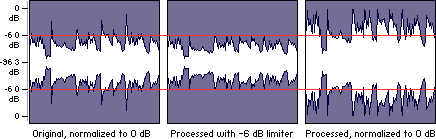
Since it only goes to the highest level, only peak normalization does not take into account the apparent loudness of the content. As such, peak normalization is commonly used to change the volume so as to ensure optimal use of the available dynamic range during the mastering phase of a digital recording. In combination with compression / restriction, however, peak normalization becomes a feature that can provide a volume advantage over off-peak normalized material. This feature of digital recording systems, compression and limiting followed by peak normalization, sets contemporary trends in program loudness.

Loudness normalization

Another type of normalization is based on a measurement of loudness, where the gain is changed to bring the average amplitude to a target level. This average can be a simple measurement of average power, such as the RMS value, or it can be a measure of human perceived loudness, such as that offered by ReplayGain, Soundcheck and EBU R128.

Loudness Normalization

For example, YouTube reference level -14 LUFS, so if a program analyzed at -10 LUFS, YouTube will decrease the level 4 dB to the reference of -14 LUFS.

Loudness normalization was made in different volume combat when listening to different music in a series. Before loudness normalization, one song in a playlist would be quieter than the rest, so the end listener would have to put a volume knob to adjust the playback volume.

Depending on the dynamic range of the content and the target level, loudness normalization may result in peaks that exceed the storage medium. Software offering such normalization usually offers the option of using dynamic range compression to avoid clipping when this happens. In this situation, signal-to-noise ratio and relative dynamics changed.

Volume normalization, an explanation

Audio Normalization: Make Your Audio & Video Consistently Loud

Audio normalization is a process in which the amplitude (volume) of an audio recording is increased or decreased in a constant relationship over time, so that the maximum amplitude or the maximum effective value or the perceived volume (volume) reaches a predetermined level, the standard. If the signal has multiple tracks, they all undergo the same correction.

Normalize Audio

Example: normalization of peaks to -3 dB:
A collection of digital recordings is made with a peak modulation standard of -3dB FS.
A new stereo recording is measured. The highest maximum level is -5.5 dB FS on the left track, -5.7 dB FS on the right track.
Normalization consists of applying a constant gain of 5.5 – 3 = 2.5 dB.
Standardization requires two passes. The first determines the maximum level, the second applies the correction to the entire recording.

Audio Normalization

Maximum normalization changes the level, but not the dynamics of the sound.
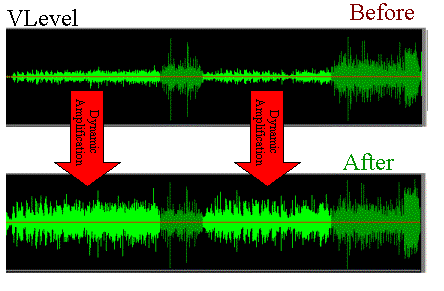
Volume normalization or perception of loudness often includes compression that changes the dynamics of sound.

Peak normalization

Peak normalization applies a constant gain to a recording to bring the highest peak to a target level, 89% professional audio (-1 dBFS true peak (True Peak)).

The sound dynamics of the recording are more or less preserved, except that maintaining a low distortion level after multiplication of all samples may involve the application of a known quantization error decorrelation noise. under the name redithering (tingling of the least significant bit) 2, which slightly increases the background noise level.

Volume normalization

The purpose of volume normalization is to bring all sound elements in a collection to the same sound volume level, so you can hear them without having to adjust the volume. In fact, the normalization of the maximum level in no way guarantees a homogeneity of the perceived sound volume (Loudness).

A simple approach to volume normalization, which is provided by various software programs, is to normalize the RMS value of the integrated signal within a few tenths of a second. The most advanced machines use extensive algorithms for more accurate evaluation of the perceived noise level. The European Broadcasting Union published a recommendation 1 in 2011, which provides a relatively simple method for this evaluation.

If the standard is not low enough, volume normalization involves compression for recordings whose sound dynamics would be higher than implied when setting the standard from the maximum level. If not, the signal peaks would exceed the quantization limits.

In the simplest implementation, volume normalization collects volume data during the first pass, determines the gain or attenuation necessary for the maximum volume to reach the norm, and applies this correction to the second pass. If the elements of the collection have the same characteristics, from form factor to top factor and dynamics, as is the case with popular music collections or recorded speech, this approach produces satisfactory results.

Extensive implementations use a standard that includes not only the volume of the sound, but also the maximum maximum values ​​and dynamics of the sound. They collect loudness levels and maximum values

VOLUME NORMALIZATION: WHAT IS THE VOLUME NORMALIZATION FUNCTION?

Audio Normalization

HOW IS THE VOLUME BETWEEN TITLES NORMALIZES?

WHAT ARE the benefits of activating the normalization feature?

The “NORMALIZE VOLUME” volume normalization feature allows you to achieve a volume of the same level, music title after music title, regardless of which one succeeds during playback.

How Audio Normalization Works

This provides undeniable listening comfort rather than having to, as before, sometimes turn the volume up or down depending on certain pieces of music.

Note that this difference between a high volume and a low volume sound is called dynamic. If this sound is short or long (1 second or 3 minutes …), be it music, voice or noise.

WHY IS THE SOUND MUSIC OR LETTERS STRONG, SOME TIME?

We must not forget that music, recorded or not, as well as everyday acoustic sounds (those that surround us) are something “alive” which, like during a human discussion, necessarily contains volume passages. weaker sound and others that are louder.

The human ear is by definition used to these differences in sound levels. If these sound differences between the low and high levels did not exist, it could end up giving us a headache because the sound heard would not be natural. The ear needs moments of rest, even if only for a moment, and stronger moments for words to remain audible (and to work the ear again!). The human ear needs this natural “breath”.

Today’s music is very “compressed” (constant sound level, few low levels) when recording (mixing), that is, there are few passages with a big difference between the lowest and highest passage of the song. The STANDARDIZE feature can even be activated and not work much if all the titles of an album are very “compressed”.

Finally, the sound world is like the aquatic world: there are high and low waves. Some tracks are not recorded (mixed) like others. They leave a big difference between low and high noise levels. The NORMALIZE VOLUME feature allows you to level up and try to get everything back to the same level.

WHEN SHOULD I USE THE STANDARDIZATION FUNCTION?

Eg. On the street or in the subway, standardization plays an additional role in making your music more audible. And of course, first and foremost to get a comfortable listening when listening to different music titles with as much sound as possible.

WHY disable the standardization feature?

When the need arises, you can turn this feature off at any time when you want to find this “breathing sound”, titles read (play), with multiple moments that contain smoother (weaker sounds) and higher variations (it’s loud).

Especially if all the titles in your album or playlist are compressed at source, disabling the NORMALIZER feature will help your ear rest, at the end of the day you will be less tired.

Deezer’s NORMALIZE feature does not compress sound and fatigue, it only reduces the major differences between high-level and low-level titles.