Understanding Audio Normalization


Free Download Mp4Gain
picture

Understanding Audio Normalization

Audio Normalization
Audio Normalization

Audio normalization is the process of adjusting the loudness of an audio recording to a standard level. The goal is to ensure that all audio files have a consistent volume, making them easier to listen to and preventing ear fatigue. In this article, we will explore the different types of audio normalization and how they work.

Audio Normalization
Audio Normalization

Peak Normalization

Peak normalization is the process of adjusting the peak amplitude of an audio recording to a certain level. The peak amplitude is the highest point in the audio signal, and it is measured in decibels (dB). The goal of peak normalization is to ensure that all audio files have the same peak amplitude, making them easier to listen to and preventing ear fatigue.

Peak normalization is typically used for digital audio files, such as MP3 and WAV files. These files are usually stored in a digital format that allows for easy manipulation of the audio data. However, peak normalization can also be applied to analog audio recordings, such as cassette tapes or vinyl records.

RMS Normalization

RMS normalization is the process of adjusting the root mean square (RMS) level of an audio recording to a certain level. The RMS level is a measure of the average power of an audio signal, and it is measured in decibels (dB). The goal of RMS normalization is to ensure that all audio files have the same RMS level, making them easier to listen to and preventing ear fatigue.

RMS normalization is typically used for digital audio files, such as MP3 and WAV files. However, it can also be applied to analog audio recordings, such as cassette tapes or vinyl records.

RMS normalization is often considered to be a more accurate method of normalizing audio than peak normalization because it takes into account the average power of the audio signal, rather than just the peak amplitude.

Loudness Normalization

Loudness normalization is the process of adjusting the loudness of an audio recording to a certain level. The loudness of an audio recording is measured in loudness units (LU). The goal of loudness normalization is to ensure that all audio files have the same loudness, making them easier to listen to and preventing ear fatigue.

Loudness normalization is typically used for broadcast audio, such as television and radio. Loudness normalization is required by many countries to ensure that the audio levels of all broadcast programs are consistent, making them easier to listen to and preventing ear fatigue.

Loudness normalization is often considered to be a more accurate method of normalizing audio than peak or RMS normalization because it takes into account the perceived loudness of the audio signal, rather than just the peak amplitude or RMS level.

Conclusion

Normalizing audio is an important process for ensuring that all audio files have a consistent volume, making them easier to listen to and preventing ear fatigue. There are several different types of audio normalization, including peak normalization, RMS normalization, and loudness normalization. Each method has its own advantages and disadvantages and is best suited for different types of audio.

When it comes to audio normalization, one solution that stands out is Mp4Gain. It is a software that allows you to normalize your audio files in a quick and efficient way. It can be used to normalize a single audio file or multiple files at once. It also supports a wide range of audio file formats, including MP3, WAV, and more. Furthermore, Mp4Gain is user-friendly and easy to navigate, making it a great option for both professional and casual users.

In conclusion, audio normalization is a crucial process for ensuring that all audio files have a consistent volume, making them easier to listen to and preventing ear fatigue. There are several different types of audio normalization, including peak normalization, RMS normalization, and loudness normalization. Each method has its own advantages and disadvantages and is best suited for different types of audio. Mp4Gain is a powerful and easy-to-use software that can help you normalize your audio files quickly and efficiently.


Free Download Mp4Gain
picture


Mp4Gain Main Window
picture


Mp4Gain Features
picture


Free Download Mp4Gain
picture

Sound normalizer

Sound normalizer

Sound normalizer
Sound normalizer

sound normalization

Sound normalizer
Sound normalizer

Since the audio was digitized, a noticeable difference in volume levels or loudness between different audio or video files began to be noticed.

What is amplification of sound?

Why does this difference or difference in audio volume or loudness occur between audio or video files after digitization?

The reasons are several and in general they are quite simple. The first is that in the days of vinyl records, since switching from one record to another took time, we generally didn’t notice much if there was a difference between them in terms of volume gain.

Neither were common users, without specialized preparation, who manipulated these vinyls. Today, on the other hand, any person using any software decides to take a CD and extract the audio using the parameters (bit rate, sample rate, etc.) that occur to them, almost at random.

And this capricious or random choice of audio settings generates a difference in quality in the long run and of course has a great impact on the volume of the audio, on the loudness of the mp3, flac, ogg, etc.

That is to say, nope, it is due exclusively to the differences that the original audio already contained, but to those that are introduced according to the settings to encode it into another format that occupies less space, such as an mp3.

This forces us to later use normalization as a method of reversing that disaster that amateur enthusiasts have introduced by encoding, without knowing what they are doing, the audio or video.

Mp4Gain is the ideal software to reverse and normalize all this in the main audio and/or video formats.

What is an audio normalizer?

What is an audio normalizer?

audio normalizer
audio normalizer

How can an audio normalizer help?

audio normalizer
audio normalizer

Mp4Gain is a tool that will adjust the volume of an mp3 file so that the loudest and softest parts of the sound are more balanced.

The main advantage of an audio normalizer is that it can be used to make a song louder without clipping or distorting it. It achieves this by increasing the volume of softer sounds, which in turn makes louder sounds quieter.

An audio enhancer is a similar tool, but instead of balancing out the volume, it increases certain frequencies to make a song clearer and more pleasant to listen to.

Normalizing the volume of audio files is crucial for many reasons: it makes listening to music more pleasant, it increases the clarity of speech, and it can even help you sleep better.

Mp4Gain is an audio normalizer and volume booster. It can be used to automatically adjust the volume of all your music files so that they are at the same level.

Mp4Gain is an easy-to-use tool for adjusting the volume of all your music files to a uniform level. It does not need any technical knowledge, just drag and drop your music files into the program window and click “Normalize”.

Mp4Gain is an audio normalizer, it can help you to increase the volume of mp3 files. It can also be used as a volume booster or audio enhancer.

Normalize audio

Normalize audio

Normalize Audio

What does normalize audio mean?

Audio normalize

The volume of sound is measured in decibels and a video or a song, that is, the audio can have more or less volume.

On the one hand we have that the audio or video file already has a “quantity” or a volume gain. That is, there is an initial volume level.

On the other hand, we would have the volume that we would assign to the amplification of our audio player.

In this case, for audio normalization we will refer to the input volume level or gain.

What happens if an audio file has noticeably lower gain? Well, it will sound at a lower loudness unless we manually modify the volume knob, which is annoying and inconvenient.

That is why the idea is that the volume input gain is optimal. Without distortion, but at a good volume.

Mp4Gain is the best software to perform this function, it is not limited to mp3s and even performs it on video files. Additionally, it can be used as a converter since regardless of the format of the input file, we can choose the format we want the output file to have.

For example if our input file is an mp4 video, we can choose to get an mp3. Thus we will have extracted the music, we normalize it and we obtain only the audio in an mp3.

Mp4Gain has many very useful functions to improve the audio quality of your songs or videos.

Mp3 normalize volume level software

FAQ

Normalize Audio

Mp3 normalize volume level software

Normalizing the volume level of an mp3 is quite simple using Mp4Gaion, which also allows you to normalize the volume level of other audio and even video formats.

Convert audio and video files and normalize them?

It’s perfectly possible to do it with Mp4Gain, you can normalize audio or video files in all major formats simultaneously and get any format you need.

Mp3 normalize volume level software

Audio Normalization

The normalization of volume levels is something that has existed for many years.
This arose with the need to be able to get the different songs or files to have a similar volume level.
It really wasn’t necessary in the vinyl era, for a lot of reasons.

First of all, changing from one disc to another took time, enough so that I didn’t notice if there was any difference in volume level. Unlike any playlist of mp3s or any other format, which play one song after another and if there is a noticeable difference in volume level, we perceive it immediately.

We also have the fact, which is not minor, that the quality of audio playback today is much higher.

Today any device used to play an audio file has enormous capacity in terms of sound quality. Today we handle as a common thing to talk about sample rates of 44100 or 48000 frames per second or 192 and up to 320 kilobits, etc. In other words, we are already very familiar and we have at our fingertips the possibility of choosing options that directly affect not only the volume level but also the quality.

Mp4Gain is the most powerful and modern normalizer that can not only normalize audio in many formats, but can also normalize videos or extract audio from video and convert it to mp3 or any other format you want.

What is Normalize audio?

What is Normalize audio?

The battle of volume

For decades, but especially in recent years, music producers discovered that by being able to manipulate volume levels on the mixing console, they were able – artificially – to get people to listen to a recording as “better” with just push the recording volume up a bit, its decibels.

audio & video normalizer

Indeed, tests carried out by universities have shown that a little more volume makes the music sound “better” when listening.

Hence, in the last few decades, especially from the 80s, there has been a war to make each musical production sound louder to achieve that effect of better sound quality.

This has resulted in recordings showing extremely uneven volume levels, some sounding very loud and others sounding too low.

But today everyone wants the music to sound at high volume, to boost the volume level, to boost the volume of the song.

Even when it comes to loud music like dance music, rock, etc. trying to boost the bass, which produce an effect not only in the ear, but literally “feel” and to make people “feel” that music, the producer must be generous in the recording console and with the equalizer.

This usually results in people perceiving that their collection of musical files has uneven volume levels, that some recordings sound very loud and others sound very low in volume.

So it has become an urgent need to find an audio volume normalizer that manages to boost the music level, that manages to boost the bass and that manages to improve the sound of each music file, that makes it sound louder.

Mp4Gaines the answer. It is without a doubt the most efficient normalizer that manages to boost the volume and make it sound louder and at the same time sound at a more equal volume level.

If you are looking to improve the volume level of your audio and video files, of the main formats, not just mp3s, Mp4Gain is definitely the most powerful, modern and efficient solution.

NORMALIZE DIGITAL AUDIO

NORMALIZE DIGITAL AUDIO

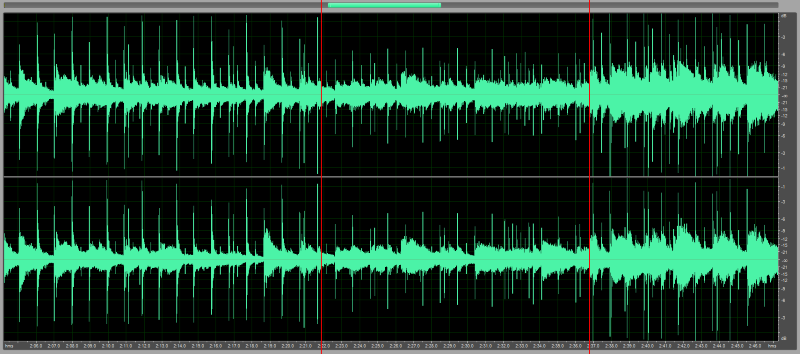
The “Normalize” feature has the function of scanning all or part of a selected audio file and detecting the highest peak.

In fact, it passes all samples in the file one after the other (counting at a rate of 44, 48 or 96000 per second of recording), temporarily stores the value until it finds a sample, the highest value ignores all the lowest values ​​that the last.

Once this final value is detected, you can imagine a value of -8 dB, the software applies an increase of 8 dB to all the samples in the file and therefore raises the total level of the file by 8 dB to find the main peaks at zero dB.

Normalize audio

Signal normalized to 0 dB peak or 0 dB at Absolute Peak – Listen

The advantage? Normalization does not allow “partial” to systematically change the listening volume from one song to another or from one fragment to another, from one disc to another. This feature says what it does, normalizes (bring it to the default).

Note: In general, a maximum normalization level of zero dB can be defined. For example: -1 dB. To prevent some intermediate CD player converters or some output amplifiers from these players from being distorted (?). Subject to debate.

Advantage: This processing only changes the overall level of the file, but by no means its dynamics (it does not reduce the difference between the highest and lowest levels of recording). So nothing to do with a limiter, a compressor or an expander.

Problem: if only one of the samples in the recording or the selected part reaches 0 dB (either positive or negative), even if all the others are -20 dB or less, the system will consider that the file does not need to be changed and then normalization will still be strictly ineffective, which is kind of silly, right?

Original signal with 0dB peak – Listen

Therefore, before normalizing the recording or marking, make sure that some isolated peaks do not deceive the system and, if necessary, remove or reduce them with the “volume” function or another (select the peak, reduce or redraw with the pencil tool) .

Also, remember to select your file in parts to apply appropriate “volume” or “normalization” levels for the sounds to be normalized.

Danger 2 (Return): It is good when the software allows it not to normalize certain recordings or fragments of recordings to zero dB.

For example: Record steps on the lawn whose average level is -35 dB and less, which is perfectly correct. If you “normalize” it to ZERO, you end up with an outrageous sound that will sound like anything but footsteps on the grass.

Mistrust: Some software offers various options for “normalization”: either in “RMS” or “Peak”. The two processes must be clearly differentiated.

RMS: It has nothing more to do with it. In fact, the software will apply a compression algorithm to the processed file. For SF, it will have 3 other predefined values, but you can choose any other value.

Peak: The software performs a “normalization” according to the technique described above. Therefore, there is no change in the recording dynamics.

Normalize the volume of an mp3

For several decades, with the appearance of MP3, it has become a customary practice that people accumulate a large number of music files, mainly in MP3 format.
Some people get to accumulate thousands of songs in the MP3 format. which are easily transported with a pendrive using any other device, to be able to listen to them anywhere, and at any time.


This is very comfortable because one does not need to load any hard disk and much less large numbers of CDs or cassettes.
but it has the disadvantage here when mixing the songs that comes from very different recordings, times, etc. It occurs very frequently in volume level differences.
It is a typical problem today, want to Play favorite songs meets the fact that some sound much louder than others. And this eventually becomes a problem.

for this the volume normalizers have been created. The volume means all the songs have a volume as optimized as possible every possible level that each of them can play.
Volume normalizers have also existed for decades, and their algorithms to achieve amazing results. today download Mp4 Gain and check results no other software can offer. Russian other options How to change the pitch of a song Without altering its speed on the contrary modify the speed without affecting the Pitch. You can also equalize it and perform various functions that will be very useful.