Audio Normalization Techniques: Peak vs. Loudness


Free Download Mp4Gain
picture

Audio Normalization Techniques: Peak vs. Loudness

Audio Normalization Techniques

As an audio optimization expert, I’m often asked about the best techniques for normalizing audio levels. In this article, I will explore two popular approaches: peak normalization and loudness normalization. These techniques, peak vs. loudness normalization, have their own unique advantages and considerations. Let’s dive in and uncover the secrets of achieving balanced and consistent audio!

Peak Normalization: Unleashing the Power of Dynamics

When it comes to peak normalization, it’s all about preserving the dynamics of your audio. Imagine a breathtaking symphony where the crescendos and diminuendos transport you to a different realm. With peak normalization, you ensure that the highest peaks of your audio reach their full potential without clipping or distortion. It’s like giving your audio the freedom to express itself with intensity and impact.

Loudness Normalization: The Harmony of Consistency

Now, let’s turn our attention to the world of loudness normalization. Have you ever experienced the frustration of constantly adjusting the volume while switching between songs or TV shows? Loudness normalization comes to the rescue! By analyzing the perceived loudness of your audio, it ensures a consistent listening experience across different tracks. Say goodbye to sudden volume jumps and immerse yourself in a harmonious soundscape.

Dynamic Range: The Dance of Soft and Loud

In the realm of audio normalization, we encounter the concept of dynamic range. Dynamic range represents the difference between the softest and loudest parts of an audio signal. Peak normalization respects the natural dynamic range, allowing the delicate whispers and thunderous roars to coexist in perfect balance. On the other hand, loudness normalization aims to reduce the dynamic range, providing a more even playing field for all elements of your audio.

Audio Clipping: Taming the Wild Peaks

Audio clipping is a notorious villain that can ruin your audio experience. Picture this: a sudden burst of sound that distorts and crackles, disrupting your enjoyment. Peak normalization acts as the hero in this story, taming those wild peaks and ensuring that your audio stays within safe limits. With peak normalization, your audio remains clean and free from the dreaded clipping monster.

LUFS: The Measure of Perceived Loudness

In the realm of loudness normalization, we encounter the term LUFS, which stands for Loudness Units Full Scale. LUFS provides a standardized measure of the perceived loudness of your audio. Loudness normalization algorithms analyze the integrated LUFS value and adjust the overall volume to match a specific target level. It’s like having a universal translator that ensures consistent loudness across different tracks and platforms.

Listening Environment: From Living Rooms to Concert Halls

Let’s talk about the listening environment and its impact on audio normalization. Every space has its unique characteristics, from the cozy intimacy of a living room to the grandeur of a concert hall. Loudness normalization takes into account these variations, delivering a consistent listening experience regardless of the environment. So whether you’re enjoying your favorite tunes at home or attending a live performance, the magic of normalization will make every moment memorable.

Personal Preference: Customizing Your Audio Journey

We all have our individual tastes and preferences when it comes to audio. Some crave the raw power of peak normalization, while others seek the comfort of consistent loudness through loudness normalization. The beauty of audio normalization techniques is that they allow you to customize your audio journey according to your personal taste. It’s like having a tailor-made suit that perfectly fits your unique style.

Metadata and Replay Gain: Enhancing the User Experience

Metadata and Replay Gain are powerful allies in the realm of audio normalization. Metadata provides valuable information about your audio, guiding normalization algorithms to make the right adjustments. Replay Gain takes it a step further by applying metadata tags to your audio files, ensuring consistent playback volume across different tracks. Together, they create a seamless and enhanced user experience, elevating your audio enjoyment to new heights.

Compression: Controlling the Sonic Landscape

Dynamic audio content, such as movies or live performances, often presents challenges for normalization. This is where compression enters the scene. Compression techniques allow you to shape the sonic landscape, reducing the dynamic range while maintaining audio quality. It’s like having a skilled conductor who ensures that every instrument is heard clearly, regardless of its volume.

Audio Editing and Mastering: Polishing the Gems

Lastly, let’s not forget the crucial role of audio editing and mastering in the pursuit of sonic perfection. Audio professionals meticulously fine-tune various parameters during the editing and mastering process. Audio normalization techniques become valuable tools in their arsenal, ensuring that the final product shines with balanced and consistent audio. It’s like adding the final touch of brilliance to your audio gems.

In conclusion, the choice between peak normalization and loudness normalization depends on your desired audio outcome. Whether you embrace the dynamic range or seek consistent loudness, these techniques empower you to create an audio experience that resonates with your vision. So go forth, unleash the power of normalization, and let your audio journey be a harmonious symphony of sound!



Free Download Mp4Gain
picture


Mp4Gain Main Window
picture


Mp4Gain Features
picture


Free Download Mp4Gain
picture

Understanding Audio Normalization

Understanding Audio Normalization

Audio Normalization
Audio Normalization

Audio normalization is the process of adjusting the loudness of an audio recording to a standard level. The goal is to ensure that all audio files have a consistent volume, making them easier to listen to and preventing ear fatigue. In this article, we will explore the different types of audio normalization and how they work.

Audio Normalization
Audio Normalization

Peak Normalization

Peak normalization is the process of adjusting the peak amplitude of an audio recording to a certain level. The peak amplitude is the highest point in the audio signal, and it is measured in decibels (dB). The goal of peak normalization is to ensure that all audio files have the same peak amplitude, making them easier to listen to and preventing ear fatigue.

Peak normalization is typically used for digital audio files, such as MP3 and WAV files. These files are usually stored in a digital format that allows for easy manipulation of the audio data. However, peak normalization can also be applied to analog audio recordings, such as cassette tapes or vinyl records.

RMS Normalization

RMS normalization is the process of adjusting the root mean square (RMS) level of an audio recording to a certain level. The RMS level is a measure of the average power of an audio signal, and it is measured in decibels (dB). The goal of RMS normalization is to ensure that all audio files have the same RMS level, making them easier to listen to and preventing ear fatigue.

RMS normalization is typically used for digital audio files, such as MP3 and WAV files. However, it can also be applied to analog audio recordings, such as cassette tapes or vinyl records.

RMS normalization is often considered to be a more accurate method of normalizing audio than peak normalization because it takes into account the average power of the audio signal, rather than just the peak amplitude.

Loudness Normalization

Loudness normalization is the process of adjusting the loudness of an audio recording to a certain level. The loudness of an audio recording is measured in loudness units (LU). The goal of loudness normalization is to ensure that all audio files have the same loudness, making them easier to listen to and preventing ear fatigue.

Loudness normalization is typically used for broadcast audio, such as television and radio. Loudness normalization is required by many countries to ensure that the audio levels of all broadcast programs are consistent, making them easier to listen to and preventing ear fatigue.

Loudness normalization is often considered to be a more accurate method of normalizing audio than peak or RMS normalization because it takes into account the perceived loudness of the audio signal, rather than just the peak amplitude or RMS level.

Conclusion

Normalizing audio is an important process for ensuring that all audio files have a consistent volume, making them easier to listen to and preventing ear fatigue. There are several different types of audio normalization, including peak normalization, RMS normalization, and loudness normalization. Each method has its own advantages and disadvantages and is best suited for different types of audio.

When it comes to audio normalization, one solution that stands out is Mp4Gain. It is a software that allows you to normalize your audio files in a quick and efficient way. It can be used to normalize a single audio file or multiple files at once. It also supports a wide range of audio file formats, including MP3, WAV, and more. Furthermore, Mp4Gain is user-friendly and easy to navigate, making it a great option for both professional and casual users.

In conclusion, audio normalization is a crucial process for ensuring that all audio files have a consistent volume, making them easier to listen to and preventing ear fatigue. There are several different types of audio normalization, including peak normalization, RMS normalization, and loudness normalization. Each method has its own advantages and disadvantages and is best suited for different types of audio. Mp4Gain is a powerful and easy-to-use software that can help you normalize your audio files quickly and efficiently.

Normalize audio

Normalize audio

Normalize Audio

What does normalize audio mean?

Audio normalize

The volume of sound is measured in decibels and a video or a song, that is, the audio can have more or less volume.

On the one hand we have that the audio or video file already has a “quantity” or a volume gain. That is, there is an initial volume level.

On the other hand, we would have the volume that we would assign to the amplification of our audio player.

In this case, for audio normalization we will refer to the input volume level or gain.

What happens if an audio file has noticeably lower gain? Well, it will sound at a lower loudness unless we manually modify the volume knob, which is annoying and inconvenient.

That is why the idea is that the volume input gain is optimal. Without distortion, but at a good volume.

Mp4Gain is the best software to perform this function, it is not limited to mp3s and even performs it on video files. Additionally, it can be used as a converter since regardless of the format of the input file, we can choose the format we want the output file to have.

For example if our input file is an mp4 video, we can choose to get an mp3. Thus we will have extracted the music, we normalize it and we obtain only the audio in an mp3.

Mp4Gain has many very useful functions to improve the audio quality of your songs or videos.

Mp3 normalize volume level software

FAQ

Normalize Audio

Mp3 normalize volume level software

Normalizing the volume level of an mp3 is quite simple using Mp4Gaion, which also allows you to normalize the volume level of other audio and even video formats.

Convert audio and video files and normalize them?

It’s perfectly possible to do it with Mp4Gain, you can normalize audio or video files in all major formats simultaneously and get any format you need.

Mp3 normalize volume level software

Audio Normalization

The normalization of volume levels is something that has existed for many years.
This arose with the need to be able to get the different songs or files to have a similar volume level.
It really wasn’t necessary in the vinyl era, for a lot of reasons.

First of all, changing from one disc to another took time, enough so that I didn’t notice if there was any difference in volume level. Unlike any playlist of mp3s or any other format, which play one song after another and if there is a noticeable difference in volume level, we perceive it immediately.

We also have the fact, which is not minor, that the quality of audio playback today is much higher.

Today any device used to play an audio file has enormous capacity in terms of sound quality. Today we handle as a common thing to talk about sample rates of 44100 or 48000 frames per second or 192 and up to 320 kilobits, etc. In other words, we are already very familiar and we have at our fingertips the possibility of choosing options that directly affect not only the volume level but also the quality.

Mp4Gain is the most powerful and modern normalizer that can not only normalize audio in many formats, but can also normalize videos or extract audio from video and convert it to mp3 or any other format you want.

Psychoacoustic model and its application in MP3 encoding

Psychoacoustic model and its application in MP3 encoding

Psychoacoustic Model

Abstract: The psychoacoustic model is the core part of audio perceptual coding, which directly affects the quality and compression ratio of audio coding.

Psychoacoustics mp3 coding

Based on the basic principles of psychoacoustics, the absolute hearing threshold, the masking effect, and the critical frequency band and other related content, combined with the mathematical expression of psychoacoustics, and analyze the algorithm flow in detail according to each module in the standard MP3 encoding program. Finally, the corresponding algorithm is used to describe the pre-echo generation mechanism and its suppression method in MP3 encoding.

Psychoacoustic model and its application in MP3 encoding

Psychoacoustic models and their applications in perceptual audio coding

In this paper, the AAC psychoacoustic model is discussed from the aspects of over-masking, forward and backward time-domain masking, FFT window coefficient analysis, and window shift criterion. Each individually masked…

Auditory psychoacoustic models and their applications in perceptual audio coding

First, the paper describes the masking effect, discusses the principles and algorithms of various perceptual audio coding standards, and focuses on the development process and features of the MPEG audio coding standard. There are two psychoacoustic models: model 1 and model 2. Level 1.

Application of the psychoacoustic model in HDTV digital audio

Digital audio is a very important part of high-definition television (HDTV). In the digital audio codec, the introduction of the psychoacoustic model greatly reduces the complexity of the codec. The basic principles of the psychoacoustic model and various psychoacoustic models in HDTV. ..

Application of the psychoacoustic model in the detection of abnormal loudspeaker sound

China is the largest country in speaker production, and the annual output of speakers can reach hundreds of millions. Due to some unpredictable situations in the speaker design and production process, speaker failure occurs. Therefore, after the speaker is produced, the first product…

Application of the psychoacoustic model in digital audio watermarking

Audio digital watermarking technology plays an increasingly important role in protecting the copyright of digital audio works, and is an effective means of solving the problem of copyright of audio works. digital.A digital watermark algorithm based on a psychoacoustic model is proposed, which can guarantee a good audio signal.. .

An adaptive audio watermarking algorithm that combines the MP3 encoding principle and the psychoacoustic model

Through the investigation of the mp3 encoding algorithm, combined with a psychoacoustic model, a watermarking algorithm for copyright protection of MP3 audio files is proposed. The embedding algorithm runs simultaneously with the compression process. First, reduce the dimension of the embedded watermark information, and then use MP3 encoding to make…

Audio and Video Series: Audio Basics Part 2

Audio and Video Series: Audio Basics Part 2

Psychoacoustics

Introduction to sound

psychoacoustic

time domain masking
Masking that occurs between temporarily adjacent sounds.

temporary masking

audio encoding
encoding process
coded process

audio file format
Audio File Format ( wiki ): The format of the file that contains the audio data.

Format Classification
Lossless formats: such as WAV, FLAC, APE, ALAC, WavPack (WV)
Lossy formats: such as MP3, AAC, Ogg Vorbis, Opus
performance comparison
Latency Comparison
delay compare

Efficiency Comparison
efficiency comparison

AAC encoding
AAC (wiki): Advanced Audio Coding, a proprietary audio coding standard for lossy digital audio compression based on MPEG-2, which appeared in 1997.

AAC exhibits better sound quality than MP3 and is intended to replace the MP3 format.

usual format
AAC LC : (low complexity) low complexity specification
AAC HE V1 : (high efficiency) AAC LC + SBR (Spectral Band Replication)
AAC HE V2 : AAC LC + SBR + PS (parametric stereo)
ac profile

data exchange format
ADIF : (Audio Data Interchange Format) Audio Data Interchange Format, can only be decoded from scratch, commonly used in disk files.
ADTS : (Audio Data Transport Stream) audio transport stream format, each frame has a sync word, which can be decoded at any position in the audio stream for data transmission.

Audio and Video Series: Audio Basics

Audio and Video Series: Audio Basics

MP3 masking

Introduction to sound

Psychoacoustic

Definition: Sound is a sound wave produced by vibration, a wave phenomenon that propagates through a medium (gas, solid, liquid) and can be perceived by the hearing organs of humans or animals.

Essential: Sound is a mechanical wave.

Three elements of sound.
Tone : sound frequency (audio), boys > girls > boys
Volume: The amplitude (amplitude) of the vibration, also known as the pitch
Timbre: The waveform of the sound, which is essentially harmonic, also known as fret, has a lot to do with the material
Icon:

tone and volume

doorbell

psychoacoustics
Psychoacoustics is the study of human perception of sound, that is, the science of human physiological and psychological responses to sound (including speech and music).

hearing/voice range
hearing range

sonar heading and range

audio quantization
quantification process
audio quantization

basic concept
Sample Size – How many bits are used to store a sample. 16 bit common
Sampling rate : 8k, 16k, 32k, 44.1k, 48k sampling rate
Number of channels: mono, dual, multichannel
Bit rate calculation
Bit rate = sample rate × sample size × number of channels

What:

The sample rate is 44.1 kHz, the sample size is 16 bits, and the two channel PCM encoded WAV file

Bitrate = 44.1k × 16 × 2 = 1411.2kb/s = 176.4KB/s

audio compression
Audio compression is a type of data compression used to reduce the transmission bandwidth requirements of streaming audio media and the storage size of audio files.

compression method
lossless compression
All the information of the original file is preserved and there is no difference from the original file on playback.

Data compression through information redundancy is a reversible process.

lossy compression
Approximate some information in the original file to get a smaller file.

The incorporation of human psychology and recognition of the auditory system in the compression results is an irreversible process.

Audio signals outside the range of human hearing and audio signals that are masked.

masking effect
Masking effect: A phenomenon in which the auditory system’s perception of one sound is obstructed by another.

frequency domain masking
One sound is drowned out by another sound at the same time.

Mp3 Normalizer – Masking Effects Part 2

Mp3 Normalizer – Masking Effects Part 2

Mp3 Normalizer

They are related to the frequency and relative loudness of sounds of different frequencies, whereas temporal masking is only related to time.

MP3 Normalizer: Psychoacoustic Model

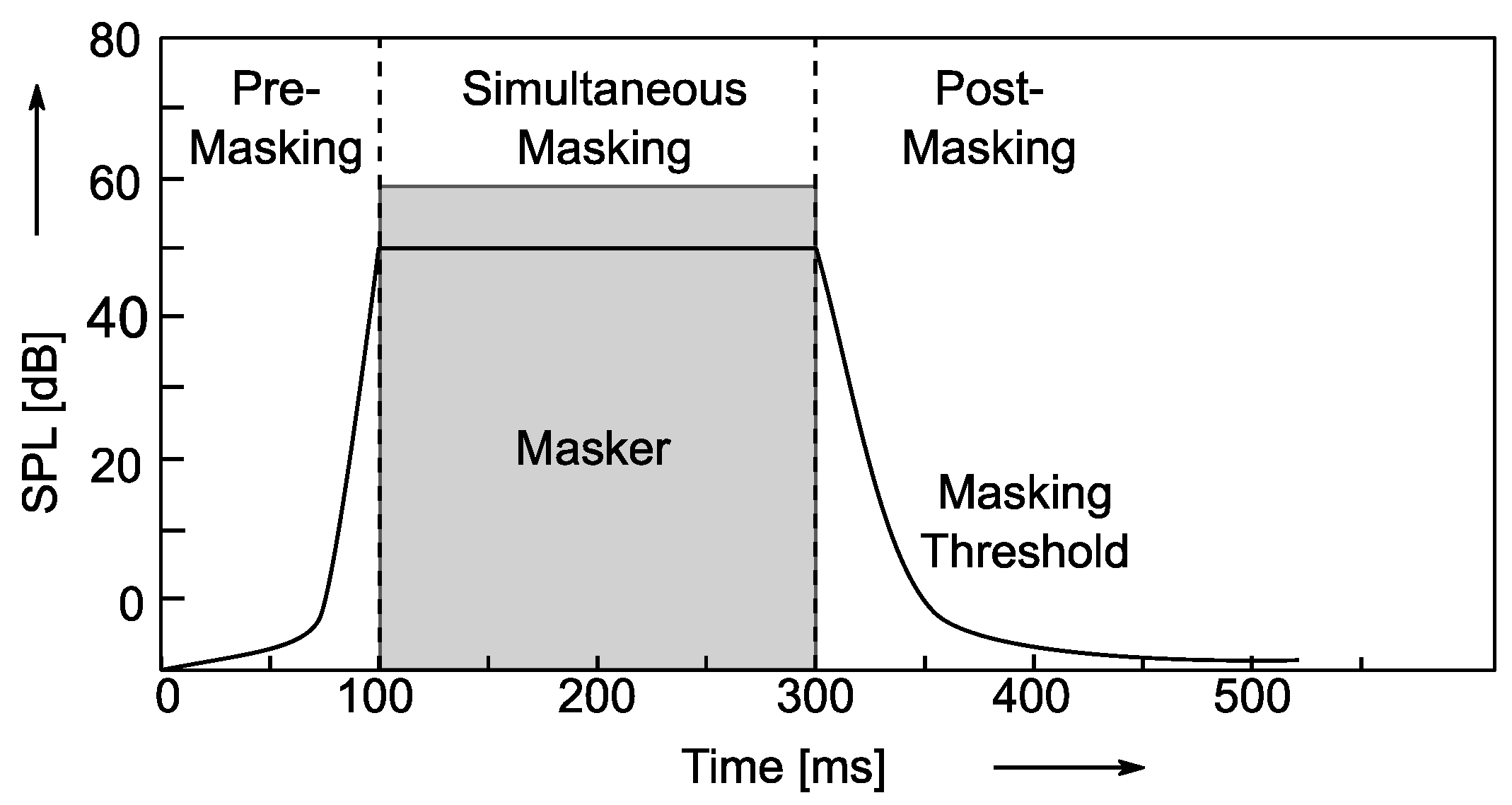
If two sounds are particularly close in time, humans may also have trouble telling them apart. For example, if a loud sound is followed by a very weak sound, the last sound will be difficult to hear. But if you play the second sound some time after the first sound stops, the last sound can be heard. How long should the interval be? For pure tones it is generally 5 ms. Of course, if the reverse effect is the same over time, if a lower sound appears before a higher sound, and the interval is too short, you won’t hear the lower sound.

Enter Bitrates, Stage Left La

JPEG compression can explicitly control the rate at which compression is discarded, but Mp3 users cannot. However, mp3 users can specify how many bits are used to store each second of music. The end effect is the same.

During encoding, the “garbage components” of the signal are compared to mathematical models of human psychoacoustics, as well as the bit rate used for compression, to decide which data to discard. The current bitrate used for mp3 compression is generally 128 kbps. The encoder will take this number into account when generating each data frame. If the bitrate is relatively low, the definition of “irrelevant” and “redundant” data will be relaxed, resulting in a large amount of data being considered useless data. Compressed audio will lose a lot of detail, resulting in a loss of sound quality. Conversely, if a higher bit rate encoding is used, the “irrelevance” and “redundancy” criteria are more precisely defined, details are preserved, but the file size is larger.

Please note that the bitrate of an mp3 file refers to the total bitrate of all encoded channels. That is, a 128 kbps stereo mp3 file is the same size as two 64 kbps mono mp3 files at the same time. But one 128kbps stereo file does sound better than two separate 64kbps mono files. Because in a stereo mp3 file, all the bits can be allocated (unevenly) to two channels as needed, for example, at a given time, one channel uses 60% of the bits and the other uses the remaining 40% , but the total number of bits will not exceed the bitrate parameter specified before encoding.

Fixed bit rate and variable bit rate

We assume that the mp3 encoding discussed here uses a fixed bitrate encoding method, which means that the output bitrate of the encoded file at any time period is whatever value you specify. The disadvantage of fixed bit rate encoding is that the amount of information in most sound files is not constant. In audio clips that use more musical instruments or have many people talking at the same time, the amount of information is large and vice versa, there are many factors that affect the amount of information in audio files. Variable bit rate encoding was developed to accommodate this characteristic of audio files. Variable bitrate encoding, which adjusts the bitrate used for encoding at any one time according to the dynamic characteristics of the audio data.

In most cases, variable bitrate encoding can achieve essentially the same sound quality as fixed bitrate encoding with a smaller file size. But variable bit rate encoding has its own drawbacks. First of all, some older players just don’t support decoding variable bitrate mp3 files and can’t play such files. Second, when the decoder plays a variable bitrate mp3, it cannot determine the current decode (play) position, and the “current play time” displayed on the player is inaccurate.

The information in the header of each frame is the same for a compressed fixed bitrate mp3 file, but not for the variable bitrate mp3 encoding. But when decoding, variable bitrate encoding does not require more computing power than a fixed bitrate file, because the mp3 decoder reads the full frame header even when playing a fixed bitrate mp3 file .

Mp3 Normalizer – Masking Effects

Mp3 Normalizer – Masking Effects

Mp3 Normalizer - Psychoacoustic Model

mp3 encoding: “masking effects” and bitrate

mp3 normalizer masking effects

masking effects

The process of information filtering by human consciousness includes a process called “masking”. People who study psychoacoustics are very concerned with the study of this process, which studies the relationship between hearing, consciousness and sound. Mutual relationship. There are two masking effects that affect the Mp3 encoding process: one is acoustic masking and the other is temporal masking.

Sync masking (also called acoustic masking)

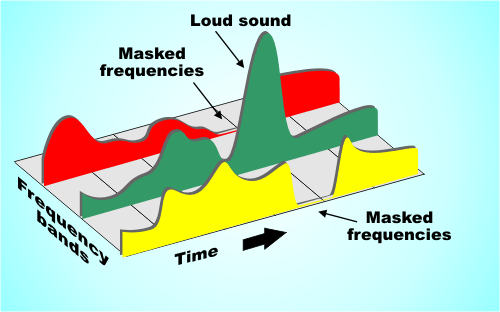
To describe the sync masking effect, it’s best to use an analogy. Imagine a bird flying in front of the sun. You see the bird fly from the left between you and the sun, and then the bird disappears because the sun’s rays are too bright. When the bird leaves the area of ​​the sun, you can see it again. Just like in a quiet environment, the sound of a guitarist’s fingers sliding across the strings can be heard, but if the same sound is played in an environment where rock music is being played, the average person cannot hear it.

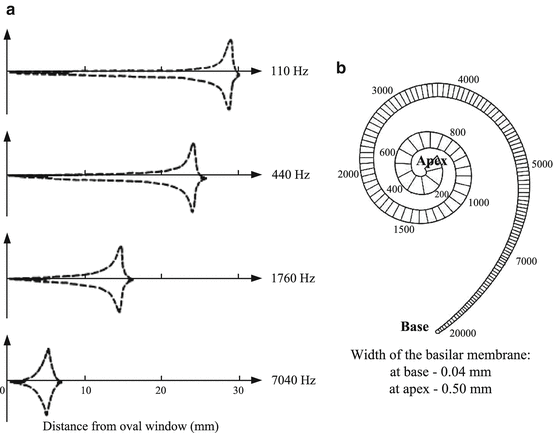
The Mp3 codec only cares about the interrelationship between frequencies and loudness. Sync masking is described in terms that the mp3 codec can handle as follows: you have a sound signal, it’s a 1000hz sine wave (one), then we have a 1100hz sine wave (two), the wave sine two is weaker, -10db. Most people do not notice the presence of sine wave two in this situation. But sine wave two is not easy to perceive, not only because it is weaker, but also because its frequency is very close to that of sine wave one. To illustrate this phenomenon, we gradually increase the frequency of the second sine wave, but keep its volume constant until we can hear it. Assuming its frequency increases to 4000 Hz, we can hear this sound. When the frequency difference between the two sine waves gradually increases, the second sine wave can be heard gradually, until its frequency increases to a certain point, most people can hear two different tones, one is louder and the other is softer. lower.

This process is what psychoacousticists call the “synchronization masking” phenomenon. Two sounds with similar frequencies but very different volumes are difficult for humans to perceive as two different sounds. Taking this phenomenon into account, mp3 tries to discard those sounds that cannot be perceived during the encoding process, or assign as few bits as possible to these sounds.

Temporary masking Temporary masking Masking effects
synchronous

Mp3 Normalizer

Mp3 Normalizer

Mp3 Normalizer

Why do we need to normalize an mp3?

Mp3 Normalizer

We need an mp3 normalizer because any user who has a lot of mp4 files or even other audio formats like flac, ogg, m4a etc. (Because Mp4Gain can normalize the main audio and video formats), but why?

For the simple reason that coming from different websites, from different sources, we not only find significant differences in volume level, but also in bitrate, etc.

This means that when playing them on our computer or on other devices, we find that these significant differences in the volume level force us to correct it manually using the volume knob.
Which is neither comfortable nor ideal.

Mp4Gain, as we mentioned, not only do mp3 normalizer, to modify the loudness. But it does the same with the most used audio and video formats, it can even extract the audio from any video and normalize it at the same time.

Mp3 Normalizer 2022

In general, the need to normalize the volume of audio and video files remains in 2022.

Search for mp4 normalizer, avi normalizer, etc. has been added lately. That is, the video normalizer has become a necessity.

Mp4 Normalizer

As we pointed out, Mp4Gain is perfectly capable of normalizing the volume level of videos in the main formats and is both an audio and video converter.

Download it, try it and discover how it improves your audio and video files.