lossless, lossy compression


Free Download Mp4Gain
picture

lossless, lossy compression
lossless, lossy compression

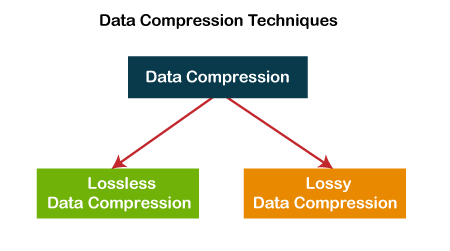
Lossless compression and lossy compression are two types of digital image file compression.

lossless, lossy compression

1. Introduction
2 The principle of compression
lossy compression
lossless compression
3 advantages and disadvantages of compression


Introduction

Lossless compression is the compression of the file itself. Like other data file compression, it is to optimize the file’s data storage method. A certain algorithm is used to represent the repeated data information. The file can be fully restored without affecting the content of the file As far as the image is concerned, there will be no loss of image detail.
Lossy compression is a change in the image itself. When saving the image, more brightness information is retained and the color hue and purity information is merged with the surrounding pixels. The melting ratio is different and the compression ratio is also different. different The amount is reduced, so the compression ratio may be high and the image quality will be reduced accordingly.
compression principle

lossy compression
Lossy compression reduces the amount of space an image occupies in memory and on disk, and when viewed on screen, you won’t notice that it has a detrimental effect on the image’s appearance. Because human eyes are more sensitive to light, the effect of light on the scene is more important than the effect of color, which is the basic foundation of lossy compression technology.
lossless compression
The basic principle of lossless compression is that the same color information should only be saved once. The software that compresses the image first determines which areas of the image are the same and which are different. Images that include repetitive data (eg blue sky) can be compressed, only the beginning and end of the blue sky need to be recorded. But there can be different shades of blue, and the sky can sometimes be obscured by trees, mountains, or other objects, which must be recorded separately. Essentially, lossless compression methods eliminate some duplication and greatly reduce the size of the image that will be saved to disk. However, the lossless compression method does not reduce the memory consumption of the image, because when the image is read from disk, the software fills in the missing pixels with the appropriate color information. If you want to reduce the amount of memory an image occupies, you should use a lossy compression method.

pros and cons of compression

lossy compression
Lossy compression is characterized by maintaining gradual color changes and eliminating sudden color changes in the image. Numerous experiments in biology have shown that the human brain fills in missing colors with colors closest to the neighborhood. For example, for a white cloud against a blue sky background, lossy compression removes some of the color at the edges of the image scene. Looking at the image on the screen, the brain fills in the missing parts of the color with the colors it sees in the scene. By using lossy compression techniques, some data is intentionally deleted and the deleted data is never recovered.
It is true that the use of lossy compression techniques can greatly compress the data in a file, but at the expense of image quality. If the image using lossy compression is only displayed on the screen, it may not have much of an impact on the image quality, at least to the degree of recognition by the human eye. However, if an image that has been subjected to lossy compression techniques is printed on a high resolution printer, the quality of the image will be severely compromised.
lossless compression
The advantage of the lossless compression method is that the image quality can be preserved better, but the compression rate of this method is relatively low. However, if you need to print the image on a high-resolution printer, it’s best to use lossless compression. Almost all image files use their respective short-form names as file extensions. From the extension you can know what format the image is stored in, what software should be used to read/write, etc.


Free Download Mp4Gain
picture


Mp4Gain Main Window
picture


Mp4Gain Features
picture


Free Download Mp4Gain
picture

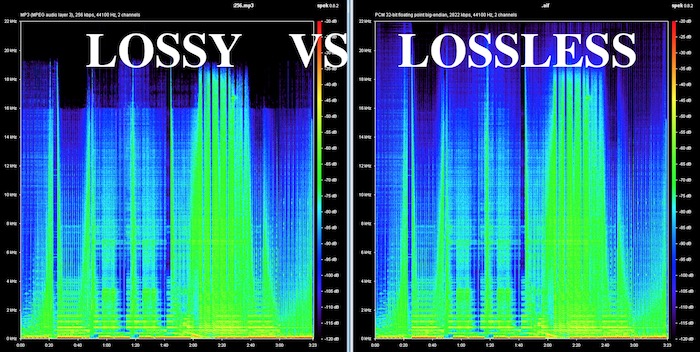
What is lossy and lossless audio?

What is lossy and lossless audio?

lossy and lossless
lossy and lossless

According to the sample rate and sample size of the sound, we can know that compared to the natural signal, the audio encoding can only be infinitely close at most, at least the current technology can only do this.

lossy and lossless
lossy and lossless

Compared with the natural signal, any digital audio coding scheme has certain advantages in that it cannot be fully restored.
In computer applications, PCM encoding can achieve the highest level of fidelity, which is widely used for material preservation and music appreciation. It is used on CDs, DVDs, and our common WAV files. Therefore, PCM has become lossless encoding by convention, because PCM represents the best level of fidelity in digital audio, it does not mean that PCM can guarantee the absolute fidelity of the signal, and PCM can only be infinitely close in the greater extent.
We usually include MP3 in the category of lossy audio encoding, which is relatively PCM encoding. The purpose of emphasizing the relativity of lossy and lossless encoding is to tell everyone that it’s hard to achieve true lossless, just like using numbers to express pi, no matter how high the precision is, it’s infinitely close, no actually equal to pi value.

The so-called lossy and lossless are relative to the software used for the audio format. According to the sample rate and sample size, it can be known that compared to the natural signal, the audio encoding can only be infinitely close at most, at least the current technology can only do this. Compared to the natural signal, any digital audio encoding scheme is lossy because it cannot be fully restored.
In computer applications, PCM encoding can achieve the highest level of fidelity, which is widely used for material preservation and music appreciation. It is used on CDs, DVDs, and our common WAV files. Therefore, PCM has become lossless encoding by convention, because PCM represents the best level of fidelity in digital audio, it does not mean that PCM can guarantee the absolute fidelity of the signal, and PCM can only be infinitely close in the greater extent.
We usually include MP3 in the category of lossy audio encoding, which is relatively PCM encoding. The purpose of emphasizing the relativity of lossy and lossless encoding is to tell everyone that it’s hard to achieve true lossless, just like using numbers to express pi, no matter how high the precision is, it’s infinitely close, no actually equal to pi value.

Lossy vs Lossless, understanding Audio Quality.

Lossy vs Lossless, understanding Audio Quality.

Lossy vs Lossless

Why the mp3 arises and becomes a success?

Lossy vs Lossless
Lossy vs Lossless

We talked in a previous article about why it was urgently needed when the internet started to find a way to compress the audio, since even thinking about transferring from one computer to another and storing an entire CD of music there was a feat that almost nobody could do. , much less online.

Fraunhoffer, who developed the mp3, mixed both theories:

1.- Compress using classic compression techniques, zip type.

2.- Use the extensive knowledge about human hearing to be able to rule out everything that the ear does not perceive.

Just as we have read that some animals see colors differently from human beings or even can see better in the dark… In the same way, the special and particular hearing of human beings has developed not in function of listening to music. .. or at least not in listening to it in high fidelity, but rather it is related more to our survival, to language, etc.

We know what the limits of human hearing are, we do not hear sounds lower or higher than certain perfectly known points.

There are whistles that dogs hear and humans don’t.

Would it make any sense to occupy more space on the hard drive to save, for example, frequencies that humans cannot hear?

The extreme purists may be exaggerating if they dream that the audio file does not drop any frequencies, but tests and trials have shown that an mp3 with a bitrate of 196 khz and a samplerate of 44100 or higher are practically indistinguishable from the uncompressed original for 99,999 people. of every 100 thousand.
Put another way, only one in a hundred thousand people can tell any small difference between a slightly above-average quality mp3 and the uncompressed original.

Mp4Gain is, without a doubt, the best option when looking to normalize the volume to make an mp3 or any other audio or video file achieve the most suitable loudness (see the list of files that Mp4Gain supports)

How to get all your mp3s to have the same volume level?

How to get all your mp3s to have the same volume level?

MP3 Normalizer

The question is clear but can be expressed in many ways:

mp3 volume level equalizer

-How do I get my mp3s to have the same volume?
-How to make all your mp3s have the same level of dbs (decibels)?
-How do I make sure that all my mp3s have a similar volume and there are no drops or increases in volume?
-How to get my mp3 to play at the same volume level?

-Volume level equalizer?

And so, I could continue writing many of the questions that come to us at Mp4Gain and that basically mean the same thing, but people have some difficulty expressing exactly what they need or want.

Because basically what they are looking for is that the different mp3s have the same sound… that they sound at a similar volume to each other.

That can be called normalize, although some people use the word “compress sound volume” even though it has its own difference… but we understand what they mean.

And the answer is simple: use Mp4Gain.

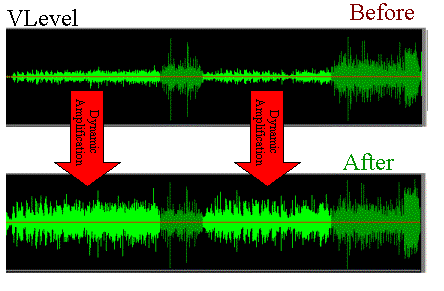
Mp4Gain offers various options (from Replay Gain to audio volume compression) to give you what you are looking for. It is by far the most advanced normalizer, although it is very simple to use.

In general terms you will only need to download the program, load your music or videos (Mp4Gain normalizes many audio and video formats and can do it in batch mode even if you use different formats) and click “NORMALIZE” and that’s it.

You don’t even need to understand what a decibel is or understand anything, just load your files and click on it and you already have the volume level problem solved.

Psychoacoustic model and its application in MP3 encoding

Psychoacoustic model and its application in MP3 encoding

Psychoacoustic Model

Abstract: The psychoacoustic model is the core part of audio perceptual coding, which directly affects the quality and compression ratio of audio coding.

Psychoacoustics mp3 coding

Based on the basic principles of psychoacoustics, the absolute hearing threshold, the masking effect, and the critical frequency band and other related content, combined with the mathematical expression of psychoacoustics, and analyze the algorithm flow in detail according to each module in the standard MP3 encoding program. Finally, the corresponding algorithm is used to describe the pre-echo generation mechanism and its suppression method in MP3 encoding.

Psychoacoustic model and its application in MP3 encoding

Psychoacoustic models and their applications in perceptual audio coding

In this paper, the AAC psychoacoustic model is discussed from the aspects of over-masking, forward and backward time-domain masking, FFT window coefficient analysis, and window shift criterion. Each individually masked…

Auditory psychoacoustic models and their applications in perceptual audio coding

First, the paper describes the masking effect, discusses the principles and algorithms of various perceptual audio coding standards, and focuses on the development process and features of the MPEG audio coding standard. There are two psychoacoustic models: model 1 and model 2. Level 1.

Application of the psychoacoustic model in HDTV digital audio

Digital audio is a very important part of high-definition television (HDTV). In the digital audio codec, the introduction of the psychoacoustic model greatly reduces the complexity of the codec. The basic principles of the psychoacoustic model and various psychoacoustic models in HDTV. ..

Application of the psychoacoustic model in the detection of abnormal loudspeaker sound

China is the largest country in speaker production, and the annual output of speakers can reach hundreds of millions. Due to some unpredictable situations in the speaker design and production process, speaker failure occurs. Therefore, after the speaker is produced, the first product…

Application of the psychoacoustic model in digital audio watermarking

Audio digital watermarking technology plays an increasingly important role in protecting the copyright of digital audio works, and is an effective means of solving the problem of copyright of audio works. digital.A digital watermark algorithm based on a psychoacoustic model is proposed, which can guarantee a good audio signal.. .

An adaptive audio watermarking algorithm that combines the MP3 encoding principle and the psychoacoustic model

Through the investigation of the mp3 encoding algorithm, combined with a psychoacoustic model, a watermarking algorithm for copyright protection of MP3 audio files is proposed. The embedding algorithm runs simultaneously with the compression process. First, reduce the dimension of the embedded watermark information, and then use MP3 encoding to make…

Audio and Video Series: Audio Basics Part 2

Audio and Video Series: Audio Basics Part 2

Psychoacoustics

Introduction to sound

psychoacoustic

time domain masking
Masking that occurs between temporarily adjacent sounds.

temporary masking

audio encoding
encoding process
coded process

audio file format
Audio File Format ( wiki ): The format of the file that contains the audio data.

Format Classification
Lossless formats: such as WAV, FLAC, APE, ALAC, WavPack (WV)
Lossy formats: such as MP3, AAC, Ogg Vorbis, Opus
performance comparison
Latency Comparison
delay compare

Efficiency Comparison
efficiency comparison

AAC encoding
AAC (wiki): Advanced Audio Coding, a proprietary audio coding standard for lossy digital audio compression based on MPEG-2, which appeared in 1997.

AAC exhibits better sound quality than MP3 and is intended to replace the MP3 format.

usual format
AAC LC : (low complexity) low complexity specification
AAC HE V1 : (high efficiency) AAC LC + SBR (Spectral Band Replication)
AAC HE V2 : AAC LC + SBR + PS (parametric stereo)
ac profile

data exchange format
ADIF : (Audio Data Interchange Format) Audio Data Interchange Format, can only be decoded from scratch, commonly used in disk files.
ADTS : (Audio Data Transport Stream) audio transport stream format, each frame has a sync word, which can be decoded at any position in the audio stream for data transmission.

Audio and Video Series: Audio Basics

Audio and Video Series: Audio Basics

MP3 masking

Introduction to sound

Psychoacoustic

Definition: Sound is a sound wave produced by vibration, a wave phenomenon that propagates through a medium (gas, solid, liquid) and can be perceived by the hearing organs of humans or animals.

Essential: Sound is a mechanical wave.

Three elements of sound.
Tone : sound frequency (audio), boys > girls > boys
Volume: The amplitude (amplitude) of the vibration, also known as the pitch
Timbre: The waveform of the sound, which is essentially harmonic, also known as fret, has a lot to do with the material
Icon:

tone and volume

doorbell

psychoacoustics
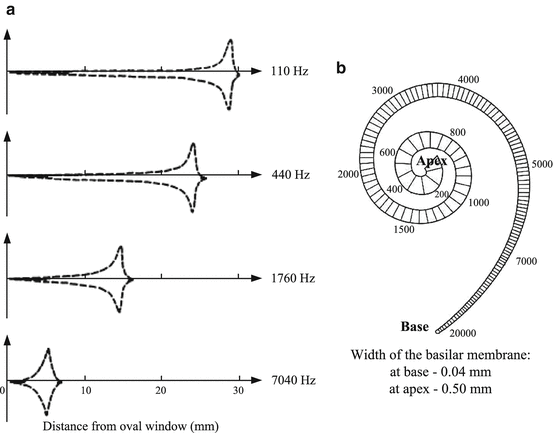
Psychoacoustics is the study of human perception of sound, that is, the science of human physiological and psychological responses to sound (including speech and music).

hearing/voice range
hearing range

sonar heading and range

audio quantization
quantification process
audio quantization

basic concept
Sample Size – How many bits are used to store a sample. 16 bit common
Sampling rate : 8k, 16k, 32k, 44.1k, 48k sampling rate
Number of channels: mono, dual, multichannel
Bit rate calculation
Bit rate = sample rate × sample size × number of channels

What:

The sample rate is 44.1 kHz, the sample size is 16 bits, and the two channel PCM encoded WAV file

Bitrate = 44.1k × 16 × 2 = 1411.2kb/s = 176.4KB/s

audio compression
Audio compression is a type of data compression used to reduce the transmission bandwidth requirements of streaming audio media and the storage size of audio files.

compression method
lossless compression
All the information of the original file is preserved and there is no difference from the original file on playback.

Data compression through information redundancy is a reversible process.

lossy compression
Approximate some information in the original file to get a smaller file.

The incorporation of human psychology and recognition of the auditory system in the compression results is an irreversible process.

Audio signals outside the range of human hearing and audio signals that are masked.

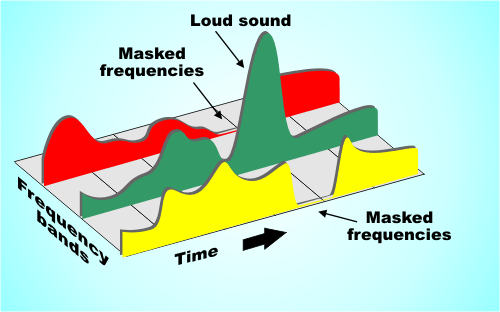
masking effect
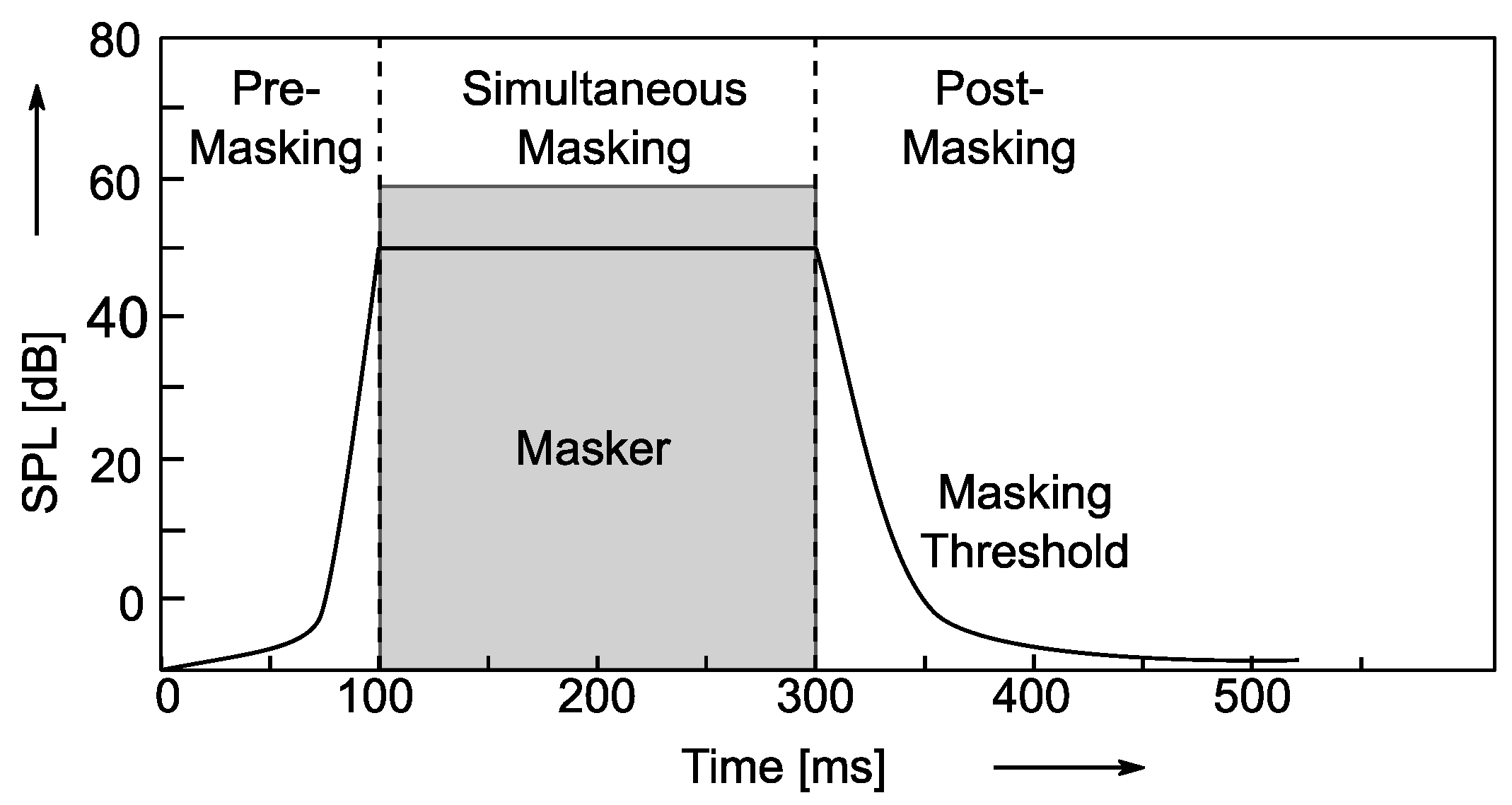
Masking effect: A phenomenon in which the auditory system’s perception of one sound is obstructed by another.

frequency domain masking
One sound is drowned out by another sound at the same time.

Mp3 Normalizer – Masking Effects Part 2

Mp3 Normalizer – Masking Effects Part 2

Mp3 Normalizer

They are related to the frequency and relative loudness of sounds of different frequencies, whereas temporal masking is only related to time.

MP3 Normalizer: Psychoacoustic Model

If two sounds are particularly close in time, humans may also have trouble telling them apart. For example, if a loud sound is followed by a very weak sound, the last sound will be difficult to hear. But if you play the second sound some time after the first sound stops, the last sound can be heard. How long should the interval be? For pure tones it is generally 5 ms. Of course, if the reverse effect is the same over time, if a lower sound appears before a higher sound, and the interval is too short, you won’t hear the lower sound.

Enter Bitrates, Stage Left La

JPEG compression can explicitly control the rate at which compression is discarded, but Mp3 users cannot. However, mp3 users can specify how many bits are used to store each second of music. The end effect is the same.

During encoding, the “garbage components” of the signal are compared to mathematical models of human psychoacoustics, as well as the bit rate used for compression, to decide which data to discard. The current bitrate used for mp3 compression is generally 128 kbps. The encoder will take this number into account when generating each data frame. If the bitrate is relatively low, the definition of “irrelevant” and “redundant” data will be relaxed, resulting in a large amount of data being considered useless data. Compressed audio will lose a lot of detail, resulting in a loss of sound quality. Conversely, if a higher bit rate encoding is used, the “irrelevance” and “redundancy” criteria are more precisely defined, details are preserved, but the file size is larger.

Please note that the bitrate of an mp3 file refers to the total bitrate of all encoded channels. That is, a 128 kbps stereo mp3 file is the same size as two 64 kbps mono mp3 files at the same time. But one 128kbps stereo file does sound better than two separate 64kbps mono files. Because in a stereo mp3 file, all the bits can be allocated (unevenly) to two channels as needed, for example, at a given time, one channel uses 60% of the bits and the other uses the remaining 40% , but the total number of bits will not exceed the bitrate parameter specified before encoding.

Fixed bit rate and variable bit rate

We assume that the mp3 encoding discussed here uses a fixed bitrate encoding method, which means that the output bitrate of the encoded file at any time period is whatever value you specify. The disadvantage of fixed bit rate encoding is that the amount of information in most sound files is not constant. In audio clips that use more musical instruments or have many people talking at the same time, the amount of information is large and vice versa, there are many factors that affect the amount of information in audio files. Variable bit rate encoding was developed to accommodate this characteristic of audio files. Variable bitrate encoding, which adjusts the bitrate used for encoding at any one time according to the dynamic characteristics of the audio data.

In most cases, variable bitrate encoding can achieve essentially the same sound quality as fixed bitrate encoding with a smaller file size. But variable bit rate encoding has its own drawbacks. First of all, some older players just don’t support decoding variable bitrate mp3 files and can’t play such files. Second, when the decoder plays a variable bitrate mp3, it cannot determine the current decode (play) position, and the “current play time” displayed on the player is inaccurate.

The information in the header of each frame is the same for a compressed fixed bitrate mp3 file, but not for the variable bitrate mp3 encoding. But when decoding, variable bitrate encoding does not require more computing power than a fixed bitrate file, because the mp3 decoder reads the full frame header even when playing a fixed bitrate mp3 file .

Mp3 Normalizer – Masking Effects

Mp3 Normalizer – Masking Effects

Mp3 Normalizer - Psychoacoustic Model

mp3 encoding: “masking effects” and bitrate

mp3 normalizer masking effects

masking effects

The process of information filtering by human consciousness includes a process called “masking”. People who study psychoacoustics are very concerned with the study of this process, which studies the relationship between hearing, consciousness and sound. Mutual relationship. There are two masking effects that affect the Mp3 encoding process: one is acoustic masking and the other is temporal masking.

Sync masking (also called acoustic masking)

To describe the sync masking effect, it’s best to use an analogy. Imagine a bird flying in front of the sun. You see the bird fly from the left between you and the sun, and then the bird disappears because the sun’s rays are too bright. When the bird leaves the area of ​​the sun, you can see it again. Just like in a quiet environment, the sound of a guitarist’s fingers sliding across the strings can be heard, but if the same sound is played in an environment where rock music is being played, the average person cannot hear it.

The Mp3 codec only cares about the interrelationship between frequencies and loudness. Sync masking is described in terms that the mp3 codec can handle as follows: you have a sound signal, it’s a 1000hz sine wave (one), then we have a 1100hz sine wave (two), the wave sine two is weaker, -10db. Most people do not notice the presence of sine wave two in this situation. But sine wave two is not easy to perceive, not only because it is weaker, but also because its frequency is very close to that of sine wave one. To illustrate this phenomenon, we gradually increase the frequency of the second sine wave, but keep its volume constant until we can hear it. Assuming its frequency increases to 4000 Hz, we can hear this sound. When the frequency difference between the two sine waves gradually increases, the second sine wave can be heard gradually, until its frequency increases to a certain point, most people can hear two different tones, one is louder and the other is softer. lower.

This process is what psychoacousticists call the “synchronization masking” phenomenon. Two sounds with similar frequencies but very different volumes are difficult for humans to perceive as two different sounds. Taking this phenomenon into account, mp3 tries to discard those sounds that cannot be perceived during the encoding process, or assign as few bits as possible to these sounds.

Temporary masking Temporary masking Masking effects
synchronous

Mp3 Normalizer

Mp3 Normalizer

Mp3 Normalizer

Why do we need to normalize an mp3?

Mp3 Normalizer

We need an mp3 normalizer because any user who has a lot of mp4 files or even other audio formats like flac, ogg, m4a etc. (Because Mp4Gain can normalize the main audio and video formats), but why?

For the simple reason that coming from different websites, from different sources, we not only find significant differences in volume level, but also in bitrate, etc.

This means that when playing them on our computer or on other devices, we find that these significant differences in the volume level force us to correct it manually using the volume knob.
Which is neither comfortable nor ideal.

Mp4Gain, as we mentioned, not only do mp3 normalizer, to modify the loudness. But it does the same with the most used audio and video formats, it can even extract the audio from any video and normalize it at the same time.

Mp3 Normalizer 2022

In general, the need to normalize the volume of audio and video files remains in 2022.

Search for mp4 normalizer, avi normalizer, etc. has been added lately. That is, the video normalizer has become a necessity.

Mp4 Normalizer

As we pointed out, Mp4Gain is perfectly capable of normalizing the volume level of videos in the main formats and is both an audio and video converter.

Download it, try it and discover how it improves your audio and video files.