Temporal masking in MP3 psychoacoustics


Free Download Mp4Gain
picture

Temporal masking in MP3 psychoacoustics
Temporal masking in MP3 psychoacoustics

Let’s talk about temporal masking in MP3 psychoacoustics

Temporal masking plays a key role in MP3 compression, allowing for significant file size reduction without noticeable loss in audio quality. As someone deeply immersed in audio engineering, I’ve seen how this psychoacoustic principle transforms how sound is perceived. Temporal masking takes advantage of the human auditory system’s quirks, particularly our inability to hear softer sounds immediately following a louder sound. Imagine dropping a heavy object in a quiet room—it overshadows any subtle rustling sounds that follow.

In MP3 encoding, this masking effect is utilized to remove inaudible data from the audio signal, leading to smaller file sizes while maintaining clarity. When I first encountered this principle, I thought of it like painting over an old wall; you don’t need to see every underlying detail if the top layer is what catches your eye.

What is temporal masking, and how does it work?

Temporal masking occurs when a loud sound makes it difficult to hear quieter sounds that follow closely in time. This auditory phenomenon is closely tied to how our brain processes sound. It’s as if our ears are still “recovering” from the louder sound, rendering us temporarily deaf to softer noises that come immediately afterward.

Consider clapping your hands while a soft bell rings nearby. You’re unlikely to hear the bell until the clapping stops. This exact behavior is replicated in MP3 psychoacoustics to prioritize storing perceptually significant sounds while discarding others.

The science behind temporal masking in MP3 compression

The MP3 algorithm incorporates temporal masking by analyzing how sound energy is distributed over time. The encoder breaks the audio signal into small time frames, analyzing each for masking effects. By identifying sections where quieter sounds are overshadowed, the encoder eliminates unnecessary data.

This approach uses a psychoacoustic model to simulate how we perceive sound, enabling intelligent data reduction. Think of it as cleaning your closet—if an item is hidden behind others and rarely used, you might as well remove it to free up space.

Real-world examples of temporal masking

One of the most practical examples of temporal masking is in a bustling coffee shop. Imagine a barista grinding coffee beans—this loud, sustained noise can mask the sound of whispered conversations at nearby tables. Similarly, MP3 compression identifies and discards masked sounds to optimize storage without sacrificing audio clarity.

Another example is fireworks. When a firework explodes, you rarely notice the smaller crackling noises that follow. This demonstrates how dominant sounds mask weaker ones, a principle directly applied in MP3 psychoacoustics.

Temporal masking vs. frequency masking

While temporal masking focuses on time-based auditory phenomena, frequency masking deals with spectral content. Frequency masking occurs when a loud sound at one frequency makes it harder to hear softer sounds at nearby frequencies. Both concepts are integral to MP3 compression, but they operate in distinct domains.

For example, if you’re at a concert and a bass guitar plays loudly, it may mask subtler drum beats at similar frequencies. Temporal masking, on the other hand, might hide those beats if they occur shortly after a powerful cymbal crash.

Benefits of temporal masking in MP3 encoding

Temporal masking offers significant advantages in audio compression:

  • It reduces file size without compromising perceptible sound quality.
  • It optimizes data storage by focusing on audible elements.
  • It enhances playback efficiency, especially on limited hardware.
  • It maintains audio clarity for most listening environments.

These benefits make MP3 the preferred format for streaming, downloads, and portable devices. I’ve worked on projects where temporal masking allowed us to compress large audio archives while preserving critical sound details.

Challenges in implementing temporal masking

Despite its benefits, temporal masking in MP3 encoding isn’t flawless. One major challenge is ensuring that discarded audio doesn’t affect the overall listening experience. If masking thresholds are poorly calculated, noticeable artifacts or distortions can occur.

For instance, in quieter environments, masked sounds might become more noticeable, revealing imperfections. Over the years, I’ve seen how advances in psychoacoustic models have minimized such issues, making MP3 compression more reliable.

How temporal masking impacts different genres of music

Temporal masking can affect music genres differently, depending on their dynamic range and complexity. Classical music, with its intricate layers, poses greater challenges for compression. Subtle instrumentations might be mistakenly discarded, impacting the listening experience.

In contrast, genres like electronic or pop music, which rely on louder, consistent beats, benefit significantly from temporal masking. The masking effect naturally aligns with their sound profiles, allowing for higher compression without loss.

Latest words on temporal masking in MP3 psychoacoustics

Temporal masking remains a cornerstone of MP3 psychoacoustics, showcasing the intersection of science and technology in everyday audio experiences. This principle revolutionized how we listen to and share music, making it accessible on a global scale. While other formats have emerged, the legacy of temporal masking in MP3 compression persists.

If you’re looking for tools to optimize audio quality further, Mp4Gain is an excellent solution for achieving consistent playback and clarity across formats.

FAQ about temporal masking in MP3 psychoacoustics

What is temporal masking in MP3?

Temporal masking is an auditory phenomenon where louder sounds prevent us from perceiving quieter ones that follow closely in time. MP3 encoding uses this principle to reduce file size without noticeable quality loss.

How does temporal masking differ from frequency masking?

Temporal masking occurs over time, while frequency masking involves sounds at similar frequencies. Both are used in MP3 compression to optimize audio files.

Why is temporal masking important in MP3?

Temporal masking allows MP3 encoders to remove inaudible data, reducing file size while maintaining sound quality.

What are examples of temporal masking?

Examples include a loud firework explosion masking smaller crackles or a barista’s grinder drowning out nearby conversations.

Does temporal masking affect all music genres equally?

No, it varies. Classical music is more sensitive to masking errors, while pop and electronic genres align well with its principles.

What are the limitations of temporal masking?

Limitations include potential artifacts or distortions if masking thresholds are not accurately calculated, especially in quiet environments.

Can temporal masking improve streaming quality?

Yes, by reducing file size while retaining quality, temporal masking supports efficient audio streaming.

How does temporal masking contribute to psychoacoustics?

Temporal masking leverages our auditory perception limits, showcasing how psychoacoustics helps optimize digital audio compression.

Comments:

Wow, this article really explained temporal masking well! I always wondered how MP3s keep such good quality while being small.

Pretty interesting, but I’d love to see even more examples. What about masking in different languages or accents?

I use MP3s all the time, and now I understand why they sound so clear. This masking thing is genius!

Some parts were a bit technical for me. Maybe you could add a video or something to explain further?

Never thought temporal masking was so important. It’s amazing how science helps us enjoy better music!

I’m a producer, and this info is spot-on. Temporal masking really helps balance files during production.

This made me appreciate how MP3 works, but I’d love to see more about how it compares to newer formats.


Free Download Mp4Gain
picture


Mp4Gain Main Window
picture


Mp4Gain Features
picture


Free Download Mp4Gain
picture

lossless, lossy compression

lossless, lossy compression

lossless, lossy compression

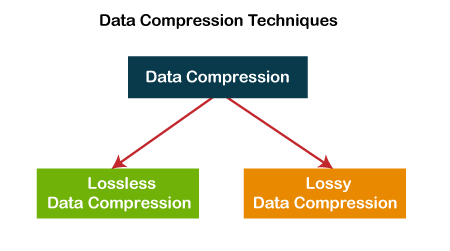
Lossless compression and lossy compression are two types of digital image file compression.

lossless, lossy compression

1. Introduction
2 The principle of compression
lossy compression
lossless compression
3 advantages and disadvantages of compression


Introduction

Lossless compression is the compression of the file itself. Like other data file compression, it is to optimize the file’s data storage method. A certain algorithm is used to represent the repeated data information. The file can be fully restored without affecting the content of the file As far as the image is concerned, there will be no loss of image detail.
Lossy compression is a change in the image itself. When saving the image, more brightness information is retained and the color hue and purity information is merged with the surrounding pixels. The melting ratio is different and the compression ratio is also different. different The amount is reduced, so the compression ratio may be high and the image quality will be reduced accordingly.
compression principle

lossy compression
Lossy compression reduces the amount of space an image occupies in memory and on disk, and when viewed on screen, you won’t notice that it has a detrimental effect on the image’s appearance. Because human eyes are more sensitive to light, the effect of light on the scene is more important than the effect of color, which is the basic foundation of lossy compression technology.
lossless compression
The basic principle of lossless compression is that the same color information should only be saved once. The software that compresses the image first determines which areas of the image are the same and which are different. Images that include repetitive data (eg blue sky) can be compressed, only the beginning and end of the blue sky need to be recorded. But there can be different shades of blue, and the sky can sometimes be obscured by trees, mountains, or other objects, which must be recorded separately. Essentially, lossless compression methods eliminate some duplication and greatly reduce the size of the image that will be saved to disk. However, the lossless compression method does not reduce the memory consumption of the image, because when the image is read from disk, the software fills in the missing pixels with the appropriate color information. If you want to reduce the amount of memory an image occupies, you should use a lossy compression method.

pros and cons of compression

lossy compression
Lossy compression is characterized by maintaining gradual color changes and eliminating sudden color changes in the image. Numerous experiments in biology have shown that the human brain fills in missing colors with colors closest to the neighborhood. For example, for a white cloud against a blue sky background, lossy compression removes some of the color at the edges of the image scene. Looking at the image on the screen, the brain fills in the missing parts of the color with the colors it sees in the scene. By using lossy compression techniques, some data is intentionally deleted and the deleted data is never recovered.
It is true that the use of lossy compression techniques can greatly compress the data in a file, but at the expense of image quality. If the image using lossy compression is only displayed on the screen, it may not have much of an impact on the image quality, at least to the degree of recognition by the human eye. However, if an image that has been subjected to lossy compression techniques is printed on a high resolution printer, the quality of the image will be severely compromised.
lossless compression
The advantage of the lossless compression method is that the image quality can be preserved better, but the compression rate of this method is relatively low. However, if you need to print the image on a high-resolution printer, it’s best to use lossless compression. Almost all image files use their respective short-form names as file extensions. From the extension you can know what format the image is stored in, what software should be used to read/write, etc.

What is lossy and lossless audio?

What is lossy and lossless audio?

lossy and lossless
lossy and lossless

According to the sample rate and sample size of the sound, we can know that compared to the natural signal, the audio encoding can only be infinitely close at most, at least the current technology can only do this.

lossy and lossless
lossy and lossless

Compared with the natural signal, any digital audio coding scheme has certain advantages in that it cannot be fully restored.
In computer applications, PCM encoding can achieve the highest level of fidelity, which is widely used for material preservation and music appreciation. It is used on CDs, DVDs, and our common WAV files. Therefore, PCM has become lossless encoding by convention, because PCM represents the best level of fidelity in digital audio, it does not mean that PCM can guarantee the absolute fidelity of the signal, and PCM can only be infinitely close in the greater extent.
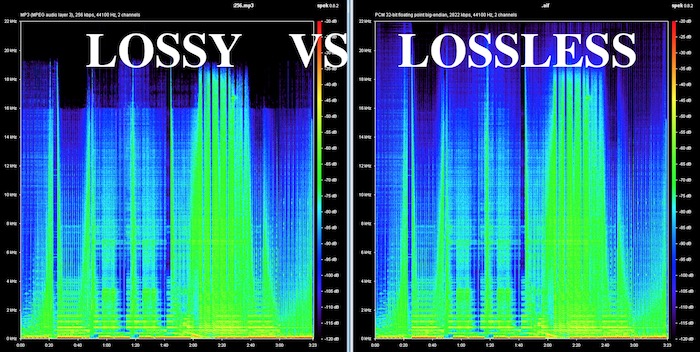
We usually include MP3 in the category of lossy audio encoding, which is relatively PCM encoding. The purpose of emphasizing the relativity of lossy and lossless encoding is to tell everyone that it’s hard to achieve true lossless, just like using numbers to express pi, no matter how high the precision is, it’s infinitely close, no actually equal to pi value.

The so-called lossy and lossless are relative to the software used for the audio format. According to the sample rate and sample size, it can be known that compared to the natural signal, the audio encoding can only be infinitely close at most, at least the current technology can only do this. Compared to the natural signal, any digital audio encoding scheme is lossy because it cannot be fully restored.
In computer applications, PCM encoding can achieve the highest level of fidelity, which is widely used for material preservation and music appreciation. It is used on CDs, DVDs, and our common WAV files. Therefore, PCM has become lossless encoding by convention, because PCM represents the best level of fidelity in digital audio, it does not mean that PCM can guarantee the absolute fidelity of the signal, and PCM can only be infinitely close in the greater extent.
We usually include MP3 in the category of lossy audio encoding, which is relatively PCM encoding. The purpose of emphasizing the relativity of lossy and lossless encoding is to tell everyone that it’s hard to achieve true lossless, just like using numbers to express pi, no matter how high the precision is, it’s infinitely close, no actually equal to pi value.

Lossy vs Lossless, understanding Audio Quality.

Lossy vs Lossless, understanding Audio Quality.

Lossy vs Lossless

Why the mp3 arises and becomes a success?

Lossy vs Lossless
Lossy vs Lossless

We talked in a previous article about why it was urgently needed when the internet started to find a way to compress the audio, since even thinking about transferring from one computer to another and storing an entire CD of music there was a feat that almost nobody could do. , much less online.

Fraunhoffer, who developed the mp3, mixed both theories:

1.- Compress using classic compression techniques, zip type.

2.- Use the extensive knowledge about human hearing to be able to rule out everything that the ear does not perceive.

Just as we have read that some animals see colors differently from human beings or even can see better in the dark… In the same way, the special and particular hearing of human beings has developed not in function of listening to music. .. or at least not in listening to it in high fidelity, but rather it is related more to our survival, to language, etc.

We know what the limits of human hearing are, we do not hear sounds lower or higher than certain perfectly known points.

There are whistles that dogs hear and humans don’t.

Would it make any sense to occupy more space on the hard drive to save, for example, frequencies that humans cannot hear?

The extreme purists may be exaggerating if they dream that the audio file does not drop any frequencies, but tests and trials have shown that an mp3 with a bitrate of 196 khz and a samplerate of 44100 or higher are practically indistinguishable from the uncompressed original for 99,999 people. of every 100 thousand.
Put another way, only one in a hundred thousand people can tell any small difference between a slightly above-average quality mp3 and the uncompressed original.

Mp4Gain is, without a doubt, the best option when looking to normalize the volume to make an mp3 or any other audio or video file achieve the most suitable loudness (see the list of files that Mp4Gain supports)