Video Volume Leveling


Free Download Mp4Gain
picture

Video Volume Leveling

Video Volume Leveling

Let’s talk about Video Volume Leveling

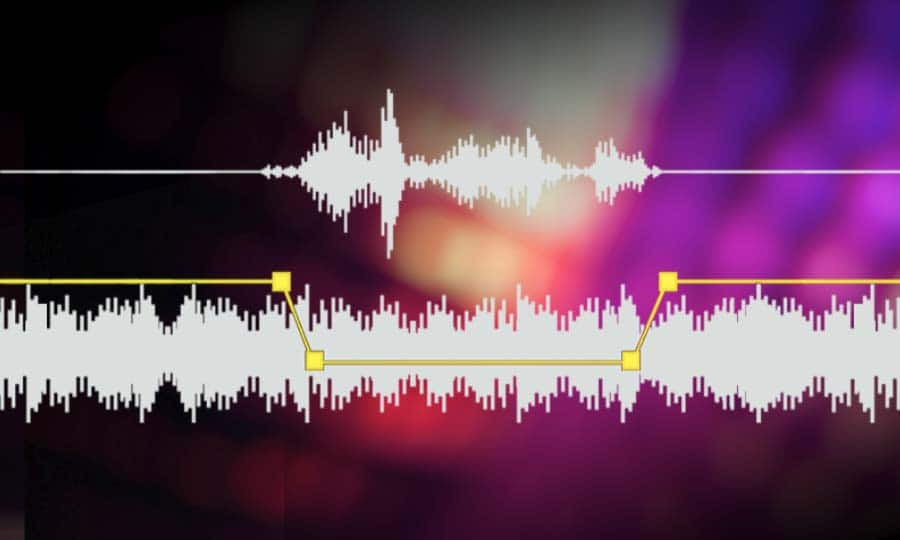
Video volume leveling is like having a magic remote that keeps the volume steady throughout a video. Think about watching a movie where the dialogue is whispered and the explosions are deafening. Annoying, right? Volume leveling smooths out those inconsistencies, so you don’t have to constantly fiddle with the remote. From my experience editing countless videos, I can tell you it’s a game-changer for improving the viewing experience. I once worked on a documentary where the interview audio was all over the place. Volume leveling saved the day, making it much easier to listen to.

Understanding Video Volume and Dynamics

Video volume, in my experience, is like the flow of water in a pipe. Sometimes it’s a trickle (quiet scenes), other times it’s a gush (loud scenes). Volume dynamics refer to these variations in loudness. Just like controlling the water flow with a valve, volume leveling controls the audio dynamics, making the loudness more consistent.

Why is Video Volume Leveling Important?

Volume leveling is crucial for creating professional-sounding videos. Here’s why I believe it’s so important:

  • Improved Viewing Experience:

    No more jarring jumps in volume! It’s like smoothing out a bumpy road for a more comfortable ride.

  • Enhanced Audio Clarity:

    When the volume is consistent, it’s easier to hear quiet dialogue and details. Imagine listening to a story where the storyteller speaks at the same volume throughout – much clearer!

  • Professionalism:

    Volume leveling is a hallmark of professional video production. It shows you care about your audience’s experience.

  • Accessibility:

    Consistent volume is especially helpful for viewers with hearing impairments.

How Video Volume Leveling Works

Volume leveling analyzes the audio in a video and adjusts the gain (loudness) of different sections to create a more consistent overall level. Think of it like adjusting the individual knobs on a sound mixer to balance all the instruments. Quiet parts are boosted, and loud parts are reduced.

Different Methods of Video Volume Leveling

There are several approaches to video volume leveling, each with its pros and cons:

  • Normalization:

    Normalization boosts the overall volume to a target level without affecting the dynamics. It’s like turning up the main volume knob on a stereo.

  • Compression:

    Compression reduces the dynamic range, making the loud parts quieter and the quiet parts louder. Think of it like squeezing a balloon – the overall volume is reduced, but it becomes more uniform.

  • Limiting:

    Limiting prevents the audio from exceeding a certain threshold, preventing clipping and distortion. It’s like a safety valve on a pressure cooker.

Choosing the Right Video Volume Leveling Technique

From my experience, the best technique depends on the specific video. Normalization is good for boosting overall loudness. Compression is useful for taming wide dynamic ranges. Limiting prevents distortion. Often, a combination of techniques works best.

Common Challenges in Video Volume Leveling

Even with the best techniques, I’ve encountered some challenges:

  • Over-Compression:

    Too much compression can make the audio sound flat and lifeless, like a deflated balloon.

  • Distortion:

    Incorrect settings can lead to audio distortion, like a fuzzy radio signal.

  • Breathing:

    Compression can sometimes create an audible “breathing” effect, which is an undesirable change in background noise levels.

Tips for Effective Video Volume Leveling

Over time, I’ve picked up some tips to get the best results:

  • Subtlety is Key:

    Aim for natural-sounding volume adjustments. Avoid drastic changes that are noticeable to the ear.

  • Monitor with Headphones:

    Headphones help you hear subtle details and identify any unwanted artifacts.

  • Experiment with Settings:

    Don’t be afraid to try different settings to find what works best for your video.

Advanced Techniques in Video Volume Leveling

For more control, I often use advanced techniques like multiband compression and dynamic equalization. These techniques allow for more precise adjustments to specific frequency ranges.

The Future of Video Volume Leveling

The future of video volume leveling is exciting! I see more AI-powered tools emerging, automating the process and making it even easier to achieve professional-sounding results. Imagine a world where videos automatically adjust their volume to suit your listening environment – that’s the future I’m excited about!

Latest words on Video Volume Leveling

Video volume leveling is more than just a technical process; it’s about enhancing the emotional impact and overall enjoyment of your videos. By understanding the principles and techniques involved, you can create videos that truly captivate your audience. MP4Gain may be a suitable solution for your video volume leveling needs.

FAQ about Video Volume Leveling

What is video volume leveling?

Video volume leveling is the process of adjusting audio levels to create a consistent volume throughout a video.

Why is video volume leveling important?

It improves the viewing experience by eliminating jarring volume fluctuations and enhancing audio clarity.

How does video volume leveling work?

It analyzes the audio and adjusts the gain of different sections to achieve a consistent overall volume.

What are the different methods of video volume leveling?

Common methods include normalization, compression, and limiting.

What is audio normalization?

Normalization boosts the overall volume to a target level without significantly affecting the dynamic range.

What is audio compression?

Compression reduces the dynamic range by making loud parts quieter and quiet parts louder.

What is audio limiting?

Limiting prevents the audio from exceeding a certain threshold, preventing clipping and distortion.

What are some common challenges in video volume leveling?

Challenges can include over-compression, distortion, and breathing artifacts.

What are some tips for effective video volume leveling?

Tips include using subtle adjustments, monitoring with headphones, and experimenting with settings.

What is the future of video volume leveling?

The future may involve more AI-powered tools and automated processes.

Comments:

Great article! This explains why some of my videos sound so much better than others. Thanks! – VideoEnthusiast

I’ve been struggling with uneven audio in my videos. This is a lifesaver! – SoundStruggler

Super helpful tips! I’ll definitely be using these in my next project. – FutureFilmmaker

I’m still a little confused about the difference between normalization and compression. Maybe you could elaborate on that? – AudioNewbie

This is the best explanation of video volume leveling I’ve found online. Thanks for sharing your expertise! – GratefulLearner

I create videos for social media, and consistent volume is so important. This article was really helpful. Thanks! – SocialMediaPro

Awesome explanation. I finally understand why some videos are so jarring to listen to. – HappyViewer

I’m a musician, and I’m starting to make music videos. This will definitely come in handy! – MusicVideoMaker

I use mp4gain.com all the time for this, its great info tho! – mp4gainFan

Good stuff, but maybe add some visuals next time? – VisualLearner


Free Download Mp4Gain
picture


Mp4Gain Main Window
picture


Mp4Gain Features
picture


Free Download Mp4Gain
picture

Audio Normalization Techniques: Peak vs. Loudness

Audio Normalization Techniques: Peak vs. Loudness

Audio Normalization Techniques

As an audio optimization expert, I’m often asked about the best techniques for normalizing audio levels. In this article, I will explore two popular approaches: peak normalization and loudness normalization. These techniques, peak vs. loudness normalization, have their own unique advantages and considerations. Let’s dive in and uncover the secrets of achieving balanced and consistent audio!

Peak Normalization: Unleashing the Power of Dynamics

When it comes to peak normalization, it’s all about preserving the dynamics of your audio. Imagine a breathtaking symphony where the crescendos and diminuendos transport you to a different realm. With peak normalization, you ensure that the highest peaks of your audio reach their full potential without clipping or distortion. It’s like giving your audio the freedom to express itself with intensity and impact.

Loudness Normalization: The Harmony of Consistency

Now, let’s turn our attention to the world of loudness normalization. Have you ever experienced the frustration of constantly adjusting the volume while switching between songs or TV shows? Loudness normalization comes to the rescue! By analyzing the perceived loudness of your audio, it ensures a consistent listening experience across different tracks. Say goodbye to sudden volume jumps and immerse yourself in a harmonious soundscape.

Dynamic Range: The Dance of Soft and Loud

In the realm of audio normalization, we encounter the concept of dynamic range. Dynamic range represents the difference between the softest and loudest parts of an audio signal. Peak normalization respects the natural dynamic range, allowing the delicate whispers and thunderous roars to coexist in perfect balance. On the other hand, loudness normalization aims to reduce the dynamic range, providing a more even playing field for all elements of your audio.

Audio Clipping: Taming the Wild Peaks

Audio clipping is a notorious villain that can ruin your audio experience. Picture this: a sudden burst of sound that distorts and crackles, disrupting your enjoyment. Peak normalization acts as the hero in this story, taming those wild peaks and ensuring that your audio stays within safe limits. With peak normalization, your audio remains clean and free from the dreaded clipping monster.

LUFS: The Measure of Perceived Loudness

In the realm of loudness normalization, we encounter the term LUFS, which stands for Loudness Units Full Scale. LUFS provides a standardized measure of the perceived loudness of your audio. Loudness normalization algorithms analyze the integrated LUFS value and adjust the overall volume to match a specific target level. It’s like having a universal translator that ensures consistent loudness across different tracks and platforms.

Listening Environment: From Living Rooms to Concert Halls

Let’s talk about the listening environment and its impact on audio normalization. Every space has its unique characteristics, from the cozy intimacy of a living room to the grandeur of a concert hall. Loudness normalization takes into account these variations, delivering a consistent listening experience regardless of the environment. So whether you’re enjoying your favorite tunes at home or attending a live performance, the magic of normalization will make every moment memorable.

Personal Preference: Customizing Your Audio Journey

We all have our individual tastes and preferences when it comes to audio. Some crave the raw power of peak normalization, while others seek the comfort of consistent loudness through loudness normalization. The beauty of audio normalization techniques is that they allow you to customize your audio journey according to your personal taste. It’s like having a tailor-made suit that perfectly fits your unique style.

Metadata and Replay Gain: Enhancing the User Experience

Metadata and Replay Gain are powerful allies in the realm of audio normalization. Metadata provides valuable information about your audio, guiding normalization algorithms to make the right adjustments. Replay Gain takes it a step further by applying metadata tags to your audio files, ensuring consistent playback volume across different tracks. Together, they create a seamless and enhanced user experience, elevating your audio enjoyment to new heights.

Compression: Controlling the Sonic Landscape

Dynamic audio content, such as movies or live performances, often presents challenges for normalization. This is where compression enters the scene. Compression techniques allow you to shape the sonic landscape, reducing the dynamic range while maintaining audio quality. It’s like having a skilled conductor who ensures that every instrument is heard clearly, regardless of its volume.

Audio Editing and Mastering: Polishing the Gems

Lastly, let’s not forget the crucial role of audio editing and mastering in the pursuit of sonic perfection. Audio professionals meticulously fine-tune various parameters during the editing and mastering process. Audio normalization techniques become valuable tools in their arsenal, ensuring that the final product shines with balanced and consistent audio. It’s like adding the final touch of brilliance to your audio gems.

In conclusion, the choice between peak normalization and loudness normalization depends on your desired audio outcome. Whether you embrace the dynamic range or seek consistent loudness, these techniques empower you to create an audio experience that resonates with your vision. So go forth, unleash the power of normalization, and let your audio journey be a harmonious symphony of sound!

Understanding Audio Normalization

Understanding Audio Normalization

Audio Normalization
Audio Normalization

Audio normalization is the process of adjusting the loudness of an audio recording to a standard level. The goal is to ensure that all audio files have a consistent volume, making them easier to listen to and preventing ear fatigue. In this article, we will explore the different types of audio normalization and how they work.

Audio Normalization
Audio Normalization

Peak Normalization

Peak normalization is the process of adjusting the peak amplitude of an audio recording to a certain level. The peak amplitude is the highest point in the audio signal, and it is measured in decibels (dB). The goal of peak normalization is to ensure that all audio files have the same peak amplitude, making them easier to listen to and preventing ear fatigue.

Peak normalization is typically used for digital audio files, such as MP3 and WAV files. These files are usually stored in a digital format that allows for easy manipulation of the audio data. However, peak normalization can also be applied to analog audio recordings, such as cassette tapes or vinyl records.

RMS Normalization

RMS normalization is the process of adjusting the root mean square (RMS) level of an audio recording to a certain level. The RMS level is a measure of the average power of an audio signal, and it is measured in decibels (dB). The goal of RMS normalization is to ensure that all audio files have the same RMS level, making them easier to listen to and preventing ear fatigue.

RMS normalization is typically used for digital audio files, such as MP3 and WAV files. However, it can also be applied to analog audio recordings, such as cassette tapes or vinyl records.

RMS normalization is often considered to be a more accurate method of normalizing audio than peak normalization because it takes into account the average power of the audio signal, rather than just the peak amplitude.

Loudness Normalization

Loudness normalization is the process of adjusting the loudness of an audio recording to a certain level. The loudness of an audio recording is measured in loudness units (LU). The goal of loudness normalization is to ensure that all audio files have the same loudness, making them easier to listen to and preventing ear fatigue.

Loudness normalization is typically used for broadcast audio, such as television and radio. Loudness normalization is required by many countries to ensure that the audio levels of all broadcast programs are consistent, making them easier to listen to and preventing ear fatigue.

Loudness normalization is often considered to be a more accurate method of normalizing audio than peak or RMS normalization because it takes into account the perceived loudness of the audio signal, rather than just the peak amplitude or RMS level.

Conclusion

Normalizing audio is an important process for ensuring that all audio files have a consistent volume, making them easier to listen to and preventing ear fatigue. There are several different types of audio normalization, including peak normalization, RMS normalization, and loudness normalization. Each method has its own advantages and disadvantages and is best suited for different types of audio.

When it comes to audio normalization, one solution that stands out is Mp4Gain. It is a software that allows you to normalize your audio files in a quick and efficient way. It can be used to normalize a single audio file or multiple files at once. It also supports a wide range of audio file formats, including MP3, WAV, and more. Furthermore, Mp4Gain is user-friendly and easy to navigate, making it a great option for both professional and casual users.

In conclusion, audio normalization is a crucial process for ensuring that all audio files have a consistent volume, making them easier to listen to and preventing ear fatigue. There are several different types of audio normalization, including peak normalization, RMS normalization, and loudness normalization. Each method has its own advantages and disadvantages and is best suited for different types of audio. Mp4Gain is a powerful and easy-to-use software that can help you normalize your audio files quickly and efficiently.

mp3 audio normalizer

mp3 audio normalizer


An mp3 audio normalizer is a tool to avoid differences in volume level in 2 or more audio files.

audio volume normalizer

There are various ways to do this, but the most common is to use software that can normalize the levels of the files automatically. This can be done with an audio editor, or with a dedicated mp3 normalizer program.

audio volume normalizer

Normalizing an audio file is checking each frame and adjusting it to be sure that each one is optimized to get the best possible volume without distortion.

An audio file can be normalized in two ways:

1. Peak Normalization:

This is where the audio file is analyzed and the highest peak is identified. The volume of the entire file is then increased or decreased so that this peak is at the maximum possible level without distortion.

2. RMS Normalization:

This is where the audio file is analyzed and the average volume level is identified. The volume of the entire file is then increased or decreased so that this average level is at the maximum possible level without distortion.

This behavior is similar to the compressor that keep the volume range of noisy and lower passages of the audio to keep both in a range that can sound fine.

The main difference is that the goal of an audio normalizer is not to change the sound of the audio, but to make sure that the volume levels of all the files are the same.

The most common format that is normalized is MP3, but other formats such as WAV can also be normalized.

In this times even video files can be normalized too.,

There are many reasons why you might want to normalize your audio files.

For example, if you have a number of files that were recorded at different levels, you may want to normalize them so that they all have the same volume level.

This can be useful if you want to create a playlist of files that are all the same volume, or if you want to make sure that all the files in a particular folder have the same volume level.

Another reason to normalize your audio files is if you want to make sure that they sound their best when played back on different devices.

For example, if you have an MP3 file that sounds great on your computer, but sounds terrible on your phone, you may want to normalize it so that it sounds its best on both devices.

Normalizing your audio files can also be useful if you want to make sure that they are suitable for use in different situations.

For example, if you have an MP3 file that you want to use as background music for a video, you may want to normalize it so that it is not too loud or too quiet.

Normalizing your audio files can also be useful if you want to make sure that they sound their best when played back at different speeds.

For example, if you have an MP3 file that sounds great when played back at normal speed, but sounds terrible when played back at double speed, you may want to normalize it so that it sounds its best at both speeds.

Normalizing your audio files can also be useful if you want to make sure that they sound their best when played back at different volumes.

For example, if you have an MP3 file that sounds great when played back at a low volume, but sounds terrible when played back at a high volume, you may want to normalize it so that it sounds its best at both volumes.

Normalizing your audio files can also be useful if you want to make sure that they are suitable for use in different environments.

For example, if you have an MP3 file that you want to use as background music for a party, you may want to normalize it so that it is not too loud or too quiet.

Normalizing your audio files can also be useful if you want to make sure that they are suitable for use in different places.

For example, if you have an MP3 file that you want to use as background music for a restaurant, you may want to normalize it so that it is not too loud or too quiet.

Normalizing your audio files can also be useful if you want to make sure that they are suitable for use at different times of the day.

For example, if you have an MP3 file that you want to use as background music for a morning show, you may want to normalize it so that it is.

What is a loudness normalizer or an audio volume normalizer?

What is a loudness normalizer or an audio volume normalizer?

audio volume normalizer

A volume normalizer is used to make sure that audio files play at the best possible volume without clipping and also that all audio files play at a similar volume.

audio volume normalizer

A volume normalizer analyzes an audio file and then adjusts it to sound at a specific volume level. This is often done with audio files that are uploaded to file sharing sites, so that all users can listen to the audio at a similar volume.

It is quite common to find volume differences in the files that are downloaded from the internet, since these have been created from a wav but different sampling and bit frequencies have been used to create them.

A volume normalizer can analyze an audio file and then apply gain or attenuation to adjust the volume of the file to a specified level. This is useful if you want to ensure that all audio files played on your website or in your application sound at a similar volume.

Because it’s frustrating to have a collection of audio or even video files and find that when you play them they play at different volumes.

For this reason, it is necessary to use a volume normalizer, with which you can make sure that all audio and video files are heard at a similar volume.

It is important to ask yourself if the bit rate is important for the quality of an audio or video file, the same for the sample rate.

The answer is no, not always.

Bit rate and sample rate refer to the amount of information that can be stored in an audio or video file.


The higher the bit rate, the higher the quality of the audio or video file.


However, sometimes a low-quality video or audio file can sound better than a high-quality file.


This is because the bit rate and sample rate are not always indicative of the quality of the audio or video file.


There are many factors that can affect the quality of an audio or video file, such as the encoder used to encode the file, the quality of the microphone used to record the file, the quality of the equipment used to play the file, etc.


In summary, the bit rate and the sample rate are not always indicative of the quality of the audio or video file.

Psychoacoustic model and its application in MP3 encoding

Psychoacoustic model and its application in MP3 encoding

Psychoacoustic Model

Abstract: The psychoacoustic model is the core part of audio perceptual coding, which directly affects the quality and compression ratio of audio coding.

Psychoacoustics mp3 coding

Based on the basic principles of psychoacoustics, the absolute hearing threshold, the masking effect, and the critical frequency band and other related content, combined with the mathematical expression of psychoacoustics, and analyze the algorithm flow in detail according to each module in the standard MP3 encoding program. Finally, the corresponding algorithm is used to describe the pre-echo generation mechanism and its suppression method in MP3 encoding.

Psychoacoustic model and its application in MP3 encoding

Psychoacoustic models and their applications in perceptual audio coding

In this paper, the AAC psychoacoustic model is discussed from the aspects of over-masking, forward and backward time-domain masking, FFT window coefficient analysis, and window shift criterion. Each individually masked…

Auditory psychoacoustic models and their applications in perceptual audio coding

First, the paper describes the masking effect, discusses the principles and algorithms of various perceptual audio coding standards, and focuses on the development process and features of the MPEG audio coding standard. There are two psychoacoustic models: model 1 and model 2. Level 1.

Application of the psychoacoustic model in HDTV digital audio

Digital audio is a very important part of high-definition television (HDTV). In the digital audio codec, the introduction of the psychoacoustic model greatly reduces the complexity of the codec. The basic principles of the psychoacoustic model and various psychoacoustic models in HDTV. ..

Application of the psychoacoustic model in the detection of abnormal loudspeaker sound

China is the largest country in speaker production, and the annual output of speakers can reach hundreds of millions. Due to some unpredictable situations in the speaker design and production process, speaker failure occurs. Therefore, after the speaker is produced, the first product…

Application of the psychoacoustic model in digital audio watermarking

Audio digital watermarking technology plays an increasingly important role in protecting the copyright of digital audio works, and is an effective means of solving the problem of copyright of audio works. digital.A digital watermark algorithm based on a psychoacoustic model is proposed, which can guarantee a good audio signal.. .

An adaptive audio watermarking algorithm that combines the MP3 encoding principle and the psychoacoustic model

Through the investigation of the mp3 encoding algorithm, combined with a psychoacoustic model, a watermarking algorithm for copyright protection of MP3 audio files is proposed. The embedding algorithm runs simultaneously with the compression process. First, reduce the dimension of the embedded watermark information, and then use MP3 encoding to make…

Audio and Video Series: Audio Basics Part 2

Audio and Video Series: Audio Basics Part 2

Psychoacoustics

Introduction to sound

psychoacoustic

time domain masking
Masking that occurs between temporarily adjacent sounds.

temporary masking

audio encoding
encoding process
coded process

audio file format
Audio File Format ( wiki ): The format of the file that contains the audio data.

Format Classification
Lossless formats: such as WAV, FLAC, APE, ALAC, WavPack (WV)
Lossy formats: such as MP3, AAC, Ogg Vorbis, Opus
performance comparison
Latency Comparison
delay compare

Efficiency Comparison
efficiency comparison

AAC encoding
AAC (wiki): Advanced Audio Coding, a proprietary audio coding standard for lossy digital audio compression based on MPEG-2, which appeared in 1997.

AAC exhibits better sound quality than MP3 and is intended to replace the MP3 format.

usual format
AAC LC : (low complexity) low complexity specification
AAC HE V1 : (high efficiency) AAC LC + SBR (Spectral Band Replication)
AAC HE V2 : AAC LC + SBR + PS (parametric stereo)
ac profile

data exchange format
ADIF : (Audio Data Interchange Format) Audio Data Interchange Format, can only be decoded from scratch, commonly used in disk files.
ADTS : (Audio Data Transport Stream) audio transport stream format, each frame has a sync word, which can be decoded at any position in the audio stream for data transmission.

Audio and Video Series: Audio Basics

Audio and Video Series: Audio Basics

MP3 masking

Introduction to sound

Psychoacoustic

Definition: Sound is a sound wave produced by vibration, a wave phenomenon that propagates through a medium (gas, solid, liquid) and can be perceived by the hearing organs of humans or animals.

Essential: Sound is a mechanical wave.

Three elements of sound.
Tone : sound frequency (audio), boys > girls > boys
Volume: The amplitude (amplitude) of the vibration, also known as the pitch
Timbre: The waveform of the sound, which is essentially harmonic, also known as fret, has a lot to do with the material
Icon:

tone and volume

doorbell

psychoacoustics
Psychoacoustics is the study of human perception of sound, that is, the science of human physiological and psychological responses to sound (including speech and music).

hearing/voice range
hearing range

sonar heading and range

audio quantization
quantification process
audio quantization

basic concept
Sample Size – How many bits are used to store a sample. 16 bit common
Sampling rate : 8k, 16k, 32k, 44.1k, 48k sampling rate
Number of channels: mono, dual, multichannel
Bit rate calculation
Bit rate = sample rate × sample size × number of channels

What:

The sample rate is 44.1 kHz, the sample size is 16 bits, and the two channel PCM encoded WAV file

Bitrate = 44.1k × 16 × 2 = 1411.2kb/s = 176.4KB/s

audio compression
Audio compression is a type of data compression used to reduce the transmission bandwidth requirements of streaming audio media and the storage size of audio files.

compression method
lossless compression
All the information of the original file is preserved and there is no difference from the original file on playback.

Data compression through information redundancy is a reversible process.

lossy compression
Approximate some information in the original file to get a smaller file.

The incorporation of human psychology and recognition of the auditory system in the compression results is an irreversible process.

Audio signals outside the range of human hearing and audio signals that are masked.

masking effect
Masking effect: A phenomenon in which the auditory system’s perception of one sound is obstructed by another.

frequency domain masking
One sound is drowned out by another sound at the same time.

Mp3 Normalizer – Masking Effects Part 2

Mp3 Normalizer – Masking Effects Part 2

Mp3 Normalizer

They are related to the frequency and relative loudness of sounds of different frequencies, whereas temporal masking is only related to time.

MP3 Normalizer: Psychoacoustic Model

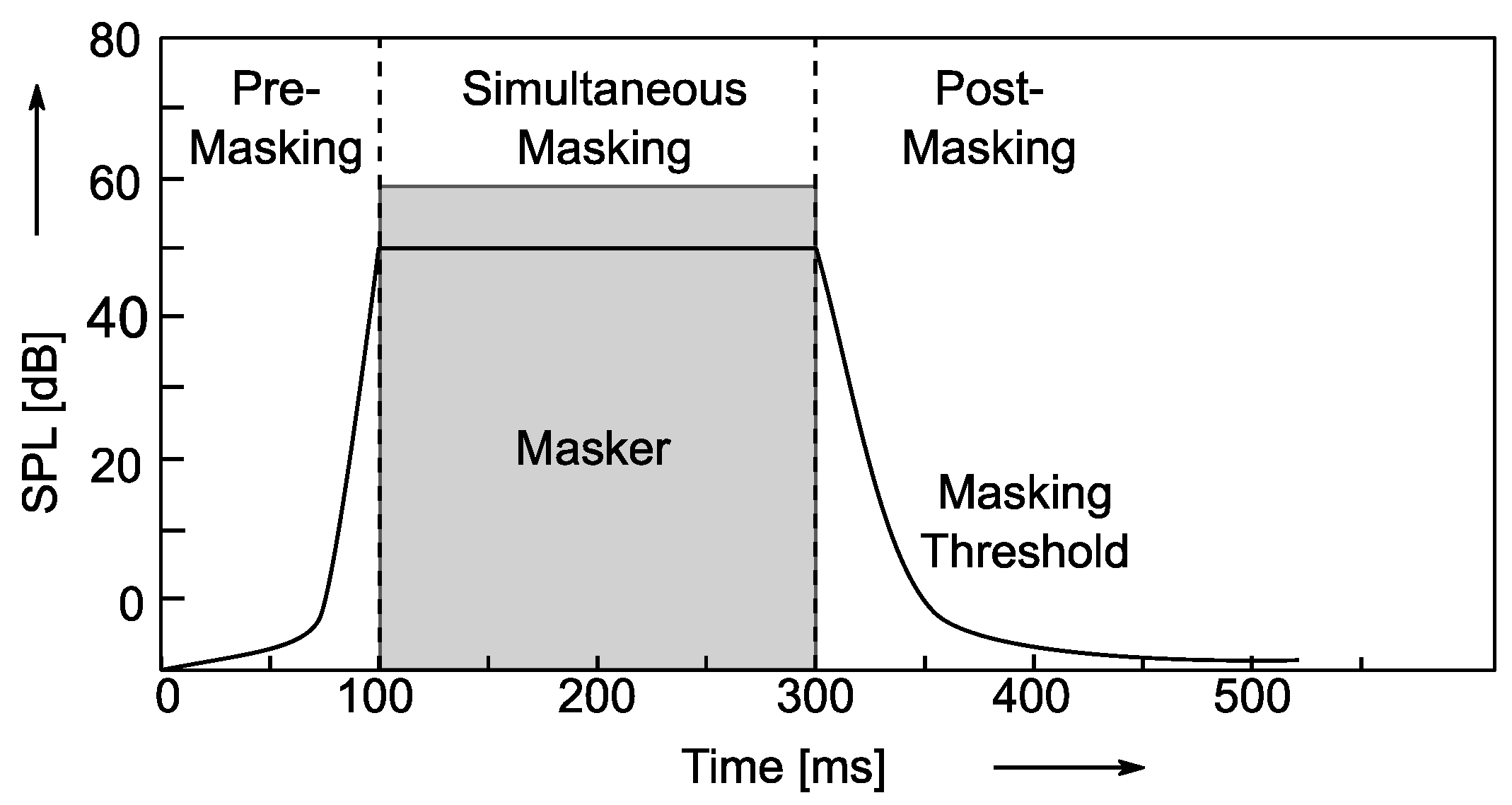
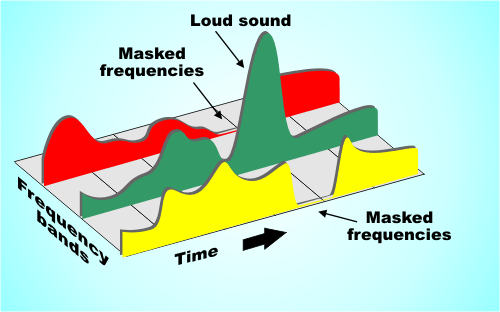
If two sounds are particularly close in time, humans may also have trouble telling them apart. For example, if a loud sound is followed by a very weak sound, the last sound will be difficult to hear. But if you play the second sound some time after the first sound stops, the last sound can be heard. How long should the interval be? For pure tones it is generally 5 ms. Of course, if the reverse effect is the same over time, if a lower sound appears before a higher sound, and the interval is too short, you won’t hear the lower sound.

Enter Bitrates, Stage Left La

JPEG compression can explicitly control the rate at which compression is discarded, but Mp3 users cannot. However, mp3 users can specify how many bits are used to store each second of music. The end effect is the same.

During encoding, the “garbage components” of the signal are compared to mathematical models of human psychoacoustics, as well as the bit rate used for compression, to decide which data to discard. The current bitrate used for mp3 compression is generally 128 kbps. The encoder will take this number into account when generating each data frame. If the bitrate is relatively low, the definition of “irrelevant” and “redundant” data will be relaxed, resulting in a large amount of data being considered useless data. Compressed audio will lose a lot of detail, resulting in a loss of sound quality. Conversely, if a higher bit rate encoding is used, the “irrelevance” and “redundancy” criteria are more precisely defined, details are preserved, but the file size is larger.

Please note that the bitrate of an mp3 file refers to the total bitrate of all encoded channels. That is, a 128 kbps stereo mp3 file is the same size as two 64 kbps mono mp3 files at the same time. But one 128kbps stereo file does sound better than two separate 64kbps mono files. Because in a stereo mp3 file, all the bits can be allocated (unevenly) to two channels as needed, for example, at a given time, one channel uses 60% of the bits and the other uses the remaining 40% , but the total number of bits will not exceed the bitrate parameter specified before encoding.

Fixed bit rate and variable bit rate

We assume that the mp3 encoding discussed here uses a fixed bitrate encoding method, which means that the output bitrate of the encoded file at any time period is whatever value you specify. The disadvantage of fixed bit rate encoding is that the amount of information in most sound files is not constant. In audio clips that use more musical instruments or have many people talking at the same time, the amount of information is large and vice versa, there are many factors that affect the amount of information in audio files. Variable bit rate encoding was developed to accommodate this characteristic of audio files. Variable bitrate encoding, which adjusts the bitrate used for encoding at any one time according to the dynamic characteristics of the audio data.

In most cases, variable bitrate encoding can achieve essentially the same sound quality as fixed bitrate encoding with a smaller file size. But variable bit rate encoding has its own drawbacks. First of all, some older players just don’t support decoding variable bitrate mp3 files and can’t play such files. Second, when the decoder plays a variable bitrate mp3, it cannot determine the current decode (play) position, and the “current play time” displayed on the player is inaccurate.

The information in the header of each frame is the same for a compressed fixed bitrate mp3 file, but not for the variable bitrate mp3 encoding. But when decoding, variable bitrate encoding does not require more computing power than a fixed bitrate file, because the mp3 decoder reads the full frame header even when playing a fixed bitrate mp3 file .

Mp3 Normalizer – Masking Effects

Mp3 Normalizer – Masking Effects

Mp3 Normalizer - Psychoacoustic Model

mp3 encoding: “masking effects” and bitrate

mp3 normalizer masking effects

masking effects

The process of information filtering by human consciousness includes a process called “masking”. People who study psychoacoustics are very concerned with the study of this process, which studies the relationship between hearing, consciousness and sound. Mutual relationship. There are two masking effects that affect the Mp3 encoding process: one is acoustic masking and the other is temporal masking.

Sync masking (also called acoustic masking)

To describe the sync masking effect, it’s best to use an analogy. Imagine a bird flying in front of the sun. You see the bird fly from the left between you and the sun, and then the bird disappears because the sun’s rays are too bright. When the bird leaves the area of ​​the sun, you can see it again. Just like in a quiet environment, the sound of a guitarist’s fingers sliding across the strings can be heard, but if the same sound is played in an environment where rock music is being played, the average person cannot hear it.

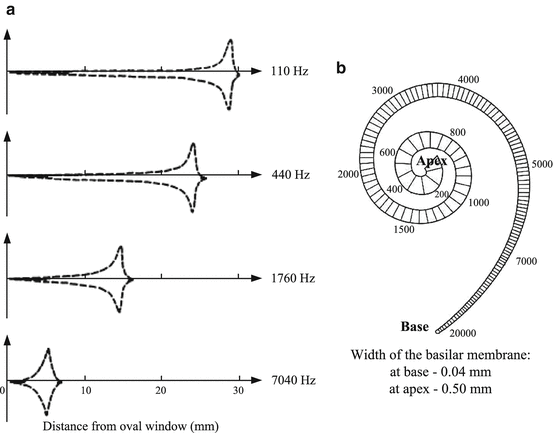
The Mp3 codec only cares about the interrelationship between frequencies and loudness. Sync masking is described in terms that the mp3 codec can handle as follows: you have a sound signal, it’s a 1000hz sine wave (one), then we have a 1100hz sine wave (two), the wave sine two is weaker, -10db. Most people do not notice the presence of sine wave two in this situation. But sine wave two is not easy to perceive, not only because it is weaker, but also because its frequency is very close to that of sine wave one. To illustrate this phenomenon, we gradually increase the frequency of the second sine wave, but keep its volume constant until we can hear it. Assuming its frequency increases to 4000 Hz, we can hear this sound. When the frequency difference between the two sine waves gradually increases, the second sine wave can be heard gradually, until its frequency increases to a certain point, most people can hear two different tones, one is louder and the other is softer. lower.

This process is what psychoacousticists call the “synchronization masking” phenomenon. Two sounds with similar frequencies but very different volumes are difficult for humans to perceive as two different sounds. Taking this phenomenon into account, mp3 tries to discard those sounds that cannot be perceived during the encoding process, or assign as few bits as possible to these sounds.

Temporary masking Temporary masking Masking effects
synchronous