mp3 audio normalizer


Free Download Mp4Gain
picture

mp3 audio normalizer


An mp3 audio normalizer is a tool to avoid differences in volume level in 2 or more audio files.
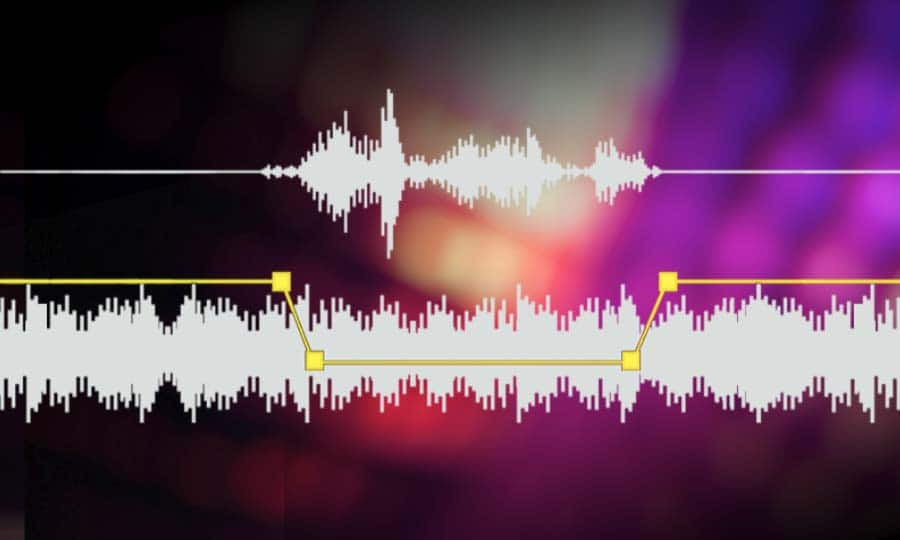
audio volume normalizer

There are various ways to do this, but the most common is to use software that can normalize the levels of the files automatically. This can be done with an audio editor, or with a dedicated mp3 normalizer program.

audio volume normalizer

Normalizing an audio file is checking each frame and adjusting it to be sure that each one is optimized to get the best possible volume without distortion.

An audio file can be normalized in two ways:

1. Peak Normalization:

This is where the audio file is analyzed and the highest peak is identified. The volume of the entire file is then increased or decreased so that this peak is at the maximum possible level without distortion.

2. RMS Normalization:

This is where the audio file is analyzed and the average volume level is identified. The volume of the entire file is then increased or decreased so that this average level is at the maximum possible level without distortion.

This behavior is similar to the compressor that keep the volume range of noisy and lower passages of the audio to keep both in a range that can sound fine.

The main difference is that the goal of an audio normalizer is not to change the sound of the audio, but to make sure that the volume levels of all the files are the same.

The most common format that is normalized is MP3, but other formats such as WAV can also be normalized.

In this times even video files can be normalized too.,

There are many reasons why you might want to normalize your audio files.

For example, if you have a number of files that were recorded at different levels, you may want to normalize them so that they all have the same volume level.

This can be useful if you want to create a playlist of files that are all the same volume, or if you want to make sure that all the files in a particular folder have the same volume level.

Another reason to normalize your audio files is if you want to make sure that they sound their best when played back on different devices.

For example, if you have an MP3 file that sounds great on your computer, but sounds terrible on your phone, you may want to normalize it so that it sounds its best on both devices.

Normalizing your audio files can also be useful if you want to make sure that they are suitable for use in different situations.

For example, if you have an MP3 file that you want to use as background music for a video, you may want to normalize it so that it is not too loud or too quiet.

Normalizing your audio files can also be useful if you want to make sure that they sound their best when played back at different speeds.

For example, if you have an MP3 file that sounds great when played back at normal speed, but sounds terrible when played back at double speed, you may want to normalize it so that it sounds its best at both speeds.

Normalizing your audio files can also be useful if you want to make sure that they sound their best when played back at different volumes.

For example, if you have an MP3 file that sounds great when played back at a low volume, but sounds terrible when played back at a high volume, you may want to normalize it so that it sounds its best at both volumes.

Normalizing your audio files can also be useful if you want to make sure that they are suitable for use in different environments.

For example, if you have an MP3 file that you want to use as background music for a party, you may want to normalize it so that it is not too loud or too quiet.

Normalizing your audio files can also be useful if you want to make sure that they are suitable for use in different places.

For example, if you have an MP3 file that you want to use as background music for a restaurant, you may want to normalize it so that it is not too loud or too quiet.

Normalizing your audio files can also be useful if you want to make sure that they are suitable for use at different times of the day.

For example, if you have an MP3 file that you want to use as background music for a morning show, you may want to normalize it so that it is.


Free Download Mp4Gain
picture


Mp4Gain Main Window
picture


Mp4Gain Features
picture


Free Download Mp4Gain
picture

What is a loudness normalizer or an audio volume normalizer?

What is a loudness normalizer or an audio volume normalizer?

audio volume normalizer

A volume normalizer is used to make sure that audio files play at the best possible volume without clipping and also that all audio files play at a similar volume.

audio volume normalizer

A volume normalizer analyzes an audio file and then adjusts it to sound at a specific volume level. This is often done with audio files that are uploaded to file sharing sites, so that all users can listen to the audio at a similar volume.

It is quite common to find volume differences in the files that are downloaded from the internet, since these have been created from a wav but different sampling and bit frequencies have been used to create them.

A volume normalizer can analyze an audio file and then apply gain or attenuation to adjust the volume of the file to a specified level. This is useful if you want to ensure that all audio files played on your website or in your application sound at a similar volume.

Because it’s frustrating to have a collection of audio or even video files and find that when you play them they play at different volumes.

For this reason, it is necessary to use a volume normalizer, with which you can make sure that all audio and video files are heard at a similar volume.

It is important to ask yourself if the bit rate is important for the quality of an audio or video file, the same for the sample rate.

The answer is no, not always.

Bit rate and sample rate refer to the amount of information that can be stored in an audio or video file.


The higher the bit rate, the higher the quality of the audio or video file.


However, sometimes a low-quality video or audio file can sound better than a high-quality file.


This is because the bit rate and sample rate are not always indicative of the quality of the audio or video file.


There are many factors that can affect the quality of an audio or video file, such as the encoder used to encode the file, the quality of the microphone used to record the file, the quality of the equipment used to play the file, etc.


In summary, the bit rate and the sample rate are not always indicative of the quality of the audio or video file.

What is an audio normalizer?

What is an audio normalizer?

audio normalizer
audio normalizer

How can an audio normalizer help?

audio normalizer
audio normalizer

Mp4Gain is a tool that will adjust the volume of an mp3 file so that the loudest and softest parts of the sound are more balanced.

The main advantage of an audio normalizer is that it can be used to make a song louder without clipping or distorting it. It achieves this by increasing the volume of softer sounds, which in turn makes louder sounds quieter.

An audio enhancer is a similar tool, but instead of balancing out the volume, it increases certain frequencies to make a song clearer and more pleasant to listen to.

Normalizing the volume of audio files is crucial for many reasons: it makes listening to music more pleasant, it increases the clarity of speech, and it can even help you sleep better.

Mp4Gain is an audio normalizer and volume booster. It can be used to automatically adjust the volume of all your music files so that they are at the same level.

Mp4Gain is an easy-to-use tool for adjusting the volume of all your music files to a uniform level. It does not need any technical knowledge, just drag and drop your music files into the program window and click “Normalize”.

Mp4Gain is an audio normalizer, it can help you to increase the volume of mp3 files. It can also be used as a volume booster or audio enhancer.

What does the quality of an mp3 or audio file depend on? Part 2

What does the quality of an mp3 or audio file depend on? Part 2

Gain vs Volume
Gain vs Volume

How to improve audio quality?

Gain vs Volume
Gain vs Volume

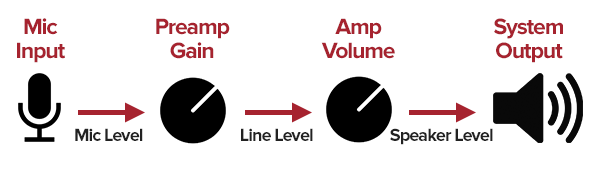
We saw in the previous article that we must differentiate the gain, which in a hyper simplified way, could be defined as the power that an input sound had, against volume that, again in a hyper simplified way, we would define as the loudness or output volume.

All this starting from the detail with which we have achieved captidad the wave that produced some sound.

To this we would add the speed with which we can transmit that information to the device or computer.

If we use a low bit rate, we will discard much of that detail that we mentioned.

So, we have the samplerate and the bit depth which somehow help to draw the wave more precisely. Remember that this is a very simplified explanation.

We also have the bit rate that will indicate how much information we can transmit per second and therefore will also affect the quality of the wave that we are “drawing” and that the more faithful the better the original.

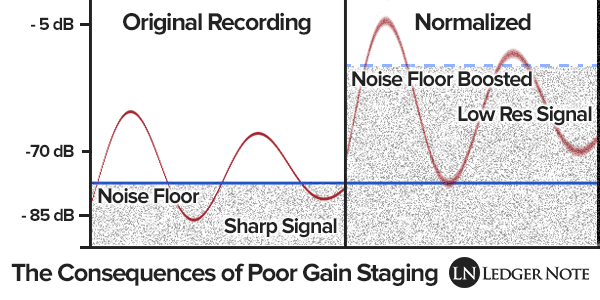
Finally we must take into account the gain that the sound had when entering and even its relationship with the noise.

And it comes as the last link in this chain, explained in a very simplified way, which would be the amplification that we would give to that sound so that it reaches a certain sonority.

All of this is handled very precisely and powerfully by Mp4Gain.

What does the quality of an mp3 or audio file depend on?

What does the quality of an mp3 or audio file depend on?

mp3 audio gain
mp3 audio gain

How to improve audio quality?

mp3 audio gain
mp3 audio gain

In essence and in a very synthetic way we could say that there are two basic factors, always assuming that the original had quality.

We also assume that high quality software such as Mp4Gain is used.

The first thing is to understand that music or sound is generated by a vibration in the air, which draws waves or can be represented by waves with different curvatures.

Quality would be, strictly speaking, being able to capture those waves with the greatest detail in order to reproduce them basically identical.

If we understand that as the most simplified, but descriptive, definition of quality of an mp3 or audio, then we can begin to understand where the issue is going.

If we have a file using 8-bit values ​​we have the possibility of having a maximum value of 255 (which is 0 dBfs), anything above those 255 (0 db) would be clipping, distortion, saturation.

Any sound that clips or saturates would be poor quality.

We can have two combinations, made up of many different options, if we talk about gain/volume.

Gain, to put it more simply, is the power of a sound input. If the sound has a weak input power, we increase the gain… we increase the input.

Volume would be, again simplifying, the output power of that signal or sound and for this we adjust the output, the amplification.

Again, Mp4Gain can handle all of this in a very advanced way.

Mp3 audio booster – Mp4 volume booster

Mp3 audio booster – Mp4 volume booster

Mp3 audio booster
Mp3 audio booster

The need to make audio booster to an mp3 or mp4 is something that occurs very frequently.

Mp4 volume booster
Mp4 volume booster

volume booster

We live in a time where audio and video devices are becoming more powerful and capable. Today high fidelity is not an advertising slogan. In many computers we can listen to any sound of the recording. Therefore, we also perceive any minimal deficiency, for example, when there are different volume levels, audios and videos with differences in volume loudness, unequal and uneven gains in volume.

Uneven volumes on mp3s

This scenario, today also leading to the area of ​​mp4 and other video formats, is something that only has one solution:

Mp4Gain is the only software capable of truly fixing these uneven volumes.

Mp4Gain has sophisticated and highly advanced algorithms that allow you to improve the quality and volume level of an audio and video file like never before.

Not only can you match things like bit rate, sample rate, loudness, and loudness perception. but also the equalization.

Mp4Gain is used in professional cabinets and also by music enthusiasts who use it at home for their mp3, mp4, etc.

Mp4Gain is the best audio normalization algorithm out there these days.


Audio volume increaser

Audio volume increaser

Audio Volume Increaser

Increase or increase the volume level of an mp3, flac, ogg, mp4, etc. ERs say, an audio or video file is something that we all need nowadays.

Audio Volume Increaser

It happens that we always find that some of our videos or songs have a higher or lower volume than the rest and we need to repair it.

Mp4Gain is the best software for this task, it offers the most sophisticated normalization and if you are demanding you can manipulate the various options that Mp4Gain offers to get exactly what you are looking for.

If, on the other hand, you just need a common standard, you don’t have to deal with complicated setups, but just load the song(s) or video(s) into the software and click a button, it’s that simple.

Mp4Gain is a very advanced software, but designed in such a way that you can use it with the utmost simplicity, it has no learning curve, its use is immediate.