What is an audio normalizer?


Free Download Mp4Gain
picture

What is an audio normalizer?

audio normalizer
audio normalizer

How can an audio normalizer help?

audio normalizer
audio normalizer

Mp4Gain is a tool that will adjust the volume of an mp3 file so that the loudest and softest parts of the sound are more balanced.

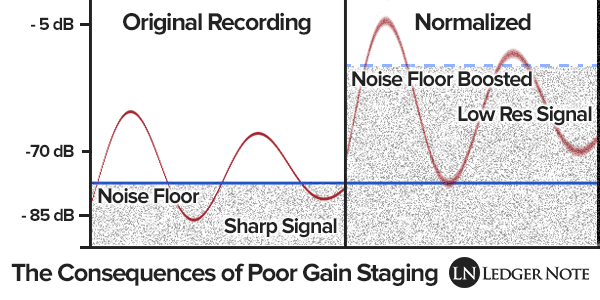
The main advantage of an audio normalizer is that it can be used to make a song louder without clipping or distorting it. It achieves this by increasing the volume of softer sounds, which in turn makes louder sounds quieter.

An audio enhancer is a similar tool, but instead of balancing out the volume, it increases certain frequencies to make a song clearer and more pleasant to listen to.

Normalizing the volume of audio files is crucial for many reasons: it makes listening to music more pleasant, it increases the clarity of speech, and it can even help you sleep better.

Mp4Gain is an audio normalizer and volume booster. It can be used to automatically adjust the volume of all your music files so that they are at the same level.

Mp4Gain is an easy-to-use tool for adjusting the volume of all your music files to a uniform level. It does not need any technical knowledge, just drag and drop your music files into the program window and click “Normalize”.

Mp4Gain is an audio normalizer, it can help you to increase the volume of mp3 files. It can also be used as a volume booster or audio enhancer.


Free Download Mp4Gain
picture


Mp4Gain Main Window
picture


Mp4Gain Features
picture


Free Download Mp4Gain
picture

What does the quality of an mp3 or audio file depend on? Part 2

What does the quality of an mp3 or audio file depend on? Part 2

Gain vs Volume
Gain vs Volume

How to improve audio quality?

Gain vs Volume
Gain vs Volume

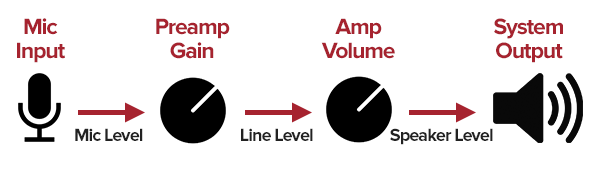
We saw in the previous article that we must differentiate the gain, which in a hyper simplified way, could be defined as the power that an input sound had, against volume that, again in a hyper simplified way, we would define as the loudness or output volume.

All this starting from the detail with which we have achieved captidad the wave that produced some sound.

To this we would add the speed with which we can transmit that information to the device or computer.

If we use a low bit rate, we will discard much of that detail that we mentioned.

So, we have the samplerate and the bit depth which somehow help to draw the wave more precisely. Remember that this is a very simplified explanation.

We also have the bit rate that will indicate how much information we can transmit per second and therefore will also affect the quality of the wave that we are “drawing” and that the more faithful the better the original.

Finally we must take into account the gain that the sound had when entering and even its relationship with the noise.

And it comes as the last link in this chain, explained in a very simplified way, which would be the amplification that we would give to that sound so that it reaches a certain sonority.

All of this is handled very precisely and powerfully by Mp4Gain.

What does the quality of an mp3 or audio file depend on?

What does the quality of an mp3 or audio file depend on?

mp3 audio gain
mp3 audio gain

How to improve audio quality?

mp3 audio gain
mp3 audio gain

In essence and in a very synthetic way we could say that there are two basic factors, always assuming that the original had quality.

We also assume that high quality software such as Mp4Gain is used.

The first thing is to understand that music or sound is generated by a vibration in the air, which draws waves or can be represented by waves with different curvatures.

Quality would be, strictly speaking, being able to capture those waves with the greatest detail in order to reproduce them basically identical.

If we understand that as the most simplified, but descriptive, definition of quality of an mp3 or audio, then we can begin to understand where the issue is going.

If we have a file using 8-bit values ​​we have the possibility of having a maximum value of 255 (which is 0 dBfs), anything above those 255 (0 db) would be clipping, distortion, saturation.

Any sound that clips or saturates would be poor quality.

We can have two combinations, made up of many different options, if we talk about gain/volume.

Gain, to put it more simply, is the power of a sound input. If the sound has a weak input power, we increase the gain… we increase the input.

Volume would be, again simplifying, the output power of that signal or sound and for this we adjust the output, the amplification.

Again, Mp4Gain can handle all of this in a very advanced way.