Why is important bitrate in audio quality?


Free Download Mp4Gain
picture

Why is important bitrate in audio quality?
Why is important bitrate in audio quality?

Bitrate

Bitrate is a crucial factor when it comes to audio quality. It refers to the amount of data processed per unit of time in an audio file.

Audio Quality

Audio quality is directly influenced by the bitrate of an audio file. Higher bitrates result in better sound reproduction and a more accurate representation of the original sound.

Sound Reproduction

The level of detail and accuracy in sound reproduction is determined by the bitrate of an audio file. A higher bitrate allows for more information to be captured and preserved, resulting in a clearer and more immersive listening experience.

Data Compression

Bitrate and data compression go hand in hand. Lower bitrates often involve more aggressive compression techniques, which can lead to a loss of audio data and a reduction in audio quality.

File Size

The bitrate of an audio file directly affects its file size. Higher bitrates require more data to be stored, resulting in larger file sizes. It’s important to strike a balance between audio quality and file size, especially when considering storage limitations or bandwidth constraints.

Streaming Services

Streaming services rely on efficient compression techniques to deliver audio files over the internet. Bitrate plays a crucial role in determining the streaming quality. Higher bitrates result in better audio fidelity but require more bandwidth.

Internet Bandwidth

The choice of bitrate for streaming or downloading audio files depends on the available internet bandwidth. Higher bitrates require more bandwidth to ensure a smooth streaming experience without interruptions or buffering.

Audio Formats

Different audio formats support varying levels of bitrate and, consequently, audio quality. Lossless formats like FLAC and WAV offer the highest audio fidelity as they preserve all the original data. Lossy formats like MP3 and AAC sacrifice some audio data to reduce file size.

Lossless

Lossless audio formats preserve all the original data, resulting in the highest audio fidelity. They are ideal for audiophiles and professionals who require the utmost accuracy in sound reproduction.

Lossy

Lossy audio formats use compression algorithms to reduce file size by sacrificing some audio data. They offer a good balance between audio quality and file size, making them suitable for everyday listening and storage purposes.

Listening Environment

The listening environment can significantly impact the perception of audio quality. Factors such as background noise, acoustics, and speaker quality can affect our ability to discern subtle differences in bitrate.

Background Noise

In a noisy environment, a lower bitrate may be sufficient as the background noise masks some of the audio details. However, in a quiet and controlled environment, a higher bitrate becomes more noticeable, providing a more immersive and enjoyable listening experience.

Acoustics

The acoustics of a room or space can influence the way audio is perceived. Proper acoustic treatment can enhance the overall audio quality, allowing for better sound reproduction and minimizing unwanted reflections or distortions.

Speaker Quality

The quality of speakers or headphones used for audio playback also plays a significant role in the overall audio experience. Higher quality speakers can better reproduce the nuances and details captured in high-bitrate audio files.

Music

Bitrate is particularly important when it comes to music. Higher bitrates allow for a more accurate representation of the original recording, resulting in a richer and more immersive musical experience.

Podcasts

Podcasts, like music, can greatly benefit from higher bitrates. Clearer and more detailed audio reproduction enhances the listening experience, making it easier to follow conversations and understand the content being discussed.

Audio Content

Whether it’s music, podcasts, audiobooks, or other forms of audio content, bitrate plays a crucial role in delivering a high-quality listening experience. Choosing the right bitrate ensures that the audio is faithfully reproduced and enjoyed to its fullest potential.



Free Download Mp4Gain
picture


Mp4Gain Main Window
picture


Mp4Gain Features
picture


Free Download Mp4Gain
picture

How to Calculate Audio Bitrate: A Comprehensive Guide

How to Calculate Audio Bitrate: A Comprehensive Guide

Audio Bitrate
Audio Bitrate

Calculating audio bitrate is an essential skill for anyone working with digital audio files. Bitrate is the amount of data used to encode one second of audio, and it plays a significant role in the quality of audio files. In this comprehensive guide, we will discuss everything you need to know about audio bitrate and how to calculate it.


Audio Bitrate
Audio Bitrate

What is Audio Bitrate?

Bitrate is the number of bits used to encode one second of audio. It is typically measured in kilobits per second (kbps) and determines the audio file’s size and quality. The higher the bitrate, the larger the audio file’s size and the better the audio quality.

Audio bitrate is determined by several factors, including:

  • The audio format
  • The audio codec
  • The audio signal characteristics

Audio Format and Codec

The audio format and codec are two critical factors that determine audio bitrate. Audio format refers to the type of audio file, such as MP3, WAV, or FLAC. Each audio format has its own advantages and disadvantages, including file size, compatibility, and audio quality.

The audio codec, on the other hand, is the software used to compress and decompress audio data. Codecs determine how efficiently audio data is compressed and how much data is used to encode one second of audio.

It is essential to choose the right audio format and codec for your needs, as they can significantly impact the audio bitrate and quality. For example, MP3 files are smaller in size but lower in quality than WAV or FLAC files.

Audio Signal Characteristics

The characteristics of the audio signal, such as its frequency range and amplitude, can also affect the effectiveness of audio compression and the resulting audio bitrate. Higher frequencies and amplitudes require more data to encode accurately, resulting in a higher bitrate.

Other factors that can affect audio bitrate include the number of audio channels and the audio’s dynamic range. Stereo audio files require more data than mono audio files, while audio files with a wide dynamic range require more data than those with a narrow dynamic range.

Calculating Audio Bitrate

Calculating audio bitrate requires you to know the audio file’s duration, size, and format. Once you have this information, you can use the following formula to calculate audio bitrate:

Bitrate = (File size in bits / Duration in seconds) / 1000

For example, if you have a 3-minute MP3 audio file with a size of 4,320,000 bytes:

  1. Convert the file size to bits: 4,320,000 x 8 = 34,560,000 bits
  2. Convert the duration to seconds: 3 x 60 = 180 seconds
  3. Calculate the bitrate: (34,560,000 / 180) / 1000 = 192 kbps

In this example, the audio file has a bitrate of 192 kbps.

Conclusion

Calculating audio bitrate is an essential skill for anyone working with digital audio files. Understanding audio format, codec, and signal characteristics can help you choose the right audio settings for your needs and ensure the best audio quality possible. By following the formula above, you can easily calculate the required bitrate for your audio files and adjust the settings accordingly. Keep in mind that bitrate is not the only factor that affects audio quality, so be sure to consider other factors such as the audio format, codec, and signal characteristics when selecting your settings.

When working with audio, it’s important to strike a balance between file size and audio quality. Higher bitrates generally result in better audio quality, but also larger file sizes. It’s up to you to determine the optimal balance for your specific needs and use case.

Final Thoughts

Calculating audio bitrate may seem like a daunting task, but with the right tools and knowledge, it can be a straightforward process. By understanding the different factors that affect audio quality and file size, you can make informed decisions when selecting your audio settings.

Remember, bitrate is just one of many factors that affect audio quality. Other factors, such as the audio format and codec, can also have a significant impact. By taking these factors into consideration and making informed decisions, you can achieve the best possible audio quality for your needs.

Whether you’re an audio professional or simply someone who enjoys working with digital audio files, understanding how to calculate audio bitrate is an important skill to have. By following the guidelines outlined in this article, you can ensure that your audio files are optimized for the best possible quality and file size.

References

Note: The information provided in this article is for educational purposes only and should not be construed as professional advice. Always consult a professional audio engineer or other qualified expert for advice on specific audio projects or issues.

mp3 audio normalizer

mp3 audio normalizer


An mp3 audio normalizer is a tool to avoid differences in volume level in 2 or more audio files.

audio volume normalizer

There are various ways to do this, but the most common is to use software that can normalize the levels of the files automatically. This can be done with an audio editor, or with a dedicated mp3 normalizer program.

audio volume normalizer

Normalizing an audio file is checking each frame and adjusting it to be sure that each one is optimized to get the best possible volume without distortion.

An audio file can be normalized in two ways:

1. Peak Normalization:

This is where the audio file is analyzed and the highest peak is identified. The volume of the entire file is then increased or decreased so that this peak is at the maximum possible level without distortion.

2. RMS Normalization:

This is where the audio file is analyzed and the average volume level is identified. The volume of the entire file is then increased or decreased so that this average level is at the maximum possible level without distortion.

This behavior is similar to the compressor that keep the volume range of noisy and lower passages of the audio to keep both in a range that can sound fine.

The main difference is that the goal of an audio normalizer is not to change the sound of the audio, but to make sure that the volume levels of all the files are the same.

The most common format that is normalized is MP3, but other formats such as WAV can also be normalized.

In this times even video files can be normalized too.,

There are many reasons why you might want to normalize your audio files.

For example, if you have a number of files that were recorded at different levels, you may want to normalize them so that they all have the same volume level.

This can be useful if you want to create a playlist of files that are all the same volume, or if you want to make sure that all the files in a particular folder have the same volume level.

Another reason to normalize your audio files is if you want to make sure that they sound their best when played back on different devices.

For example, if you have an MP3 file that sounds great on your computer, but sounds terrible on your phone, you may want to normalize it so that it sounds its best on both devices.

Normalizing your audio files can also be useful if you want to make sure that they are suitable for use in different situations.

For example, if you have an MP3 file that you want to use as background music for a video, you may want to normalize it so that it is not too loud or too quiet.

Normalizing your audio files can also be useful if you want to make sure that they sound their best when played back at different speeds.

For example, if you have an MP3 file that sounds great when played back at normal speed, but sounds terrible when played back at double speed, you may want to normalize it so that it sounds its best at both speeds.

Normalizing your audio files can also be useful if you want to make sure that they sound their best when played back at different volumes.

For example, if you have an MP3 file that sounds great when played back at a low volume, but sounds terrible when played back at a high volume, you may want to normalize it so that it sounds its best at both volumes.

Normalizing your audio files can also be useful if you want to make sure that they are suitable for use in different environments.

For example, if you have an MP3 file that you want to use as background music for a party, you may want to normalize it so that it is not too loud or too quiet.

Normalizing your audio files can also be useful if you want to make sure that they are suitable for use in different places.

For example, if you have an MP3 file that you want to use as background music for a restaurant, you may want to normalize it so that it is not too loud or too quiet.

Normalizing your audio files can also be useful if you want to make sure that they are suitable for use at different times of the day.

For example, if you have an MP3 file that you want to use as background music for a morning show, you may want to normalize it so that it is.

What is a loudness normalizer or an audio volume normalizer?

What is a loudness normalizer or an audio volume normalizer?

audio volume normalizer

A volume normalizer is used to make sure that audio files play at the best possible volume without clipping and also that all audio files play at a similar volume.

audio volume normalizer

A volume normalizer analyzes an audio file and then adjusts it to sound at a specific volume level. This is often done with audio files that are uploaded to file sharing sites, so that all users can listen to the audio at a similar volume.

It is quite common to find volume differences in the files that are downloaded from the internet, since these have been created from a wav but different sampling and bit frequencies have been used to create them.

A volume normalizer can analyze an audio file and then apply gain or attenuation to adjust the volume of the file to a specified level. This is useful if you want to ensure that all audio files played on your website or in your application sound at a similar volume.

Because it’s frustrating to have a collection of audio or even video files and find that when you play them they play at different volumes.

For this reason, it is necessary to use a volume normalizer, with which you can make sure that all audio and video files are heard at a similar volume.

It is important to ask yourself if the bit rate is important for the quality of an audio or video file, the same for the sample rate.

The answer is no, not always.

Bit rate and sample rate refer to the amount of information that can be stored in an audio or video file.


The higher the bit rate, the higher the quality of the audio or video file.


However, sometimes a low-quality video or audio file can sound better than a high-quality file.


This is because the bit rate and sample rate are not always indicative of the quality of the audio or video file.


There are many factors that can affect the quality of an audio or video file, such as the encoder used to encode the file, the quality of the microphone used to record the file, the quality of the equipment used to play the file, etc.


In summary, the bit rate and the sample rate are not always indicative of the quality of the audio or video file.

The bit rate directly affects the sound quality.

The bit rate directly affects the sound quality.

audio bit rate
audio bit rate

High bitrate is good and low bitrate is bad.

audio bit rate
audio bit rate

The code rate is the number of data bits transmitted per unit of time during data transmission. Generally, the unit we use is kbps, that is, kilobits per second.

The popular understanding is the sampling rate. The higher the sampling rate per unit time, the higher the precision, and the processed file is closer to the original file, but the file size is proportional to the sampling rate, so almost all encoding formats pay attention. It’s about how to use the lowest code rate to achieve the least distortion. The cbr (fixed code rate) and vbr (variable code rate) derived from this core are all articles in this regard, but things are not absolute, in terms of audio, the higher the bit rate, the lower the compressed ratio, the smaller the sound quality loss and the closer it is to the sound quality of the audio source.
The information in the computer is represented by binary 0 and 1, and each 0 or 1 is called a bit, which is represented by lowercase b, that is, bit (bit); uppercase B represents byte, ie byte, one byte = Eight bits, ie 1B=8b; the capital K in front stands for thousand, that is, thousand bits (Kb) or kilobytes (KB). Indicates the size of the file, usually using bytes (KB) to indicate the size of the file.

Kbps: The first thing to understand is that ps refers to /s, which is every second. Kbps refers to the speed of the network, that is, how many thousands of bits of information are transmitted per second (K means thousands of bits, Kb means how many thousands of bits), it is expressed in kb (kilobit), and in the case KBps means how many kilobytes are transferred per second. 1KBps = 8Kbps. The Internet speed of ADSL is 512 Kbps. If converted to bytes, it is 512/8 = 64 KBps (that is, 64 kilobytes per second).

A frame is a still image, and continuous frames form an animation, like a television image.
We normally say the number of frames. Simply put, it is the number of image frames transmitted in 1 second. It can also be understood that the graphics processor can update several times per second, usually expressed in fps (Frames Per Second). Each frame is a still image, and showing frames in rapid succession creates the illusion of movement. Higher frame rates result in smoother, more realistic animations. The more frames per second (fps), the smoother the motion is displayed.

What is the bitrate of the music?
It can also be called bit rate, which is nothing more than the amount of data reproduced per second by a type of music, the unit is expressed in bits, that is, binary bits. bps is the bit rate. b is bit, s is second, p is per, and one byte is equal to 8 binary bits. That is, the file size of a 4-minute song at 128bps is calculated as (128/8)*4*60=3840kB=3.8MB, which means that the same song with the same bit rate (bps) will not no matter what format (such as mp3 wma) The capacity is basically the same, which can only represent a transmission rate, not the sound quality. Due to different compression engines, the sound quality of different formats varies a lot. However, for the same format, the higher the bitrate, the larger the file and the better the sound quality.

What is the sample rate of the music?
Sampling rate refers to the number of samples per unit of time. The sampling rate is 44KHz, which means the number of samples per second is 44K, which means that 44,000 pieces of data are used to describe the sound waveform in 1 second. That is, the higher the sample rate, the better the sound quality. But he and bitrate are two completely different concepts.

What do bitrate and sample rate mean in audio files?

What do bitrate and sample rate mean in audio files?

Audio Bitrate
Audio Bitrate


What is the proper video bitrate?


Audio Bitrate
Audio Bitrate


What do bitrate and sample rate mean in audio files?

The meaning of bit rate and sample rate in audio files is as follows:

1. Bit rate:

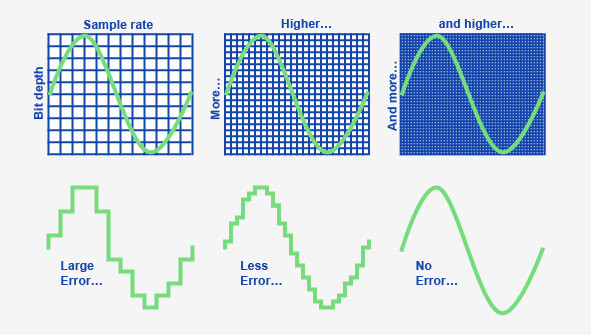
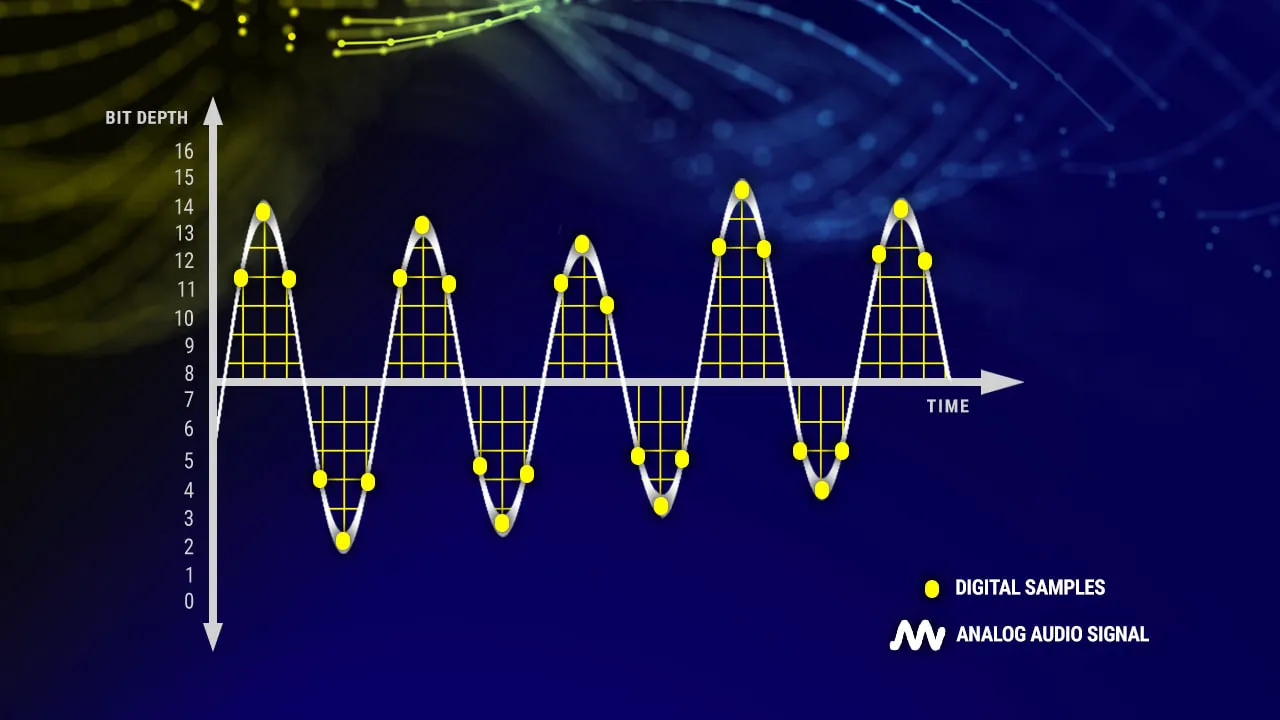
Bit rate refers to the number of bits (bits) transmitted per second. The unit is bps (bits per second) The higher the bit rate, the more data is transmitted per second. Bitrate in sound refers to the amount of binary data per unit of time after converting an analog sound signal to a digital sound signal, which is an indirect measure of audio quality.

2. Sampling rate:

Audio sample rate refers to the number of times the recording device samples the sound signal in one second. The higher the sample rate, the more realistic and natural the sound will be. On today’s major capture cards, the sample rate is generally divided into five levels: 11025 Hz, 22050 Hz, 24000 Hz, 44100 Hz and 48000 Hz.


What is the proper video bitrate?

After knowing what the video bitrate is, let’s take a look at the proper video bitrate. As mentioned above, many video bitrates are between 2M-4M, which is divided by the video resolution, of which 720p video The bitrate of 1080P video is generally 2M, and the bitrate of 1080P video is 4M. If the video bitrate exceeds 4M, then the video quality is what we often call 2K or even 4K, and the video production cost is relatively high .

Finally, let’s introduce the optimal bitrate of each resolution video, so you can adjust it according to the needs of the video:

1.360p or 480p video: The bit rate of this type of video is preferably greater than or equal to 0.8M.

2720p video: The bitrate of this type of video should be greater than or equal to 1.5M, of which 2M bitrate is the best.

3. 1080p video: ≥2.5M, the optimal bit rate is 4M-8M.

4.4k video: 4k is currently the highest quality type of video and its bit rate is typically 12M.

Lossless audio formats compete in quality with a CD?

Lossless audio formats compete in quality with a CD?

Mp3 vs CD
Mp3 vs CD

Can the sound quality of lossless music really be the same as a CD?

Lossy vs Lossless
Lossy vs Lossless

With the increase in storage space of mobile phones and computers, and the improvement of hardware sound quality indicators, more and more people have begun to pay attention to lossless music. The mobile phone has already started with 64G capacity. At the same time, it also uses high-quality audio chips such as ESS, and even has built-in op amp chips. This configuration that can compete with HiFi Walkman on paper was unimaginable. in recent years. of. At the same time, more and more consumers are beginning to pay attention to high-quality headphones. In this context, listening to lossy audio formats like MP3 is a bit like killing a chicken with a knife. Playing lossless music on a mobile phone has gradually become an ordinary thing.


Now that mobile phones are equipped with powerful DAC chips, more and more people pay attention to lossless music.

However, there are actually some arguments about lossless music, and these arguments are a bit “metaphysical”. For example, many people argue whether the sound quality of lossless music is really “lossless”, and the “iron proof” is that after restoring lossless music to Wav format, the Hash file finds out that there is a difference. What exactly is happening? Is it really mysticism? Let’s talk lossless music today.

Can the sound quality of lossless music really be the same as a CD?

After the music is digitized, it is often packaged on a CD in PCM format. PCM audio on CDs is generally 16-bit, 44 kHz, and is usually stored in Wav format. The audio on normal CDs is PCM, but PCM is not limited to the specifications of normal CDs. PCM audio can also achieve high-definition audio specifications such as 24-bit and 384kHz. This high-spec audio is relatively common in the audio track of Blu-ray movies. Few people use high-definition audio for music products, but in recent years, Hi-Res Audio also uses the HD Audio specification.

Can an mp3 sound with the same quality as a CD? Yes

Can an mp3 sound with the same quality as a CD? Yes

MP3 vs. CD
MP3 vs. CD

The Great Experiment of the bitrate in the MP3.

MP3 vs. CD
MP3 vs. CD

A programmer decided to check if there was really much quality between different bitrates and the quality of a professional CD.

He put on one side the CD, also a FLAC (without quality loss) and on the other different mp3 with different options of CBR, VBR and 128,160,192,320 kbps.

The encoding of a music file is a balance between quality and size.

Normally using good mp3 encoding it is possible to store 5 to 10 times more music than saving WAV formats from a CD.

In order to measure, he put thousands of people to listen to music files, they are telling them if they were listening to a CD, a FLAC, an mp3 with different boirates, The results:

The absolute winner was the mp3 at 160 kbps VBR.

It was the one that received the best ratings, even above the CD. This is possible to understand because programs like Mp4Gain significantly improve the volume, the quality, they do bass boost, etc.

An Mp3 at 192 kbps is indistinguishable from a CD according to the results of this study.

This comes to destroy many preconceptions of people who, based on things they have read, but are exaggerated, make believe that the mp3 is dead or at least obsolete and this is not the case at all.

As we mentioned, an mp3 with the appropriate settings sounds the same or even better than a CD.

How much does the bit rate affect the sound quality in an mp3? Part 2

How much does the bit rate affect the sound quality in an mp3? Part 2

CBR and VBR
CBR and VBR

Is the bit rate very important?

CBR and VBR
CBR and VBR

We had already explained in a previous article that the bitrate expresses the amount of bits or information that an audio file can carry.

We gave an example, using ONE word to describe an object, then 2 words, then 10 words, etc. and we saw how that amount of information is crucial to be able to give detail that will increase quality.

We will now explain the two most important modes used to determine which bitrate a file will use.

CBR

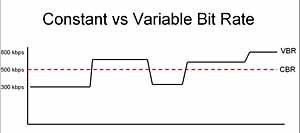
This case is when the bitrate of an mp3 is constant, regardless of the content it contains.
Imagine that we put the highest butrate which is 320 and the file contains only silence.
It will still stay at 320 even if it doesn’t have any data.

We know that this example is extreme, but we want to illustrate the idea that the bitrate will be the same all the time, even when there are notable differences in the amount and complexity of the information.

VBR

Instead we have this other option that will try to regulate or adapt the bitrate precisely depending on the information.
If there is an initial silence, use the lowest bitrate, if there are moments of great complexity, use the highest.

Let’s think and be aware that the bitrate directly affects the size of the mp3.

So with VBR we have intelligent savings, keeping a low bitrate at times when it would be wasteful to use a higher one and increase the bitrate when the information demand requires it.

Mp4aGain is an application that manages all these options very well so that you can obtain the best results. Because we know exactly what we are talking about.


Is the bit rate very important?

We had already explained in a previous article that the bitrate expresses the amount of bits or information that an audio file can carry.

We gave an example, using ONE word to describe an object, then 2 words, then 10 words, etc. and we saw how that amount of information is crucial to be able to give detail that will increase quality.

We will now explain the two most important modes used to determine which bitrate a file will use.

CBR

This case is when the bitrate of an mp3 is constant, regardless of the content it contains.
Imagine that we put the highest butrate which is 320 and the file contains only silence.
It will still stay at 320 even if it doesn’t have any data.

We know that this example is extreme, but we want to illustrate the idea that the bitrate will be the same all the time, even when there are notable differences in the amount and complexity of the information.

VBR

Instead we have this other option that will try to regulate or adapt the bitrate precisely depending on the information.
If there is an initial silence, use the lowest bitrate, if there are moments of great complexity, use the highest.

Let’s think and be aware that the bitrate directly affects the size of the mp3.

So with VBR we have intelligent savings, keeping a low bitrate at times when it would be wasteful to use a higher one and increase the bitrate when the information demand requires it.

Mp4aGain is an application that manages all these options very well so that you can obtain the best results. Because we know exactly what we are talking about.

How much does the bit rate affect the sound quality in an mp3?

How much does the bit rate affect the sound quality in an mp3?

audio bit rate quality

Is the bit rate very important?

audio bit rate quality

The bit rate strictly measures the amount of information per second that an audio file can carry.
What does this mean?

That the greater the number of bits per second, the greater the “detail” and the greater the number of details, the higher the resolution and therefore the quality.

Let us imagine an example that would illustrate the matter very clearly:

You must describe an object, but you can only use ONE word.

You say:

-Car

That doesn’t say much.

Now you can use 2 words:

1.- car 2.- red

We already have more information.

Now you can use 6 words:

1.- car 2.- new 3.- red 4.- convertible 5.- sports car 6.- luxury

Now you have a much more elaborate image, thanks to the fact that you were able to provide more information. If you could now use 20 words or 100, it would be a more precise idea each time that you could convey.

Exactly the same thing happens with music and the bit rate is the amount of information that can be transmitted per second.

An estimate like the following is generally known:

8 Kbps Mono: Telephone Sound.
16 Kbps Mono: Better quality than shortwave.
32 Kbps Mono: Better quality than AM.
64 Kbps Stereo: Better quality than FM.
112 – 128 Kbps: Quality close to CD.
160 Kbps: Quality closer to CD.
192 Kbps: Practically CD quality.
256 Kbps: CD quality virtually indistinguishable from an original CD.
320 Kbps: CD quality.

Mp4Gain can help you make your entire music collection the same bitrate.

In a following article we will give more information about this interesting topic. Very necessary if you want to really have quality in your audio and more if you use Mp4Gain.