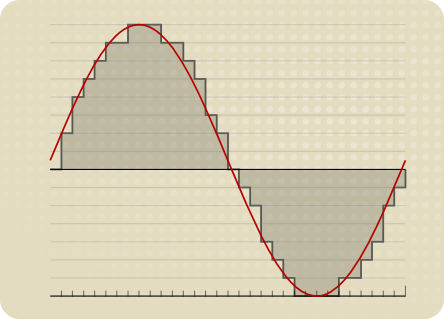
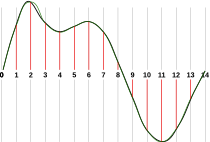
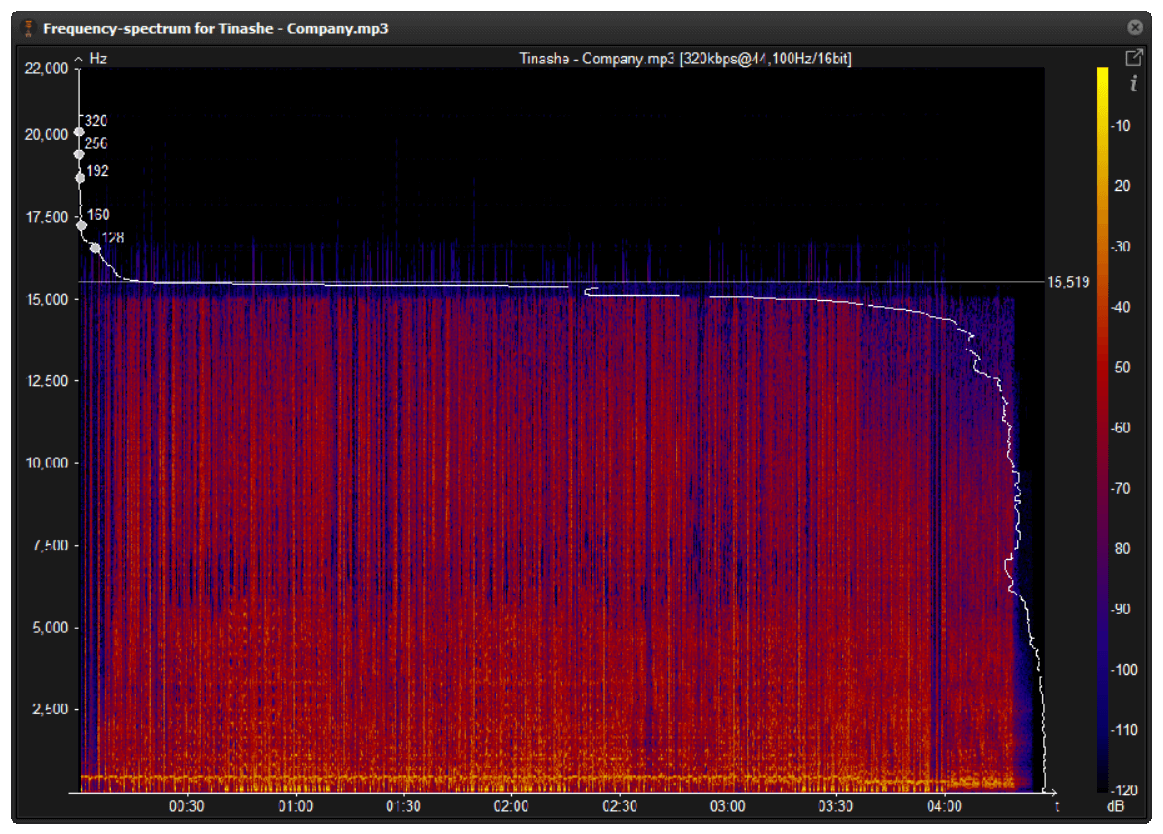
In this article, we will explore the technical aspects of audio bitrates. We will discuss what a bitrate is, how it affects audio quality, and how to choose the right bitrate for your needs.
What is a bitrate?
A bitrate is the number of bits per second that are used to encode an audio file. The higher the bitrate, the more data is used to encode the file, and the higher the quality of the audio will be. However, higher bitrates also result in larger file sizes.
How does bitrate affect audio quality?
Bitrate affects audio quality by determining how much data is used to represent the original sound waves. Higher bitrates allow for more data to be used, which results in more accurate representations of the original sound waves. This results in better audio quality, such as increased clarity and reduced noise.
How to choose the right bitrate
The right bitrate for you will depend on a number of factors, including:
The type of audio you are listening to. For example, music and speech have different requirements.
The quality of your audio equipment. Higher-quality equipment can reproduce higher bitrates without introducing any noticeable distortion.
Your personal preferences. Some people may prefer the sound of higher bitrates, while others may not notice a difference.
General bitrate recommendations
Here are some general bitrate recommendations for different types of audio:
Speech: 32 kbps to 96 kbps
Music: 128 kbps to 320 kbps
High-quality audio: 256 kbps to 512 kbps or higher
It is important to note that these are just general recommendations. The best way to determine the right bitrate for you is to experiment and see what sounds best to your ears.
Final words about audio bitrates
Audio bitrate is an important factor to consider when choosing an audio file format or when setting up an audio streaming service. By understanding how bitrate affects audio quality, you can choose the right bitrate for your needs and get the best possible listening experience.
The Importance of Bitrate in Digital Audio and Video
The Importance of Bitrate in Digital Audio and Video
Have you ever watched a video that was all glitchy and the sound was all messed up? Or listened to a song and it sounded like it was being played on a scratched record? Well, that’s because of something called the bitrate.
The Importance of Bitrate in Digital Audio and Video
What is Bitrate?
Bitrate is the number of bits of information that are processed in a certain amount of time. In digital audio and video, it determines the quality of the sound and video. The higher the bitrate, the better the quality, and the more information is processed.
Why is Bitrate Important?
When you watch a video or listen to a song, the bitrate helps to determine the quality of the sound and video. The higher the bitrate, the more information is processed, and the better the quality. If the bitrate is low, then the quality will be poor and you might miss out on important details.
For example, if you’re watching a video of a concert and the bitrate is low, then you might not be able to hear the singer’s voice clearly or see the instruments being played. This can be really frustrating and ruin the whole experience for you.
How Does Bitrate Affect Digital Audio and Video?
Bitrate affects digital audio and video in several ways. For one, it affects the file size. If the bitrate is high, then the file size will be large, and if the bitrate is low, then the file size will be small.
Another way that bitrate affects digital audio and video is by affecting the quality. If the bitrate is high, then the quality will be good, and if the bitrate is low, then the quality will be poor. This can be especially noticeable when you’re watching a video with a lot of movement, like a sports game or a music video.
Finally, bitrate can also affect how long it takes to download or upload a video or audio file. If the bitrate is high, then it will take longer to download or upload, and if the bitrate is low, then it will take less time.
How to Choose the Right Bitrate for Your Digital Audio and Video
When it comes to choosing the right bitrate for your digital audio and video, there are a few things to keep in mind. First, think about what you’re using the video or audio for. If it’s for personal use, then a lower bitrate might be okay, but if it’s for professional use, then a higher bitrate is probably better.
Another thing to consider is the quality of the video or audio. If you want the best quality possible, then a higher bitrate is the way to go. But if you don’t need the best quality and just want something that’s good enough, then a lower bitrate might be fine.
Finally, think about the file size. If you don’t have a lot of storage space, then a lower bitrate might be a good choice, but if you have plenty of storage space, then a higher bitrate might be the way to go.
The higher the bitrate, the higher the sound quality and the larger the file size.
audio bit rate
but the quality of the source file determines the final quality.
audio bit rate
From highest to lowest, the sound quality will be worse, but from lowest to highest, the sound quality will remain unchanged at most, but the file will be larger.Many
General mp3 are good with bit rate around 128, and also 3-4 BM in size.
The bitrate, choosing it, directly affects the size of your mp3 file and the listening experience. High compression ratio has high distortion, and low compression ratio has low distortion, but how do we find a balance point that we can accept on both counts? This requires careful exploration in the experiment. Considering that the sound quality of low bitrate files is not suitable for playing music, the minimum set is 128kbps, and four fixed bitrate files of 128, 192, 256 and 320 are used for comparison. and try.
The compression ratio of 128 kbps is still relatively rough, and the high-frequency part is highly distorted after compression. It sounds hollow, wrinkled, rough, and there are often flickering sounds. Misunderstanding, the compressed volume of a 3 minute 39 piece of music is 3414 Kb. Although the volume is not large, the sound is not satisfactory, and there are relatively large defects.
192kbps bit rate compression effect is much better than 128. First of all, the sound is solid, at least there is no empty feeling, the high-frequency distortion is also much less, the sound is compact, the noise is small and clean, and achieve relatively ideal listening The sound effect, just because the compression is still relatively strong, the detail performance is still not very good, the texture of musical instruments, especially instruments of wind, it is still very hard, unreal and lacks musicality. The compressed size is 5123kb, and I think the compression ratio is 128~ It is better to use it in a mp3 player with a capacity of ~256m, which can not only satisfy the basic sense of hearing, but also is suitable in size.128m can store about 95 minutes of music, and 256m can double to 190 minutes of music.
The 256 kbps compression rate is naturally a step higher than 192 in terms of sound quality. Take the first 10 seconds of the track, the low frequency of the cello is obviously less grainy, and the sound is more smooth and natural, with texture and texture. It is also clearer, with much more detail, the rendering of the atmosphere is more prominent, the rotation of parts in the following songs is also more expressive, the clarity of large and small signals is also improved, and the sound is more detailed and lasting. But at the same time, the file size has also increased to 6831kb, which is still affordable for a 256m mp3 player. It is not difficult to know by calculation. According to the bit rate of 256, about 135 minutes of music can be stored. Generally speaking, it is enough, 128m is a bit less and can only support a little over an hour, so it is recommended to use 192 bitrate for 128m.
320 kbps is the maximum bitrate that lame can provide. The final file generated is 8592kb which is about 8.4M. Compared to the 37M of the wav file the compression ratio is basically 4.5:1 but the generated mp3 file sounds very distorted Now on Compared with other 320 bit rate, the natural advantage is obvious, the tone, details, etc. are very delicate, basically achieve the sound quality of the original CD copy, especially in the CD player with playback function from mp3, the basic No difference, but I use relatively high-end earplugs with high resolution, plus my experience and skill with music and equipment, I can still hear a lot of differences compared to wav files, first Instead, the compressed mp3 sounds a bit The crunch feeling is relatively dry on the whole. Without the wav file, it sounds fresh and dynamic. In terms of final details, nuances and sense of space, the separation is not as high as the quality of the wav file, but it is quite close in terms of timbre, but the performance is poor and the digital flavor is relatively strong. So if you are using a miniature hard drive player like an iPod, I recommend you use 320kbps compression ratio, which can get the best listening experience. Of course listening to wav directly is the best~
The code rate is the number of data bits transmitted per unit of time during data transmission. Generally, the unit we use is kbps, that is, kilobits per second.
The popular understanding is the sampling rate. The higher the sampling rate per unit time, the higher the precision, and the processed file is closer to the original file, but the file size is proportional to the sampling rate, so almost all encoding formats pay attention. It’s about how to use the lowest code rate to achieve the least distortion. The cbr (fixed code rate) and vbr (variable code rate) derived from this core are all articles in this regard, but things are not absolute, in terms of audio, the higher the bit rate, the lower the compressed ratio, the smaller the sound quality loss and the closer it is to the sound quality of the audio source.
The information in the computer is represented by binary 0 and 1, and each 0 or 1 is called a bit, which is represented by lowercase b, that is, bit (bit); uppercase B represents byte, ie byte, one byte = Eight bits, ie 1B=8b; the capital K in front stands for thousand, that is, thousand bits (Kb) or kilobytes (KB). Indicates the size of the file, usually using bytes (KB) to indicate the size of the file.
Kbps: The first thing to understand is that ps refers to /s, which is every second. Kbps refers to the speed of the network, that is, how many thousands of bits of information are transmitted per second (K means thousands of bits, Kb means how many thousands of bits), it is expressed in kb (kilobit), and in the case KBps means how many kilobytes are transferred per second. 1KBps = 8Kbps. The Internet speed of ADSL is 512 Kbps. If converted to bytes, it is 512/8 = 64 KBps (that is, 64 kilobytes per second).
A frame is a still image, and continuous frames form an animation, like a television image.
We normally say the number of frames. Simply put, it is the number of image frames transmitted in 1 second. It can also be understood that the graphics processor can update several times per second, usually expressed in fps (Frames Per Second). Each frame is a still image, and showing frames in rapid succession creates the illusion of movement. Higher frame rates result in smoother, more realistic animations. The more frames per second (fps), the smoother the motion is displayed.
What is the bitrate of the music?
It can also be called bit rate, which is nothing more than the amount of data reproduced per second by a type of music, the unit is expressed in bits, that is, binary bits. bps is the bit rate. b is bit, s is second, p is per, and one byte is equal to 8 binary bits. That is, the file size of a 4-minute song at 128bps is calculated as (128/8)*4*60=3840kB=3.8MB, which means that the same song with the same bit rate (bps) will not no matter what format (such as mp3 wma) The capacity is basically the same, which can only represent a transmission rate, not the sound quality. Due to different compression engines, the sound quality of different formats varies a lot. However, for the same format, the higher the bitrate, the larger the file and the better the sound quality.
What is the sample rate of the music?
Sampling rate refers to the number of samples per unit of time. The sampling rate is 44KHz, which means the number of samples per second is 44K, which means that 44,000 pieces of data are used to describe the sound waveform in 1 second. That is, the higher the sample rate, the better the sound quality. But he and bitrate are two completely different concepts.
What do bitrate and sample rate mean in audio files?
Audio Bitrate
What is the proper video bitrate?
Audio Bitrate
What do bitrate and sample rate mean in audio files?
The meaning of bit rate and sample rate in audio files is as follows:
1. Bit rate:
Bit rate refers to the number of bits (bits) transmitted per second. The unit is bps (bits per second) The higher the bit rate, the more data is transmitted per second. Bitrate in sound refers to the amount of binary data per unit of time after converting an analog sound signal to a digital sound signal, which is an indirect measure of audio quality.
2. Sampling rate:
Audio sample rate refers to the number of times the recording device samples the sound signal in one second. The higher the sample rate, the more realistic and natural the sound will be. On today’s major capture cards, the sample rate is generally divided into five levels: 11025 Hz, 22050 Hz, 24000 Hz, 44100 Hz and 48000 Hz.
What is the proper video bitrate?
After knowing what the video bitrate is, let’s take a look at the proper video bitrate. As mentioned above, many video bitrates are between 2M-4M, which is divided by the video resolution, of which 720p video The bitrate of 1080P video is generally 2M, and the bitrate of 1080P video is 4M. If the video bitrate exceeds 4M, then the video quality is what we often call 2K or even 4K, and the video production cost is relatively high .
Finally, let’s introduce the optimal bitrate of each resolution video, so you can adjust it according to the needs of the video:
1.360p or 480p video: The bit rate of this type of video is preferably greater than or equal to 0.8M.
2720p video: The bitrate of this type of video should be greater than or equal to 1.5M, of which 2M bitrate is the best.
3. 1080p video: ≥2.5M, the optimal bit rate is 4M-8M.
4.4k video: 4k is currently the highest quality type of video and its bit rate is typically 12M.
Lossless audio formats compete in quality with a CD?
Mp3 vs CD
Can the sound quality of lossless music really be the same as a CD?
Lossy vs Lossless
With the increase in storage space of mobile phones and computers, and the improvement of hardware sound quality indicators, more and more people have begun to pay attention to lossless music. The mobile phone has already started with 64G capacity. At the same time, it also uses high-quality audio chips such as ESS, and even has built-in op amp chips. This configuration that can compete with HiFi Walkman on paper was unimaginable. in recent years. of. At the same time, more and more consumers are beginning to pay attention to high-quality headphones. In this context, listening to lossy audio formats like MP3 is a bit like killing a chicken with a knife. Playing lossless music on a mobile phone has gradually become an ordinary thing.
Now that mobile phones are equipped with powerful DAC chips, more and more people pay attention to lossless music.
However, there are actually some arguments about lossless music, and these arguments are a bit “metaphysical”. For example, many people argue whether the sound quality of lossless music is really “lossless”, and the “iron proof” is that after restoring lossless music to Wav format, the Hash file finds out that there is a difference. What exactly is happening? Is it really mysticism? Let’s talk lossless music today.
Can the sound quality of lossless music really be the same as a CD?
After the music is digitized, it is often packaged on a CD in PCM format. PCM audio on CDs is generally 16-bit, 44 kHz, and is usually stored in Wav format. The audio on normal CDs is PCM, but PCM is not limited to the specifications of normal CDs. PCM audio can also achieve high-definition audio specifications such as 24-bit and 384kHz. This high-spec audio is relatively common in the audio track of Blu-ray movies. Few people use high-definition audio for music products, but in recent years, Hi-Res Audio also uses the HD Audio specification.
Can an mp3 sound with the same quality as a CD? Yes
MP3 vs. CD
The Great Experiment of the bitrate in the MP3.
MP3 vs. CD
A programmer decided to check if there was really much quality between different bitrates and the quality of a professional CD.
He put on one side the CD, also a FLAC (without quality loss) and on the other different mp3 with different options of CBR, VBR and 128,160,192,320 kbps.
The encoding of a music file is a balance between quality and size.
Normally using good mp3 encoding it is possible to store 5 to 10 times more music than saving WAV formats from a CD.
In order to measure, he put thousands of people to listen to music files, they are telling them if they were listening to a CD, a FLAC, an mp3 with different boirates, The results:
The absolute winner was the mp3 at 160 kbps VBR.
It was the one that received the best ratings, even above the CD. This is possible to understand because programs like Mp4Gain significantly improve the volume, the quality, they do bass boost, etc.
An Mp3 at 192 kbps is indistinguishable from a CD according to the results of this study.
This comes to destroy many preconceptions of people who, based on things they have read, but are exaggerated, make believe that the mp3 is dead or at least obsolete and this is not the case at all.
As we mentioned, an mp3 with the appropriate settings sounds the same or even better than a CD.
How much does the bit rate affect the sound quality in an mp3? Part 2
CBR and VBR
Is the bit rate very important?
CBR and VBR
We had already explained in a previous article that the bitrate expresses the amount of bits or information that an audio file can carry.
We gave an example, using ONE word to describe an object, then 2 words, then 10 words, etc. and we saw how that amount of information is crucial to be able to give detail that will increase quality.
We will now explain the two most important modes used to determine which bitrate a file will use.
CBR
This case is when the bitrate of an mp3 is constant, regardless of the content it contains.
Imagine that we put the highest butrate which is 320 and the file contains only silence.
It will still stay at 320 even if it doesn’t have any data.
We know that this example is extreme, but we want to illustrate the idea that the bitrate will be the same all the time, even when there are notable differences in the amount and complexity of the information.
VBR
Instead we have this other option that will try to regulate or adapt the bitrate precisely depending on the information.
If there is an initial silence, use the lowest bitrate, if there are moments of great complexity, use the highest.
Let’s think and be aware that the bitrate directly affects the size of the mp3.
So with VBR we have intelligent savings, keeping a low bitrate at times when it would be wasteful to use a higher one and increase the bitrate when the information demand requires it.
Mp4aGain is an application that manages all these options very well so that you can obtain the best results. Because we know exactly what we are talking about.
Is the bit rate very important?
We had already explained in a previous article that the bitrate expresses the amount of bits or information that an audio file can carry.
We gave an example, using ONE word to describe an object, then 2 words, then 10 words, etc. and we saw how that amount of information is crucial to be able to give detail that will increase quality.
We will now explain the two most important modes used to determine which bitrate a file will use.
CBR
This case is when the bitrate of an mp3 is constant, regardless of the content it contains.
Imagine that we put the highest butrate which is 320 and the file contains only silence.
It will still stay at 320 even if it doesn’t have any data.
We know that this example is extreme, but we want to illustrate the idea that the bitrate will be the same all the time, even when there are notable differences in the amount and complexity of the information.
VBR
Instead we have this other option that will try to regulate or adapt the bitrate precisely depending on the information.
If there is an initial silence, use the lowest bitrate, if there are moments of great complexity, use the highest.
Let’s think and be aware that the bitrate directly affects the size of the mp3.
So with VBR we have intelligent savings, keeping a low bitrate at times when it would be wasteful to use a higher one and increase the bitrate when the information demand requires it.
Mp4aGain is an application that manages all these options very well so that you can obtain the best results. Because we know exactly what we are talking about.
How much does the bit rate affect the sound quality in an mp3?
audio bit rate quality
Is the bit rate very important?
audio bit rate quality
The bit rate strictly measures the amount of information per second that an audio file can carry.
What does this mean?
That the greater the number of bits per second, the greater the “detail” and the greater the number of details, the higher the resolution and therefore the quality.
Let us imagine an example that would illustrate the matter very clearly:
You must describe an object, but you can only use ONE word.
You say:
-Car
That doesn’t say much.
Now you can use 2 words:
1.- car 2.- red
We already have more information.
Now you can use 6 words:
1.- car 2.- new 3.- red 4.- convertible 5.- sports car 6.- luxury
Now you have a much more elaborate image, thanks to the fact that you were able to provide more information. If you could now use 20 words or 100, it would be a more precise idea each time that you could convey.
Exactly the same thing happens with music and the bit rate is the amount of information that can be transmitted per second.
An estimate like the following is generally known:
8 Kbps Mono: Telephone Sound.
16 Kbps Mono: Better quality than shortwave.
32 Kbps Mono: Better quality than AM.
64 Kbps Stereo: Better quality than FM.
112 – 128 Kbps: Quality close to CD.
160 Kbps: Quality closer to CD.
192 Kbps: Practically CD quality.
256 Kbps: CD quality virtually indistinguishable from an original CD.
320 Kbps: CD quality.
Mp4Gain can help you make your entire music collection the same bitrate.
In a following article we will give more information about this interesting topic. Very necessary if you want to really have quality in your audio and more if you use Mp4Gain.
As we have already been explaining, this entire topic is based on and one can only speak of “quality” if one refers specifically to the human ear.
We humans do not consider better quality the ability to record frequencies that we cannot even hear, neither because they are very high frequencies nor very low frequencies.
Nor do we consider a recording of poor quality that has not been able to record these frequencies.
Some animals would possibly have a different opinion.
So, having this point clear, we have to consider high fidelity to a recording that could faithfully record those frequencies that we humans can hear. The rest does not interest us.
So, all this first issue of encoding or compressing is based on that, on ensuring that the frequencies that the human ear can perceive remain with the greatest fidelity.
And we benefit from knowing that there are other inaudible frequencies, but they take up disk space and we can remove them without experiencing a drop in quality.
Mp4Gain is a program that handles these areas very well and manages to make it sound as good as possible and nobody will notice the difference between one format and another, because they all sound of the best possible quality.