In this article, we will explore the technical aspects of audio bitrates. We will discuss what a bitrate is, how it affects audio quality, and how to choose the right bitrate for your needs.
What is a bitrate?
A bitrate is the number of bits per second that are used to encode an audio file. The higher the bitrate, the more data is used to encode the file, and the higher the quality of the audio will be. However, higher bitrates also result in larger file sizes.
How does bitrate affect audio quality?
Bitrate affects audio quality by determining how much data is used to represent the original sound waves. Higher bitrates allow for more data to be used, which results in more accurate representations of the original sound waves. This results in better audio quality, such as increased clarity and reduced noise.
How to choose the right bitrate
The right bitrate for you will depend on a number of factors, including:
The type of audio you are listening to. For example, music and speech have different requirements.
The quality of your audio equipment. Higher-quality equipment can reproduce higher bitrates without introducing any noticeable distortion.
Your personal preferences. Some people may prefer the sound of higher bitrates, while others may not notice a difference.
General bitrate recommendations
Here are some general bitrate recommendations for different types of audio:
Speech: 32 kbps to 96 kbps
Music: 128 kbps to 320 kbps
High-quality audio: 256 kbps to 512 kbps or higher
It is important to note that these are just general recommendations. The best way to determine the right bitrate for you is to experiment and see what sounds best to your ears.
Final words about audio bitrates
Audio bitrate is an important factor to consider when choosing an audio file format or when setting up an audio streaming service. By understanding how bitrate affects audio quality, you can choose the right bitrate for your needs and get the best possible listening experience.
What is the relationship between audio and video bit depth?
audio and video bit depthaudio and video bit depth
Audio Bit Depth and Video Bit Depth
Audio and video quality are two essential components of any multimedia content. Bit depth is one of the key factors that determine the quality of audio and video content. The bit depth of audio refers to the number of bits used to represent the amplitude of a sound wave. In contrast, video bit depth refers to the number of bits used to represent the color and brightness of each pixel in an image or video frame.
The higher the bit depth, the more accurately the audio or video content can be represented. A higher bit depth allows for a greater dynamic range and more subtle variations in sound or image. In general, a higher bit depth is desirable for both audio and video content.
As a personal experience, I have worked with audio and video editing for several years, and I have noticed a significant improvement in quality when using a higher bit depth. I often use a bit depth of 24 bits for audio and 10 bits for video when working on high-quality content.
Audio and Video Synchronization
The synchronization between audio and video is crucial for creating a seamless multimedia experience. When the audio and video are out of sync, it can be distracting and diminish the overall quality of the content.
The bit depth of both audio and video can affect the synchronization. For example, if the audio has a higher bit depth than the video, the audio may appear to be out of sync with the video. This can occur because the audio takes longer to process due to the higher bit depth. To avoid this issue, it is essential to ensure that both the audio and video have the same bit depth.
As a personal tip, I recommend using software that allows for precise synchronization adjustments. I have found that the use of keyframes and markers can significantly improve the accuracy of synchronization between audio and video.
Audio and Video Codecs and File Formats
Audio and video codecs and file formats can also affect the bit depth and overall quality of multimedia content. A codec is a software program that compresses and decompresses audio or video data, while a file format determines how the compressed data is stored.
Lossy codecs, such as MP3 and H.264, compress audio and video data by discarding information deemed unnecessary. This can result in a lower bit depth and lower overall quality. In contrast, lossless codecs, such as FLAC and ProRes, maintain the original quality by compressing the data without discarding any information.
As a personal preference, I usually work with lossless codecs and file formats when editing audio and video content. However, it is essential to consider the intended use and distribution of the content when choosing codecs and file formats. For example, lossy codecs are often used for streaming and web distribution due to their smaller file sizes.
Final Words
In conclusion, bit depth is a critical factor in determining the quality of audio and video content. A higher bit depth allows for greater accuracy and dynamic range. Ensuring that the audio and video have the same bit depth is crucial for synchronization. Codecs and file formats can also affect the bit depth and overall quality of multimedia content. Choosing the right codecs and file formats depends on the intended use and distribution of the content.
Remember that mp4gain is a great solution to normalize and convert audio and video files to ensure they have the same bit depth and quality.
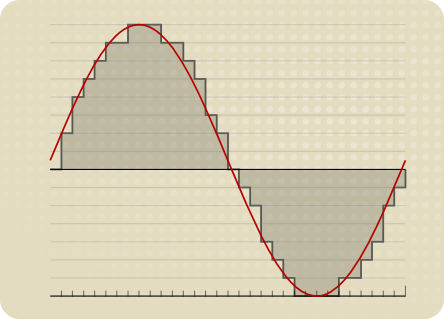
Digital Audio Encoding is the process of converting an analog audio signal into a digital format, which can be stored, processed, and transmitted electronically. It involves the use of an Analog-to-Digital Converter (ADC) to sample and quantize the analog audio waveform into a series of binary numbers that can be interpreted by a digital device. The resulting digital audio data can then be compressed, processed, and transmitted over various digital platforms, such as the internet, CDs, DVDs, and other digital storage devices.
The Importance of Digital Audio Encoding
Digital Audio Encoding has revolutionized the way we consume and produce audio content. It has made it possible to store, edit, and transmit high-quality audio content with minimal loss of quality. Some of the benefits of digital audio encoding include:
Improved sound quality: Digital audio encoding allows for high-quality audio content that is free from the distortions and noise associated with analog audio.
Easy storage and transfer: Digital audio files can be easily stored and transferred over various digital platforms with minimal loss of quality.
Efficient compression: Digital audio files can be compressed into smaller file sizes without significant loss of quality, making it easier to store and transfer large audio files.
Greater accessibility: Digital audio content can be easily accessed over various digital platforms, including the internet, mobile devices, and other digital devices.
The Digital Audio Encoding Process
The Digital Audio Encoding process involves several steps, which include:
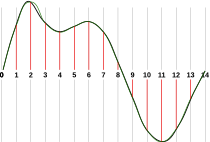
Sampling: The analog audio waveform is sampled at regular intervals using an Analog-to-Digital Converter (ADC).
Quantization: The sampled waveform is quantized, i.e., each sample is assigned a binary number that represents its amplitude value.
Encoding: The quantized samples are encoded into a digital format, such as WAV, MP3, or AAC.
Compression: The encoded digital audio file can be compressed using lossy or lossless compression algorithms to reduce its file size.
Lossy vs. Lossless Audio Compression
Lossy and lossless audio compression are two types of compression algorithms used in digital audio encoding. Lossy compression algorithms compress audio files by removing data that is deemed unnecessary or redundant. This results in a smaller file size but may result in a loss of audio quality. Lossless compression algorithms, on the other hand, compress audio files without any loss of quality. This results in a larger file size but maintains the original audio quality.
Bitrate and its Importance in Digital Audio Encoding
Bitrate is a measure of the amount of data used to represent each second of digital audio. It is measured in bits per second (bps) or kilobits per second (kbps). The bitrate of a digital audio file has a significant impact on its quality and file size. Higher bitrates result in higher quality audio files but also larger file sizes. Lower bitrates result in smaller file sizes but may result in a loss of audio quality.
Common Digital Audio Formats
There are several digital audio formats used in digital audio encoding, including:
WAV: WAV is a lossless audio format that is commonly used for storing high-quality audio content.
MP3: MP3 is a lossy audio format that is commonly used for compressing and storing digital audio files for playback on various digital devices.
AAC: AAC is a lossy audio format that is commonly used for compressing and streaming digital audio content over the internet.
FLAC: FLAC is a lossless audio format that is commonly used for storing high-quality audio content, similar to WAV.
Challenges in Digital Audio Encoding
Despite the many benefits of digital audio encoding, there are several challenges that must be addressed to ensure optimal audio quality. These challenges include:
Sampling rate limitations: The sampling rate of an ADC can affect the accuracy of the digital audio representation. Higher sampling rates generally result in higher accuracy, but also require larger file sizes.
Bit depth limitations: The bit depth of an ADC can affect the dynamic range and noise floor of the digital audio representation. Higher bit depths generally result in higher accuracy, but also require larger file sizes.
Compression artifacts: Lossy compression algorithms can introduce compression artifacts, such as distortion and noise, which can degrade audio quality.
Future Developments in Digital Audio Encoding
Digital Audio Encoding is an ever-evolving field, with ongoing developments aimed at improving audio quality, reducing file sizes, and enhancing accessibility. Some of the latest developments include:
High-resolution audio: High-resolution audio formats, such as MQA and DSD, offer even higher audio quality than standard digital audio formats.
Immersive audio: Immersive audio formats, such as Dolby Atmos and DTS:X, offer a more immersive listening experience by incorporating height and surround sound elements.
Object-based audio: Object-based audio formats, such as MPEG-H 3D Audio, offer greater flexibility in audio content creation and delivery by enabling individual audio objects to be separately mixed and streamed.
FAQs
1. What is digital audio encoding?
Digital audio encoding is the process of converting an analog audio signal into a digital format, which can be stored, processed, and transmitted electronically.
2. Why is digital audio encoding important?
Digital audio encoding has revolutionized the way we consume and produce audio content by providing improved sound quality, easy storage and transfer, efficient compression, and greater accessibility.
3. What are some common digital audio formats?
Some common digital audio formats include WAV, MP3, AAC, and FLAC.
4. What is the difference between lossy and lossless audio compression?
Lossy compression algorithms compress audio files by removing data that is deemed unnecessary or redundant, resulting in a smaller file size but may result in a loss of audio quality. Lossless compression algorithms compress audio files without any loss of quality, resulting in a larger file size but maintaining the original audio quality.
5. What is bitrate and why is it important in digital audio encoding?
Bitrate is a measure of the amount of data used to represent each second of digital audio. It is important in digital audio encoding because it has a significant impact on audio quality and file size.
6. What are some challenges in digital audio encoding?
Some challenges in digital audio encoding include sampling rate limitations, bit depth limitations, and compression artifacts.
7. What are some future developments in digital audio encoding?
Some future developments in digital audio encoding include high-resolution audio, immersive audio, and object-based audio.
8. What is the difference between a lossy and lossless audio format?
Lossy audio formats use compression algorithms to reduce file size, sacrificing some audio quality in the process. Lossless audio formats, on the other hand, use compression algorithms that do not compromise audio quality, resulting in larger file sizes.
9. What is a sampling rate and how does it affect audio quality?
A sampling rate is the number of times per second that an analog audio signal is measured and converted into a digital signal. The higher the sampling rate, the more accurately the digital signal represents the original analog signal, resulting in higher audio quality. However, higher sampling rates also require larger file sizes and more processing power.
10. What is bit depth and how does it affect audio quality?
Bit depth refers to the number of bits used to represent each audio sample in a digital audio file. A higher bit depth allows for a greater dynamic range and lower noise floor, resulting in higher audio quality. However, higher bit depths also require larger file sizes and more processing power.
11. What is lossless compression?
Lossless compression is a compression algorithm that reduces the size of a digital audio file without sacrificing any audio quality. This is achieved by identifying and removing redundant or unnecessary data in the audio file.
12. What is immersive audio and how does it enhance the listening experience?
Immersive audio is an audio format that uses spatial sound technology to create a more immersive listening experience. This is achieved by incorporating height and surround sound elements, which create a more three-dimensional soundstage. This allows for a more realistic and engaging listening experience, especially when combined with a surround sound system.
Conclusion
Digital audio encoding has revolutionized the way we produce and consume audio content, providing improved sound quality, easy storage and transfer, efficient compression, and greater accessibility. While there are some challenges to overcome, ongoing developments in high-resolution, immersive, and object-based audio formats promise to further enhance the digital audio experience.
References
Bosi, M., & Goldberg, R. (2012). Introduction to digital audio coding and standards. Springer Science & Business Media.
Thompson, J. (2013). Understanding digital audio. Focal Press.
The Importance of Bitrate in Digital Audio and Video
The Importance of Bitrate in Digital Audio and Video
Have you ever watched a video that was all glitchy and the sound was all messed up? Or listened to a song and it sounded like it was being played on a scratched record? Well, that’s because of something called the bitrate.
The Importance of Bitrate in Digital Audio and Video
What is Bitrate?
Bitrate is the number of bits of information that are processed in a certain amount of time. In digital audio and video, it determines the quality of the sound and video. The higher the bitrate, the better the quality, and the more information is processed.
Why is Bitrate Important?
When you watch a video or listen to a song, the bitrate helps to determine the quality of the sound and video. The higher the bitrate, the more information is processed, and the better the quality. If the bitrate is low, then the quality will be poor and you might miss out on important details.
For example, if you’re watching a video of a concert and the bitrate is low, then you might not be able to hear the singer’s voice clearly or see the instruments being played. This can be really frustrating and ruin the whole experience for you.
How Does Bitrate Affect Digital Audio and Video?
Bitrate affects digital audio and video in several ways. For one, it affects the file size. If the bitrate is high, then the file size will be large, and if the bitrate is low, then the file size will be small.
Another way that bitrate affects digital audio and video is by affecting the quality. If the bitrate is high, then the quality will be good, and if the bitrate is low, then the quality will be poor. This can be especially noticeable when you’re watching a video with a lot of movement, like a sports game or a music video.
Finally, bitrate can also affect how long it takes to download or upload a video or audio file. If the bitrate is high, then it will take longer to download or upload, and if the bitrate is low, then it will take less time.
How to Choose the Right Bitrate for Your Digital Audio and Video
When it comes to choosing the right bitrate for your digital audio and video, there are a few things to keep in mind. First, think about what you’re using the video or audio for. If it’s for personal use, then a lower bitrate might be okay, but if it’s for professional use, then a higher bitrate is probably better.
Another thing to consider is the quality of the video or audio. If you want the best quality possible, then a higher bitrate is the way to go. But if you don’t need the best quality and just want something that’s good enough, then a lower bitrate might be fine.
Finally, think about the file size. If you don’t have a lot of storage space, then a lower bitrate might be a good choice, but if you have plenty of storage space, then a higher bitrate might be the way to go.