Exploring Audio Bitrates: Technical Deep Dive


Free Download Mp4Gain
picture

Exploring Audio Bitrates: Technical Deep Dive
Audio Bitrates
Audio Bitrates
Audio Bitrates
Audio Bitrates

In this article, we will explore the technical aspects of audio bitrates. We will discuss what a bitrate is, how it affects audio quality, and how to choose the right bitrate for your needs.

What is a bitrate?

A bitrate is the number of bits per second that are used to encode an audio file. The higher the bitrate, the more data is used to encode the file, and the higher the quality of the audio will be. However, higher bitrates also result in larger file sizes.

How does bitrate affect audio quality?

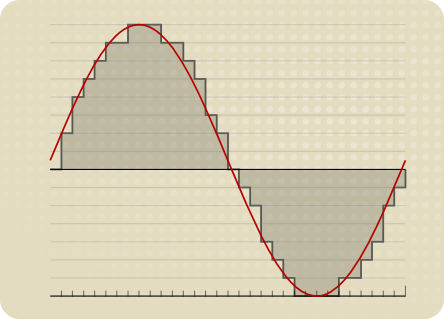
Bitrate affects audio quality by determining how much data is used to represent the original sound waves. Higher bitrates allow for more data to be used, which results in more accurate representations of the original sound waves. This results in better audio quality, such as increased clarity and reduced noise.

How to choose the right bitrate

The right bitrate for you will depend on a number of factors, including:

  • The type of audio you are listening to. For example, music and speech have different requirements.
  • The quality of your audio equipment. Higher-quality equipment can reproduce higher bitrates without introducing any noticeable distortion.
  • Your personal preferences. Some people may prefer the sound of higher bitrates, while others may not notice a difference.

General bitrate recommendations

Here are some general bitrate recommendations for different types of audio:

  • Speech: 32 kbps to 96 kbps
  • Music: 128 kbps to 320 kbps
  • High-quality audio: 256 kbps to 512 kbps or higher

It is important to note that these are just general recommendations. The best way to determine the right bitrate for you is to experiment and see what sounds best to your ears.

Final words about audio bitrates

Audio bitrate is an important factor to consider when choosing an audio file format or when setting up an audio streaming service. By understanding how bitrate affects audio quality, you can choose the right bitrate for your needs and get the best possible listening experience.


Mp4Gain

Mp4Gain


Free Download Mp4Gain
picture


Mp4Gain Main Window
picture


Mp4Gain Features
picture


Free Download Mp4Gain
picture

What is the relationship between audio and video bit depth?

What is the relationship between audio and video bit depth?

audio and video bit depth

Audio Bit Depth and Video Bit Depth

Audio and video quality are two essential components of any multimedia content. Bit depth is one of the key factors that determine the quality of audio and video content. The bit depth of audio refers to the number of bits used to represent the amplitude of a sound wave. In contrast, video bit depth refers to the number of bits used to represent the color and brightness of each pixel in an image or video frame.

The higher the bit depth, the more accurately the audio or video content can be represented. A higher bit depth allows for a greater dynamic range and more subtle variations in sound or image. In general, a higher bit depth is desirable for both audio and video content.

As a personal experience, I have worked with audio and video editing for several years, and I have noticed a significant improvement in quality when using a higher bit depth. I often use a bit depth of 24 bits for audio and 10 bits for video when working on high-quality content.

Audio and Video Synchronization

The synchronization between audio and video is crucial for creating a seamless multimedia experience. When the audio and video are out of sync, it can be distracting and diminish the overall quality of the content.

The bit depth of both audio and video can affect the synchronization. For example, if the audio has a higher bit depth than the video, the audio may appear to be out of sync with the video. This can occur because the audio takes longer to process due to the higher bit depth. To avoid this issue, it is essential to ensure that both the audio and video have the same bit depth.

As a personal tip, I recommend using software that allows for precise synchronization adjustments. I have found that the use of keyframes and markers can significantly improve the accuracy of synchronization between audio and video.

Audio and Video Codecs and File Formats

Audio and video codecs and file formats can also affect the bit depth and overall quality of multimedia content. A codec is a software program that compresses and decompresses audio or video data, while a file format determines how the compressed data is stored.

Lossy codecs, such as MP3 and H.264, compress audio and video data by discarding information deemed unnecessary. This can result in a lower bit depth and lower overall quality. In contrast, lossless codecs, such as FLAC and ProRes, maintain the original quality by compressing the data without discarding any information.

As a personal preference, I usually work with lossless codecs and file formats when editing audio and video content. However, it is essential to consider the intended use and distribution of the content when choosing codecs and file formats. For example, lossy codecs are often used for streaming and web distribution due to their smaller file sizes.

Final Words

In conclusion, bit depth is a critical factor in determining the quality of audio and video content. A higher bit depth allows for greater accuracy and dynamic range. Ensuring that the audio and video have the same bit depth is crucial for synchronization. Codecs and file formats can also affect the bit depth and overall quality of multimedia content. Choosing the right codecs and file formats depends on the intended use and distribution of the content.

Remember that mp4gain is a great solution to normalize and convert audio and video files to ensure they have the same bit depth and quality.