In this article, we will explore the technical aspects of audio bitrates. We will discuss what a bitrate is, how it affects audio quality, and how to choose the right bitrate for your needs.
What is a bitrate?
A bitrate is the number of bits per second that are used to encode an audio file. The higher the bitrate, the more data is used to encode the file, and the higher the quality of the audio will be. However, higher bitrates also result in larger file sizes.
How does bitrate affect audio quality?
Bitrate affects audio quality by determining how much data is used to represent the original sound waves. Higher bitrates allow for more data to be used, which results in more accurate representations of the original sound waves. This results in better audio quality, such as increased clarity and reduced noise.
How to choose the right bitrate
The right bitrate for you will depend on a number of factors, including:
The type of audio you are listening to. For example, music and speech have different requirements.
The quality of your audio equipment. Higher-quality equipment can reproduce higher bitrates without introducing any noticeable distortion.
Your personal preferences. Some people may prefer the sound of higher bitrates, while others may not notice a difference.
General bitrate recommendations
Here are some general bitrate recommendations for different types of audio:
Speech: 32 kbps to 96 kbps
Music: 128 kbps to 320 kbps
High-quality audio: 256 kbps to 512 kbps or higher
It is important to note that these are just general recommendations. The best way to determine the right bitrate for you is to experiment and see what sounds best to your ears.
Final words about audio bitrates
Audio bitrate is an important factor to consider when choosing an audio file format or when setting up an audio streaming service. By understanding how bitrate affects audio quality, you can choose the right bitrate for your needs and get the best possible listening experience.
Digital Audio Encoding is the process of converting an analog audio signal into a digital format, which can be stored, processed, and transmitted electronically. It involves the use of an Analog-to-Digital Converter (ADC) to sample and quantize the analog audio waveform into a series of binary numbers that can be interpreted by a digital device. The resulting digital audio data can then be compressed, processed, and transmitted over various digital platforms, such as the internet, CDs, DVDs, and other digital storage devices.
The Importance of Digital Audio Encoding
Digital Audio Encoding has revolutionized the way we consume and produce audio content. It has made it possible to store, edit, and transmit high-quality audio content with minimal loss of quality. Some of the benefits of digital audio encoding include:
Improved sound quality: Digital audio encoding allows for high-quality audio content that is free from the distortions and noise associated with analog audio.
Easy storage and transfer: Digital audio files can be easily stored and transferred over various digital platforms with minimal loss of quality.
Efficient compression: Digital audio files can be compressed into smaller file sizes without significant loss of quality, making it easier to store and transfer large audio files.
Greater accessibility: Digital audio content can be easily accessed over various digital platforms, including the internet, mobile devices, and other digital devices.
The Digital Audio Encoding Process
The Digital Audio Encoding process involves several steps, which include:
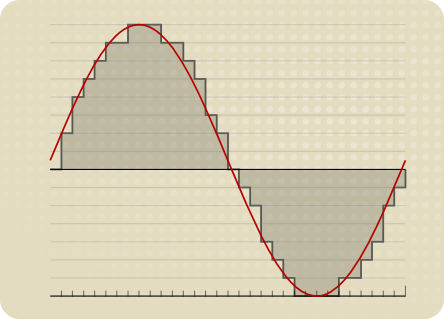
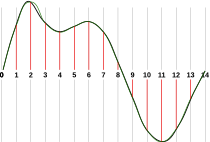
Sampling: The analog audio waveform is sampled at regular intervals using an Analog-to-Digital Converter (ADC).
Quantization: The sampled waveform is quantized, i.e., each sample is assigned a binary number that represents its amplitude value.
Encoding: The quantized samples are encoded into a digital format, such as WAV, MP3, or AAC.
Compression: The encoded digital audio file can be compressed using lossy or lossless compression algorithms to reduce its file size.
Lossy vs. Lossless Audio Compression
Lossy and lossless audio compression are two types of compression algorithms used in digital audio encoding. Lossy compression algorithms compress audio files by removing data that is deemed unnecessary or redundant. This results in a smaller file size but may result in a loss of audio quality. Lossless compression algorithms, on the other hand, compress audio files without any loss of quality. This results in a larger file size but maintains the original audio quality.
Bitrate and its Importance in Digital Audio Encoding
Bitrate is a measure of the amount of data used to represent each second of digital audio. It is measured in bits per second (bps) or kilobits per second (kbps). The bitrate of a digital audio file has a significant impact on its quality and file size. Higher bitrates result in higher quality audio files but also larger file sizes. Lower bitrates result in smaller file sizes but may result in a loss of audio quality.
Common Digital Audio Formats
There are several digital audio formats used in digital audio encoding, including:
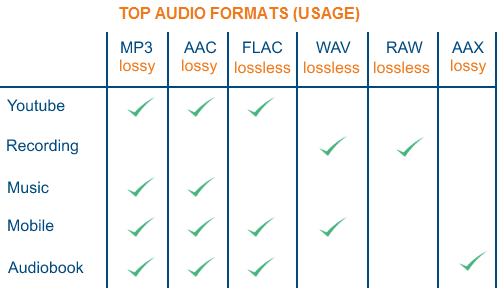
WAV: WAV is a lossless audio format that is commonly used for storing high-quality audio content.
MP3: MP3 is a lossy audio format that is commonly used for compressing and storing digital audio files for playback on various digital devices.
AAC: AAC is a lossy audio format that is commonly used for compressing and streaming digital audio content over the internet.
FLAC: FLAC is a lossless audio format that is commonly used for storing high-quality audio content, similar to WAV.
Challenges in Digital Audio Encoding
Despite the many benefits of digital audio encoding, there are several challenges that must be addressed to ensure optimal audio quality. These challenges include:
Sampling rate limitations: The sampling rate of an ADC can affect the accuracy of the digital audio representation. Higher sampling rates generally result in higher accuracy, but also require larger file sizes.
Bit depth limitations: The bit depth of an ADC can affect the dynamic range and noise floor of the digital audio representation. Higher bit depths generally result in higher accuracy, but also require larger file sizes.
Compression artifacts: Lossy compression algorithms can introduce compression artifacts, such as distortion and noise, which can degrade audio quality.
Future Developments in Digital Audio Encoding
Digital Audio Encoding is an ever-evolving field, with ongoing developments aimed at improving audio quality, reducing file sizes, and enhancing accessibility. Some of the latest developments include:
High-resolution audio: High-resolution audio formats, such as MQA and DSD, offer even higher audio quality than standard digital audio formats.
Immersive audio: Immersive audio formats, such as Dolby Atmos and DTS:X, offer a more immersive listening experience by incorporating height and surround sound elements.
Object-based audio: Object-based audio formats, such as MPEG-H 3D Audio, offer greater flexibility in audio content creation and delivery by enabling individual audio objects to be separately mixed and streamed.
FAQs
1. What is digital audio encoding?
Digital audio encoding is the process of converting an analog audio signal into a digital format, which can be stored, processed, and transmitted electronically.
2. Why is digital audio encoding important?
Digital audio encoding has revolutionized the way we consume and produce audio content by providing improved sound quality, easy storage and transfer, efficient compression, and greater accessibility.
3. What are some common digital audio formats?
Some common digital audio formats include WAV, MP3, AAC, and FLAC.
4. What is the difference between lossy and lossless audio compression?
Lossy compression algorithms compress audio files by removing data that is deemed unnecessary or redundant, resulting in a smaller file size but may result in a loss of audio quality. Lossless compression algorithms compress audio files without any loss of quality, resulting in a larger file size but maintaining the original audio quality.
5. What is bitrate and why is it important in digital audio encoding?
Bitrate is a measure of the amount of data used to represent each second of digital audio. It is important in digital audio encoding because it has a significant impact on audio quality and file size.
6. What are some challenges in digital audio encoding?
Some challenges in digital audio encoding include sampling rate limitations, bit depth limitations, and compression artifacts.
7. What are some future developments in digital audio encoding?
Some future developments in digital audio encoding include high-resolution audio, immersive audio, and object-based audio.
8. What is the difference between a lossy and lossless audio format?
Lossy audio formats use compression algorithms to reduce file size, sacrificing some audio quality in the process. Lossless audio formats, on the other hand, use compression algorithms that do not compromise audio quality, resulting in larger file sizes.
9. What is a sampling rate and how does it affect audio quality?
A sampling rate is the number of times per second that an analog audio signal is measured and converted into a digital signal. The higher the sampling rate, the more accurately the digital signal represents the original analog signal, resulting in higher audio quality. However, higher sampling rates also require larger file sizes and more processing power.
10. What is bit depth and how does it affect audio quality?
Bit depth refers to the number of bits used to represent each audio sample in a digital audio file. A higher bit depth allows for a greater dynamic range and lower noise floor, resulting in higher audio quality. However, higher bit depths also require larger file sizes and more processing power.
11. What is lossless compression?
Lossless compression is a compression algorithm that reduces the size of a digital audio file without sacrificing any audio quality. This is achieved by identifying and removing redundant or unnecessary data in the audio file.
12. What is immersive audio and how does it enhance the listening experience?
Immersive audio is an audio format that uses spatial sound technology to create a more immersive listening experience. This is achieved by incorporating height and surround sound elements, which create a more three-dimensional soundstage. This allows for a more realistic and engaging listening experience, especially when combined with a surround sound system.
Conclusion
Digital audio encoding has revolutionized the way we produce and consume audio content, providing improved sound quality, easy storage and transfer, efficient compression, and greater accessibility. While there are some challenges to overcome, ongoing developments in high-resolution, immersive, and object-based audio formats promise to further enhance the digital audio experience.
References
Bosi, M., & Goldberg, R. (2012). Introduction to digital audio coding and standards. Springer Science & Business Media.
Thompson, J. (2013). Understanding digital audio. Focal Press.
Digital Audio File Formats: Everything You Need to Know
Digital Audio File Formats
Digital audio file formats have become ubiquitous in the modern era of music and sound. They allow for easy storage, distribution, and manipulation of audio data. However, with so many different formats available, it can be challenging to know which one to use for a particular purpose. This article aims to provide a comprehensive guide to digital audio file formats, explaining what they are, how they work, and which ones are best suited for different use cases.
Digital Audio File Formats
What Are Digital Audio File Formats?
Digital audio file formats are a type of computer file that contains digital audio data. They are used to store, distribute, and manipulate audio data in a variety of contexts, such as music production, broadcasting, and online streaming. Audio data is typically recorded and stored in an analog format, such as magnetic tape or vinyl records. Digital audio file formats allow this data to be converted into a digital format, which can be stored and manipulated using computers and digital audio software.
There are many different digital audio file formats available, each with its own characteristics and intended uses. Some of the most common formats include:
MP3
WAV
AIFF
FLAC
ALAC
AAC
How Do Digital Audio File Formats Work?
Digital audio file formats work by converting analog audio data into a digital format. This involves sampling the audio data at regular intervals and converting each sample into a binary code that can be stored on a computer. The most common way of doing this is to use pulse-code modulation (PCM), which involves measuring the amplitude of the audio signal at regular intervals and converting it into a binary code.
Once the audio data has been converted into a digital format, it can be stored on a computer in a digital audio file format. Different formats use different encoding schemes to compress the audio data and reduce the file size. Some formats, such as MP3, use lossy compression, which means that some of the audio data is lost during the compression process. Other formats, such as FLAC, use lossless compression, which means that all of the audio data is retained during compression.
Which Digital Audio File Format Should You Use?
The choice of digital audio file format depends on a variety of factors, such as the intended use of the audio data, the desired sound quality, and the available storage space. Some of the most common use cases and the recommended file formats for each are:
Music Production
When producing music, it is essential to use a high-quality, uncompressed audio format to ensure that the final mix sounds as good as possible. The recommended format for music production is WAV or AIFF, which are both uncompressed, lossless formats that retain all of the audio data.
Online Streaming
For online streaming, it is important to use a format that can be streamed easily over the internet without using too much bandwidth. The recommended format for online streaming is MP3, which uses lossy compression to reduce the file size while retaining a high level of sound quality.
High-Resolution Audio
For high-resolution audio, it is important to use a format that can retain all of the audio data without introducing any compression artifacts. The recommended formats for high-resolution audio are FLAC and ALAC, which are both lossless, uncompressed formats.
Streaming Audio Formats
Streaming audio formats have become increasingly popular in recent years, with the rise of music streaming services such as Spotify, Apple Music, and Tidal. These services use various audio formats to stream music over the internet.
MP3
MP3 is one of the most popular audio formats for streaming music due to its small file size and good quality. MP3 is a lossy format, which means that it compresses the audio data by discarding some of the information that is deemed less important to the listener. The resulting file size is much smaller than a lossless format such as WAV or FLAC, but there is a tradeoff in audio quality. Most streaming services use MP3 as the default format for streaming music due to its widespread compatibility and low bandwidth requirements.
AAC
AAC stands for Advanced Audio Coding, and it is a lossy audio codec that is widely used for music streaming and downloading. AAC is the default audio codec for Apple devices and is used by popular music streaming services such as Spotify, Tidal, and YouTube. AAC is similar to MP3 in terms of file size and quality, but it is more efficient in its compression algorithm, resulting in better sound quality at the same bitrate. AAC is also capable of supporting higher bitrates than MP3, making it a popular choice for high-quality streaming.
FLAC
FLAC is a lossless, uncompressed audio format that is popular among audiophiles and music enthusiasts due to its high-quality sound and ability to retain all of the original audio data. While FLAC files are much larger than lossy formats such as MP3 and AAC, they offer superior sound quality that is comparable to the original studio recording. FLAC is not commonly used for streaming due to its large file size, but it is popular for downloading high-quality music files.
ALAC
ALAC stands for Apple Lossless Audio Codec, and it is a lossless audio format that is similar to FLAC but is optimized for use with Apple devices. ALAC is compatible with most Apple devices and can be used with iTunes to download and stream high-quality music. ALAC is not as widely supported as FLAC, but it is a popular choice for Apple users who want to retain the original sound quality of their music files.
Conclusion
Digital audio file formats have come a long way since the early days of digital music, with new formats and technologies continually being developed to improve sound quality and file size. Each format has its advantages and disadvantages, and the choice of format will depend on the intended use of the audio file. For streaming music over the internet, lossy formats such as MP3 and AAC are the most commonly used due to their small file size and widespread compatibility. For high-quality audio, lossless formats such as FLAC and ALAC are recommended to retain all of the original audio data without introducing compression artifacts. Ultimately, the choice of format will depend on the listener’s preferences and the intended use of the audio file.
When it comes to adjusting the volume of your digital audio files, one useful tool is mp4gain. Mp4gain is a software tool that allows you to normalize the volume of your audio files to a consistent level, eliminating the need to adjust the volume manually. This can be particularly useful when dealing with files from different sources that may have different volume levels. Mp4gain is easy to use and can help to improve the listening experience of your digital music collection.
The Importance of Bitrate in Digital Audio and Video
The Importance of Bitrate in Digital Audio and Video
Have you ever watched a video that was all glitchy and the sound was all messed up? Or listened to a song and it sounded like it was being played on a scratched record? Well, that’s because of something called the bitrate.
The Importance of Bitrate in Digital Audio and Video
What is Bitrate?
Bitrate is the number of bits of information that are processed in a certain amount of time. In digital audio and video, it determines the quality of the sound and video. The higher the bitrate, the better the quality, and the more information is processed.
Why is Bitrate Important?
When you watch a video or listen to a song, the bitrate helps to determine the quality of the sound and video. The higher the bitrate, the more information is processed, and the better the quality. If the bitrate is low, then the quality will be poor and you might miss out on important details.
For example, if you’re watching a video of a concert and the bitrate is low, then you might not be able to hear the singer’s voice clearly or see the instruments being played. This can be really frustrating and ruin the whole experience for you.
How Does Bitrate Affect Digital Audio and Video?
Bitrate affects digital audio and video in several ways. For one, it affects the file size. If the bitrate is high, then the file size will be large, and if the bitrate is low, then the file size will be small.
Another way that bitrate affects digital audio and video is by affecting the quality. If the bitrate is high, then the quality will be good, and if the bitrate is low, then the quality will be poor. This can be especially noticeable when you’re watching a video with a lot of movement, like a sports game or a music video.
Finally, bitrate can also affect how long it takes to download or upload a video or audio file. If the bitrate is high, then it will take longer to download or upload, and if the bitrate is low, then it will take less time.
How to Choose the Right Bitrate for Your Digital Audio and Video
When it comes to choosing the right bitrate for your digital audio and video, there are a few things to keep in mind. First, think about what you’re using the video or audio for. If it’s for personal use, then a lower bitrate might be okay, but if it’s for professional use, then a higher bitrate is probably better.
Another thing to consider is the quality of the video or audio. If you want the best quality possible, then a higher bitrate is the way to go. But if you don’t need the best quality and just want something that’s good enough, then a lower bitrate might be fine.
Finally, think about the file size. If you don’t have a lot of storage space, then a lower bitrate might be a good choice, but if you have plenty of storage space, then a higher bitrate might be the way to go.
When choosing the best digital audio format, several factors must be taken into account. The most popular digital audio formats are MP3, AAC and WAV.
What is the best digital audio format?
MP3
MP3 is the most commonly used digital audio format. It is a compression format that allows audio information to be compressed without a great loss of quality. It is compatible with most audio players and is very easy to play on most devices.
AAC
AAC is a digital audio format developed by Apple. It offers better sound quality than older digital audio formats like MP3, but with a much smaller file size. This means more songs can be stored on a device without affecting performance.
WAV
WAV is the lossless digital audio format. This means that the original audio file is saved exactly as it was recorded. This means that WAV files are much larger than MP3 or AAC files, which means that more storage space is needed to store the files.
In conclusion, the best digital audio format depends on your needs and preferences. If you need a small file size, MP3 or AAC are good options. If you need the best sound possible, then WAV is the best choice.
What is the digital audio format with the best sound quality?
Currently there are several digital audio formats, each with its own qualities. The most popular formats are FLAC, MP3, AAC, OGG and WMA. But which of these offers the best sound quality?
FLAC (Free Lossless Audio Codec)
FLAC is a lossless audio format that preserves all the characteristics of the original audio without any compression. This means that the audio is reproduced with the highest sound quality, without any loss of quality. Also, FLAC is an open format, so it is compatible with most audio players.
MP3 (Moving Picture Experts Group Layer 3)
MP3 is a compressed audio format used to reduce file sizes. This allows more audio files to be stored and streamed, but also causes a loss of quality. However, if a high bit rate is used, the sound quality of MP3 files can still be very good.
AAC (Advanced Audio Coding)
AAC is a compressed audio format developed by Apple as an alternative to MP3. It has a better compression ratio than MP3, which means smaller audio files with equal or better sound quality. However, as with MP3, the sound quality depends on the bit rate.
OGG (Ogg Vorbis)
OGG is a lossless audio format developed by Xiph.Org. Like FLAC, it does not compress audio, so audio files are played at highest sound quality. Unlike FLAC, however, OGG is a closed format, so it is not supported by all audio players.
WMA (Windows Media Audio)
WMA is a compressed audio format developed by Microsoft. It is compatible with most audio players, but offers lower sound quality than other formats. Also, like MP3 and AAC, the sound quality depends on the bit rate.
Conclusion
Of the five popular digital audio formats, FLAC and OGG offer the best sound quality because they don’t compress the audio. However, MP3, AAC and WMA offer good sound quality if a high bit rate is used. Finally, FLAC is the most widely supported digital audio format, while OGG is the least widely supported.
As the most classic Windows media audio format, the WAVE file is widely used, which uses three parameters to represent sound: the number of sampled bits, the sample rate, and the number of channels.
The channels are divided into mono and stereo, and the sample rates are generally 11025 Hz (11 kHz), 22050 Hz (22 kHz), and 44100 Hz (44 kHz). The capacity occupied by the WAVE file = (sampling frequency × sampling bits × channel) × time/8 (1 byte = 8 bits).
traditional mod
MOD is a wavetable-like music format, but its structure is similar to MIDI, it uses real samples, and the volume is small. In the earlier DOS era, MOD was often used as background music for games. Modern mods can contain many audio tracks in many formats, such as S3M, NST, 669, MTM, XM, IT, XT, and RT.
midi music computer
MIDI is short for Musical Instrument Data Interface. Records the sound played by the instrument digitally (each note is recorded as a number), and then synthesizes these records via FM or wavetable during playback: FM synthesis is the sound of the instrument is simulated by mixing the multi-frequency sounds; wavetable synthesis consists of storing the sound samples of the instrument in the wavetable of the sound card and extracting the sound from the wavetable as you play.
Boss Boss MP3
It can be said that MP3 is famous, it uses MPEG Audio Layer 3 technology to compress the sound with a compression ratio of 1:10 or even 1:12, with a sampling rate of 44kHz and a bit rate of 112kbit/s. .
MP3 music is music stored in digital form. If you want to play it, you must have a corresponding digital playback and decoding system. Generally, MP3 digital music is decoded by special software and then restored to a waveform sound signal for playback output. This type of software is called For MP3 players, such as Winamp, etc.
Overlord RA series online
RA, RAM, and RM are Real’s mature network audio formats, using “streaming audio” technology, making them well suited for network streaming. Information such as copyright, singer, producer, mail and song title can be added during production.
RA can be called the supreme lord of multimedia communication on the Internet. It is suitable for streaming on the Internet and is currently the best format for listening to online music online.
VQF with high compression ratio
VQF or TwinVQ is an audio compression technology developed by Nippon Telegraph and Telephone and Yamaha Corporation.
The audio compression rate of VQF is almost twice that of standard MPEG audio and can reach approximately 1:18 or even higher. And popular compression formats like MP3 and RA are usually only around 1:12. But it still won’t affect the sound quality, when VQF compress music at 44kHz-80kbit/s audio sampling rate, its sound quality will be better than 44kHz-128kbit/s MP3, when compress at 44kHz-96kbit/s , the music is close to 44kHz-256kbit/s MP3.
MD minidisc
MD (ie MiniDisc) is a comprehensive portable music format released by SONY in 1992. The compression algorithm it uses is ATRAC technology (the compression ratio is 1:5). MD is divided into Recordable MD (Recordable, with two heads of magnetic head and laser head) and Single Play MD (Prerecorded, only laser head).
The powerful editing function is the strong point of MD. You can quickly select tracks, move tracks, merge, split, delete and edit track titles. It is more personalized than CD and you can have your own MD album at any time. MD products include MD Walkman, MD bedside audio, MD car audio, MD recording deck, MD camera gun and MD driver, etc.