AAC Format


Free Download Mp4Gain
picture

AAC Format

AAC Format
AAC Format
AAC Format
AAC Format

What is AAC Format?

The Advanced Audio Codec, commonly abbreviated as ACC, is a standardized digital audio compression scheme. It has been designed to achieve better sound quality than MP3 at similar bit rates. Born out of the necessity to enhance audio quality in the era of digital technology, ACC has since become a prominent format in various multimedia applications.
Every format has its unique attributes, and ACC stands out for its efficiency and versatility. Its architecture allows it to retain more sound detail, thereby promising richer audio experiences.

Audio formats play a crucial role in defining the essence of digital media. Choosing the right format can determine the balance between quality and size, a factor paramount to the digital age.
“In the realm of sound, ACC shines bright amidst the myriad of formats.” – The Sound Almanac

Benefits of using ACC audio.

The superiority of ACC over some other traditional formats lies in its myriad advantages. Firstly, it offers a wider frequency range, meaning listeners can hear more details in both the low and high ends of the audio spectrum.
Moreover, it provides a more efficient compression algorithm, allowing for smaller file sizes without sacrificing quality. This makes ACC an excellent choice for streaming services and other platforms where bandwidth and storage are of concern.

Lastly, ACC’s adaptability ensures it can be used across various platforms, ensuring consistent audio quality regardless of the device.
“A great audio format is like a symphony; it brings out the best in every note.” – Digital Media Chronicles

How does AAC compare to MP3?

When one draws a comparison between ACC and MP3, the former often comes out on top in terms of technical prowess. While MP3 revolutionized the music industry in the 90s, ACC has taken the reins in the 21st century by providing enhanced audio clarity.
A key distinction lies in their bit rates. ACC can deliver similar or even better quality than MP3 at a reduced bit rate, making it more efficient and versatile.

However, it’s essential to understand that while ACC might hold technical advantages, MP3’s widespread adoption ensures its presence in most audio applications.
“While MP3 paved the way, ACC refined the path.” – Echoes of the Digital Age

Historical background of AAC format.

Delving into the history, ACC was introduced in 1997 as part of the MPEG-2 standard. Designed to be the successor of MP3, its development was driven by the goal of surpassing the existing audio formats in quality and efficiency.
Throughout its journey, ACC has undergone various enhancements. Each iteration aimed at refining its performance, making it a stalwart in the realm of digital audio.

Today, it stands as a testament to the advancements in audio technology, bridging the past and the present.
“History isn’t just about dates; it’s about innovation, especially in the digital world.” – Auditory Odyssey

Technical specifications of AAC.

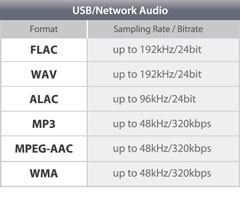
ACC’s brilliance is underscored by its technical underpinnings. It supports up to 48 channels, as opposed to MP3’s two channels. Additionally, it boasts a wider frequency range, extending from 8Hz to 96kHz.
Its sampling rates and enhanced compression algorithms ensure a superior audio experience, setting ACC apart from its counterparts.

It’s these technical attributes that allow ACC to retain audio fidelity even at lower bit rates, a hallmark of its design.
“In technology, the devil is in the details, and ACC mastered them all.” – The Digital Revolution

How is AAC used in the modern era?

Today, ACC is ubiquitous. From streaming services to podcasts, its presence can be felt across various multimedia platforms. Its efficiency makes it ideal for applications where bandwidth is paramount, ensuring listeners receive top-tier audio quality.
Moreover, as devices evolve, ACC’s adaptability ensures its seamless integration, cementing its position in the digital realm.

The digital landscape is ever-evolving, and ACC continues to remain at its forefront, owing to its versatility and excellence.
“Modern challenges require modern solutions, and ACC is the answer to today’s audio challenges.” – Tales of the Technological Era

What devices support AAC playback?

Most modern devices, ranging from smartphones to home entertainment systems, support ACC playback. Its widespread acceptance is a testament to its superiority and the industry’s confidence in its capabilities.
Manufacturers realize the importance of sound quality for consumers. By incorporating ACC compatibility, they ensure that listeners get the best audio experience possible, regardless of the device they use.

As technology marches forward, the list of devices that support ACC is only expected to grow.
“In a world filled with noise, it’s the clarity of ACC that shines through.” – Rhythms of the Modern World

Future prospects of AAC technology.

The trajectory of ACC appears promising. As audio requirements become more demanding and listeners more discerning, AAC’s attributes position it as the format of the future.
Developments in audio technology might bring about new formats, but the foundational principles of ACC will likely remain relevant. Its adaptability ensures it can evolve with the times, making it a lasting presence in the audio world.
“The future is but a canvas, and ACC has already painted its masterpiece.” – Soundscapes of Tomorrow

Is AAC the best audio format?

While it’s tempting to label AAC as the best, it’s essential to understand that the “best” is subjective. AAC holds undeniable advantages in terms of efficiency and quality. However, the right format often depends on specific use cases and personal preferences.
That said, in many scenarios, ACC does emerge as the top contender, balancing quality with efficiency like few other formats can.
“Perfection isn’t an end but a journey, and ACC’s journey is nothing short of remarkable.” – The Audio Anthology

Potential drawbacks of AAC.

No technology is without its shortcomings. Some critics argue that while AAC is efficient, it may not always deliver the best quality for audiophiles at higher bit rates compared to other lossless formats.
Additionally, older devices might not support ACC, leading to compatibility issues.

Despite these drawbacks, AAC’s merits often outweigh its limitations, making it a favorite in many applications.
“Every coin has two sides, but it’s the shine that often catches the eye.” – Digital Dilemmas

Final words

The AAC format, with its rich history and technical brilliance, stands as a beacon in the realm of audio technology. Its journey from its inception to its widespread adoption today underscores its significance. As we continue to evolve in the digital age, ACC’s role in shaping our auditory experiences cannot be overstated.


Free Download Mp4Gain
picture


Mp4Gain Main Window
picture


Mp4Gain Features
picture


Free Download Mp4Gain
picture

Digital Audio Quality

Digital Audio Quality

Digital Audio Quality

Data rate refers to the data flow used by a video file in a unit of time, also called bit rate or bit stream rate.

Digital Audio Quality

The popular interpretation is the sampling rate, which is the most important part of image quality control in video encoding. Generally, the units we use are kb/s or Mb/s. Generally speaking, at the same resolution, the higher the code stream of the video file, the lower the compression ratio and the higher the image quality. The higher the code stream, the higher the sampling rate per unit time, the higher the data stream, the higher the accuracy, the closer the processed file is to the original file, the better the image quality, the clearer the image quality and the higher the decoding capability of the playback device is required.

Of course, the larger the code stream, the larger the file size. The calculation formula is file size = time X code rate/8. For example, a 720P RMVB file with a 1 Mbps stream of 90 minutes is common on the Internet and its volume is = 5400 seconds × 1 Mb/8 = 675 MB.

Generally speaking, a video file includes images and sounds, just like an RMVB video file, which contains video information and audio information. Audio and video have their own sampling methods and different bit rates, that is, the same video Audio and video file bit rate is not the same. And what we’re talking about is the bitrate of a video file, which generally refers to the sum of the bitrate of the audio and video information in the video file.

Taking the most popular and familiar RMVB video file in China as an example, VB in RMVB refers to VBR, which is short for Variable Bit Rate. The Chinese meaning is variable bit rate, which means that RMVB adopts dynamic encoding. In this way, a higher sample rate is used for complex dynamic images (singing and dancing, flying cars, wars, actions, etc.), while a lower sample rate is used for static images, and the resources are use rationally to achieve image quality and volume .Effect.

The most fundamental difference between code rate and sample rate is that the code rate is for the source file.


2. Sampling rate

Sample rate (also called sample rate or sample rate) defines the number of samples per second taken from a continuous signal to form a discrete signal, and is expressed in hertz (Hz). Sampling rate refers to the sampling frequency when converting an analog signal to a digital signal, i.e. how many points are sampled per unit of time. How many bits are in the data for a sample point? Bit rate refers to the number of bits (bits) transmitted per second. The unit is bps (bit per second). The higher the bitrate, the more data transmitted and the better the sound quality. Bit rate = sample rate x number of bits used x number of channels.

The sample rate is similar to the number of frames of moving images. For example, the sampling rate of movies is 24 Hz, the sampling rate of PAL format is 25 Hz, and the sampling rate of NTSC format is 30 Hz. When we play back the still images sampled at the same rate as the sampling frequency, we see a continuous image. In the same way, when a CD recorded at a sampling rate of 44.1 kHz is played back at the same rate, a continuous sound can be heard. Obviously, the higher the sample rate, the more coherent the sound will be heard and the picture will be seen. Of course, the sampling rate that human auditory and visual organs can distinguish is limited, which is basically higher than sound sampled at 44.1 kHz, and most people haven’t noticed the difference.

The number of digits in the sound is equivalent to the number of colors on the screen, indicating the amount of data per sample. Of course, the larger the amount of data, the more accurate the playback sound, so as not to confuse the sound. of the teapot with the train whistle. In the same way, it is more clear and precise for the image, so as not to confuse blood and ketchup. However, limited by the function of human organs, 16-bit sound and 24-bit image are basically the limits of ordinary humans, and the highest digits can only be distinguished by instruments.

Detailed Music Format Part 2

Detailed Music Format Part 2

Music Format
Music Format

Music CD

Music Format
Music Format


That is, CD records. A CD can play sound files of approximately 74 minutes. The Windows system comes with a CD player. Also, the software that comes with most sound cards provides CD playback functionality, and even some CD-ROM drives are offline. from computer Can be used as a stand-alone CD player when powered on.

WMA with unlimited potential

In developing its own network media service platform, Microsoft primarily promotes ASF (Audio Streaming Format), which is an open standard that supports data transmission over various networks and protocols. It supports audio, video, and a variety of other types of multimedia. And WMA is short for Windows Media Audio, which is equivalent to an ASF file that contains only audio.
The compression ratio of WMA files can be as high as 1:18 in 80kbps 44kHz mode, which is basically the same as VQF. And the compression speed is doubled compared to MP3. So it should be more competitive than VQF.

Vorbis free music format

To avoid rising royalties charged by MP3 music companies, programmers at GMGI’s iCast company developed a new free music format, Vorbis, that rivals or even exceeds MP3 in sound quality. And it will be released over the internet and can be downloaded for free without worrying about infringement issues. But MP3 has become very popular on the Internet, and Microsoft’s Windows Media technology has also started to spread, and Vorbis’s outlook is still not optimistic.

Other audio formats

AIF/AIFF: A sound file format developed by Apple, supported by the MAC platform, and supports 16-bit stereo at 44.1 kHz.
AU: SUN’s AU Compressed Sound File Format, which only supports 8-bit sound, is a commonly used sound file format on the Internet, mainly created by SUN workstations.
CDA: CD audio track file.
CMF: A MIDI-like sound file developed by CREATIVE.
DSP: Abbreviation for digital signal processing. By improving the signal processing method, sound quality will be greatly improved and songs will be more pleasing to the ear.
S3U: MP3 playback file list
RMI: MIDI Instrument Sequence

Lossy compression:

AAC – Sound quality is second only to MPC at high bit rates and looks good at both high and low bit rates. The encoding speed is too slow!
MPC: Performance is average at low bitrate, not as good as MP3 and OGG encoded by Mp3Pro, sound quality is best at high bitrate, and encoding speed is
fast.OGG: The sound quality is better at a low bitrate, and the same is true at a high bitrate. Encoding is slightly slower.
MP3 (MP3Pro): Sound quality is lower than OGG at low bit rate and other aspects are the same as MP3
WMA: High and low bit rates are average, VBR is not supported and the highest is 192Kbit/s

lossless compression:

FLAC – Worst compression ratio of the four, decent encoding speed, good platform support.
PAC: Slightly slower encoding speed, third in compression ratio, good platform support.
APE: The fastest encoding speed, the best compression rate, and the platform is generally supported.
WV: The encoding speed is very fast, the compression rate is second among the four types, and it is only supported by the Windows platform.

Detailed music format

Detailed music format

Audio File Formats
Audio File Formats

classic wave

Audio File Formats
Audio File Formats

As the most classic Windows media audio format, the WAVE file is widely used, which uses three parameters to represent sound: the number of sampled bits, the sample rate, and the number of channels.
The channels are divided into mono and stereo, and the sample rates are generally 11025 Hz (11 kHz), 22050 Hz (22 kHz), and 44100 Hz (44 kHz). The capacity occupied by the WAVE file = (sampling frequency × sampling bits × channel) × time/8 (1 byte = 8 bits).

traditional mod

MOD is a wavetable-like music format, but its structure is similar to MIDI, it uses real samples, and the volume is small. In the earlier DOS era, MOD was often used as background music for games. Modern mods can contain many audio tracks in many formats, such as S3M, NST, 669, MTM, XM, IT, XT, and RT.

midi music computer

MIDI is short for Musical Instrument Data Interface. Records the sound played by the instrument digitally (each note is recorded as a number), and then synthesizes these records via FM or wavetable during playback: FM synthesis is the sound of the instrument is simulated by mixing the multi-frequency sounds; wavetable synthesis consists of storing the sound samples of the instrument in the wavetable of the sound card and extracting the sound from the wavetable as you play.

Boss Boss MP3

It can be said that MP3 is famous, it uses MPEG Audio Layer 3 technology to compress the sound with a compression ratio of 1:10 or even 1:12, with a sampling rate of 44kHz and a bit rate of 112kbit/s. .
MP3 music is music stored in digital form. If you want to play it, you must have a corresponding digital playback and decoding system. Generally, MP3 digital music is decoded by special software and then restored to a waveform sound signal for playback output. This type of software is called For MP3 players, such as Winamp, etc.

Overlord RA series online

RA, RAM, and RM are Real’s mature network audio formats, using “streaming audio” technology, making them well suited for network streaming. Information such as copyright, singer, producer, mail and song title can be added during production.
RA can be called the supreme lord of multimedia communication on the Internet. It is suitable for streaming on the Internet and is currently the best format for listening to online music online.

VQF with high compression ratio

VQF or TwinVQ is an audio compression technology developed by Nippon Telegraph and Telephone and Yamaha Corporation.
The audio compression rate of VQF is almost twice that of standard MPEG audio and can reach approximately 1:18 or even higher. And popular compression formats like MP3 and RA are usually only around 1:12. But it still won’t affect the sound quality, when VQF compress music at 44kHz-80kbit/s audio sampling rate, its sound quality will be better than 44kHz-128kbit/s MP3, when compress at 44kHz-96kbit/s , the music is close to 44kHz-256kbit/s MP3.

MD minidisc

MD (ie MiniDisc) is a comprehensive portable music format released by SONY in 1992. The compression algorithm it uses is ATRAC technology (the compression ratio is 1:5). MD is divided into Recordable MD (Recordable, with two heads of magnetic head and laser head) and Single Play MD (Prerecorded, only laser head).
The powerful editing function is the strong point of MD. You can quickly select tracks, move tracks, merge, split, delete and edit track titles. It is more personalized than CD and you can have your own MD album at any time. MD products include MD Walkman, MD bedside audio, MD car audio, MD recording deck, MD camera gun and MD driver, etc.

AAC: Lossy Encoding Is Getting Better – AAC Format Summary

AAC: Lossy Encoding Is Getting Better – AAC Format Summary

AAC Music File Format

At the time of writing this article, the MP3 codec is over 23 years old. So as not to repeat myself with the article (its most recent version), which already describes the OGG Vorbis codecs (and again hello to the Xiph organization, this is also its development), MPC (Musepack), WMA (Windows Media Audio) and AAC, I will briefly describe the format here. AAC in terms of technologies that until recently were at the forefront of lossy coding.

AAC Format

In my humble opinion, AAC (Advanced Audio Codec) is one of the most advanced formats in the field of data encoding. I will describe the main features of this format, starting with the popular profiles that can be represented by a matryoshka (see the figure below):

– Low Complexity Advanced Audio Coding (LC-AAC)

Low decoding complexity is great for implementing a hardware codec; The hardware requirements for CPU and RAM are also low, which has gained a lot of popularity for this profile. It encodes the 96 kbps signal efficiently.

– High Efficiency Advanced Audio Coding (HE-AAC).

The HE-AAC profile is an extension of LC-AAC and is complemented by patented SBR (Spectral Band Replication, thick – “spectral repetition”) technology. It is spectral repetition technology that allows you to “preserve” high frequencies by encoding at low bit rates.

Why is “save” in quotes? Because the king is not real: the codec leaves room for additional information that is used by the codec synthesizer to restore the high frequencies, but since these frequencies are synthesized, that is, they are recreated by the codec, they are, in fact, a rough copy of the high frequencies that existed in the original file. … In practice, a signal encoded at 48 kbps will sound, for example, as mp3 at 98 kbps if it is supported by the decoder; otherwise, the file will simply be played without restoring the high frequencies and its bit rate will correspond to its mp3-like quality.

– High Efficiency Advanced Audio Coding Version 2 (HE-AACv2)

This profile is relatively young (described in 2006), it was created for a more efficient audio coding in low bandwidth conditions.
The second version of the profile is an extension of the first profile, the changes are in the addition of PS (Parametric Stereo) technology. The principle is somewhat similar to SBR technology: the codec also makes room for recovery information from the stereo base, sacrificing precision.

The operating conditions for this profile are the same as for the HE-AAC described above; The lack of profile support from the decoder will make the recording sound in mono.

– AAC-LD (advanced audio coding – low delay)

The AAC-LD profile has advanced coding algorithms to reduce delays (up to 20 ms);

– AAC-ELD (Advanced Audio Coding – Enhanced Low Delay)

This profile, which inherits all the capabilities of HE-AACv2 (analogous SBR and PS technologies are used, but designed for low latencies);

– AAC main profile

This profile was introduced as MPEG-2 AAC or HC-AAC (High Complexity Advanced Audio Coding). Not compatible with LC-AAC;

– AAC-LTP (Advanced Audio Coding – Long Term Prediction)

This profile is more complex and resource intensive (but also of higher quality) than all the others. It is also not compatible with LC-AAC.

That’s all I wanted to write about this codec. I put the greatest emphasis on the technologies that are used in various AAC profiles (which, by the way, generate a lot of abbreviations: AAC, LC-AAC, eAAC +, aacPlus, HE-AAC, etc.), as I will compare them with the from Opus, but the codec does its job: it is widely used in Internet radio, as well as in digital radio transmission technologies: DRM (Digital Radio Mondiale) and DAB (Digital Audio Broadcasting) (you can see these technologies here), YouTube , as an audio track for many videos in mp4, mkv, etc.

2. Introduction to Opus: description of the format

On December 21, 2017, Xiph announced the beta version of the Opus audio codec version 1.3. I will not go into important matters when I describe this codec, since such information is freely available (for example, here, here, and for those who know English, here and here). The release notes for this beta version can be found here. Here I will point out that this codec is an excellent candidate to replace other codecs. It has many advantages:

bit rate from 6 to 510 Kbit / s;
sampling frequency from 8 to 48 KHz;
support for constant bitrates (CBR) and variables (VBR);
support for narrowband and wideband audio;
support for voice and music;
support for stereo and mono;

Audio file format AAC

AAC files are designed to replace MP3 files. Lossy compression gives you better sound at the same bit rates. AAC files are standardized by ISO / IEC as part of the MPEG-2 and MPEG-4 file families (originally they were members of the MPEG-2 Part 7 filegroup). AAS files contain a higher number of sample rates (compared to MP3) and up to 48 channels. Significantly improved encoding efficiency, including an increased number of filter sets. Enhanced transient signal coding accuracy. Like MP3 files, AAS files suppress sound at frequencies that a person cannot hear. This way you can reduce the file size. Compared to MP3, AAS files are much smaller.

AAC Format

Technical details of AAC files

MPEG-2 Part 7 files are represented by three types of files: Low Complexity AAC-LC, Main Type (AAC Main), and Variable Rate Files (AAC-SSR). AAS files allow temporary noise generation, uneven sampling, and repeated generation of the bitstream format (for 16 stereo channels, 16 mono channels, 16 low-frequency channels, and 16 channels for single bitstream annotation). In 1999, the MPEG-2 Part-7 format was incorporated into the MPEG-4 Part-3 format, allowing the introduction of audio object types as well as constant noise replacement technology. The AAC format is currently described in ISO / IEC 14496-3. Lossy compression uses sound masking to remove unnecessary information while maintaining quality.

Aac format

Additional information about the AAC format

Until now, the AAC format has not yet achieved mass distribution in audio media. However, in a number of parameters it exceeds all existing types of audio compression, which means that it deserves our attention.

What is this?

Let’s start with the definition: AAC is the proprietary (proprietary) option for compressing an audio file. At the same time, the quality loss when encoding is less than with MP3 at the same bit rate. Furthermore, the AAC format is a wideband algorithm for encoding audio that uses two fundamental encoding principles to greatly reduce the amount of data required to transmit high-quality digital audio. This solution is recognized as one of the highest quality implemented using lossy compression technology. The format is compatible with most modern devices, including laptops. It should be noted that ringtones in AAC format can be purchased from the iTunes store and that this store presents music that is only compressed with this solution. It should also be said that the AAC format was originally created as a successor to MP3, which can offer improved encoding quality. The solution was published in 1997 as the new seventh part of the MPEG-2 family.

All the details

Interestingly, the AAC format has a sample rate in the range of 8 to 96 kHz, as well as the number of channels in the range of 1 to 48. MP3 uses a set of hybrid filters. AAC, in turn, refers to the modified discrete cosine transform with an expanded “window” size that reaches 2048 points.

Therefore, compared to MP3, AAC is much better suited for encoding audio with complex pulse stream as well as square wave signals. The format was given the ability to dynamically change MDCT block lengths within 2048-256 points. In the case of a short or simple movement, a small 256-point “window” is used to achieve better resolution. In this case, a default 2048-point “window” is used to maximize encoding efficiency. AAC has several advantages over regular MP3. Noteworthy is the implementation of a large number of audio channels (up to 48), significant coding efficiency at constant and variable bit rates, and sample rates from 8 Hz to 96 kHz (for MP3 from 8 Hz to 48 kHz). and a more flexible special mode called Joint Stereo. The solution is “AAS +”, a codec designed for a low bit rate. It is a combination of SBR and AAC

Audio formats

Before going through the different audio formats to identify the best ones for you, it seems right to try to make you understand what digital audio is. In short, it is nothing more than a representation of real sounds through a chain of zeros and ones. The more there is in a file, the closer the digital sound will be to what it represents.

Audio Formats

Better audio formats

It all started with Pulse-Code Modulation (PCM), created in 1937 and characterized by two properties: the sampling frequency to measure the amplitude of the waveform and the bit depth to measure possible digital values. It is basically the faithful conversion of analog audio into a digital file in which no compression is done. The result is a very large audio file, which takes up a lot of space.

Audio Formats

To remedy this, therefore, more or less compressed audio formats have been created that, depending on their characteristics, are divided into two different types: Lossless formats, that is, when the information contained in the final file is identical to that contained in the source file and therefore there is no loss of quality, and lossy formats, for which the information contained in the final file is less than that contained in the source file with the consequent loss of quality but in benefit of the space of necessary storage. For more details, continue reading, below you will find the different audio formats belonging to the categories in question indicated and explained.

Lossless (WAV, AIFF, FLAC and ALAC)

As I told you a few lines above, Lossless audio formats are those that are not compressed or that, despite being subjected to this type of treatment, the final quality remains practically unchanged with respect to the original audio. The main formats that belong to this category are the following: WAV, AIFF, FLACC, ALAC and APE. Let’s see its characteristics in detail.

WAV – An acronym for WAVEform audio file format, is a standard that was developed by Microsoft and IBM in 1991. It is the most popular category of apparent audio file format. It is not compressed and is essentially what you get when you rip audio from a music CD with your computer. It takes up a lot of space (1,411 kilobits of information per second of stereo music at 44,100 Hz / 16 bits), but it reproduces sounds faithfully. In terms of quality and quantity of information, it is similar to the AIFF format, which you will find explained below.
AIFF – Short for Audio Interchange File Format, it belongs mainly to the Mac world, it was developed by Apple based on the Electronic Arts Interchange File Format and is particularly suitable for audiophiles and music recorders. It basically has the same characteristics as the WAV format mentioned above, so it is not compressed, so it takes up a lot of space (1,411 Kilobits of information per second of stereo music at 44,100 Hz / 16 bits) and is capable of reproducing sounds with a lot of fidelity.

FLAC: is the abbreviation for Free Lossless Audio Codec. It is an open source codec that is often used to store music CDs on the computer without loss of quality and is compatible with most programs and devices. Compared to the formats that I have already told you about, it has a minimal degree of compression, but most people cannot perceive significant differences compared to a WAV or AIFF file.
ALAC – Short for Apple Lossless Audio Codec, is essentially Apple’s worldwide counterpart to the earlier FLAC format. The quality is good on average but the format is not as efficient as the FLAC in terms of weight. Then keep in mind the fact that not all gamers support it, so unless you have uniquely and exclusively Apple devices, it may not be the best solution to opt for.

Other important but less common audio formats that always belong to the Lossless calorie are Monkey’s Audio (APE) and OptimFROG (OFR). Its characteristics are more or less similar to those of the FLAC and ALAC formats.

Lossy (MP3, AAC, WMA, and Ogg Vorbis)

Now let’s move on to the audio formats belonging to the Lossy category, that is, those always subjected to compression that take up very little space but “sacrifice” a certain degree of audio quality. The main formats in this category are: MP3, AAC, WMA, and Ogg Vorbis. For more information, keep reading, you will find more details about it below.

MP3: in Full Moving Picture Expert Group-1/2 Audio Layer 3, also known as MPEG-1 Audio Layer III or MPEG-2 Audio Layer III.

Do you know what is the best audio format? (for musicians and listeners)

Maybe you are a musician who has had the hard work of learning sound theory, writing and arranging your music, practicing, recording, and now you want to show your work to the world. What is the best audio format to distribute your recording? Or maybe you are a music lover looking for the best way to organize your collection. It may be that your collection comes from CDs or vinyl or even digitally downloaded. What is the best audio format to store your collection?

vinyl

Choosing the right file format is important. On the one hand, the selected format affects the fidelity of the sound. However, the selected format also limits which devices can play your files. In this guide, we explain the different audio formats available, what they offer and how they are used in the best possible way. First, let’s understand what digital audio files are.

In short, what is the best audio format for you?
To choose the best audio file format you need, think about the purpose of each file. Here are some common uses with suggestions for the best audio formats for each:

If you are an artist …


Do you record a CD with your work? WAV! Conventional CDs use WAV, so export your music from DAW to Wav (or other lossless and then convert properly) and use these files to burn to CD. If you compress CDs from a factory, export in wav but in the original sampling rate and bit depth settings. Leave these settings to them.
Do you share your music with the public? Lossy! You want a smaller file size and maximum compatibility with them from your listeners. Any device plays an MP3 file and is easy to share online.
Should you distribute your music with Magroove or another aggregator for streaming services and online music stores? Streaming services have their own conversion systems, and each one works in a different format (the vast majority, lossy), so you probably won’t get a lossless song. Get a good mp3 that survives encoding (and is easier to load) and save Lossless versions somewhere, whether burning to CD or distributing to acts overseas!
If you are a listener or a collector …
Are you archiving your music? FLAC with maximum compression! A lossless compressed format such as FLAC or ALAC lets you store your files efficiently without losing sound quality. Records in the original multimedia format settings. CD, for example, 16-bit, 44.1 kHz.
Do you digitize music from a vinyl? Record at least in a lossless format. Read about the recording / conversion settings, especially sample rate and bit depth, and understand what lossless quality you need.

Digital audio format guide.

Digital audio format guide.

Since digital music has become popular, its fans have gradually developed the desire to hear it in the best possible quality.
For a time, the technical limits and the costs prevented us from achieving this goal, which is no longer an illusion.

audio formats

The music streaming services market has never been so successful and we talk a lot about it in this article, but there are so many digital music formats … we’ve made this guide for clarity.

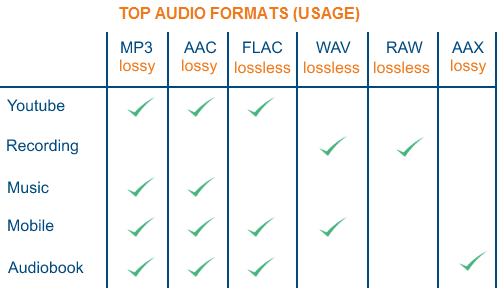
The teacher recorded in the studio is recorded at the resolution that defines the artist, but then the album we hear can be converted into a large number of more or less compressed formats, which, as shown in this infographic, into two large families are divided. . ::

Lossy audio formats: If the quality and the data contained are inferior to the original file, which leads to loss of detail, but to the benefit of the lightness of the file. These formats are widely used by streaming services like Spotify and take up less space.

Lossless: If the quality of the generated file matches that of the original master, without loss of quality, however, they require storage systems such as NAS and are not ideal for streaming via a mobile device connection.

losseless

Let’s start with the first Lossy family (AAC, MP3, Ogg Vorbis and WMA)

AAC

Advanced Audio Coding (MPEG-4) is the standard standard used by Apple for iTunes. Nostalgic people who had an iPod will remember that when CDs were imported into their MAC, the files were converted to this format. At the same bit rate, it takes up the same space as an MP3, but the conversion can be of higher quality.

MP3

An acronym for Moving Picture Expert Group-1/2 Audio Layer 3 is the world’s most widely used compressed audio format and was first introduced in 1998. The compression algorithm removes some details from the audio track that you can hardly hear The human ear By compressing a WAV file, you get an MP3 file that is up to 90 times lighter than the original. This depends on the bit rates or the amount of digital information (bits) that are transmitted or recorded in a unit of time. They can vary between 32 (poor quality) and 320 KB (excellent quality) per second.

OGG Vorbis

It’s an open source format with a quality comparable to MP3 that was unknown until recently, but is now used by services like Spotify. OGG is the file extension, while Vorbis is the compression algorithm.

WMA

Windows Media Player is the format invented by Microsoft in response to the MP3 standard. The quality is the same, but has the disadvantage that it is only compatible with devices of this brand.

Now let’s discover the features of the lossless family (FLAC, ALAC, AIFF, WAV and DSD).

FLAC

Free lossless audio codec. It is the most widely used open source format for downloading music without loss of quality compared to the original source. A fairly attentive ear can easily tell the difference from a smaller format, lower quality file.
iTunes does not support playback of this format because it uses its (ALAC).

A THE C.

The Apple Lossless Audio Codec or FLAC for the Apple world is only ideal if you use Apple branded devices, even if it does not correspond to the FLAC in terms of weight.

AIFF

This audio swap file format is also owned by Apple, which was developed based on the Electronic Arts swap file format and is particularly suitable for audiophiles and music producers. It has essentially the same properties as the WAV format, but without compression, and is used by artists because it can also be used to embed metadata such as text, notes or other information in the file.

WAV

The WAVE audio file format, introduced by Microsoft and IBM in 1991, continues to be used and represents what you get when you import a music CD to your Microsoft computer. When playing back a file of this format that can also be read by a MAC, a special function is used in the Intel CPU. These are very heavy files that reach a maximum of 2 GB and reproduce the sounds in a very faithful manner.

DSD

Direct Stream Digital is a registered trademark of Philips and Sony, developed for the Super Audio CD. An encoding method is used that uses a single bit instead of predicting a higher bit depth, but at a much higher sampling rate to record, store, and reproduce extremely high sound quality. The original sampling rate was 2,822 MHz and its format is known as DSD64