M4A vs FLAC


Free Download Mp4Gain
picture

M4A vs FLAC

M4A vs FLAC
M4A vs FLAC
M4A vs FLAC
M4A vs FLAC

Differences between M4A and FLAC

M4A and FLAC are both audio file formats, but they are quite distinct in their characteristics. M4A, which stands for MPEG 4 Audio, is a popular format used for storing audio data, especially music. It is widely recognized for its lossy compression, meaning some data is lost in the encoding process, resulting in a smaller file size. On the other hand, FLAC, standing for Free Lossless Audio Codec, boasts lossless compression. No data is discarded, maintaining the original audio quality.

“Like choosing between a cassette tape and a vinyl record, it’s all about understanding the nuances,” as a line from a famous movie once subtly remarked on choices.

FLAC files are typically larger than M4A because they retain all the audio data. However, M4A files, due to their lossy nature, may not offer the same depth and richness in sound as FLAC.

Which is better: M4A or FLAC?

Defining which format is “better” depends largely on the user’s needs. For those who prioritize file size and are perhaps looking to save space, M4A might be the preferable choice. Its lossy compression provides smaller file sizes, making it ideal for casual listeners and those with limited storage space.

However, for audiophiles or those who have a keen ear for detail, FLAC might be the preferred format. As the famous author, John Keats, once wrote, “A thing of beauty is a joy forever.” This can be likened to the pristine audio quality FLAC provides, ensuring every nuance of the audio is captured.

Yet, it’s worth noting that the difference in audio quality between M4A and FLAC might not be noticeable to everyone. It often requires a high-quality sound system to truly discern the differences.

What are the advantages of M4A over FLAC?

M4A does come with certain advantages. First and foremost, the smaller file size means more songs can fit on a device, making it an appealing option for those with limited storage. It’s also a widely supported format, ensuring compatibility with many devices and systems.

“Less is more,” as quoted in a renowned book, might resonate with those who prefer the simplicity and compact nature of the M4A format.

Additionally, M4A files tend to process faster due to their size. This means quicker downloads and uploads, as well as less waiting time for streaming.

How does FLAC’s quality compare to M4A?

FLAC’s quality is, objectively speaking, superior to M4A. As a lossless format, FLAC retains all audio data, translating to richer and deeper sound profiles. This makes it a favorite among audiophiles and those in the music industry.

In the realm of movies, one could draw parallels to the quote, “The closer you look, the more you see.” With FLAC, the closer you listen, the more you hear.

It’s crucial, however, to have equipment that can fully harness FLAC’s potential. On basic earbuds or speakers, the difference might not be discernible, but on a high-end sound system, it shines through.

Final Words

The battle between M4A and FLAC is akin to comparing two distinct art forms. Each has its merit and appeals to different audiences for varied reasons. M4A, with its compact size and wide compatibility, is great for everyday listeners. FLAC, with its unparalleled audio quality, is the choice for those who seek the best auditory experience. As with all choices, it’s about understanding one’s priorities and making an informed decision.


Free Download Mp4Gain
picture


Mp4Gain Main Window
picture


Mp4Gain Features
picture


Free Download Mp4Gain
picture

Which Audio Codec is Better?

Which Audio Codec is Better?

Audio Codec
Audio Codec

When it comes to audio, the codec is the magic behind the scenes that helps you hear your favorite songs and sounds. But have you ever wondered what makes one codec better than another? In this article, we’ll explore the world of audio codecs and find out which one is the best.

Audio Codec
Audio Codec

What is an audio codec?

An audio codec is a type of software that compresses and decompresses audio files. This process makes the audio smaller, so it can be easily stored and shared on your computer, phone, or online. When you want to listen to the audio, the codec decompresses it so you can hear it in its original quality.

Why are there different codecs?

Just like how you can choose between different types of ice cream flavors, there are different types of codecs because everyone has different tastes and preferences. Some codecs are better for music, while others are better for speech. Some are easy to use, while others are more complex. The choice of codec depends on the type of audio you want to compress, the size of the file, and the quality of the sound you want to preserve.

The most popular codecs

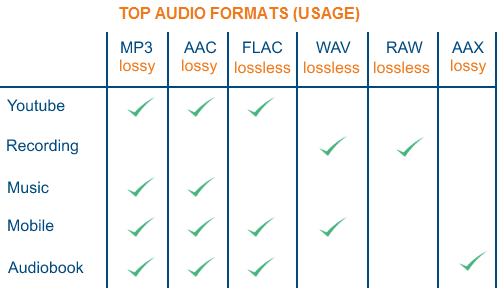
There are many different audio codecs out there, but here are some of the most popular ones:

  • MP3
  • AAC
  • FLAC
  • WAV

MP3

MP3 is one of the most popular codecs and has been around for over 20 years. It’s a great choice for music because it compresses audio files into smaller sizes while still preserving the quality of the sound. MP3 is also compatible with most devices and players, making it a convenient option for many people.

AAC

AAC stands for Advanced Audio Coding and is a newer codec that was developed by Apple. It’s commonly used by Apple devices, like the iPhone and iPad, and provides better sound quality than MP3 at a lower bit rate. AAC is also used by many online streaming services, like Spotify and Apple Music, to deliver high-quality audio to their users.

FLAC

FLAC stands for Free Lossless Audio Codec and is a popular option for audiophiles. This codec compresses audio files into smaller sizes without losing any quality, making it the perfect choice for people who want the best sound possible. The downside to FLAC is that it’s not as widely supported as MP3 and AAC, so you may need to use special software to play FLAC files on your device.

WAV

WAV is a common codec for professional audio and is often used in recording studios. It’s a lossless codec, which means it doesn’t compress audio files and preserves the original sound quality. However, WAV files are usually much larger than files compressed with other codecs, so they may take up a lot of space on your device.

Conclusion

In conclusion, the choice of codec depends on the type of audio you want to store and share, and your personal preferences. MP3 is a classic and widely supported option, while AAC offers better sound quality. FLAC is the perfect choice for audiophiles who want to preserve the original sound quality, and WAV is used in professional settings. To find the best solution for you, consider your needs and try out different codecs to see which one works best for you. And finally, if you want to enhance the audio quality of your files, you can use Mp4Gain to adjust the volume and improve the sound of your audio files.

It’s important to remember that the audio codec you choose will affect the size, quality, and compatibility of your audio files. So choose wisely, and enjoy the world of audio!

Detailed music format

Detailed music format

Audio File Formats
Audio File Formats

classic wave

Audio File Formats
Audio File Formats

As the most classic Windows media audio format, the WAVE file is widely used, which uses three parameters to represent sound: the number of sampled bits, the sample rate, and the number of channels.
The channels are divided into mono and stereo, and the sample rates are generally 11025 Hz (11 kHz), 22050 Hz (22 kHz), and 44100 Hz (44 kHz). The capacity occupied by the WAVE file = (sampling frequency × sampling bits × channel) × time/8 (1 byte = 8 bits).

traditional mod

MOD is a wavetable-like music format, but its structure is similar to MIDI, it uses real samples, and the volume is small. In the earlier DOS era, MOD was often used as background music for games. Modern mods can contain many audio tracks in many formats, such as S3M, NST, 669, MTM, XM, IT, XT, and RT.

midi music computer

MIDI is short for Musical Instrument Data Interface. Records the sound played by the instrument digitally (each note is recorded as a number), and then synthesizes these records via FM or wavetable during playback: FM synthesis is the sound of the instrument is simulated by mixing the multi-frequency sounds; wavetable synthesis consists of storing the sound samples of the instrument in the wavetable of the sound card and extracting the sound from the wavetable as you play.

Boss Boss MP3

It can be said that MP3 is famous, it uses MPEG Audio Layer 3 technology to compress the sound with a compression ratio of 1:10 or even 1:12, with a sampling rate of 44kHz and a bit rate of 112kbit/s. .
MP3 music is music stored in digital form. If you want to play it, you must have a corresponding digital playback and decoding system. Generally, MP3 digital music is decoded by special software and then restored to a waveform sound signal for playback output. This type of software is called For MP3 players, such as Winamp, etc.

Overlord RA series online

RA, RAM, and RM are Real’s mature network audio formats, using “streaming audio” technology, making them well suited for network streaming. Information such as copyright, singer, producer, mail and song title can be added during production.
RA can be called the supreme lord of multimedia communication on the Internet. It is suitable for streaming on the Internet and is currently the best format for listening to online music online.

VQF with high compression ratio

VQF or TwinVQ is an audio compression technology developed by Nippon Telegraph and Telephone and Yamaha Corporation.
The audio compression rate of VQF is almost twice that of standard MPEG audio and can reach approximately 1:18 or even higher. And popular compression formats like MP3 and RA are usually only around 1:12. But it still won’t affect the sound quality, when VQF compress music at 44kHz-80kbit/s audio sampling rate, its sound quality will be better than 44kHz-128kbit/s MP3, when compress at 44kHz-96kbit/s , the music is close to 44kHz-256kbit/s MP3.

MD minidisc

MD (ie MiniDisc) is a comprehensive portable music format released by SONY in 1992. The compression algorithm it uses is ATRAC technology (the compression ratio is 1:5). MD is divided into Recordable MD (Recordable, with two heads of magnetic head and laser head) and Single Play MD (Prerecorded, only laser head).
The powerful editing function is the strong point of MD. You can quickly select tracks, move tracks, merge, split, delete and edit track titles. It is more personalized than CD and you can have your own MD album at any time. MD products include MD Walkman, MD bedside audio, MD car audio, MD recording deck, MD camera gun and MD driver, etc.

What is the best audio format for me?

What is the best audio format for me?

Best Audio File Formats

After all, it’s not always clear which format is best for music. Some services, like Amazon, sell digital music in MP3 format. Although Apple offers song downloads from its iTunes Store in AAC format.

Audio File Formats

So the question arises what formats can your device play. If it is relatively new, it can play lossless formats like FLAC, as well as older lossy formats like MP3 and AAC.

And to add even more confusion, there is the listening factor. How important is sound quality to you?

To help you decide, here are some things you can do.

Check the format compatibility of your portable device

Before deciding on an audio format, the first thing to do is check its compatibility. This can usually be found on the manufacturer’s website or in the specifications section of the user manual (if there is one, of course).

If you are not going to use high quality audiophile equipment in the future, then lossy audio may be sufficient if you are only going to use your laptop. For greater compatibility, the MP3 file format is the safest bet. This is an old algorithm, but it works well. In fact, it is still the most compatible audio format for everyone.

However, if you are ripping tracks from a music CD, for example, it would be wise to keep a lossless copy on your computer / external hard drive and lose it for your laptop as well. This will keep your music safe in the future, even if new formats and hardware show up later.

Consider the bit rate

Bitrate is an important factor to know, especially if you are looking for the best quality music playback. However, the actual bit rate setting depends on the audio format you are using.

For example, the MP3 (MPEG-1 Audio Layer III) format has a bit rate range of 32 to 320 kbps. There are also two encoding methods you can choose from: CBR and VBR. In this case, instead of encoding using the default CBR (constant bit rate) encoding, it is much better to use VBR (variable bit rate) encoding. This is because VBR will provide you with the best file size ratio.

The encoding you use is also an important factor.

Best digital audio formats

Best digital audio formats

Digital Audio Formats

Today, there are several dozen formats (codecs) that are used to represent audio files. Among them, there are no more than a dozen running gear.
Save and read later –

MP3, FLAC, ACC, WAV

In the 20th century, we choose between the media and the media to play music. Cassettes, vinyl, CD – each multimedia format had its own player, each had its own advantages and disadvantages. In the 21st century, the focus has changed significantly. Playback tools have become omnivorous and you have to choose not the multimedia format, but the format of the audio file.

At a time when digital music had not yet penetrated the computer as it does now, the choice for connoisseurs of high-quality sound was quite simple and straightforward. The most popular CDs, and those who could afford to buy more expensive equipment and discs, opted for SACD or DVD-Audio players, or universal models that play all optical audio disc formats. Now you can get high-quality audio content without buying discs, in which case the whole choice comes down to the format for storing your music.

Today, there are several dozen formats (codecs) that are used to represent audio files. Among them, there are no more than a dozen running gear. Lossy audio compression is most often done using the MP3 (MPEG-1 Layer3) codec, less often the WMA format, which is a proprietary Microsoft development, is used for this purpose; AAC, developed by Apple or available under the GPL-free Ogg Vorbis format. We will not dwell on the topic of compressed audio in detail, we will limit ourselves to a brief description.

Saehan Information Systems F10 – The world’s first mp3 player appeared in 1998 and cost $ 250
The MP3 format and its aforementioned analogues allow you to compress CD quality music material into smaller files (the compression ratio ranges from 2: 1 to 11: 1). As the developers envisioned, compression algorithms should process the audio stream in such a way that the sound of the compressed file does not differ from the original. In fact, you can hear the difference between the sound of a compressed file and an uncompressed original, and the higher the quality class of the equipment, the more obvious these differences become. There is no difficulty in burning a CD to MP3 or getting ready-to-use MP3 files from the Internet or on physical media.

The only specificity of compression files is the ability to incorporate copy protection or unauthorized playback protection (DRM) into them. One of the main initiators and distributors of the technology to protect audio files was Apple, which, however, very early presented a proposal to abandon such solutions and urged all manufacturers of music products to distribute it without protection. Since 2009, music sold on the iTunes Store is not protected. The vast majority of compressed content sold over the Internet and on physical media is also not protected against unauthorized reproduction.

ITunes interface
There are several different formats to store digital music without losing quality. The lossless and uncompressed audio stream is saved to a WAV or AIFF file. In this case, the file type is determined by the type of operating system on which the audio stream is saved. WAV format is a joint development of Microsoft and IBM, and AIFF is the brainchild of Apple. There are also proprietary lossless audio compression formats: Microsoft’s WMA Loseless (also known as WMA9) and Apple’s ALAC. Of these, only the second has become widespread due to the fact that it is almost the only way to listen to high-quality audio from iOS devices.

Another option for storing uncompressed audio content is disc images, which are a single file with the ISO extension, which is an unmodified copy of the content on a digital medium.

The most widely used lossless music compression format is the FLAC (Free Lossless Audio Codec) format. As its name suggests, this format is distributed under a free license, which means that to ensure its support on any audio device, it is not necessary to pay royalties. FLAC allows you to store audio tracks with up to eight channels and a bit depth of up to 32 bits and a virtually unlimited sample rate, allowing it to be used to store any content, including multi-channel HD soundtracks. The popularity of FLAC as a high quality audio compression codec is as great as the popularity of MP3 among compression audio formats. The vast majority of high-quality music is stored and distributed in the FLAC format.