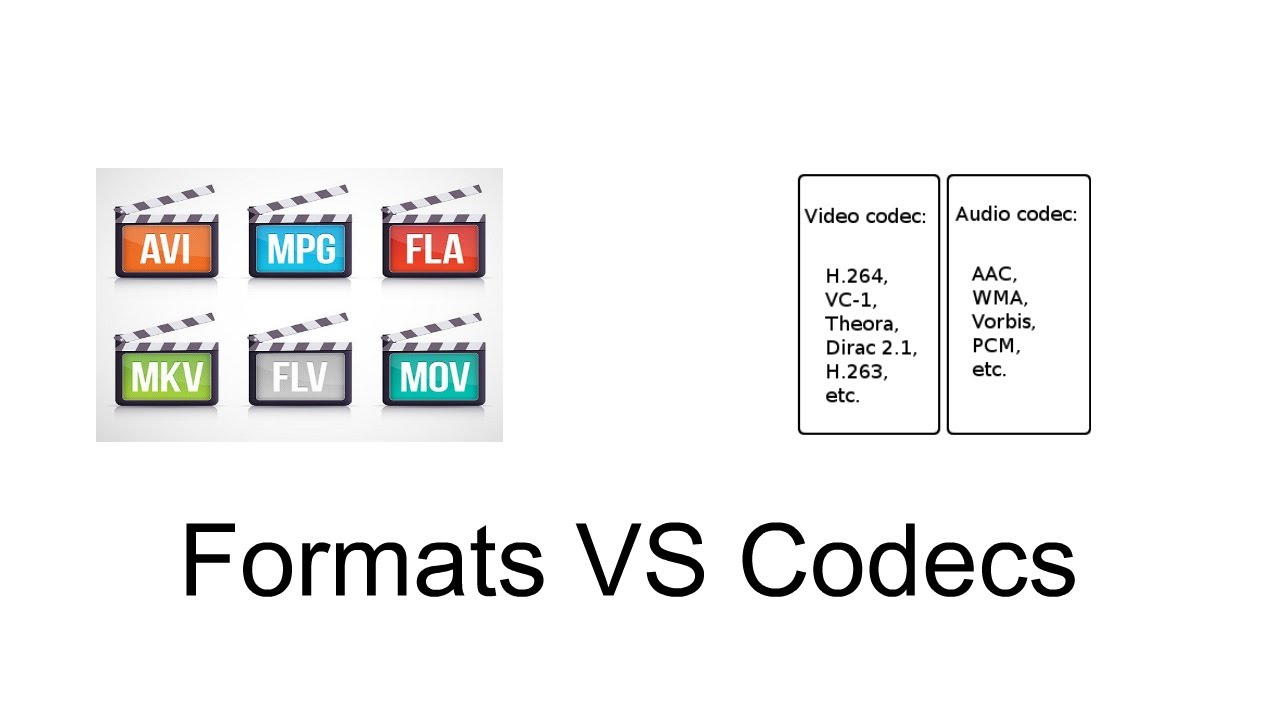
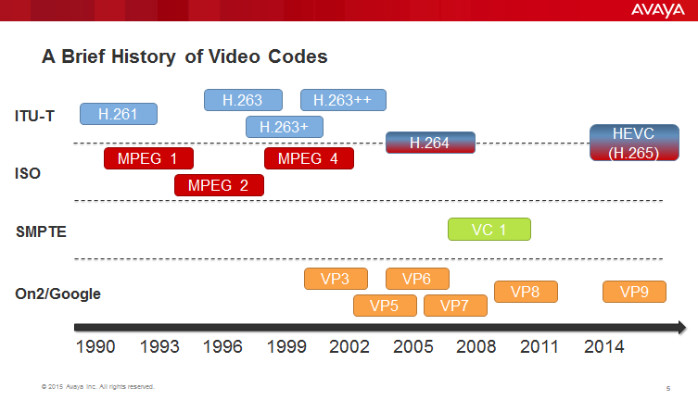
Audio codecs, short for compression-decompression algorithms, are essential tools in the world of digital audio. Think of them as translators that help digital audio files communicate efficiently while conserving storage space and maintaining sound quality. They achieve this by encoding audio data during compression and decoding it during playback.
Imagine you’re packing for a trip, and you want to save space in your suitcase. You decide to use vacuum-sealed bags for your clothes. Similarly, an audio codec compresses audio data into a more compact format for efficient storage or transmission. When you unpack your suitcase at your destination, you release the air from the bags to restore your clothes to their original form—this is akin to an audio codec decoding compressed audio data for playback.
There’s a wide range of audio codecs available, each with its own strengths and weaknesses. Some prioritize small file sizes, making them ideal for streaming, while others emphasize preserving audio quality, a must for audiophiles. Understanding these differences helps you choose the right codec for your specific needs.
What Are Lossless Audio Codecs?
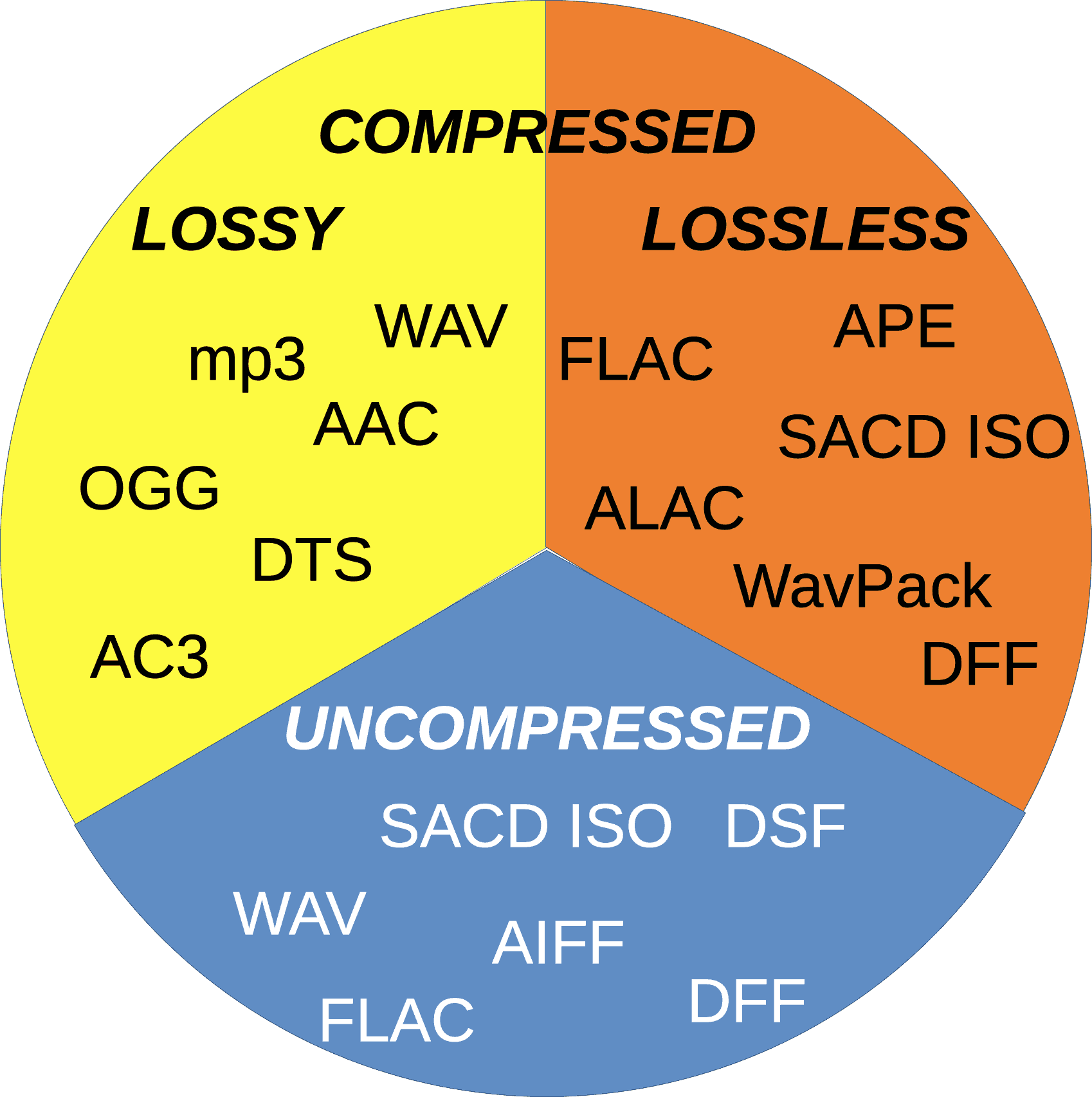
Lossless audio codecs are like the archivists of the audio world. They compress audio data without sacrificing any of the original quality. This is akin to zipping a file on your computer; when you unzip it, you get back an identical copy of the original.
Imagine you have a precious handwritten letter. You want to make a copy for safekeeping, but you don’t want to lose any detail or quality. A lossless audio codec accomplishes this by finding patterns in the audio data and encoding them more efficiently. When you want to listen to the music or sound stored with a lossless codec, it’s like opening the envelope of your preserved letter—you get the same experience as the original.
Lossless audio codecs are favored by audiophiles and professionals who prioritize audio quality over file size. They are ideal for archiving music collections and audio recordings where every nuance matters.
Popular Audio Codecs
When it comes to audio codecs, several popular options are commonly used in various applications. One of the most recognizable is MP3, which revolutionized digital music. MP3, short for MPEG-1 Audio Layer 3, achieves significant compression while maintaining decent audio quality, making it suitable for music streaming and portable devices.
AAC (Advanced Audio Coding) is another well-known codec, commonly used by Apple devices. It offers superior sound quality compared to MP3 at similar bitrates, making it a popular choice for iTunes and other Apple platforms.
For lossless audio, FLAC (Free Lossless Audio Codec) stands out. It’s widely adopted by audiophiles and music enthusiasts for its ability to compress audio without any loss in quality. FLAC files are perfect for preserving high-fidelity audio.
As an expert in audio technology, I can confidently say that understanding audio codecs is crucial for anyone working with digital audio. Whether you’re a music lover, a content creator, or a tech enthusiast, the right knowledge about audio codecs can significantly enhance your experience and the quality of your audio content.
Audio codec rate control plays a crucial role in determining the balance between audio quality and file size. Over the years, significant advancements have been made in rate control methods, enabling more efficient compression and higher audio fidelity. One such innovation is the use of machine learning algorithms to optimize rate control parameters.
By employing machine learning models, audio codecs can analyze audio content and adapt their rate control strategies dynamically. This approach allows codecs to adjust bitrate allocation based on the complexity of the audio signal, resulting in improved audio quality with reduced file sizes.
“Incorporating machine learning into rate control empowers audio codecs to make smarter decisions, delivering exceptional audio quality while efficiently utilizing available bitrate.” – Audio Compression Trends: The Rise of Machine Learning
Another notable advancement is the implementation of psychoacoustic models in rate control algorithms. These models simulate human hearing perception to identify irrelevant audio components that can be discarded without compromising perceptual audio quality. By leveraging psychoacoustic principles, codecs can allocate bitrates more effectively, focusing on preserving the most critical audio elements.
“Psychoacoustic rate control techniques revolutionize audio compression by optimizing the allocation of bits to retain the essential components that shape the listener’s auditory experience.” – The Art of Audio Rate Control: Psychoacoustic Innovations
Impact of Rate Control Methods on Audio Quality
Rate control methods significantly influence the audio quality of compressed files. In constant bitrate (CBR) control, a fixed amount of bits is allocated per audio frame, ensuring a consistent bitrate throughout the file. While CBR guarantees a predictable file size, it may lead to audio artifacts and inefficiencies in bitrate allocation.
On the other hand, variable bitrate (VBR) control dynamically adjusts the bitrate based on the complexity of the audio content. VBR allows higher bitrates for more intricate audio segments, resulting in better audio quality compared to CBR. However, VBR may lead to larger file sizes, which can be a concern in bandwidth-constrained scenarios.
“Choosing the right rate control method is a trade-off between audio quality and file size. While CBR offers predictability, VBR excels in preserving audio fidelity by allocating more bits to intricate audio segments.” – Rate Control Strategies: Balancing Quality and Efficiency
Improving Audio Compression Efficiency with Rate Control Techniques
Rate control techniques play a vital role in improving audio compression efficiency. By optimizing the allocation of bits, codecs can achieve higher compression ratios without compromising audio quality. One of the key techniques is adaptive rate control, where the codec continuously monitors the audio signal and adjusts the bitrate allocation on the fly.
Adaptive rate control is particularly valuable in real-time communication applications, such as VoIP calls and video conferencing. These applications require low-latency audio transmission, and adaptive rate control ensures efficient utilization of available bandwidth while maintaining high-quality voice communication.
“Adaptive rate control ensures efficient audio compression in real-time communication, providing users with crystal-clear voice quality even in bandwidth-constrained environments.” – The Power of Adaptation: Efficient Rate Control for Real-Time Communication
Additionally, hybrid rate control methods combine the advantages of both CBR and VBR. By employing adaptive elements alongside a predetermined bitrate for certain segments, hybrid rate control strikes a balance between consistency and efficiency.
“Hybrid rate control methods merge the strengths of CBR and VBR, offering a flexible approach to audio compression that optimizes bitrate allocation based on audio content complexity.” – Hybrid Rate Control: The Best of Both Worlds
Trade-offs between Rate Control and Encoding Time
Rate control methods may also impact encoding time, which is a crucial consideration in various applications. In general, CBR encoding requires less computation, as the bitrate allocation remains constant throughout the encoding process. This results in faster encoding times compared to VBR, where the bitrate allocation varies frame by frame.
However, the encoding time can vary depending on the complexity of the rate control algorithm used. Some advanced rate control methods, like machine learning-based models, may require additional computational resources but can achieve better compression efficiency.
“Developers must strike a balance between encoding time and compression efficiency when selecting rate control methods, considering the specific needs of their applications.” – Rate Control Trade-offs: Balancing Speed and Efficiency
In real-time communication applications, low encoding time is crucial to ensure minimal latency during audio transmission. Adaptive rate control, which adjusts bitrate allocation on the fly, allows for efficient compression without significant delays.
“Real-time communication demands low encoding time, making adaptive rate control a valuable choice for ensuring real-time voice transmission with minimal latency.” – Low Latency Encoding: Enabling Real-Time Communication
Rate Control and Audio Codec Decoding Requirements
The choice of rate control method also affects the decoding requirements of audio codecs. In CBR-encoded files, the decoding process is straightforward, as the bitrate remains constant throughout the file, requiring a relatively simple decoding algorithm.
In contrast, VBR-encoded files require more sophisticated decoding algorithms to adapt to the varying bitrates. Decoders must analyze the bitrate information within each frame to accurately reconstruct the audio signal.
“VBR-encoded files demand more robust decoding algorithms, as decoders must dynamically adjust to the varying bitrates to ensure faithful audio reproduction.” – VBR Decoding: Adapting to Bitrate Variability
The complexity of adaptive rate control methods may also impact decoding requirements. In adaptive rate control, both the encoder and decoder must share information to adjust the bitrate allocation effectively. This interaction between the encoder and decoder may require higher computational resources for decoding.
“Adaptive rate control introduces a level of complexity in decoding, as the encoder and decoder must collaborate to ensure efficient bitrate allocation and high-quality audio reconstruction.” – Adaptive Rate Control: Coordinating Encoder and Decoder
Rate Control Methods for Low-Latency Applications
In low-latency applications like real-time communication, rate control methods must strike a balance between audio quality and transmission speed. Adaptive rate control stands out as an excellent choice for such scenarios, as it allows codecs to adapt to varying network conditions while prioritizing audio clarity.
Another effective strategy for low-latency applications is the use of scalable rate control. Scalable codecs produce multiple layers of audio data, enabling receivers to decode the appropriate layer depending on the available bandwidth. This approach ensures seamless audio transmission even in bandwidth-constrained environments.
“Scalable rate control enables low-latency audio transmission by offering multiple layers of data, allowing receivers to select the optimal layer for their available bandwidth.” – Scalable Codecs: Adapting to Bandwidth Constraints
Low-latency rate control techniques also play a crucial role in gaming applications, where real-time voice chat and audio cues are essential for player coordination and immersion. Adaptive bitrate allocation in these contexts ensures that critical audio information is transmitted with minimal delay.
“Low-latency rate control techniques are fundamental in gaming applications, delivering real-time voice communication and audio cues that enhance player experiences.” – Real-Time
The Impact of Audio Codec on Voice QualityThe Impact of Audio Codec on Voice Quality
How Does the Choice of Audio Codec Affect Voice Quality?
The choice of an audio codec can significantly influence the quality of voice reproduction in various applications. While some codecs prioritize efficiency and smaller file sizes, others focus on preserving audio fidelity. For voice-centric applications like voice calls, video conferencing, and voice-over work, the balance between compression and audio quality becomes crucial. High-compression audio codecs, commonly used for online streaming and communication, may sacrifice some voice clarity to achieve smaller file sizes. On the other hand, lossless codecs prioritize audio fidelity, ensuring a true representation of the original voice recording.
Finding the right audio codec for voice-related applications involves striking a balance between compression efficiency and voice clarity. It’s essential to understand the specific requirements of each use case and choose an appropriate codec that delivers the desired voice quality.
“In the world of audio codecs, the choice between compression and voice quality becomes a delicate dance. A careful balance is required to ensure efficient data transmission while preserving the essence of the human voice.” – The Art of Voice Quality in Audio Codecs
What is the Impact of Audio Compression on Voice Clarity?
Audio compression is a fundamental process in audio codecs, aiming to reduce file sizes without significantly compromising audio quality. However, the level of compression directly affects voice clarity, especially in lossy codecs.
In lossy codecs, the compression process discards some audio data deemed less essential to human hearing. While this can achieve considerable compression ratios, it may result in a loss of subtle nuances in the human voice, affecting overall clarity.
On the other hand, lossless codecs retain all audio data, ensuring pristine voice clarity at the cost of larger file sizes.
The impact of audio compression on voice clarity is a delicate balance, and striking the right compromise is essential to maintain the intelligibility and naturalness of voice recordings.
“Audio compression is a double-edged sword. While it empowers efficient data transmission, its impact on voice clarity demands careful consideration in audio codec design.” – The Voice Clarity Conundrum: Balancing Compression and Fidelity
Which Audio Codecs Offer the Best Voice Quality?
When it comes to voice quality, lossless audio codecs are known for their ability to preserve audio fidelity faithfully. Formats like FLAC and PCM are renowned for their pristine reproduction of voice recordings, making them ideal choices for applications where audio quality is paramount.
However, lossless codecs come with the trade-off of larger file sizes, which may not be practical for certain applications with bandwidth and storage constraints.
On the other end of the spectrum, high-quality lossy codecs like Opus have garnered recognition for their impressive voice reproduction capabilities at lower bitrates. Opus excels in real-time communication applications, providing clear and natural voice quality even with reduced data transfer.
Ultimately, the best audio codec for voice quality depends on the specific requirements of each application, considering factors like available bandwidth, storage limitations, and the desired level of audio fidelity.
“Voice quality enthusiasts lean towards lossless codecs, while real-time applications find solace in high-quality lossy codecs, proving that there’s no one-size-fits-all solution in the quest for perfect voice reproduction.” – Unraveling the Quest for the Ultimate Voice Codec
Can a High-Compression Audio Codec Maintain Voice Fidelity?
The pursuit of higher compression ratios in audio codecs is often at odds with the preservation of voice fidelity. High-compression audio codecs, designed to reduce file sizes significantly, inevitably introduce some degree of data loss.
While modern high-compression codecs have made significant advancements in audio quality preservation, it remains challenging to achieve near-lossless voice reproduction at ultra-low bitrates.
However, certain advanced codecs like Opus have managed to strike a remarkable balance between compression efficiency and voice fidelity. Opus’s hybrid approach, combining both lossy and lossless techniques, allows it to deliver exceptional voice quality even at lower bitrates.
While the compromise between compression and voice fidelity is inevitable, the development of more efficient codecs continues to push the boundaries of what’s achievable in audio compression.
“The holy grail of high-compression audio codecs lies in the delicate dance between efficiency and fidelity, with Opus leading the charge in delivering impressive voice quality at low bitrates.” – The Quest for Voice Fidelity: Navigating the Compression Maze
How Does the Bitrate of an Audio Codec Affect Voice Reproduction?
The bitrate of an audio codec plays a pivotal role in voice reproduction, directly impacting the level of audio detail and clarity. Higher bitrates allocate more data to represent audio nuances, resulting in improved voice fidelity and overall sound quality.
On the other hand, lower bitrates reduce the amount of data allocated to voice reproduction, leading to a trade-off between reduced file sizes and a potential loss of voice clarity.
The selection of the appropriate bitrate for voice-related applications depends on various factors, including the target platform, available bandwidth, and the desired level of voice quality.
“The bitrate of an audio codec acts as a master puppeteer, orchestrating the balance between file size and voice quality, ultimately defining the audio experience.” – The Bitrate Dilemma: Striking the Perfect Balance in Voice Reproduction
Is Voice Quality Compromised in Lossy Audio Codecs?
Lossy audio codecs are designed to achieve high compression ratios by discarding audio data that is deemed less critical to human hearing. While this approach enables efficient data transmission, it inevitably results in some loss of audio fidelity.
The impact of voice quality compromise in lossy codecs depends on the specific bitrate used and the complexity of the audio content. At higher bitrates, the loss of voice clarity is minimal, while lower bitrates may exhibit more noticeable artifacts in voice reproduction.
Despite the inherent trade-off, modern lossy codecs like Opus excel in voice-centric applications, striking a balance between compression and voice quality, especially in real-time communication scenarios.
“Lossy codecs present a delicate challenge, but with modern advancements, they’ve proven capable of delivering impressive voice quality, redefining the boundaries of audio compression.” – Embracing the Nuances: Unraveling Voice Quality in Lossy Codecs
What Are the Factors that Influence Voice Quality in Audio Codecs?
Voice quality in audio codecs is influenced by several critical factors: Bitrate: The bitrate directly affects the amount of data allocated to voice reproduction, impacting overall voice clarity and sound fidelity.
Compression Algorithm: The compression algorithm determines the balance between data reduction and audio fidelity, affecting the level of voice quality preservation.
Latency: Low latency in real-time communication applications contributes to a more natural and seamless voice experience3. Keywords (related to “The Impact of Audio Codec on Voice Quality”):
When it comes to audio, the codec is the magic behind the scenes that helps you hear your favorite songs and sounds. But have you ever wondered what makes one codec better than another? In this article, we’ll explore the world of audio codecs and find out which one is the best.
Audio Codec
What is an audio codec?
An audio codec is a type of software that compresses and decompresses audio files. This process makes the audio smaller, so it can be easily stored and shared on your computer, phone, or online. When you want to listen to the audio, the codec decompresses it so you can hear it in its original quality.
Why are there different codecs?
Just like how you can choose between different types of ice cream flavors, there are different types of codecs because everyone has different tastes and preferences. Some codecs are better for music, while others are better for speech. Some are easy to use, while others are more complex. The choice of codec depends on the type of audio you want to compress, the size of the file, and the quality of the sound you want to preserve.
The most popular codecs
There are many different audio codecs out there, but here are some of the most popular ones:
MP3
AAC
FLAC
WAV
MP3
MP3 is one of the most popular codecs and has been around for over 20 years. It’s a great choice for music because it compresses audio files into smaller sizes while still preserving the quality of the sound. MP3 is also compatible with most devices and players, making it a convenient option for many people.
AAC
AAC stands for Advanced Audio Coding and is a newer codec that was developed by Apple. It’s commonly used by Apple devices, like the iPhone and iPad, and provides better sound quality than MP3 at a lower bit rate. AAC is also used by many online streaming services, like Spotify and Apple Music, to deliver high-quality audio to their users.
FLAC
FLAC stands for Free Lossless Audio Codec and is a popular option for audiophiles. This codec compresses audio files into smaller sizes without losing any quality, making it the perfect choice for people who want the best sound possible. The downside to FLAC is that it’s not as widely supported as MP3 and AAC, so you may need to use special software to play FLAC files on your device.
WAV
WAV is a common codec for professional audio and is often used in recording studios. It’s a lossless codec, which means it doesn’t compress audio files and preserves the original sound quality. However, WAV files are usually much larger than files compressed with other codecs, so they may take up a lot of space on your device.
Conclusion
In conclusion, the choice of codec depends on the type of audio you want to store and share, and your personal preferences. MP3 is a classic and widely supported option, while AAC offers better sound quality. FLAC is the perfect choice for audiophiles who want to preserve the original sound quality, and WAV is used in professional settings. To find the best solution for you, consider your needs and try out different codecs to see which one works best for you. And finally, if you want to enhance the audio quality of your files, you can use Mp4Gain to adjust the volume and improve the sound of your audio files.
It’s important to remember that the audio codec you choose will affect the size, quality, and compatibility of your audio files. So choose wisely, and enjoy the world of audio!
What is the best way to listen to music on your car smartphone? Part 2
What are the benefits of connecting a USB cable and listening?
If you connect a USB cable to listen, you can upload your smartphone at the same time you play music. Therefore, you do not have to worry about running out of battery on your smartphone, even if you play music for a long time.
In addition to better sound quality than Bluetooth, there is less delay time. For example, when watching a video in a car, the image and sound may not be synchronized with Bluetooth, but with USB, the gap is small.
What are the disadvantages of connecting a USB cable and listening?
Since a cable is required, the audio area tends to be crowded. If it is too long, the pendant cable will not only be neglected, but can also be trapped on the gear lever or on the steering wheel, which is dangerous.
Connect and play with the voice entry (AUX)
If you are using a smartphone with a headphone connector and the navigation or audio system of the car has a hole to connect the AUX terminal, you can use this connection method using the cable for the AUX connection.
This is a method for connecting a smartphone directly to the audio system of a car. The price of the aux cable varies from one pin to another, but you can listen to good quality music for about 1000 yen.
What are the benefits of connecting an audio input (AUX)?
Like USB, AUX has a cable connection, so it does not have a load function. However, since it is a dedicated audio terminal, you can enjoy music with a better sound quality.
If you want to focus on sound quality, the AUX connection is the most recommendable.
What are the disadvantages of connecting the audio input (AUX) to listen?
As with USB cables, it is filled with more cables around the audio. Also, if you want to load at the same time, you will need more cables. The USB cable can be used for both domestic use, but the AUX cable is rarely used, so it is a nuisance to prepare it for the car.
In addition, recently, some smartphones do not have a headphone connector, so there is a tendency to prepare many things.
What is the best way to listen to music on your car smartphone?
Compare Bluetooth, USB, FM and more transmitters!
How to listen to music on your smartphone by car?
Connect and play through Bluetooth
Connect with a USB cable and play
Connect and play with the voice entry (AUX)
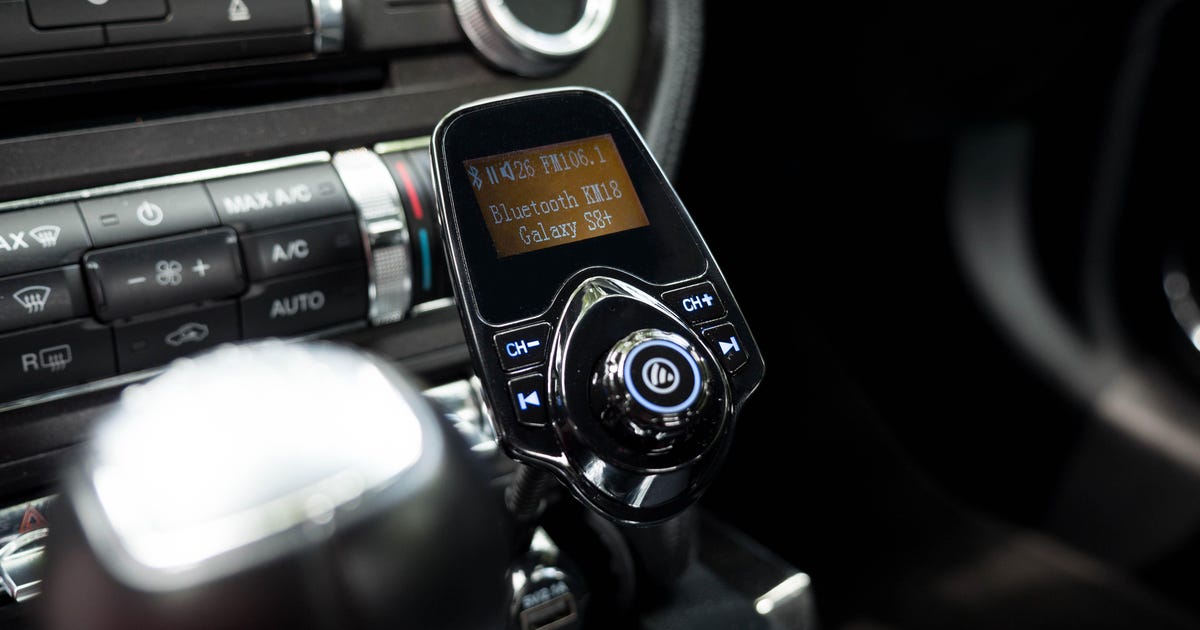
Connect with the FM transmitter and play
What to follow, the best connection method for each person
How to listen to music on your smartphone by car?
The smartphone that most people use now. Smartphones are playing an active role not only in daily life and work, but also in driving, for example, providing cars a function that allows car manufacturers to be linked to smartphones.
In addition, many people use their smartphones such as music players and many people want to listen to the songs that they usually listen while driving. There are four main ways to listen to music on your car smartphone.
Listen with Bluetooth
Connect the USB cable and listening
Listen with voice entry (AUX)
Listen with FM Transmitter
Bluetooth is the mainstream now, but some people can say that their car is not compatible with Bluetooth or that sound quality can deteriorate if it is wireless. Therefore, we will present the advantages and disadvantages of each connection method.
Connect and play through Bluetooth
The first method that I will present is to connect your smartphone to a car navigation system (or stereo of the automobile) via Bluetooth. If your car already has a car navigation or stereo system with Bluetooth, this method is the most economical.
What are the benefits of connecting through Bluetooth and Listen?
In the Bluetooth case, once the pairing is completed, the smartphone and the car will connect automatically from the next time, and the music will be played automatically when the car is turned on. ..
The best part is that you do not have to buy additional equipment. Since radio waves are omitted and music is reproduced, it is not necessary to prepare wiring as cables, and the cables do not hang into the car. As it is not necessary to enter the cable one by one, although you connect a person’s smartphone in the rear seat, for example, the cable does not go through the inside of the car and is very smart.
What are the disadvantages of connecting by Bluetooth and Listen?
Since it is necessary to have a navigation and audio system for the car that Bluetooth admits, it will be expensive to install it if it is not installed. In many cases, rental cars and shared cars are not compatible with this.
It can also be annoying to play automatically.
Connect with a USB cable and play
Many of the latest audio and navigation systems for automobiles can be equipped with a USB terminal. In most cases, this USB terminal supports not only the load, but also the audio playback. If you prepare and connect a USB cable, you can listen to music while loading.
The codec is a factor that determines the quality of the sound
It is sometimes said that the sound quality changes depending on the Bluetooth codec, but it is more accurate to think of it as “a factor that determines the sound quality”.
For example, the order in which sounds are transmitted when listening to music with wireless headphones can be simplified as follows.
Play music on your smartphone (playback device / software)
Music data is compressed and transmitted to headphones (codec)
Restore the data received by the headphones to the analog signal (DAC)
Amplify the analog signal (amplifier)
Send the amplified signal to the speaker (driver)
As mentioned above, there are many factors that determine the sound quality other than the Bluetooth codec, so it is good to understand that “the sound quality does not change with the Bluetooth codec alone.”
Free professional consultation! Reservation accepted today
Tech Camp is a school that allows engineers and web designers to trade jobs for inexperienced people. (If conditions are met, benefits will be paid). With a
complete support system, the success rate to change jobs is 99%! * Click here to learn about the experiences of those who actually took the course.
“Is it okay for me to continue with the current job if there is anxiety and” any free advice I can refer to? Why not participate? A professional IT career change counselor will solve your problems from a neutral point of view.
As a blog reader privilege, we are giving away an Amazon gift certificate worth 3,000 yen! We will not make any unreasonable requests, so please feel free to contact us. * Accumulated results from September 1, 2016 to December 31, 2020. Percentage of those who have completed the prescribed learning and career change activities
Bluetooth codec list
We present the main Bluetooth codecs used in Bluetooth audio equipment.
Bluetooth codec list
Feature codec name
SBC Standard Bluetooth Audio Codec
CAA High quality sound codec mainly used in iPhone
aptX Higher sound quality and lower delay than SBC and AAC
aptX LL Sound quality equivalent to aptX and less lag
aptX HD High-quality sound codec supporting 24-bit / 48 kHz
Adaptive aptX Codec that achieves high sound quality, low lag, and connection stability
LDAC High-quality sound codec developed by SONY that supports up to 24-bit / 96kHz
Samsung scalable codec Achieves high sound quality and connection stability with the original Samsung codec
HWA High-quality, low-delay codec developed by Huawei
UAT 24-bit / 192 kHz ultra-high sound quality with original Hiby Music codec
SBC
SBC (Subband Codec) is a standard codec for Bluetooth audio.
The number of quantization bits / sample rate is 16-bit / 48 kHz, the latency (delay) is 220 ms (± 50 ms), and in principle it can be played on all Bluetooth audio devices.
At the beginning of its appearance it was said that the sound quality was poor, but it has been improving with the advancement of technology, and it is said that it has reached a level comparable to other codecs depending on the device.
CAA
Source: AirPods (2nd generation) -Apple (Japan)
AAC (Advanced Audio Coding) is a codec with lower delay and higher sound quality than SBC.
The number of quantization bits / sample rate is 16 bit / 48 kHz and the latency (delay) is 120 ms (± 30 ms) at 128 kbps, which is mainly used in Apple products (iPhone / iPad).
aptX
Source: Qualcomm® aptX ™ Audio
aptX is a high-quality, low-latency codec developed by CSR (currently purchased by Qualcomm).
The number of quantization bits / sample rate is 16-bit / 48 kHz and the latency (delay) is 70 ms (± 10 ms), which is used in the standard codec of Android smartphones.
As the name implies, aptX LL (aptX Low Latency) is a low latency codec.
The number of quantization bits / sample rate is 16 bits / 48 kHz, which is the same as aptX, but the latency (delay) is very small, less than 40 ms.
Since there is little discrepancy between video and audio, it can be said to be the best codec for watching videos and gaming.
aptX HD
Source: Qualcomm® aptX ™ HD Audio
aptX HD is a codec that improves the sound quality of aptX.
Although the latency (delay) is approximately 130 ms, which is less than aptX, the number of quantization bits / sample rate has been expanded to 24-bit / 48 kHz and the range of expression has been expanded.
The headphone jack has disappeared from the iPhone and wireless headphones have quickly become mainstream.
Bluetooth is used for wireless headphone communication, and the difference in the Bluetooth codec affects sound quality and sound delay.
This article describes the Bluetooth codec according to the following items.
What is a Bluetooth codec?
Main Bluetooth codecs and their characteristics
How to check the Bluetooth codec of your computer / smartphone
Please refer to that.
3 Smartphone / PC Bluetooth codec support information and confirmation method
3.1 How to check the supported Bluetooth codec on your Android smartphone
3.2 How to check the compatible Bluetooth codec on iPhone / iPad
3.3 Bluetooth codec compatible with Windows PC
3.4 Bluetooth codec for Mac
4 Choose the Bluetooth codec that suits your purpose
What is a Bluetooth codec? Audio compression method
The Bluetooth codec is a “method of compressing audio data”.
When sending voice data from smartphone or PC to wireless headphones, etc., the amount of data is large and time consuming and delays occur.
Compression technology solves this problem.
There are several compression technologies, each with different delay, compression efficiency, sound quality, etc., and the general term for these compression methods is “codec.”
Delay, compression efficiency, and sound quality differ by codec
There are three main differences depending on the Bluetooth codec.
delay
Compression efficiency
Sound quality
“Delay” represents the time lapse between the sender and the receiver.
When watching a video, the smaller the lag, the smaller the gap between the video and the audio, and the more natural the video can be seen.
“Compression efficiency” indicates how efficiently the audio data can be compressed, and the higher the compression efficiency, the smaller the amount of data.
Codecs with high sound quality, low latency and high connection stability, such as aptX LL and aptX adaptive, can be said to have high compression efficiency.
Is the sound quality of the Bluetooth headphones not good? Part 4
What is low quality Bluetooth codec?
SBC (Sub Band Codec) is a codec that is said to have low sound quality, unlike high sound quality codecs like AAC, aptX, aptX HD, and LDAC.
In general, according to a wireless connection (radio) apparently towards the low sound quality Bluetooth connection with a wired connection connecting the AUX connection cable or the like Bluetooth, also flat sound and lengthening treble lost the stereoscopic realism Sound quality is said to be often suppressed, which is largely due to this SBC.
SBC, which is a codec specified as standard support in A2DP for music streaming, has become a specification that considerably sacrifices sound quality due to reasons such as reducing the hardware load of the computer under the premise at the time. specification …
Although the sound quality is low, on the contrary, there are few restrictions on the device side and it has been adopted in various devices, so it can be said that it was the engine that drove the widespread use of Bluetooth.
Bluetooth A2DP codec list
Using the bitrate as an index that determines the sound quality, if you rearrange the Bluetooth A2DP codecs in a list,
[Reference] FM radio: about 96 kbps
SBC: Since it is a standard A2DP codec, it can be used with all devices that support Bluetooth A2DP. Practically 64 to about 200 kbps.
AAC – Originally the format adopted by the iTunes Store. Widely used in Apple Bluetooth devices such as iPhone and iPod. Effectively up to 320 kbps.
aptX – Currently developed by CSR Limited, which was acquired by Qualcomm. Really up to 384 kbps.
aptX HD – Like aptX, developed by CSR Limited. Actually up to 576 kbps higher than aptX.
LDAC: developed by Sony. It is mainly used to connect high quality sound sources, such as high resolution. Really up to 990 kbps.
[Reference] Media that records compressed sound sources such as mp3 / AAC: Nearly 64 to 320 kbps
[Reference] CD (-DA): 1,411 kbps
Will be. The higher the number, the greater the amount of data per second, so the sound quality is considered to be higher. The Bluetooth connection via SBC is approximately 200 kbps even under the best communication conditions. If the communication conditions are bad, the amount of data transfer will be reduced to the equivalent of 64 kbps and the sound quality will be lower than that of FM radio.
For example, generally well compressed sound source data, such as mp3 or AAC, used is a data amount of about 256 kbps, when selecting the SBC as the codec, the Bluetooth connection, the part of the Bluetooth connection due to the low SBC quality, it becomes a bottleneck.
SBC has already finished its role in popularizing Bluetooth to some extent. In the future, considering that the maximum bit rate supported by general compressed sound sources like mp3 and AAC is 320 kbps, AAC, aptX, aptX HD and LDAC, which are high quality sound codecs with a standard of 320 kbps or higher. , it will be possible. I think you should use it as much as possible to make a Bluetooth connection.
– –
4 points to consider when using a high quality Bluetooth sound codec (AAC, aptX, LDAC)
Next, I would like to write about the precautions when using high quality sound codecs when connecting to Bluetooth A2DP: AAC, aptX, aptX HD and LDAC.
Generally speaking, there are four points to consider when connecting a high-quality Bluetooth A2DP sound codec.
Both connected devices must support the same high-quality codec
Be careful of wireless connection environment other than Bluetooth, such as WiFi and radio wave interference
AAC codec support such as Bluetooth A2DP is required instead of AAC file support
Reconfirm the A2DP codec selection settings for the Bluetooth connection
Is the sound quality of the Bluetooth headphones not good? Part 3
Correct use of high-quality sound codec to avoid deterioration of the sound quality of the Bluetooth connection!
With the expansion of Bluetooth, when listening to music on a smartphone such as an iPhone or Walkman, it is no longer necessary to connect a cable each time, making it extremely convenient.
But did you know that there are actually high and low quality Bluetooth connections that look the same?
Bluetooth high quality sound connection codec picture
There are several standards for high-quality Bluetooth connection methods.
However, even if the Bluetooth device supports a high-quality sound connection, if you make a mistake in pairing with the other party’s Bluetooth device, the connection may inadvertently lead to low-quality sound, so be careful.
For example, just like you feel that the sound has changed when you switch the headset from a wired connection to a Bluetooth connection, the sound quality improves depending on the connection partner even with the same Bluetooth compatible device, such as headphones, earphones, Portable speakers. , car navigation systems, car audio, etc. It can happen that it gets worse or worse.
Here, I will write about the method and precautions for connecting to high-quality sound via Bluetooth so that you can connect to Bluetooth with the best possible sound quality.・ High-quality sound codec support status list (link on page) of Bluetooth Compatible Devices.
Table of Contents
PR
What is the Bluetooth A2DP codec?
What is a codec?
First of all, what is a “codec” in general? As for, if you write it in English, it will be “codec”. When stripped, “codec = co der + DEC”, is made up of “oder”, which is a method of decoding data as a code (en).
With a Bluetooth connection, the music data is sent as a wireless signal, that is, a radio wave, but the data is compressed to transmit it efficiently when the radio wave is sent over the air. In other words, the Bluetooth codec is a method that compresses data before transmission and decompresses it after reception.
What is a high-quality Bluetooth codec?
As a Bluetooth codec, that is, a data compression method, the following four methods are a method that can achieve the necessary data compression while maintaining high sound quality, that is, a high sound quality codec.
AAC – Originally the format adopted by the iTunes Store. Widely used in Apple Bluetooth devices such as iPhone and iPod. Effectively up to 320 kbps.
aptX – Currently developed by CSR Limited, which was acquired by Qualcomm. Really up to 384 kbps.
aptX HD – Like aptX, developed by CSR Limited. Actually up to 576 kbps higher than aptX.
LDAC: developed by Sony. It is mainly used to connect high quality sound sources, such as high resolution. Really up to 990 kbps.
The higher the number, the greater the amount of data per second, so it can be said that the sound quality is higher.