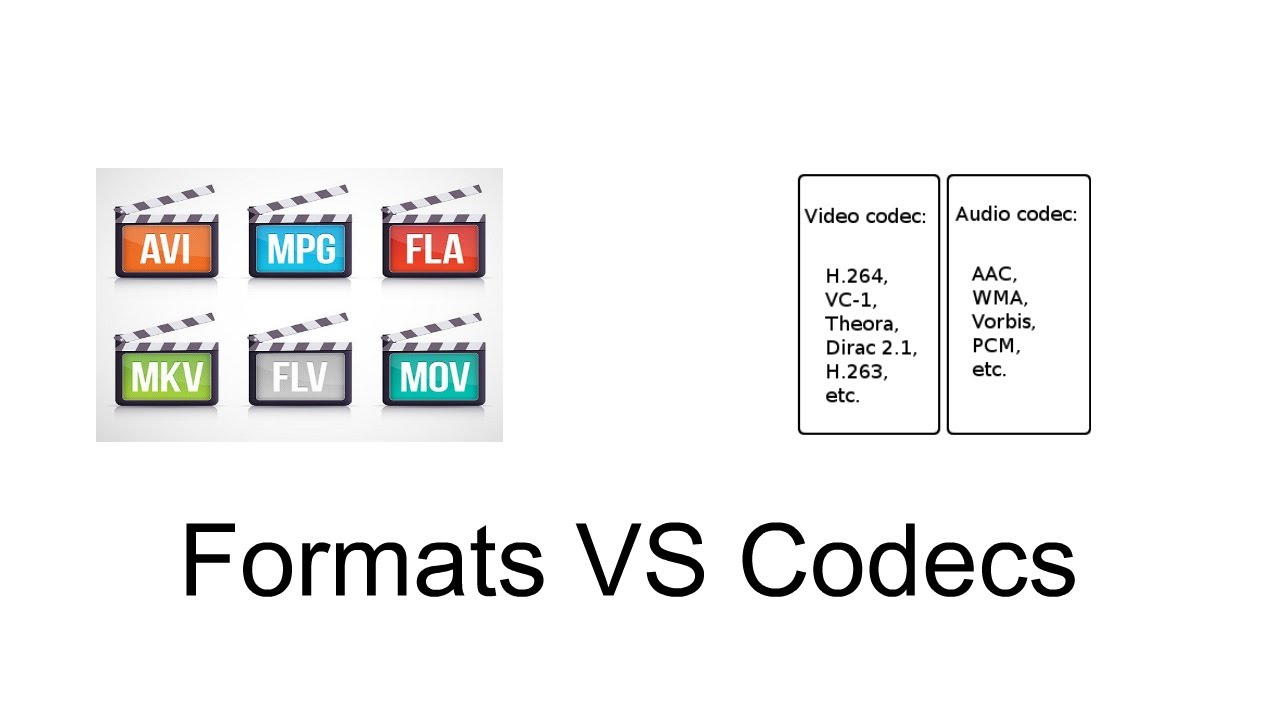
Audio codecs, short for compression-decompression algorithms, are essential tools in the world of digital audio. Think of them as translators that help digital audio files communicate efficiently while conserving storage space and maintaining sound quality. They achieve this by encoding audio data during compression and decoding it during playback.
Imagine you’re packing for a trip, and you want to save space in your suitcase. You decide to use vacuum-sealed bags for your clothes. Similarly, an audio codec compresses audio data into a more compact format for efficient storage or transmission. When you unpack your suitcase at your destination, you release the air from the bags to restore your clothes to their original form—this is akin to an audio codec decoding compressed audio data for playback.
There’s a wide range of audio codecs available, each with its own strengths and weaknesses. Some prioritize small file sizes, making them ideal for streaming, while others emphasize preserving audio quality, a must for audiophiles. Understanding these differences helps you choose the right codec for your specific needs.
What Are Lossless Audio Codecs?
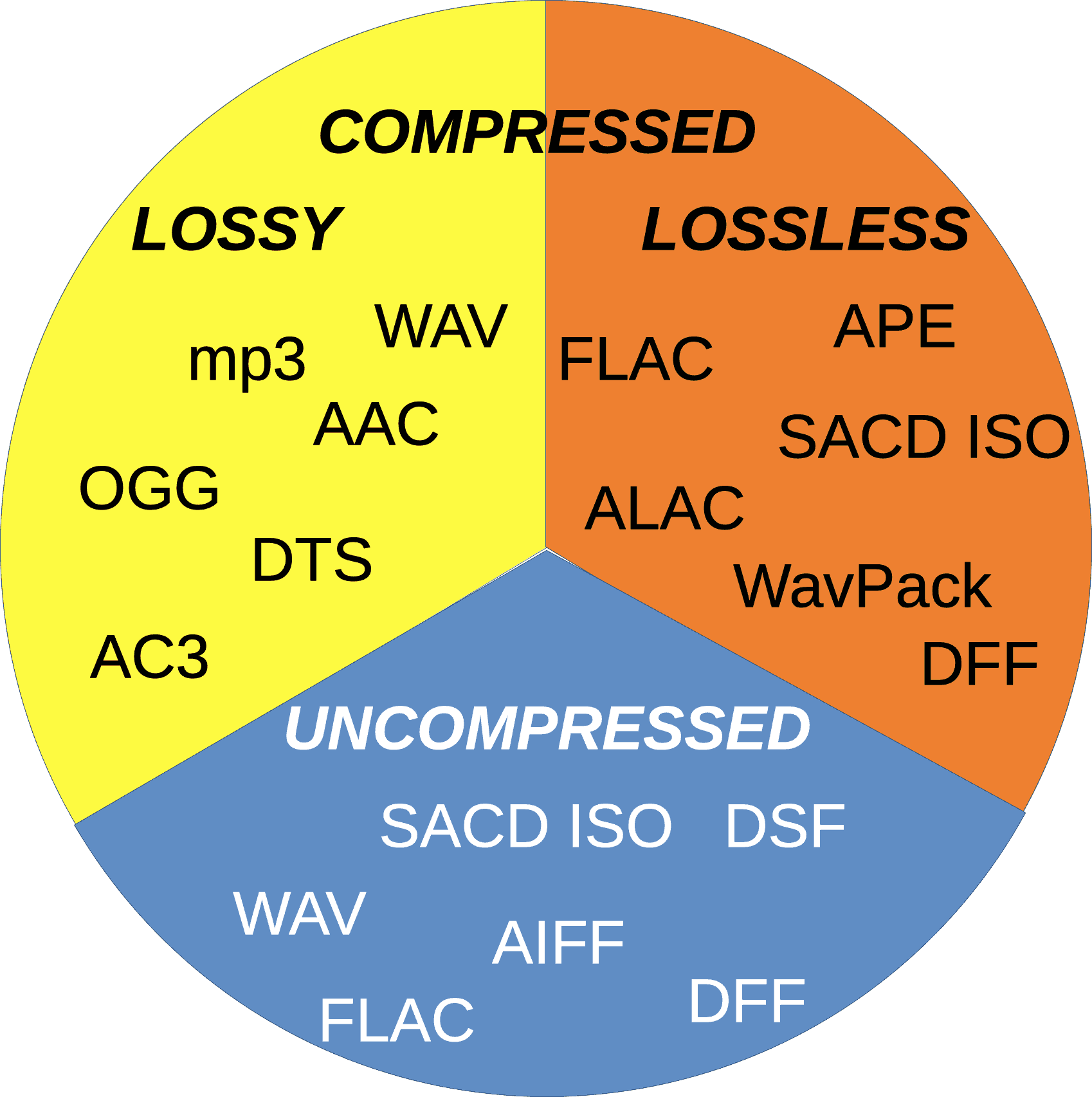
Lossless audio codecs are like the archivists of the audio world. They compress audio data without sacrificing any of the original quality. This is akin to zipping a file on your computer; when you unzip it, you get back an identical copy of the original.
Imagine you have a precious handwritten letter. You want to make a copy for safekeeping, but you don’t want to lose any detail or quality. A lossless audio codec accomplishes this by finding patterns in the audio data and encoding them more efficiently. When you want to listen to the music or sound stored with a lossless codec, it’s like opening the envelope of your preserved letter—you get the same experience as the original.
Lossless audio codecs are favored by audiophiles and professionals who prioritize audio quality over file size. They are ideal for archiving music collections and audio recordings where every nuance matters.
Popular Audio Codecs
When it comes to audio codecs, several popular options are commonly used in various applications. One of the most recognizable is MP3, which revolutionized digital music. MP3, short for MPEG-1 Audio Layer 3, achieves significant compression while maintaining decent audio quality, making it suitable for music streaming and portable devices.
AAC (Advanced Audio Coding) is another well-known codec, commonly used by Apple devices. It offers superior sound quality compared to MP3 at similar bitrates, making it a popular choice for iTunes and other Apple platforms.
For lossless audio, FLAC (Free Lossless Audio Codec) stands out. It’s widely adopted by audiophiles and music enthusiasts for its ability to compress audio without any loss in quality. FLAC files are perfect for preserving high-fidelity audio.
As an expert in audio technology, I can confidently say that understanding audio codecs is crucial for anyone working with digital audio. Whether you’re a music lover, a content creator, or a tech enthusiast, the right knowledge about audio codecs can significantly enhance your experience and the quality of your audio content.
Audio codec rate control plays a crucial role in determining the balance between audio quality and file size. Over the years, significant advancements have been made in rate control methods, enabling more efficient compression and higher audio fidelity. One such innovation is the use of machine learning algorithms to optimize rate control parameters.
By employing machine learning models, audio codecs can analyze audio content and adapt their rate control strategies dynamically. This approach allows codecs to adjust bitrate allocation based on the complexity of the audio signal, resulting in improved audio quality with reduced file sizes.
“Incorporating machine learning into rate control empowers audio codecs to make smarter decisions, delivering exceptional audio quality while efficiently utilizing available bitrate.” – Audio Compression Trends: The Rise of Machine Learning
Another notable advancement is the implementation of psychoacoustic models in rate control algorithms. These models simulate human hearing perception to identify irrelevant audio components that can be discarded without compromising perceptual audio quality. By leveraging psychoacoustic principles, codecs can allocate bitrates more effectively, focusing on preserving the most critical audio elements.
“Psychoacoustic rate control techniques revolutionize audio compression by optimizing the allocation of bits to retain the essential components that shape the listener’s auditory experience.” – The Art of Audio Rate Control: Psychoacoustic Innovations
Impact of Rate Control Methods on Audio Quality
Rate control methods significantly influence the audio quality of compressed files. In constant bitrate (CBR) control, a fixed amount of bits is allocated per audio frame, ensuring a consistent bitrate throughout the file. While CBR guarantees a predictable file size, it may lead to audio artifacts and inefficiencies in bitrate allocation.
On the other hand, variable bitrate (VBR) control dynamically adjusts the bitrate based on the complexity of the audio content. VBR allows higher bitrates for more intricate audio segments, resulting in better audio quality compared to CBR. However, VBR may lead to larger file sizes, which can be a concern in bandwidth-constrained scenarios.
“Choosing the right rate control method is a trade-off between audio quality and file size. While CBR offers predictability, VBR excels in preserving audio fidelity by allocating more bits to intricate audio segments.” – Rate Control Strategies: Balancing Quality and Efficiency
Improving Audio Compression Efficiency with Rate Control Techniques
Rate control techniques play a vital role in improving audio compression efficiency. By optimizing the allocation of bits, codecs can achieve higher compression ratios without compromising audio quality. One of the key techniques is adaptive rate control, where the codec continuously monitors the audio signal and adjusts the bitrate allocation on the fly.
Adaptive rate control is particularly valuable in real-time communication applications, such as VoIP calls and video conferencing. These applications require low-latency audio transmission, and adaptive rate control ensures efficient utilization of available bandwidth while maintaining high-quality voice communication.
“Adaptive rate control ensures efficient audio compression in real-time communication, providing users with crystal-clear voice quality even in bandwidth-constrained environments.” – The Power of Adaptation: Efficient Rate Control for Real-Time Communication
Additionally, hybrid rate control methods combine the advantages of both CBR and VBR. By employing adaptive elements alongside a predetermined bitrate for certain segments, hybrid rate control strikes a balance between consistency and efficiency.
“Hybrid rate control methods merge the strengths of CBR and VBR, offering a flexible approach to audio compression that optimizes bitrate allocation based on audio content complexity.” – Hybrid Rate Control: The Best of Both Worlds
Trade-offs between Rate Control and Encoding Time
Rate control methods may also impact encoding time, which is a crucial consideration in various applications. In general, CBR encoding requires less computation, as the bitrate allocation remains constant throughout the encoding process. This results in faster encoding times compared to VBR, where the bitrate allocation varies frame by frame.
However, the encoding time can vary depending on the complexity of the rate control algorithm used. Some advanced rate control methods, like machine learning-based models, may require additional computational resources but can achieve better compression efficiency.
“Developers must strike a balance between encoding time and compression efficiency when selecting rate control methods, considering the specific needs of their applications.” – Rate Control Trade-offs: Balancing Speed and Efficiency
In real-time communication applications, low encoding time is crucial to ensure minimal latency during audio transmission. Adaptive rate control, which adjusts bitrate allocation on the fly, allows for efficient compression without significant delays.
“Real-time communication demands low encoding time, making adaptive rate control a valuable choice for ensuring real-time voice transmission with minimal latency.” – Low Latency Encoding: Enabling Real-Time Communication
Rate Control and Audio Codec Decoding Requirements
The choice of rate control method also affects the decoding requirements of audio codecs. In CBR-encoded files, the decoding process is straightforward, as the bitrate remains constant throughout the file, requiring a relatively simple decoding algorithm.
In contrast, VBR-encoded files require more sophisticated decoding algorithms to adapt to the varying bitrates. Decoders must analyze the bitrate information within each frame to accurately reconstruct the audio signal.
“VBR-encoded files demand more robust decoding algorithms, as decoders must dynamically adjust to the varying bitrates to ensure faithful audio reproduction.” – VBR Decoding: Adapting to Bitrate Variability
The complexity of adaptive rate control methods may also impact decoding requirements. In adaptive rate control, both the encoder and decoder must share information to adjust the bitrate allocation effectively. This interaction between the encoder and decoder may require higher computational resources for decoding.
“Adaptive rate control introduces a level of complexity in decoding, as the encoder and decoder must collaborate to ensure efficient bitrate allocation and high-quality audio reconstruction.” – Adaptive Rate Control: Coordinating Encoder and Decoder
Rate Control Methods for Low-Latency Applications
In low-latency applications like real-time communication, rate control methods must strike a balance between audio quality and transmission speed. Adaptive rate control stands out as an excellent choice for such scenarios, as it allows codecs to adapt to varying network conditions while prioritizing audio clarity.
Another effective strategy for low-latency applications is the use of scalable rate control. Scalable codecs produce multiple layers of audio data, enabling receivers to decode the appropriate layer depending on the available bandwidth. This approach ensures seamless audio transmission even in bandwidth-constrained environments.
“Scalable rate control enables low-latency audio transmission by offering multiple layers of data, allowing receivers to select the optimal layer for their available bandwidth.” – Scalable Codecs: Adapting to Bandwidth Constraints
Low-latency rate control techniques also play a crucial role in gaming applications, where real-time voice chat and audio cues are essential for player coordination and immersion. Adaptive bitrate allocation in these contexts ensures that critical audio information is transmitted with minimal delay.
“Low-latency rate control techniques are fundamental in gaming applications, delivering real-time voice communication and audio cues that enhance player experiences.” – Real-Time
The Impact of Audio Codec on Voice QualityThe Impact of Audio Codec on Voice Quality
How Does the Choice of Audio Codec Affect Voice Quality?
The choice of an audio codec can significantly influence the quality of voice reproduction in various applications. While some codecs prioritize efficiency and smaller file sizes, others focus on preserving audio fidelity. For voice-centric applications like voice calls, video conferencing, and voice-over work, the balance between compression and audio quality becomes crucial. High-compression audio codecs, commonly used for online streaming and communication, may sacrifice some voice clarity to achieve smaller file sizes. On the other hand, lossless codecs prioritize audio fidelity, ensuring a true representation of the original voice recording.
Finding the right audio codec for voice-related applications involves striking a balance between compression efficiency and voice clarity. It’s essential to understand the specific requirements of each use case and choose an appropriate codec that delivers the desired voice quality.
“In the world of audio codecs, the choice between compression and voice quality becomes a delicate dance. A careful balance is required to ensure efficient data transmission while preserving the essence of the human voice.” – The Art of Voice Quality in Audio Codecs
What is the Impact of Audio Compression on Voice Clarity?
Audio compression is a fundamental process in audio codecs, aiming to reduce file sizes without significantly compromising audio quality. However, the level of compression directly affects voice clarity, especially in lossy codecs.
In lossy codecs, the compression process discards some audio data deemed less essential to human hearing. While this can achieve considerable compression ratios, it may result in a loss of subtle nuances in the human voice, affecting overall clarity.
On the other hand, lossless codecs retain all audio data, ensuring pristine voice clarity at the cost of larger file sizes.
The impact of audio compression on voice clarity is a delicate balance, and striking the right compromise is essential to maintain the intelligibility and naturalness of voice recordings.
“Audio compression is a double-edged sword. While it empowers efficient data transmission, its impact on voice clarity demands careful consideration in audio codec design.” – The Voice Clarity Conundrum: Balancing Compression and Fidelity
Which Audio Codecs Offer the Best Voice Quality?
When it comes to voice quality, lossless audio codecs are known for their ability to preserve audio fidelity faithfully. Formats like FLAC and PCM are renowned for their pristine reproduction of voice recordings, making them ideal choices for applications where audio quality is paramount.
However, lossless codecs come with the trade-off of larger file sizes, which may not be practical for certain applications with bandwidth and storage constraints.
On the other end of the spectrum, high-quality lossy codecs like Opus have garnered recognition for their impressive voice reproduction capabilities at lower bitrates. Opus excels in real-time communication applications, providing clear and natural voice quality even with reduced data transfer.
Ultimately, the best audio codec for voice quality depends on the specific requirements of each application, considering factors like available bandwidth, storage limitations, and the desired level of audio fidelity.
“Voice quality enthusiasts lean towards lossless codecs, while real-time applications find solace in high-quality lossy codecs, proving that there’s no one-size-fits-all solution in the quest for perfect voice reproduction.” – Unraveling the Quest for the Ultimate Voice Codec
Can a High-Compression Audio Codec Maintain Voice Fidelity?
The pursuit of higher compression ratios in audio codecs is often at odds with the preservation of voice fidelity. High-compression audio codecs, designed to reduce file sizes significantly, inevitably introduce some degree of data loss.
While modern high-compression codecs have made significant advancements in audio quality preservation, it remains challenging to achieve near-lossless voice reproduction at ultra-low bitrates.
However, certain advanced codecs like Opus have managed to strike a remarkable balance between compression efficiency and voice fidelity. Opus’s hybrid approach, combining both lossy and lossless techniques, allows it to deliver exceptional voice quality even at lower bitrates.
While the compromise between compression and voice fidelity is inevitable, the development of more efficient codecs continues to push the boundaries of what’s achievable in audio compression.
“The holy grail of high-compression audio codecs lies in the delicate dance between efficiency and fidelity, with Opus leading the charge in delivering impressive voice quality at low bitrates.” – The Quest for Voice Fidelity: Navigating the Compression Maze
How Does the Bitrate of an Audio Codec Affect Voice Reproduction?
The bitrate of an audio codec plays a pivotal role in voice reproduction, directly impacting the level of audio detail and clarity. Higher bitrates allocate more data to represent audio nuances, resulting in improved voice fidelity and overall sound quality.
On the other hand, lower bitrates reduce the amount of data allocated to voice reproduction, leading to a trade-off between reduced file sizes and a potential loss of voice clarity.
The selection of the appropriate bitrate for voice-related applications depends on various factors, including the target platform, available bandwidth, and the desired level of voice quality.
“The bitrate of an audio codec acts as a master puppeteer, orchestrating the balance between file size and voice quality, ultimately defining the audio experience.” – The Bitrate Dilemma: Striking the Perfect Balance in Voice Reproduction
Is Voice Quality Compromised in Lossy Audio Codecs?
Lossy audio codecs are designed to achieve high compression ratios by discarding audio data that is deemed less critical to human hearing. While this approach enables efficient data transmission, it inevitably results in some loss of audio fidelity.
The impact of voice quality compromise in lossy codecs depends on the specific bitrate used and the complexity of the audio content. At higher bitrates, the loss of voice clarity is minimal, while lower bitrates may exhibit more noticeable artifacts in voice reproduction.
Despite the inherent trade-off, modern lossy codecs like Opus excel in voice-centric applications, striking a balance between compression and voice quality, especially in real-time communication scenarios.
“Lossy codecs present a delicate challenge, but with modern advancements, they’ve proven capable of delivering impressive voice quality, redefining the boundaries of audio compression.” – Embracing the Nuances: Unraveling Voice Quality in Lossy Codecs
What Are the Factors that Influence Voice Quality in Audio Codecs?
Voice quality in audio codecs is influenced by several critical factors: Bitrate: The bitrate directly affects the amount of data allocated to voice reproduction, impacting overall voice clarity and sound fidelity.
Compression Algorithm: The compression algorithm determines the balance between data reduction and audio fidelity, affecting the level of voice quality preservation.
Latency: Low latency in real-time communication applications contributes to a more natural and seamless voice experience3. Keywords (related to “The Impact of Audio Codec on Voice Quality”):
Recently, more and more wireless headsets and smartphones have been released without a 3.5mm jack, and the latter are getting more and more sophisticated Bluetooth codecs.
However, desktop systems are much more conservative in this regard: here almost all devices are still equipped with a headphone jack, and the cable rarely interferes, therefore, with the transmission of sound via Bluethtooth, here everything is sadder.
However, the customization of a PC is much greater than that of smartphones, so if you bought great wireless headphones, don’t worry, you can also enjoy high-quality sound on the desktop operating system.
What are Bluetooth codecs?
First, a brief introduction to the theory. With wireless sound transmission, everything is more complicated than with a wired one: here you cannot just connect the cable and immediately get high-quality sound; this requires that both the headphones and the device support the desired codec.
Their complete list is quite impressive:
SBC is the basic codec included in the A2DP standard, which is compatible with 99% of all BT devices released in the last 10 years, and absolutely all wireless headphones. Consequently, if you don’t want to understand, you can just buy any BT headset and connect it to your device; the music will be broadcast. It would seem, what is the problem then? And is that SBC is comparable in sound quality to mp3 with a bit rate of 128 kbps: that is, you can listen to podcasts or YouTube videos without any problem, but you can hardly enjoy the music. Therefore, in the last 10 years, more “cooler” codecs have been developed, which transmit sound better.
AptX is perhaps the most qualitative leap after SBC. And while its bit rates are comparable (~ 300 kbps), AptX squeezes sound less harshly, so music in plugs or inexpensive headphones will often sound even better than when the same headphones are connected with a cable to a smartphone. Unfortunately, on a PC, even with a built-in audio card, the sound through the cable can still be better, although you do need some pretty expensive headphones to tell the difference. Therefore, this codec can be considered a basic level – a sufficient number of users listening to music on streaming services in mp3 with bit rates of 250-320 kbps, such BT sound will suit.
AptX LL – Same AptX, but with low latency (low latency). If conventional wireless codecs have a delay of 100-200 ms, here it is below 40 ms, which is important in games. However, in reality, it all largely depends on both your device and the headphones: for example, personally, I do not feel the audio lag in AptX HD in games.
AptX HD is an improved version of AptX with a bit rate almost double (576 kbps). But this is still a lossy transmission of sound, although much less than in the case of previous codecs. As a result, if you listen to music on Spotify, Apple Music, and other services, the sound quality will be indistinguishable from cable or even better if you have high-quality headphones with a good DAC inside. But if you prefer lossless and, most likely, have special equipment to listen to it, unfortunately the cable here will still be noticeably better.
LDAC is Sony’s highest quality codec (available for free on Android 8.0 and above). It has three levels of bitrate: 330, 660 and 990 kbps. The former is similar in quality to AptX, so there is no point in considering it. The second works roughly at the level of Aptx HD. But the third, perhaps the most interesting: it is obvious that for music from streaming services this is excessive, but this is almost the only codec that allows you to transfer without loss with almost no loss of quality. However, problems are already emerging with the stability of transferring music with such a high bit rate; in other words, already behind a wall of the fountain, you will be haunted by the constant stuttering of sound.
LHDC is an analog of Huawei’s LDAC, it has a bit rate of 900 kbps, while only this company’s smartphones and some headphones support it. As a result, in terms of quality, it should work at the LDAC level, but in practice you most likely won’t find it anywhere.
AAC is the only high-quality codec supported by iPhone. Not having the highest bit rate of 256 kbit / s allows you to get quality sound somewhere between AptX and AptX HD due to this being the only psychoacoustic codec between them.
While Bluetooth technology offers an easy way to listen to wireless audio through speakers and headphones, some people are opposed to Bluetooth because in terms of audio fidelity it is better to choose one of the Wi-Fi based wireless technologies such as AirPlay, DLNA , Play-Fi or Sonos. … While this understanding is generally correct, there is more to using Bluetooth than meets the eye.
A little about Bluetooth technology
Bluetooth was not originally created for audio entertainment, but rather to connect speakerphone and phone headsets. It has also been designed with a very narrow bandwidth, which forces data compression to be applied to the audio signal. While this format may be ideal for phone calls, it is not ideal for playing music. Additionally, Bluetooth can apply this compression over existing data compression, such as digital audio files or sources streamed over the Internet.
Bluetooth 5.0 standard – a new level of wireless communication
But one important thing to keep in mind is that the Bluetooth system should not apply this additional compression. That’s why:
All Bluetooth devices must support low complexity subband encoding. However, Bluetooth devices can also support additional codecs, which can be found in the Bluetooth Advanced Audio Distribution Profile specification. Additional codecs listed: MPEG 1 and 2 Audio, MPEG 3 and 4, ATRAC and aptX.
In fact, the familiar MP3 format is MPEG-1 Layer 3, so MP3 is included in the specification as an additional codec.
Additional Bluetooth codecs
The official Bluetooth standard in section 4.2.2 states: “The device can also support additional codecs to maximize usability. When both SRC and SNK support the same subcode, that codec can be used instead of the required codec. ”
In this document, SRC refers to the source device and SNK refers to the destination (or receiver) device. So the source would be your smartphone, tablet, or computer, and the receiver would be your bluetooth speaker, headset, or receiver.
By design, Bluetooth does not necessarily add additional data compression to material that is already compressed. If both the source and receiver devices support the codec used to encode the original audio signal, the audio can be transmitted and received without change. So if you are listening to MP3 or AAC files that you have saved on your smartphone, tablet, or computer, Bluetooth should not degrade the sound quality if both devices support this format.
This rule also applies to Internet radio and music streaming services that are encoded in MP3 or AAC format, which covers most of what is available today. However, some music services are experimenting with other formats, for example Spotify uses the Ogg Vorbis codec.
According to the Bluetooth SIG, the organization that licenses Bluetooth, compression remains the norm for now. This is mainly due to the fact that the phone has to transmit not only music, but also calls and other notifications related to calls. However, there is no reason why a manufacturer cannot switch from SBC compression to MP3 or AAC if it supports the Bluetooth receiver. This will apply compression to the notifications, but the original MP3 or AAC files will be transmitted without modification.
What about aptX
The quality of stereo sound transmitted via Bluetooth has improved over time. The current aptX codec, which is marketed as an upgrade to the mandatory SBC codec, provides CD-like audio quality via Bluetooth wireless technology.
Just remember that both your Bluetooth source and receiver need to support the aptX codec in order to benefit. However, if you are playing MP3 or AAC material, it is best if the manufacturer uses the proprietary format of the original audio file without additional transcoding via aptX or SBC.
Bluetooth 5.0: new power saving mode
Most Bluetooth audio devices are not made by companies whose employees wear their brand on their chest, but by an original design that you have never heard of. And the Bluetooth receiver used in the audio product was probably not made by ODM, but by another manufacturer. The more complex a digital product is and the more engineers work on it, the more likely it is that no one knows everything about what is actually going on inside the device. One format can easily be transcoded to another and you will never know, because hardly any Bluetooth receiver will tell you what the incoming format is.
A must-have brief on Bluetooth, from the basics to daily practice in audio land, was posted on HiFi.nl this summer. That raised a number of questions for readers, which, in short, are almost the same: “Great, that wireless connection, but what is left of the quality of the source file when you send audio over Bluetooth?”
We know that since the introduction of the current standard in the field of wireless connection, things have evolved considerably. While Bluetooth was never primarily intended to send or receive audio signals, but rather to allow hardware like the mouse and keyboard to communicate with each other, quite a few steps have been taken to exploit and enhance those capabilities. Consider Bluetooth version 4.0 and the arrival of the now-familiar aptX codec. However, the transfer is not (yet) loss-free. Is the quality of the source file sufficiently preserved with a wireless connection via Bluetooth? In other words, does it make sense to play FLAC instead of MP3, for example if you use Bluetooth to send the music to your speaker?
Codecs
The wired versus wireless discussion will likely always persist. After all, there are numerous hi-fi manufacturers that specialize in audio cables and tell a very good story about it (and besides, of course, there’s the good digital cable twist). When talking specifically about wireless audio over Bluetooth, there is always the element of compression. Due to the limited bandwidth of the connection, by definition there will be data compression and therefore loss of quality. (Not to mention, Bluetooth operates within the 2.4Ghz frequency that many other equipment in the house are also ‘connected’ to.)
aptX
The algorithm used also depends on the codecs supported by both the sender and the receiver. The only one that always works is low complexity subband encoding, or SBC. SBC is still used if, for example, the smartphone supports aptX, but the headphones do not; is the backup option. aptX, which has already done a lot to limit compromise, is certainly not the official standard and is still quite rare, regardless of the fact that there are so many different variants of su. What aptX also does exactly to ensure the ‘lossless CD quality’ of the connection is known only to the creator CSR and owner Qualcomm (you know, the American telecom giant), and their interpretation is, at best of the cases, vague. to name. In any case, the transport of audio data is still dependent on the bandwidth of the connection, which does not have the lossless qualities of transmission over optical cables, for example. The essence: With Bluetooth audio streaming, the audio stream is encoded with a lossy algorithm. After all, Bluetooth has insufficient bandwidth for lossless, let alone high resolution.
“It is always recommended to work with lossless FLAC or ALAC files”
Now what?
Well then there is loss of audio quality. And it’s no secret that hi-fi enthusiasts aren’t fans of compression. However, is the commitment so present that there is as much to horrify as with MP3? No, because thanks to innovations in the quality and bandwidth of a Bluetooth connection, much is being done to minimize the audible effect of compression, as this study shows between SBC, the younger aptX, and 320 mp3 Kbps. So the question is whether it can still be heard in an a / b test with, for example, optical cabling as an alternative. However, the main question is whether an a / b test with different source files via Bluetooth has any effect. The answer is really simple: do you prefer the loss of a good file or a less good file? After all: the better the source, given the (for the moment) inevitable but increasingly marginal loss of quality via Bluetooth, the better the end result. So it is always wise to work with lossless FLAC or ALAC files, because no matter what happens behind the scenes with Bluetooth streaming, you certainly won’t have to deal with double lossy compression, which is always a downside.
Finally, you have to put the Bluetooth app in perspective. After all, for many seasoned audiophiles, the above won’t be a discussion at all, for the simple reason that the listening room isn’t set up for an audio connection via Bluetooth (“Wired! Wired! “). Therefore, the use depends on the circumstances.
In recent years, the disappearance of 3.5 mm ports from smartphones is causing wireless audio to gain a lot of strength. And among all wireless technologies, Bluetooth stands out strongly.
With the latest versions of Bluetooth, the connectivity between the devices is very stable. The technology already works. So manufacturers are starting to put more emphasis on streaming audio quality by focusing on improving codecs that compress audio files and stream them wirelessly from source to audio device.
Basic concepts
Bitrate or bit rate (kbps): usually measured in kbps or Mbps. It is the amount of data that is transmitted per second through the Bluetooth connection.
Sampling frequency (kHz): is the number of data per second in an audio file. We have to bear in mind that we need two data to accurately capture a frequency, which is why refresh rates around 40 kHz (44.1 kHz or 48 kHz) are very common, which is twice the frequency range of the human ear.
Bit Depth (-bit): Represents the number of bits saved for each audio sample. Higher bit depth records a signal more accurately. The quality of CDs is 16-bit, but high-resolution files are typically 24-bit.
If we didn’t compress the files, the bitrate could be calculated by multiplying the sample rate by the bit depth.
Best audio codecs for Bluetooth
Codecs are encoding and decoding algorithms that compress audio into manageable data packets for more efficient transmission.
The efficiency of the codec will determine the speed at which the audio data is sent and also the resulting audio quality.
One very important thing to keep in mind is that, to use a certain codec, both the audio source and receiver must be compatible with it.
This means that, even if my headphones are aptX, if my mobile doesn’t support the aptX codec, the connection between the two can never be aptX. The Bluetooth protocol will negotiate the connection and choose the next best codec. If there are none in between (AAC, for example), the final connection will end up using the SBC codec (which is universal).
Next, we are going to see the most used audio codecs in Bluetooth connections:
To read later …
► The 7 Best Turntables of 2020: Buying, Setting Up and More
► The 8 best Bluetooth and TWS headphones of 2020: cheap, sports, gaming …
► The 7 Best Bluetooth Speakers of 2020 – We Tried Them All!
SBC (low-complexity SubBand Codec)
sbc
The SBC codec was developed by the SIG (Special Interest Group), the organization responsible for developing Bluetooth technology, for the A2DP (Advanced Audio Distribution Profile) audio profile. This codec is one of the minimum requirements that any Bluetooth audio device must be able to use in order to connect to a wireless source. This means that all Bluetooth audio devices have to be capable of working with this codec as a minimum. ref
The SBC was created in 1993 and requires very little computing power. The downside is that the compression efficiency is not very good, so even at its maximum bitrate of 328 kbps, it does not achieve remarkable sound quality either. Also, the sound is quite delayed.
AAC (Advanced Audio Coding)
aac
The AAC codec was developed by several companies (AT&T, Fraunhofer Institute, Dolby Laboratories, Sony Corporation and Nokia) and was announced internationally by the MPEG group (Moving Pictures Experts Group) in April 1997. Besides being a codec used by the protocol Bluetooth, AAC is also one of the most popular codecs on the internet thanks to being used extensively by Apple and YouTube.
The AAC is characterized by having a much higher audio quality for the same bit rate as the SBC codec, however the latency is usually even worse. Ref
aptX, aptX LL, aptX HD, and aptX Adaptive
aptx
AptX (audio data reduction technology) is a codec designed in the 80s of the last century and used in the cinema and on the radio. The codec was later acquired by the company CSR (Cambridge Silicon Radio) which in turn was bought in August 2015 by Qualcomm.ref
The codec is characterized by offering better sound quality, but it requires more processing power. Its typical compression ratio is 4: 1.
Currently, the codec has three variations (aptX Low Latency, aptX HD, aptX Adaptive) that reduce latency or improve your audio quality.
aptX LL (Low Latency): has latencies close to 30 ms. For comparison, the SBC codec has typical latencies of 170 ms. So it is almost 6 times faster.