Audio codecs, short for compression-decompression algorithms, are essential tools in the world of digital audio. Think of them as translators that help digital audio files communicate efficiently while conserving storage space and maintaining sound quality. They achieve this by encoding audio data during compression and decoding it during playback.
Imagine you’re packing for a trip, and you want to save space in your suitcase. You decide to use vacuum-sealed bags for your clothes. Similarly, an audio codec compresses audio data into a more compact format for efficient storage or transmission. When you unpack your suitcase at your destination, you release the air from the bags to restore your clothes to their original form—this is akin to an audio codec decoding compressed audio data for playback.
There’s a wide range of audio codecs available, each with its own strengths and weaknesses. Some prioritize small file sizes, making them ideal for streaming, while others emphasize preserving audio quality, a must for audiophiles. Understanding these differences helps you choose the right codec for your specific needs.
What Are Lossless Audio Codecs?
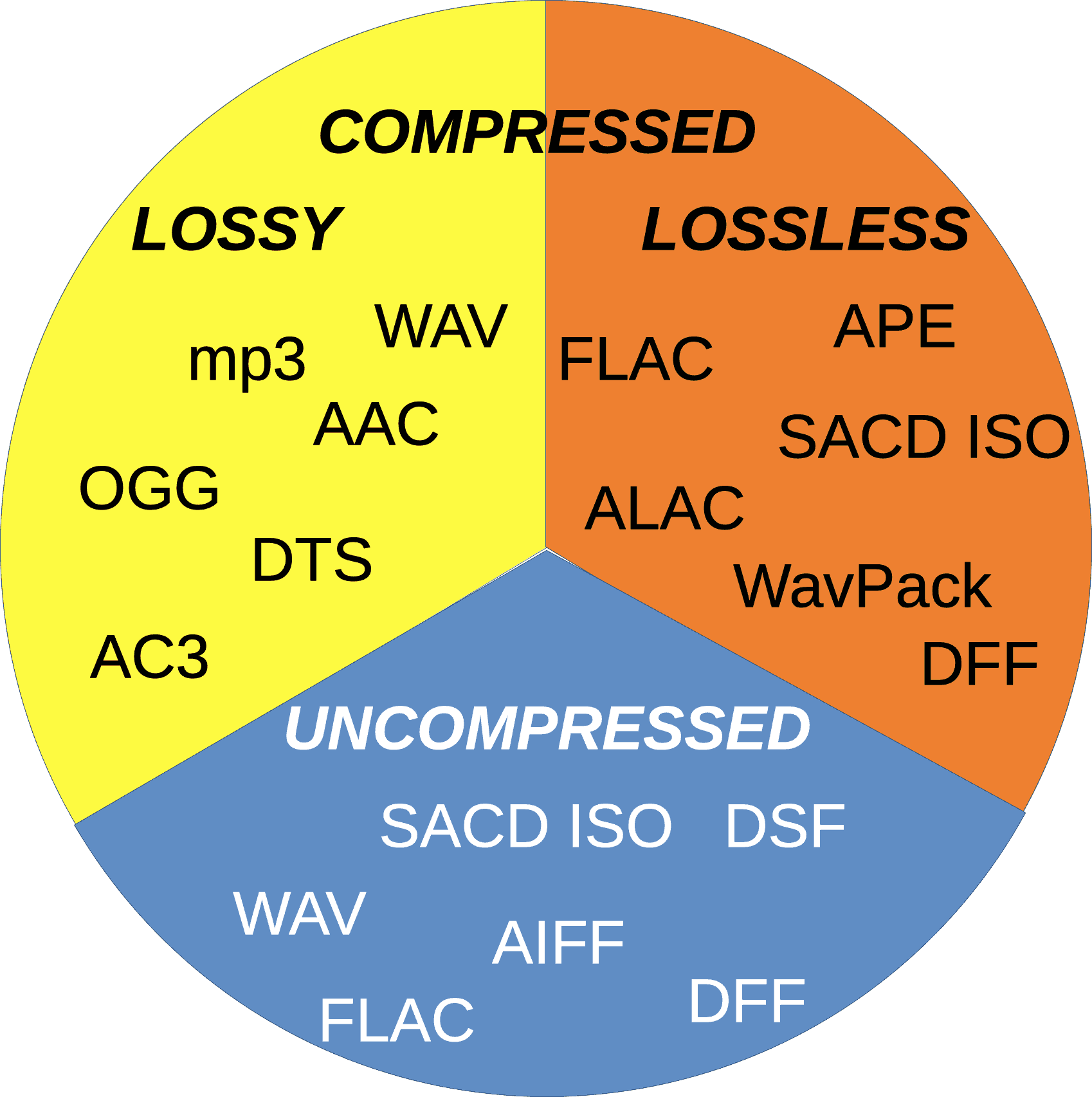
Lossless audio codecs are like the archivists of the audio world. They compress audio data without sacrificing any of the original quality. This is akin to zipping a file on your computer; when you unzip it, you get back an identical copy of the original.
Imagine you have a precious handwritten letter. You want to make a copy for safekeeping, but you don’t want to lose any detail or quality. A lossless audio codec accomplishes this by finding patterns in the audio data and encoding them more efficiently. When you want to listen to the music or sound stored with a lossless codec, it’s like opening the envelope of your preserved letter—you get the same experience as the original.
Lossless audio codecs are favored by audiophiles and professionals who prioritize audio quality over file size. They are ideal for archiving music collections and audio recordings where every nuance matters.
Popular Audio Codecs
When it comes to audio codecs, several popular options are commonly used in various applications. One of the most recognizable is MP3, which revolutionized digital music. MP3, short for MPEG-1 Audio Layer 3, achieves significant compression while maintaining decent audio quality, making it suitable for music streaming and portable devices.
AAC (Advanced Audio Coding) is another well-known codec, commonly used by Apple devices. It offers superior sound quality compared to MP3 at similar bitrates, making it a popular choice for iTunes and other Apple platforms.
For lossless audio, FLAC (Free Lossless Audio Codec) stands out. It’s widely adopted by audiophiles and music enthusiasts for its ability to compress audio without any loss in quality. FLAC files are perfect for preserving high-fidelity audio.
As an expert in audio technology, I can confidently say that understanding audio codecs is crucial for anyone working with digital audio. Whether you’re a music lover, a content creator, or a tech enthusiast, the right knowledge about audio codecs can significantly enhance your experience and the quality of your audio content.
Audio codec rate control plays a crucial role in determining the balance between audio quality and file size. Over the years, significant advancements have been made in rate control methods, enabling more efficient compression and higher audio fidelity. One such innovation is the use of machine learning algorithms to optimize rate control parameters.
By employing machine learning models, audio codecs can analyze audio content and adapt their rate control strategies dynamically. This approach allows codecs to adjust bitrate allocation based on the complexity of the audio signal, resulting in improved audio quality with reduced file sizes.
“Incorporating machine learning into rate control empowers audio codecs to make smarter decisions, delivering exceptional audio quality while efficiently utilizing available bitrate.” – Audio Compression Trends: The Rise of Machine Learning
Another notable advancement is the implementation of psychoacoustic models in rate control algorithms. These models simulate human hearing perception to identify irrelevant audio components that can be discarded without compromising perceptual audio quality. By leveraging psychoacoustic principles, codecs can allocate bitrates more effectively, focusing on preserving the most critical audio elements.
“Psychoacoustic rate control techniques revolutionize audio compression by optimizing the allocation of bits to retain the essential components that shape the listener’s auditory experience.” – The Art of Audio Rate Control: Psychoacoustic Innovations
Impact of Rate Control Methods on Audio Quality
Rate control methods significantly influence the audio quality of compressed files. In constant bitrate (CBR) control, a fixed amount of bits is allocated per audio frame, ensuring a consistent bitrate throughout the file. While CBR guarantees a predictable file size, it may lead to audio artifacts and inefficiencies in bitrate allocation.
On the other hand, variable bitrate (VBR) control dynamically adjusts the bitrate based on the complexity of the audio content. VBR allows higher bitrates for more intricate audio segments, resulting in better audio quality compared to CBR. However, VBR may lead to larger file sizes, which can be a concern in bandwidth-constrained scenarios.
“Choosing the right rate control method is a trade-off between audio quality and file size. While CBR offers predictability, VBR excels in preserving audio fidelity by allocating more bits to intricate audio segments.” – Rate Control Strategies: Balancing Quality and Efficiency
Improving Audio Compression Efficiency with Rate Control Techniques
Rate control techniques play a vital role in improving audio compression efficiency. By optimizing the allocation of bits, codecs can achieve higher compression ratios without compromising audio quality. One of the key techniques is adaptive rate control, where the codec continuously monitors the audio signal and adjusts the bitrate allocation on the fly.
Adaptive rate control is particularly valuable in real-time communication applications, such as VoIP calls and video conferencing. These applications require low-latency audio transmission, and adaptive rate control ensures efficient utilization of available bandwidth while maintaining high-quality voice communication.
“Adaptive rate control ensures efficient audio compression in real-time communication, providing users with crystal-clear voice quality even in bandwidth-constrained environments.” – The Power of Adaptation: Efficient Rate Control for Real-Time Communication
Additionally, hybrid rate control methods combine the advantages of both CBR and VBR. By employing adaptive elements alongside a predetermined bitrate for certain segments, hybrid rate control strikes a balance between consistency and efficiency.
“Hybrid rate control methods merge the strengths of CBR and VBR, offering a flexible approach to audio compression that optimizes bitrate allocation based on audio content complexity.” – Hybrid Rate Control: The Best of Both Worlds
Trade-offs between Rate Control and Encoding Time
Rate control methods may also impact encoding time, which is a crucial consideration in various applications. In general, CBR encoding requires less computation, as the bitrate allocation remains constant throughout the encoding process. This results in faster encoding times compared to VBR, where the bitrate allocation varies frame by frame.
However, the encoding time can vary depending on the complexity of the rate control algorithm used. Some advanced rate control methods, like machine learning-based models, may require additional computational resources but can achieve better compression efficiency.
“Developers must strike a balance between encoding time and compression efficiency when selecting rate control methods, considering the specific needs of their applications.” – Rate Control Trade-offs: Balancing Speed and Efficiency
In real-time communication applications, low encoding time is crucial to ensure minimal latency during audio transmission. Adaptive rate control, which adjusts bitrate allocation on the fly, allows for efficient compression without significant delays.
“Real-time communication demands low encoding time, making adaptive rate control a valuable choice for ensuring real-time voice transmission with minimal latency.” – Low Latency Encoding: Enabling Real-Time Communication
Rate Control and Audio Codec Decoding Requirements
The choice of rate control method also affects the decoding requirements of audio codecs. In CBR-encoded files, the decoding process is straightforward, as the bitrate remains constant throughout the file, requiring a relatively simple decoding algorithm.
In contrast, VBR-encoded files require more sophisticated decoding algorithms to adapt to the varying bitrates. Decoders must analyze the bitrate information within each frame to accurately reconstruct the audio signal.
“VBR-encoded files demand more robust decoding algorithms, as decoders must dynamically adjust to the varying bitrates to ensure faithful audio reproduction.” – VBR Decoding: Adapting to Bitrate Variability
The complexity of adaptive rate control methods may also impact decoding requirements. In adaptive rate control, both the encoder and decoder must share information to adjust the bitrate allocation effectively. This interaction between the encoder and decoder may require higher computational resources for decoding.
“Adaptive rate control introduces a level of complexity in decoding, as the encoder and decoder must collaborate to ensure efficient bitrate allocation and high-quality audio reconstruction.” – Adaptive Rate Control: Coordinating Encoder and Decoder
Rate Control Methods for Low-Latency Applications
In low-latency applications like real-time communication, rate control methods must strike a balance between audio quality and transmission speed. Adaptive rate control stands out as an excellent choice for such scenarios, as it allows codecs to adapt to varying network conditions while prioritizing audio clarity.
Another effective strategy for low-latency applications is the use of scalable rate control. Scalable codecs produce multiple layers of audio data, enabling receivers to decode the appropriate layer depending on the available bandwidth. This approach ensures seamless audio transmission even in bandwidth-constrained environments.
“Scalable rate control enables low-latency audio transmission by offering multiple layers of data, allowing receivers to select the optimal layer for their available bandwidth.” – Scalable Codecs: Adapting to Bandwidth Constraints
Low-latency rate control techniques also play a crucial role in gaming applications, where real-time voice chat and audio cues are essential for player coordination and immersion. Adaptive bitrate allocation in these contexts ensures that critical audio information is transmitted with minimal delay.
“Low-latency rate control techniques are fundamental in gaming applications, delivering real-time voice communication and audio cues that enhance player experiences.” – Real-Time
The Impact of Audio Codec on Voice QualityThe Impact of Audio Codec on Voice Quality
How Does the Choice of Audio Codec Affect Voice Quality?
The choice of an audio codec can significantly influence the quality of voice reproduction in various applications. While some codecs prioritize efficiency and smaller file sizes, others focus on preserving audio fidelity. For voice-centric applications like voice calls, video conferencing, and voice-over work, the balance between compression and audio quality becomes crucial. High-compression audio codecs, commonly used for online streaming and communication, may sacrifice some voice clarity to achieve smaller file sizes. On the other hand, lossless codecs prioritize audio fidelity, ensuring a true representation of the original voice recording.
Finding the right audio codec for voice-related applications involves striking a balance between compression efficiency and voice clarity. It’s essential to understand the specific requirements of each use case and choose an appropriate codec that delivers the desired voice quality.
“In the world of audio codecs, the choice between compression and voice quality becomes a delicate dance. A careful balance is required to ensure efficient data transmission while preserving the essence of the human voice.” – The Art of Voice Quality in Audio Codecs
What is the Impact of Audio Compression on Voice Clarity?
Audio compression is a fundamental process in audio codecs, aiming to reduce file sizes without significantly compromising audio quality. However, the level of compression directly affects voice clarity, especially in lossy codecs.
In lossy codecs, the compression process discards some audio data deemed less essential to human hearing. While this can achieve considerable compression ratios, it may result in a loss of subtle nuances in the human voice, affecting overall clarity.
On the other hand, lossless codecs retain all audio data, ensuring pristine voice clarity at the cost of larger file sizes.
The impact of audio compression on voice clarity is a delicate balance, and striking the right compromise is essential to maintain the intelligibility and naturalness of voice recordings.
“Audio compression is a double-edged sword. While it empowers efficient data transmission, its impact on voice clarity demands careful consideration in audio codec design.” – The Voice Clarity Conundrum: Balancing Compression and Fidelity
Which Audio Codecs Offer the Best Voice Quality?
When it comes to voice quality, lossless audio codecs are known for their ability to preserve audio fidelity faithfully. Formats like FLAC and PCM are renowned for their pristine reproduction of voice recordings, making them ideal choices for applications where audio quality is paramount.
However, lossless codecs come with the trade-off of larger file sizes, which may not be practical for certain applications with bandwidth and storage constraints.
On the other end of the spectrum, high-quality lossy codecs like Opus have garnered recognition for their impressive voice reproduction capabilities at lower bitrates. Opus excels in real-time communication applications, providing clear and natural voice quality even with reduced data transfer.
Ultimately, the best audio codec for voice quality depends on the specific requirements of each application, considering factors like available bandwidth, storage limitations, and the desired level of audio fidelity.
“Voice quality enthusiasts lean towards lossless codecs, while real-time applications find solace in high-quality lossy codecs, proving that there’s no one-size-fits-all solution in the quest for perfect voice reproduction.” – Unraveling the Quest for the Ultimate Voice Codec
Can a High-Compression Audio Codec Maintain Voice Fidelity?
The pursuit of higher compression ratios in audio codecs is often at odds with the preservation of voice fidelity. High-compression audio codecs, designed to reduce file sizes significantly, inevitably introduce some degree of data loss.
While modern high-compression codecs have made significant advancements in audio quality preservation, it remains challenging to achieve near-lossless voice reproduction at ultra-low bitrates.
However, certain advanced codecs like Opus have managed to strike a remarkable balance between compression efficiency and voice fidelity. Opus’s hybrid approach, combining both lossy and lossless techniques, allows it to deliver exceptional voice quality even at lower bitrates.
While the compromise between compression and voice fidelity is inevitable, the development of more efficient codecs continues to push the boundaries of what’s achievable in audio compression.
“The holy grail of high-compression audio codecs lies in the delicate dance between efficiency and fidelity, with Opus leading the charge in delivering impressive voice quality at low bitrates.” – The Quest for Voice Fidelity: Navigating the Compression Maze
How Does the Bitrate of an Audio Codec Affect Voice Reproduction?
The bitrate of an audio codec plays a pivotal role in voice reproduction, directly impacting the level of audio detail and clarity. Higher bitrates allocate more data to represent audio nuances, resulting in improved voice fidelity and overall sound quality.
On the other hand, lower bitrates reduce the amount of data allocated to voice reproduction, leading to a trade-off between reduced file sizes and a potential loss of voice clarity.
The selection of the appropriate bitrate for voice-related applications depends on various factors, including the target platform, available bandwidth, and the desired level of voice quality.
“The bitrate of an audio codec acts as a master puppeteer, orchestrating the balance between file size and voice quality, ultimately defining the audio experience.” – The Bitrate Dilemma: Striking the Perfect Balance in Voice Reproduction
Is Voice Quality Compromised in Lossy Audio Codecs?
Lossy audio codecs are designed to achieve high compression ratios by discarding audio data that is deemed less critical to human hearing. While this approach enables efficient data transmission, it inevitably results in some loss of audio fidelity.
The impact of voice quality compromise in lossy codecs depends on the specific bitrate used and the complexity of the audio content. At higher bitrates, the loss of voice clarity is minimal, while lower bitrates may exhibit more noticeable artifacts in voice reproduction.
Despite the inherent trade-off, modern lossy codecs like Opus excel in voice-centric applications, striking a balance between compression and voice quality, especially in real-time communication scenarios.
“Lossy codecs present a delicate challenge, but with modern advancements, they’ve proven capable of delivering impressive voice quality, redefining the boundaries of audio compression.” – Embracing the Nuances: Unraveling Voice Quality in Lossy Codecs
What Are the Factors that Influence Voice Quality in Audio Codecs?
Voice quality in audio codecs is influenced by several critical factors: Bitrate: The bitrate directly affects the amount of data allocated to voice reproduction, impacting overall voice clarity and sound fidelity.
Compression Algorithm: The compression algorithm determines the balance between data reduction and audio fidelity, affecting the level of voice quality preservation.
Latency: Low latency in real-time communication applications contributes to a more natural and seamless voice experience3. Keywords (related to “The Impact of Audio Codec on Voice Quality”):
A software level audio codec is a specialized computer program, a codec that compresses (compresses) or decompresses (decompresses) digital audio data according to an audio file format or streaming audio format. The task of an audio codec as a compressor is to provide an audio signal with a certain quality / precision and the smallest possible size. Compression reduces the amount of space required to store audio data, and it is also possible to reduce the bandwidth of the channel through which the audio data is transmitted. Most audio codecs are implemented as software libraries that interact with one or more audio players such as QuickTime Player, XMMS, Winamp, VLC Media Player, MPlayer, or Windows Media Player.
Popular software audio codecs by application:
MPEG-1 Layer III (MP3): a proprietary audio codec (music, audiobooks, etc.) for computers and digital players
Advanced Audio Codec (AAC) – The second most common proprietary codec, positioned as an alternative to MP3. Most popular along with H.264 (AVC) video codec received in online video (eg flash video on YouTube)
Ogg Vorbis (OGG) is a free codec widely used in computer games and file-sharing networks to transfer music.
Free Lossless Audio Codec (FLAC) is a free codec that uses lossless compression. Alternative and less common lossless codecs: WavPack (WV), Monkey’s Audio (APE), etc.
GSM-FR is the first digital voice coding standard used in GSM phones
Adaptive multi rate (AMR): human voice recording on mobile phones and other mobile devices
G.723.1: one of the basic codecs for IP telephony applications
G.729 is a proprietary narrowband codec used to digitally represent speech
Internet Low Bit Rate Codec (iLBC) – A popular free codec for IP telephony (in particular for Skype and Google Talk)
Hardware codec
Realtek ALC 882 HD audio codec chip on motherboard
Realtek ALC 882 HD audio codec chip on motherboard
A hardware audio codec refers to a separate chip that encodes and decodes an analog audio signal into a digital signal and vice versa using analog-to-digital and digital-to-analog converters. Digital-to-analog conversion occurs when the computer sends sound to external speakers, and analog-to-digital conversion occurs when sound enters the computer from outside.
The audio codec is the main, but not always the only, component of a sound card. It is an intermediate link, an interface between analog ports to receive and transmit sound and digital sound processing units
In massive onboard sound cards on motherboards, the audio codec actually represents the entire sound card: it converts the analog signal received from the connectors into digital and transmits it to the south bridge of the motherboard, from where the sound digital goes to the central processor. This technology for processing digital audio in a central processor is called host signal processing.
In discrete sound cards connected to the motherboard, the audio codec performs the same function as in the integrated ones, but after digitization it transmits the audio signal not to the central processor, but to an audio processing and control chip special, also located on the sound card.
An audio codec chip is typically about 7mm², and in the case of an integrated sound card, it is typically located near the back of the motherboard. The main manufacturers of hardware audio codecs are Realtek, VIA Technologies, C-Media, Intel, and Analog Devices.
Choosing an audio codec for online streaming and recording.
Are you interested in what is an audio codec and how to choose the right one to get the best result from online streaming or recording?
Imagine that we live in a completely analog world. Then there would be no need for audio codecs. What is it, you ask? It is an algorithm used to convert analog audio to digital. This is what is needed in the world of digital devices, media players and the Internet.
The quality of audio codecs has improved significantly over the years. Let’s go back, for example, to the 80s, when the first digital amplifiers appeared. Compared to the reproduction quality of a modern digital amp, the difference will be obvious. The best audio codecs offer better and more realistic sound.
But now there are so many different audio codecs. Which to choose?
Many codecs are quite specific. Some of them are proprietary, while others were created for specific applications, most often telecommunications. For voice signals, such as on your phone, you do not need to use high-fidelity audio codecs, as the reproduction of a signal with a limited audio range is more suitable in this case. But for music playback, a high-quality audio signal is certainly preferable.
If you dig deeper, you will find that different audio codecs serve different purposes in processing the original analog signal. For example, an audio codec like PCM is a lossless compression algorithm. This means that the signal is reproduced in digital form without losing a single bit of original information. Other audio codecs, such as AAC and MP3, compress audio with some loss.
Compression reduces the bits of the original content and therefore reduces the file size. If you are listening to songs on a mobile device, you can be sure that these files have been compressed to take up less space. And that is why you can save a large number of music files on your device, but their quality will differ from optimal.
Audio codecs for Epiphan Pearl and Pearl-2
Of course, it is impossible to tell in detail all the characteristics of audio codecs in one article, but it can still help to clarify some of the nuances in choosing the correct audio codec for live streaming or recording using Epiphan Pearl or Pearl- 2 .
There are 3 audio codecs available:
-PCM – Uncompressed audio codec, which may be the best option if you plan to record shows for further editing and if you are not limited by network bandwidth.
-AAC: audio codec with compression algorithm best suited for live streaming or content recording with immediate playback on media players or for uploading to the Internet. Experts believe that AAC plays better audio than MP3 with the same audio bit rate. As a rule, the newer codecs reproduce the analog signal better than their predecessors, you can trust the experts on this.
-MP3: a fairly old, but still very popular audio code compression algorithm, also suitable for live streaming or recording content with immediate playback on media players or uploading to the Internet.
Choosing the correct audio codec is important when setting up live streaming or recording with the Epiphan Pearl or Pearl-2. Sample rate and audio oversampling effects are other important parameters for improving sound quality.
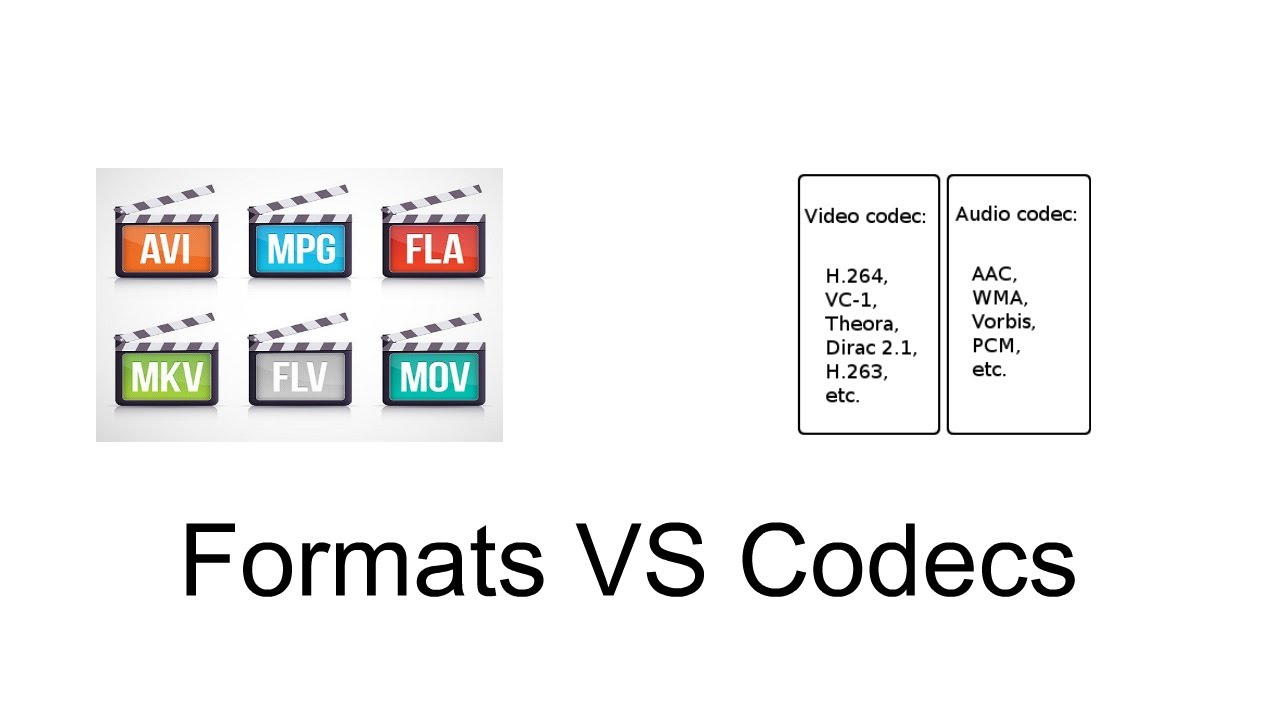
CODEC is a program that reduces the number of bytes contained in large files (similar to WinZIP) so that they can be stored on storage media and then played back. Typically used to compress and decompress multimedia files such as songs or videos (CODEC is actually short for CO compression / DEC compression, ie compression / decompression). There are audio and video codecs. MPEG-1, MPEG-2, MPEG-4, Vorbis, DivX, … are examples of CODEC.
The main difference between a CODEC and a compression algorithm like WinZIP is that in CODECs the compression / decompression is done in real time. This means that while CODEC is watching a video behind the scenes, it processes the data stream by unpacking it. A CODEC can consist of two parts: an encoder for compressing the multimedia file (encoding) and a decoder for decompressing the file (decoding). Some CODECs can contain both parts, others only one.
CODECs can be installed and updated on older computers or multimedia devices or integrated in dedicated hardware components (e.g. CD or DVD players). CODECs should not be confused with containers. A container contains one or more streams that have already been coded by CODEC. Very often you will find an audio and a video stream in the container at the same time. AVI, Ogg, MOV, ASF, … are examples of containers. while others just one of them.
CODECs should not be confused with containers. A container contains one or more streams that have already been coded by CODEC. Very often you will find an audio and a video stream in the container at the same time. AVI, Ogg, MOV, ASF, … are examples of containers. Very often you will find an audio and a video stream in the container at the same time. AVI, Ogg, MOV, ASF, … are examples of containers. Very often you will find an audio and a video stream in the container at the same time. AVI, Ogg, MOV, ASF, … are examples of containers.
Where can I find the CODEC?
If Tizio creates a document with the Word program and sends it to Caio, the latter must use the Word program to open it. If a film is compressed with the XYZ-CODEC, the same CODEC must be used for the display.
At this point the question arises: Where can the CODECs be found? CODECs are available on the Internet. There are dozens of audio and video formats and related CODECs. However, there is no point in downloading them individually and then installing them on the computer. It is much better to download a collection of CODECs like K-Lite Codec Pack. K-Lite Codec Pack is a collection of CODEC for Microsoft Windows, with which the operating system can play various audio and video formats that are not supported by default.
In addition to CODECs, the K-Lite Codec Package can also contain other tools, including: Media Player Classic for playing multimedia files, information tools such as Media Info and tools for editing CODECs. There are four versions of the K-Lite codec package:
Basic – Plays many of the popular video file formats, e.g. B. AVI, MKV, MP4, OGM and FLV
Standard: Contains everything that is required to reproduce the most commonly used formats.
Full: Supports multiple audio and video formats. It also has coding support
Mega: combines the content of “K-Lite Codec Pack (Full)” and Real Alternative. In the past, it also included QuickTime Alternative. QuickTime Alternative (with Media Player Classic) and QT Lite (without Media Player Classic) are now available as separate programs
The standard version is for the average user, while the full version is for advanced users who edit and decode videos. The K-Lite Codec Pack is updated regularly and contains everything you need to play all movies and music. Any uninstallation will also remove everything that has been installed from the package.