Which Audio Codec is Better?


Free Download Mp4Gain
picture

Which Audio Codec is Better?

Audio Codec
Audio Codec

When it comes to audio, the codec is the magic behind the scenes that helps you hear your favorite songs and sounds. But have you ever wondered what makes one codec better than another? In this article, we’ll explore the world of audio codecs and find out which one is the best.
Audio Codec
Audio Codec

What is an audio codec?

An audio codec is a type of software that compresses and decompresses audio files. This process makes the audio smaller, so it can be easily stored and shared on your computer, phone, or online. When you want to listen to the audio, the codec decompresses it so you can hear it in its original quality.

Why are there different codecs?

Just like how you can choose between different types of ice cream flavors, there are different types of codecs because everyone has different tastes and preferences. Some codecs are better for music, while others are better for speech. Some are easy to use, while others are more complex. The choice of codec depends on the type of audio you want to compress, the size of the file, and the quality of the sound you want to preserve.

The most popular codecs

There are many different audio codecs out there, but here are some of the most popular ones:

  • MP3
  • AAC
  • FLAC
  • WAV

MP3

MP3 is one of the most popular codecs and has been around for over 20 years. It’s a great choice for music because it compresses audio files into smaller sizes while still preserving the quality of the sound. MP3 is also compatible with most devices and players, making it a convenient option for many people.

AAC

AAC stands for Advanced Audio Coding and is a newer codec that was developed by Apple. It’s commonly used by Apple devices, like the iPhone and iPad, and provides better sound quality than MP3 at a lower bit rate. AAC is also used by many online streaming services, like Spotify and Apple Music, to deliver high-quality audio to their users.

FLAC

FLAC stands for Free Lossless Audio Codec and is a popular option for audiophiles. This codec compresses audio files into smaller sizes without losing any quality, making it the perfect choice for people who want the best sound possible. The downside to FLAC is that it’s not as widely supported as MP3 and AAC, so you may need to use special software to play FLAC files on your device.

WAV

WAV is a common codec for professional audio and is often used in recording studios. It’s a lossless codec, which means it doesn’t compress audio files and preserves the original sound quality. However, WAV files are usually much larger than files compressed with other codecs, so they may take up a lot of space on your device.

Conclusion

In conclusion, the choice of codec depends on the type of audio you want to store and share, and your personal preferences. MP3 is a classic and widely supported option, while AAC offers better sound quality. FLAC is the perfect choice for audiophiles who want to preserve the original sound quality, and WAV is used in professional settings. To find the best solution for you, consider your needs and try out different codecs to see which one works best for you. And finally, if you want to enhance the audio quality of your files, you can use Mp4Gain to adjust the volume and improve the sound of your audio files.

It’s important to remember that the audio codec you choose will affect the size, quality, and compatibility of your audio files. So choose wisely, and enjoy the world of audio!


Free Download Mp4Gain
picture


Mp4Gain Main Window
picture


Mp4Gain Features
picture


Free Download Mp4Gain
picture

Audio codec

Audio codec

Audio Codec

Software codec

AUDIO CODEC

A software level audio codec is a specialized computer program, a codec that compresses (compresses) or decompresses (decompresses) digital audio data according to an audio file format or streaming audio format. The task of an audio codec as a compressor is to provide an audio signal with a certain quality / precision and the smallest possible size. Compression reduces the amount of space required to store audio data, and it is also possible to reduce the bandwidth of the channel through which the audio data is transmitted. Most audio codecs are implemented as software libraries that interact with one or more audio players such as QuickTime Player, XMMS, Winamp, VLC Media Player, MPlayer, or Windows Media Player.

Popular software audio codecs by application:

MPEG-1 Layer III (MP3): a proprietary audio codec (music, audiobooks, etc.) for computers and digital players
Advanced Audio Codec (AAC) – The second most common proprietary codec, positioned as an alternative to MP3. Most popular along with H.264 (AVC) video codec received in online video (eg flash video on YouTube)
Ogg Vorbis (OGG) is a free codec widely used in computer games and file-sharing networks to transfer music.
Free Lossless Audio Codec (FLAC) is a free codec that uses lossless compression. Alternative and less common lossless codecs: WavPack (WV), Monkey’s Audio (APE), etc.
GSM-FR is the first digital voice coding standard used in GSM phones
Adaptive multi rate (AMR): human voice recording on mobile phones and other mobile devices
G.723.1: one of the basic codecs for IP telephony applications
G.729 is a proprietary narrowband codec used to digitally represent speech
Internet Low Bit Rate Codec (iLBC) – A popular free codec for IP telephony (in particular for Skype and Google Talk)

Hardware codec
Realtek ALC 882 HD audio codec chip on motherboard
A hardware audio codec refers to a separate chip that encodes and decodes an analog audio signal into a digital signal and vice versa using analog-to-digital and digital-to-analog converters. Digital-to-analog conversion occurs when the computer sends sound to external speakers, and analog-to-digital conversion occurs when sound enters the computer from outside.

The audio codec is the main, but not always the only, component of a sound card. It is an intermediate link, an interface between analog ports to receive and transmit sound and digital sound processing units

In massive onboard sound cards on motherboards, the audio codec actually represents the entire sound card: it converts the analog signal received from the connectors into digital and transmits it to the south bridge of the motherboard, from where the sound digital goes to the central processor. This technology for processing digital audio in a central processor is called host signal processing.

In discrete sound cards connected to the motherboard, the audio codec performs the same function as in the integrated ones, but after digitization it transmits the audio signal not to the central processor, but to an audio processing and control chip special, also located on the sound card.

An audio codec chip is typically about 7mm², and in the case of an integrated sound card, it is typically located near the back of the motherboard. The main manufacturers of hardware audio codecs are Realtek, VIA Technologies, C-Media, Intel, and Analog Devices.

Choosing an audio codec for online streaming and recording.

Choosing an audio codec for online streaming and recording.

Audio Codec

Are you interested in what is an audio codec and how to choose the right one to get the best result from online streaming or recording?

Audio Codecs

Imagine that we live in a completely analog world. Then there would be no need for audio codecs. What is it, you ask? It is an algorithm used to convert analog audio to digital. This is what is needed in the world of digital devices, media players and the Internet.

The quality of audio codecs has improved significantly over the years. Let’s go back, for example, to the 80s, when the first digital amplifiers appeared. Compared to the reproduction quality of a modern digital amp, the difference will be obvious. The best audio codecs offer better and more realistic sound.

But now there are so many different audio codecs. Which to choose?
Many codecs are quite specific. Some of them are proprietary, while others were created for specific applications, most often telecommunications. For voice signals, such as on your phone, you do not need to use high-fidelity audio codecs, as the reproduction of a signal with a limited audio range is more suitable in this case. But for music playback, a high-quality audio signal is certainly preferable.

If you dig deeper, you will find that different audio codecs serve different purposes in processing the original analog signal. For example, an audio codec like PCM is a lossless compression algorithm. This means that the signal is reproduced in digital form without losing a single bit of original information. Other audio codecs, such as AAC and MP3, compress audio with some loss.

Compression reduces the bits of the original content and therefore reduces the file size. If you are listening to songs on a mobile device, you can be sure that these files have been compressed to take up less space. And that is why you can save a large number of music files on your device, but their quality will differ from optimal.

Audio codecs for Epiphan Pearl and Pearl-2
Of course, it is impossible to tell in detail all the characteristics of audio codecs in one article, but it can still help to clarify some of the nuances in choosing the correct audio codec for live streaming or recording using Epiphan Pearl or Pearl- 2 .

There are 3 audio codecs available:

-PCM – Uncompressed audio codec, which may be the best option if you plan to record shows for further editing and if you are not limited by network bandwidth.

-AAC: audio codec with compression algorithm best suited for live streaming or content recording with immediate playback on media players or for uploading to the Internet. Experts believe that AAC plays better audio than MP3 with the same audio bit rate. As a rule, the newer codecs reproduce the analog signal better than their predecessors, you can trust the experts on this.

-MP3: a fairly old, but still very popular audio code compression algorithm, also suitable for live streaming or recording content with immediate playback on media players or uploading to the Internet.
Choosing the correct audio codec is important when setting up live streaming or recording with the Epiphan Pearl or Pearl-2. Sample rate and audio oversampling effects are other important parameters for improving sound quality.

What is the best Bluetooth audio codec: LDAC, aptX, AAC, etc.?

What is the best Bluetooth audio codec: LDAC, aptX, AAC, etc.?

Bluetooth Audio Codec

There is a clear future for wireless devices, in particular for headphones. Smartphone manufacturers are increasingly abandoning the 3.5mm audio jack as they continue to implement wireless solutions, including TWS. In almost every review, the phrase Bluetooth audio codecs appears.

Bluetooth audio codec

What does it actually mean and what are the results of using this specification? Here you select the Bluetooth codec with the best sound quality and maximum connection stability. CONTENTS Best Bluetooth Audio Codecs APTX APTX HD SBC CAA LDAC LHDC

What is the best Bluetooth audio codec? The best Bluetooth audio codecs There are currently dozens of codecs, which can be confusing, but it is very important to understand them. They have a major impact on sound quality, transmission delays, and signal quality. Another part of modern standards allows a more economical use of battery power.

Chances are, the reader has already heard of bit rate and compression, as well as more specific terms like lossy. All this is a real minefield for a person who just wants to buy high-quality headphones with a fast, high-quality and stable connection to the device and a “tasty” sound. Below are the audio codecs that you should definitely be familiar with. APTX The Bluetooth aptX audio codec first appeared in the technological world in the late 1980s. Its essence was the transmission of sound in CD format via Bluetooth. In order to transfer enough data over the wireless network, aptX uses compression. Reduce latency. AptX includes support for 16-bit / 48 kHz LCPM up to 352 kbps, which is why it is classified as a lossy compressed format.

The final file size is really small, but its decryption does not restore the original quality. AptX is now considered the most popular Bluetooth codec among MP3 consumers. Almost all Android smartphones support it. APTX HD It’s not hard to guess that aptX HD is the aptX audio codec with the best audio resolution. The technology was acquired by Qualcomm, so more expensive Android smartphones based on Qualcomm’s chipset support AtpX HD by default. It can handle clear 24-bit / 48 kHz audio with a maximum bit rate of 576 kbps. Now the audio quality is better than that of the CD. The signal-to-noise ratio is much better compared to the previous version, it can be heard even without particularly high-pitched hearing.

It is felt especially in the details of the tools that are merged into aptX. In order to use the technology, both the smartphone and the headphones must support this codec. Today it can be found in OnePlus 8 and 8 Pro, Google Pixel 3a and Huawei P30 and P30 Pro. Among the headphones, the aptX HD codec mainly features world giants and similar models are not cheap. For example Sony WH-1000MX3 and Bowers & Wilkins PX and some TWS like Cambridge Audio Melomania 1. There is also an aptx LL codec which reduces latency. This is Qualcomm technology that increases the audio transmission speed up to 40ms. It is widely used in gaming headsets.

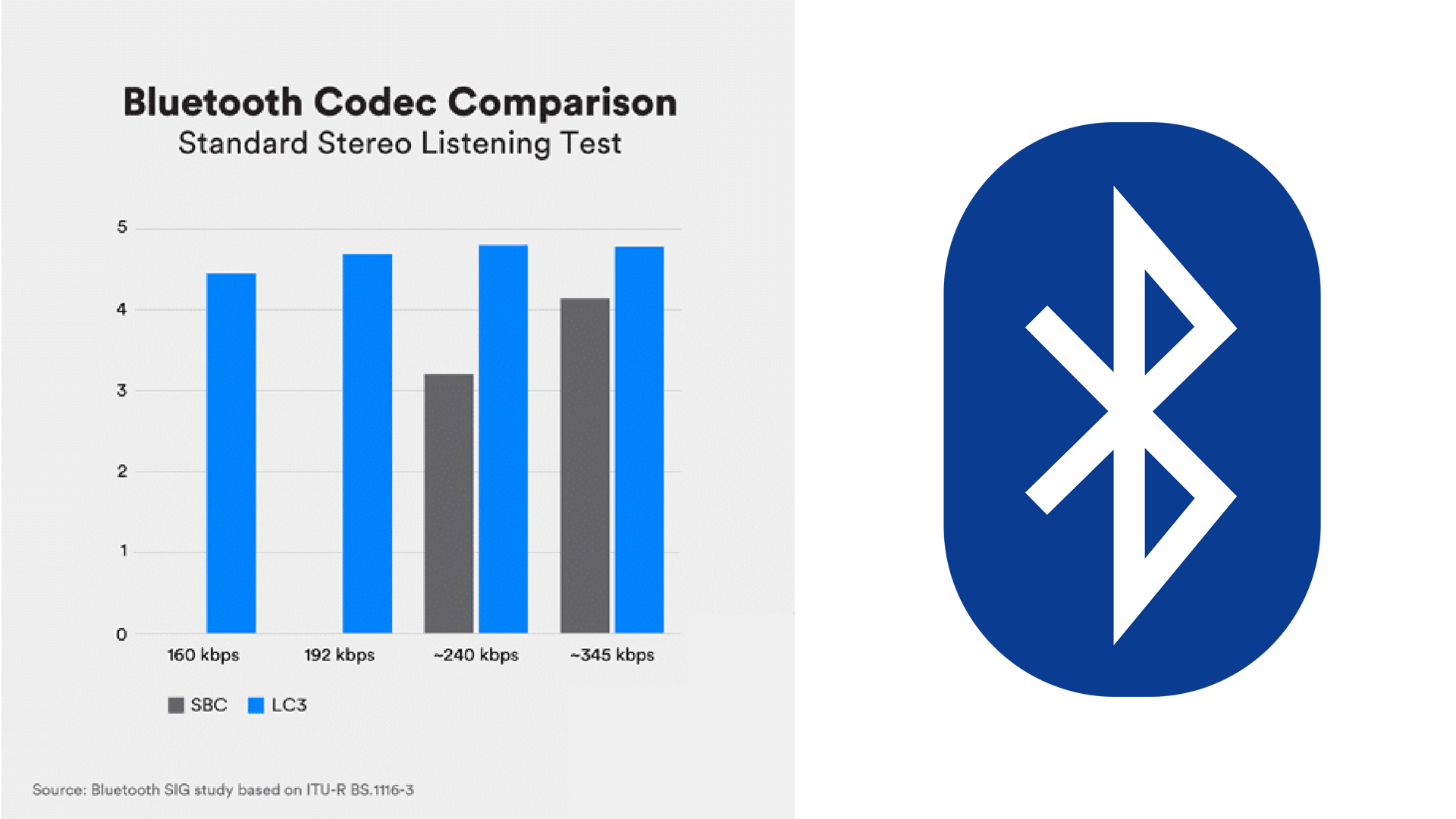
SBC Subband Encoding (SBC) is the default codec used with Bluetooth. It is a low quality Bluetooth audio signal. This is not the audio codec favorably shared by a smartphone or headphones, but almost all devices support it. It is considered mandatory for all A2DP devices. The maximum transmission speed is about 320 kbps.

ACC

Advanced Audio Coding (AAC) is the standard received by Apple iPhone users. It is also used by the free version of YouTube. AAC allows you to fully enjoy MP3 audio quality, but at a limited bit rate of up to 250 kbps. The downside of the codec is high power consumption, which negatively affects the battery life of both devices. To unleash all facets of MP3, you need not only an iPhone, but also premium headphones like the Bose Noise Canceling 700. Подробнее: https://gamesqa.ru/smartfony/kakoj-luchshij-audiokodek-bluetooth-ldac- aptx-aac-18159 /