Which Audio Codec is Better?


Free Download Mp4Gain
picture

Which Audio Codec is Better?

Audio Codec
Audio Codec

When it comes to audio, the codec is the magic behind the scenes that helps you hear your favorite songs and sounds. But have you ever wondered what makes one codec better than another? In this article, we’ll explore the world of audio codecs and find out which one is the best.
Audio Codec
Audio Codec

What is an audio codec?

An audio codec is a type of software that compresses and decompresses audio files. This process makes the audio smaller, so it can be easily stored and shared on your computer, phone, or online. When you want to listen to the audio, the codec decompresses it so you can hear it in its original quality.

Why are there different codecs?

Just like how you can choose between different types of ice cream flavors, there are different types of codecs because everyone has different tastes and preferences. Some codecs are better for music, while others are better for speech. Some are easy to use, while others are more complex. The choice of codec depends on the type of audio you want to compress, the size of the file, and the quality of the sound you want to preserve.

The most popular codecs

There are many different audio codecs out there, but here are some of the most popular ones:

  • MP3
  • AAC
  • FLAC
  • WAV

MP3

MP3 is one of the most popular codecs and has been around for over 20 years. It’s a great choice for music because it compresses audio files into smaller sizes while still preserving the quality of the sound. MP3 is also compatible with most devices and players, making it a convenient option for many people.

AAC

AAC stands for Advanced Audio Coding and is a newer codec that was developed by Apple. It’s commonly used by Apple devices, like the iPhone and iPad, and provides better sound quality than MP3 at a lower bit rate. AAC is also used by many online streaming services, like Spotify and Apple Music, to deliver high-quality audio to their users.

FLAC

FLAC stands for Free Lossless Audio Codec and is a popular option for audiophiles. This codec compresses audio files into smaller sizes without losing any quality, making it the perfect choice for people who want the best sound possible. The downside to FLAC is that it’s not as widely supported as MP3 and AAC, so you may need to use special software to play FLAC files on your device.

WAV

WAV is a common codec for professional audio and is often used in recording studios. It’s a lossless codec, which means it doesn’t compress audio files and preserves the original sound quality. However, WAV files are usually much larger than files compressed with other codecs, so they may take up a lot of space on your device.

Conclusion

In conclusion, the choice of codec depends on the type of audio you want to store and share, and your personal preferences. MP3 is a classic and widely supported option, while AAC offers better sound quality. FLAC is the perfect choice for audiophiles who want to preserve the original sound quality, and WAV is used in professional settings. To find the best solution for you, consider your needs and try out different codecs to see which one works best for you. And finally, if you want to enhance the audio quality of your files, you can use Mp4Gain to adjust the volume and improve the sound of your audio files.

It’s important to remember that the audio codec you choose will affect the size, quality, and compatibility of your audio files. So choose wisely, and enjoy the world of audio!


Free Download Mp4Gain
picture


Mp4Gain Main Window
picture


Mp4Gain Features
picture


Free Download Mp4Gain
picture

In simple words about 4K video codecs

In simple words about 4K video codecs

Codecs of 4K Videos

If you have experience streaming or recording video signals, you probably know what video codecs are. Video codec – a device or program that allows you to compress (encode) large video files for viewing or editing; the name is formed at the same time as the English words: «co the mpressor / dec ompressor»

4K codecs

In the context of the characteristics of professional environments, live or recording codecs reduce the size (or bit rate) of the data stream, allowing the transfer of data to a wide audience. For example, a compressed 1080p30 signal typically takes 4-8 Mbps, while an uncompressed version of the signal would take 1.5 Gbps – that’s 250 times longer! Given current network bandwidth limitations, it would be nearly impossible to transmit at such a high bit rate without using video codecs.

Live streaming in 4K?
Streaming or recording in 4K resolution, if possible, definitely has its advantages. This is, first of all, the quality and clarity of the video, as well as ample opportunities for further processing.

In terms of formats and codecs, 4K resolution (3840×2160 pixels) contains four times more pixels than the most popular modern Full HD resolution (1920 × 1080), meaning in one frame, you can transmit much more data to your audience.

Fortunately, new codecs have already appeared that allow you to work with 4K and higher resolutions.

H.265 codec is the best choice for 4K
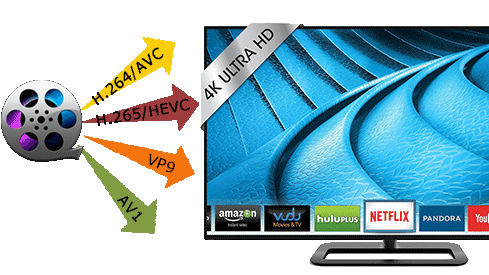
H.265, also known as HEVC, is the successor to the modern generation H.264 codec (known as AVC), which is capable of encoding / decoding 4K video. HEVC is installed in most 4K televisions and computer monitors. When encoded, H.265 consumes up to 8-10 times more processing power than H.264, making HEVC unsuitable for transmitting small to medium-sized data using the latest technologies. Video-on-demand resources such as Netflix generally encode their video content well before making it available to users. In addition, these resources can be allowed as additional computing power,

Обратите внимание, что старые форматы и кодеки (AVC / H.264) по-прежнему способны обрабатывать видео с разрешением 4K а разница заключается в том, что новые, типа HEVC, делают это более эффективно. При этом качество видео при увеличенной степени сжатия стало лучше, и это не сказалось наебитрей. HEVC, способный поддерживать разрешения до 8K (8192 × 4320) – это видео-формат будущего!

At the same time, there are no end-user costs associated with HEVC / H.265, while hardware manufacturers, providers of paid programs and streaming services must pay royalties for using HEVC technology in their products and / or services. . A good example would be modern 4K televisions or monitors, in which the H.265 codec is incorporated during production, and users get it for free with the purchase of the corresponding device.

Free video streaming services (such as YouTube) have traditionally been exempt from royalty payments, but this has not affected HEVC. This exclusion has generated a series of interesting collaborations between renowned high-tech companies in the creation of new open source video formats.

Alliance for Open Media
Dissatisfied with the licensing rules and patent royalties associated with HEVC, tech giants like Microsoft, Google, Mozilla, Cisco, Intel, Netflix, and Amazon have formed a new consortium: the Alliance for Open Media (AOM). It is a non-profit organization dedicated to the development of the next generation of video codecs, video encoding formats, and related technologies. For 2016-2017, AOM plans to introduce new technology that enables video data to be compressed more efficiently, which in turn will significantly reduce the load on the Internet connection and significantly increase the capabilities of modern web networks that transmit video to personal computers, smart phones, game consoles, streaming consoles. , televisions, etc. Also, when using the new format, no royalties will be paid. It follows that any company can create software that can convert,

Many of the group members have already contributed to the development of the next generation of 4K codecs; Cisco created Thor, Mozilla worked with Daala and Google with VP9. AMD, ARM, Intel, and Nvidia have recently joined the Alliance.

VP9 is the most popular 4K codec
The VP9 codec is open source and royalty free. It owes its popularity to its use in web applications during the gradual transition from Flash to HTML5 technology.