Which Audio Codec is Better?


Free Download Mp4Gain
picture

Which Audio Codec is Better?

Audio Codec
Audio Codec

When it comes to audio, the codec is the magic behind the scenes that helps you hear your favorite songs and sounds. But have you ever wondered what makes one codec better than another? In this article, we’ll explore the world of audio codecs and find out which one is the best.
Audio Codec
Audio Codec

What is an audio codec?

An audio codec is a type of software that compresses and decompresses audio files. This process makes the audio smaller, so it can be easily stored and shared on your computer, phone, or online. When you want to listen to the audio, the codec decompresses it so you can hear it in its original quality.

Why are there different codecs?

Just like how you can choose between different types of ice cream flavors, there are different types of codecs because everyone has different tastes and preferences. Some codecs are better for music, while others are better for speech. Some are easy to use, while others are more complex. The choice of codec depends on the type of audio you want to compress, the size of the file, and the quality of the sound you want to preserve.

The most popular codecs

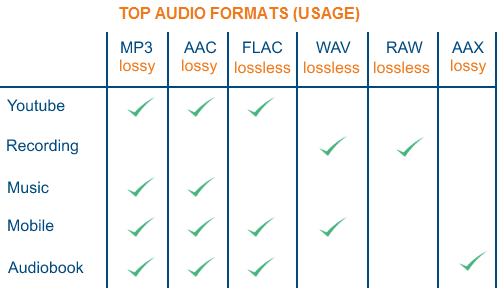
There are many different audio codecs out there, but here are some of the most popular ones:

  • MP3
  • AAC
  • FLAC
  • WAV

MP3

MP3 is one of the most popular codecs and has been around for over 20 years. It’s a great choice for music because it compresses audio files into smaller sizes while still preserving the quality of the sound. MP3 is also compatible with most devices and players, making it a convenient option for many people.

AAC

AAC stands for Advanced Audio Coding and is a newer codec that was developed by Apple. It’s commonly used by Apple devices, like the iPhone and iPad, and provides better sound quality than MP3 at a lower bit rate. AAC is also used by many online streaming services, like Spotify and Apple Music, to deliver high-quality audio to their users.

FLAC

FLAC stands for Free Lossless Audio Codec and is a popular option for audiophiles. This codec compresses audio files into smaller sizes without losing any quality, making it the perfect choice for people who want the best sound possible. The downside to FLAC is that it’s not as widely supported as MP3 and AAC, so you may need to use special software to play FLAC files on your device.

WAV

WAV is a common codec for professional audio and is often used in recording studios. It’s a lossless codec, which means it doesn’t compress audio files and preserves the original sound quality. However, WAV files are usually much larger than files compressed with other codecs, so they may take up a lot of space on your device.

Conclusion

In conclusion, the choice of codec depends on the type of audio you want to store and share, and your personal preferences. MP3 is a classic and widely supported option, while AAC offers better sound quality. FLAC is the perfect choice for audiophiles who want to preserve the original sound quality, and WAV is used in professional settings. To find the best solution for you, consider your needs and try out different codecs to see which one works best for you. And finally, if you want to enhance the audio quality of your files, you can use Mp4Gain to adjust the volume and improve the sound of your audio files.

It’s important to remember that the audio codec you choose will affect the size, quality, and compatibility of your audio files. So choose wisely, and enjoy the world of audio!



Free Download Mp4Gain
picture


Mp4Gain Main Window
picture


Mp4Gain Features
picture


Free Download Mp4Gain
picture

Detailed music format

Detailed music format

Audio File Formats
Audio File Formats

classic wave

Audio File Formats
Audio File Formats

As the most classic Windows media audio format, the WAVE file is widely used, which uses three parameters to represent sound: the number of sampled bits, the sample rate, and the number of channels.
The channels are divided into mono and stereo, and the sample rates are generally 11025 Hz (11 kHz), 22050 Hz (22 kHz), and 44100 Hz (44 kHz). The capacity occupied by the WAVE file = (sampling frequency × sampling bits × channel) × time/8 (1 byte = 8 bits).

traditional mod

MOD is a wavetable-like music format, but its structure is similar to MIDI, it uses real samples, and the volume is small. In the earlier DOS era, MOD was often used as background music for games. Modern mods can contain many audio tracks in many formats, such as S3M, NST, 669, MTM, XM, IT, XT, and RT.

midi music computer

MIDI is short for Musical Instrument Data Interface. Records the sound played by the instrument digitally (each note is recorded as a number), and then synthesizes these records via FM or wavetable during playback: FM synthesis is the sound of the instrument is simulated by mixing the multi-frequency sounds; wavetable synthesis consists of storing the sound samples of the instrument in the wavetable of the sound card and extracting the sound from the wavetable as you play.

Boss Boss MP3

It can be said that MP3 is famous, it uses MPEG Audio Layer 3 technology to compress the sound with a compression ratio of 1:10 or even 1:12, with a sampling rate of 44kHz and a bit rate of 112kbit/s. .
MP3 music is music stored in digital form. If you want to play it, you must have a corresponding digital playback and decoding system. Generally, MP3 digital music is decoded by special software and then restored to a waveform sound signal for playback output. This type of software is called For MP3 players, such as Winamp, etc.

Overlord RA series online

RA, RAM, and RM are Real’s mature network audio formats, using “streaming audio” technology, making them well suited for network streaming. Information such as copyright, singer, producer, mail and song title can be added during production.
RA can be called the supreme lord of multimedia communication on the Internet. It is suitable for streaming on the Internet and is currently the best format for listening to online music online.

VQF with high compression ratio

VQF or TwinVQ is an audio compression technology developed by Nippon Telegraph and Telephone and Yamaha Corporation.
The audio compression rate of VQF is almost twice that of standard MPEG audio and can reach approximately 1:18 or even higher. And popular compression formats like MP3 and RA are usually only around 1:12. But it still won’t affect the sound quality, when VQF compress music at 44kHz-80kbit/s audio sampling rate, its sound quality will be better than 44kHz-128kbit/s MP3, when compress at 44kHz-96kbit/s , the music is close to 44kHz-256kbit/s MP3.

MD minidisc

MD (ie MiniDisc) is a comprehensive portable music format released by SONY in 1992. The compression algorithm it uses is ATRAC technology (the compression ratio is 1:5). MD is divided into Recordable MD (Recordable, with two heads of magnetic head and laser head) and Single Play MD (Prerecorded, only laser head).
The powerful editing function is the strong point of MD. You can quickly select tracks, move tracks, merge, split, delete and edit track titles. It is more personalized than CD and you can have your own MD album at any time. MD products include MD Walkman, MD bedside audio, MD car audio, MD recording deck, MD camera gun and MD driver, etc.

All about Audio formats (2020)

The algorithm used to compress and decompress files is called CODEC (acronym for compression / decompression). “Codec” is software that tells the computer which mathematical operations it must manipulate to compress them and which ones to perform to show them compressed.
Instead, the “format” is a kind of file that contains the codec and integrates it with the system.

Sounds are digitally recorded using a technique called “sampling”: the sound wave is divided into many pieces called samplers.

audio file formats

The quality of a digital audio track depends on:

– sampling frequency, measured Hertz (Hz, number of samples per second). A frequency at 11.025 Hz is suitable for recording voice, one at 22.050 Hz (medium quality) is suitable for recording a tape and one at 44,100 Hz for recording in CD quality. Reducing the sample rate leads to loss of quality.

– from termination, ie. the number of bits used (8.16, 24 to 32) for each ciampione (with 8 bits = 1 byte for 256 options, 16 bits = 2 bytes for 256 * 256 = 65,536 values ​​in the levels, and so on). Converting 16-bit to 8-bit samples cuts the original file in half, but also reduces the quality of the music.
– the number of channels: mono (1) or stereo (2).

bit rate: the product of these three elements: frequency, resolution, and number of channels are defined as bit rate, ie bits per second or bps. From this it can be deduced that every second there are 44,100 recorded values ​​which are then multiplied by the 2 stereo sound channels which are multiplied by 16 as the recording takes place in 16 bits (corresponding to 2 bytes). Then we get:

The bit rate for songs on audio CDs = 44,100 * 16 bit * 2 = 1,411.2 kbps (~ 10.6 MByte per minute 44,100 * 2 byte * 2 * 60)
The bit rate of an audio recording = 22,050 * 8 * 1 = 176.4 Kbps (~ 1.3 MByte per minute = 22,050 * 1 byte * 1 * 60)

Accordingly, compressing by reducing the total length of the file will reduce the average length of the subsequent ones, ie. it will reduce the average bit rate. Therefore, in these cases, the average bit rate becomes the index of the compression scope. For example, if the source file had a bit rate of 1,411 Kbit / if the compressed file had an average bit rate of 320 Kbit / s, we would have reduced by a factor of approx. 4.5.
Loss compression compromises the loss of information and the size of the final file, while a lossless compression must balance the size of the final file with the execution times of the algorithm.

losseless

The most popular lossless audio formats are:

-WAV sampling, Wave file (Waveform Extension), where wave means wave: standard format for audio files in the Windows audio sampling environment; It has large dimensions as it manages sampling frequencies of up to 44.1 kHz, 48 kHz and now also 96 and even 192 kHz, resolution of up to 32 linear bits and allows to store stereo or surround signals with a number
Unlimited in a single speaker file (equivalent to so many channels). The wave format is nothing more than digital recording of real sounds, sounds that have had
originates from a source external to the PC. In a WAV piece of music drums, piano, guitar, bass or
voice is heard in the same way, regardless of the PC to which the file is heard (to
obviously with the same acoustic quality of the hardware components).
-Aif (Apple Audio Interchange File Format or AIFF) similar to WAV format, is a format that generates good sound quality, is compatible with many browsers and does not require plugins. to Apple’s AIFF format. The Au format also manages more efficient quantization methods that allow a reduction in the amount of data by even 4 times the original value at the cost of a modest loss of quality.
-APE (Monkey Audio; .ape): Lost raw format that allows you to reduce the space occupied
our music about 50% (in some cases even more) without loss of quality. This way an album there
wav format has approx. 600 MB, has an average of 300 MB (much more than about 100 MB a
high bit rate and 60 mpc of an mp3, but the quality is identical to the original); I say, on average, because there is
certain types of music where the level of compression is even higher. To listen to songs in this format,
you can use plugins for WinAmp or, better yet, a player that integrates the native as
Foobar 2000. Right now it’s probably the best lossless codec considering a balance between
speed and compression (click here for lossless comparison table).