Lossy vs Lossless Audio in OGG


Free Download Mp4Gain
picture

Lossy vs Lossless Audio in OGG
Lossy vs Lossless Audio in OGG

Let’s talk about Lossy vs Lossless Audio in OGG

When it comes to audio quality, choosing between lossy and lossless audio can make a big difference. In audio compression, “lossy” means some data gets removed to make the file smaller, while “lossless” keeps all the original audio information. OGG is a popular format known for flexibility with both lossy and lossless compression, so you can get high-quality sound in a smaller file size. As an audio expert, I’ll walk you through the ins and outs of these formats, drawing from my years of experience with audio compression, so you can make the best choice for your needs.

Understanding OGG Format Basics

The OGG format is like a sturdy container, housing different types of audio codecs. It’s especially popular for its open-source, patent-free nature, and high-quality sound. With OGG, you can have lossy or lossless compression, depending on what matters more—quality or file size. Think of it like packing for a trip: sometimes you need to pack light (lossy), and other times, you want to bring everything (lossless). The flexibility of OGG makes it perfect for anyone who values good sound, but also wants control over file size.

What is Lossy Audio Compression?

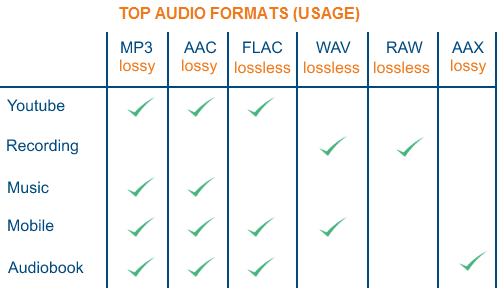
Lossy audio compression removes “unnecessary” parts of audio that our ears may not easily pick up, which makes the file size much smaller. It’s like skimming off the less noticeable sounds in a song or recording. MP3 and OGG Vorbis are common lossy formats. If you’re streaming music online, lossy formats are everywhere. But while the space savings are great, there’s a trade-off: you lose some detail in sound quality. For casual listeners, it’s often a non-issue, but for audiophiles, those subtle sounds matter.

What is Lossless Audio Compression?

In lossless audio compression, all the original audio data is preserved. This format, like OGG FLAC, doesn’t cut any corners. Imagine you’re saving a photo without changing a single pixel; that’s what lossless does for sound. The file is bigger, yes, but you get pure, untouched audio. In my experience, musicians, DJs, and audio engineers often prefer lossless formats because every sound, every subtle tone, is kept intact. For casual listening, though, the larger file size might be more of a hassle than it’s worth.

Comparing OGG Vorbis (Lossy) with OGG FLAC (Lossless)

Comparing OGG Vorbis and OGG FLAC is a bit like comparing a paperback book to a hardcover. OGG Vorbis reduces file size by about 90%, perfect for quick downloads or streaming. OGG FLAC, on the other hand, maintains top quality, but it’s bigger. OGG Vorbis is great for everyday listening, but if you’re an audio purist, OGG FLAC is where you’ll hear the difference. You’ll notice richer, fuller sounds in OGG FLAC, especially in classical or jazz music where subtlety is key.

  • Quality Differences: Audible or Not?

  • File Size Considerations

  • Performance for Streaming vs. Offline Playback

How Lossy Compression Works in OGG Vorbis

OGG Vorbis, the lossy version of OGG, uses advanced algorithms to remove sounds our ears aren’t as sensitive to. It’s like compressing a sponge and squeezing out the excess water, keeping the sponge itself intact but smaller. This way, you get a smaller file size with audio that’s nearly identical to the original. It’s commonly used for streaming music because it keeps quality high and file size low—essential for avoiding buffering issues on slow networks.

The Science Behind Lossless Compression in OGG FLAC

Lossless compression in OGG FLAC is more like folding a sheet—no material is removed; it’s just compacted in a way that you can unfold it back to its original form. The audio data is untouched, making it a favorite among sound engineers who need top fidelity. OGG FLAC is especially valuable in professional settings, like when recording a song or podcast, where every little detail counts.

Pros and Cons of Using Lossy OGG for Audio

Using lossy OGG has a lot of perks, especially if you need to save space. It’s like having a lighter suitcase for travel—you can take it anywhere without the bulk. However, lossy compression may sacrifice some subtle details, so it’s not ideal for everyone. Here are some quick points:

  • Smaller File Size

  • Great for Streaming and Download Speeds

  • Minor Loss of Audio Detail

  • Not Ideal for High-End Sound Systems

Pros and Cons of Using Lossless OGG for Audio

Lossless OGG, like FLAC, maintains full sound quality. It’s like a heavy-duty suitcase that carries everything you need. While the file size is larger, the quality remains top-notch. Here’s a rundown of pros and cons:

  • Exceptional Audio Quality

  • Perfect for Archival Storage

  • Larger File Size

  • More Demanding on Storage Space

Is Lossy or Lossless Better for Music Streaming?

If you’re streaming music, you’ll likely lean toward lossy OGG, especially with slower internet speeds. Lossy compression keeps file sizes manageable and minimizes buffering. But for platforms dedicated to high-quality sound, lossless is increasingly common. Lossy streaming is a compromise between quality and accessibility, while lossless streaming is all about giving you the best audio, especially on platforms where fidelity is a top priority.

Best Scenarios for Choosing Lossy OGG

Lossy OGG is perfect for everyday listening, especially when you’re on the go. Whether it’s on a jog or commuting, lossy audio offers high-quality sound without filling up your phone’s storage. When you’re not looking for flawless quality but still want something that sounds good, lossy OGG is the way to go. It’s especially great if you’re listening on devices where audio fidelity isn’t as noticeable.

Best Scenarios for Choosing Lossless OGG

Lossless OGG really shines when quality is paramount, like for a professional DJ or a music producer. It’s also ideal for creating a digital archive of your favorite albums. Lossless OGG ensures every note, every instrument, is perfectly preserved. If you’ve got the storage space and care about every detail in the music, go for lossless OGG. It’s also an excellent choice if you plan to listen on high-quality sound systems where every sound matters.

Do File Size and Storage Space Matter to You?

Lossy OGG saves a ton of space, perfect if you’re low on storage. However, if storage is abundant, lossless OGG is a good way to get premium sound without compromise. I always ask myself, “How important is quality versus storage for me?” If I want to fit more music on my phone, I’ll go lossy. If I’m working on a sound project where I need the best quality, lossless OGG it is.

Final Words on Lossy vs Lossless Audio in OGG

Ultimately, the choice between lossy and lossless OGG depends on your needs and setup. For most listeners, lossy OGG offers a great balance between quality and file size. But for audiophiles, sound engineers, and music lovers who want every detail, lossless OGG can’t be beat. If you’re still on the fence, try testing out both formats in your own environment to hear the difference. And when you’re ready to optimize your audio, MP4Gain is here to help ensure every sound, whether lossy or lossless, is just right.

Comments:

Jackson: Really helpful breakdown! I didn’t even know the difference between lossy and lossless. Helped a lot for my project!

Marie123: Finally I get it! All the tech words usually confuse me but this article was simple and super clear.

SoundwaveMike: Good info, but I’d love to see more on how the lossy compression actually affects different genres of music.

LeeGuitarist: Wow, never knew OGG was that versatile! I always stuck with MP3, but now I’m gonna try OGG FLAC!

BobTheBuilder: Too much detail for my taste, but good for people who want to learn everything about audio!

Anna_Loves_Music: This explained a

lot! I’ve been trying to figure out how to save space on my phone without losing my fave tunes.

https://x.com/ricardo_mx_news/status/1850633331957813490


Free Download Mp4Gain
picture


Mp4Gain Main Window
picture


Mp4Gain Features
picture


Free Download Mp4Gain
picture

Detailed music format

Detailed music format

Audio File Formats
Audio File Formats

classic wave

Audio File Formats
Audio File Formats

As the most classic Windows media audio format, the WAVE file is widely used, which uses three parameters to represent sound: the number of sampled bits, the sample rate, and the number of channels.
The channels are divided into mono and stereo, and the sample rates are generally 11025 Hz (11 kHz), 22050 Hz (22 kHz), and 44100 Hz (44 kHz). The capacity occupied by the WAVE file = (sampling frequency × sampling bits × channel) × time/8 (1 byte = 8 bits).

traditional mod

MOD is a wavetable-like music format, but its structure is similar to MIDI, it uses real samples, and the volume is small. In the earlier DOS era, MOD was often used as background music for games. Modern mods can contain many audio tracks in many formats, such as S3M, NST, 669, MTM, XM, IT, XT, and RT.

midi music computer

MIDI is short for Musical Instrument Data Interface. Records the sound played by the instrument digitally (each note is recorded as a number), and then synthesizes these records via FM or wavetable during playback: FM synthesis is the sound of the instrument is simulated by mixing the multi-frequency sounds; wavetable synthesis consists of storing the sound samples of the instrument in the wavetable of the sound card and extracting the sound from the wavetable as you play.

Boss Boss MP3

It can be said that MP3 is famous, it uses MPEG Audio Layer 3 technology to compress the sound with a compression ratio of 1:10 or even 1:12, with a sampling rate of 44kHz and a bit rate of 112kbit/s. .
MP3 music is music stored in digital form. If you want to play it, you must have a corresponding digital playback and decoding system. Generally, MP3 digital music is decoded by special software and then restored to a waveform sound signal for playback output. This type of software is called For MP3 players, such as Winamp, etc.

Overlord RA series online

RA, RAM, and RM are Real’s mature network audio formats, using “streaming audio” technology, making them well suited for network streaming. Information such as copyright, singer, producer, mail and song title can be added during production.
RA can be called the supreme lord of multimedia communication on the Internet. It is suitable for streaming on the Internet and is currently the best format for listening to online music online.

VQF with high compression ratio

VQF or TwinVQ is an audio compression technology developed by Nippon Telegraph and Telephone and Yamaha Corporation.
The audio compression rate of VQF is almost twice that of standard MPEG audio and can reach approximately 1:18 or even higher. And popular compression formats like MP3 and RA are usually only around 1:12. But it still won’t affect the sound quality, when VQF compress music at 44kHz-80kbit/s audio sampling rate, its sound quality will be better than 44kHz-128kbit/s MP3, when compress at 44kHz-96kbit/s , the music is close to 44kHz-256kbit/s MP3.

MD minidisc

MD (ie MiniDisc) is a comprehensive portable music format released by SONY in 1992. The compression algorithm it uses is ATRAC technology (the compression ratio is 1:5). MD is divided into Recordable MD (Recordable, with two heads of magnetic head and laser head) and Single Play MD (Prerecorded, only laser head).
The powerful editing function is the strong point of MD. You can quickly select tracks, move tracks, merge, split, delete and edit track titles. It is more personalized than CD and you can have your own MD album at any time. MD products include MD Walkman, MD bedside audio, MD car audio, MD recording deck, MD camera gun and MD driver, etc.

Uncompressed audio formats

Uncompressed audio formats

Uncompressed audio formats

Below, we list the various types of uncompressed linear audio formats. The first three are the ones that have become the main ones supported by most of today’s professional audio applications and are: audio swap file format :

-AIF, AIFF The audio exchange file format is of Apple (1985) origin and allows the storage of mono or multichannel samples of 8 or 16 bits and various sampling rates. Being a format designed to be portable, it can also be easily converted (as we will see, Microsoft RIFF is similar) and is therefore often used. Extensions RIFF WAVE :


-WAV Developed by Microsoft and IBM in 1992, the RIFF WAVE (whose full name is Resource Sharing File Format Waveform Audio Format) follows the specifications of the more general rich information file format. It was introduced starting with Windows 3.1 and quickly became the most popular format for PC applications. WAV files support various types of sampling: they are single or multi-channel, 8 or 16 bits at different sampling rates with various encoding systems, even if the most common are PCM and ADPCM. Extensions TRANSMISSION WAVE FORMAT (BWF) :

Uncompressed audio formats


-WAV It is an extension of the popular WAVE format and was created by the European Broadcasting Union (EBU) in 1997 and updated in 2001 and 2003. The purpose of this format is to add to the normal .WAV metadata format to facilitate the exchange of data between different platforms and different audio applications, allowing the files thus encoded to identify themselves autonomously and allow synchronization with other recordings. Since the only difference from “normal” WAVE files is in the extended information written in the file header area, the two formats are absolutely compatible and a particular player is not required for playback. In order to overcome the limitation on the maximum size of the WAVE file (2 Gb) in 2006, it was specified as an extension of the BWF l! RF-64, SD2 Sound Designer II Format SD2f file extension The Sound Designer 2 format is proprietary to Digidesign and is the evolution of the original Sound Designer 1 format, unlike which it structures the data so that all audio samples are stored in the file’s data fork and all parameters in place . resource holder. This is extremely convenient in files where the data fork can become hundreds of Mb and more, because it is possible to modify, add, cut the parameters of the audio file without having to modify the sample data, a feature that saves a lot of time, especially at a time when computers and hard drives were vastly smaller in capacity and slower in data processing and writing. It can also be monophonic or multichannel (interleaved), Sampling depth of up to 24 bits at different sampling frequencies of up to 192 KHz, as in the case of Pro Tools HD. It should be noted that in multitrack applications such as Pro Tools, the standard professional market software created for a DSP based card system, each track is recorded in a separate mono file, even for stereo or multi-channel tracks. In the case of a stereo track, the “split stereo” file is used, which consists of two monophonic files with the same name but with the two suffixes .L and .R (or in previous versions (L) and (R) ), that remain physically separated but that the application treats as a single stereophonic file, operating all the editing operations on both files simultaneously in perfect phase coherence; In native applications (ie fully dependent on CPU processing power), all those in practice outside of Pro Tools software (not Pro Tools LE or Pro Tools M-Powered who are also “native” even if they depend of specific Digidesign software or M-Audio production hardware), instead, the use of “interleaved” files is generalized, that is, stereo or multichannel files in which all the channels are stored in a single file. The stereo track is represented by a single file containing the two channels, which are “written” in blocks (first a number n of blocks from the left channel followed by an equal number n of blocks from the right channel, and so on). This type of file, created to dominate applications, used in multitrack applications still generates a bit of confusion, because although it is more practical (in theory) to be used within the native application, it needs to become a “split” file when imported into Pro Tools.