Detailed music format


Free Download Mp4Gain
picture

Detailed music format

Audio File Formats
Audio File Formats

classic wave

Audio File Formats
Audio File Formats

As the most classic Windows media audio format, the WAVE file is widely used, which uses three parameters to represent sound: the number of sampled bits, the sample rate, and the number of channels.
The channels are divided into mono and stereo, and the sample rates are generally 11025 Hz (11 kHz), 22050 Hz (22 kHz), and 44100 Hz (44 kHz). The capacity occupied by the WAVE file = (sampling frequency × sampling bits × channel) × time/8 (1 byte = 8 bits).

traditional mod

MOD is a wavetable-like music format, but its structure is similar to MIDI, it uses real samples, and the volume is small. In the earlier DOS era, MOD was often used as background music for games. Modern mods can contain many audio tracks in many formats, such as S3M, NST, 669, MTM, XM, IT, XT, and RT.

midi music computer

MIDI is short for Musical Instrument Data Interface. Records the sound played by the instrument digitally (each note is recorded as a number), and then synthesizes these records via FM or wavetable during playback: FM synthesis is the sound of the instrument is simulated by mixing the multi-frequency sounds; wavetable synthesis consists of storing the sound samples of the instrument in the wavetable of the sound card and extracting the sound from the wavetable as you play.

Boss Boss MP3

It can be said that MP3 is famous, it uses MPEG Audio Layer 3 technology to compress the sound with a compression ratio of 1:10 or even 1:12, with a sampling rate of 44kHz and a bit rate of 112kbit/s. .
MP3 music is music stored in digital form. If you want to play it, you must have a corresponding digital playback and decoding system. Generally, MP3 digital music is decoded by special software and then restored to a waveform sound signal for playback output. This type of software is called For MP3 players, such as Winamp, etc.

Overlord RA series online

RA, RAM, and RM are Real’s mature network audio formats, using “streaming audio” technology, making them well suited for network streaming. Information such as copyright, singer, producer, mail and song title can be added during production.
RA can be called the supreme lord of multimedia communication on the Internet. It is suitable for streaming on the Internet and is currently the best format for listening to online music online.

VQF with high compression ratio

VQF or TwinVQ is an audio compression technology developed by Nippon Telegraph and Telephone and Yamaha Corporation.
The audio compression rate of VQF is almost twice that of standard MPEG audio and can reach approximately 1:18 or even higher. And popular compression formats like MP3 and RA are usually only around 1:12. But it still won’t affect the sound quality, when VQF compress music at 44kHz-80kbit/s audio sampling rate, its sound quality will be better than 44kHz-128kbit/s MP3, when compress at 44kHz-96kbit/s , the music is close to 44kHz-256kbit/s MP3.

MD minidisc

MD (ie MiniDisc) is a comprehensive portable music format released by SONY in 1992. The compression algorithm it uses is ATRAC technology (the compression ratio is 1:5). MD is divided into Recordable MD (Recordable, with two heads of magnetic head and laser head) and Single Play MD (Prerecorded, only laser head).
The powerful editing function is the strong point of MD. You can quickly select tracks, move tracks, merge, split, delete and edit track titles. It is more personalized than CD and you can have your own MD album at any time. MD products include MD Walkman, MD bedside audio, MD car audio, MD recording deck, MD camera gun and MD driver, etc.


Free Download Mp4Gain
picture


Mp4Gain Main Window
picture


Mp4Gain Features
picture


Free Download Mp4Gain
picture

What music format has the best sound quality?

What music format has the best sound quality?

Best Audio Format

When I want to download a song, I always feel that the sound quality is not so pure, it seems a bit muddy, what format is good to listen to?

Best Audio Format Codec

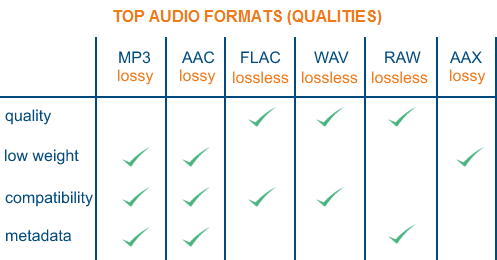
There are three lossless music quality formats: ape, wav and flac.

APE is one of the popular lossless compression formats for digital music. Due to its early appearance, it has a wide user base all over the world, especially in mainland China. Lossless compression formats such as APE use a more refined recording method to reduce volume, and the restored data is the same as the original file, ensuring file integrity.

WAV is a sound file format developed by Microsoft. It complies with the RIF file specification and is used to store audio information resources on the Windows platform. It is widely compatible with the Windows platform and its applications. This format supports a variety of compression types. algorithms and supports multiple WAV file with standard format is the same as CD format, with 44.1K sampling rate and 16-bit quantization number, so the sound file quality is almost the Same as CD.

Chinese translation FLAC is a lossless audio compression coding. FLAC is a well-known free audio compression codec, which is characterized by lossless compression. Unlike other lossy compression codes such as MP3 and AAC, it does not destroy any original audio data, so it can restore the sound quality of music discs. It has been compatible with many software and hardware audio products (such as CDs, etc.) since 2012.

What music format is good in sound quality?

What music format is good in sound quality?

Audio File Format

1. WAV format The format

Audio File Formats

WAV is a sound file format developed by Microsoft, also called waveform sound file. It is the first digital audio format and is widely supported by Windows platform and applications. The WAV format supports many compression algorithms, supports a variety of audio bits, sample rates, and channels. It adopts a sampling frequency of 44.1 kHz and a quantization number of 16 bits. Therefore, the sound quality of WAV is almost the same as that of CD, but WAV format requires too much storage space, it is very inconvenient to communicate and broadcast.
Supplement: Lossless format, Disadvantage: The volume is very large!
2. Format
FLAC FLAC is short for Free Lossless Audio Codec, which can be interpreted as Chinese lossless audio compression coding. FLAC is a well-known free audio compression codec, which is characterized by lossless compression. Unlike other lossy compression codes such as MP3 and AAC, it does not destroy any original audio data, so it can restore the sound quality of music discs. It is now compatible with many software and hardware audio products. In short, FLAC is similar to MP3, but it has lossless compression, which means that the audio is compressed in FLAC without losing any information. This compression is similar to Zip, but FLAC will give you a higher compression ratio, because FLAC is a compression method specially designed for the characteristics of audio, and you can use the player to play FLAC compressed files like you normally play MP3 files. same.
Supplement: It is a lossless format. Compared with ape, it is bigger in size, but it has good compatibility and fast encoding speed. The player supports a
longer edition of this paragraph.
3.APE format
APE is one of the most popular digital music file formats. Unlike lossy compression methods like MP3, APE is a lossless audio compression technology, which means that after compressing the audio data file read from the audio CD in APE format, you can also compress the file in APE format. The audio file is exactly the same as before compression, without any loss. The file size of APE is about half that of a CD, but with the rise of broadband, the APE format is loved by many music lovers, especially for friends who want to stream audio CDs over the net. APE can help them save a lot of resources
Supplement: It is a lossless compression format, which is smaller than flac. Encoding is slow.

What are the differences between the audio formats?

What are the differences between the audio formats?

Audio Formats

Common audio formats are: CD, WAVE, AIFF, MPEG, MP3, MPEG-4, MIDI, WMA, RealAudio, VQF, OggVorbis, AMR, APE, FLAC, AAC.

Audio Format

FAQ

What are the audio formats?

The most common audio formats are: CD, WAVE, AIFF, MPEG, MP3, MPEG-4, MIDI, WMA, RealAudio, VQF, OggVorbis, AMR, APE, FLAC, AAC. But new formats are being designed and will be available soon. There are other very new ones like Opus that are gaining followers and users.

What are the best audio formats?

We could say that audio formats are divided into god classes: Lossless and Lossy.
LossLess formats are usually ranked as the best, for example FLAC.

Which normalizer can normalize most audio and video formats?

Mp4Gain is the normalizer that offers the largest number of audio and video formats. It’s even a convert as well as a normalizer

The difference of each sound quality:

1. The sound quality of the CD format is a relatively high audio format. Therefore, when it comes to audio formats, the CD is naturally the pioneer.

2. WAVE is a sound file format developed by Microsoft. Complies with the PIFF Resource Interchange File Format file specification. It is used to store the WINDOWS platform audio information resources and is compatible with the WINDOWS platform and its applications.

3. AIFF (Audio Interchange File Format) format and AU format are very similar to WAV, and these common music formats are also supported by most audio editing software.

4. MPEG is the English abbreviation for Moving Picture Experts Group. This group of experts was established in 1988 to create video and audio compression standards for CDs. MPEG audio file refers to the sound part in the MPEG standard, that is, the MPEG audio layer.

5. The MP3 format was born in Germany in the 1980s. The so-called MP3 refers to the audio part of the MPEG standard, that is, the MPEG audio layer.

6. The MPEG-4 standard is a video compression standard for multimedia applications published by the International Group of Experts on Moving Images in October 2000.

What is the best audio format for me?

What is the best audio format for me?

Best Audio File Formats

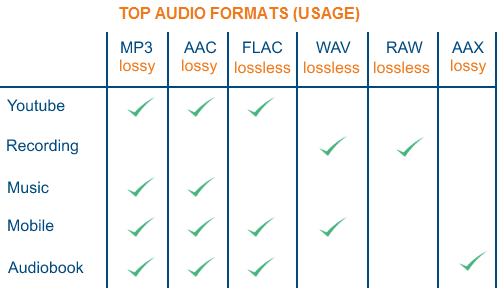
After all, it’s not always clear which format is best for music. Some services, like Amazon, sell digital music in MP3 format. Although Apple offers song downloads from its iTunes Store in AAC format.

Audio File Formats

So the question arises what formats can your device play. If it is relatively new, it can play lossless formats like FLAC, as well as older lossy formats like MP3 and AAC.

And to add even more confusion, there is the listening factor. How important is sound quality to you?

To help you decide, here are some things you can do.

Check the format compatibility of your portable device

Before deciding on an audio format, the first thing to do is check its compatibility. This can usually be found on the manufacturer’s website or in the specifications section of the user manual (if there is one, of course).

If you are not going to use high quality audiophile equipment in the future, then lossy audio may be sufficient if you are only going to use your laptop. For greater compatibility, the MP3 file format is the safest bet. This is an old algorithm, but it works well. In fact, it is still the most compatible audio format for everyone.

However, if you are ripping tracks from a music CD, for example, it would be wise to keep a lossless copy on your computer / external hard drive and lose it for your laptop as well. This will keep your music safe in the future, even if new formats and hardware show up later.

Consider the bit rate

Bitrate is an important factor to know, especially if you are looking for the best quality music playback. However, the actual bit rate setting depends on the audio format you are using.

For example, the MP3 (MPEG-1 Audio Layer III) format has a bit rate range of 32 to 320 kbps. There are also two encoding methods you can choose from: CBR and VBR. In this case, instead of encoding using the default CBR (constant bit rate) encoding, it is much better to use VBR (variable bit rate) encoding. This is because VBR will provide you with the best file size ratio.

The encoding you use is also an important factor.

What audio formats exist? All you need to know.

FLAC, WAV, AIFF, DSD … these are just some of the acronyms you can find when looking for a digital format. They are also accompanied by technical data such as sample rates and bit depth. So many terms can leave you more misplaced than a chicken in a dance. And unless you are an expert in digital sound, the process to choose the audio format that best suits your needs can be a mess. But if they explain it to you, the subject is relatively simple. That is why in Culturasonora we have prepared a complete guide on the different audio formats used.

Audio formats: OGG vs Opus vs FLAC vs ALAC

Nowadays a lot of the music that is heard sounds through online platforms. It is worth talking about the audio formats used by services such as Spotify, Tidal, or Apple Music.
What is the OGG format?
OGG audio formats are like supercharged MP3s. They are compressed audio files, which means that they have a size that allows transmission via WiFi, but at the same time they avoid damage that is usually generated in the compression process. Spotify uses these OGG formats. Depending on how much you want to pay for this service you can listen to them through this portal with different sample rates: from 96 kbps, to Premium 320 kbps files. The audio quality provided by Spotify for Premium users is quite good.
What is the Opus format?
Opus is a new codec that uses the Ogg container. It was developed by the same creators of FLAC, with the help of Mozilla and Skype. It can handle up to 510 kbps and 48 kHz. This new format stands out for its low latency, so it is ideal for online audio streams. Its average latency of 22.5 ms is well below other codecs. It is versatile, open and more and more platforms are adopting it.
What is the FLAC format?
With FLAC audio codecs the sound quality increases with respect to the OGG. They are Lossless, or lossless, audio formats that perform a great trick: they compress file sizes up to 60% without losing quality. In addition, they allow the transmission of sample rates of up to 1,411 kbps, which is much higher than any other audio format. This is the format used by the Tidal platform, the best service for high quality audio transmissions.
What is the ALAC format?
Finally we have the ALAC (Apple Lossless Audio Codec). This format is basically Apple’s alternative to FLAC. It is the format used by Itunes and for Apple Music broadcasts.

What is the difference between the different audio formats, and which one should I choose?

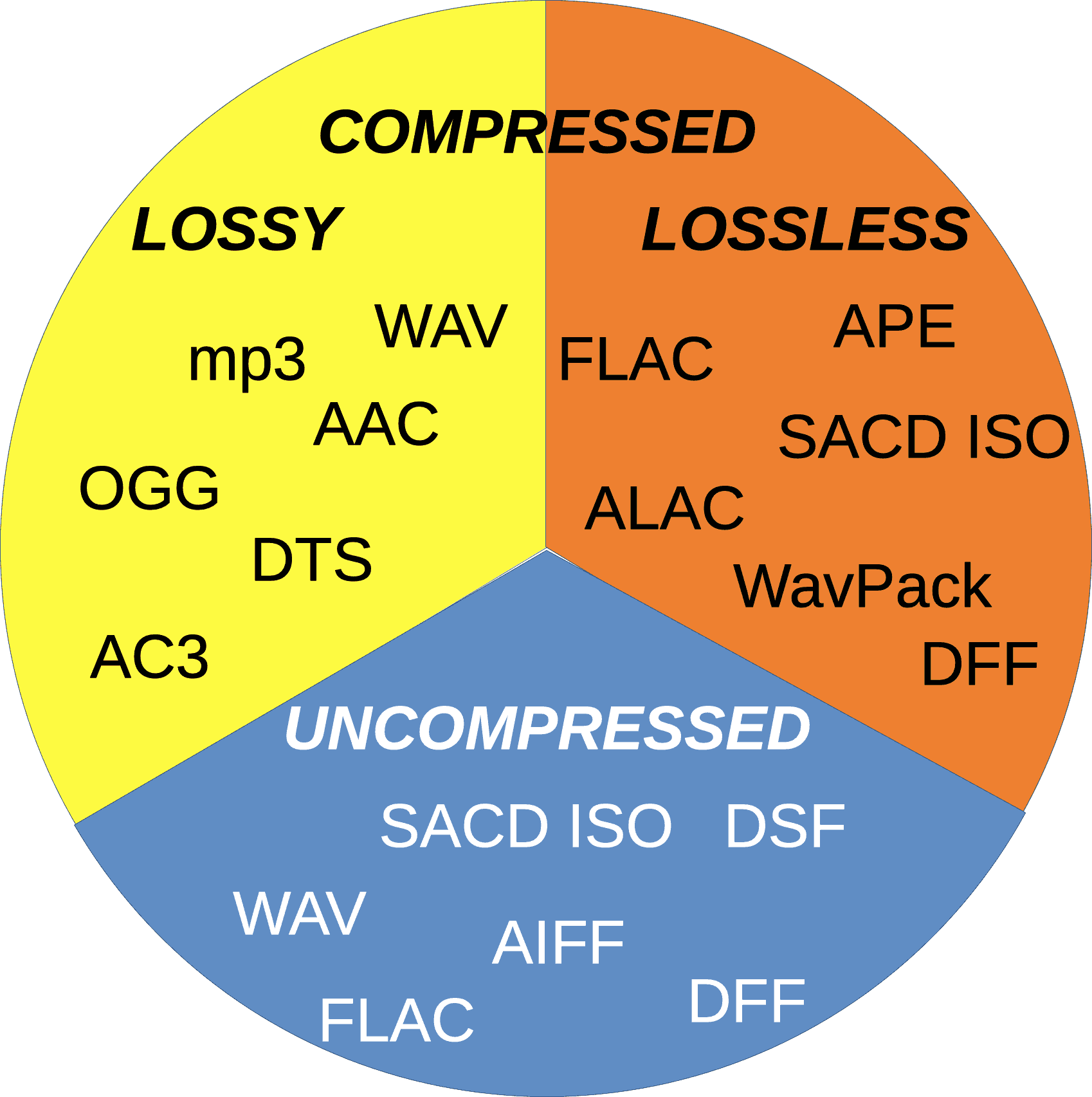
There are two types of sound quality: lossless and lossless. Lossless music preserves the sound quality of the original source – in most cases, CD – intact, on the other hand, lossy music compresses the file to save space (in exchange for decreasing quality). The following formats are included in lossless formats:

loseless formats

Formats WITHOUT loss of quality:

WAV and AIFF: Both are uncompressed formats, which are exact copies of the original sound source. The two formats have essentially the same quality; They simply store the data differently. AIFF was created by Apple – you’ll see it often in its products – but WAV is much more universal. However, since they are not compressed, they take up too much unnecessary space. Unless you’re editing sound, we don’t need to use this format.

FLAC: Free lossless sound codec – Free Lossless Audio Codec (FLAC). It is the most used lossless codec, it is a good option if we seek to store our music without losing quality. Unlike WAV and AIFF, it uses compression, taking up less space. However, it is still a lossless format, which means that the sound quality is the same as the original source, so it is better to listen to than WAV and AIFF. It is also free and free software, which is useful if you like to take a look at how it works.

Apple lossless (Apple Lossless): Also known as ALAC, it is similar to FLAC. Use compression, although it is made by Apple. Its compression is not as efficient as that of FLAC, so the files will be a bit larger, but it is compatible with iTunes and iOS (FLAC not). Therefore, if you use iTunes or iOS as the main software for listening to music, you should choose this format.

APE: It is a file of very high compression without losses, which means that you will save more space. The quality is the same as FLAC, ALAC and other lossless files, but it is not compatible with most players. On the other hand, it makes the processor work harder to decode when it is so compressed. Generally, I would not recommend using this format unless you are very concerned about space and have a compatible player.

Formats with losses: MP3, AAC, OGG and more

MP3: MPEG Audio Layer III, or MP3 for short, is the most common lossy format. So much that it has become synonymous with music downloads on the internet. It is not the most efficient format of all, but it is undoubtedly the most compatible, making this the first option to choose between lost sounds.

AAC: Advanced Audio Coding, also known as AAC, is similar to MP3, although a bit more efficient. Which means that the files take up less space and with the same sound quality as MP3. And, with Apple’s iTunes making it so popular, it’s as compatible as MP3.

Ogg Vorbis: The Vorbis format, often known as Ogg Vorbis due to the use of the Ogg container, is the free software version to MP3 and AAC. Its main attraction is that it is not restricted by patents, but that does not affect you as a user – in fact, despite being open it is of similar quality, and much less popular than MP3 and AAC, so not all players support it . I do not recommend it unless you are interested in the fact of being open source.

WMA: Windows Media Audio. The proprietary format of Microsoft, similar to MP3 or AAC. It really offers no advantage over the other formats, and is not very well supported.

So which audio format should you use?

Now that we have seen the differences between each format, which one should we use for our music? In general, we recommend using MP3 or AAC. They are compatible with most players, and the quality of both is very similar to that of the original source if it is encoded with a high bit rate. Unless you have specific needs, MP3 and AAc are the most recommended options.

However, there is something to say to store music in lossless formats such as FLAC. Although we probably don’t notice a higher quality, it is good to store music if you plan to convert it to other formats later – since converting from one format with losses to another Lossy (eg, from AAC to MP3) will produce lower quality files. In that case we recommend FLAC. In addition, we can choose the lossless format we want, since converting between formats without losses does not degrade the quality of the file.

As a final conclusion, we can say that one should not become obsessed with the subject. We just have to be sure to choose something widely compatible, not convert between two formats with losses, and enjoy music.

An advantage is that Mp4Gain works with all these fromatos (and more) and you can convert from one to another, without problems or loss of quality, on the contrary, with tools like the Equalizer, you can improve the sound to your liking.