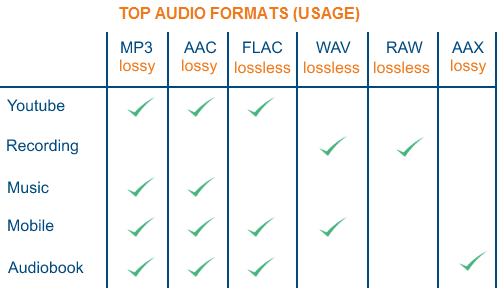
Detailed music format


Free Download Mp4Gain
picture

Detailed music format

Audio File Formats
Audio File Formats

classic wave

Audio File Formats
Audio File Formats

As the most classic Windows media audio format, the WAVE file is widely used, which uses three parameters to represent sound: the number of sampled bits, the sample rate, and the number of channels.
The channels are divided into mono and stereo, and the sample rates are generally 11025 Hz (11 kHz), 22050 Hz (22 kHz), and 44100 Hz (44 kHz). The capacity occupied by the WAVE file = (sampling frequency × sampling bits × channel) × time/8 (1 byte = 8 bits).

traditional mod

MOD is a wavetable-like music format, but its structure is similar to MIDI, it uses real samples, and the volume is small. In the earlier DOS era, MOD was often used as background music for games. Modern mods can contain many audio tracks in many formats, such as S3M, NST, 669, MTM, XM, IT, XT, and RT.

midi music computer

MIDI is short for Musical Instrument Data Interface. Records the sound played by the instrument digitally (each note is recorded as a number), and then synthesizes these records via FM or wavetable during playback: FM synthesis is the sound of the instrument is simulated by mixing the multi-frequency sounds; wavetable synthesis consists of storing the sound samples of the instrument in the wavetable of the sound card and extracting the sound from the wavetable as you play.

Boss Boss MP3

It can be said that MP3 is famous, it uses MPEG Audio Layer 3 technology to compress the sound with a compression ratio of 1:10 or even 1:12, with a sampling rate of 44kHz and a bit rate of 112kbit/s. .
MP3 music is music stored in digital form. If you want to play it, you must have a corresponding digital playback and decoding system. Generally, MP3 digital music is decoded by special software and then restored to a waveform sound signal for playback output. This type of software is called For MP3 players, such as Winamp, etc.

Overlord RA series online

RA, RAM, and RM are Real’s mature network audio formats, using “streaming audio” technology, making them well suited for network streaming. Information such as copyright, singer, producer, mail and song title can be added during production.
RA can be called the supreme lord of multimedia communication on the Internet. It is suitable for streaming on the Internet and is currently the best format for listening to online music online.

VQF with high compression ratio

VQF or TwinVQ is an audio compression technology developed by Nippon Telegraph and Telephone and Yamaha Corporation.
The audio compression rate of VQF is almost twice that of standard MPEG audio and can reach approximately 1:18 or even higher. And popular compression formats like MP3 and RA are usually only around 1:12. But it still won’t affect the sound quality, when VQF compress music at 44kHz-80kbit/s audio sampling rate, its sound quality will be better than 44kHz-128kbit/s MP3, when compress at 44kHz-96kbit/s , the music is close to 44kHz-256kbit/s MP3.

MD minidisc

MD (ie MiniDisc) is a comprehensive portable music format released by SONY in 1992. The compression algorithm it uses is ATRAC technology (the compression ratio is 1:5). MD is divided into Recordable MD (Recordable, with two heads of magnetic head and laser head) and Single Play MD (Prerecorded, only laser head).
The powerful editing function is the strong point of MD. You can quickly select tracks, move tracks, merge, split, delete and edit track titles. It is more personalized than CD and you can have your own MD album at any time. MD products include MD Walkman, MD bedside audio, MD car audio, MD recording deck, MD camera gun and MD driver, etc.



Free Download Mp4Gain
picture


Mp4Gain Main Window
picture


Mp4Gain Features
picture


Free Download Mp4Gain
picture

What are the digital audio formats?

What are the digital audio formats?

PCM, Wav, Aiff. Compression. Mp3, Ogg, Wma.

Working with digital audio is almost a chore for puzzle specialists. Since audio is saved on the computer and all computer files have extensions, we have to interpret each acronym and abbreviation.

The extension is the end of the file after the name and period. It is used to know what type of file it is, whether it is a text, a video or an audio. There are many extensions and they are all sure to sound familiar to you: WAV, RM, MP3, WMA, OGG … Let’s play, then, to decipher puzzles and see what each of these acronyms means.


 UNCOMPRESSED DIGITAL AUDIO FILES

.PCM

It is not a file type or format, but a technique of transforming analog to digital audio without any compression. (1) Therefore, we do not see audios with the pcm extension. We work with PCM when digitizing, but we always keep files with one of these extensions:

.WAV: (Wave, wave in English)

It is the most widely used uncompressed digital audio format. It belongs to Microsoft / IBM.

.AIFF: (Audio Interchange File Format)

It is similar to WAV but for Apple Macintosh or MAC computers.

.CDA

: These are the audio tracks recorded on Compact Disc that also use the PCM system.

All uncompressed files are large. Approximately 10 megabytes for every minute of audio. These are the formats used to store audio at a professional level since the quality is very good. But when we don’t need that much quality and we’re short on space, it’s time to use file compression.

 AUDIO COMPRESSION

Compressing is reducing and whenever we reduce we lose something. The same is true for digital audio. The latest advances have allowed compression to be done with the least possible loss of quality, but there always are. Against that, much has been gained in reducing the size of the files.

While a 4-minute audio in WAV format takes approximately 40 megabytes, that same audio, compressed to MP3, can reduce its weight to 4 megabytes, 10 times less. And apparently, they sound the same. (2)

SAVE WITHOUT COMPRESSING

When working in production, it is always recorded in WAV, without compression. In that same way it is edited and mixed. If the final result of the edition is an audio to be uploaded on the Web or saved on the hard drive of a computer, we can compress it to mp3 but with a quality of no less than 160 kbps.

If, on the contrary, the production has as its final destination to be recorded on a CD, never compress, always leave the audio in WAV and burn it that way on the CD.

1. How does compression work?

It is not about wrinkling or crushing the audio. Most audio compression systems take advantage of a “defect” in our ears to reduce file size. It is called masking.

Masking is a property of the human ear that prevents it from distinguishing two frequencies close together within the same range, one masking the other. For example, if a sound with a frequency of 12 Khz and another of 12.2 Khz sounds at the same time in a song, we could remove one of the two without being noticed when listening to it.

In this way, the compressor “subtracts” the masked frequencies, which reduces the number of bytes. And fewer bytes in computing translates into smaller files, but not shorter. The song, when compressed, lasts as long as it is uncompressed.

2. Quality of compressed files

We saw in the previous question that digital audio has two parameters: the sampling frequency (the optimum is 44.1 Khz.) And the resolution or size of each sample (8 or 16 bits). By compressing, we add a third parameter to these two, the bitrate. It is the amount of kilobytes per second (kbps) and refers to the quality of the compression.

• A lower number of Kbps, more compression, smaller file size, but lower quality.

• A higher number of Kbps, less compression, larger file size and more quality.

A compressed audio at 128 Kbps has a higher compression level than a 256 Kbps one. That means that 128 is a smaller file and less quality than 256. Although you must have a cat’s ear to distinguish between both!

VARIABLE OR CONSTANT BIT

Some files have a constant bit rate per second (CBR Constant Bit Rate) and others have a variable one (VBR Variable Bit Rate). The constant is always the same for all audio, for example 128 kilobytes per second. In the variable method, what the compressor does is use more bits when there are parts of the audio where there are more frequencies and it cannot mask all of them.


COMPRESSED FILE FORMATS

Mp3 (MPEG-1 Audio Layer 3)

It achieves high compressions without much loss, although it all depends on the quality of the compression we use. 128 Kbps and below is not recommended.

Although mp3 is the most widely used compression standard, especially for audio on Web pages, the great drawback is its patent. So any player or editing software that wants to use it has to pay for it.

.OGG (Vorbis)

As a result of this patent, the Xiph.org Foundation developed in 2002 a completely free codec (5) for audio compression. Similar in characteristics to mp3, it is beginning to be used a lot on the Web and in some players since manufacturers do not have to pay the costs of the patent. At this point, it is difficult to completely replace the mp3 but it is eating up a lot of ground.

.AAC (Advanced Audio Coding)

The compression level is higher than mp3 (MPEG-1) without major loss of quality. AAC is one of the codecs used in the new MPEG-4 compression standard. This audio format is used in players like the iPod and in some of the new digital radio systems. AAC is shaping up to be the successor to the mp3.

.RAM (also RM or RA)

They are the files of the Real Network company for audio. The problem is that its reproduction and edition is very limited to software from the same company and few others.

.WMA (Windows Media Audio)

It is Windows’ bet on compressed formats. It is like a WAV, but smaller and less quality. While mp3 and ogg files are played by almost all players and editors, the same is not the case with wma files, so it is rarely used.

. AA3 (ATRAC – Adaptive Transform Acoustic Coding)

Format invented by Sony. It is the one used by minidisc recorder-players.