10 Common Audio Formats: Which Format Should I Choose?


Free Download Mp4Gain
picture

10 Common Audio Formats: Which Format Should I Choose?

Audio Formats
Audio Formats

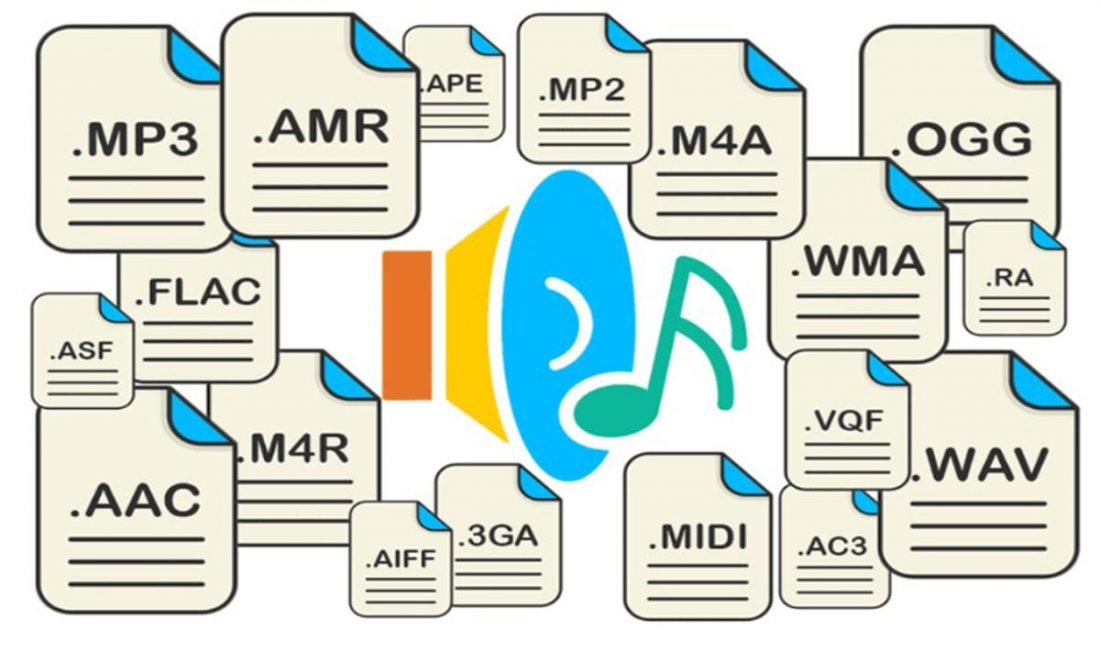
Audio files come in various formats and sizes, in addition to our common MP3, there are AAC, FLAC, OGG, WMA, etc.

Audio Formats
Audio Formats

Why are there so many different audio standards? What format is the best? What should you choose when saving audio files?

In fact, all audio formats can be divided into 3 categories, and once you understand the characteristics of each of these 3 types, you can choose one of the three, and then choose a further subdivided category according to your specific needs.

Comparison of audio formats – operation, equipment – Introduction to 10 common audio formats: which format should I choose?
uncompressed audio format
The uncompressed format preserves the original audio waveform. The so-called original audio waveform refers to the result after the sound is captured and converted to a digital signal for storage. Raw audio waveforms are stored without any post processing. From the results, such an audio file will consume a lot of space. For 24-bit (24-bit) 96 KHz audio, you need about 34 MB of storage space per minute.

Uncompressed audio format: PCM
PCM is short for Pulse-Code Modulation, which is a technical method of simulating sound using digital signals. The sounds that we can hear in nature exist in the form of physical sound waves, and in order to simulate this sound wave with a digital signal, scientists decided to sample it and record it with another wave, which is what we call a pulse.

Therefore, digital audio has two basic concepts: sample rate and bit depth. The so-called sampling rate refers to the speed of how many times the sound is sampled. The so-called bit depth refers to the space occupied by a single sample. In uncompressed formats, the product of the sample rate, bit depth, and audio duration is the space occupied by the digital signal that represents the audio content.

PCM is a format commonly used on CDs and DVDs, but its derivative LPCM is often used in practice. LPCM is short for Linear PCM, which is Linear Pulse Code Modulation. Most PCM files in use today are actually LPCM files, so there is no need to differentiate between them.

Uncompressed audio format: WAV
WAV is short for Waveform Audio File Format, which is a standard audio format developed by Microsoft and IBM in 1991.

Many people think that WAV is an uncompressed audio format, but this is not entirely true. In fact, WAV is a “wrapper” type format, a common format developed by Microsoft to use audio for various platforms. So it is possible for WAV to contain compressed audio, but this is rarely the format of choice when using compression these days.


Free Download Mp4Gain
picture


Mp4Gain Main Window
picture


Mp4Gain Features
picture


Free Download Mp4Gain
picture

What are the common audio formats?

What are the common audio formats?

common audio formats

Most frequent and popular sound formats

common audio formats

05 AAC format

AAC is actually short for Advanced Audio Coding. The algorithm adopted by AAC is different from that of MP3. AAC improves encoding efficiency by combining other features. The AAC audio algorithm far surpasses some previous compression algorithms (such as MP3, etc.) in terms of compression capabilities. In conclusion, AAC can provide better sound quality with 30% smaller file size than MP3 files.

It is one of the best lossy formats out there. There are multiple encodings, with bit rates up to 448 kbps. In terms of hardware support, advanced mobile phones and mp3 players are now generally supported.

06 VQF format

The VQF format is an audio compression technology jointly developed by YAMAHA and NTT. Its compression ratio can reach 1:18. Therefore, under the same circumstances, the compressed VQF file size is 30%-50% smaller than MP3, which is more suitable for online streaming, while the sound quality is excellent, near to CD quality (16-bit, 44.1 kHz stereo). But VQF has not revealed the technical standards, so far it has not become popular.

07 FLAC format

FLAC is short for Free Lossless Audio Codec, which can be interpreted as Chinese lossless audio compression coding, which is characterized by lossless compression. Unlike other lossy compression codes like MP3 and AAC, it can restore the sound quality of music discs. It is now compatible with many software and hardware audio products.
It can be said that FLAC is similar to MP3, but it is losslessly compressed, which means that the audio is compressed in FLAC without losing any information. And you can use the player to play compressed FLAC files, just like playing MP3 files.

08 APE format

APE is one of the most popular digital music file formats. Unlike lossy compression methods like MP3, APE is a lossless audio compression technology, which means that after compressing the audio data file read from the audio CD in APE format, you can also compress the file in APE format. The audio file is exactly the same as before compression, without any loss.

The file size of APE is about half that of CD, which is loved by many music lovers, especially for friends who want to stream audio CDs over the network, APE can help them save a lot of resources.

What are the common audio formats?

What are the common audio formats?

common audio formats

Most frequent and popular sound formats

common audio formats

01 MP3 format

MP3 is one of the most common audio formats. Its full name is Moving Picture Experts Group Audio Layer III. Simply put, MP3 is an audio compression technology that uses MPEG Audio Layer 3 technology to compress music into a smaller capacity file with a compression ratio of 1:10 or even 1:12. Compress files to a lesser extent in small cases. And it keeps the original sound quality very well.

It is precisely because of MP3’s small size and high sound quality that the MP3 format has become almost synonymous with online music. Use an MP3 player to uncompress (decode) MP3 files in real time so that high-quality MP3 music can be played. The highest bitrate is 320K, and the high-frequency part is one size fits all, which is its default.

02 WMA format

The full name of WMA is Windows Media Audio, which is an audio format promoted by Microsoft. The WMA format achieves a higher compression ratio by reducing the data stream while maintaining sound quality. The compression ratio can usually reach 1:18, and the generated file size is only half of the corresponding MP3 file. In addition, WMA can also be added to prevent copying through the DRM scheme, or add restrictions on playback time and playback times, and even restrictions on playback machines, which can effectively prevent piracy.

03 WAV format

WAV format is a lossless sound format developed by Microsoft Corporation, also known as waveform sound file. It is the oldest digital audio format and is widely supported by the Windows platform and its applications. The WAV format supports many compression algorithms, supports a variety of audio bits, sample rates, and channels. It adopts 44.1kHz 16-bit sampling rate. Therefore, the sound quality of WAV is almost the same as that of CD, and it is suitable for uploading to all major music platforms. But the WAV format is bulky and difficult to spread.

04 ASF format

The full name of ASF is Advanced Streaming Format, which is a media playback format developed by Microsoft and is suitable for playback on the Internet.

All the Audio Format Differences: Which One Should You Use?

All the Audio Format Differences: Which One Should You Use?

All the Audio Format

Three classifications of audio formats

All the Audio Format

Characteristics and differences of different audio formats

Which audio format is right for you?

You already know MP3, but what about AAC, FLAC, OGG or WMA? Why are there so many audio file formats and is there any best audio format?

Comparison of audio formats

Audio files come in various types and sizes. While we’re all probably familiar with MP3, what about AAC, FLAC, OGG, or WMA? Why are there so many audio standards? Is there a better audio format? Which ones are important and which ones can be ignored?

All audio formats are divided into three main categories, and once you know what the categories mean, you can choose the format within the categories that best suits your needs.

uncompressed audio format

Uncompressed audio consists of actual sound waves that have been captured and converted to digital format without any additional processing. So uncompressed audio files tend to be the most accurate, but take up a lot of disk space: about 34MB per minute for 24-bit 96KHz stereo.

Audio file format: PCM

PCM stands for Pulse Code Modulation, a digital representation of the original analog audio signal. Analog sounds exist as waveforms. To convert a waveform into digital bits, the sound must be sampled and recorded at specific intervals (or pulses).

This digital audio format has a “sample rate” (how often the samples are made) and a “bit depth” (how many bits are used to represent each sample). There is no compression involved. Digital recordings are almost accurate representations of analog sounds.

Overview in the jungle of audio formats

Overview in the jungle of audio formats

Audio Formats

Size does not necessarily matter, especially with compressed audio files. The deciding factor here is the algorithm that is used during encoding. Meanwhile, there are quite a few, but not all of them harmonize with iTunes, iPod & Co. We provide an overview of supported formats and introduce the general working method of audio compression.

Audio File Formats

Since Philips introduced the audio CD in 1982, digitally stored music has been ubiquitous. However, since then, the number of digital data formats available has become so great that it is very easy to lose sight of things. There are basically compressed and uncompressed formats. The uncompressed WAV and AIFF formats are mainly used in audio media production due to their file size and high quality of the audio signal, and still on good old audio CDs.

Compression and reduction

Formats like Apple Lossless manage to reduce the amount of data without reducing the quality of the signal. This lossless encoder procedure is called data compression. However, you still have to live with relatively large files. This can quickly lead to difficulties, especially when gaming on mobile devices, as the battery drains very quickly. On a fourth-generation iPod, AAC-compressed music could only be played for three and a half hours in the test. However, when highly compressed audio books were used, it was more than ten hours. The other lossy processes accept a loss of quality in exchange for the advantage of a small file size. Here, the original quality of the music signal cannot be restored during playback. These compression processes make use of certain properties of human hearing to reduce data: the brain simply masks sound signals that are considerably quieter than other sounds that are perceived at the same time. Another effect that has been exploited is that there must be a minimal difference in the frequency of the tones to be able to distinguish them and to be able to perceive them consciously. Here there is also the possibility of saving. The encoder just skips everything within the specified bit rate that the brain would also leave out in its opinion. If the bit rate is set too low in relation to the complexity of the audio signal, you will inevitably notice signal interference, so-called artifacts, during decompression, that is, you will notice that the original has been compressed.

Bit rates for everyone and everything
Lossy encoders, unlike lossless encoders, can compress source material with different bit rates. The results are qualitatively very different. As a general rule, the average listener can no longer distinguish what is heard from the original signal of a bit rate of 160 kbps for MP3 and 128 kbps for AAC. However, this only applies to music; audiobooks, for example, can be compressed much more without incurring excessive losses. Bit rates of 96 kbps are sufficient for good results. Modern versions of encoders, including iTunes, can also compress the audio signal with a variable bit rate (VBR). The complexity of the source material is checked. If a passage is not very elaborately designed, the encoder automatically regulates the bit rate and saves space for more complicated parts. There it increases the bit rate again to improve the result. The option in iTunes to select the encoder settings and the encoder itself can be found in iTunes -> Settings -> Advanced -> Import. From encoder to bit rate to variable bit rate, you can choose the one that best suits your needs and needs from many options.

AIFF
This data format is not compressed and corresponds to the original data on an audio CD. Therefore, a large file size is expected. A music CD usually contains 80 minutes of music with a size of 700 MB. Therefore, this format is a bit difficult to handle. AIFF isn’t doing itself a favor, especially on mobile music players, as the battery capacity drains very quickly.

Wav
In principle, what has been said above also applies to WAV files, the two formats are very similar. This format is also usually uncompressed, but there are also variants with compression.

MP3
The MP3 data format, strictly speaking the MPEG1 Audio Layer 3 standard, was one of the first to achieve high data compression and therefore a reduced file size. In times of Internet connections via modem, it quickly found widespread use. Today’s encoders come with a variety of possible VBR and bit rates, so there is something for every purpose.

Lossless apple
This can be used to create files that have no signal loss compared to the original when played back. However, the files are quite large and the bit rate is usually over 900 kbps. Therefore, this format is less suitable for mobile devices due to the shorter battery life.

AAC and protected AAC
This encoder is a further development of MP3 and generally works better than MP3 encoders. Protected AAC files have rights management (music files purchased from the iTunes Music Store are in this format).

Audible
Audiobooks purchased from Audible.com come in a file format that is a variation of AAC. The files have the extension .m4b. This file format supports bookmarks so you can continue listening to an audiobook where you last left it.

Windows Media Audio on Mac
Since Windows Media Player no longer exists for the Mac operating system, the Flip4Mac company has been offering a QuickTime component that allows you to open Windows Media files directly in QuickTime Player. However, digital rights management files cannot be played. WMA files offered by some internet music stores (eg Musicload.de) cannot be played with this solution. iTunes is also not supported. You can find an installer for the component on our brochure CD under Software -> Mac -> WMA Components 2.2.0.49R.dmg.

OGG Vorbis Audio
The OGG format, which is free of software patents, can be added to iTunes at a later date. The required QuickTime components can be found under Software -> Win -> OGG_xiph-qt-win32-0.1.5.exe or Software -> Mac -> OGG_xiph-qt-0.1.8.dmg on our brochure CD. After installation with the supplied installation program in the respective operating system, both QuickTime and iTunes can play OGG files. However, all iPod and iPhone models still cannot play OGG.

All about Audio formats (2020)

The algorithm used to compress and decompress files is called CODEC (acronym for compression / decompression). “Codec” is software that tells the computer which mathematical operations it must manipulate to compress them and which ones to perform to show them compressed.
Instead, the “format” is a kind of file that contains the codec and integrates it with the system.

Sounds are digitally recorded using a technique called “sampling”: the sound wave is divided into many pieces called samplers.

audio file formats

The quality of a digital audio track depends on:

– sampling frequency, measured Hertz (Hz, number of samples per second). A frequency at 11.025 Hz is suitable for recording voice, one at 22.050 Hz (medium quality) is suitable for recording a tape and one at 44,100 Hz for recording in CD quality. Reducing the sample rate leads to loss of quality.

– from termination, ie. the number of bits used (8.16, 24 to 32) for each ciampione (with 8 bits = 1 byte for 256 options, 16 bits = 2 bytes for 256 * 256 = 65,536 values ​​in the levels, and so on). Converting 16-bit to 8-bit samples cuts the original file in half, but also reduces the quality of the music.
– the number of channels: mono (1) or stereo (2).

bit rate: the product of these three elements: frequency, resolution, and number of channels are defined as bit rate, ie bits per second or bps. From this it can be deduced that every second there are 44,100 recorded values ​​which are then multiplied by the 2 stereo sound channels which are multiplied by 16 as the recording takes place in 16 bits (corresponding to 2 bytes). Then we get:

The bit rate for songs on audio CDs = 44,100 * 16 bit * 2 = 1,411.2 kbps (~ 10.6 MByte per minute 44,100 * 2 byte * 2 * 60)
The bit rate of an audio recording = 22,050 * 8 * 1 = 176.4 Kbps (~ 1.3 MByte per minute = 22,050 * 1 byte * 1 * 60)

Accordingly, compressing by reducing the total length of the file will reduce the average length of the subsequent ones, ie. it will reduce the average bit rate. Therefore, in these cases, the average bit rate becomes the index of the compression scope. For example, if the source file had a bit rate of 1,411 Kbit / if the compressed file had an average bit rate of 320 Kbit / s, we would have reduced by a factor of approx. 4.5.
Loss compression compromises the loss of information and the size of the final file, while a lossless compression must balance the size of the final file with the execution times of the algorithm.

losseless

The most popular lossless audio formats are:

-WAV sampling, Wave file (Waveform Extension), where wave means wave: standard format for audio files in the Windows audio sampling environment; It has large dimensions as it manages sampling frequencies of up to 44.1 kHz, 48 kHz and now also 96 and even 192 kHz, resolution of up to 32 linear bits and allows to store stereo or surround signals with a number
Unlimited in a single speaker file (equivalent to so many channels). The wave format is nothing more than digital recording of real sounds, sounds that have had
originates from a source external to the PC. In a WAV piece of music drums, piano, guitar, bass or
voice is heard in the same way, regardless of the PC to which the file is heard (to
obviously with the same acoustic quality of the hardware components).
-Aif (Apple Audio Interchange File Format or AIFF) similar to WAV format, is a format that generates good sound quality, is compatible with many browsers and does not require plugins. to Apple’s AIFF format. The Au format also manages more efficient quantization methods that allow a reduction in the amount of data by even 4 times the original value at the cost of a modest loss of quality.
-APE (Monkey Audio; .ape): Lost raw format that allows you to reduce the space occupied
our music about 50% (in some cases even more) without loss of quality. This way an album there
wav format has approx. 600 MB, has an average of 300 MB (much more than about 100 MB a
high bit rate and 60 mpc of an mp3, but the quality is identical to the original); I say, on average, because there is
certain types of music where the level of compression is even higher. To listen to songs in this format,
you can use plugins for WinAmp or, better yet, a player that integrates the native as
Foobar 2000. Right now it’s probably the best lossless codec considering a balance between
speed and compression (click here for lossless comparison table).

Better audio formats

You have decided to digitize the music tracks in your audio CD collection by transferring everything to your computer. You started to examine the possibility of converting it into a format that is more convenient for you.

audio formats

With a little experience in this area, however, you would like to get some advice on the subject so you can make the best decision. How do you say? Things are exactly the same and you want to know if I can help you by giving you the best audio formats? Of course yes, that’s exactly what he wanted to do.

audio formats

If you allow me a few minutes of your free time, I can actually use threads and characters to tell you which audio formats are most popular, what strengths and weaknesses they have and what purposes they may be more or less convenient for. Contact. Condition to choose those who you think are actually right for you. To complete the information and give you an even more comprehensive overview of the topic, I will also indicate at the end of the article which tools you can use to carry out various conversion processes. You will find that once you have read this manual, there is no longer any doubt about what to do.

In order to? How about putting the conversation aside and finally getting to the point? Yes? Excellent! So I suggest that you don’t waste any more time and immediately focus on the topic. Make yourself comfortable in front of your trusted computer and read everything below. I am sure you can say that you are happy and satisfied with what you have learned. As always, I hope you enjoy reading.

MAIN AUDIO FORMATS

MAIN AUDIO FORMATS

Even the audio formats differ in their versatility and level of compression, and even if they are not as numerous as the video formats, it is better to look at the properties to get satisfactory results according to the requirements of our work.

Microsoft Wave [Extension: WAV] It is Microsoft’s proprietary format and is certainly the most widely used. This diffusion depends on commercial aspects and the fact that it is the most supported among the competitors. It has various compressions and is a versatile and highly editable format. For this reason, it is suitable for general digital audio, both for multimedia publications (although there are certainly better formats) and for desktop video (real standard). An excellent program for processing wave files (but also other formats) is CoolEdit.

audio format

MPEG Audio (extension: MPG / MP3) MP3 stands for MPEG1 Layer3. The MPEG algorithm, the basis of MP3, emerged from the need to develop a world standard for the representation of moving images and audio. This standard was developed in 1988 for the treatment of audio and video signals and has the special feature of compressing files and reducing them by 12 times compared to their natural size.

This high-compression format is based in particular on theories of psychoacoustics: each individual has a hearing that is sensitive to frequencies from 20 Hz to 20 kHz, and in particular the man perceives sounds between 2 and 4 kHz better. In addition, some sounds mask nearby frequencies so that you cannot hear all of the sounds.

audio format

These considerations have led to the development of an algorithm that eliminates all “redundant” noise for the human ear and achieves a high level of file compression and sound quality that is comparable to the digital and can be downloaded directly to your PC.

MP3 enables good results, making small and high quality playback compatible. An established audio standard is the MPEG Layer3 version, which produces very small files of excellent quality, an excellent compromise when duplicating and creating audio files on CD. The XingMPEG encoder is an excellent software for creating MP3s.

Given the prevalence and importance of the topic on a legal level, let’s find out what it is and what benefits we can achieve by using this MPEG format.

An audio CD generally contains 60 to 78 minutes and is characterized by a quantization level of 16 bits and a sampling rate of 44.1 kHz, ie 44,100 samples per second. The quantization level describes the maximum number of intensity levels that a single sample can hold: for example 8 bits = 256 levels (28), 16 bits = 65,356 levels (216). The higher the number of levels that the signal can assume, the more precise the signal reproduction.

There is approximately 650 MB of data on a normal audio CD.

Conventionally, to reduce the size, we can work in two ways: 1) Reduce the quantization: that is, convert the samples from 16 bits to 8 bits, but lose the dynamics, quality and get a lot of noise; 2) Reduce the sampling frequency. As a result, the frequency range would decrease in the event of a loss of resolution.

The MPEG format, on the other hand, reduces the amount of information stored and therefore significantly reduces the size of the files by filtering out unimportant audio information according to the models developed on this basis. From research on the perception of the human ear, you decide which information is important and which is not . These studies have enabled us to know how our brain analyzes sounds, except irrelevant ones that are imperceptible (e.g. ultrasound).

The MPEG audio format also performs this process of removing intelligent weak signals. So if there is a strong signal, the weakest signal is not perceived.

When using a high compression rate, the MPEG encoder eliminates parts of audible information that are still of minor importance. With a slight compression rate, the difference to the uncompressed original is minimal.

Layers I, II, III can be viewed as the layers through which the MPEG format has evolved. All layers are based on the same perceptual coding scheme, the complexity of which increases for each of them. Layer II has superior quality at lower bit rates than Layer I; However, the most complex coding system currently available is Layer III,


MP4 (Extension: MP4) is an audio compression technology recently launched by Global Music Outlet (GMO) under license from AT&T Labs (January 99). As you understand, it is a further development of the MP3 format and seems to offer the ability to offer it a higher compression factor, which should even reach a factor of 16. Although the name is very similar, conceptually it has nothing to do with layer 3 and is actually in direct competition with it. Compressed MP4 files are presented as executable Win9x or WinNT files and offer the relatively encapsulated player.

Audio exchange (extension: AIF / AIFF) Format created to standardize the various audio standards between PC and Machintosh.

Microsoft NetShow (Extension: ASF) Audio extension of the format for streaming audio / video on the web.

Yamaha SoundVQ [Extension: VQF] Audio format released by Yamaha in direct competition with MP3.

Everything you need to know about audio files … compressed and uncompressed

Everything you need to know about audio files … compressed and uncompressed

Regardless of whether you’re listening to MP3 files or high-definition audio, it’s time to find out exactly which file format is best for your needs.

audio formats

As you organize your digital music collection, you may be impressed by the number of different audio file formats you have collected over the years. For this reason (and since a good review doesn’t hurt anyone) we’d like to deepen the discussion of the most common audio file formats, explain the differences and explain why you should be interested in learning more about them. Whether you’re listening to low quality MP3 files, slightly better AAC tracks, or high definition audio in FLAC or WAV, it’s time to find out exactly what you’re dealing with and which file format best suits your needs.

formats and codecs

File formats and codecs

Below is a list of all common audio file formats and the differences between them.

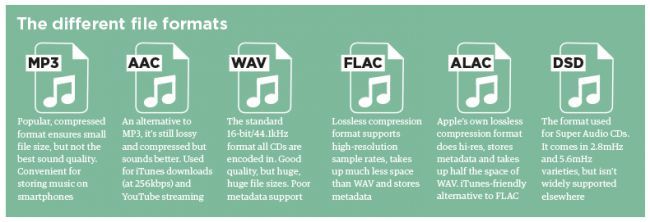
-AAC (no high resolution): Apple’s alternative to MP3. It’s a compressed audio format, but it sounds better than MP3 and is used to download music from iTunes and stream via Apple Music.

-AIFF (high resolution): Apple’s alternative to WAV, but with better metadata support. It’s an uncompressed and lossless format, but it’s not very popular.

-DSD (High Resolution) – The uncompressed single bit format for super audio CDs. It is available in the 2.8 MHz, 5.6 MHz and 11.2 MHz variants, but due to its high-quality codec it is (currently) not suitable for streaming.

-FLAC (High Resolution) – This lossless compression format supports high-resolution sampling rates, takes up about half the WAV space, and stores metadata. It is license-free and is the preferred format for downloading and storing albums in high resolution or CD quality. The disadvantage is that it is not compatible with Apple (therefore it is not compatible with iTunes).

-MP3 (not high definition): Lossy, compressed format that guarantees small file sizes, but is far from the best possible audio quality. However, it is still very convenient for storing music on smartphones and other mobile devices and is widely used.

-MQA (High Resolution) – A lossless compression format with high resolution files for more efficient transmission. It is used for high-resolution streaming from Tidal Masters and other similar services.

-OGG (not high resolution): Sometimes you can find him by his full name, Ogg Vorbis. An open source and compressed alternative to MP3 and AAC that is not limited by patents. This format is used (at 320 kbit / s) to stream Spotify.

-WAV (High Resolution) – The standard format in which all audio CDs are encoded. Excellent sound quality and no compression, which means large files (especially for high-resolution files). However, metadata (album art, artist information, and song title) are hardly supported.

-WMA Lossless – An uncompressed embodiment of Windows Media Audio, but is no longer supported by smartphones or tablets.

The 10 most common audio formats: which one to use?

The 10 most common audio formats: which one to use?

Audio files are available in all types and sizes. And although we are all familiar with MP3, what do you think of AAC, FLAC, OGG or WMA? Why are there so many audio standards? Which are important and which to ignore?

It’s actually quite easy to find that all audio formats fall into three main categories. Once you know what the categories mean, you can simply choose a format within the category that best suits your needs.

Uncompressed audio formats

Uncompressed audio consists of actual sound waves that have been captured without further processing and converted into a digital format. As a result, uncompressed audio files are usually the most accurate, but take up a lot of space, about 34MB per minute for 96-bit and 96-bit stereo.

Audio file format: PCM

PCM stands for Pulse Code Modulation, a digital representation of analog audio signals. Analog tones exist as waveforms, and in order to convert a waveform into digital bits, the tone must be sampled and recorded at certain intervals (or pulses).

This digital audio format has a “sample rate” (how often a sample is taken) and a “bit depth” (how many bits are used to represent each sample). No compression is required. The digital recording is an almost exact representation of the analog sound.

PCM is the most common audio format used on CD and DVD. There is a PCM subtype called Linear Pulse Code Modulation, in which samples are taken at linear intervals. LPCM is the most common form of PCM, so the two terms are almost interchangeable at this point.

Audio file format: WAV

WAV stands for Waveform Audio File Format (at some point also called Audio for Windows, but no longer). It is a standard developed by Microsoft and IBM in 1991.

audio formats

Many people believe that all WAV files are uncompressed audio files, but that’s not exactly true. WAV is actually a Windows container for various audio formats. This means that a WAV file may contain compressed audio, but this is rarely used.

Most WAV files contain uncompressed audio in PCM format. The WAV file is just a container for PCM encoding, so it is more suitable for use on Windows systems. However, Mac systems can generally open WAV files with ease.

Audio file format: AIFF

AIFF stands for Audio Interchange File Format. Similar to how Microsoft and IBM developed WAV for Windows, AIFF is a format developed by Apple for Mac systems in 1988.

Similar to WAV files, AIFF files can contain several types of audio formats. For example, there is a compressed version called AIFF-C and another version called Apple Loops that is used by GarageBand and Logic Audio. Both use the same AIFF extension.

Most AIFF files contain uncompressed audio in PCM format. The AIFF file is just a container for PCM encoding, making it more suitable for use on Mac systems. However, Windows systems can generally open AIFF files with ease.

Lossy compression audio formats.

Lossy compression occurs when some data is lost during the compression process. Compression is important because uncompressed audio takes up a lot of space.

In other words, lossy compression means that the sound quality and fidelity for smaller files are affected. If you are hurt, you will hear artifacts and other oddities in the audio. But if done correctly, you won’t feel the difference.

Audio file format: MP3

MP3 stands for MPEG-1 Audio Layer 3. It was released in 1993 and is becoming increasingly popular. It is the world’s most popular audio format for music files. There is a reason why we had “MP3 players” but no “OGG players”!

The main purpose of MP3 is in three ways: 1) removing all audio that is out of the normal human hearing range, and 2) reducing the quality of inaudible sounds, then 3) compressing all the other audio as efficiently as possible.

Almost every digital device in the world with audio playback can read and play MP3 files, be it PC, Mac, Android, iPhone, Smart TV or anything else. If you need a universal device, MP3 will never disappoint you.

Note: MP3 is not the same as MP4!


Audio file format: AAC

AAC stands for Advanced Audio Coding. It was developed in 1997 as the successor to MP3 and although it has become popular as a format to be used, it has never surpassed MP3 as the most popular.

The compression algorithm used by AAC is much more advanced and technical than MP3. So if you compare the same recording in MP3 and AAC format with the same bit rates, the AAC generally has better audio quality.

Although MP3 is a more popular format, AAC is still widely used today. In fact, this is the standard audio compression method used by YouTube, Android, iOS, iTunes, later Nintendo laptops, and later PlayStation.

Audio file format: OGG (Vorbis)

OGG represents nothing. In fact, it’s not even a compression format. OGG is a multimedia container that can contain all types of compression formats. However, Vorbis files are most commonly used. Therefore, these audio files are called Ogg Vorbis files.

Vorbis was first released in 2000 and is growing in popularity for two reasons: 1) it conforms to the principles of open source software and 2) it works significantly better than most other lossy compression formats (ie) this results in a smaller file size for an equivalent sound quality.

MP3 and AAC are so strong that OGG struggles to get into the spotlight – not many devices support them natively, but they do improve over time. It is currently used primarily by supporters of hardcore open source software.

Audio file format: WMA (lossy)

WMA stands for Windows Media Audio. It was first published in 1999 and has gone through several developments since then, always keeping the same name and WMA extension. It is a proprietary format created by Microsoft.

Similar to AAC and OGG, WMA should fix some of the errors in the MP3 compression method, and it turns out that WMA’s approach to compression is very similar to that of AAC and OGG. Yes, in terms of the quality of objective compression, WMA is really better than MP3.

However, since WMA is proprietary, it is not supported by many devices and platforms. In addition, it offers no real advantage over AAC or OGG. If MP3 is not good enough, it is only more practical to use one instead of WMA.

Audio formats with lossless compression.

The opposite lossy compression is lossless compression, in which the size of an audio file is reduced without loss of data between the source audio file and the compressed audio file.

The disadvantage is that lossless compressed audio files are larger than lossy compressed audio files, up to 2 times 5 times larger for the same source file.

Audio file format: FLAC

FLAC is an abbreviation for Free Lossless Audio Codec. Maybe a bit on the nose, but it has quickly become one of the most popular lossless formats since its launch in 2001.

The good news is that FLAC can compress an original source file by up to 60 percent without losing a single bit of data. What’s even better is that FLAC is a free, open source audio file format, so there are no intellectual property restrictions.

FLAC is compatible with most major programs and devices and is the primary alternative to MP3 for music. You basically get the full quality of uncompressed audio with half the file size. That is why many see FLAC as the best audio format.

Audio file format: ALAC

ALAC stands for Apple Lossless Audio Codec. It was developed and published as a proprietary format in 2004, but became open source and copyright-free in 2011. ALAC is sometimes referred to as Apple Lossless.

While ALAC is good, it is somewhat less efficient than FLAC in terms of compression. However, Apple users cannot choose between the two, as iTunes and iOS offer native support for ALAC and no support for FLAC.

Audio file format: WMA (lossless)

WMA stands for Windows Media Audio. We already discussed this in the lossy compression section, but we explained this here because there is a lossless alternative called WMA Lossless that uses the same extension. Confused, I know.

Compared to FLAC and ALAC, WMA Lossless is the worst compression efficiency, but not much. Since it is a proprietary format, it is not suitable for open source software enthusiasts, but is natively supported on Windows and Mac systems.