10 Common Audio Formats: Which Format Should I Choose?


Free Download Mp4Gain
picture

10 Common Audio Formats: Which Format Should I Choose?

Audio Formats
Audio Formats

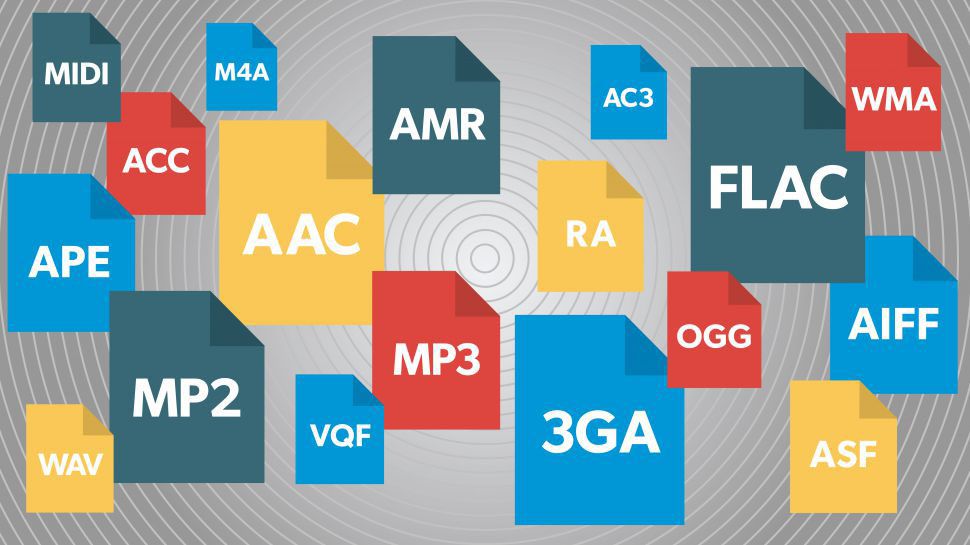
Audio files come in various formats and sizes, in addition to our common MP3, there are AAC, FLAC, OGG, WMA, etc.

Audio Formats
Audio Formats

Why are there so many different audio standards? What format is the best? What should you choose when saving audio files?

In fact, all audio formats can be divided into 3 categories, and once you understand the characteristics of each of these 3 types, you can choose one of the three, and then choose a further subdivided category according to your specific needs.

Comparison of audio formats – operation, equipment – Introduction to 10 common audio formats: which format should I choose?
uncompressed audio format
The uncompressed format preserves the original audio waveform. The so-called original audio waveform refers to the result after the sound is captured and converted to a digital signal for storage. Raw audio waveforms are stored without any post processing. From the results, such an audio file will consume a lot of space. For 24-bit (24-bit) 96 KHz audio, you need about 34 MB of storage space per minute.

Uncompressed audio format: PCM
PCM is short for Pulse-Code Modulation, which is a technical method of simulating sound using digital signals. The sounds that we can hear in nature exist in the form of physical sound waves, and in order to simulate this sound wave with a digital signal, scientists decided to sample it and record it with another wave, which is what we call a pulse.

Therefore, digital audio has two basic concepts: sample rate and bit depth. The so-called sampling rate refers to the speed of how many times the sound is sampled. The so-called bit depth refers to the space occupied by a single sample. In uncompressed formats, the product of the sample rate, bit depth, and audio duration is the space occupied by the digital signal that represents the audio content.

PCM is a format commonly used on CDs and DVDs, but its derivative LPCM is often used in practice. LPCM is short for Linear PCM, which is Linear Pulse Code Modulation. Most PCM files in use today are actually LPCM files, so there is no need to differentiate between them.

Uncompressed audio format: WAV
WAV is short for Waveform Audio File Format, which is a standard audio format developed by Microsoft and IBM in 1991.

Many people think that WAV is an uncompressed audio format, but this is not entirely true. In fact, WAV is a “wrapper” type format, a common format developed by Microsoft to use audio for various platforms. So it is possible for WAV to contain compressed audio, but this is rarely the format of choice when using compression these days.


Free Download Mp4Gain
picture


Mp4Gain Main Window
picture


Mp4Gain Features
picture


Free Download Mp4Gain
picture

All the Audio Format Differences: Which One Should You Use?

All the Audio Format Differences: Which One Should You Use?

All the Audio Format

Three classifications of audio formats

All the Audio Format

Characteristics and differences of different audio formats

Which audio format is right for you?

You already know MP3, but what about AAC, FLAC, OGG or WMA? Why are there so many audio file formats and is there any best audio format?

Comparison of audio formats

Audio files come in various types and sizes. While we’re all probably familiar with MP3, what about AAC, FLAC, OGG, or WMA? Why are there so many audio standards? Is there a better audio format? Which ones are important and which ones can be ignored?

All audio formats are divided into three main categories, and once you know what the categories mean, you can choose the format within the categories that best suits your needs.

uncompressed audio format

Uncompressed audio consists of actual sound waves that have been captured and converted to digital format without any additional processing. So uncompressed audio files tend to be the most accurate, but take up a lot of disk space: about 34MB per minute for 24-bit 96KHz stereo.

Audio file format: PCM

PCM stands for Pulse Code Modulation, a digital representation of the original analog audio signal. Analog sounds exist as waveforms. To convert a waveform into digital bits, the sound must be sampled and recorded at specific intervals (or pulses).

This digital audio format has a “sample rate” (how often the samples are made) and a “bit depth” (how many bits are used to represent each sample). There is no compression involved. Digital recordings are almost accurate representations of analog sounds.

THE MOST COMMON FORMATS FOR MUSIC AND OTHER AUDIO FILES, AND HOW THEY ARE RELATED TO EACH OTHER

THE MOST COMMON FORMATS FOR MUSIC AND OTHER AUDIO FILES, AND HOW THEY ARE RELATED TO EACH OTHER

Music Formats


And for the direct competitors of the universal MP3 format, they can count on a lot today.

Music Formats

Due to continuing inconsistencies in home storage of the WAV format, it was eventually discontinued. But for professional studios, he says, the basics of the job. Especially when recording live vocals or instruments. Just convert the recorded material from WAV to MP3 at the final stage.

music format

However, music can be represented in some other popular formats nowadays. For example, many times (especially the Internet) they use these data types like OGG, AIFF, AMR, etc. But the real competitor of MP3 has become the newest and best audio FLAC etc. Of course, for MP3 you can convert all parameters to the maximum, but the playback quality of FLAC represents much higher. Also, it is a single file and the separation occurs directly on the track due to the player or startup software. In other words, listeners see each track individually, but can switch between playback tracks. For the MP3 format, this also seems possible to merge multiple tracks through it, thus creating a single file. But here it is in this version fast switching between tracks will not be possible (normal fast forward should be used, that’s all).

However, not everything is bad. The fact that music or audiobooks are all popular formats today allows them to be easily converted, even keeping the original parameters of the audio material. Based on this, and for sound processing and conversion and audio editors, almost all programs call converters. Any program of this type (MP3 editor or converter) detects the original and final type of audio files, is unambiguous and can produce direct and reverse transformations. Let’s explain this specific example.

WAVE THEORY AUDIO EDITOR FOR MP3 FILES
Many types of software are used in audio processing today. First, look at the narrow application of so-called audio editors. The most prominent representatives of these can be called giants Sony Audio Forge, Sintrillium Cool Editing Pro, which was later acquired by Adobe and renamed Audition, Acoustica Mixcraft, ACID Pro and many others.

mp3 editor

The principle on which they operate is that, for convenience, all MP3 audio programs have a typical waveform, as originally used for WAV files. This method determines the appearance and opportunity enough to edit any type of conventional audio material in WAV format. Other than that, the fact that you can do basic copy, cut, paste, etc. E., it’s just a matter of getting the frequency characteristics and bitrate changes, not to mention using a lot of extra effects that plug into VSTs via DirectX or a generic host bridge studio thing.

In its simplest form, the conversion can be done using the standard file menu, which contains the line “Save As…” (Save As…) or the export function present in MP3 format. Thus, all the process is reduced to just the final selection of the format (MP3 here as an example) and activation of the recording mode. In this case the conversion will be done automatically saving the current configuration parameters and the frequency characteristics. I don’t like the original version? ?Nothing is easier than changing the format to MP3, pre-specified with higher settings. However, one thing needs to be considered here: if the raw material is of such poor quality that special remediation or even professional tools will not work for audio it is necessary to use Repairs here, the intervention of various filters, etc. D. For the layman, it will cause great difficulties.

As is clear, there is absolutely no difference between the audiobooks we are dealing with: MP3, music or just recorded voice or noise. By the way, audiobooks are supposed to have a much lower sound quality by default. This is understandable, since the file has to take up minimal space and, in general, the perceived sound characteristics of speech are not that important. Finally, is this a professional recording of a particular set of albums?

However, if you use some standard operations, even without specific knowledge, it’s fine to achieve good results, especially since there are such built-in templates, based on any application for specific operations. Of course, it will be very difficult for the first time to achieve a perfect sound, but if you study the plan and understand how it works, it will work like clockwork, and as a result, it will take a lot of time.

Audio formats

Before going through the different audio formats to identify the best ones for you, it seems right to try to make you understand what digital audio is. In short, it is nothing more than a representation of real sounds through a chain of zeros and ones. The more there is in a file, the closer the digital sound will be to what it represents.

Audio Formats

Better audio formats

It all started with Pulse-Code Modulation (PCM), created in 1937 and characterized by two properties: the sampling frequency to measure the amplitude of the waveform and the bit depth to measure possible digital values. It is basically the faithful conversion of analog audio into a digital file in which no compression is done. The result is a very large audio file, which takes up a lot of space.

Audio Formats

To remedy this, therefore, more or less compressed audio formats have been created that, depending on their characteristics, are divided into two different types: Lossless formats, that is, when the information contained in the final file is identical to that contained in the source file and therefore there is no loss of quality, and lossy formats, for which the information contained in the final file is less than that contained in the source file with the consequent loss of quality but in benefit of the space of necessary storage. For more details, continue reading, below you will find the different audio formats belonging to the categories in question indicated and explained.

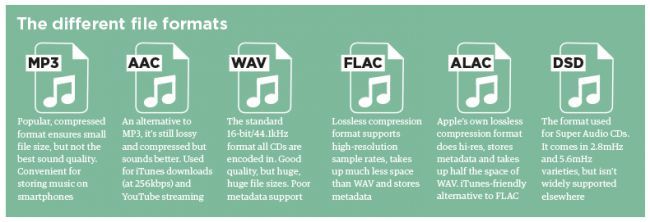
Lossless (WAV, AIFF, FLAC and ALAC)

As I told you a few lines above, Lossless audio formats are those that are not compressed or that, despite being subjected to this type of treatment, the final quality remains practically unchanged with respect to the original audio. The main formats that belong to this category are the following: WAV, AIFF, FLACC, ALAC and APE. Let’s see its characteristics in detail.

WAV – An acronym for WAVEform audio file format, is a standard that was developed by Microsoft and IBM in 1991. It is the most popular category of apparent audio file format. It is not compressed and is essentially what you get when you rip audio from a music CD with your computer. It takes up a lot of space (1,411 kilobits of information per second of stereo music at 44,100 Hz / 16 bits), but it reproduces sounds faithfully. In terms of quality and quantity of information, it is similar to the AIFF format, which you will find explained below.
AIFF – Short for Audio Interchange File Format, it belongs mainly to the Mac world, it was developed by Apple based on the Electronic Arts Interchange File Format and is particularly suitable for audiophiles and music recorders. It basically has the same characteristics as the WAV format mentioned above, so it is not compressed, so it takes up a lot of space (1,411 Kilobits of information per second of stereo music at 44,100 Hz / 16 bits) and is capable of reproducing sounds with a lot of fidelity.

FLAC: is the abbreviation for Free Lossless Audio Codec. It is an open source codec that is often used to store music CDs on the computer without loss of quality and is compatible with most programs and devices. Compared to the formats that I have already told you about, it has a minimal degree of compression, but most people cannot perceive significant differences compared to a WAV or AIFF file.
ALAC – Short for Apple Lossless Audio Codec, is essentially Apple’s worldwide counterpart to the earlier FLAC format. The quality is good on average but the format is not as efficient as the FLAC in terms of weight. Then keep in mind the fact that not all gamers support it, so unless you have uniquely and exclusively Apple devices, it may not be the best solution to opt for.

Other important but less common audio formats that always belong to the Lossless calorie are Monkey’s Audio (APE) and OptimFROG (OFR). Its characteristics are more or less similar to those of the FLAC and ALAC formats.

Lossy (MP3, AAC, WMA, and Ogg Vorbis)

Now let’s move on to the audio formats belonging to the Lossy category, that is, those always subjected to compression that take up very little space but “sacrifice” a certain degree of audio quality. The main formats in this category are: MP3, AAC, WMA, and Ogg Vorbis. For more information, keep reading, you will find more details about it below.

MP3: in Full Moving Picture Expert Group-1/2 Audio Layer 3, also known as MPEG-1 Audio Layer III or MPEG-2 Audio Layer III.

Mp3, the winner

In the era of broadband connections, fiber optics and HD videos on YouTube, MP3 remains the reference format for audio files. We are now so used to listening to music in compressed formats, and often through poor quality playback systems, that it is difficult for us to remember what listening to music really means. The recent evolution from download to hit-and-run streaming has only made the situation worse by further devaluing the value of music. When was the last time you listened to a record from start to finish without interruption, spending those 30-40 minutes on “simple” listening activity?
Audio formats

Premise: This post is not a crusade against Spotify because I use it myself for new releases or to have some background music at work, it is not even an analog vs. digital (or vinyl vs. CD vs. MP3) post because on this topic en Much has already been said. My goal is to make you understand what you are missing, in qualitative terms, if you listen to music in compressed formats.
Audio formats

Sampling and theoretical aspects.

Audio recording on a computer or digital medium assumes that the signal passes through an analog> digital (AD) converter, so that the continuous electrical signal generated by microphones or musical instruments is transformed into a digital signal (series of 0 and 1) This process is called sampling. The final quality of the recording depends on several factors: converter quality, sample rate, and bit depth.

To make an easily understandable comparison: When shooting a movie, the “analog” reality perceived by our eye is stored in a movie that takes 24 frames per second. If we consider the standard of the audio CD (44.1 kHz, 16 bits), for every second of music 44100 pictures are taken from the computer to the continuous electrical signal. If with the sampling frequency we have simply established how many times in a second the waveform will be analyzed, with the bit depth we assign to each sample a numerical value: 2 ^ 16 = 65,536 possible values.

If you wonder how it got to 44,100, I refer you to the Nyquist-Shannon sampling theorem.

When we press the record button on our computer, through the PCM (pulse code modulation) sampling process described above, the files are saved in uncompressed WAV or AIFF format.

Lossless files and lossy files

PCM files take up a lot of space on our hard drives because, as we have seen, there is the data necessary to describe the analog waveform in as much detail as possible. Indicatively, a WAV or AIFF file as audio CD will occupy 10 MB for every minute of music.

To overcome this problem, remember that in the early 2000s storage space cost around $ 10 / GB, while today the price is around $ 0.03 / GB (source): Audio formats have been introduced that , through an algorithm encodes and decodes information, reduces the size of the file. These codecs fall into two categories: formats with lossless compression and formats with lossy compression.

As the name implies, lossless compression indicates a reduction in file weight (usually around 50%) without loss of information. Leaving the world of audio aside for a second, ZIP and RAR files are clear examples of this type of compression: at any time we can “unzip” such a file and have access to the original information again without this no way has changed.

The most common file formats are: FLAC (Free Lossless Audio Codec) and ALAC (Apple Lossless Audio Codec).

Lossy compression, on the other hand, implies that some of the original audio information is somehow removed to obtain a file that weighs even 90% less than the PCM.

By what criteria is information removed without “compromising” the original audio too much? Since our hearing is an imperfect instrument, codecs exploit two principles of psychoacoustics: the minimum threshold of audibility (the human ear does not perceive all frequencies in the range between 20Hz and 20kHZ equally) and masking (a weaker sound). is masked, making it inaudible, by a louder sound.)

Compression algorithms, however advanced, introduce a number of artifacts into audio files that, if played back in discrete quality audio systems, can be easily recognized or at least noticed even by an inexperienced ear. Several studies have shown that an untrained ear does not distinguish the difference between an uncompressed file and an MP3 with a bit rate equal to 256kb / s or more.

The most common lossy formats are: MP3, OGG Vorbis, AAC.

The victory of MP3

Since its introduction in the mid-1990s, MP3 has established itself as the industry-standard consumer format fueled by file-sharing through peer-to-peer channels, where, with slow connections, the heaviest file was the one it was downloaded, the longer it took to obtain it, and since the market introduction of MP3 players in which we tried to store as much music as possible and, therefore, we resorted to very compressed files.

In the transition from the era of downloading to that of small transmission files, they ensure smoother and smoother data transmission.

Despite, therefore, the evolution that has taken place in recent years in the speed of Internet connections and the reduction in the price of storage systems, only in recent years have services been created to buy files from High-quality online audio (HD tracks) or HD streaming services (Tidal).

Examples and audio files.

The main services we use to buy or listen to music use these compression levels (all information is taken from the official websites of each service at the time this publication was written).

Spotify: OGG Vorbis files at 96 kb / s (normal mobile quality), 160 kb / s (normal desktop and web player quality, high mobile quality), 320 kb / s (premium users: high desktop quality, very high quality mobile).
iTunes: By default, CDs are imported into 128 kb / s AAC files. Files in the iTunes Store are of this quality, except for “iTunes Plus” songs converted to AAC at 256 kb / s.
Pandora: 64kb / s AAC (free users), 192kb / s AAC (premium users).
YouTube: HD videos (720 or 1080p) have an audio quality equal to 384kb / s, SD videos (360, 480p) have an audio quality equal to 128kb / s.


Choose the sound format well into 2020

Although many dematerialized music rhymes with MP3, it is recommended to take a tour of the owner in existing dematerialized formats to choose the audio format well when digitizing their CD / Vinyl.

What is an audio format?

An audio format is to simplify a kind of container where dematerialized music is stored: it is important to choose it carefully when ripping a CD, because its properties will directly affect the quality of the file created.

audio formats

Therefore, selecting audio format is a crucial step and it is advisable to guarantee three things with priority: the quality, functionality, and the fact that they are standard and legible on a maximum of devices, whether on a PC or MAC computer, but also on your smartphone / car radio …

It is also important to understand that in general, and although there are exceptions, the choice of audio format consists of placing the cursor in the middle between the quality on the one hand and the space occupied by the media on the other. storage.

audio format

Choose audio format: which challengers?

select aac-ogg-wma mp3 audio format
The 4 semi-amazing audio formats with destructive compression.

MP3:
Give glory where honor is due. MP3 is just as popular as it is underrated: it will have done a lot for dematerialized music by itself and has enabled millions of people around the world to discover a new way to listen to their music.

MP3 is a format of strong and destructive compression, in other words, a large part of the musical signal will be suppressed (priority, frequencies inaudible to the human ear … but not only!), And therefore offers a quality that only becomes good for from 256/320 kbps.

Is this a good opportunity today? Not being the best from a quality standpoint, choosing mp3 audio format today allows you to be sure that you can listen to it on all devices released for 10 years. MP3 is dematerialized music, what jeans should wear: versatility and the highest “acceptance rate” in the world.

Note that it is also advisable to choose mp3 audio format if you have limited storage space on a smartphone, for example because it is (in the company of AAC / WMA / OGG) the type of format that requires least space.

AAC:
This format is similar to “Apple MP3”. It has the same qualities and shortcomings as the previous one with some details: slightly better at the same speed, on the other hand it is far less standard: except for the fact that manufacturers have made explicit agreements (and pay because they require a license) , we find in Practice much fewer AAC compliant devices.

So it should be avoided unless you only have Apple products around you (even the car radio? I doubt it) and even in this case they are all perfectly mp3 compatible.

WMA
If AAC is Apple’s MP3, WMA Microsoft is MP3. Even less widespread because it doesn’t benefit from iTunes / Music Store / iPOD steamroller (who still remembers Zune’s iPod killer? Miscrosoft)

Again, forget the same qualities and shortcomings as MP3, but even less standard, therefore urgent. I even advise you to convert your existing WMA files to MP3 at a similar or slightly higher bit rate to ensure durability. Therefore, choosing WMA audio format today is not a good idea.

OGG:
We also find it under the name “vorbis”, we also have an mp3 clone here, except it is compatible with the free world (understand free) a bit in the same format as Linux.

Ogg is a completely free format unlike the previous ones, but despite this it is very confidential and is generally used only by those who take a pro-free dogmatic stance. While this position is quite respectable, selecting OGG audio format in 2014/2015 does not seem like a good idea because it is not widely distributed and above all it is like MP3, a destructive format.

WAV:
WAV is the first format on the list that does not deteriorate the quality extracted from the CD, and therefore offers an identical bit rate of 1411 kbps and therefore provides optimal quality.

However, the format shows its age and is limited in several ways: no space optimization (one second of silence = one second of noise) and no metadata or album cover management.

Therefore, choosing Wav audio format is similar to generating very heavy files and simply impossible to organize properly in a music database.

An overview of the main audio formats that can be found on your computer

Codec for mp3, mpc, flac, mono, ogg vorbis and more.

For convenience, audio formats can be divided into unprofitable (unprofitable) and unprofitable (or unprofitable without losing quality).

The idea of ​​loss formats (most common among ordinary users) stems from the idea that the human ear misunderstands all the sounds that are in a standard WAV file at 44,100 samples per second.

In this way (as in the JPG format of the images) we will drop the high frequencies, which are thought to be less different from our hearing. The more these frequencies are reduced, the more space is allocated to our track (for example, 3 MB instead of 6 MB for a few minutes of song or much more) … but it also degrades the quality of the result, as the cut frequencies are no longer so “inaudible”.

Converting to WAV from lossy formats does not provide any benefit (unless you have to process the track and save it several times, in which case the quality loss will be limited to the first step); There are also programs that are able to bring some of these high frequencies back into our tracks, such as Steinberg Clean Plus or others (such as the first versions of Easy CD Creator or other, even more professional ones), but by doing the job properly , more than No they can do a lot.

Unbearable (lossy) formats try to reduce the space occupied by the track without touching the sound; the degree of compression will be much less than the loss, but there will be no loss of quality. If it is converted back to WAV (possibly processed), the sound will be identical to the previous one.

wav

To listen to audio tracks in various formats, we recommend using audio players that can support different formats, such as AIMP and Foobar2000.

Lost audio formats (lossy quality)

WMA (.wma): Windows Media audio format, compressed and very similar to mp3. Microsoft audio compression format. Files compressed in this format are approximately 20% smaller than MP3 files

MP3 (.mp3) is briefly suitable for the MPEG 1 III layer and identifies audio files that use this algorithm. This is a standard that removes inaudible sounds from the human ear. This way the 128 kbps mp3 track takes up 1/11 of its space in .wav or audio CD format.
Some rate 128-bit bits as “CD quality”; In fact, the frequencies that are reduced to save hard disk space are not so “inaudible”. 192 The results are starting to get good and at only 320 kbps we can talk about the quality of CDs … Until a few years ago the quality of mp3 was considered high, but now with the advent of more modern sound cards, 24 bits: we continue to use mp3 compared to other formats like like ogg or mpc, more for its diffusion and compatibility than the quality of the result. A 600 MB album in wav format will take up about 50 MB in 128 mp3 format.

To convert an audio track to mp3, it’s a good idea to use the Lame mp3 codec (free) in all the best conversion programs (download).

AAC audio format

AAC (.aac and .mp4): A lossy format that delivers high quality (currently the highest among lossy formats), at least one step higher than mp3. A feature of this format is the ability to protect DRM from being freely copied from one platform to another (unless applications are used to protect it).

AC3 (ac3). This is the audio format used by DVDs. We usually find it at 384 kbps (and 6 channels), but it is also possible that you only have it at 2 channels and lower speeds. One of the free programs that supports it (and allows, for example, to reduce the bit rate) is BeLight (Besweet).

OGG VORBIS (.ogg) is a great open source codec. It is able to give better results than mp3, especially at low bit rates (higher quality, less space), which is less than 128 kbps (download). It is compatible with virtually all audio players (both software and audio).

MusePack (.mpc): Very large output format, especially at high bit rates (more than 192 kbps and above). The results are much better than mp3: just listen to one 192 kbps mp3 encoded track and one mpc track at the same bit rate to immediately feel the difference (in some cases without words …). Many people considered this to be the best lossy audio format, at least until mp4 was released. It is compatible with WinAmp through plug-ins and, on average, with more advanced players such as Foobar 2000.

Digital audio formats

Digital audio formats

Below is a non-exhaustive list of the most widely used digital audio formats.

AIFF – Audio Exchange File Format

Apple uses a standard audio format. This can be considered the wav equivalent of a mac environment. Audio data is organized according to PCM encoding and is not compressed. There is also a condensed option defined as AIFF-C or AIFC.

AAC – Advanced Audio Encoding

This format is based on MPEG2 and MPEG4 lossy compression standards. It was created as a successor to the mp3 format, which uses a slightly better algorithm. This allows you to get slightly better quality for the same speed.

ALAC – Apple Lossless Audio Codec

This is Apple’s lossless audio format. Also called ALE (Apple Lossless Encoder).

ATRAC (.mp3) – acoustic coding of adaptive transformation

Old Sony audio format with ATRAC compression. Files always have a .mp3 extension, but you need the ATRAC3 driver to open them. MiniDisc was a commercial advertising product that took advantage of this type of format. The codec was later improved by subsequent enhancements such as ATRAC3 (1999), ATRAC3plus (2002), and ATRAC Advanced Lossless (2006).

AS

This is the standard audio format used by Sun, Unix, and Java operating systems. Data encoding can be PCM (uncompressed) or compressed with μ-law, a-law G729 codecs. The Au audio format was introduced by Sun Microsystems. It was a format used on NeXT systems and early websites. Initially, the file did not have a header (the original data from the file) because the encoding was unique: 8 bits with µ-law compression and a sampling rate of 8000 Hz. The latest version of this format contains a header consisting of six blocks. 32 bits, an optional block of information, and finally audio data.

flac

FLAC is a free lossless audio codec

It is an audio codec with lossy compression (without losing information). Data compression can reach 50-60% without losing quality.

M4P

It is a patented version of the MP4 AAC format with a DRM (Digital Rights Management) system developed by Apple to download music from the iTunes Music Store.

MPEG-4 Part 14 or MP4 (formerly ISO / IEC 14496-14: 2003) is a storage medium for multimedia data. It is mainly used to store audio / video data, but can also be used to store other types of data, such as still images and subtitles. Like all modern formats, this format allows data to be sent over the Internet in real time: this feature is implemented by adding a data path for transmission control. The only extension for files that use this codec is .mp4.

mp3

MP3 – MPEG layer III audio recording

It is currently the most widely used audio format. The MPEG-1 or MPEG-2 III audio layer, commonly referred to as MP3, is a patented lossy format. It is used for digital music use at the user (non-professional) level.

OGG

It is an open source container that supports a variety of formats, the best known being the Vorbis audio format. This format offers MP3-like audio compression, but is less common. The big difference with mp3 is the absolute free format. In terms of performance, with the same parameters, Vorbis is slightly more efficient than MP3.

The Ogg cache can handle multiple independent streams at the same time: audio, video, text (such as subtitles), and additional data (metadata).

RA and RM

This is a format developed by Real Audio to transmit audio over the Internet. The .Ra format allows you to store all the audio files you want to transfer in one file. The codec enables transmission from very low quality to high accuracy.

RAW

A RAW file can contain any type of data, but in reality it is mainly used for PCM-encoded (uncompressed) audio data. Thus, unlike the uncompressed audio format (wav, aiff), a flat file does not contain headers with information about the data itself (usually the header contains information about: sampling rate, quantitative bits, channels, type of markup used for the ideas). A typical file extension for this type is: .raw, .pcm, without the extension.

Vox

This audio format uses Dialogic ADPCM (Adaptive Differential Pulse Code Modulation). This performs 4. compression. Vox files are similar to wave files, except that they do not have a header, so you need to specify frequency information.

Better audio formats

You have decided to digitize the music tracks in your audio CD collection by transferring everything to your computer. You started to examine the possibility of converting it into a format that is more convenient for you.

audio formats

With a little experience in this area, however, you would like to get some advice on the subject so you can make the best decision. How do you say? Things are exactly the same and you want to know if I can help you by giving you the best audio formats? Of course yes, that’s exactly what he wanted to do.

audio formats

If you allow me a few minutes of your free time, I can actually use threads and characters to tell you which audio formats are most popular, what strengths and weaknesses they have and what purposes they may be more or less convenient for. Contact. Condition to choose those who you think are actually right for you. To complete the information and give you an even more comprehensive overview of the topic, I will also indicate at the end of the article which tools you can use to carry out various conversion processes. You will find that once you have read this manual, there is no longer any doubt about what to do.

In order to? How about putting the conversation aside and finally getting to the point? Yes? Excellent! So I suggest that you don’t waste any more time and immediately focus on the topic. Make yourself comfortable in front of your trusted computer and read everything below. I am sure you can say that you are happy and satisfied with what you have learned. As always, I hope you enjoy reading.

MAIN AUDIO FORMATS

MAIN AUDIO FORMATS

Even the audio formats differ in their versatility and level of compression, and even if they are not as numerous as the video formats, it is better to look at the properties to get satisfactory results according to the requirements of our work.

Microsoft Wave [Extension: WAV] It is Microsoft’s proprietary format and is certainly the most widely used. This diffusion depends on commercial aspects and the fact that it is the most supported among the competitors. It has various compressions and is a versatile and highly editable format. For this reason, it is suitable for general digital audio, both for multimedia publications (although there are certainly better formats) and for desktop video (real standard). An excellent program for processing wave files (but also other formats) is CoolEdit.

audio format

MPEG Audio (extension: MPG / MP3) MP3 stands for MPEG1 Layer3. The MPEG algorithm, the basis of MP3, emerged from the need to develop a world standard for the representation of moving images and audio. This standard was developed in 1988 for the treatment of audio and video signals and has the special feature of compressing files and reducing them by 12 times compared to their natural size.

This high-compression format is based in particular on theories of psychoacoustics: each individual has a hearing that is sensitive to frequencies from 20 Hz to 20 kHz, and in particular the man perceives sounds between 2 and 4 kHz better. In addition, some sounds mask nearby frequencies so that you cannot hear all of the sounds.

audio format

These considerations have led to the development of an algorithm that eliminates all “redundant” noise for the human ear and achieves a high level of file compression and sound quality that is comparable to the digital and can be downloaded directly to your PC.

MP3 enables good results, making small and high quality playback compatible. An established audio standard is the MPEG Layer3 version, which produces very small files of excellent quality, an excellent compromise when duplicating and creating audio files on CD. The XingMPEG encoder is an excellent software for creating MP3s.

Given the prevalence and importance of the topic on a legal level, let’s find out what it is and what benefits we can achieve by using this MPEG format.

An audio CD generally contains 60 to 78 minutes and is characterized by a quantization level of 16 bits and a sampling rate of 44.1 kHz, ie 44,100 samples per second. The quantization level describes the maximum number of intensity levels that a single sample can hold: for example 8 bits = 256 levels (28), 16 bits = 65,356 levels (216). The higher the number of levels that the signal can assume, the more precise the signal reproduction.

There is approximately 650 MB of data on a normal audio CD.

Conventionally, to reduce the size, we can work in two ways: 1) Reduce the quantization: that is, convert the samples from 16 bits to 8 bits, but lose the dynamics, quality and get a lot of noise; 2) Reduce the sampling frequency. As a result, the frequency range would decrease in the event of a loss of resolution.

The MPEG format, on the other hand, reduces the amount of information stored and therefore significantly reduces the size of the files by filtering out unimportant audio information according to the models developed on this basis. From research on the perception of the human ear, you decide which information is important and which is not . These studies have enabled us to know how our brain analyzes sounds, except irrelevant ones that are imperceptible (e.g. ultrasound).

The MPEG audio format also performs this process of removing intelligent weak signals. So if there is a strong signal, the weakest signal is not perceived.

When using a high compression rate, the MPEG encoder eliminates parts of audible information that are still of minor importance. With a slight compression rate, the difference to the uncompressed original is minimal.

Layers I, II, III can be viewed as the layers through which the MPEG format has evolved. All layers are based on the same perceptual coding scheme, the complexity of which increases for each of them. Layer II has superior quality at lower bit rates than Layer I; However, the most complex coding system currently available is Layer III,


MP4 (Extension: MP4) is an audio compression technology recently launched by Global Music Outlet (GMO) under license from AT&T Labs (January 99). As you understand, it is a further development of the MP3 format and seems to offer the ability to offer it a higher compression factor, which should even reach a factor of 16. Although the name is very similar, conceptually it has nothing to do with layer 3 and is actually in direct competition with it. Compressed MP4 files are presented as executable Win9x or WinNT files and offer the relatively encapsulated player.

Audio exchange (extension: AIF / AIFF) Format created to standardize the various audio standards between PC and Machintosh.

Microsoft NetShow (Extension: ASF) Audio extension of the format for streaming audio / video on the web.

Yamaha SoundVQ [Extension: VQF] Audio format released by Yamaha in direct competition with MP3.