AAC Description


Free Download Mp4Gain
picture

AAC Description

AAC

AAC is short for Advanced Audio Coding, which appeared in 1997 and was originally an audio coding technology based on MPEG-2. Co-developed by Fraunhofer IIS, Dolby Laboratories, AT&T, Sony and other companies to replace the MP3 format. In 2000, the MPEG-4 standard was introduced, and AAC reintegrated other technologies (PS, SBR). To distinguish it from the traditional MPEG-2 AAC, AAC with SBR or PS features is also called MPEG-4 AAC.
AAC - Advanced Audio Codec

AAC is a new generation of lossy audio compression technology. It derives three main encodings, LC-AAC, HE-AAC, and HE-AACv2 through some additional encoding technologies (such as PS, SBR, etc.). LC-AAC is the Compared to traditional AAC, in relative terms, it is mainly used for medium and high code rate (>= 80 Kbps), HE-AAC (equivalent to AAC+SBR) is mainly used for medium and low code (<= 80 Kbps), and the recently released HE-AACv2 (equivalent to AAC+SBR+PS) is mainly used for low bit rates (<=48 Kbps); in fact, most encoders are set to <=48 Kbps to automatically enable PS technology, and >48 Kbps does not add PS, which is equivalent to ordinary HE-AAC.

2. Brief description of AAC specification

AAC has a total of 9 specifications to meet the needs of different occasions:

MPEG-2 AAC LC Low Complexity Specification (Low Complexity): Relatively simple, no gain control, but improved

Encoding efficiency, you can find a balance point in the encoding efficiency of medium bit rate and sound quality

Main Main Specification MPEG-2 AAC

Scalable sample rate MPEG-2 AAC SSR

MPEG-4 AAC LC Low Complexity Specification (Low Complexity) —— the current mobile phone is more common in the MP4 file

The audio part of the file includes the audio file of this specification

Main Main Specification MPEG-4 AAC —— It contains all the functions except gain control, and its sound quality is the best

Scalable sample rate MPEG-4 AAC SSR

MPEG-4 AAC LTP Long Term Prediction

Low Delay Specification MPEG-4 AAC LD (Low Delay)

MPEG-4 AAC HE (High Efficiency) High Efficiency Specification—-This specification is suitable for low bit rate encoding, with

Nero ACC encoder support

Currently the most used are LC and HE (suitable for low bit rates). The popular Nero AAC encoding program only supports the three specifications of LC, HE and HEv 2. For AAC audio encoded, the specifications are displayed in LC. HE is actually AAC(LC)+SBR technology, HEv2 is AAC(LC)+SBR+PS technology;

Hev1 and HEv2 are simply represented by this diagram:

(AAC in the figure refers to the original AAC-LC)

HE: “High Efficiency.” HE-AAC v1 (also known as AACPlusV1, SBR) implements AAC(LC)+SBR technology by means of a wrapper. SBR actually stands for Spectral Band Replication. Briefly describe, the main spectrum of music is concentrated in the low-frequency band, and the high-frequency band has a small but important amplitude, which determines the sound quality. If the whole frequency band is encoded, if it is to protect the high frequency, the low frequency band will be encoded too precisely and the file will be huge; if the main low-frequency component is preserved and the high-frequency component is lost, the sound quality will be lost. SBR cuts the frequency spectrum, the low frequency is encoded separately to save the main components, and the high frequency is amplified and encoded separately to save the sound quality. It is “built-in”, and the sound quality is also preserved in the case of reducing the file size, which perfectly resolves this contradiction.


Free Download Mp4Gain
picture


Mp4Gain Main Window
picture


Mp4Gain Features
picture


Free Download Mp4Gain
picture

Introduction to AAC audio encoding

Introduction to AAC audio encoding

AAC Audio

AAC audio coding format, the full name is “Advanced Audio Codec”.

AAC Audio

This state-of-the-art, advanced encoding standard was jointly developed by Fraunhofer IIS (former MP3 standards maker), Dolby, AT&T, Sony, Apple, and other industry giants. AAC audio coding technology was formulated as early as 1997. At that time, it was used as one of the MPEG2-AAC audio coding specifications in MPEG-2. Later, it was used in MPEG-4 in 2000 (ISO 14496-3 Audio), so now it changed to the MPEG-4 AAC standard, that is, AAC has become one of the main members of the MPEG4 family, which is the audio coding system in the third part of MPEG4. AAC provides up to 48 channels of full-range audio. Among them, AAC audio coding is divided into nine specifications in different fields: MPEG-2 AAC main MPEG-2 AAC LC (low complexity) MPEG-2 AAC ××× (scalable sampling rate) MPEG-4 AAC main MPEG -4 AAC LC (Low Complexity) MPEG-4 AAC ××× (Scalable Sample Rate) MPEG-4 AAC LTP (Long Term Prediction) MPEG-4 AAC LD (Low Delay) MPEG-4 AAC HE (High Efficiency) AACPlusV1/V2( 3GPP ) Among them, the first three estimates are difficult to apply, and among the last six, LC and HE are the most used, so these two are mainly introduced:

MPEG-4 AAC LC (Low Complexity) is the most widely used specification, we call it “low complexity specification”, we call it “LC-AAC” for short, this specification can strike a balance in terms of coding efficiency and sound quality . at the half bit rate point. The so-called average bit rate refers to the bit rate between 96 kbps and 192 kbps. So if you want to use the LC-AAC specification, please try to control the bitrate within the range mentioned above. In this range, LC-AAC can completely beat MP3 with the highest quality LAME slow encoding mode at the same bit rate. In my opinion, whether it is a Walkman or streaming music over the Internet, it is recommended to use the LC-AAC 128kbps-192kbps encoding specification. MPEG-4 AAC HE (High Efficiency) AACPlusV1/V2(3GPP), we call it “High Efficiency Specification”, we call it “HE-AAC” or “AACPlus” for short, this specification is suitable for low bit rate encoding bits, because this specification also incorporates the type of SBR technology in Mp3Pro. When you need to encode audio files between 32 kbps and 96 kbps, it is recommended to prefer the “HE-AAC” encoding specification. With this spec, you can easily kill Microsoft formats like WMA9 and WMAPro within this range at the same bitrate. If you’re a fan of audio novels or radio dramas, consider the He-AAC specification, which can provide crystal-clear vocal dialogue even at a very low bitrate.

So if you need to encode AAC at relatively high bit rates (192kbps-384kbps or more), how should you choose? If your bit rate does not exceed 256kbps (eg: 192kbps-256kbps), “LC-AAC” can also be applied. If you really need a higher bit rate, choose the Main encoding (main specification). At high bit rate, AAC can also easily beat the very popular Lame MP3, even 320kbps CBR MP3 is not Mian-AAC’s opponent at all. Even many people believe that the LC-AAC medium bit rate, 192kbps CBR has reached the sound quality of 320 CBR Lame MP3. Of course, only the MPC format can compete with high-bitrate AAC, but the MPC format is too versatile. Having said that, there is no need to use high bitrate AAC, and Main-AAC will have problems in some general purpose or ××× players, because the sound quality of LC-AAC mentioned above is good enough, and the versatility is good. If you are an audiophile, just use lossless, like FLAC etc.

Is the effect the same when playing poor quality songs on good speakers and playing poor quality songs on poor speakers?

Is the effect the same when playing poor quality songs on good speakers and playing poor quality songs on poor speakers?

Speakers

First, if a song (sound source) with poor recording quality is played back with good sound, the effect will be worse initially. The meaning of high fidelity is that it largely restores to the state at the time of recording and tries not to lose it.

Speakers

The better the sound, the better the sound source can be restored with the best effect. On the contrary, if a sound source with poor sound quality is played by a good speaker, it will also expose faults and failures.

Second, the sound source in lossless format is played back with poor sound. Relatively speaking, as long as the sound isn’t particularly bad and the high, mid, and low frequencies are balanced, it won’t be too unpleasant, but the expressiveness and detail aren’t good enough.

3. The so-called lossless is just an encoding format, it doesn’t mean the lossless effect is necessarily good, and it also depends on the recording level or environment. For example, recordings of live performances, even in lossless formats, are not as good as studio recordings.

Fourth, the sound source and sound are equally important. Good sound is not necessarily expensive, the effect is only related to personal understanding and desire, but not necessarily to price.

Depending on the sound quality, 128kbps mp3 is relatively poor, and there are many lossless types, but in my opinion, the sound is the most important, only if the sound is good, you can know whether the sound quality of the song is good. otherwise you will use dozens of blue. What is the difference between the Bud small speaker that plays lossless and mp3? I’m not a part of the team, and I don’t recommend buying all kinds of hi-fi playback devices, but you still need to buy one for a few dollars. Headphones In principle, I don’t recommend using headphones if they’re not good enough. Preferably “flat response”.

Is there a difference between the sound quality of AAC and lossless format?

Is there a difference between the sound quality of AAC and lossless format?

AAC

What a big difference!

AAC

Common lossless sound quality is APE, FLAC, etc. AAC does not fall into the category of lossless sound quality.

AAC uses the smallest volume to get the best format that is close to lossless sound quality, but there is still distortion compression after all.

An APE song is a few tens of MB, while AAC is only a few MB.

ACC

Advanced Audio Coding ACC (English: Advanced Audio Coding, AAC), based on MPEG-2 audio coding technology. Co-developed by Fraunhofer IIS, Dolby Laboratories, AT&T, Sony (Sony) and other companies, the goal is to replace the MP3 format. In the year 2000, after the appearance of the MPEG-4 standard, AAC reintegrated its features and added SBR technology and PS technology. To distinguish it from the traditional MPEG-2 AAC, it is also called MPEG-4 AAC.

APE is one of the popular distortion-free compression formats for digital music, compressed by Monkey’s audio software.

Compared with the similar FLAC file format, ape has error checking ability but does not provide error correction function to ensure pure and lossless files; another feature is that the compression rate is about 55%, which is higher than that of FLAC, and the volume is about half of the original CD, for easy storage.

FLAC

FLAC is a well-known free audio compression codec, which is characterized by distortion-free compression. Unlike other distorted compression codes like MP3 and AAC, it will not destroy any original audio data, so it can restore the sound quality of music CDs. It has been supported by many software and hardware audio products since 2012.

Compared with APE, the FLAC format file is a little larger by 2%-3%, but the advantage of FLAC lies in the faster encoding and decoding speed, and the CPU computing power requirement is quite low, and the format is also very fault-tolerant, even if a small piece of music is damaged, and does not affect subsequent music playback.

Lossless format – what is it?

Lossless format – what is it?

Flac format

High quality music in Lossless format.

FLAC

If you take a normal audio CD with analog sound, burn it in WAV format for uncompressed sound, then compress WAV using lossless codec, then unzip the resulting audio file into WAV and burn the result to a blank CD, you can get two completely identical audio CDs.

The advantage of lossless for storing an audio collection is that the quality of the recordings is much higher than that of lossy codecs and they take up less space than uncompressed audio. It is true that lossy files are smaller than lossless music files. Most modern playback programs understand the lossless format. Those programs that cannot play it can easily learn it using the lossless plugin. What are lossless audio formats?

Lossless audio formats

A true music lover is unlikely to be satisfied with the sound of music recorded in Ogg Vorbis or MP3 compression formats. Of course, if you listen to audio recordings on home audio equipment, sound defects cannot be heard with your ear, but if you try to play a compressed file on high-quality Hi-Fi equipment, you will immediately find sound defects. . Of course, creating a collection of quality music on CD or vinyl is not easy. There is a reasonable alternative to this path for lovers of high-quality sound – lossless music. It can be stored on your PC in a format that allows you to keep the original music settings unchanged, even if compression is applied. In this way it simultaneously solves the problems of high-quality music and its compact storage, since the audio equipment for listening (headphones, speakers, amplifiers) is quite affordable.

FLAC – Free Lossless Audio Codec Audio File

FLAC – Free Lossless Audio Codec Audio File

FLAC

FLAC extension

flac

How to open flac files
Windows: ComboPlayer, Roxio Creator 2012, Adobe Audition 3, Nullsoft Winamp Media Player 5.6, VideoLAN VLC media player, Foobar2000, GoldWave, VUPlayer, aTunes.
Mac OS: Roxio Toast 11, Adobe Audition 3, Cog, MacAmp Lite X, VideoLAN VLC media player, aTunes.
Linux: VideoLAN VLC media player, aTunes.

Description of the FLAC extension
Popularity: Frequently used

Section: Audio files

Developer: flac.sourceforge.net

The FLAC extension is an acronym for Free Lossless Audio Codec, an open source audio format that uses lossless audio compression, which means that the audio is compressed into the FLAC format without loss of quality or original data.

In simple terms, FLAC is similar to MP3 but is lossless, which means that the audio is compressed into FLAC with no loss of quality. This is similar to how ZIP works, but in the case of the .FLAC file, you will get much better compression as it is specifically designed for audio, and you can play the compressed FLAC files on your favorite player (or in your car, or in your home stereo system), just like you would play an MP3 file.

FLAC files are freely available and compatible with most operating systems, including Windows, “Unix” (Linux, * BSD, Solaris, OS X, IRIX), BeOS, OS / 2, and Amiga. Systems have been created for Autotools, MSVC, Watcom C, and Project Builder.

MIME type: audio / x-flac
HEX code: 66 4C 61 43 00 00 00 22
ASCII code: fLaC

Audio Lossless, lossless

Audio Lossless, lossless

lossless audio


lossless audio

To avoid as much as possible a decrease in sound quality during the compression of an audio file, special methods have been developed to store audio information, avoiding losses, which in fact can be compared with the file, when the information is simply packed in a zip file, the size of which is significantly smaller than the original data. Subsequently, this data can be clearly restored on each bit. Also, the bit rate itself is not important for these files. These audio files are collectively called Lossless, Music As Is. These algorithms allow you to compress files two to three times. As a result, the size turns out quite large, but at the same time with the preservation of the original sound.

The most popular lossless formats are as follows.

FLAC
Audio Formats The abbreviation is the name “Free Lossless Audio Codec”. Provides complete security of all data in the audio stream, capable of 1.4 to 4x compression with 350-1010 kbps bit rate, used to create audio collections, and used for listening on premium equipment .

Pros:
– high quality;
– a large number of additional features;
– free license.
Disadvantages:
– quite large size;
– on older operating systems, you must additionally download the appropriate players.

Wav
Audio Formats Waveform audio format is one of the oldest formats that was created by Microsoft together with IBM. It is the best audio format for processing and storing uncompressed audio data in CD-like quality. One minute of sound “weighs” about 10 MB. Therefore, it is not recommended to store a music library in .wav or send these audio files over the Internet.

Pros:
– impeccable quality;
– Instant unpacking – “on the fly” with economical use of the processor;
– wide distribution and support of a large number of programs and audio devices.
Disadvantages:
– a lot of weight.

A THE C
Audio Formats
To store lossless compressed information on Apple devices. In terms of compression ratio, it is slightly lower than free FLAC.

Pros:
– there is no loss of quality when copying from a CD;
– the ability to easily convert to any other audio file format with good quality;
– restoration of a collection of CDs by recording new ones with the same quality instead of damaged ones.
Disadvantages:
– big size;
– limitations on compatibility with audio devices.

MONKEY
Audio Formats Monkey’s Audio is a fairly popular format that is released for Windows, but it has several unofficial codecs for other platforms. The format supports 8-, 16-, and 24-bit audio files, so it is widely used in the professional field.

Pros:
– high compression ratio and data processing speed;
– the possibility of direct reproduction of compressed information;
– support for information labels and, as a result, the ability to create convenient sound files.
Disadvantages:
– limited support.

Where can I find lossless music?
Listening to lossless music is a real treat. Also, if ordinary desktop speakers are used for a cheap computer or headphones, the full potential of lossless formats cannot be revealed. This requires high-end audio equipment: turntables, speakers, amplifiers, premium headphones, and even high-quality cables. At the same time, a question remains: where to get music in these formats?

Today, together with AudioCD, you can have high-quality music always at hand. This is facilitated by online music streaming services, which are constantly growing in popularity.

FLAC (Free Lossless Audio Codec File) Ad

FLAC (Free Lossless Audio Codec File)

FLAC AUDIO

The FLAC audio file format

Flac

The FLAC format was developed by the staff of the Xiph.org website. It was used to compress audio files. Compression does not result in loss of quality, which means that no data is lost during this process. The FLAC format allows users to maintain the original quality of the files; it is this property that makes the format an ideal method for backing up audio data, as physical media can deteriorate over time. FLAC files are used for high-quality audio backup from CD. the quality of MP3 files is poor. FLAC files are completely free of charge and widely available. Tools to verify the integrity of records, metadata, and images can be added to the format.

Technical details of FLAC files
Due to the high encoding speed, FLAC files are usually at least 50% smaller than the original file size. However, such compression does not result in any loss of quality. FLAC files are often used for online streaming and real-time online encoding. In this case, a FLAC project contains the following elements: stream format, container format, reference codec library, and input plug-ins. The FLAC format supports fixed point samples with PCM bit ranges from 4 to 32 bits per sample and sample rates up to 655,350 Hz (channels 1 to 8). When new fields are added, existing decoders feel no impact thanks to the protection of FLAC files.

More information about the FLAC file format
.Flac file extension
Audio file category
Example file Download file example.flac (2.5 MiB)
Related programs Real Player
VLC Media Player Player
Windows Media

What is the Flac format?

What is the Flac format?

FLAC

FLAC format description

flac audio format

A FLAC (Free Lossless Audio Codec) file is an audio file that has been compressed without losing sound quality. The .flac file format is considered inferior to MP3 in terms of compression ratio, but FLAC clearly demonstrates the best sound quality results.

FLAC files are very popular among connoisseurs of listening to audio on high-end stereos. Many music lovers prefer to create their own audio collection, where the FLAC format helps improve the quality of listening to music.
There is a type of FLAC Fingerprint file attached, named “ffp.txt”, which stores the data from the .flac file itself, as well as a checksum.

With the right software, the user will be able to listen to this file extension without any problem. There are a large number of all kinds of players distributed for free. The most popular are Nullsoft Winamp and AIMP Player, and VideoLAN VLC Media Player. You should know that you can open a FLAC file using Windows Media Player; however, for full Lossless Audio format operation, you will need CoreFLAC / Illiminable filters.

You can edit the FLAC file format with Adobe Audition or Sound Forge. The hardware of certain mobile devices is also capable of opening a FLAC file. Some users prefer to convert FLAC to another format due to the large amount of memory consumed, but for those who are interested in high sound quality, the FLAC extension will give them a real pleasure in listening to music.

Analyzing the main audio formats Part 3

Analyzing the main audio formats Part 3

audio file formats

How about high definition music?

Audio Formats

Unlike HD video, there is still no universal standard for high definition audio.

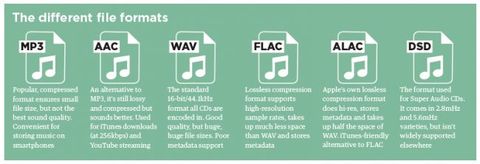
Without going into detail, this term generally refers to recordings with a higher sample rate and / or bit depth than CD (i.e. 16 bit / 44.1 kHz). Examples of high-resolution audio are 16-bit / 96 kHz or 24-bit / 192 kHz files.

Due to the presence of additional audio information, high-resolution files sound much better than compressed files, which lose this information during the compression process. These formats require more disk space, but their quality is definitely worth the investment.

High-resolution audio includes uncompressed formats, such as AIFF and WAV, and lossless formats, such as FLAC and ALAC. DSD (partly a niche format used on Super Audio CDs) also falls under the Hi-Res Audio category, but it is compatible with a much smaller number of devices. When it comes to streaming, services like Tidal Masters use an MQA container to stream high definition files over networks using the lowest possible signal bandwidth.

When it comes to playing high-resolution audio formats, it is already supported by many devices today. The 24-bit files can be played with Denon HEOS wireless speakers, as well as premium portable music players like Cowon Plenue D2 and Astell & Kern A & norma SR15.

Also, most flagship Android smartphones support Hi-Res Audio, for example the highly rated Samsung Galaxy S10 +, but you won’t be able to immediately hear them on a new iPhone. We’ve found ways around this limitation, but keep in mind that Hi-Res Audio files are still not as compact as their lossy counterparts.

What is the best audio format for you?
The format you choose depends on whether you are more concerned about memory capacity or sound quality, and what type of device you intend to use it with.

The popularity of MP3s came at a time when the cost of disk space was very high. Today’s smartphones, music players, and laptops are equipped with an impressive amount of memory, so it makes sense to pay attention to higher-than-CD quality formats.

If you have decided to archive your audio files, FLAC or another lossless format might be a good option. They represent a good compromise between compression level and sound quality, allowing you to listen to high-quality digital music and save disk space. Just be sure to check the compatibility of the selected format and available devices.