Lossless Audio Compression Part 3


Free Download Mp4Gain
picture

Analyzing the main audio formats Part 2

Audio File Format

Compressed and uncompressed audio files

audio file format

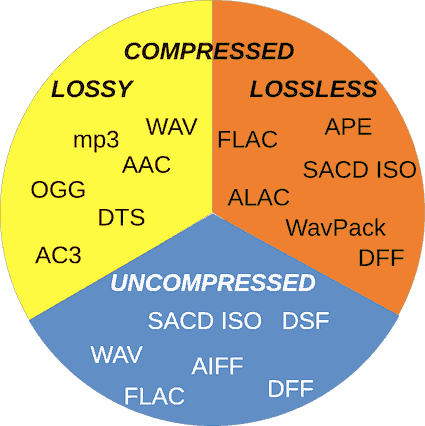
Let’s start by examining three categories into which all audio file formats can be grouped. They are determined by the degree of data compression and the associated loss of sound quality.

If a special algorithm (or codec) was not used to compress the audio in your file, this will lead to a double result: first, there will be no loss of sound quality, and second, you will soon run out of audio space. your hard drive.

In essence, the uncompressed recording is fully consistent with the original audio file, in which real sound signals are recorded in digital representation.

WAV, AIFF or FLAC: uncompressed formats
WAV and AIFF are the most popular uncompressed audio file formats. Both are based on PCM (Pulse Code Modulation), a well-known mechanism for directly converting audio to digital format. WAV and AIFF use similar technologies, but the storage methods are slightly different. CD-quality files and higher resolution files can be burned in these formats.

The WAV format was developed by Microsoft and IBM and is therefore used on Windows-based platforms; it is the standard CD recording format.

The AIFF format was created by Apple as an alternative to WAV; And while AIFF files are less common, they provide more comprehensive metadata support, allowing you to store album art, song titles, and the like.

The downside to these formats is that they require a large amount of memory. CD-quality files (16-bit, 44.1 kHz) occupy approximately 10 MB of disk space per minute of sound.

ALAC, FLAC, WMA Lossless: lossless audio formats
We all love FLAC. Lossless format, files in FLAC (Free Lossless Audio Codec, Free Lossless Audio Codec) are almost half the size of uncompressed WAV or AIFF files with equivalent sample rate, but in terms of sound, no loss of quality is noted. FLAC also supports higher resolution than CD quality, up to 32-bit and 192 kHz.

Besides FLAC, there are other lossless formats: ALAC (Apple Lossless) and WMA Lossless (Windows Media Audio). The former is a great alternative for iOS and iTunes, although the file size is slightly larger than FLAC. Not all smartphones and tablets support it.

AAC and MP3: lossy audio formats
Who has not heard of MP3? Everyone has heard of him. This most common audio format is convenient for storing music on iPods or tablets and is compatible with almost any device. However, this requires the sacrifice of a significant amount of information. To reduce file sizes by an order of magnitude compared to CD-quality recordings, a significant percentage of the original data needs to be discarded, leading to a loss in sound quality.

The bit rate at which the MP3 file is recorded also affects the sound quality. 128 kbps MP3s lose more information than 320 kbps files (this means “kilobits per second”, where each “bit” is essentially a small part of a song). Given the steep decline in memory costs, there is no reason these days to listen to files at 128 kbps; 320kbps MP3s make sense with limited storage space and are also still the standard format for downloading files from online stores.

Another lossy format, AAC (Advanced Audio Coding), also offers compression like MP3, but thanks to slightly more efficient algorithms, it provides better sound quality. AAC is used for iTunes downloads and Apple Music (256 kbps) streams and YouTube streams.

The Vorbis format, often referred to as Ogg Vorbis to emphasize the use of the Ogg container, is an open source, patent-free alternative to MP3 and AAC. This 320 kbps bit rate format is used in Spotify streams.

If you plan to use lossy formats, consider the following fact: increasing the number of “bits” generally leads to an increase in sound quality, but it is highly dependent on the efficiency of the codec with which the file is converted. If most of the music in your collection is encoded at 128 Kbps, you may have noticed that despite the fundamental similarity in sound, due to the low efficiency of the codec, MP3 files are likely to be somewhat audible. worse than AAC or Ogg. Vorbis.



Free Download Mp4Gain
picture


Mp4Gain Main Window
picture


Mp4Gain Features
picture


Free Download Mp4Gain
picture

Lossless Audio Compression Part 3

Analyzing the main audio formats

Audio File Formats

As you organize your digital music collection, you can dive into a variety of audio file formats. Almost everyone has heard of MP3, but what is OGG, AIFF, or MQA?

audio formats

If, after reading the list, you have the suspicion that all these formats for obtaining such chic abbreviations were studied in different universities, we will help to dispel it. This material will clarify the essence of some popular music formats, the difference between them and why it is important to know them.

Regardless of what you’re listening to – low-bit-rate MP3s, slightly better tracks in AAC, or high-resolution audio in FLAC or WAV – it’s time to find out exactly what you’re getting in each case and how to choose the optimal format.

Let’s take a look at the pros and cons of each.

A quick overview of file formats and codecs

In order not to beat around the bush, we’ll provide a quick guide to all file formats and the differences between them at first. If you want to know more, here is a more detailed description of the differences in size, sound quality and compatibility.

AAC (not a high resolution audio format). Apple’s popular alternative to MP3. Compressed and lossy, but with higher sound quality. Used to download from iTunes and stream from Apple Music.

AIFF (high resolution). Apple’s alternative to WAV with more complete metadata. It is not an uncompressed and lossy format very popular with large files.

DSD (high resolution). One-bit format used in Super Audio CD. Available in 2.8 MHz, 5.6 MHz and 11.2 MHz sample rates. Due to the use of a high quality codec, it is currently not used for transmission. Uncompressed format.

FLAC (high resolution). Lossless compression format supporting high-resolution supporting sample rates and metadata storage; the file size is half that of WAV. Due to the absence of royalties, it is considered the best format for downloading and storing albums in high resolution audio. Its main drawback is the lack of support for Apple devices (and therefore incompatibility with iTunes).

MP3 (not high resolution audio format). Popular compression and lossy format with small file size and far from the highest sound quality. Convenient for storing music on smartphones and iPods.

MQA (high resolution). Compressed format for storing high resolution files in an easier way to transmit. Used by the Tidal Masters service for high resolution audio streaming.

OGG (not high resolution audio format). He is sometimes referred to as his full name: Ogg Vorbis. An open source alternative to MP3 and AAC that is not covered by patents. This 320 kbps bit rate format is used in Spotify streams.

WAV (high resolution). The standard format in which all CDs are recorded. Great sound quality, but large files due to lack of compression. Weak support for metadata (versions, song titles and artists).

WMA Lossless (high resolution). An uncompressed version of Windows Media Audio, the compatibility of which is no longer often found on smartphones and tablets.

What is the highest quality music format right now? PART 2

What is the highest quality music format right now? PART 2

Audio Files Formats

CD discs

audio file formats

The audio CD format, or rather the .cda extension, appeared around the same time.

Unlike “wave” files saved on the hard disk, they cannot be edited. Today it can be opened in an audio processing program, reformatted by audio transcoding, and saved anywhere other than on a CD.

After specifying the output format and the device we will play them on, the conversion will begin. For all these tasks, we only need to drag and drop the elements that we are working with in its user interface. For example, if we are playing a file at twice the speed, an easy way to interpolate would be to play one sample out of two.

If you place the object at 50% pitch, you should double the number of samples, and an easy way to do this is to find the average of the two actual samples. Well, this signal needs to be decompressed, and this requires a proportionally higher CPU load that can “saturate”. And a less saturated processor means less risk of “hang.” We will analyze the most popular compression formats that will allow us to compress any file without losing information. What is fast? The most powerful?

MP3 codec
With the advent of the LAME MP3 Encoder codec, the music industry experienced a real shock, because those files “weighed” dozens of times less than the same WAV file. Even a five minute compose at full compression rarely exceeds the size of 5-7MB. Agree, a significant advance, not to mention the fact, allowed not only to adjust the above characteristics, but also some additional parameters in the form of ID3 tags, which contained information, for example, about the artist, album name and tracks. , the release date.

What is file compression? What does squeeze mean?
And the most used? Have you ever come across a file that was too busy and you didn’t know how to make it work less, like mail it to a friend? Compressing the file allows us to reduce the size of the file. It will take up less space on your hard drive and it will be easier to send. Depending on the type of file used and the type of compression, its size will be reduced more or less.

What compression formats are there and which are the most popular?
As we just said, there are several types of compression methods. For example, it is a compression method used to compress video, audio, or image files. The main characteristic of this compression method is that by compressing approximations, the media file is reduced in size. This method looks for repeating patterns in addition to other more advanced methods. This is achieved by reducing the file size without loss of information or quality, although obviously the file size is not reduced. Unlike the previous case, this information is not lost. … When it comes to compression formats and methods, we have a wide range.

This type has become the most popular. Look, almost the entire Internet is full of this universal format. In general, we can say that the MP3 audio format has become a true revolution in sound. It remains one of the most popular and in-demand so far, even though it is being replaced by other types of audio. But more on that later.

A Guide to Choosing Audio File Formats: The Present Century and a Bit of the Past
.
FLAC, APE, ALAC and all, or just lossless
Formats from another planet: WavPack, Opus, MPC and other scary lyrics
FLAC vs MP3
So what should I do?
Introduction
As always, I’ll start with the senile complaints. Twenty years ago … In fact, twenty years ago there was no particular option. Because there were CDs that were turned into WAV files that took up the space of an average “hard drive”, well, there was quite a bit of space left in the operating system. And on the BBS. And the games. And in the archive of files. And that’s it. Because the average size of a hard drive back then was a whopping 850 megabytes today. Yes, exactly that 850, and exactly one megabyte. The impetus for everything was given by the appearance of the MP3 format in 1997, and it was a very significant year!

What is the highest quality music format right now?

What is the highest quality music format right now?

audio format

The first audio format in computer games

Audio Format

The first mention of computer sound came from the creation of primitive games at the time, in which sound was played through the system’s speaker. But no matter how hard the developers of such software (software) have been, the required quality, compatible with tape or reel recordings or recorders, could not be achieved.

High definition digital music has been around for a long time. Why does it seem that it is now catching on? In addition to traction, they can have devices like one, the answer on the market. The author of this disappearance does not have to look very far. Except in special cases, most of the users are more than enough for their smartphone to listen to music. Even players that have settled down, you see, they reduce the ground they hit year after year.

That is why many manufacturers are looking for a solution on how to change the audio format so that the sound is natural. Frankly, this has led to more competition than we have now. This applies not only to the material being played, but also to studio sound, live performances, quality or basic parameter settings in terms of knowledge of physics, acoustics, etc.

We come to the millionth question. This requires a sensitive ear and some education. If you’re a high-profile foodie, you’ll probably know the difference first, but for ordinary mortals who only listen to music with a background meter, it’s probably too hard to pay the difference just to have that kind of quality.

It is not just a music player. Those that combine with this equipment are not cheap. To top it all, there is music that is sold in high definition formats, which is also a bit more expensive. Finally, this is the technical section. There is not even consensus among audio professionals themselves on whether these devices make such an important distinction. At least on paper, it seems that HD music sounds better, but there is a strong marketing component behind it. Are we willing to pay to see the audience as music lovers?

The appearance of the WAV format
It is believed that the first full quality of audio formats was associated with the appearance of the standard and the .wav file extension (this abbreviation was formed from the English word “wave” or wave). Anyway, he became the first-born that could be processed into computer programs on a professional level.

As is usual in most multimedia files with which we work almost daily, we link to video with photos or audio files, depending on the type of use that we are going to make of them, we must use them in a specific format, so It is also important to know the main differences between them.

But this is what we are going to talk about, these are some alternatives that we are going to present to you and that will be very helpful when it comes to testing and converting the different types of audio files that we usually find. If you want to know the main differences between the two, we recommend that you take a look at this post that we offer you.

Advanced Audio Formats Part 2

Advanced Audio Formats Part 2


DTSaudio formats

DTS – Digital Theater System, in fact, is Dolby Digital, or rather its competitor. DTS uses a lower compression rate than Dolby, so it actually sounds better, as evidenced by DVDs that have DTS or DD tracks. DTS in home theater systems uses a maximum bit rate of 1536 kbps (full bit rate), this sound is better than Dolby Digital’s AC-3 format. DTS – Uses 6 free audio tracks and supports 7.1 sound distribution system, with this DTS 4.0 bit rate – it will sound as immersive as Dolby 5.1.

AIFF VS FLAC

FLAC

FLAC – (Free Lossless Audio Codec). Unlike lossy codecs (MP3, Ogg, and AAC), it does not remove any information from the audio stream and is designed for listening to music on high-quality Hi-Fi and Hi-End equipment and for archiving a professional audio collection. Currently, the FLAC format is supported by many audio players and music applications. The basic decoder uses ID3v1 and ID3v2 tags to store basic types of metadata, so they can be freely added and edited.

SUNSARA
Varicose veins disappear without a trace in 10 days!
MORE INFORMATION →
MIDI

MIDI: (Musical Instrument Digital Interface), unlike other formats, MIDI does not store digital sound, but sets of commands: notes played, links to instruments, sound parameters. The convenience of the MIDI format is to use a device that is arranged according to the indicated chords. Midi files are typically several orders of magnitude smaller than digitized audio of the same quality. The MIDI format is versatile and designed so that any sequencer can read and write data without loss. At the same time, MIDI information that is incomprehensible to other software applications does not lead to misunderstandings, but is simply ignored. The mid-year backing track format allows you to save information about the instrument used, the tempo, the size designation, the information about the musical keys, the name of the track and the patterns and their number.

MP3

MP3: (MPEG Layer version 3) At the moment, MP3 is the most popular digital music encoding format. MP3 is a lossy compression format, that is, part of the audio information, according to the psychoacoustic model, the human ear can barely perceive is removed from the original file, irrevocably. The debate on MP3 quality still continues … First, the quality of the resulting MP3 depends not only on the bit rate of the compressed file, but also on the version of the encoding program used: the codec. Many music gourmets prefer to compress music with “maximum quality” – 320 kbps, or switch to other formats, for example FLAC, where the average bit rate is ~ 1000 kbps. At the moment, MP3 is the leader in universal recognition, but at the same time it is not a professional format in terms of technique. Professional musicians and DJs no longer use tracks with a bit rate lower than 320 kbps.

MODIFICATION

MOD is a format designed for the Amiga platform. Each MOD file contains digitized recordings of actual instrument sounds, called samples, somewhat similar to the structure of MIDI. Cj or a composer who writes in the MOD format uses a program called a tracker, in which he specifies what instrument, at what time, what note and octave should sound; This sequence of notes is written in a list; one track and several tracks. sounding in parallel forms a block called a pattern. The pattern collection forms a module: a file in MOD format, with the extension .mod. A track bar corresponds to an actual channel in which cj can play or edit numbered notes. Notes can be assigned various “patterns”, for example: tremolo, glissando, and so on.

OGG

OGG – Vorbis was developed in 2002 by the Xiphophorus team as an alternative to all paid licensed audio formats. Ogg Vorbis is compatible with all popular platforms. The format does not restrict the user to just two channels of audio (left and right), it supports up to 255 separate channels at a sample rate of up to 192 kHz and up to 32 bits, making Vorbis ideal for encoding DVD-Audio of 6 channels. home theater audio.

Advanced Audio Formats

Advanced Audio Formats

audio formats

Various physical methods have been developed to store audio data for these purposes, such as vinyl records, magnetic tape, CD, DAT, MD (minidisc), DVD, or converting music scores to music (MIDI), in the same way.

Audio File Formats

Many different computing methods have emerged. Audio data storage – digital: OGG, Mp3, Flac, Wav formats.
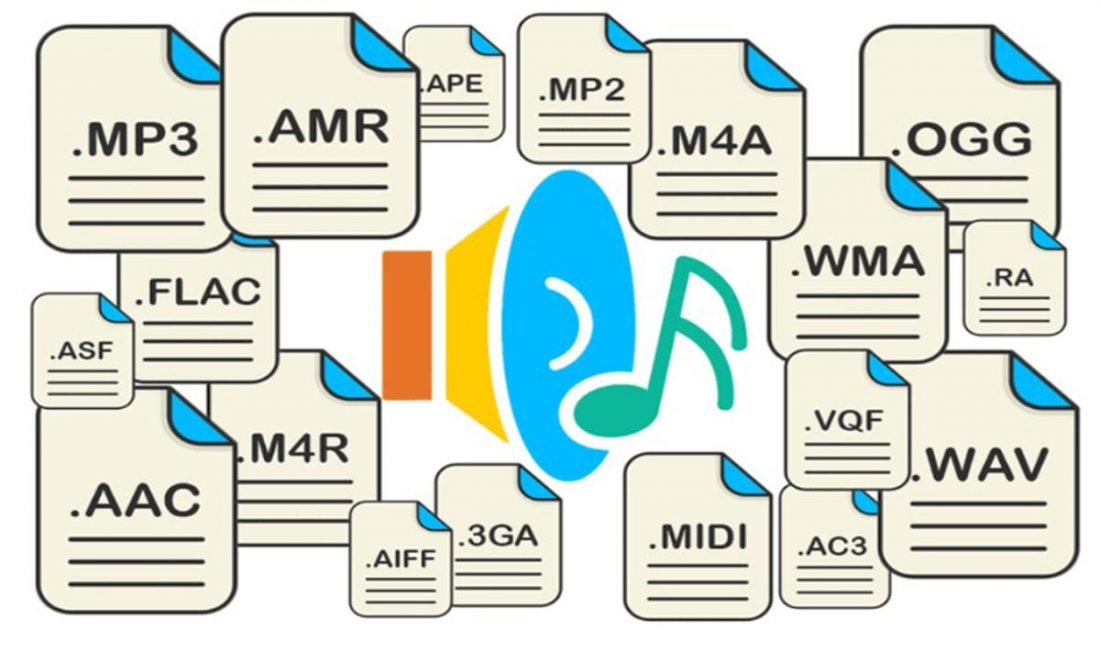
It is impossible to consider and discuss all audio formats, codecs, their advantages and disadvantages, so in our article we will try to talk about the most popular audio file extensions that you may have to work with.
Why can’t we use any universal audio file encoding format?

Because for the implementation of various functions, a different format is required. For example: to play CDs in a CD-ROM drive, to record music or sound effects in video games, to record a movie track or video clip, to play on mobile phones or transfer files over the Internet, in addition, there are a number of of operating systems that are the most used in the world. These include: Amiga, Macintosh, NEXT, and Windows personal computers. Also, the job of a dj, sound engineer, cj, video engineer, or a simple music lover is quite different in nature. This may require that your audio data be saved in your own way. For example, the audio on a CD must be saved using 16 bits and a sampling frequency of 44.1 kHz. However, to download sound over the Internet, it is better to use a different bit depth and sample rate, as each minute of 16-bit, 44-kilohertz audio takes about 10MB. those. an average 5 minute track will be 50 “meters” – this is too much information for the average user. This article presents brief information on the most popular music formats.

AA (audible audiobook file)

AA (Audible Audio Book File) is a proprietary format developed by Audible. It is used to record audiobooks that are sold through the Audible and iTunes services. It is possible to reduce or accelerate the speed of listening to files: digital tone, the ability to leave bookmarks when listening to audiobooks, file protection, when delivering sound recordings over the Internet.

AAC (advanced audio coding)

AAC (Advanced Audio Coding) is an audio file format with less loss of quality when encoding than MP3 in the same sizes. Lossless music encoding of original quality using the ALAC profile. AAC is a family of MPEG4 audio coding algorithms. Unlike the hybrid mp3 filter bank, AAC uses MDST (Modified Cosine Transform) technology, which means that the listener gets better sound quality than MP3 encoding with the same or lower bit rate. Possible AAC file extensions: .m4a. m4b .m4p.

AIFF

AIFF – This is the audio data format for the Apple Macintosh platform. The .aiff format supports 8- and 16-bit mono and stereo. If files in this format contain a Mac-Binary header (text, photos, copyright holder information, a single number, etc.), then the file will have the extension .snd. You can listen to an audio file with the extension .nd using Sound Forge. Forge will, of course, open such a file, but it will recognize it as a Macintosh resource format and it will not affect sound quality.

APE (mono audio)

APE – (Monkey’s Audio), developed by Matthew T. Ashland is a lossless digital audio format. Monkey’s audio codec is released for Microsoft Windows platform only, although there are several unofficial codecs for MacOS, Linux, BeOS Monkey’s audio files use the following extensions: .ape to store audio and .apl to store metadata This format is not free as its license severely restricts the distribution of .ape files.

Description of the main audio formats

Description of the main audio formats

audio fomats

In the world of music there are a large number of musical formats of its modifications and versions, created by the giants of the music industry and small companies that have received public recognition in the electronic world.

AUDIO FORMATS

Various physical methods have been developed to store audio data for this purpose, such as vinyl records, magnetic tape, CD, DAT, MD (minidisc), DVD, or converting music scores to music (MIDI), in the same way. Many different computing methods have emerged. Audio data storage – digital: OGG, Mp3, Flac, Wav formats.

It is impossible to consider and discuss all audio formats, codecs, their advantages and disadvantages, so in my article I will try to talk about the most popular audio file extensions that you find.

Why can’t we use any universal audio file encoding format? Because for the implementation of various functions, a different format is required. For example: to play CDs in a CD drive, to record music or sound effects in video games, to record a movie track or video clip, to play on mobile phones or transfer files via the Internet, in addition, there are a number of The world’s most widely used operating systems … These include: Amiga, Macintosh, NEXT, and Windows personal computers.

Also, the job of a dj, sound engineer, cj, video engineer, or a simple music lover is quite different in nature. This may require your audio data to be saved in his way. For example, the audio on a CD must be saved using 16 bits and a sample rate of 44.1 kHz. However, to download sound over the internet, we’d better use a different bit depth and sample rate, as each minute of 16-bit, 44-kilohertz audio takes up about 10MB, that is, an average track of 5 minutes will be 50 meters, which is too much information for the average user. This article provides an overview of the most popular music formats.

AA (Audible Audio Book File) is a proprietary format developed by Audible. It is used to record audiobooks that are sold through the Audible and iTunes services. It is possible to reduce or accelerate the speed of listening to files: digital tone, the ability to leave bookmarks when listening to audiobooks, file protection, when delivering sound recordings over the Internet.

AAC (Advanced Audio Coding) is an audio file format with less loss of quality when encoding than MP3 in the same sizes. Lossless music encoding of original quality using the ALAC profile. AAC is a family of MPEG4 audio coding algorithms. Unlike the hybrid mp3 filter bank, AAC uses MDST (Modified Cosine Transform) technology, which means that the listener gets better sound quality than MP3 encoding with the same or lower bit rate. Possible AAC file extensions: [.m4a], [.m4b], [.m4p].

Additionally, AAC is a wideband audio coding algorithm that uses two basic coding principles to greatly reduce the amount of data required to transmit high-quality digital audio. This format is one of the highest quality, uses lossy compression, compatible with most modern equipment, including notebooks.

As of 2009, it is much less widespread than MP3 and other workarounds. AAC (Advanced Audio Coding) was originally created as a successor to MP3 with improved encoding quality. The AAC format, officially known as ISO / IEC 13818-7, was released in 1997 as the new seventh part of the MPEG-2 family. There is also the AAC format known as MPEG-4 Part 3.

Benefits of AAC over MP3:

– up to 48 audio channels;

– high coding efficiency with constant and variable bit rate;

– sampling frequencies from 8 Hz to 96 kHz (MP3: 8 Hz – 48 kHz);

– More flexible set stereo mode.

ADX is a proprietary ADICM-based lossy compression and storage format developed by CRI Middleware specifically for use in video games. The most characteristic feature is the ability to loop the sound recording, which makes the use of the format convenient to use as background music in various games that support this media container. It is compatible with many SEGA Dreamcast games, some PlayStation 2 and GameCube games.

Unlike MP3, it does not use the psychoacoustic model of reducing the volume of sound data (reducing its complexity). Instead, the ADPCM model uses a prediction function relative error data log to store the samples, which means greater conservation of the signal.

Audio formats. Understanding the differences

Audio formats. Understanding the differences

Audio File Format

There are many different audio formats.

audio file formats

You can’t even imagine how many audio formats there are. Now we will consider only the most popular ones, and if you need complete information, you can find it on Wikipedia.

Audio formats
Sound is itself an analog phenomenon. In order for it to register on a computer, it must be digitized. Digitized audio takes up a lot of space. Therefore, they use special algorithms to encode and compress data: codecs. Codecs provide encoding / decoding of audio / video data, as well as compression / decompression of such data. Download a set of codecs for Windows:

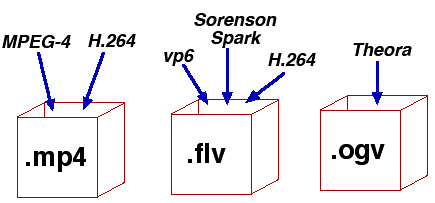
The type of media file format (audio or video, no difference) is determined by its extension. For example, MP3 files have the extension .mp3. The codec for this format is always the same: MPEG Layer-Ç. But for the MP4 format, the codecs may be different.

Some formats, such as MP4 and FLV, can contain streaming audio and video. So, if you see a file with the extension .mp4, you can’t definitely tell that it contains only music or only video, or a movie – audio and video. After all, initially in such formats, the possibility of transmitting both audio and video was raised.

We all know that once information is compressed, it can be lost. Therefore, all codecs can be divided into two groups: with loss of quality and without loss of quality. Don’t be intimidated by the word “lossy”: As a general rule, codecs cut off “unnecessary” information that is invisible to our eyes and ears (almost invisible).

Lossless compression codecs include:

FLAC (Free Lossless Audio Codec);
APE (Monkey’s Audio);
ALAC (Apple Lossless Audio Codec).
And here are the lossy codecs:

If you are a fan of sound then it makes sense to look for music in FLAG format. For normal home listening, the most popular MP3 format is sufficient. Also, to experience the total difference between MP3 and FLAC formats, you need professional sound reproduction equipment; unfortunately, the tablet does not belong to said team. So I don’t see any reason to download FLAC music to a tablet.

Now let’s take a quick look at the audio formats themselves:

WAV is the first (or one of the first) audio formats. It is used to store uncompressed audio recordings. One minute of recording in WAV format requires 10MB. An audio CD is usually copied in this format and then the resulting WAV files are compressed with an MP3 codec to save space.
MP3 (MPEG Layer-3) is the most widely used audio format. It reduces the sound with a loss of quality, but only the sound that is not heard by the human ear is cut off. As a result, a person does not hear the difference and the sound takes up less space. The main characteristic of this format is the bit rate. The higher the bit rate, the better the sound quality. Uncompressed audio CD has a bit rate of 1411.2 Kbps. The highest sound quality in the case of MP3 format is achieved at a bit rate of 320 Kbps. Anything below 320 Kbps is of worse quality . The difference between 128 Kbps and 320 Kbps is already felt by ear, so if you can download recordings with a higher bit rate, go for it.
WMA (Windows Media Audio) is a format developed by Microsoft for the Windows operating system. Microsoft tried to create a replacement for MP3, but, as time has shown, it failed.
OGG is an open format that supports encoding of audio with various codecs. The most widely used OGG codec is Vorbis. In terms of compression quality, the format is comparable to MP3, but less common in terms of media player and audio player support. If you can download music in MP3 and OGG format, you should choose MP3 because your audio player may not support OGG format.
AAC is a proprietary audio format that provides better sound quality than MP3. It is currently the best lossy audio coding algorithm. A file of this format can have the extensions aac, mp4, m4a, m4b, t4p, t4g.
FLAC is a lossless compression format. It does not make any changes to the audio stream, so the sound encoded with it is identical to the original. Used for listening to sound in high-level sound systems.
Video formats
There are no fewer video content formats and standards than audio formats. Let’s start with the international standards that define the data storage and encoding format of multimedia files:

Everything you need to know about video codecs and containers

Everything you need to know about video codecs and containers

Video Container Formats and Video Codecs

Today, everyone seems to be aiming to become filmmakers. People use a wide variety of gadgets and devices for filming, including mobile phones and digital cameras, as well as portable and professional video cameras. The latest generation of digital SLR cameras can record high definition video, which is being replaced by Ultra HD (4K) video.

Codecs and containers

It takes effort to learn how to make good videos, but it becomes even more difficult when you want to show your video masterpiece in all its glory to friends, family, or put it online for everyone to see. You may need to upload it to YouTube, you may want to burn your own Blu-ray Disc or DVD, or you may just want to upload a video to your mobile phone or tablet.

Everything you need to know about video codecs and containers

Let’s first understand the types of codecs. General concept of codecs

If you chat with people who are into video processing or visit the relevant web forums, one way or another, you will find yourself involved in the sometimes heated debate about which codec is better. In fact, the effectiveness of any codec is highly dependent on the compression mode used and the type of video material being processed. So it is worth considering different codecs, taking into account their specific use and the characteristics of the compressed material. Video codecs are mainly covered below, but the section on format containers also mentions the use of audio codecs. Video recording and archiving

Most modern consumer electronic devices receive content in some kind of already compressed format. As a general rule, only professional video operators work with uncompressed HD video. Of course, ideally, if possible, in the presence of a large-capacity storage system, the video files should be stored in the original recording format, because this ensures the highest quality. Transcoding a video from one type of compression to another can introduce subtle artifacts that can degrade image quality. (These errors are minimized with good software transcoding.)

Today, many codecs with specific specializations are offered. The average user may never find most of them. The next section is dedicated to codecs, such as compression / decompression systems, used as part of special software that is designed to encode or transcode video files.

x.264 / MPEG-4 AVC (Advanced Video Coding). This most common codec is used in modern digital video and still cameras, in which shooting results are saved as files on built-in hard drives, memory cards, etc.

H.265 (HEVC – High Efficiency Video Coding) the latest most efficient video compression standard developed in response to the need to migrate to ultra high definition video, known as Ultra HD or 4K.
H.265 was originally developed as HEVC (High Efficiency Video Coding). It was approved as the official successor to H.264 in April 2013.

MJPEG (Motion JPEG). This is an older format used by some older generation digital cameras and video equipment. It was developed by experts who participated in the development of the JPEG (Joint Picture Experts Group) codec to compress ordinary still images, hence the name of this codec.

DV and HDV The DV standard was developed by a consortium of video technology companies for tape storage systems and was often used in camcorders with a mini tape cassette slot. Some DV versions have been used successfully in professional camcorders, and the HDV version has been developed to support high definition tape cassettes.

Everything you need to know about video codecs and containers

Everything you need to know about video codecs and containers

Video Formats, Codecs and Containers

Sometimes it is quite difficult to figure out which codec and container are the best to create your video masterpiece.

Video Container,  Video Codec

Today, everyone seems to be striving to become filmmakers. People use a wide variety of devices and devices for filming, including mobile phones, digital cameras, portable and professional video cameras. And the latest generation of digital SLR cameras can record high definition video.

Making a good video takes a bit of effort, but it becomes even more difficult when you want to show your masterpiece to other people in all its glory. Maybe you need to upload it to YouTube, maybe you are going to burn your own Blu-ray or DVD, maybe you want to download the video to your mobile phone or tablet.

Sometimes it is difficult to figure out which codec and container is best for creating your video masterpiece. The material below can help you solve this problem.

What is the difference between a codec and a container?

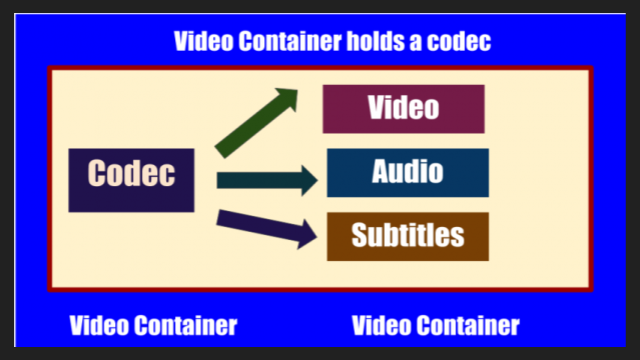
Novice users are often confused when trying to figure out the difference between codecs and containers. Now the word Codec has become commonplace, and initially the term was an abbreviation for the concept of KOMPRESSOR-DEKOMPRESSOR. What do codecs do?

They take data from digital media and compress it (for transmission and storage) or decompress it for viewing and transcoding. Each codec uses a specific method to encode and decode digital data.

Uncompressed video and audio (raw means unprocessed, or often “raw”) require a lot of storage space. Uncompressed 1080i HD video recorded at 50 frames per second consumes up to 410 gigabytes per hour. Audio on CDs, quite out of date by modern standards, plays for around 74 minutes with a 680 megabyte disk capacity. However, eight-channel audio encoded with a 24-bit resolution will require 16 megabits per second, or several gigabytes per hour. Even broadband internet connectivity is sometimes not enough to listen to music in full audio resolution. This is the reason why digital video and audio recordings must be compressed for transmission and storage.

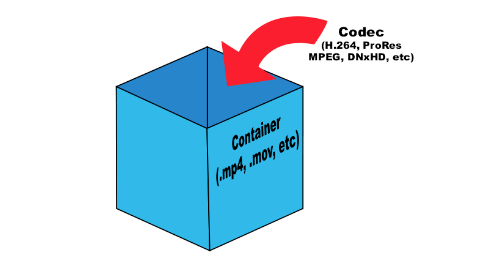
Once the media is compressed within reasonable limits, it must be packaged for shipping and later viewing. For this, container formats are used that act as a “black box” filled with various multimedia formats. Good container formats can accommodate files compressed with different codecs.

Let’s take a look at the types of codecs.

General concept of codecs

If you chat with people who are into video processing or visit the relevant web forums, one way or another, you will find yourself involved in the sometimes heated debate about which codec is better. In fact, the effectiveness of any codec is highly dependent on the compression mode used and the type of video material being processed. Therefore, it is worth considering various codecs and taking into account their specific use and the characteristics of the compressed material. Video codecs are mainly covered below, but the section on format containers also mentions the use of audio codecs.

Capture and archive videos

Most modern consumer electronic devices receive content in some kind of already compressed format. Usually only professional videographers work with uncompressed HD video. Of course, ideally, if possible, in the presence of a large-capacity storage system, the video files should be stored in the original recording format, because this ensures the highest quality. Transcoding a video from one type of compression to another can introduce subtle artifacts that can degrade image quality. (These errors are minimized with good software transcoding.) Many codecs with specific specializations are currently offered. The average user may never find most of them. The next section is dedicated to codecs as compression / decompression systems,

x.264 / MPEG-4 AVC (Advanced Video Coding). This most common codec is used in modern digital video and digital cameras, where shooting results are saved as files on built-in hard drives, memory cards, etc.

MJPEG (Motion JPEG). This is an older format used by some older generation digital cameras and video equipment. It was developed by the same specialists (Joint Picture Experts Group), who participated in the earlier development of the JPEG codec for compressing ordinary still images, hence the name of this codec.

DV and HDV. The DV standard was developed by a consortium of companies from