What music file format is recommended? Part 2


Free Download Mp4Gain
picture

What music file format is recommended? Part 2

AUDIO FORMATS

Opus is a new audio compression format developed by the IETF and standardized by RFC6716 in 2012. There is very little hardware and software supported, but at low bit rates of 128 kbps or less, it appears to be the strongest sound quality with compression with lost.

audio formats

Vorbis is a free audio file format developed by Xiph.org. It seems to be used on Youtube too. Since the standard bit rate is 112 kbps, the sound quality at a low bit rate appears to be good.

WMA is a standard Windows audio compression method developed by Microsoft. If the bit rate is 160 kbps or less, it exceeds the MP3 upper limit frequency. However, the size will be a little larger.

AAL (ATRAC Advanced Lossless) is a lossless compressed version of ATRAC mentioned above. According to Sony, it can be compressed to about half the size of the data without losing any music information on the CD, but it actually seems to vary considerably depending on the sound source.

As the name implies, Apple Lossless (ALAC) is Apple’s lossless compression audio codec. Used in iTunes, etc.

FLAC is an audio file format developed and distributed as free open source software. It seems to be the most popular in lossless compression.

Monkey’s Audio is an audio format that compresses PCM losslessly without degrading sound quality. It is so named because it is used in music playing software called Monkey’s Audio. The characteristic is that it does not fit the name and the compression rate is high.

TAK is a high-speed, high-compression, lossless compression audio encoder. It has the same level of compression as Monkey’s Audio, but it’s pretty crazy.

TTA is a free real-time lossless compression audio encoder / decoder. Like TAK, it’s too manic so I wouldn’t use it.

WMA Lossless is a lossless compressed version of WMA mentioned above.

Equalizer Image
AIFF is an uncompressed audio file format developed by Apple. It seems to be the Windows WAV. It seems to have been used on Macintosh (Mac) for a long time.

WAV (WAVE) is a format for describing audio data developed by Microsoft and IBM. This is what happens when you convert a CD (Linear PCM) into an uncompressed file in Windows.

Also, the sound quality of lossy compressed music file formats is almost the same at 192 kbps bit rates. If it is 160 kbps or less, I am wondering if other compression formats are slightly better than MP3. In this case, it is better to check the music player software. Sound quality is exactly the same for lossless and uncompressed music file formats. Lossless compression will have issues with compression ratio and playback load.

I want to read it together
What is free high-quality music player software for Windows?
After all, what music file format is recommended?
Image of listening to music with a portable music player
I’ve mentioned it so far, but I recommend MP3 or WAV (AIFF). The reason is as follows.

Due to the large capacity of hard drives and flash memory, lossy compressed music file formats do not need to have a bit rate lower than 192 kbps.
The compression ratio of the lossless music file format is currently 60 to 70% maximum, so taking into account the encoding time and effort and loading during playback, the file format of Uncompressed music is sufficient for lossless compression.
I don’t think I can distinguish between 192kbps MP3 and WAV, so I can’t help but worry about the compression format.
MP3 and WAV have many compatible hardware and software.


Free Download Mp4Gain
picture


Mp4Gain Main Window
picture


Mp4Gain Features
picture


Free Download Mp4Gain
picture

What music file format is recommended?

What music file format is recommended?

audio format

There are many types of music file formats, so it is difficult to know which one is recommended.

AUDIO FORMAT

I have only used MP3 and WAV due to their confusion, so I don’t really know about the new music file formats that are increasing year after year. So, I took a quick look at the existing music file formats based on the information from the internet. Let’s make a list of types and extensions so that you can easily understand them later.

* The target is a music file format that can be converted from a CD (linear PCM).


* The format can be replaced with the term codec and the extension can be replaced with the term file format. Simply put, a codec is a device or software that can encode (encode) and decode (decode) data in both directions using one encoding method. A file format is an information device like a computer. It is the storage format of the file used in.

* The bit rate for lossy compression is 192 kbps.

* The corresponding items indicate the amount of hardware and software that the music file format supports. ◎ Many, ○ Many, ▲ Normal, △ Less, × Very few.

Currently, lossless compression is emerging as a compression format in addition to lossy compression. Irreversible compression (lossy compression) is a data compression method in which the data before compression and the data after compression do not completely match, and reversible compression (lossless compression) is the data before and after compression. It is a data compression method that exactly matches the data.

In other words, lossy compression is a poor sound quality compression method because it adds a reduction in the amount of data, and lossless compression is a good sound quality compression method because it does not reduce the amount of data. . They are all the same in the sense that they aim for high sound quality with the smallest possible size.

Now, I’m sure there are music file formats that you already know, but let’s briefly explain each one.

Mixer Image
AAC is a music file format standardized in 1997 (approved in 1999). Standardized in order to obtain high sound quality and high compression that exceeds MP3. If the bit rate is 160 kbps or less, it exceeds the MP3 upper limit frequency.

ATRAC is a voice data compression technology developed by Sony since 1992. If the bit rate is less than 128 kbps, it is above the upper frequency limit of MP3.

HE-AAC is a music file format standardized in 2003. By incorporating SBR technology into the aforementioned AAC, the playback band has been expanded and the sound quality and compression efficiency at low bit rates (128 kbps or less) have been vastly improved.

* SBR (Spectral Band Replication) is a technology for audio compression and encoding, which aims to strengthen the conventional encoding method and increase the compression rate.

MP3 is the oldest music file format standardized in 1991 (approved in 1993). Since it is old, it has a high penetration rate and there is a large amount of supported hardware and software.

Audio formats.

Audio formats.

Audio Formats

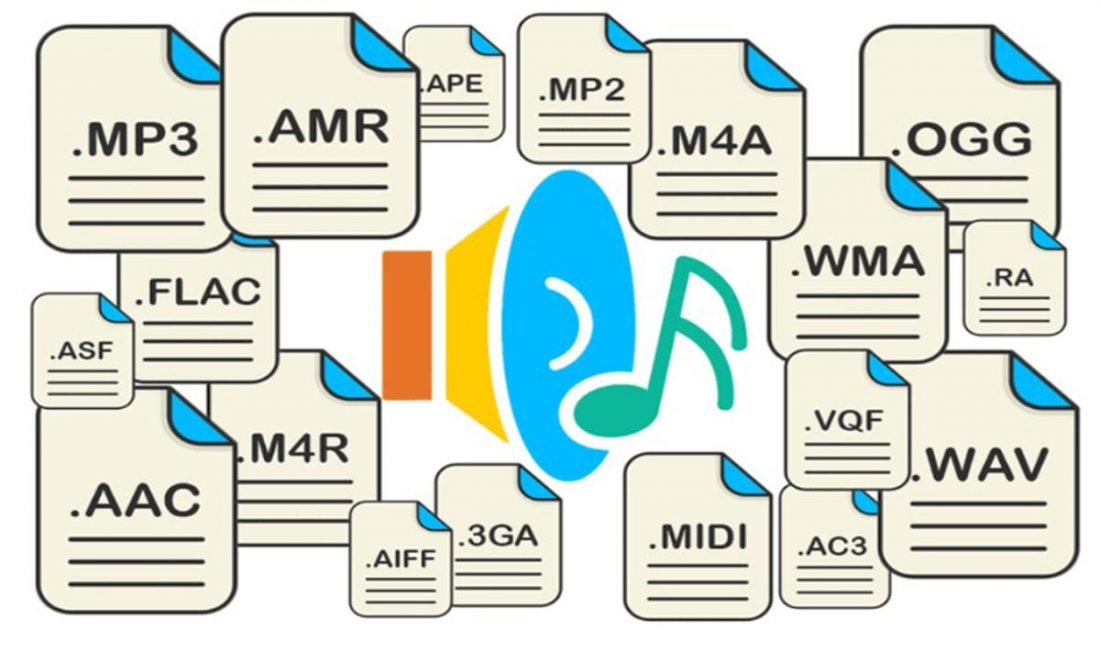
There are many types of voice file formats, as well as image file formats.

Audio Files

Since the digital audio files are easy to copy, the illegal copy and distribution of music files has become a problem these days.

As explained in what analog data is, the mechanism of digital audio files is that analog signals become digital data and are saved.

Explaining in detail the conversion method, to convert an analogue to digital waveform, it is necessary to perform a job called “sampling” that measures (record) the sound waveform at regular intervals, and is the sampling cycle. The sampling frequency is called (sampling frequency).

The sampling frequency represents the number of samples per second and is in Hz. In other words, it is a unit that expresses how many times the sound is measured and recorded per second, and the greater the value, the more faithful the original and greater sound becomes the quality of the sound. However, the amount of data will increase proportionally.

The sampling frequency of a typical music CD is 44.1 k Hz. However, even if the sampling frequency is increased, there are sounds and frequency bands that can not really be recorded, so some classical music enthusiasts love expensive analogue equipment.

In addition, it is not only the sampling frequency, which affects the quality of the sound, but also the “sampling bit” that indicates the strength (volume) of the sound (16 bits are 65,535, 24 bits are 16,777,215). (Express) and “Number of channels” (number of sound lines recorded as stereo, monaural and 5.1 channels) also have an effect. The higher the value, the greater the sound quality.

Another factor that greatly affects sound quality is the bit rate. The bit rate represents the amount of data to be recorded per second and the unit is “BPS”.

In other words, the higher the bit rate, the more information can be stored, which results in a higher sound quality. As will be described in detail below, in the MP3 file format, 128 K BPS is the minimum bit rate that can be heard.

However, there is “constant bit rate” and “variable bit rate” in the bit rate. The constant bit rate is the same bit rate that is fixed from the beginning to the end of the voice, and the variable bit rate increases or decreases the bit rate according to the amount of voice information.

In other words, the bit rate is high for clauses with multiple voices and the bit rate is low for simple low voice clauses. You can reduce the total size of the file by choosing a variable bit rate.

This is the information contained in the digitized data of analog audio signals.

However, digitized data can not be used as. Just converting this data into an arbitrary file format and saving them, it will be possible to use them with multimedia devices and application software that admit that format.

The storage format of said data

file format

Is named. A file format is a file format with an extension.

Then, to save the data in a file format, it is necessary to transform (encode: encoding) the data according to that format. (For coding, see What is a character code?)

A dedicated program is used to codify the data, but said coding program is

Codec (codec)
Is named. In other words, the gross data obtained by converting analog signals into digital data are processed by a codec to market them as a file format.

Therefore, there are many types of codecs and coding methods for each type of codec.

Most current codecs are programs that compress and encode data when creating a file and decompress (decompress) data by playing a file. In general terms, codecs are used to compress and decompress data. It refers to a compression method program of this type.

Highest quality audio format. Part 3

Highest quality audio format. Part 3

Audio Formats

Music formats: which is better

audio file format

What devices support it?

There are several formats that support high definition music. The quality of each format may vary depending on how it was recorded and at what frequencies.

There are many other brands that are already flirting with portable devices that are supposedly capable of HD audio. It is good to note that it is not enough to play high resolution audio with the file. It requires adapted audio electronics and is compatible with these frequencies and bit rates. Of course, a high-end output device is also required.

The first audio format in computer games
The first mention of computer sound came from the creation of primitive games at the time, in which sound was played through the speaker of the system. But no matter how hard the developers of such software (software) have been, the required quality, compatible with tape or reel recordings or recorders, could not be achieved.

High definition digital music has been around for a long time. Why does it seem that it is now catching on? In addition to traction, they can have devices like one, the answer on the market. The author of this disappearance does not have to look very far. Except in special cases, most of the users are more than enough for their smartphone to listen to music. Even the players that have settled down, you see, they’re reducing the ground that they hit from year to year.

That is why many manufacturers have started looking for solutions on how to change the audio format so that the sound is natural. Frankly, this has led to more competition than we have now. This applies not only to the material being played, but also to studio sound, live performances, quality or basic parameter settings in terms of knowledge of physics, acoustics, etc.

We come to the millionth question. This requires a sensitive ear and some education. If you’re a high-profile foodie, you’ll probably know the difference first, but for ordinary mortals who only listen to music with a background meter, it’s probably too hard to pay the difference just to have that kind of quality.

It is not just a music player. Those that combine with this equipment are not cheap. To top it all, there is music that is sold in high definition formats, which is also a bit more expensive.

Finally, this is the technical section. There is not even consensus among audio professionals themselves on whether these devices make such an important distinction. At least on paper, it seems that HD music sounds better, but there is a strong marketing component behind it. Are we willing to pay to see the audience as music lovers?

Highest quality audio format. Part 2

Highest quality audio format. Part 2

audio file formats

Music formats: which is better

Audio File Format

For comparison, I will give information about the Wav format, which supports high-quality sound. With a sampling frequency of 44100 Hz, its bit rate is 1411 kb / s and 1 minute of a file recorded in this format occupies approximately 10 m of hard disk space.

So what are the most common audio formats today?

This group of formats records and compresses audio in a way that preserves its exact original quality when decoded. In lossy compression, the sound undergoes some modification. For example, compression cuts audio frequencies that are not audible to the human ear. When decoded, the file will differ from the original in terms of the information stored in it, but it sounds almost the same.

Learn more about the most common audio formats.
Some of the most common loss formats. However, this has been compromised by some independent tests. It generally provides better sound quality with the same file size. The sound sequence does not change and the sound encoded in this format is identical to the original. It is often used to reproduce sound in high-quality audio systems. Playback compatibility on devices and players is limited, so it is often converted to other formats if desired before playing on the player.

AAC (advanced audio coding) – other names – MPEG-2 AAC and MPEG-2 NBC. Evolution of MP3 files. With a lower bit rate, they are not inferior to MP3 quality.
AIFF is a file format for Mac OS, uncompressed data. High quality sound.
ASF (Advanced Streaming Format) is the standard format for Mac OS. Large file size with high sound quality comparable to AudioCD.
AudioCD (CDA): analog audio, high quality sound.
FLAC (Free Lossless Audio Codec) is a free audio codec that compresses audio by up to 50 percent without losing sound quality.
Liquid Audio (LQT, LA1) is a secure format for paid music downloads over the network.
MP2 (MPEG-1, Layer2) is a legacy audio format, predecessor of MP3.
MP3 (MPEG-1, Layer3) is an audio format that provides acceptable sound quality with a high compression ratio. One of the most popular formats in the world.
VQF is an audio format, an outdated analog of MP3.
WAV is a standard Windows file, high quality sound is supported. It takes up a lot of disk space.
WMA (Windows Media Audio) is an emerging format from Microsoft. With smaller file sizes and lower bit rates, it is not inferior to MP3 quality.

As a rule, today the term “audio” refers to everything that is connected with sound, whether it is playing, processing, mixing, mastering or listening to recordings. But few people know that audio formats since their inception have constantly undergone many significant changes, sometimes for the better and then for the worse. The problem is that, compared to the original formats, the creators of the new formats tried to improve the sound quality, and this invariably affected the size of the played file. Downsizing, on the contrary, led to a loss of quality. But it was not always like this.

Highest quality audio format

Highest quality audio format.

audio format

Music formats: which is better

audio format
In this article, I want to give an incomplete list of the most common music formats. With some we are more familiar, with others less, for example, those who use the Windows operating system on their computer are practically unfamiliar with the AIFF file format for Mac OS, an analog of the more famous WAV format. But that is not the point

Today there are “very many” music formats, they differ from each other by different sound compression algorithms, while the compression ratio itself is expressed by a concept such as the bit rate.

Uncompressed formats are not compressed. They simply unfold during opening. Although the size of these files is usually very large. The downside of lossy compression files is that it removes some data from the original file. But the advantage is that they are smaller, open faster and take up less space.

Lossy files can have a high or low resolution depending on the compression ratio. The higher the quality, the less information will be lost. The bit rate corresponds to the information processed per second. A higher bit rate means more information per second. And more information per second means better sound. Now you understand the basics of compression, file types, and bit rates, right?

The lower the bit rate, the poorer the sound quality of the compressed and recoded file. The audio bit rate is measured in kilobytes per second. To make it clearer what sound is, depending on its bitrate, the following table sheds light on this problem:

800 bps – 800 bps is the minimum quality for speech to be recognizable.
8 kbps – 8 kbps – the quality of telephone voice transmission.
32 kbps – 32 kbps – AM quality.
96 kbps – 96 kbps – FM quality.
128-160 kbps – 128-160 kbps – quality standard.
192 kbps to 192 kbps digital streaming with DAB quality (digital audio streaming). Becoming the new standard for MP3 music. At the same time, the bit rate, only professionals can tell the difference in sound.
224-320 kbps – 224-320 kbps – quality close to CD quality.
1411 kbps – 1411 kbps – PCM audio format, similar to CD “Compact Disc Digital Audio”.

Of course, it is necessary to remember and understand that the sound will depend on another characteristic of digital sound, such as the sampling frequency, which is responsible for representing the spectrum of the signal.

If we talked about each of the audio formats, we would be here all day. Of course, you have other responsibilities and a lot of music to produce. This is the best use for each of these formats. They take up a lot of hard drive space. For one simple reason: it has the best of both worlds.

They are compressed, which makes them easier to handle in terms of size. But they also offer a nice, rich sound. If you’re listening to streaming music, chances are you are. They are useful for transferring multiple files at the same time, browsing an entire directory, or quickly sharing and linking tracks.

8,000 Hz: telephone, enough to talk, Nellymoser codec;
1,025 Hz;
22,050 Hz – radio;
44 100 Hz – used in audio CDs;
48,000 Hz – DVD, DAT.
96,000 Hz – DVD-Audio (MLP 5.1)
192,000 Hz – DVD Audio (MLP 2.0)
2822 400 Hz – SACD Super audio CD 5.1
The most common format, especially on the Internet, is MP3. It uses a compression algorithm that minimizes the loss of sound quality and reduces the size of the data required to reproduce the recording and ensure the quality of the reproduction. The file size depends on the compression ratio, so when you create an MP3 at an average bit rate of 128 kbps, the result is a file that is approximately 1/10 the size of the original CD-Audio file.

By the way, don’t forget any format.
Try and judge for yourself. Choosing the correct format depends on each context. So think about what kind of sound you are sharing and where you are sharing it. Are you using the correct format? So make smart decisions and use the correct format. Digital audio can be saved in various formats. Each of them corresponds to a specific file extension that contains it.

It is not an audio format itself, so its functions are discussed separately. There are a large number of audio formats. Typically, the format type matches the file extension. Certain types of files are assigned a specific codec. In simple terms, the format can be compared to a container in which a video or sound signal can be stored using a given codec.

Choosing the best format to compress audio data: MP3, AAC or WavPack? Part 2

Choosing the best format to compress audio data: MP3, AAC or WavPack? Part 2

Audio File Formats

The square wave after conversion to AAC retains its shape, although base distortion and harmonics around the 1 kHz peak also occurred, albeit less noticeably than in MP3.

Music File Formats

At the same time, the AAC demonstrates a 1 dB higher measured noise level. What would that mean, an intermediate recording on a cassette, or what? No, the AAC algorithm sure uses something like noise shaping, a great invention that allows you to reduce quantization errors when mixing a pseudo-random noise signal. Again, this isn’t just about drowning out the distortion below the noise floor; more sophisticated math is applied here.

To illustrate, let’s look at the artifacts around the so-called 11.025 kHz jitter test. Why this particular frequency? Because the multiple harmonic of this peak falls exactly on the upper limit of the spectrum of the 44 kHz sampled digital stream, and all the rest will be outside of it. Small spurious peaks, especially those that are symmetrical with respect to pitch (modulation products, “sidebands”) – these are the grains of fluctuation.

Stability in AAC (top) and MP3 (bottom) jitter testing

As you can see, Fool-MP3 saved a low noise level, but generated more high frequency fluctuations (more perceptible to the ear), and AAC increased the noise a bit, but avoided clutter in the rest of the spectrum. But the WavPack encoder does even bigger tricks with noise shaping.

WavPack: keep frequency, change bit width
In general, if it is immediate and very short, then the WavPack encoder math today belongs to the most flexible and cool protocols for audio enthusiasts, no joke. Unlike FLAC, it can support 32-bit computation (I recommended it for creating lossless vinyl rips). Also, in WavPack you can even package a DSD file without converting it to PCM. In this case, the size of said file will be much smaller than the original dsf. But we will talk about lossless WavPack later, but for now we will consider the unique working principle of lossy WavPack codec.

In one of my reviews, I showed that in several cases, when compressing at a loss, it makes sense to reduce not the sample rate, but directly the bit depth of the signal (i.e. below 24 or 16 bits), carefully mixing the dither (that is, a special noise profile to reduce quantization errors). WavPack went in exactly this glorious way, without touching on discretion and frequency in general, but changing the bit depth, which is now a dynamic value, describing the loudness level of the signal. A bit like the DSD principle, right?

It is noteworthy that when converting to a lossy WavPack, you can also save a parallel “correction” file, with which you can fully restore the original, down to the last bit. However, in this case, you will not be able to save disk space, since the size of that pair will still correspond to the original without loss. However, the functionality of the protocol is still impressive.

The bitrate of our test file was set at 320kb / s to compare it to the maximum of our MP3 and AAC, but theoretically it can be set higher in WavPack. This is especially useful for highs, I’ll show you how later, and MQA is no longer needed!

Harmonic distortion comparison of original (green) and lossy WavPack encoded file (white). The noise level has increased slightly and there is almost no distortion.

In the graphics, the lossy WavPack demonstrates the commendable lack of a harmonic fence that the previous two encoders had run into due to the aggressive psychoacoustic model. There are no such nifty algorithms in WavPack, nor are there any frequency response filters; only dynamic signal level weighting works for a given bitrate, and that’s it. As a result, the 1 kHz test gives only a few odd-order harmonics: 3rd, 7th, 9th, and so on. The frequency range is preserved, also the square wave. In the 11 kHz jitter test, in the rest of the spectrum, except for the increase in noise, no parasitic activity was observed.

In jitter test with 11025 Hz tone, lossy WavPack is all clear

For the listening experience, I have selected a couple of fairly loud and well written phonograms, which you can also download and listen to in three lossy encoding variations with a 320 kb / s bit rate: MP3, AAC and WavPack. In the same place, in these two files, the standard CD FLAC originals with 16 bit / 44 kHz resolution will be attached.

Choosing the best format to compress audio data: MP3, AAC or WavPack?

Choosing the best format to compress audio data: MP3, AAC or WavPack?

audio file

If not lossless, who? MP3, AAC, what else? Previously, we have already studied music compression algorithms several times, it is time to compare the most valuable ones.

Audio File Format

Amicably, one should give up lossy codecs entirely, but it’s always interesting to draw a line where quantity turns into quality. Also, even a lossy codec can surprise you with something, you’ll see. In this review, we decided not to fool ourselves with different VBR modes, but to immediately stop at the maximum bitrate with a constant value of 320 kb / s. Today, with modern laptop capacity, asking for an extra 10MB for album capacity at the risk of losing quality? So that? In general, even with older codecs, the 320 kb / s stream ensures the absence of characteristic artifacts with nasty jingles. The first part of the review will be devoted to comparing the growth of artifacts using RMAA software, in the second part, the subjective experience of the listener in real phonograms is presented.

Comparison frequency response of three lossy formats relative to original WAV

If the last time the iPad Mini was used as a sound source, now, to improve the accuracy, we take any influence of the iron out of the brackets, and then all the distortion analysis will be done exclusively in the digital domain, without conversion to analogical. , since RMAA provides that opportunity.

To do this, we generate a test sample in WAV in RMAA, then we alternately handle it in various lossy codecs. Then we will convert WAV from them again, so that the program can “recognize” the file and evaluate deviations from the original template. Now we look at how the high frequencies are cut off and the distortion grows, giving the sound an unpleasant color. By the way, there won’t be that many. In general, at a bit rate of 320 kb / s it will not be so easy to detect something harmful by ear. It’s not even artifacts, but maybe a bit of a “dull” sound compared to the original. The phonogram seems to fade a bit, it loses its mobility due to the alteration of transient processes after psychoacoustic processing. But it will not always be possible to clearly record this difference, it depends on the specific track.

MP3: avalanche distortion
Let’s start with the most popular format. MP3 is a monster from the Fraunhofer Institute that has taken over the Earth. Because of this, nowadays it doesn’t occur to anyone to use pure WAV for sound recording. Even if they rip out the defaced YouTube audio, they still shred it back to MP3, and even at an obscene 128kb / s bit rate. We will not do this, and for testing we will use the latest version of the LAME 3.100 encoder with an insane preset and a 320 kb / s bit rate.

In the first figure, it was seen that the spectrum in MP3, as expected, undergoes oscillations in the HF region and finally filters at the 20 kHz limit. Of course, this is the limit of the synthetic test; in a real music signal, it will probably be even lower. The size of the dynamic range in the MP3 file has not changed compared to the original. Those. The LAME 3,100 encoder at 320 kb / s does not add any intrinsic noise to the recording.

1 kHz waveform distortion when encoded in MP3 compared to original WAV

Converting a single 1 kHz signal to MP3 showed the appearance of many small harmonic distortions. And although formally their participation is small (0.0009%), that is, one and a half to two times less than in the exhaust of a good DAC: in the dynamic spectrum of a real phonogram, their number will grow in an avalanche and in an unpredictable order. Furthermore, the “thickening” of the base of the strait at the original 1 kHz peak indicates certain problems, tainted by parasitic oscillations. This characteristic is clearly illustrated by the 100 Hz “square” wave after conversion to MP3. As you can see, its outline loses its definition along the horizontal axis. All of this ultimately has a negative effect on hearing fatigue when listening to MP3s, unfortunately even the highest bit rates.

100 Hz “square” wave after conversion to MP3 (top) and AAC (bottom)

AAC: increase the noise, but keep it clean
A more precise way operates the AAS algorithm, which is actively used by Apple, and not only by it. Digital TV broadcasters work with this audio codec, and AAC is also included in the MPEG-4 container package.

What is the best audio format for my portable device?

What is the best audio format for my portable device?

audio format mobile device

Does it matter what audio format you use?

Best Video/Audio Formats

Check the format of your laptop
Choose the level of sound quality you want
Consider the bit rate
Is the music service you are using adequate?
Video: In what format to download music, FLAC or mp3? Chenfec C01 MP3 MP4 Player Review with Bluetooth 4.0 16Gb Memory and Pedometer with MicroSD Voice Recorder 2021, March

He brings musical experience, including experience as a music producer and composer, to articles on digital music.

If you have a portable device that can play digital music, have you ever wondered what specific audio format you should use?

After all, it’s not always clear which format is best for music. Some services like Amazon sell digital music in MP3 format. While Apple offers song downloads from its iTunes Store in AAC format.

The question then is what formats can your device actually play. If it is relatively new, it can play lossless formats like FLAC and older ones like MP3 and AAC.

And to add even more confusion, there is also a listening factor. How important is sound quality to you?

To help you decide, here are some things you can do.

Check the format of your laptop
Before choosing an audio format, the first thing to do is check its compatibility. This can usually be found on the manufacturer’s website or in the specifications section of the user manual (if provided, of course).

Here are articles that can help if you own one of the following Apple devices:

Choose the level of sound quality you want

If you are not going to use high quality audiophile equipment in the future, a lossy audio format may be sufficient if you only intend to use your laptop. For wide compatibility, the MP3 file format is the safest option. This is an old algorithm, but it works well. In fact, it is still the most compatible audio format of all.

However, if, for example, you rip tracks from a music CD, it may be wise to save a lossless copy on your computer / external hard drive and convert it to a lossy format for your laptop as well. This will keep your music safe in the future, even if new formats and hardware appear later.

Consider the bit rate
Bit rate is an important factor to become familiar with, especially when looking for the best quality music playback. However, the actual bit rate setting you need will depend on the audio format you are using.

For example, the MP3 (MPEG-1 Audio Layer III) format has a bit rate range of 32 to 320 Kbps. You can also choose two encoding methods, namely CBR and VBR. In this case, instead of encoding using the default CBR (constant bit rate), it is much better to use VBR (variable bit rate) encoding. This is because VBR will give you the best quality-to-file size ratio.

The encoder you use is also an important factor.

If you are using an audio file converter that uses, for example, the MP3 Lame encoder, then the recommended preset for high-quality audio is “extreme fast”, which corresponds to the following:

Lameness Sensor Switch: -V0
Average bit rate: approx. 245 kbps.
VBR working range: 220-260 kbps.
Is the music service you are using adequate?
It is best to choose the music service that works best for you and your portable device.

For example, if you own an iPhone or other Apple product and exclusively use the iTunes Store for your music, then it makes sense to stick with the AAC format, especially if you’re going to stay in the Apple ecosystem. This is a lossy compression scheme, but it is ideal for the average listener.

However, if you have a mix of hardware and want your music library to be compatible with everything, then choosing a music download service that offers MP3 is probably the best option; after all, it is still the de facto standard.

But if you are a music lover who wants only the best and your laptop can handle lossless audio files, then choosing an HD music service is easy.

What audio format should I choose? Highest quality music format Part 3

What audio format should I choose? Highest quality music format Part 3

AUDIO FORMAT

Audiophiles versus compressed music

audio formats

Most audiophiles who value the best possible sound quality tend to avoid MP3, AAC, and other digital audio formats because these formats use compression to create smaller files. The trade-off is that the upper and lower limits of the audio range are lost. Loss is not noticed by most average listeners, but for sound enthusiasts it can be a barrier. If you are used to listening to music on your iPhone or Android device, you will probably be satisfied with AAC or MP3.

Lossy audio compression
I’ll start with the well-known and widely used MP3 format (although not always the favorite). This audio format is actively used everywhere and everywhere, where it is needed and where it is not needed. But this does not mean that it is not worthy of the place it occupies in its niche. Very worthy. Although he has been “sitting” in his niche for about two decades, no one has “kicked” him out of there yet. And there were many who wanted to say it. And the main favorite of them is WMA (Windows Media Audio), which was conceived by Microsoft as an alternative to MP3. As a result, it is an alternative and it is, despite the best efforts of the developers. The next character is OGG. Despite the broader possibilities than MP3, for example, it never received widespread acceptance. Although it is compatible with many operating systems. Perhaps, it is worth mentioning the AAC audio format, which was supposed to replace MP3 in the relay. It has improved encoding quality and reduced compression loss. But Ay.

The main advantage of these formats is their small size. The downside is the loss of quality.