Introduction to various conventional audio encodings (or formats) Part 3


Free Download Mp4Gain
picture

Introduction to various conventional audio encodings (or formats) Part 3

PCM

Hearing model import: Experts have found that the human ear has a shadow effect through long-term acoustic research.

PCM

The sound signal is actually a type of energy wave, which propagates in air or other media. The most direct response of the human ear to the amount of sound energy, that is, the volume or pressure of the sound, is to hear the size of the sound. We call it the volume, which means the volume. The unit of energy is the decibel (dB). Even sounds of the same volume can be perceived by people as different in size due to their different frequencies. The 4000 Hz frequency is the easiest for the human ear to hear. It doesn’t matter if the frequency increases or decreases, even if the volume is the same, everyone will feel the sound becomes smaller. But when the volume drops to a certain level, the human ear cannot hear it, and each frequency has a different value.

You can see that this curve basically forms a V. When the frequency exceeds 15000 Hz, the human ear will feel that the sound is very small. Many people who are not very good at hearing cannot hear the frequency of 20000 Hz at all, no matter how loud it is… When the human ear hears two sounds with different frequencies and different volume at the same time, the one with the lower volume will also be ignored. For example, it is hard to hear the sound of the computer cooling fan during the day, but it becomes a noise source at night. According to this principle, the encoder can filter out many inaudible sounds to simplify information complexity and increase the compression ratio without significantly reducing sound quality. This shading is called the simultaneous shading effect. However, sound A is protected by sound B. If A is within the protection range centered on B, the protection will be more obvious. This range is called the critical bandwidth. The critical bandwidth of each frequency is different and the higher the frequency, the larger the critical bandwidth.


Free Download Mp4Gain
picture


Mp4Gain Main Window
picture


Mp4Gain Features
picture


Free Download Mp4Gain
picture

Introduction to various conventional audio encodings (or formats) Part 2

Introduction to various conventional audio encodings (or formats) Part 2

pcm

2. MP3 encoding

PCM

As the most popular audio compression format, MP3 is widely accepted by everyone. Various MP3-related software products emerge in a never-ending stream, and more hardware products start to support MP3 as well. Many VCD/DVD players that we can buy are compatible with MP3. , and there are more portable MP3 players, etc. Although several of the major music companies are extremely displeased with this open format, they cannot prevent the survival and spread of this compressed audio format. MP3 has been in development for 10 years. It is short for MPEG (MPEG: Moving Picture Experts Group) Audio Layer-3, which is a coding scheme derived from MPEG1. MP3 can achieve an incredible 12:1 compression ratio and still maintain basically audible sound quality. In the days when the hard drive was expensive, users quickly accepted MP3. With the popularity of the Internet, hundreds of millions of users accepted MP3. users At the beginning of the release of MP3 encoding technology, it was actually very imperfect. Due to a lack of research on sound and human hearing, almost all early mp3 encoders were crudely encoded and the sound quality was severely damaged. With the continuous introduction of new technologies, mp3 encoding technology has been improved over and over again, including two major technical improvements.

VBR: An interesting feature of MP3 files is that they can be read and played, which is also in line with the most basic features of streaming media. That is, the player can play without first reading the entire content of the file and play where it reads, even if the file is partially damaged. Although mp3 can have a file header, it is not very important for mp3 format files. Because of this feature, each frame of an MP3 file can have a separate average data rate without a special decoding scheme. That is why there is a technology called VBR (Variable bitrate, dynamic data rate), which allows each segment or even each frame of an MP3 file to have a separate bitrate, the advantage of this is that the sound quality is guaranteed to the maximum. . File size is limited. The advantages of this technology are obvious, but it is really difficult to use, because it requires the encoder to know how to assign the bitrate to each segment, which is like a dummy for encoders without waveform analysis. As such, VBR technology didn’t seem glamorous as soon as it appeared.

Introduction to various conventional audio encodings (or formats)

Introduction to various conventional audio encodings (or formats)

PCM

1.PCM encoding

PCM

PCM Pulse Code Modulation is short for Pulse Code Modulation. In the text above, we mentioned the general PCM workflow. We don’t need to care which calculation method is used in the final PCM encoding. We just need to know the advantages and disadvantages of the PCM encoded audio stream. The biggest advantage of PCM encoding is good sound quality and the biggest disadvantage is its large size. Our common audio CD uses PCM encoding, and the capacity of one CD can only hold 72 minutes of music information.

2. WAVE

This is an old audio file format, developed by Microsoft. WAV is a file format that complies with the PIFF Resource Interchange File Format specification. All WAVs have a file header, the encoding parameters of this file header audio stream. WAV does not have strict rules for encoding audio streams. In addition to PCM, almost all encodings that support the ACM specification can encode WAV audio streams. Many friends do not have this concept. Let’s take AVI as an example, because AVI and WAV are very similar in file structure, but AVI has one more video stream. There are many types of AVIs we have come into contact with, so we often need to install some decoders to watch some AVIs. DivX, which we have come into contact with a lot, is a type of video encoding. AVI can use DivX encoding to compress video streams, of course, we can also use other code compression. Similarly, WAV can also use a variety of audio codecs to compress its audio stream, but we commonly use WAV whose audio stream is processed by PCM encoding, but this does not mean that WAV can only use PCM codec, it is also you can use MP3 codec. in WAV Just like AVI, as long as the corresponding Decode is installed, you can enjoy these WAVs.

On the Windows platform, WAV based on PCM encoding is the best supported audio format. All audio software can support it perfectly. Because it can meet higher sound quality requirements, WAV is also the preferred format for music creation and editing. Suitable for storing musical material. Therefore, WAV based on PCM encoding is used as an intermediate format, and is often used in the mutual conversion of other encodings, such as MP3 to WMA.

PCM Audio Coding Part 4

PCM Audio Coding Part 4

pcm

Bit rate

PCM

Bitrate refers to how many bits per second the encoded audio data must be represented.

lossy and lossless
For “lossless audio” we usually mean, it generally refers to the 16-bit/44.1kHz sample rate file format in the traditional CD format, and is called lossless compression because it includes the file format of 20Hz-22.05kHz. frequency response frequency that completely covers the audible range of the human ear.

Where I have confusion here is the relationship between the channel and the sample rate? At first, the sample rate was assumed to be 44100. If two channels were used, the sample rate of each channel would be 22100. This is actually incorrect, the sample rate is the sample rate of each channel, not the sample rate of all channels.
Therefore, if the sample rate is 44100, then for two channels the number of samples collected should be 88200.

PCM Audio Coding Part 3

PCM Audio Coding Part 3

PCM

Sampling frequency

PCM

The human frequency recognition range is 20HZ – 20000HZ. If 20,000 sound samples per second can be sampled, it can meet the needs of human ears during playback.

8000 Hz for telephone sampling.
A sample rate of 22050 is typically used.
44100 is already CD quality, and samples over 48000 are meaningless to the human ear
When decoding AAC (Advanced Audio Coding) audio with a sampling rate of 44.1 kHz, the decoding time of one frame should be controlled within 23.22 milliseconds. Usually it is a frame with 1024 sampling points.

Why do we have to talk about audio frames here?
The concept of audio frames is not as clear as that of video frames. Almost all video encoding formats can simply think of a frame as an encoded image. But the audio frame is related to the encoding format, which is implemented by each encoding standard. Because if it’s PCM (unencoded audio data), you don’t need the concept of frames at all, and it can be played according to the sample rate and sample precision. For example, for audio with a sample rate of 44.1 kHz and a sample precision of 16 bits, you can calculate that the bit rate is 44100 16 kbps and the audio data per second is fixed at 44100 16/8 bytes .
But we don’t want all the samples returned to us for processing, what we want is to return all the data sampled over a period of time. The audio box here is how much sample data is returned to us each time and in general 2048 sample data is returned.
So what is the size of 2048 sample data using 16-bit sampling bits for mono? 2048*16/8 = 4096 bytes.

Sampling bits
Each sampled data registers the amplitude, and the sampling precision depends on the size of the storage space (sampling bits):

1 byte (ie 8 bits) can only register 256 numbers, that is, only the amplitude can be divided into 256 levels
2 bytes (ie 16 bits) can be as small as 65536 numbers, which is already the CD standard;
4 bytes (i.e. 32 bits) can subdivide the amplitude into 4294967296 levels, which is really unnecessary
If it’s stereo, the samples are doubled and the file is almost doubled in size.

PCM Audio Coding Part 2

PCM Audio Coding Part 2

PCM Audio Coding

Coding

PCM

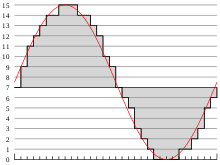
The quantized sampled signal is converted into a series of decimal digital code streams arranged according to the sampling sequence, ie, a decimal digital signal. A simple and efficient data system is a binary code system. Therefore, the decimal digital code must be converted to a binary code. Based on the total number of decimal digital codes, the number of binary code bits required can be determined, that is, the word length (sampling bits) The process of transforming the quantized sample signal into a binary code stream of a given word length is called encoding.

Example
Next, the above 1.65 V corresponds to a quantization level of 128. The corresponding binary system is 10000000. That is, the encoded result of the sample point is 10000000. Of course, this is an encoding method without considering values positive and negative, and there are many types of coding methods that require specific analysis of specific problems. (PCM audio format encoding is A-law 13 polyline encoding)

PCM audio encoding
PCM signals are not subject to any encoding or compression (lossless compression). Compared to analog signals, it is less susceptible to transmission system clutter and distortion. The dynamic range is wide and the sound quality is quite good. The coding adopts the A-law 13 polyline coding.

A-grade 13-fold line
The A-law is a form of logarithmic compansion in PCM non-uniform quantization. Digital pulse code modulation (PCM) is the basic method for digitizing analog signals today. PCM includes three steps: sampling, quantization, and encoding. Among them, the quantization is the discrete value of the sampling values. Uniform quantization and non-uniform quantization can effectively improve the quantization signal-to-noise ratio of the signal. Quantization of speech signals often takes two logarithmic forms of non-uniform quantization and ITU-recommended compression characteristics: A-law and Mu-law. A-law coding is primarily used in 30/32-channel group systems, and A- The PCM law is used in Europe and China.

See the article for more details

channel
Channels can be divided into PCM mono and stereo (two channels)
.Each sample value is contained in an integer i whose length is the minimum number of bytes needed to accommodate the specified sample length.
The low significant byte is stored first, and the bit representing the sample amplitude is placed in the high significant bit of i, and the remaining positions are 0, so the data format of the PCM waveform samples 8 and 16 bit is as follows.

What music file format is recommended? Part 2

What music file format is recommended? Part 2

AUDIO FORMATS

Opus is a new audio compression format developed by the IETF and standardized by RFC6716 in 2012. There is very little hardware and software supported, but at low bit rates of 128 kbps or less, it appears to be the strongest sound quality with compression with lost.

audio formats

Vorbis is a free audio file format developed by Xiph.org. It seems to be used on Youtube too. Since the standard bit rate is 112 kbps, the sound quality at a low bit rate appears to be good.

WMA is a standard Windows audio compression method developed by Microsoft. If the bit rate is 160 kbps or less, it exceeds the MP3 upper limit frequency. However, the size will be a little larger.

AAL (ATRAC Advanced Lossless) is a lossless compressed version of ATRAC mentioned above. According to Sony, it can be compressed to about half the size of the data without losing any music information on the CD, but it actually seems to vary considerably depending on the sound source.

As the name implies, Apple Lossless (ALAC) is Apple’s lossless compression audio codec. Used in iTunes, etc.

FLAC is an audio file format developed and distributed as free open source software. It seems to be the most popular in lossless compression.

Monkey’s Audio is an audio format that compresses PCM losslessly without degrading sound quality. It is so named because it is used in music playing software called Monkey’s Audio. The characteristic is that it does not fit the name and the compression rate is high.

TAK is a high-speed, high-compression, lossless compression audio encoder. It has the same level of compression as Monkey’s Audio, but it’s pretty crazy.

TTA is a free real-time lossless compression audio encoder / decoder. Like TAK, it’s too manic so I wouldn’t use it.

WMA Lossless is a lossless compressed version of WMA mentioned above.

Equalizer Image
AIFF is an uncompressed audio file format developed by Apple. It seems to be the Windows WAV. It seems to have been used on Macintosh (Mac) for a long time.

WAV (WAVE) is a format for describing audio data developed by Microsoft and IBM. This is what happens when you convert a CD (Linear PCM) into an uncompressed file in Windows.

Also, the sound quality of lossy compressed music file formats is almost the same at 192 kbps bit rates. If it is 160 kbps or less, I am wondering if other compression formats are slightly better than MP3. In this case, it is better to check the music player software. Sound quality is exactly the same for lossless and uncompressed music file formats. Lossless compression will have issues with compression ratio and playback load.

I want to read it together
What is free high-quality music player software for Windows?
After all, what music file format is recommended?
Image of listening to music with a portable music player
I’ve mentioned it so far, but I recommend MP3 or WAV (AIFF). The reason is as follows.

Due to the large capacity of hard drives and flash memory, lossy compressed music file formats do not need to have a bit rate lower than 192 kbps.
The compression ratio of the lossless music file format is currently 60 to 70% maximum, so taking into account the encoding time and effort and loading during playback, the file format of Uncompressed music is sufficient for lossless compression.
I don’t think I can distinguish between 192kbps MP3 and WAV, so I can’t help but worry about the compression format.
MP3 and WAV have many compatible hardware and software.

What music file format is recommended?

What music file format is recommended?

audio format

There are many types of music file formats, so it is difficult to know which one is recommended.

AUDIO FORMAT

I have only used MP3 and WAV due to their confusion, so I don’t really know about the new music file formats that are increasing year after year. So, I took a quick look at the existing music file formats based on the information from the internet. Let’s make a list of types and extensions so that you can easily understand them later.

* The target is a music file format that can be converted from a CD (linear PCM).

â—‹
* The format can be replaced with the term codec and the extension can be replaced with the term file format. Simply put, a codec is a device or software that can encode (encode) and decode (decode) data in both directions using one encoding method. A file format is an information device like a computer. It is the storage format of the file used in.

* The bit rate for lossy compression is 192 kbps.

* The corresponding items indicate the amount of hardware and software that the music file format supports. ◎ Many, ○ Many, ▲ Normal, △ Less, × Very few.

Currently, lossless compression is emerging as a compression format in addition to lossy compression. Irreversible compression (lossy compression) is a data compression method in which the data before compression and the data after compression do not completely match, and reversible compression (lossless compression) is the data before and after compression. It is a data compression method that exactly matches the data.

In other words, lossy compression is a poor sound quality compression method because it adds a reduction in the amount of data, and lossless compression is a good sound quality compression method because it does not reduce the amount of data. . They are all the same in the sense that they aim for high sound quality with the smallest possible size.

Now, I’m sure there are music file formats that you already know, but let’s briefly explain each one.

Mixer Image
AAC is a music file format standardized in 1997 (approved in 1999). Standardized in order to obtain high sound quality and high compression that exceeds MP3. If the bit rate is 160 kbps or less, it exceeds the MP3 upper limit frequency.

ATRAC is a voice data compression technology developed by Sony since 1992. If the bit rate is less than 128 kbps, it is above the upper frequency limit of MP3.

HE-AAC is a music file format standardized in 2003. By incorporating SBR technology into the aforementioned AAC, the playback band has been expanded and the sound quality and compression efficiency at low bit rates (128 kbps or less) have been vastly improved.

* SBR (Spectral Band Replication) is a technology for audio compression and encoding, which aims to strengthen the conventional encoding method and increase the compression rate.

MP3 is the oldest music file format standardized in 1991 (approved in 1993). Since it is old, it has a high penetration rate and there is a large amount of supported hardware and software.

Audio formats.

Audio formats.

Audio Formats

There are many types of voice file formats, as well as image file formats.

Audio Files

Since the digital audio files are easy to copy, the illegal copy and distribution of music files has become a problem these days.

As explained in what analog data is, the mechanism of digital audio files is that analog signals become digital data and are saved.

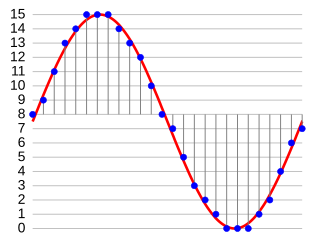
Explaining in detail the conversion method, to convert an analogue to digital waveform, it is necessary to perform a job called “sampling” that measures (record) the sound waveform at regular intervals, and is the sampling cycle. The sampling frequency is called (sampling frequency).

The sampling frequency represents the number of samples per second and is in Hz. In other words, it is a unit that expresses how many times the sound is measured and recorded per second, and the greater the value, the more faithful the original and greater sound becomes the quality of the sound. However, the amount of data will increase proportionally.

The sampling frequency of a typical music CD is 44.1 k Hz. However, even if the sampling frequency is increased, there are sounds and frequency bands that can not really be recorded, so some classical music enthusiasts love expensive analogue equipment.

In addition, it is not only the sampling frequency, which affects the quality of the sound, but also the “sampling bit” that indicates the strength (volume) of the sound (16 bits are 65,535, 24 bits are 16,777,215). (Express) and “Number of channels” (number of sound lines recorded as stereo, monaural and 5.1 channels) also have an effect. The higher the value, the greater the sound quality.

Another factor that greatly affects sound quality is the bit rate. The bit rate represents the amount of data to be recorded per second and the unit is “BPS”.

In other words, the higher the bit rate, the more information can be stored, which results in a higher sound quality. As will be described in detail below, in the MP3 file format, 128 K BPS is the minimum bit rate that can be heard.

However, there is “constant bit rate” and “variable bit rate” in the bit rate. The constant bit rate is the same bit rate that is fixed from the beginning to the end of the voice, and the variable bit rate increases or decreases the bit rate according to the amount of voice information.

In other words, the bit rate is high for clauses with multiple voices and the bit rate is low for simple low voice clauses. You can reduce the total size of the file by choosing a variable bit rate.

This is the information contained in the digitized data of analog audio signals.

However, digitized data can not be used as. Just converting this data into an arbitrary file format and saving them, it will be possible to use them with multimedia devices and application software that admit that format.

The storage format of said data

file format

Is named. A file format is a file format with an extension.

Then, to save the data in a file format, it is necessary to transform (encode: encoding) the data according to that format. (For coding, see What is a character code?)

A dedicated program is used to codify the data, but said coding program is

Codec (codec)
Is named. In other words, the gross data obtained by converting analog signals into digital data are processed by a codec to market them as a file format.

Therefore, there are many types of codecs and coding methods for each type of codec.

Most current codecs are programs that compress and encode data when creating a file and decompress (decompress) data by playing a file. In general terms, codecs are used to compress and decompress data. It refers to a compression method program of this type.

Audio formats: rating and benefits

Audio formats: rating and benefits

Audio Formats

As actual field studies have shown, a good idea to rank the top ten audio formats turned out to be an impossible task at first.

Audio formats

Competition conditions too different for unequal participants. In addition, some corruption schemes or lobbyists of transnational companies in the field of audio recording interfere in our good cause to help people choose the best sound product.

The world’s most popular MP3 format reached the leaders of popular love solely due to multi-million dollar promotional investments. And if you take the sound quality, then regular. And even in terms of compression and disk space savings, it’s not the highest compression either.

Therefore, a compromise decision was made: divide the test subjects into three groups and compare and identify the leaders by groups.

Three types of audio formats
No compression.
Lossless compression.
Lossy compression.
Uncompressed audio recording formats show their best performance only on high-quality professional audio equipment.

If you have an inexpensive tablet or smartphone in your hands, then wonderful music will sound on your device, but you will not hear it simply because the hardware and software resource and the speakers or headphones cannot reproduce such high sound quality.

On the other hand, if you start MP3 sound recording through professional stereos and amplifiers, you will hear such noise and rattle from the speakers that, again, this type of use is completely meaningless.

Audio classification by type of sound reproduction equipment
For professional equipment, uncompressed audio formats.
For semi-professional teams, compressed audio formats. But without loss.
For inexpensive equipment: lossy and compressed audio formats.
In the first case, the hardware is so expensive that it is ridiculous to worry about saving money on media.

In the second case, the owner of an Apple device for a thousand dollars will obviously be able to call himself and spend a couple of hundred dollars on a bulky memory.

In the third case, since it has hardly been possible to raise money for a cheap smartphone, saving on the size of the stored music is very important. Well, no one is going to listen to a symphony orchestra in Hi-Fi on the phone anyway. Unless you can download a ringtone from the classics for fun to make it look like a fresh bell pepper to the eyes of tomatoes.

With this concludes the overture, we begin to present the subject.

Audio formats for high quality sound
This includes uncompressed formats.

PCM – Pulse Code Modulation. The original analog audio is sampled as is, without any modification.
PCM is the most common audio recording format used on CDs and DVDs. Dolby multi-channel, surround, subject to high-quality speakers, sounding almost one-on-one with a live performance.

If you like to sit in front of a home theater and immerse yourself in empathy for the main and supporting characters in the movie, this is it.

Wav
A fairly old format, developed as early as 1991. Well, the old masters always thought of high quality.

Many people consider WAV to be an uncompressed format. But it is actually a container and it can also contain compressed files.

In most cases, WAV contains uncompressed PCM audio. Therefore, the quality is high. But even for one minute of recording, approximately 32MB of memory is wasted.

Good enough compatibility with Windows and Mac.

AIFF
WAV analog from Apple developers. This is also a container and also usually contains sound in PCM format. Good compatibility with Windows.

Lossy compressed audio formats
Truly popular formats for everyone.

MP3
In accordance with the MPEG-1 Audio Layer 3 standard, it appeared in 1993 and instantly won universal love precisely because of its economy in memory consumption.

A CD can store the complete discography of your favorite band.
Throw some records in the glove compartment and you can enjoy music from Kaliningrad to Vladivostok.
During this time, you can listen to all the books by all the writers worth listening to.
The MP3 format is such a solid eunuch, from which they cut the most reluctant, but began to show the ability to store and save. So MP3 is a very inexpensive format.

The main advantage is that he leans on everything that he just plays and sings.

AAC
An advanced form of audio encoding. The younger but advanced brother of MP3. It has slightly improved sound characteristics and a higher compression ratio.

Applies to Android, iOS, iTunes, YouTube, Nintendo, and the latest versions of PlayStation.