Audio formats


Free Download Mp4Gain
picture

Before you know the audio formats, know that they are divided into two main groups: the compressed and the uncompressed.
audio formats

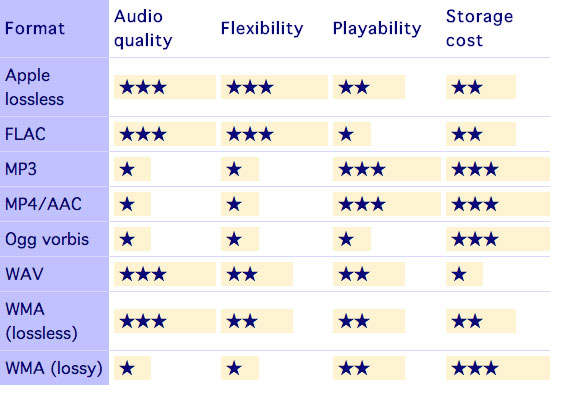
Uncompressed formats are those in which the audio quality is assessed and without loss of information, which guarantees that the audios are practically identical to the real ones. Tablets reduce the original file size, taking up less space on your computer or cell phone memory. However, the quality and information may be compromised.

audio format

It is worth mentioning that it is not just a good format that guarantees that the end result will be of excellent sound quality. You need to do your part, too, using good audio software to make the necessary changes and “cleanup,” as well as using quality equipment to record your voice.

1. Advanced Audio Coding (AAC)

It is considered the main competitor to the most famous format on the Internet, MP3, and is commonly used on Apple devices, based on the MPEG-4 standard.

Compared to MP3, AAC has more flexibility, which means you will experience less data loss and quality when compressed. Also, it has a better level at lower bit rates, such as 128 kbps.

2. OGG Vorbis

This is a non-proprietary format, that is, they have no restrictions for audio players to play it. Also, it has a better compression rate than MP3, however it is not as well known or advertised.

It is widely used in game audio, because among other qualities, it brings open source, which provides greater customization, but is difficult to standardize. Its audio quality is quite satisfactory.

3. MP3

Considered the most popular audio format in the world, MP3 offers high compatibility, allowing music and audio to be played in virtually any program or media player.

It was created in Germany and uses the so-called perceptual encoding, which encodes only the sounds that humans can hear. Of all, it manages to be the most balanced in terms of quality versus size.

It may get to lower bit rates, but there may be a final quality loss.

4. WMA

This is Microsoft’s standard format and also quite popular. Unlike MP3, WMA allows the creation of content-protected copies, thus preventing your music or other audio productions from being pirated.

Microsoft’s proposal is that the format achieve a sound property equivalent to that of MP3, but in a much smaller size. In practice, this does not happen, but at low bit rates the result is very similar.

It offers four codecs:

Standard WMA: acts as an MP3 repeater;
WMA Pro: guarantees higher definition audio;
WMA Lossless: allows file compression without loss of quality;
WMA Voice – Aimed at low bit rate voice recordings.

5. MP2

Although it already has a successor, MP2 is still widely used, being the standard format for transmitting radio and television audio. It is a file extension for MPEG -1 layer II playback (MP3 plays in MPEG -1/2 layer III).

One of the attributes of the MP2 is that it still has great compatibility, as well as fewer errors than its successor. In addition to having better performance in audios with higher bit rates.

6. Real Audio

RealNetworks proprietary format. They have multiple audio codecs and great performance for those with low bit rates. It was constantly used in dial-up modems, hi-fi formats for music and streaming, as is the case with web radio.

RealNetworks is an internet provider that works with streaming services. It was founded by a former Microsoft executive and also offers entertainment services through subscriptions.

7. Audio Coding 3 (AC3)

Created in 1983 by Dolby Laboratories, AC3 is primarily used in DVDs, Blu-ray players, home theaters, and HDTV playback. It can reproduce frequencies between 20 and 20,000 Hz, which is equivalent to the human audible sound.

Therefore, the AC3 can reproduce unique and detailed sounds, with very good quality. Its bit rate goes up to 640kpbs and its display speed goes up to 48kHz.

8. WAV

One of the best characteristics of this format is that it has a high sound fidelity rate, that is, it faithfully reproduces what was recorded without compression or loss of data.

It is widely used by those who work with audio editing, since it will be able to manipulate the real sound and without any interference. It is also considered for those who need more definition and sound fidelity as possible for their productions.


Free Download Mp4Gain
picture


Mp4Gain Main Window
picture


Mp4Gain Features
picture


Free Download Mp4Gain
picture

Mp3, the winner

In the era of broadband connections, fiber optics and HD videos on YouTube, MP3 remains the reference format for audio files. We are now so used to listening to music in compressed formats, and often through poor quality playback systems, that it is difficult for us to remember what listening to music really means. The recent evolution from download to hit-and-run streaming has only made the situation worse by further devaluing the value of music. When was the last time you listened to a record from start to finish without interruption, spending those 30-40 minutes on “simple” listening activity?

Audio formats

Premise: This post is not a crusade against Spotify because I use it myself for new releases or to have some background music at work, it is not even an analog vs. digital (or vinyl vs. CD vs. MP3) post because on this topic en Much has already been said. My goal is to make you understand what you are missing, in qualitative terms, if you listen to music in compressed formats.

Audio formats

Sampling and theoretical aspects.

Audio recording on a computer or digital medium assumes that the signal passes through an analog> digital (AD) converter, so that the continuous electrical signal generated by microphones or musical instruments is transformed into a digital signal (series of 0 and 1) This process is called sampling. The final quality of the recording depends on several factors: converter quality, sample rate, and bit depth.

To make an easily understandable comparison: When shooting a movie, the “analog” reality perceived by our eye is stored in a movie that takes 24 frames per second. If we consider the standard of the audio CD (44.1 kHz, 16 bits), for every second of music 44100 pictures are taken from the computer to the continuous electrical signal. If with the sampling frequency we have simply established how many times in a second the waveform will be analyzed, with the bit depth we assign to each sample a numerical value: 2 ^ 16 = 65,536 possible values.

If you wonder how it got to 44,100, I refer you to the Nyquist-Shannon sampling theorem.

When we press the record button on our computer, through the PCM (pulse code modulation) sampling process described above, the files are saved in uncompressed WAV or AIFF format.

Lossless files and lossy files

PCM files take up a lot of space on our hard drives because, as we have seen, there is the data necessary to describe the analog waveform in as much detail as possible. Indicatively, a WAV or AIFF file as audio CD will occupy 10 MB for every minute of music.

To overcome this problem, remember that in the early 2000s storage space cost around $ 10 / GB, while today the price is around $ 0.03 / GB (source): Audio formats have been introduced that , through an algorithm encodes and decodes information, reduces the size of the file. These codecs fall into two categories: formats with lossless compression and formats with lossy compression.

As the name implies, lossless compression indicates a reduction in file weight (usually around 50%) without loss of information. Leaving the world of audio aside for a second, ZIP and RAR files are clear examples of this type of compression: at any time we can “unzip” such a file and have access to the original information again without this no way has changed.

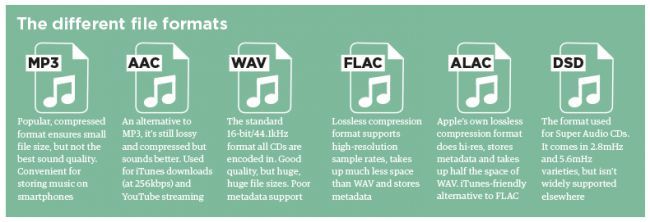
The most common file formats are: FLAC (Free Lossless Audio Codec) and ALAC (Apple Lossless Audio Codec).

Lossy compression, on the other hand, implies that some of the original audio information is somehow removed to obtain a file that weighs even 90% less than the PCM.

By what criteria is information removed without “compromising” the original audio too much? Since our hearing is an imperfect instrument, codecs exploit two principles of psychoacoustics: the minimum threshold of audibility (the human ear does not perceive all frequencies in the range between 20Hz and 20kHZ equally) and masking (a weaker sound). is masked, making it inaudible, by a louder sound.)

Compression algorithms, however advanced, introduce a number of artifacts into audio files that, if played back in discrete quality audio systems, can be easily recognized or at least noticed even by an inexperienced ear. Several studies have shown that an untrained ear does not distinguish the difference between an uncompressed file and an MP3 with a bit rate equal to 256kb / s or more.

The most common lossy formats are: MP3, OGG Vorbis, AAC.

The victory of MP3

Since its introduction in the mid-1990s, MP3 has established itself as the industry-standard consumer format fueled by file-sharing through peer-to-peer channels, where, with slow connections, the heaviest file was the one it was downloaded, the longer it took to obtain it, and since the market introduction of MP3 players in which we tried to store as much music as possible and, therefore, we resorted to very compressed files.

In the transition from the era of downloading to that of small transmission files, they ensure smoother and smoother data transmission.

Despite, therefore, the evolution that has taken place in recent years in the speed of Internet connections and the reduction in the price of storage systems, only in recent years have services been created to buy files from High-quality online audio (HD tracks) or HD streaming services (Tidal).

Examples and audio files.

The main services we use to buy or listen to music use these compression levels (all information is taken from the official websites of each service at the time this publication was written).

Spotify: OGG Vorbis files at 96 kb / s (normal mobile quality), 160 kb / s (normal desktop and web player quality, high mobile quality), 320 kb / s (premium users: high desktop quality, very high quality mobile).
iTunes: By default, CDs are imported into 128 kb / s AAC files. Files in the iTunes Store are of this quality, except for “iTunes Plus” songs converted to AAC at 256 kb / s.
Pandora: 64kb / s AAC (free users), 192kb / s AAC (premium users).
YouTube: HD videos (720 or 1080p) have an audio quality equal to 384kb / s, SD videos (360, 480p) have an audio quality equal to 128kb / s.

Most important audio formats

Most important audio formats

MP3

MPEG Audio Layer III
-Compressed digital format with loss.
-Its compression size: 11 to 1
-Compresses the audio using a lossy algorithm to obtain a smaller size, decoding the signal, allowing less bits to be consumed, which translates into less weight and less quality.
-Extension: .MP3
-Good compatibility. Can be played on almost all audio players
-Easily distributable online
-Better quality-space ratio
-Loss of the original sound, implies a decrease in quality throughout the format
-Supports two channels
-Distortion in frequency bands where the brightness and sparkle (5000hz-20000hz) are located.
-Increase in the bass and subwoofer frequencies (250hz – 40hz) due to the dynamic compression of the sound that causes a different equalization from the original recording.
-present patterns between tracks

AAC

Advanced Audio Coding
– Lossy compressed digital format
-It is an audio compression system developed by the Fraunhoffer Institute, AT&T, Sony and Dolby Laboratories.
– It is an audio broadband coding algorithm with higher performance than MP3.
-Extension: .m4a, .m4b, .m4p, .m4v, .m4r, .3gp, .mp4, .aac
-Play files from the hard disk of a computer with a quality that can be similar to the CD using significantly less space than an mp3.
-This system increases the quality of the mp3.
-Loss of original sound
-Subject to patent

WAV

Waveform audio format
-Uncompressed digital format.
– Windows own format
– Used to store sounds on PC, supports mono and stereo files at various resolutions and sampling rates
– Extension is .wav
-High sound quality
-Provides faithful listening to the audio
-It works in Windows applications and in common equipment with a CD player.

– Includes support for almost all current audio codecs
– Compatible to convert into various formats by means of the appropriate software.Example switching from Wav to Mp3
-It takes up a lot of disk space
-Poor quality-space ratio
-Difficult to distribute online due to the weight of the file
-Allows to capture in the same file up to 6 hours

FLAC

Free Lossless Audio Codec
– Lossless compressed format

-Extension: .flac
-Higher quality in high fidelity equipment
-Information is continuous between separate tracks
-It does not delete information from the original content
-It is an open source format.
-Code and decode quickly
-It takes up a lot of disk space
-It is not supported by all portable players

AIFF

Audio Interchange File Format
-Uncompressed format without loss.
– Format typical of native applications of Mac OS X for example iTunes
-Extension: .aiff or .aif.
-High sound quality
-Requires large storage space

OGG VORBIS

-Compressed format loss
– Stream-oriented container, which means that
can be written and read in one step, making it suitable
for streaming on the internet.
– Free software version to MP3 and AAC.
– Intended to allow maximum encoder flexibility
Extension: .ogg
-It is free, open and not patented
-Similar to MP3
-Good value for space
-Improved same-size MP3 quality.
-It is not supported by all players
-Loss of original sound

WMA

Windows Media Audio
– Lossy audio compression format, although there is a more recent lossless development
-Windows version to compress audio
-Extension: .wma
-Ideal for real-time streaming
-Reduce size of large files
– Inclusion of support in Windows Media Player
-Lower quality
-It takes space
Real Audio
-Media player with various functions and Internet connection tools
Example: listening to music and watching videos hosted on the Internet (streaming), and creating and playing extensive playlists.

– Ideal for live streaming over the network due to its streming ability
– the coding allows adapting it to the user’s reception capacity depending on their internet connection speed.
-Can be used in different operating systems (Windows, Linux, Mac OS)
– Ability to transfer files to other multimedia devices
-Reduction in file sizes

-Incompatibility with some browsers
-High RAM consumption

APE

– Lossless compressed format
-Extension: .ape
-Save space
-High quality
-Better file compression rate
-It is not compatible with most players.
-Slow to compress and decompress files

What audio formats are there? All you need to know


FLAC, WAV, AIFF, DSD … these are just some of the initials that you can find when you are looking for a digital format. They are also accompanied by technical data such as sample rates and bit depth. So many terms can leave you more misplaced than a chicken at a dance. And it is that unless you are an expert in digital sound, the process to choose the audio format that best suits your needs can be a mess. But if they explain it to you, the topic is relatively simple. That is why at Culturasonora we have prepared a complete guide for you on the different audio formats most used. This will prevent any acronym from taking you on the dark side.

What are Bit Depth and Sample Rate?

These two concepts are basic. To understand how audio formats work you need to know what Bit Depth and Sample Rate are. These are two measures that indicate the quality of a digital audio file. We are going to try to summarize it so that you keep the general idea

samplerate

When you read the specifications of the audio formats you come across a couple of figures. For example: 32-bit / 192kHz or 24-bit / 96kHz. These numbers indicate the bit depth and the sample rate. These references tell us how much information the different formats transmit and the quality of the sound. For example, the audio we hear on a regular CD, or on a Spotify stream, is 16bit / 44.1kHz. Samples are always measured in Hertz (or hertz) and bit depth in Bits.

Softwares or hardwares usually do not work with a continuous flow of information, but usually use pieces, samples or samples to effectively manage the data that is transmitted. The sample rate is the number of samples per second that are obtained from a recording. The higher the number of times a device plays samples, the higher the sound quality. Each of these extracts or samples has a certain amount of information, which is the bit depth, or bit depth.

So that you understand it better we are going to make a somewhat beastly analogy, which is not entirely true, but that will help you get the sense of all this. Which is what interests us. If you control a bit of photography and image you will get it right away: the sample rate would be something similar to the frames or frames per second of a video, and the bit rate would be similar to the pixels of a photograph. The higher the bit depth number, the more information each sample will have. The more pixels an image has, the higher resolution each frame of a video will have. The more frames per second a movie has, the better definition. In short: the higher the number of the Bit Depth and the Sample Rate, the higher the quality of the audio file. Heard cooking?

Audio formats: MP3 vs WAV vs AIFF

What is the MP3 format?

If you’re interested in getting some audio fidelity and decent sound from your files, you’ll want to avoid this format. Why? Because basically an MP3 is a file that sacrifices audio quality to minimize size. They weigh very little for any device to read. The negative? Compressing these files provides poor, almost lifeless sound. Today, hardly anyone uses this format seriously. Even its creators recently ended the license by declaring it dead. But surely from time to time you come across a zombie file with this format.

What is WAV format?

WAVs (Waveform Audio File Format) are just as common but better for anyone who wants a decent audio format. They are higher resolution files than MP3s. A WAV is an audio piece that is encoded with something known as Pulse Code Modulation (PCM), a medium that encodes analog audio pieces and converts them to digital so they can have the Sample rate and Bit Depth of the that we have already talked about previously.

What is the AIFF format?

The AIFF (Audio Interchange File Format) audio format is very similar to WAV in that it also uses PCM to encode analog audio pieces and present them in digital format. This format was born as a response from Apple to Microsoft’s WAV, and at the beginning it could only work on MAC computers. Currently AIFF and WAV are more or less interchangeable.
In summary…
To close this topic, we will tell you that if you have a file in WAV or AIFF audio formats, you will hear a piece of sound of good quality. Normally these formats are used in files that we reproduce through our services, such as the iTunes music library. We will not see them in online streaming services, which tend to use special types of files.