Digital audio encoding


Free Download Mp4Gain
picture

Digital audio encoding

Digital audio encoding

In fact, one or another digital form of representation of analog audio signals is already a coding method – a sequence of numbers that describes an analog audio signal is itself a digital code.

Digital Audio Encoding

However, the encoding that we are going to talk about now is something else. Now let’s look at the methods of encoding digital audio signals.

A digitized audio signal “in its pure form” is a fairly accurate, but not the most compact, way of recording the original analog signal.

Judge for yourself. To obtain complete information about the original analog signal in the frequency range 0-20 kHz (in the audible frequency range), the analog signal must be sampled at a frequency of at least 40 kHz. Therefore, the CD – DA standard (the standard for recording data on audio CDs familiar to all) establishes the following encoding parameters: recording of two or one channel in PCM format with a sampling frequency of 44.1 kHz and a 16-bit quantization bit depth. One hour of music in this format takes up approximately 600 MB of space (60 minutes * 60 seconds * 2 channels * 44100 samples per second * 2 bytes per sample = approximately 605 MB). Taking into account that, for example, the music collection of an ordinary music lover may have 5,000 tracks with an average length of about 3 minutes each, the amount of memory required to store it in its original digital form is quite significant. Awesome. Therefore, storing relatively large amounts of audio data, ensuring fairly good sound quality, requires the use of various “tricks” to compress the data.

In general, all existing methods for encoding audio information can be conditionally divided into only two types.

1. Lossless data compression (“Lossless Encoding”) is a method of encoding (compacting) digital audio information, which enables one hundred percent recovery of the original data from the compressed transmission (the term ” original data “here means the original form of the digitized audio data). This method of data compression is used in cases where one hundred percent absolute preservation of the quality of the original audio data is required. Lossless compression algorithms that exist today can reduce the volume of data occupied by 20-50% and at the same time guarantee a 100% recovery of the original digital material from the compressed data. The operating mechanisms of such encoders are similar to the operating mechanisms of general data archivers, such as ZIP or RAR, but at the same time they are specially adapted to compress audio data …. Lossless encoding While it is ideal in terms of preserving the quality of audio materials, it cannot provide a high level of compression.

2. There is another more modern way to compact data. This so-called lossy data compression (Engl. “Lossy encoding”) The purpose of encoding is to achieve the highest data compression rate by all means while keeping sound quality at an acceptable level. The idea behind lossy encoding is based on two simple underlying considerations:

original digital audio data is redundant: it contains a lot of unnecessary information that is useless to the ear, which can be removed, thereby increasing the compression ratio;
Requirements for the sound quality of audio material may vary and depend on specific purposes and areas of use.
Lossy encoding is therefore called “lossy”, which results in the loss of some of the audio information. Such encoding leads to the fact that the decoded signal, when reproduced, sounds similar to the original, but in reality it is no longer identical to it. Most lossy coding methods rely on the use of the psychoacoustic properties of the human auditory system, as well as various tricks associated with resampling and resampling the signal. In frequency, during the compression process, the encoder analyzes the audio data to identify various details of the sound that can be ignored. Disguised frequencies, inaudible and inaudible sound details can be sacrificed for a higher compression ratio. Where intelligibility is only important in sound (for example, in telephony, where the presence of frequencies above 4 kHz is not necessary), the audio information during the encoding process undergoes a serious “simplification”, which, together with the use of successful “smart” quantifiers and “greedy” data compression algorithms.


Free Download Mp4Gain
picture


Mp4Gain Main Window
picture


Mp4Gain Features
picture


Free Download Mp4Gain
picture

Digital audio formats or how sound is stored on a computer

Digital audio formats or how sound is stored on a computer

Digital Audio Formats

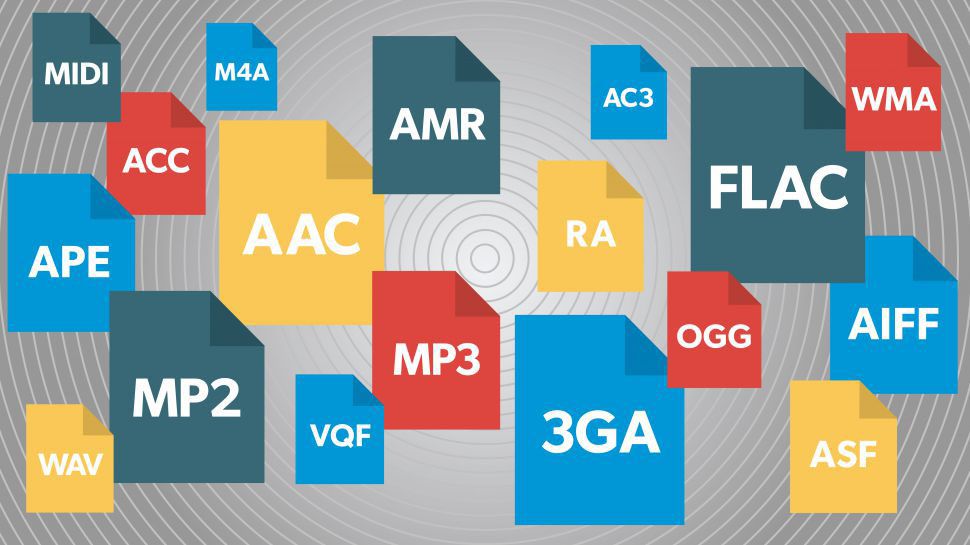
Today there are about three dozen common digital audio formats. Why you need to create so many types of sound files to store one type of content and how to manage all this, you will learn from this material.

Audio format developments | Digital audio | How to Create Digital Media  Infographics Using ConceptDraw PRO | Audio Infographic

Surely many users prefer to use their home computer not only as a workhorse, but also as a multimedia center, where they can watch movies or family photos, as well as listen to their favorite music. Although compact digital players or mobile phones are certainly more suitable for listening to musical compositions, but unlike them, a computer can not only play music.

No matter how big the built-in memory of your music player is, it will most likely be difficult to store your entire music library on it. Plus, you can create, edit, organize, and search for music with your PC. Also, don’t forget that there are around three dozen common digital audio formats today, and most players are far from omnivorous and can only play a few of them.

So why do you need to create so many music formats to store one type of content? The fact is that, in the vast majority of cases, the sound is stored in “compressed” form, since one minute of uncompressed composition occupies about 10 MB on the hard disk. On the one hand, this seems not to be much, but on the other, if you are a music lover and your collection consists of several hundred or even thousands of songs, then it is clear that the sound must be compressed to reduce the space it occupies in electronic media.

Various special algorithms are used to compress music files, which subsequently determine the structure and presentation of the audio data, or so-called digital audio file formats. All audio formats can be divided into three groups: uncompressed audio formats, lossless compression, and lossy compression.

No compression
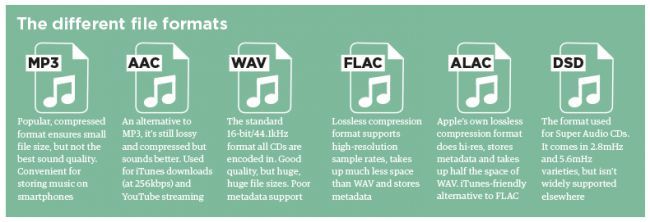
One of the most widespread formats related to this type is the well-known WAV. The sound of files with this extension is stored without compression or changes. It is true that much more space is required to store uncompressed files and therefore WAV is more widely used only in professional audio and video applications, where the sound should not have a loss of quality before processing. Keeping ordinary musical compositions in this form is unwarranted waste.

To play WAV files, you do not need any special software, as all media players understand this format, including the standard Windows Media audio player built into the Windows system.

Another format used to store uncompressed audio that is worth mentioning is Apple’s development called AIFF (Audio Interchange File Format). As you may have guessed, it is most commonly used on Macintosh computers running Mac OS X.

Lossless compression (lossless)
Lossless compression algorithms for audio files work on the principle of conventional file cabinets. They do not provide the highest level of compression (40 to 60%), while they have virtually no effect on sound quality. It is also worth noting that in this case, the encrypted data can be fully restored to its original form. Therefore, the use of lossless compression is most often used when it is important to keep the compressed data identical to the original.

The most popular audio formats in this group are FLAC (Free Lossless Audio Codec), APE (Monkey’s Audio), WMA (Windows Media Lossless), and ALAC (Apple Lossless Audio Codec). Each has its own pros and cons. For example, the APE codec offers slightly better compression gains, while FLAC is more common. In general, all true music lovers store their music collections in lossless formats, as they do not remove any data from the audio stream and the files created with these codecs can be listened to even on high-quality stereos.

To play lossless compressed formats, as a rule, third-party players (except WMA) are used, such as MPlayer, foobar, AIMP, Winamp, VLC and others, since all the necessary codecs are already built into them. Another option is to separately install an additional codec pack (for example, K-Lite), after which you can listen to files in lossless format from almost any audio player.

Lossy compression
This is the most popular group of algorithms that provides the maximum audio compression ratio (up to 10 times or more). However, unlike previous formats, the audio file loses quality here, and how much depends

Varieties of digital audio formats.

Varieties of digital audio formats.

Audio Formats

There are several concepts of audio format.

Audio Format

The audio data presentation format in digital form depends on the quantization method of a digital-to-analog converter (DAC). The sound equipment at the present time the most common two types of quantization:

Pulse – code modulation
sigma – delta – modulation
Often bit quantization and frequency sampling point for various audio devices that record and play back as digital audio presentation format (24-bit / 192 kHz, 16-bit / 48 kHz).

The file format determines the structure and presentation of the audio characteristics of the data when stored on a PC storage device. To eliminate redundancy of audio data using audio codecs, with the help of which compression of audio data is carried out. There are three groups of audio file formats:

uncompressed audio formats, such as WAV, AIFF
lossless compressed audio formats (APE, FLAC)
audio formats, with the use of lossy compression (mp3, ogg)
There are only modular music format files. By synthetically or sampled pre-recorded live instruments, they are, in the main, used for the creation of modern electronic music (MOD). Also here the format of MIDI can be attributed, which is not a sound recording, but in this with the help of a sequencer it allows to record and play music, using a specific set of commands in the form of text.

Sound digital media formats are used as that of mass-propagated sound recordings (the CD, the SACD), so and in a professional recording (the DAT, MiniDisc).

For surround sound systems and you can select sound formats, in a multi-channel accompaniment largely without sound for movies. Such systems have a set family of two large formats that compete the companies of the Digital Theater then Systems Inc. – DTS and Dolby Laboratories Inc. – Dolby Digital.

Also called format the number of channels in multi-channel sound systems (5. 1; 7. 1). Initially, this system was designed for the cinema, but later it was extended to home theater systems.

What formats are used to represent digital audio?

What formats are used to represent digital audio?

Audio Formats

The format is used in two different ways.

Digital Audio Formats

When using a specialized medium or recording method and special read / write devices, the concept of format includes both physical characteristics of a sound carrier: the dimensions of a cassette with a magnetic tape or disk, the tape itself, or a disc, recording method, signal parameters, encoding and error protection principles, etc. .P. When using a universal information medium of wide application, for example, a flexible computer or a hard disk, the format is understood only as a method of encoding a digital signal, the peculiarities of the arrangement of bits and words and the structure of service information; all the “low-level” part directly related to working with the media, in this case, remains under the control of the computer and its operating system.

Of the specialized digital audio formats and media, the following are the best known today:

CD (Compact Disc) is a 120mm or 90mm single sided optical laser read / write disc, containing a maximum of 74 minutes of stereo sound at 44.1 kHz sampling rate and 16 linear quantization bits. The system is offered by Sony and Philips and is called CD-DA (Compact Disc – Digital Audio). For error protection, Cross Interleaved Reed-Solomon code (CIRC) and Hamming code 8-14 modulation (Eight to Fourteen Modulation, EFM) are used. A distinction is made between stamped compact discs (CD) write-only (CD-R) and rewritable (CD-RW).
PCM decoder (PCM deck): a system for converting the digital audio signal into a pseudo-video signal compatible with popular video formats (NTSC, PAL / SECAM) and vice versa. PCM decoders are used in combination with home (VHS) or studio (S-VHS, Beta, U-Matic) VCRs, using them as read / write devices. The devices operate with 16-bit linear quantization at sample rates of 44.056 kHz (NTSC) and 44.1 kHz (PAL / SECAM) and can record a two- or four-channel digital signal. In fact, such a decoder is a modem (modulator-demodulator) for a video signal.
S-DAT (Fixed Head Digital Audio Tape – Fixed Head Digital Audio Tape) is a system similar to a conventional cassette recorder, in which recording and reading is performed by a block of thin film fixed heads in a 3.81 mm wide tape in a double-sided cassette with dimensions of 86 x 55.5 x 9.5 mm. It implements two- or four-channel 16-bit recording at 32, 44.1, and 48 kHz.
R-DAT (Rotating Head Digital Audio Tape) is a VCR-like system with cross-tilted rotating head recording. The most popular tape-based digital recording format, R-DAT systems are often referred to simply as DAT. The R-DAT uses a 73 x 54 x 10.5mm cassette, with a 3.81mm wide tape, and the cassette and tape system itself is very similar to a typical VCR. The basic belt speed is 8.15mm / s, the rotation speed of the main unit is 2000rpm. R-DAT operates with a two-channel signal (on some models, four channels) at sample rates of 44.1 and 48 kHz with 16-bit linear quantization and 32 kHz with 12-bit non-linear quantization. To guard against errors, a double Reed-Solomon code and modulation with an 8-10 code are used. Cassette capacity – 80. .240 minutes depending on speed and belt length. Domestic DAT recorders are usually equipped with a phonogram illegal copy protection system, which does not allow recording from the analog input at a frequency of 44.1 kHz, as well as direct digital copying in the presence of SCMS prohibition codes (Serial Code Managenent System). Studio tape recorders have no such restrictions.
DASH (Digital Audio Stationary Head) is a 6.3 and 12.7 mm wide magnetic tape recording system with fixed heads. Belt speed is 19.05, 38.1, 76.2 cm / sec. Implements 16-bit recording with sample rates of 44.056, 44.1 and 48 kHz from 2 to 48 channels.
ADAT (Alesis DAT) is a proprietary system for recording eight-channel audio on S-VHS videotape, developed by Alesis. It uses linear quantization of 16 bits at 48 kHz, the capacity of the cassette is up to 60 minutes per channel. ADAT tape recorders can be cascaded so that a 128-channel synchronous recording system can be assembled.

Digital audio file formats wav, mp3, aiff, ogg, flac, m4a

Digital audio file formats wav, mp3, aiff, ogg, flac, m4a

digital audio formats

The last five years gave a great boost to the development of portable and stationary audio systems, and with this support for a variety of digital audio formats.

DIGITAL AUDIO FORMATS

Small pocket devices have a large internal memory and fixed audio equipment has become even smarter and more demanding. That is why, now, we can not save space on the player and download songs that weigh between 15 and 30 MB each, but at home, listen to digital music in a quality equal to the sound of an analog vinyl.

Description of popular digital audio formats
However, the most widespread audio formats still have their pros and cons, and even in an urgent matter like digital audio, a “panacea” has not yet been found. Classic digital audio formats are divided into “compressed” and “uncompressed” streams, as well as “lossless” formats, which exclude loss of sound.

Description of digital audio formats Description of digital audio formats

Wav audio format
The waveform audio file format (WAVE, WAV – “in waveform”) is a file format for storing a recording of an uncompressed digitized audio sequence. In general, this is the most common format for working in the studio and in broadcasting. allows you to get the most honest sound quality. For example, the standard audio CD format is an LPCM audio stream, with parameters: 2ch (stereo), 44-100Hz, 16bit.

Mp3 audio format
MPEG-1/2 Audio Layer 3: (MP3) is the most popular digital format for storing compressed audio. The MP3 format uses a special algorithm designed to greatly reduce the size of the original file. This format allows you to keep the audio close to the original sound, but thanks to a variety of settings, extremely small size.
Compared to the standard audio CD format, a file in MP3 format and a bit rate of 128 kbps will be approximately 1/11 the size of the original file.

FLAC audio format
FLAC (Free Lossless Audio Codec) is a popular free codec designed for lossless compression of audio data. What does that mean? Unlike lossy audio codecs such as MP3 or OGG, the FLAC audio codec does not remove any information from the audio stream. This format is ideal for audiophiles who create their own music collections and listen to music on high-quality equipment.

Ogg audio format
OGG is a format that has not gained great popularity, but is nonetheless used by a fairly large audience. The OGG format, similar to MP3, compresses audio with loss of quality, but is fundamentally different in practical conversions. This made it possible to get better quality with a smaller file size and to display this codec as absolutely independent. In addition to similar formats that convert lossy audio, OGG has the ability to adjust container properties.

Aiff audio format
The Audio Interchange File Format (AIFF) is a fairly universal audio file format developed by Apple, which is used to store audio data. Like its counterpart, the WAV format, it is uncompressed audio and is widely used in professional recordings and music production.
The .aiff and .aif files created by Apple Loops are used by GarageBand and Logic Audio music editors.

M4a audio format
Apple Losseles (also known as Apple Lossless Encoder, ALE or Apple Lossless Audio Codec, ALAC) (m4a) is another Apple development. This audio format refers to uncompressed audio, which provides lossless playback. It is a fairly specific format, which is mainly supported by products of the creator company, and in some cases, as in the iPhone system sounds, where it is possible to use exclusively the m4a format.

ABOUT DIGITAL AUDIO FORMATS

ABOUT DIGITAL AUDIO FORMATS

Digital Audio Formats

Today, there are several digital audio formats that are superior in quality to compact discs and are available on both physical media and the Internet. What are advanced sound lovers listening to now? Let’s find out.

Digital Audio Formats

The capabilities and quality of the CD-DA format were initially limited by the capabilities of CD as a medium. Legend has it that the standard 74-minute compact disc capacity was chosen in order to be able to record long classical pieces without splitting into two discs. And to be absolutely precise, this figure appeared thanks to Beethoven’s Ninth Symphony: it lasts exactly 74 minutes. Another default parameter was the 44.1 kHz sample rate. This figure defines the upper limit of the reproduced frequency range. For a CD that had to reproduce frequencies up to 20 kHz, this was the lowest possible carrier frequency. As a result, the only field of maneuver was the bit depth, the level of which was 16 bits. With regard to sound recording, bit depth determines its dynamic range and resolution.

The CD cannot be copied into the memory of the computer in the usual way, since we usually copy files. To save a CD-DA, you need a special program, a program that allows you to convert data recorded on an audio disc to PCM format (WAV file). A properly organized CD-DA ripping process allows you to get a completely identical digital copy on your hard drive. Audio CDs are generally saved on a computer as a large FLAC audio file (also WAV, WV, or APE) with a CUE index card or as separate tracks.

As the best digital audio format, the CD did not last that long, just over ten years. In the mid-nineties, the first format appeared that allows for better sound quality. HDCD was an improved version of CD-DA. Their difference consisted in a special recording algorithm that made it possible to save additional data on the sampling depth in a standard CD format. With an HDCD decoder, the output signal received not 16, but 20 bits, which did not give the standard of 96, but up to 120 dB of dynamic range and a very noticeable increase in recording resolution. At the same time, devices without an HDCD decoder played discs like normal CD-DAs. Interestingly, when saving such a disk on a PC in the same way,

The next leap in terms of sound quality came at the beginning of the new millennium. Two HD audio formats were introduced to the audiophile audience at once, appearing almost simultaneously. DVD-Audio, a further development of the traditional recording method and promoted by Panasonic and Toshiba. It is capable of recording 24-bit / 192 kHz in stereo mode and 24-bit / 96 kHz in multi-channel mode.

The SACD format competed with it, which, by the way, looked much less like a normal CD, although it was called “super CD”. Super Audio CD, developed by Sony, was based on the revolutionary DSD encoding algorithm. This digitizing method assumed one-bit sampling at an ultra-high frequency of 2.8224 MHz. The encoding and decoding principles of a DSD stream are much simpler than in high-bit formats and are essentially closer to the principles of analog technology. At the same time, the SACD format retains all the advantages of the advanced digital format and has output characteristics comparable to DVD-Audio in both sound quality and number of channels.

Both DVD-Audio and SACD were designed with a high level of copy protection, but inquisitive minds have already won over both formats, so if desired, the content of both disc types can be saved to a PC as images. ISO (without changing the structure and original codec) or FLAC tracks in 24-bit / 96 kHz or 24-bit / 192 kHz. Almost simultaneously with the DVD-Audio and SACD formats, another original format for publishing high-quality music was born: DAD 24/96. DAD stands for Digital Audio Disk, but it is essentially a DVD-Video with a high-quality still image and sound that can be played on any standard DVD player or PC.

Obviously, with this approach, Blu-ray media, with its HD sound formats, recorded in high quality without compression, is quite applicable for recording music in high quality. However, at the moment there are few such publications, and a special version of the BD-Audio format has every chance of not seeing the light of day, as the sale of high-quality audio material is already very active on the Internet. Anyone who does not want to convert DVD-Audio, DAD and SACD discs to the FLAC format on their own can officially buy albums already converted in 24-bit / 96 kHz or 24-bit / 192 kHz quality.

Comparison of audio formats

What is the best audio format for what purpose?

Comparison of audio formats

All radio and podcast producers are faced with the question: What audio format is best for my shows and contributions? There is usually no simple answer. Each file format and each codec has advantages and disadvantages.

Audio Formats Comparison

Before converting / converting, you need to be clear about what you plan to do with your audio file: Should it be published to the NRWision media library? Is the program designed to broadcast on the Internet or for the home audio system? Should the file be edited again if necessary? Only then can you weigh which audio format and which properties make the most sense.

Audio File Formats comparision

Compress without loss?

You must decide whether you want the best possible sound quality or the smallest possible file size. With some audio codecs, sound is retained at its full bandwidth and without loss. Other codecs compress the file so that it takes up less space or is faster to transfer online. At best, it can still be played on many different devices and players. Depending on the strength of the compression, the sound of music or voice recording may also be audibly affected.

In the case of audio files, information such as sample rate and bit rate always play a role.

The sample rate indicates how often the level is saved per second. CDs, for example, have a sample rate of 44,100 Hz. 44,100 values ​​are stored for one second of music.

Bit transfer rate

Bit rate defines the amount of data that is processed per second. It can be constant or variable and therefore also influences the sound quality.
Important: When converting audio files to other formats, the quality cannot be improved, it only deteriorates or is preserved. With each compression, some of the audio data is lost, although it is not necessarily audible.

Next we present the audio formats and their properties.

MP3

File extension: .mp3

MP3 is probably the most popular and widely used audio format in the world. It became the standard for music files on the Internet more than 20 years ago and has been freely available since 2017. By the way, MP3 was developed by the Fraunhofer Institute in Germany, among others. Raw audio is highly compressed when converted to MP3 files to save storage space. Only what humans can hear should be preserved. You can set the degree of compression, the so-called bit rate. 192 kBit / s (kilobits per second) roughly corresponds to CD quality. At higher bit rates, MP3 files sound lossless to most people. Lower bit rates are used, for example, in Internet radios.

Advantage:
widely used, compatible with many playback devices, high compression

Disadvantage:
possibly loss of audible quality, especially at low bit rates

Wav

File extension: .wav

WAV files are not compressed and therefore take up a lot of storage space. But they can be used well for audio editing and can be easily edited in almost any software.

WAV files were developed for Windows computers in 1991. However, they can also be reproduced and used on other operating systems.

Advantage:
no need to encode / decode when editing

Disadvantage:
very large files

WMA

File extension: .wma

Originally, the WMA (Windows Media Audio) format was supposed to compete with MP3, but it could not be established equally. Audio data is also compressed here, if possible without audible loss.

Some versions of WMA files may contain a certificate key to prevent piracy.

Advantage:
good compression with high sound quality

Disadvantages:
not very widespread, only supported by a few players

AAC (advanced audio coding)

File extension: .aac

This audio format is considered the successor to the MP3 format. With the AAC format, developers have managed to further reduce memory size while maintaining the best possible sound quality.

The AAC process is being used with increasing frequency on music websites, Internet radio stations, and as a soundtrack format for video files.

Advantage:
very good compression, small files with high audio quality

Disadvantage:
not yet compatible with all programs and devices

Ogg

File extension: .ogg

In Ogg files, there is actually a container format. In addition to compressed audio, it can also contain video and text data. Also, Ogg files can be used well as an online stream. Even so, the format never prevailed against MP3 among home users.

Advantage:
small file size with good sound quality, no license

Disadvantage:
not compatible with many programs, must be converted for audio processing

FLAC (Free Lossless Audio Codec)

File extension: .flac

The name already gives it away: the FLAC codec is freely available and compresses audio files without loss of quality. The format is mainly used for music that can be faithfully reproduced thanks to FLAC. More and more players support FLAC files, sometimes just with the help of a plugin.

The FLAC codec makes audio files 30 to 60 percent smaller. This makes them much larger than MP3 files. To do this, you can decode it and thus restore the original data without loss.

Advantage:
no loss, no license

Disadvantage:
relatively large files, not natively supported by all players

Opus

File extension: .opus

The latest file format from our overview should become the Internet audio standard. Opus is developed openly and has several advantages. The audio codec significantly reduces the bit rate again. The quality of music and language is preserved as best as possible. Additionally, Opus files can be streamed and contain metadata.

Opus plays practically no role (yet) in audio processing. We are curious to see if and how the format will prevail for years to come.

Audio formats

Before you know the audio formats, know that they are divided into two main groups: the compressed and the uncompressed.

audio formats

Uncompressed formats are those in which the audio quality is assessed and without loss of information, which guarantees that the audios are practically identical to the real ones. Tablets reduce the original file size, taking up less space on your computer or cell phone memory. However, the quality and information may be compromised.

audio format

It is worth mentioning that it is not just a good format that guarantees that the end result will be of excellent sound quality. You need to do your part, too, using good audio software to make the necessary changes and “cleanup,” as well as using quality equipment to record your voice.

1. Advanced Audio Coding (AAC)

It is considered the main competitor to the most famous format on the Internet, MP3, and is commonly used on Apple devices, based on the MPEG-4 standard.

Compared to MP3, AAC has more flexibility, which means you will experience less data loss and quality when compressed. Also, it has a better level at lower bit rates, such as 128 kbps.

2. OGG Vorbis

This is a non-proprietary format, that is, they have no restrictions for audio players to play it. Also, it has a better compression rate than MP3, however it is not as well known or advertised.

It is widely used in game audio, because among other qualities, it brings open source, which provides greater customization, but is difficult to standardize. Its audio quality is quite satisfactory.

3. MP3

Considered the most popular audio format in the world, MP3 offers high compatibility, allowing music and audio to be played in virtually any program or media player.

It was created in Germany and uses the so-called perceptual encoding, which encodes only the sounds that humans can hear. Of all, it manages to be the most balanced in terms of quality versus size.

It may get to lower bit rates, but there may be a final quality loss.

4. WMA

This is Microsoft’s standard format and also quite popular. Unlike MP3, WMA allows the creation of content-protected copies, thus preventing your music or other audio productions from being pirated.

Microsoft’s proposal is that the format achieve a sound property equivalent to that of MP3, but in a much smaller size. In practice, this does not happen, but at low bit rates the result is very similar.

It offers four codecs:

Standard WMA: acts as an MP3 repeater;
WMA Pro: guarantees higher definition audio;
WMA Lossless: allows file compression without loss of quality;
WMA Voice – Aimed at low bit rate voice recordings.

5. MP2

Although it already has a successor, MP2 is still widely used, being the standard format for transmitting radio and television audio. It is a file extension for MPEG -1 layer II playback (MP3 plays in MPEG -1/2 layer III).

One of the attributes of the MP2 is that it still has great compatibility, as well as fewer errors than its successor. In addition to having better performance in audios with higher bit rates.

6. Real Audio

RealNetworks proprietary format. They have multiple audio codecs and great performance for those with low bit rates. It was constantly used in dial-up modems, hi-fi formats for music and streaming, as is the case with web radio.

RealNetworks is an internet provider that works with streaming services. It was founded by a former Microsoft executive and also offers entertainment services through subscriptions.

7. Audio Coding 3 (AC3)

Created in 1983 by Dolby Laboratories, AC3 is primarily used in DVDs, Blu-ray players, home theaters, and HDTV playback. It can reproduce frequencies between 20 and 20,000 Hz, which is equivalent to the human audible sound.

Therefore, the AC3 can reproduce unique and detailed sounds, with very good quality. Its bit rate goes up to 640kpbs and its display speed goes up to 48kHz.

8. WAV

One of the best characteristics of this format is that it has a high sound fidelity rate, that is, it faithfully reproduces what was recorded without compression or loss of data.

It is widely used by those who work with audio editing, since it will be able to manipulate the real sound and without any interference. It is also considered for those who need more definition and sound fidelity as possible for their productions.

Mp3, the winner

In the era of broadband connections, fiber optics and HD videos on YouTube, MP3 remains the reference format for audio files. We are now so used to listening to music in compressed formats, and often through poor quality playback systems, that it is difficult for us to remember what listening to music really means. The recent evolution from download to hit-and-run streaming has only made the situation worse by further devaluing the value of music. When was the last time you listened to a record from start to finish without interruption, spending those 30-40 minutes on “simple” listening activity?

Audio formats

Premise: This post is not a crusade against Spotify because I use it myself for new releases or to have some background music at work, it is not even an analog vs. digital (or vinyl vs. CD vs. MP3) post because on this topic en Much has already been said. My goal is to make you understand what you are missing, in qualitative terms, if you listen to music in compressed formats.

Audio formats

Sampling and theoretical aspects.

Audio recording on a computer or digital medium assumes that the signal passes through an analog> digital (AD) converter, so that the continuous electrical signal generated by microphones or musical instruments is transformed into a digital signal (series of 0 and 1) This process is called sampling. The final quality of the recording depends on several factors: converter quality, sample rate, and bit depth.

To make an easily understandable comparison: When shooting a movie, the “analog” reality perceived by our eye is stored in a movie that takes 24 frames per second. If we consider the standard of the audio CD (44.1 kHz, 16 bits), for every second of music 44100 pictures are taken from the computer to the continuous electrical signal. If with the sampling frequency we have simply established how many times in a second the waveform will be analyzed, with the bit depth we assign to each sample a numerical value: 2 ^ 16 = 65,536 possible values.

If you wonder how it got to 44,100, I refer you to the Nyquist-Shannon sampling theorem.

When we press the record button on our computer, through the PCM (pulse code modulation) sampling process described above, the files are saved in uncompressed WAV or AIFF format.

Lossless files and lossy files

PCM files take up a lot of space on our hard drives because, as we have seen, there is the data necessary to describe the analog waveform in as much detail as possible. Indicatively, a WAV or AIFF file as audio CD will occupy 10 MB for every minute of music.

To overcome this problem, remember that in the early 2000s storage space cost around $ 10 / GB, while today the price is around $ 0.03 / GB (source): Audio formats have been introduced that , through an algorithm encodes and decodes information, reduces the size of the file. These codecs fall into two categories: formats with lossless compression and formats with lossy compression.

As the name implies, lossless compression indicates a reduction in file weight (usually around 50%) without loss of information. Leaving the world of audio aside for a second, ZIP and RAR files are clear examples of this type of compression: at any time we can “unzip” such a file and have access to the original information again without this no way has changed.

The most common file formats are: FLAC (Free Lossless Audio Codec) and ALAC (Apple Lossless Audio Codec).

Lossy compression, on the other hand, implies that some of the original audio information is somehow removed to obtain a file that weighs even 90% less than the PCM.

By what criteria is information removed without “compromising” the original audio too much? Since our hearing is an imperfect instrument, codecs exploit two principles of psychoacoustics: the minimum threshold of audibility (the human ear does not perceive all frequencies in the range between 20Hz and 20kHZ equally) and masking (a weaker sound). is masked, making it inaudible, by a louder sound.)

Compression algorithms, however advanced, introduce a number of artifacts into audio files that, if played back in discrete quality audio systems, can be easily recognized or at least noticed even by an inexperienced ear. Several studies have shown that an untrained ear does not distinguish the difference between an uncompressed file and an MP3 with a bit rate equal to 256kb / s or more.

The most common lossy formats are: MP3, OGG Vorbis, AAC.

The victory of MP3

Since its introduction in the mid-1990s, MP3 has established itself as the industry-standard consumer format fueled by file-sharing through peer-to-peer channels, where, with slow connections, the heaviest file was the one it was downloaded, the longer it took to obtain it, and since the market introduction of MP3 players in which we tried to store as much music as possible and, therefore, we resorted to very compressed files.

In the transition from the era of downloading to that of small transmission files, they ensure smoother and smoother data transmission.

Despite, therefore, the evolution that has taken place in recent years in the speed of Internet connections and the reduction in the price of storage systems, only in recent years have services been created to buy files from High-quality online audio (HD tracks) or HD streaming services (Tidal).

Examples and audio files.

The main services we use to buy or listen to music use these compression levels (all information is taken from the official websites of each service at the time this publication was written).

Spotify: OGG Vorbis files at 96 kb / s (normal mobile quality), 160 kb / s (normal desktop and web player quality, high mobile quality), 320 kb / s (premium users: high desktop quality, very high quality mobile).
iTunes: By default, CDs are imported into 128 kb / s AAC files. Files in the iTunes Store are of this quality, except for “iTunes Plus” songs converted to AAC at 256 kb / s.
Pandora: 64kb / s AAC (free users), 192kb / s AAC (premium users).
YouTube: HD videos (720 or 1080p) have an audio quality equal to 384kb / s, SD videos (360, 480p) have an audio quality equal to 128kb / s.

Choose the sound format well into 2020

Although many dematerialized music rhymes with MP3, it is recommended to take a tour of the owner in existing dematerialized formats to choose the audio format well when digitizing their CD / Vinyl.

What is an audio format?

An audio format is to simplify a kind of container where dematerialized music is stored: it is important to choose it carefully when ripping a CD, because its properties will directly affect the quality of the file created.

audio formats

Therefore, selecting audio format is a crucial step and it is advisable to guarantee three things with priority: the quality, functionality, and the fact that they are standard and legible on a maximum of devices, whether on a PC or MAC computer, but also on your smartphone / car radio …

It is also important to understand that in general, and although there are exceptions, the choice of audio format consists of placing the cursor in the middle between the quality on the one hand and the space occupied by the media on the other. storage.

audio format

Choose audio format: which challengers?

select aac-ogg-wma mp3 audio format
The 4 semi-amazing audio formats with destructive compression.

MP3:
Give glory where honor is due. MP3 is just as popular as it is underrated: it will have done a lot for dematerialized music by itself and has enabled millions of people around the world to discover a new way to listen to their music.

MP3 is a format of strong and destructive compression, in other words, a large part of the musical signal will be suppressed (priority, frequencies inaudible to the human ear … but not only!), And therefore offers a quality that only becomes good for from 256/320 kbps.

Is this a good opportunity today? Not being the best from a quality standpoint, choosing mp3 audio format today allows you to be sure that you can listen to it on all devices released for 10 years. MP3 is dematerialized music, what jeans should wear: versatility and the highest “acceptance rate” in the world.

Note that it is also advisable to choose mp3 audio format if you have limited storage space on a smartphone, for example because it is (in the company of AAC / WMA / OGG) the type of format that requires least space.

AAC:
This format is similar to “Apple MP3”. It has the same qualities and shortcomings as the previous one with some details: slightly better at the same speed, on the other hand it is far less standard: except for the fact that manufacturers have made explicit agreements (and pay because they require a license) , we find in Practice much fewer AAC compliant devices.

So it should be avoided unless you only have Apple products around you (even the car radio? I doubt it) and even in this case they are all perfectly mp3 compatible.

WMA
If AAC is Apple’s MP3, WMA Microsoft is MP3. Even less widespread because it doesn’t benefit from iTunes / Music Store / iPOD steamroller (who still remembers Zune’s iPod killer? Miscrosoft)

Again, forget the same qualities and shortcomings as MP3, but even less standard, therefore urgent. I even advise you to convert your existing WMA files to MP3 at a similar or slightly higher bit rate to ensure durability. Therefore, choosing WMA audio format today is not a good idea.

OGG:
We also find it under the name “vorbis”, we also have an mp3 clone here, except it is compatible with the free world (understand free) a bit in the same format as Linux.

Ogg is a completely free format unlike the previous ones, but despite this it is very confidential and is generally used only by those who take a pro-free dogmatic stance. While this position is quite respectable, selecting OGG audio format in 2014/2015 does not seem like a good idea because it is not widely distributed and above all it is like MP3, a destructive format.

WAV:
WAV is the first format on the list that does not deteriorate the quality extracted from the CD, and therefore offers an identical bit rate of 1411 kbps and therefore provides optimal quality.

However, the format shows its age and is limited in several ways: no space optimization (one second of silence = one second of noise) and no metadata or album cover management.

Therefore, choosing Wav audio format is similar to generating very heavy files and simply impossible to organize properly in a music database.