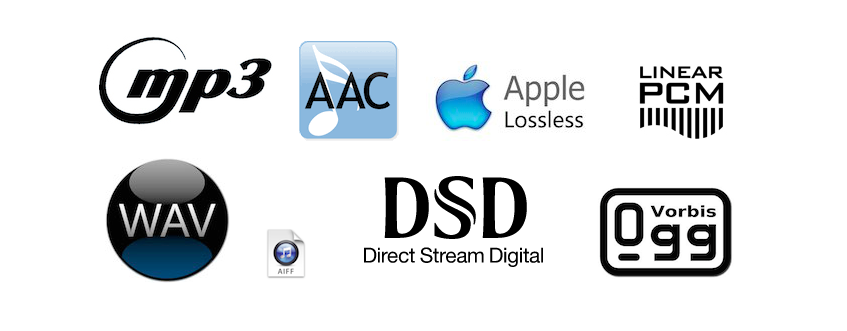
Advantages and disadvantages of the main digital audio formats


Free Download Mp4Gain
picture

Advantages and disadvantages of the main digital audio formats

CDA:

Advantage
· It is the most standard digital format of all.
· Contains Digitized Stereo Music
· Play all audio spectrum
WAV (AIFF):

Advantage:
· It can contain other resolutions or even be monophonic.
· It can be considered a lot to record voices.

Disadvantages:
· It is considered insufficient for music.
· The most common are 16-bit and 44.1kHz.
· 8 bit 22kHz monophonic WAVs were only capable of reproducing this resolution.
MP3:

Advantage:
· It is adaptable for most devices.
· It is very accessible.

Disadvantages:
· You can force to pay for the use of codecs.
· Contains too many losses, making them clearly insufficient for the quality of MP3 players.
· Adds obvious losses in the stereo image, permanently missing the highest frequencies.
· It is one of the worst in audio quality.
· The higher the resolution, the more the MP3 will occupy.
· It also affects the definition and timbre of the instruments.
· It also removes certain sounds that move at the same frequencies as another louder sound.
· Add excessive modifications to the original music.

WMA:

Advantage:
· Improve MP3 quality.
· There does not seem to be an advantage to using a proprietary format having free alternatives.
· All Windows and many MP3 players support it natively.

Disadvantages:
· Over the years it may become obsolete or discontinued by Microsoft.
· Add artifacts and losses similar to MP3, although lighter.

OGG (Vorbis):

Advantage:
· It would be the equivalent of MP3 and WMA but free and free.
· The code of the codecs is open.
· It is available to the community, which can continue to improve it.
· It has excellent compression rates.
· Quality superior to that of WMA and much superior to MP3.
· Sounds better than a 192 Kbps MP3
· Adds a certain artificial brightness at high frequencies, the losses produced by psychoacoustic theory being much lower.

ATRAC3:

Advantage:
· ATRAC3 plus in an improved ATRAC format.
· Cuts at certain frequencies are auditively seen in secondary and treble instruments.

M4A / MP4 / ACC:

Advantage:
· Contains ACC audio.
· They are capable of playing video.
· The quality of the AAC is much higher than that of the MP3.
· Adds some distortion in the mid frequencies and digital artifacts in secondary instruments.

MPC (musepack):

Advantage:
· It is free and free.
· Excellent sound quality.
· It offers the best quality of all and the losses are practically negligible.

Disadvantages:
· It is one of the most modern and sophisticated formats with loss.
· The resulting files are larger.
· Codecs are not intended for low bitrates.

RA (Real Audio):

Advantage:
· Compress to limits to be able to transmit audio streaming through slow 56 Kbps modems

Disadvantages:
· Requires installation of Real Audio player.
· Slow, heavy and full of advertising.

APE (Monkey Audio):

Advantage:
· It is a lossless format.
· We compress but when unzipping we get the same files intact.
· Contains the full disk wave.

Disadvantages:
· It is a proprietary format.
· It has a discreet support on the platforms.
· Slow decompression.

FLAC:

Advantage:
· It is a free lossless audio format.
· The quality is equal to that of the APE.
· We use less processor.
· It is multichannel (accepts all streaming).
· Avoid annoying shorts.
· It is very compatible.


Free Download Mp4Gain
picture


Mp4Gain Main Window
picture


Mp4Gain Features
picture


Free Download Mp4Gain
picture

What are digital audio formats

What are digital audio formats

Digital audio formats are basically containers. And the differences between them are fundamentally in:

Whether or not they are compressed.

If they are compressed, in the quality of compression.

The type of labeling they can support.
Digital audio formats

MP3

It is the best known, popular and most widely used. They are known by their “.mp3” extension.

It was developed by Moving Picture Experts Group, so that it was part of the well-known MPEG-1 and MPEG-2 standards.

Its fundamental characteristic resides in the fact that the technology behind it performs a compression of the sound sequence, resulting in a really small file, which normally occupies half of the original file. To achieve this, the loss of certain sounds is necessary, which supposedly cannot be heard by the human ear.

Audio formats

WAV

Developed by the Microsoft and IBM companies, this format, whose name comes from the acronym WAVE (Waveform Aujdio File Format), is currently one of the audio formats that do not have compression in the data, therefore they present an excellent quality.

They are known by their “.wav” extension.

On the other hand, this format has the peculiarity that it includes support for almost all current audio codecs. This makes WAV one of the most widely used formats in the field of professional sound, since the sound is captured with parameters of 44100 Hz and at 16 bits, the same quality can be obtained as on a CD.

On the contrary, one of the disadvantages of this format is that it has a limitation in recording, since it can only capture a maximum of 6.6 hours in the same file at maximum quality.

Audio formats

AIFF

The AIFF (Audio Interchange File Format) format is very similar to WAV. It was born as an answer from Apple to Microsoft’s WAV, being initially only compatible with MAC computers. Currently it can also be used in Windows.

Due to its characteristics, AIFF, together with FLAC and WAV, are usually the most widely used formats in the professional field of audio.

WMA

The WMA (Windows Media Audio) format is a music file format created by Microsoft.

One of its main characteristics is that those files that have been compressed in WMA format take up less space than MP3 files, which also implies a reduction in their quality. Therefore, it is a lossy audio compression format.

OGG

OGG audio formats are compressed audio files, which means that they have a size that allows them to be transmitted via WIFI, but at the same time they avoid the damages that are usually generated in the compression process.

For example, Spotify uses these OGG formats.

Audio formats

FLAC

When we talk about the FLAC (Free Lossless Audio Codec) format, we are referring to a codec free of audio compression and without loss of quality.

Emerged within the community responsible for the OGG project, FLAC has become one of the WAV format’s strongest competitors, due to its advantages in terms of sound quality.

Its objective is to reduce the size of the original file, eliminating data that is usually known as “waste”, without causing loss of quality.

This is the format used by the Tidal platform, the best high quality audio streaming service.

What is the difference between the different audio formats, and which should I choose?

What is the difference between the different audio formats, and which should I choose?

Lossless formats: WAV, AIFF, FLAC, Apple Lossless and others

In summary, there are two types of sound quality: lossless and lossy. Lossless music preserves the sound quality of the original source – in most cases, CD – intact, on the other hand, lossy music compresses the file to save space (in exchange for decreasing quality). Lossless formats include the following formats:

WAV and AIFF: Both are uncompressed formats, making them exact copies of the original sound source. The two formats are essentially the same quality; they simply store the data differently. AIFF was created by Apple – you will see it often in its products – but WAV is much more universal. However, since they are not compressed, they take up too much unnecessary space. Unless you are editing sound, we do not need to use this format.

FLAC: Free Lossless Audio Codec (FLAC). It is the most used lossless codec, it is a good option if we want to store our music without losing quality. Unlike WAV and AIFF, it uses compression, taking up less space. However, it is still a lossless format, which means that the sound quality is the same as the original source, so it is better for listening than WAV and AIFF. It is also free and free software, which is useful if you like to take a look at how it works.

-Lossless Apple (Apple Lossless): Also known as ALAC, it is similar to FLAC. It uses compression, although it is made by Apple. Its compression is not as efficient as that of FLAC, so the files will be slightly larger, but it is compatible with iTunes and iOS (FLAC not). Therefore, if you use iTunes or iOS as the main software for listening to music, you should choose this format.

APE: It is a very high lossless compression file, which means you will save more space. The quality is the same as FLAC, ALAC and other lossless files, but it is not compatible with most players. On the other hand, it makes the processor work more to decode because it is so compressed. Generally, I would not recommend using this format unless you are very concerned about space and have a compatible player.

Lossy formats: MP3, AAC, OGG and more

For day to day, we are more likely to use lossy formats. They save significantly more space, and if they have a high enough bitrate, it will be very difficult to distinguish the quality of the original source. The most commonly used formats are shown below:

MP3: MPEG Audio Layer III, or MP3 for short, is the most common lossy format. So much so that it has become synonymous with music downloads on the internet. It is not the most efficient f-format of all, but it is certainly the most compatible, making this the first choice of lossy sounds.

AAC: Advanced Audio Coding, also known as AAC, is similar to MP3, although slightly more efficient. Which means that the files take up less space and with the same sound quality as MP3. And, with Apple’s iTunes making it so popular, it’s as compatible as MP3.

Ogg Vorbis: The Vorbis format, often known as Ogg Vorbis due to the use of the Ogg container, is the free software version to MP3 and

AAC. Its main attraction is that it is not restricted by patents, but that does not affect you as a user – in fact, despite being open it is of similar quality, and much less popular than MP3 and AAC, so not all players support it. . I do not recommend it unless you are interested in being open source.

WMA: Windows Media Audio. Microsoft’s proprietary format, similar to MP3 or AAC. It really doesn’t offer any advantage over other formats, and it’s not very well supported.

So which one should you use?

Now that we have seen the differences between each format, which one should we use for our music? In general, we recommend using MP3 or AAC. They are compatible with most players, and the quality of both is very similar to that of the original source if encoded with a high bitrate. Unless you have specific needs, MP3 and AAc are the most recommended options.

However, there is something to be said for storing music in lossless formats like FLAC. Although we probably won’t notice higher quality, it is good for storing music if you plan to convert it to other formats later – as converting from one lossy format to another. Lossy (eg from AAC to MP3) will produce lower quality files.

Audio Formats: Know all that exist

Audio Formats: Know all that exist

There are several kinds or types of audio formats, you probably know the most common ones such as mp3, mp4, wav, etc. In this article you will know which are the most important apart from those mentioned above and how they differ from each other.

What is an audio format?

An audio format is a multimedia container where data is stored in an audio file. Each of these has its own characteristics and capabilities in terms of reproduction, they also have a sample rate (bit rate) and a specific bit depth (bit depth) that are closely related to the quality of each format.

Let’s talk about the sample rate and the bit depth
These two terms refer to the way it is stored and how an audio file is played. For this, what is sought is to digitally re-interpret the analog signal of a recording. As they have a type of continuous analog wave signal and instead the digital language used by computers is given by shorter and more concrete actions (1 and 0) executed at high speed, that continuous analog wave must be described in more values Small and concrete.

To achieve this conversion, small fragments of a specific size of the analog signal are taken, each sample (sample) contains the necessary information so that by putting all the “pieces” together and reproducing them in the same order and at the same speed in which they were captured, as a result a reliable digital interpretation of analog recording.

The frequency at which each of these samples is reproduced is what is called “sampling rate” or “sample rate” and the digital data in bits contained in each sample is called “bit depth” or “bit depth ”.

How is an audio format different from a codec?
The difference between these two is that while a codec as its name says is responsible for encoding and decoding all the information in an audio file, the format gives us the idea of ​​how this audio information is stored, what is its bit depth, its sample rate, etc.

Types of audio formats

Among the types of audio formats there is a large amount and we will separate them into 4 groups or families to understand a little better the characteristics and potential they have:

1.Compressed audio format

The uncompressed formats allow several sample rate combinations in a flexible way and seek to preserve all the details of the analog recording even the details inaudible to our ears.

The main ones are:

WAV

Owned by IBM and Microsoft, the Wave Audio File Format was developed by these two previous ones to store sounds on the PC or computer. It is relatively similar to the Mac AIFF and a variant of the RIFF or Resource Interchange File Format which is a file format for the exchange of resources.

AIFF

The Audio Interchange File Format was co-developed by Apple Inc. to store sound data on personal computers. The AIFF is used professionally for audio applications along with SDII and WAV because it is a compression-free format and fast signal processing

AU

This format was formerly common on internet pages. At first it was encoded in 8-bit data with a sample rate of 8000 Hz, uploading in the newer files to a 32-bit encoding.

2. Compressed audio format without loss or lossless
Because the uncompressed formats encode both the sound of a recording and the silences, a few seconds of sound from an audio file will weigh the same as the same seconds of silence. The type of lossless format compresses the file so that silence does not take up almost anything in size.

Between them we have:

Shorten

The SHN format is used for lossless compression of CD quality audio files, it is similar to formats such as RAR or ZIP with the difference that it is optimized for compression of audio data.

WMA Lossless

The WMA or Windows Media Audio format is a compressed audio format which has 4 codecs of which the WMA Lossless codec allows the compression of an audio file without loss of definition.

Within the codecs for this type of audio we have:
TTA

The True Audio Codec Compresses audio in 8, 16, or 24 lossless bits that are stored in WAV format files, which is done while maintaining good operating speed.

ATRAC

Although the first version of the ATRAC codec (Adaptive Transform Acoustic Coding) was developed as a lost audio encoder, currently the most recent version of this codec (ATRAC3) in addition to doubling the compression capacity of the first version is capable of encoding the An audio file with very few losses.

DIGITAL AUDIO FORMATS

DIGITAL AUDIO FORMATS

Currently, thanks to digital audio formats, we can store and listen to our music on numerous devices, such as mobile phones, tablets, computers and music players.


What are digital audio formats?

Digital audio formats are basically containers. And the differences between them are fundamentally in:

Whether or not they are compressed.
If they are compressed, in the quality of compression.
The type of labeling they can support.
Digital audio formats

MP3

It is the best known, popular and most used. They are known by their extension “.mp3”.

It was developed by Moving Picture Experts Group, to be part of the well-known MPEG-1 and MPEG-2 standards.

Its fundamental characteristic lies in the fact that the technology behind it compresses the sound sequence, resulting in a really small file, which normally occupies half of the original file. To achieve this, it is necessary to lose certain sounds, which supposedly cannot be heard by the human ear.

Audio formats

WAV

Developed by the companies Microsoft and IBM, this format, whose name comes from the acronym WAVE (Waveform Aujdio File Format), is currently one of the audio formats that have no compression in the data, so they have excellent quality.

They are known for their “.wav” extension.

On the other hand, this format has the particularity that it includes support for almost all current audio codecs. This makes the WAV one of the most used formats in the field of professional sound, since the sound is captured with parameters of 44100 Hz and at 16 bits, the same quality can be obtained as on a CD.

On the contrary, one of the disadvantages of this format is that it has a limitation in recording, since it can only capture a maximum of 6.6 hours at maximum quality in the same file.

Audio formats

AIFF

The AIFF (Audio Interchange File Format) format is very similar to WAV. It was born as an answer from Apple to the Microsoft WAV, being initially only compatible with MAC computers. Currently it can also be used on Windows.

Due to its characteristics, AIFF, together with FLAC and WAV, are usually the most used formats in the professional field of audio.

Wma

The WMA (Windows Media Audio) format is a format of music files created by Microsoft.

One of its main features is that those files that have been compressed in WMA format occupy less space than MP3s, which also means reducing their quality. Therefore, it is a lossy audio compression format.

OGG

OGG audio formats are compressed audio files, which means that they have a size that allows them to be transmitted via WIFI, but at the same time avoid the damage that is usually generated in the compression process.

For example, Spotify uses these OGG formats.

Audio formats

OPUS

Opus is a new codec that use the Ogg container. It was developed by the same creators of FLAC, with the help of Mozilla and Skype.

This new format stands out for its low latency, being ideal for online audio transmissions.

FLAC

When we talk about the FLAC (Free Lossless Audio Codec) format, we are referring to an audio compression free codec without loss of quality.

Emerged within the community responsible for the OGG project, FLAC has become one of the strongest competitors of the WAV format, due to its advantages in terms of its sound quality.

Its objective is to reduce the size of the original file, eliminating data that are usually known as “waste”, without causing loss of quality.

This is the format used by the Tidal platform, the best service for high quality audio transmissions.

Audio formats

A THE C

The Alac (Apple Lossless Audio Codec) format is basically Apple’s alternative to FLAC. It is the format used by Itunes and for Apple Music broadcasts.

The most used audio formats

As you can imagine, when we talk about digital formats in the field of sound, the range is wide. When choosing the one that best suits our needs we have to think about several issues. To do this, the first thing is to know the most used audio formats.

CPA Online sound postproduction course We begin by clarifying the concepts of Bit Depth and the Sample Rate, fundamental to understand how audio formats work. These are two measures that indicate the quality of a digital audio file.

When we read the specifications of the audio formats and we find, for example, 32-bit / 192kHz and 24-bit / 96kHz, these figures refer to the “bit depth” and the “sample rate” respectively. They tell us how much information the different formats transmit and the sound quality. The higher the number of times a device plays the samples, the higher the quality.

Audio formats

MP3: these files weigh very little for any device to read. The negative part is that the quality of the compression pro is sacrificed.
CPA Online sound postproduction course

WAV (Waveform Audio File Format): are higher resolution files than MP3s, a piece of audio that is encoded with what is known as Pulse Code Modulation (PCM). The analog audio pieces are encoded and converted into digital so that they can have the Sample rate and the Bit Depth.
AIFF (Audio Interchange File Format): It is very similar to WAV and also uses the PCM to encode analog audio parts and present them in digital format. In fact, the AIFF and WAV files are more or less interchangeable.
In short, when we talk about a file in WAV or AIFF audio format we talk about a piece of sound of good quality.