Digital audio formats or how sound is stored on a computer


Free Download Mp4Gain
picture

Digital audio formats or how sound is stored on a computer

Digital Audio Formats

Today there are about three dozen common digital audio formats. Why you need to create so many types of sound files to store one type of content and how to manage all this, you will learn from this material.
Audio format developments | Digital audio | How to Create Digital Media  Infographics Using ConceptDraw PRO | Audio Infographic

Surely many users prefer to use their home computer not only as a workhorse, but also as a multimedia center, where they can watch movies or family photos, as well as listen to their favorite music. Although compact digital players or mobile phones are certainly more suitable for listening to musical compositions, but unlike them, a computer can not only play music.

No matter how big the built-in memory of your music player is, it will most likely be difficult to store your entire music library on it. Plus, you can create, edit, organize, and search for music with your PC. Also, don’t forget that there are around three dozen common digital audio formats today, and most players are far from omnivorous and can only play a few of them.

So why do you need to create so many music formats to store one type of content? The fact is that, in the vast majority of cases, the sound is stored in “compressed” form, since one minute of uncompressed composition occupies about 10 MB on the hard disk. On the one hand, this seems not to be much, but on the other, if you are a music lover and your collection consists of several hundred or even thousands of songs, then it is clear that the sound must be compressed to reduce the space it occupies in electronic media.

Various special algorithms are used to compress music files, which subsequently determine the structure and presentation of the audio data, or so-called digital audio file formats. All audio formats can be divided into three groups: uncompressed audio formats, lossless compression, and lossy compression.

No compression
One of the most widespread formats related to this type is the well-known WAV. The sound of files with this extension is stored without compression or changes. It is true that much more space is required to store uncompressed files and therefore WAV is more widely used only in professional audio and video applications, where the sound should not have a loss of quality before processing. Keeping ordinary musical compositions in this form is unwarranted waste.

To play WAV files, you do not need any special software, as all media players understand this format, including the standard Windows Media audio player built into the Windows system.

Another format used to store uncompressed audio that is worth mentioning is Apple’s development called AIFF (Audio Interchange File Format). As you may have guessed, it is most commonly used on Macintosh computers running Mac OS X.

Lossless compression (lossless)
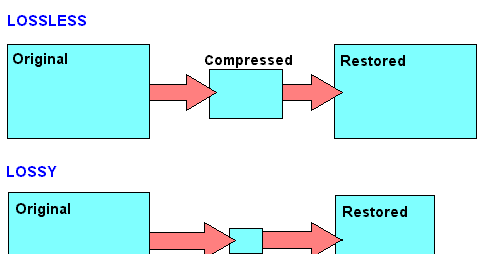
Lossless compression algorithms for audio files work on the principle of conventional file cabinets. They do not provide the highest level of compression (40 to 60%), while they have virtually no effect on sound quality. It is also worth noting that in this case, the encrypted data can be fully restored to its original form. Therefore, the use of lossless compression is most often used when it is important to keep the compressed data identical to the original.

The most popular audio formats in this group are FLAC (Free Lossless Audio Codec), APE (Monkey’s Audio), WMA (Windows Media Lossless), and ALAC (Apple Lossless Audio Codec). Each has its own pros and cons. For example, the APE codec offers slightly better compression gains, while FLAC is more common. In general, all true music lovers store their music collections in lossless formats, as they do not remove any data from the audio stream and the files created with these codecs can be listened to even on high-quality stereos.

To play lossless compressed formats, as a rule, third-party players (except WMA) are used, such as MPlayer, foobar, AIMP, Winamp, VLC and others, since all the necessary codecs are already built into them. Another option is to separately install an additional codec pack (for example, K-Lite), after which you can listen to files in lossless format from almost any audio player.

Lossy compression
This is the most popular group of algorithms that provides the maximum audio compression ratio (up to 10 times or more). However, unlike previous formats, the audio file loses quality here, and how much depends


Free Download Mp4Gain
picture


Mp4Gain Main Window
picture


Mp4Gain Features
picture


Free Download Mp4Gain
picture

Varieties of digital audio formats.

Varieties of digital audio formats.

Audio Formats

There are several concepts of audio format.

Audio Format

The audio data presentation format in digital form depends on the quantization method of a digital-to-analog converter (DAC). The sound equipment at the present time the most common two types of quantization:

Pulse – code modulation
sigma – delta – modulation
Often bit quantization and frequency sampling point for various audio devices that record and play back as digital audio presentation format (24-bit / 192 kHz, 16-bit / 48 kHz).

The file format determines the structure and presentation of the audio characteristics of the data when stored on a PC storage device. To eliminate redundancy of audio data using audio codecs, with the help of which compression of audio data is carried out. There are three groups of audio file formats:

uncompressed audio formats, such as WAV, AIFF
lossless compressed audio formats (APE, FLAC)
audio formats, with the use of lossy compression (mp3, ogg)
There are only modular music format files. By synthetically or sampled pre-recorded live instruments, they are, in the main, used for the creation of modern electronic music (MOD). Also here the format of MIDI can be attributed, which is not a sound recording, but in this with the help of a sequencer it allows to record and play music, using a specific set of commands in the form of text.

Sound digital media formats are used as that of mass-propagated sound recordings (the CD, the SACD), so and in a professional recording (the DAT, MiniDisc).

For surround sound systems and you can select sound formats, in a multi-channel accompaniment largely without sound for movies. Such systems have a set family of two large formats that compete the companies of the Digital Theater then Systems Inc. – DTS and Dolby Laboratories Inc. – Dolby Digital.

Also called format the number of channels in multi-channel sound systems (5. 1; 7. 1). Initially, this system was designed for the cinema, but later it was extended to home theater systems.

What formats are used to represent digital audio?

What formats are used to represent digital audio?

Audio Formats

The format is used in two different ways.

Digital Audio Formats

When using a specialized medium or recording method and special read / write devices, the concept of format includes both physical characteristics of a sound carrier: the dimensions of a cassette with a magnetic tape or disk, the tape itself, or a disc, recording method, signal parameters, encoding and error protection principles, etc. .P. When using a universal information medium of wide application, for example, a flexible computer or a hard disk, the format is understood only as a method of encoding a digital signal, the peculiarities of the arrangement of bits and words and the structure of service information; all the “low-level” part directly related to working with the media, in this case, remains under the control of the computer and its operating system.

Of the specialized digital audio formats and media, the following are the best known today:

CD (Compact Disc) is a 120mm or 90mm single sided optical laser read / write disc, containing a maximum of 74 minutes of stereo sound at 44.1 kHz sampling rate and 16 linear quantization bits. The system is offered by Sony and Philips and is called CD-DA (Compact Disc – Digital Audio). For error protection, Cross Interleaved Reed-Solomon code (CIRC) and Hamming code 8-14 modulation (Eight to Fourteen Modulation, EFM) are used. A distinction is made between stamped compact discs (CD) write-only (CD-R) and rewritable (CD-RW).
PCM decoder (PCM deck): a system for converting the digital audio signal into a pseudo-video signal compatible with popular video formats (NTSC, PAL / SECAM) and vice versa. PCM decoders are used in combination with home (VHS) or studio (S-VHS, Beta, U-Matic) VCRs, using them as read / write devices. The devices operate with 16-bit linear quantization at sample rates of 44.056 kHz (NTSC) and 44.1 kHz (PAL / SECAM) and can record a two- or four-channel digital signal. In fact, such a decoder is a modem (modulator-demodulator) for a video signal.
S-DAT (Fixed Head Digital Audio Tape – Fixed Head Digital Audio Tape) is a system similar to a conventional cassette recorder, in which recording and reading is performed by a block of thin film fixed heads in a 3.81 mm wide tape in a double-sided cassette with dimensions of 86 x 55.5 x 9.5 mm. It implements two- or four-channel 16-bit recording at 32, 44.1, and 48 kHz.
R-DAT (Rotating Head Digital Audio Tape) is a VCR-like system with cross-tilted rotating head recording. The most popular tape-based digital recording format, R-DAT systems are often referred to simply as DAT. The R-DAT uses a 73 x 54 x 10.5mm cassette, with a 3.81mm wide tape, and the cassette and tape system itself is very similar to a typical VCR. The basic belt speed is 8.15mm / s, the rotation speed of the main unit is 2000rpm. R-DAT operates with a two-channel signal (on some models, four channels) at sample rates of 44.1 and 48 kHz with 16-bit linear quantization and 32 kHz with 12-bit non-linear quantization. To guard against errors, a double Reed-Solomon code and modulation with an 8-10 code are used. Cassette capacity – 80. .240 minutes depending on speed and belt length. Domestic DAT recorders are usually equipped with a phonogram illegal copy protection system, which does not allow recording from the analog input at a frequency of 44.1 kHz, as well as direct digital copying in the presence of SCMS prohibition codes (Serial Code Managenent System). Studio tape recorders have no such restrictions.
DASH (Digital Audio Stationary Head) is a 6.3 and 12.7 mm wide magnetic tape recording system with fixed heads. Belt speed is 19.05, 38.1, 76.2 cm / sec. Implements 16-bit recording with sample rates of 44.056, 44.1 and 48 kHz from 2 to 48 channels.
ADAT (Alesis DAT) is a proprietary system for recording eight-channel audio on S-VHS videotape, developed by Alesis. It uses linear quantization of 16 bits at 48 kHz, the capacity of the cassette is up to 60 minutes per channel. ADAT tape recorders can be cascaded so that a 128-channel synchronous recording system can be assembled.

Digital audio file formats wav, mp3, aiff, ogg, flac, m4a

Digital audio file formats wav, mp3, aiff, ogg, flac, m4a

digital audio formats

The last five years gave a great boost to the development of portable and stationary audio systems, and with this support for a variety of digital audio formats.

DIGITAL AUDIO FORMATS

Small pocket devices have a large internal memory and fixed audio equipment has become even smarter and more demanding. That is why, now, we can not save space on the player and download songs that weigh between 15 and 30 MB each, but at home, listen to digital music in a quality equal to the sound of an analog vinyl.

Description of popular digital audio formats
However, the most widespread audio formats still have their pros and cons, and even in an urgent matter like digital audio, a “panacea” has not yet been found. Classic digital audio formats are divided into “compressed” and “uncompressed” streams, as well as “lossless” formats, which exclude loss of sound.

Description of digital audio formats Description of digital audio formats

Wav audio format
The waveform audio file format (WAVE, WAV – “in waveform”) is a file format for storing a recording of an uncompressed digitized audio sequence. In general, this is the most common format for working in the studio and in broadcasting. allows you to get the most honest sound quality. For example, the standard audio CD format is an LPCM audio stream, with parameters: 2ch (stereo), 44-100Hz, 16bit.

Mp3 audio format
MPEG-1/2 Audio Layer 3: (MP3) is the most popular digital format for storing compressed audio. The MP3 format uses a special algorithm designed to greatly reduce the size of the original file. This format allows you to keep the audio close to the original sound, but thanks to a variety of settings, extremely small size.
Compared to the standard audio CD format, a file in MP3 format and a bit rate of 128 kbps will be approximately 1/11 the size of the original file.

FLAC audio format
FLAC (Free Lossless Audio Codec) is a popular free codec designed for lossless compression of audio data. What does that mean? Unlike lossy audio codecs such as MP3 or OGG, the FLAC audio codec does not remove any information from the audio stream. This format is ideal for audiophiles who create their own music collections and listen to music on high-quality equipment.

Ogg audio format
OGG is a format that has not gained great popularity, but is nonetheless used by a fairly large audience. The OGG format, similar to MP3, compresses audio with loss of quality, but is fundamentally different in practical conversions. This made it possible to get better quality with a smaller file size and to display this codec as absolutely independent. In addition to similar formats that convert lossy audio, OGG has the ability to adjust container properties.

Aiff audio format
The Audio Interchange File Format (AIFF) is a fairly universal audio file format developed by Apple, which is used to store audio data. Like its counterpart, the WAV format, it is uncompressed audio and is widely used in professional recordings and music production.
The .aiff and .aif files created by Apple Loops are used by GarageBand and Logic Audio music editors.

M4a audio format
Apple Losseles (also known as Apple Lossless Encoder, ALE or Apple Lossless Audio Codec, ALAC) (m4a) is another Apple development. This audio format refers to uncompressed audio, which provides lossless playback. It is a fairly specific format, which is mainly supported by products of the creator company, and in some cases, as in the iPhone system sounds, where it is possible to use exclusively the m4a format.

ABOUT DIGITAL AUDIO FORMATS

ABOUT DIGITAL AUDIO FORMATS

Digital Audio Formats

Today, there are several digital audio formats that are superior in quality to compact discs and are available on both physical media and the Internet. What are advanced sound lovers listening to now? Let’s find out.

Digital Audio Formats

The capabilities and quality of the CD-DA format were initially limited by the capabilities of CD as a medium. Legend has it that the standard 74-minute compact disc capacity was chosen in order to be able to record long classical pieces without splitting into two discs. And to be absolutely precise, this figure appeared thanks to Beethoven’s Ninth Symphony: it lasts exactly 74 minutes. Another default parameter was the 44.1 kHz sample rate. This figure defines the upper limit of the reproduced frequency range. For a CD that had to reproduce frequencies up to 20 kHz, this was the lowest possible carrier frequency. As a result, the only field of maneuver was the bit depth, the level of which was 16 bits. With regard to sound recording, bit depth determines its dynamic range and resolution.

The CD cannot be copied into the memory of the computer in the usual way, since we usually copy files. To save a CD-DA, you need a special program, a program that allows you to convert data recorded on an audio disc to PCM format (WAV file). A properly organized CD-DA ripping process allows you to get a completely identical digital copy on your hard drive. Audio CDs are generally saved on a computer as a large FLAC audio file (also WAV, WV, or APE) with a CUE index card or as separate tracks.

As the best digital audio format, the CD did not last that long, just over ten years. In the mid-nineties, the first format appeared that allows for better sound quality. HDCD was an improved version of CD-DA. Their difference consisted in a special recording algorithm that made it possible to save additional data on the sampling depth in a standard CD format. With an HDCD decoder, the output signal received not 16, but 20 bits, which did not give the standard of 96, but up to 120 dB of dynamic range and a very noticeable increase in recording resolution. At the same time, devices without an HDCD decoder played discs like normal CD-DAs. Interestingly, when saving such a disk on a PC in the same way,

The next leap in terms of sound quality came at the beginning of the new millennium. Two HD audio formats were introduced to the audiophile audience at once, appearing almost simultaneously. DVD-Audio, a further development of the traditional recording method and promoted by Panasonic and Toshiba. It is capable of recording 24-bit / 192 kHz in stereo mode and 24-bit / 96 kHz in multi-channel mode.

The SACD format competed with it, which, by the way, looked much less like a normal CD, although it was called “super CD”. Super Audio CD, developed by Sony, was based on the revolutionary DSD encoding algorithm. This digitizing method assumed one-bit sampling at an ultra-high frequency of 2.8224 MHz. The encoding and decoding principles of a DSD stream are much simpler than in high-bit formats and are essentially closer to the principles of analog technology. At the same time, the SACD format retains all the advantages of the advanced digital format and has output characteristics comparable to DVD-Audio in both sound quality and number of channels.

Both DVD-Audio and SACD were designed with a high level of copy protection, but inquisitive minds have already won over both formats, so if desired, the content of both disc types can be saved to a PC as images. ISO (without changing the structure and original codec) or FLAC tracks in 24-bit / 96 kHz or 24-bit / 192 kHz. Almost simultaneously with the DVD-Audio and SACD formats, another original format for publishing high-quality music was born: DAD 24/96. DAD stands for Digital Audio Disk, but it is essentially a DVD-Video with a high-quality still image and sound that can be played on any standard DVD player or PC.

Obviously, with this approach, Blu-ray media, with its HD sound formats, recorded in high quality without compression, is quite applicable for recording music in high quality. However, at the moment there are few such publications, and a special version of the BD-Audio format has every chance of not seeing the light of day, as the sale of high-quality audio material is already very active on the Internet. Anyone who does not want to convert DVD-Audio, DAD and SACD discs to the FLAC format on their own can officially buy albums already converted in 24-bit / 96 kHz or 24-bit / 192 kHz quality.

Lossless audio formats

Lossless audio formats

Lossless audio

Audio files can be converted in a more or less space saving way using lossless or lossy codecs. While the data reduction is absolutely true to the original with lossless codecs, a difference can be heard from the original material, especially with heavy compression with lossy codecs.

Lossless compressed audio files lose approximately 25% to 50% of their original file size. Typical representatives are Monkey’s Audio, FLAC, or WavPack. Modern lossy codecs like AAC, Ogg Vorbis, or MP3, on the other hand, reduce source material by 90% without sounding noticeably worse.

Lossless audio compression

Unlike documents or images, for example, audio files are very difficult to compress, since identical repetitions are very rare in music. But it is precisely on such occurrences that the Huffmann or Lempel-Ziv algorithms depend, which are used in ZIP or RAR, for example. Therefore, most non-clustered compressors employ predictive coding. The signal is divided into a music component and a noise component. Depending on how well this prediction has been made, the noise component should ideally be Gaussian white noise that can be easily compressed using conventional methods.
In the ideal case, the result is 50% compression, which is highly dependent on the piece of music.

Monkey’s Audio, FLAC and WavPack are popular formats for lossless compression of WAV (PCM) files, for example digitized original recordings from the recording studio (for archiving or later processing) or archiving copies of music CDs. The sound quality is always the same as the original and the checksums reveal corrupted files. Increasing hard drive capacity at affordable prices makes “Lossless Codecs” interesting for everyday use.

Uncompressed: WAV (PCM)

WAV is the largest common denominator of Windows audio formats. The Macintosh equivalent is called AIFF. WAV is actually the collective term for various subformats, of which PCM is the most common and is generally equated with WAV.

WAV (PCM) is an uncompressed recording of sound samples: the time signal of a noise is sampled, quantized, digitized, and saved at discrete points in time. The more often and finer you record these values, the better the sound. With CD quality music, this instantaneous value is recorded 44,100 times per second and recorded with 16-bit “precision”, that is, 2 ^ 16 = 65536 possible values.

With the help of special programs (eg CDex, EAC, Audiograbber), Audio CDs can be transferred to the hard disk as WAV (PCM) files. Viewed in this way, WAV (PCM) files are copies of the original, provided the CD-ROM drive is not read incorrectly or the CD is damaged. One minute at CD quality requires roughly 10MB of storage space, which is not as happy to give away even in the age of ever-larger hard drives.

On the PC, WAV (PCM) and CD-quality (44.1 kHz, 16-bit, stereo) audio files are often the starting material for creating space-saving audio files in formats such as MP3. However, for sound processing on the home PC, WAV (PCM) is the first choice.

Monkey’s Audio

Monkey’s Audio is a lossless audio codec for PCM wave files. Monkey’s Audio comes with a convenient program interface (in English), over which files can be compressed, decompressed, verified or tagged. PCM wave files (any sample rate, 8/16/24 bit, mono or stereo) or corresponding Shorten or WavPack files are accepted as source files. Monkey’s Audio does not support multiple channels.

The APE tags that are used to store the title information can be supplemented with their own fields and are therefore very flexible. They are now used in conjunction with other audio formats as well.

The included command line encoder allows integration into other programs. Various audio players support the format through plugins. A plug-in for Winamp can be installed at the same time as installation. Monkey’s Audio is a Windows program by default. However, there is a platform independent version of Java.

FLAC

FLAC stands for “Free Lossless Audio Codec”. There are several lossless audio codecs available. FLAC is suitable here for several reasons: FLAC follows the open source philosophy (free open source code, available for many operating systems), works very fast, has a good and secure framework structure.

Lossless audio formats 

WAV (.wav) The WAV format is nothing more than a digital recording of real sounds, sounds that come from a source outside the PC. With WAV music, drums, piano, guitar, bass or vocals are heard the same, no matter what computer the file is played on (with the same acoustic quality of hardware components, of course).

wav

DSD (DFF, .Dsf) are used in digital media such as Super Audio CDs. Sampling quality is very high (variable sampling rate is approximately 64 times higher than for audio CDs), although according to several operators in this sector, it must be absolutely determined whether the final quality is higher than the sampling quality. PCM (used in high quality Blu-Ray and DVD Audio). I can reproduce free readers like Foobar 2000 or AIMP on our computer.

AIFF (.aif). It’s the Apple audio format used by Apple for Mac. It’s basically the WAV equivalent used by Windows.

APE (Mono Audio; .ape): Ordinary with a loss that allows us to reduce by about 50% the space occupied by our music (in some cases even more), without losing quality. In this way, an album that takes up about 600 MB in wav format averages 300 MB (much more than about 100 MB of high-speed mpc and 60 mp3 mp3, but the quality is the same as the original); On average, I speak because there are certain types of music where the level of compression is even higher. You can use WinAmp plug-ins to listen to songs in this format, or better yet, a player that uses it natively as Foobar 2000. Right now, it’s probably the best lossless codec, considering the balance between speed and compression (Click here for a lossless comparison table) format.)

Apple Lossless Audio Codec – ALAC (.m4a) This is a lossless audio codec created by Apple a few years ago and available as an open source from Apple since October 2011. Some programs support it in Windows (encoded). , including DbPowerAmp.

FLAC (.flac): a very popular open source format. It used to be very popular (among music purists), but some space has been lost with the MonkeyAudio bee format, which allows for better compression in the same quality. Compared to others, it always came in .ape format (but also after WavPack).


LA (Lossless Audio: .la): The lossless format that compresses the most. Conversion to this format is very slow, but achieves the best compression in history (for example, MonkeyAudio, this album would take up about 290 MB compared to 300 MB in APE). This is not widespread, as some MB obtained on a bee is not worth the long wait (and less support from third-party programs), but it is the winner of my lossless format comparison.flac

OPTIM FROG (.ofr) – Excellent lossless codec, best after LA as compressibility. Compression, when set to slightly high levels, is about 3 times slower than Monkey Audio and the gain in MB is about 2%. Like all other formats on this site, you can listen without the addition of Foobar 2000.

WAVPACK (.wv, wvc) – is a valid open source compression format that allows lossless, lossy and hybrid results. The compression rate is high and the compression is good. Another interesting hybrid format is that the lossy file is merged with another file, which allows you to completely restore the original file without loss in case we want to restore it.

Differences between digital audio formats (MP3, AAC, FLAC, WAV files, etc.)

Differences between digital audio formats (MP3, AAC, FLAC, WAV files, etc.)

What are the main digital audio formats and what are the differences between WAV, MP3, AAC, FLAC and others?

audio file formats

Differences in audio files To discover all types of digital audio formats, you must first understand briefly and synthetically what digital audio means and how it was created.

It all starts with Pulse Code Modulation (PCM), the basis for digital audio, which was founded in 1937 and is characterized by two properties: sampling rate for measuring the waveform amplitude and bit depth for measuring possible digital values.

If the sound is continuous in the real world, this is not the case in the digital world.

To understand the difference, you can think of digital videos that consist of still images that change quickly and give the impression of continuous motion.

It is the same for audio and the amplitude of the sound waves in a digital format is not fluid, but changes according to certain criteria at predefined intervals.

Since I am not an audio technician or physicist to do simple things and understand what digital audio is, I have found a very explanatory analogy that I am trying to explain here.

The analog audio source can be thought of as the water flowing from an open tap and the amplitude of the audio waveform as the water temperature.

Sampling can be viewed as the frequency with which the finger is immersed in the flowing water per second

The more the finger is immersed in it, the more continuous the temperature changes become.

audio formats

If you put your finger in the running water 44,100 times per second, it’s almost like holding your finger still all the time.

This is the idea behind the sampling rate.

In terms of bit depth, we should think that we’re using a thermometer instead of the finger.

If the water temperature is higher than that of the surrounding area, we will say that it is hot, otherwise it will be cold if it is below it.

Instead of only 2 options, we could mark 16 possible values ​​for measuring the water temperature.

The bit depth can be viewed as the number of values ​​with which the thermometer is to be used to measure the temperature. The more they are, the more accurate information is obtained.

Without losing ourselves technically, we are now seeing the most important digital audio file formats and their differences.

1) WAV and AIFF are lossless (i.e. uncompressed) PCM-based audio container formats with some minor changes in data storage.

.WAV or Wave is the standard format when you take a CD out of your computer (CD ripping).

A WAV and an AIFF can be converted into each other without changing the quality.

These audio formats are suitable for a stereo system (2 channels), they are sampled at 44.1 kHz (or 44100 times per second) with 16 bits (“CD quality”) and the files are approximately 10 MB per minute.

2) Lossless formats: FLAC (Free Lossless Audio Codec), ALAC (Apple Lossless Audio Codec) and APE

These formats compress audio using algorithms.

The difference between compressed files and FLAC files is that FLAC is specifically designed for audio and therefore has better compression rates without data loss.

As a rule, a .FLAC takes up half of the storage space of a WAV in megabytes and maintains the “CD quality”.

A FLAC can be converted to WAV without loss of quality and is the preferred format for those who want to listen to music with the best quality and great speakers.

3) Loss formats: MP3, AAC, WMA, Vorbis

.MP3 and .AAC files are the most common formats when you need to store music on a computer or phone and need to share or download music on the network and the Internet.

MP3 is a highly compressed “lossy” format that sacrifices a certain amount of audio quality for a significant gain in file size.

An MP3 has a size of approximately 1 MB per minute.

The difference to lossless formats is that if you convert the file to a less compressed format like WAV, the quality sacrificed during compression will not be restored.

The various lossy formats use different data storage algorithms, so they vary the size of the files with the same quality. For lossy formats such as MP3, the audio quality is measured using the bit rate value, which is generally specified in “192 kbit / s” or “192 kbit / s”.

The higher the bit rate, the more detailed the sound becomes.

What are the most popular audio formats?

What are the most popular audio formats?

There are dozens of audio files that we can use to convert a song, but the really useful ones can be counted on the fingers of one hand.

losseless

When we think of an audio file, most of us immediately think of MP3. Without a doubt, it’s one of the most popular audio formats, but it’s not the only one. Let’s see what are the most popular audio formats and what are the differences in use. And we have to choose that according to our needs.

There are different categories of audio files. First we defined the formats as uncompressed. The word itself defines this section of the file. In this case, the recorded sound waves are actually converted into a digital format without further processing. What does it all mean? In files that are very difficult to save and take up a lot of space. In order to simplify the storage of audio files and to reduce the load, formats with lossy data compression were created. These sacrifice some quality in favor of the small storage space required.

losseless

To fix this error, which represents the loss of quality in favor of file size, compressed audio formats were created without loss of data. Obviously, they’re not small files like lossy compression, but they’re still smaller than uncompressed. However, it must be said that these types of formats are only widespread in certain cases.

PCM

PCM is the most common and widely used audio format on CDs and DVDs that we have at home. It is the faithful conversion of analog audio into a digital file. It is no coincidence that it is an uncompressed audio format. Remember that analog sounds exist as waveforms. In order to convert a sound wave into digital bits, the sound must be sampled and recorded at certain intervals.

WAV

WAV stands for Waveform Audio File Format (previously it was also called Audio for Windows, now it is no longer). It is a standard developed by Microsoft and IBM in 1991. WAV files can contain compressed and uncompressed audio formats. In most cases, however, they are used for uncompressed people. Although it was developed for Windows, it can also be safely opened on a Mac.

MP3

This is without a doubt the most popular audio format. It was released in 1993 and over the years its success has increased thanks to the combination with the pieces of music. Why are they used so often? Quite simply, these are lossy compressed files, and the generated files are so small that users can create a music library without taking up too much space. And the quality? It is much lower than other formats, but the human ear doesn’t always manage to notice the difference significantly. MP3 is also a universal file. It can be found on smartphones, computers, smart TVs, tablets and many other electronic devices.

WMA

WMA stands for Windows Media Audio. It was first published in 1999 and has gone through several developments since then, always keeping the same name. As you can easily guess, it is an audio format created by Microsoft. It was developed to replace MP3s. Unfortunately, there are very few platforms that support this, so the MP3 mastery has never been compromised.

OGG

OGG is not a real compression audio format. We can define it as a multi-purpose multimedia container. It can contain all types of audio formats, but is often used to contain Vorbis files. It is one of the best performing files to reduce size without losing quality.

FLAC

FLAC stands for Free Codec Lossless Audio. It is a lossless, compressed format that was created in 2001. A FLAC file can be compressed to 60% of its original size without minimal loss of sound quality. It is also an open source format. Because of this, it is compatible with most programs and devices. It is the best quality alternative to MP3.

Lossy and Lossy Digital Audio Formats: Audio Codec Guide

Lossy and Lossy Digital Audio Formats: Audio Codec Guide

In recent years, the way we listen to music has changed a lot, also thanks to the Internet, which has allowed a great diffusion of digital audio files. In a short time we went from vinyl to CD, to online music transmitted in high resolution.

losselless

An analog sound to be handled by a computer must become digital. To maintain the exact fidelity of the original audio, you must write a lot of information, thus producing heavy files that take up a lot of disk space. Hence the need to reduce the size of the audio file to save space on various storage media, such as hard drives, but also to take better advantage of the available bandwidth for transferring and listening to files.

Digital audio formats

Every day we use multimedia content such as YouTube, online radio or music streaming services, with a quality that is sometimes enough, other times excellent. This is because the files are the result of a data compression process through the use of codecs.

audio file formats

What is an audio codec?

A codec is an algorithm for encoding and decoding the audio (but also video) data stream.
It is used both to compress a file and to convert, for example, an analog to digital file. The difference in digital audio formats lies in the type of compression that determines their quality and, consequently, their size according to the type of codec used.

Types of digital audio formats.

Audio formats can be of three types:

-Loss (with data loss)
-No loss (no data loss)
-Uncompressed

Lossy digital audio formats

Lossy audio formats are compressed files with lost data and information. They allow you to significantly reduce the size of the original file, even up to 90%. The sound quality is lower than the CD-Audio standard because the compression algorithm “cuts” certain frequencies that the human ear has more difficulty perceiving and, therefore, are less relevant, generally the highest (more than 16 -17,000 Hz).

The Lossy audio format is widely used for listening to digital audio, such as streaming (Spotify, Deezer, Apple Music, etc.). Depending on the type of codec used, compression can vary significantly, as does the quality of the listening. The most popular and popular format is MP3 and WMA.

MP3

The most famous and well-known digital audio format. In its entirety, Motion Picture Expert Group-1/2 Audio Layer, 3, developed by MPEG, offers good compression and discrete audio quality, in particular with a bit rate of 192 kbit / s and 320 kbit / s. Although still widely used, better compression algorithms can be found.

OGG Vorbis

The open source format without lossy audio compression offers an excellent alternative to MP3. With the same perceived quality, it allows for greater compression. The high frequencies (above 16 kHz) are wider and wider, offering greater spatiality of sound. Also used in computer games, it is also often used for audio streaming. Spotify music, for example, uses the Ogg Vorbis digital audio format from 96 kbit / s to 320 kbit / s in addition to the AAC codec.

WMA

Windows Media Audio is Microsoft’s proprietary digital audio format. Encrypted WMA offers excellent compression and good audio quality at high bit rates, but at the same time little compatibility. Precisely for this feature it is now little used. WMA consists of four different codecs: WMA codec, lossless WMA (lossless), WMA Pro, or WMA Voice.

AAC

The Advanced Audio Coding Format (AAC) is part of the MPEG consortium and was born as MP3’s successor. It became famous thanks to Apple that uses it with iTunes, but also thanks to several radios (DABè) that use it to transmit audio. It is the excellent quality and good compression digital audio format used by YouTube, iPhone, Android smartphones and many other devices such as Nintendo and Playstation. The AAC supports 48 audio channels with sampling up to 96 kHz and uses constant bit rate (CBR – Constant Bit Rate) or variable (VBR – Variable Bit Rate) compression encoding. AAC is one of the best lossy codecs, the encoding speed is not among the best.

MPC

Musepack (or MPC) together with AAC vies for the podium as the best lossy digital audio format. The quality is very high, thanks to the VBR encoding that guarantees a good distribution of the bit rate. The peculiarity of this codec, in terms of AAC, is the clarity of the sound, which is very wide and spacious. Good encoding speed, it is ideal for those looking for quality while keeping a small audio file size.

ATTRAC

ATRAC (Adaptive Transform Acoustic Coding) is a lossy audio compression algorithm developed by Sony. Born for MiniDisc (MD) whose production ended in 2013, this codec has not been very successful and is no longer used today.

mP3Pro

Derived from MP3, its peculiarity lies in the fact that it maintains the same quality as an MP3 at 128 kbps but with lower bit rates, from 64 kbps to a maximum of 96 kbps. Compression of the higher frequencies, a painful note from lossy files, occurs through the Spectral Band Replication (SBR) algorithm. The result is space savings at lower bit rates, but also less dynamic and unclear sound.

Dolby Digital

Dolby Digital is a multi-channel audio encoding system, used primarily in DVD, film, and digital television. Contrary to what one might think, it is a lossy audio format, therefore compressed with loss of information. Known as Dolby Digitale 5.1, it works with a minimum bit rate of 96 kbit / s up to a maximum of 640 kbit / s. On DVD, it maintains an average of 192 kbit / s in stereo audio and up to 448 kbit / s in 5.1 signals

Lossless digital audio formats

Lossless audio formats are compressed but lossless files. They maintain the original audio quality, without degrading its characteristics in any way, while managing to compress certain information up to 40-50%. The most popular and widely used Lossless Codec format is the FLAC (Free Lossless Audio Codec) file. Apple has produced its own lossless format called ALAC (Apple’s Lossless Audio Codec) that iTunes uses.

Lossless files offer the quality of a CD (reported as standard), but to maintain fidelity, the dimensions will be larger and take up more disk space than Lossy, but still half the original file.

FLAC

FLAC (Free Lossless Audio Codec) is a codec released under a free software license with lossless data compression. Extended and compatible with most audio devices, the FLAC codec compresses data from a minimum of 30% to 50%, compared to the original file, while maintaining the perceived quality unchanged.
A Flac file can be 8, 16, or 24-bit deep and has a sample rate of up to 192 kHz (Flac Hi-Res).
Various music audio streaming services like Deezer Music, QoBuz, Tidal offer high quality music equal to or higher than the CD standard using this format.

Lossless wma

WMA Lossless is the lossless version of Microsoft’s WMA Lossy codec. It offers good and fast compression. Although it is proprietary, it can also be played by VLC Media Player, WinaAmp, RealPlayer and others.

A THE C

ALAC (Apple Lossless Audio Codec), also known as ALE (Apple Lossless Encoder) is an audio codec developed by Apple in 2004. In 2011, the source code was made available under an open source license. Primarily used by iTunes, other online music services have also used it in recent years. Excellent audio quality and fast decoding, but slightly less compression than FLAC files.