Dissecting Audio Lossy Formats


Free Download Mp4Gain
picture

Dissecting Audio Lossy Formats: Technical Mechanisms and Trade-offs


Audio Lossy Formats
Audio Lossy Formats
Audio Lossy Formats
Audio Lossy Formats

Understanding Audio Compression

As an audio enthusiast, I have always been fascinated by the technology behind audio compression. Audio compression is the process of reducing the size of an audio file by removing or reducing redundant or irrelevant information. This is done to make the file smaller and more manageable, especially for streaming and other bandwidth-limited applications.
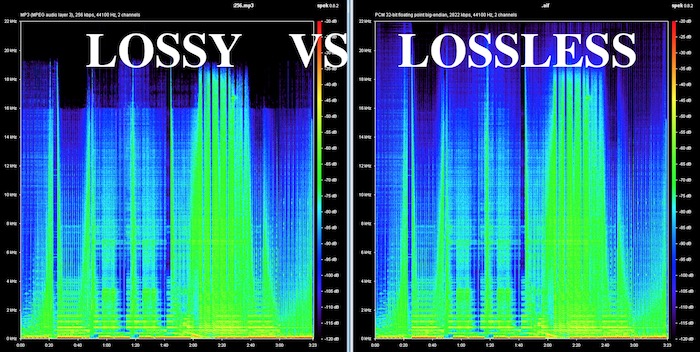
There are two types of audio compression: lossless and lossy. Lossless compression preserves all of the original audio data, while lossy compression removes some of the data to achieve a smaller file size. Lossy compression is the most common type of audio compression used today, and it is used in a wide range of applications, from music streaming services to podcasting.

Audio Compression Techniques

There are many different techniques used in audio compression, each designed to optimize audio quality and reduce file size. One of the most important techniques is perceptual coding, which involves analyzing the human perception of sound and using that information to remove or reduce irrelevant information.
Another important technique is psychoacoustic modeling, which is used to identify and remove sounds that are not perceptible to the human ear. As the book “The Art of Digital Audio” explains, “Psychoacoustic modeling is a technique that takes advantage of the limitations of human hearing to remove sounds that are not perceptible to the listener.”
In my experience, understanding these techniques and how they work together is essential for optimizing audio quality and reducing file size. By using the right combination of techniques, you can achieve excellent audio quality while minimizing file size.

Audio Compression Trade-offs

One of the key trade-offs of audio compression is the balance between audio quality and file size. As the book “The Audio Programming Book” explains, “The more you compress an audio file, the smaller it becomes, but the more audio quality you lose.”
In my experience, this trade-off is particularly important for musicians and sound engineers. By understanding the trade-offs between audio quality and file size, you can make informed decisions about how to compress your audio files for different applications.
Overall, dissecting audio lossy formats is essential for anyone working with audio. By understanding the technical mechanisms and trade-offs of audio compression, you can optimize your audio quality and file size, making it ideal for a wide range of applications.
Final words:
In conclusion, audio compression is a powerful technology that offers excellent audio quality at reduced file sizes. By understanding the techniques and technologies behind audio compression, you can optimize your audio quality and file size, making it ideal for streaming and other bandwidth-limited applications. And if you’re looking for a powerful tool to help you normalize and convert your audio and video files, be sure to check out mp4gain.



Free Download Mp4Gain
picture


Mp4Gain Main Window
picture


Mp4Gain Features
picture


Free Download Mp4Gain
picture

The Benefits of Lossless Audio Formats

The Benefits of Lossless Audio Formats

Lossless Audio Formats

Lossless Audio Formats Explained

As an audiophile, I always strive to achieve the highest possible quality of sound. Lossless audio formats such as FLAC, ALAC, and WAV are my go-to choices when it comes to digital music. These formats use audio compression algorithms that preserve all the original audio data while reducing the file size. This means that the music you listen to sounds exactly as the artist intended it, without any loss of quality.
When I first discovered lossless audio formats, I was blown away by the difference in sound quality compared to lossy formats like MP3. The music was clearer, more detailed, and had a wider dynamic range. The benefits of lossless audio formats are not just limited to the listening experience, they also have practical benefits. Lossless files take up less storage space on your device than uncompressed audio files like WAV, and can be easily streamed over the internet without compromising quality.

As the famous musician David Byrne once said, “Lossless audio formats offer an uncompromising listening experience that allows you to hear every nuance of a recording. It’s like hearing the music for the first time.”

The Advantages of FLAC and ALAC

FLAC and ALAC are two of the most popular lossless audio formats. They are both open-source and free to use, which means they have a wide range of support across different devices and software. FLAC has become the de facto standard for lossless audio on the internet, while ALAC is the preferred format for Apple devices.
One of the biggest advantages of FLAC and ALAC is their ability to handle high-resolution audio. These formats can handle audio at up to 24-bit/192kHz, which is significantly higher than the 16-bit/44.1kHz standard of CD-quality audio. This means that you can listen to your favorite music with even greater detail and clarity.

In addition, FLAC and ALAC both have robust error correction capabilities. This means that if a file is corrupted during download or transfer, the audio data can still be recovered without any loss of quality. This is a major advantage over lossy formats like MP3, which cannot recover from data errors.

The Benefits of WAV

WAV is a lossless audio format that has been around since the early days of digital audio. It is the standard format for audio CDs, and is widely used in professional audio production. One of the main benefits of WAV is its compatibility with a wide range of hardware and software.
WAV files are uncompressed, which means that they retain all the original audio data. This makes them ideal for situations where maximum audio quality is required, such as mastering and archiving. In addition, WAV files can be edited without any loss of quality, making them the preferred format for audio engineers and producers.

As the great music producer Rick Rubin once said, “WAV files are the gold standard for audio quality. They offer the most accurate representation of the original recording, and are essential for anyone serious about music production.”

Final Words

In conclusion, lossless audio formats offer a superior listening experience compared to lossy formats like MP3. Whether you choose FLAC, ALAC, or WAV, you can be sure that you are getting the best possible sound quality. As an audiophile, I highly recommend using lossless audio formats for your music collection. And if you’re looking for a reliable and efficient way to normalize and convert your audio files, MP4Gain is the perfect solution.

lossless sound quality

lossless sound quality

lossless sound quality

The principle of these audio compression methods is to keep as much as possible the parts that are easy to hear for the human ear.

lossless sound quality


In the main constant bit rate (CBR) mode, audible data in the audio is removed and it is easier for the human ear to hear. The more information that is retained for the part, the less information that is retained for the less audible part. As sound complexity increases, the degree of sound quality degradation becomes more apparent. For example, when listening to pure human music voice performances and performances combined with background music, pure The degree of degradation of the compressed music of the human voice is less obvious than that of the original file.

As for the lossless sound quality provided by today’s streaming platform, there are many formats, but strictly speaking, these formats, including flac and ALAC, belong to lossless compression (non-destructive data compression) rather than quality. lossless sound in a narrow sense, but due to its performance it is almost the same as WAVE, but the file is small, the decoding speed is fast, and it can be used in streaming services, so it is also a representative format of lossless sound quality that has entered the era without CD support, and it is also the current music streaming service.

Also, MQA like Tidal is a more controversial format, because although MQA is lossless audio compression in a broad sense, it focuses on driving high-quality music files that are above CD quality at a size similar to those of CD quality flac files. , but it can also be restored to the original high-quality audio format, but the controversial point is whether the higher compression ratio can maintain the same real auditory sense as the original high-quality audio has always been controversial. At the same time, MQA requires a specific device to perform hardware decoding. Yes, many devices can only decode MQA through software.

▲Currently called Hi-Res Audio generally refers to sound quality higher than that of a CD, but to be certified, the device must support the processing capability of the 24-bit 96kHz format.

However, since MP3 and AAC are previously planned destructive music compression formats, their purpose is to compress CD-level sound quality into smaller files, so most encoding specifications are presented in one presentation. CD-level 16-bit 44.1 kHz or 16-bit 48 kHz; but MQA is a format with a small file size that locks in high sound quality requirements. Basically, the MQA format will be music equivalent to 24-bit PCM or higher.

lossless sound quality

lossless sound quality

lossless sound quality

Although lossless sound quality and high-quality streaming services have appeared on the market for a while

lossless sound quality

Like Apple isn’t the first to make true wireless earbuds, but it has ridden the wave of the market, with Apple’s launch of so-called hi-fi. compressed sound quality in Apple Music. In fact, after the lossless compression commonly known in the audio industry, lossless sound quality and high sound quality have instantly become a hot topic for many people to discuss, but whether the benefits of quality Lossless sound systems are really Obviously, the author will devote some space from theoretical concepts to practical levels. The difference is a simple overview, but the following arguments focus on easy understanding, so some of the descriptions are not entirely accurate.

What is lossless sound quality? What is the sound quality of the music we usually listen to?
The photo mentions * Introduction to KKBOX sound quality (including format), release year, sound quality, including numbers, KKBox, streaming media, Hi-Res Audio and Hi-Fi

▲ Both AAC and MP3 are destructive compression, while FLAC and ALAC are lossless compression

Before we get into the details, let’s talk about what is called lossless sound quality; From the author’s concept and cognition, the so-called lossless sound quality is a relative word rather than an absolute word. The main source is the relative word born due to the appearance of the MP3 music compression format; after the music industry went digital, digital music files were generally recorded via PCM encoding, and WAVE files were generally used on CDs. The time and space situation that MP3 was born into was because hard drive capacity was generally small at the time. To store a large amount of music data in storage space, you probably need to compress the files.

The reason why MP3 cannot be called a lossless format is because it essentially compresses the original WAVE in a way that limits the bitrate by combining concepts like the psychology of sound. The bitrate compression mode, compared to the bitrate of the original WAVE file, compresses at least in a range of 1:4 to 12:1. The higher the bitrate, the greater the amount of retained information. For example, AAC format also adopts similar audio psychology for compression, but the efficiency is better than MP3. Therefore, most of the lossless sound quality of most streaming platforms currently uses AAC as the mainstream.

THE MOST COMMON FORMATS FOR MUSIC AND OTHER AUDIO FILES, AND HOW THEY ARE RELATED TO EACH OTHER

THE MOST COMMON FORMATS FOR MUSIC AND OTHER AUDIO FILES, AND HOW THEY ARE RELATED TO EACH OTHER

Music Formats


And for the direct competitors of the universal MP3 format, they can count on a lot today.

Music Formats

Due to continuing inconsistencies in home storage of the WAV format, it was eventually discontinued. But for professional studios, he says, the basics of the job. Especially when recording live vocals or instruments. Just convert the recorded material from WAV to MP3 at the final stage.

music format

However, music can be represented in some other popular formats nowadays. For example, many times (especially the Internet) they use these data types like OGG, AIFF, AMR, etc. But the real competitor of MP3 has become the newest and best audio FLAC etc. Of course, for MP3 you can convert all parameters to the maximum, but the playback quality of FLAC represents much higher. Also, it is a single file and the separation occurs directly on the track due to the player or startup software. In other words, listeners see each track individually, but can switch between playback tracks. For the MP3 format, this also seems possible to merge multiple tracks through it, thus creating a single file. But here it is in this version fast switching between tracks will not be possible (normal fast forward should be used, that’s all).

However, not everything is bad. The fact that music or audiobooks are all popular formats today allows them to be easily converted, even keeping the original parameters of the audio material. Based on this, and for sound processing and conversion and audio editors, almost all programs call converters. Any program of this type (MP3 editor or converter) detects the original and final type of audio files, is unambiguous and can produce direct and reverse transformations. Let’s explain this specific example.

WAVE THEORY AUDIO EDITOR FOR MP3 FILES
Many types of software are used in audio processing today. First, look at the narrow application of so-called audio editors. The most prominent representatives of these can be called giants Sony Audio Forge, Sintrillium Cool Editing Pro, which was later acquired by Adobe and renamed Audition, Acoustica Mixcraft, ACID Pro and many others.

mp3 editor

The principle on which they operate is that, for convenience, all MP3 audio programs have a typical waveform, as originally used for WAV files. This method determines the appearance and opportunity enough to edit any type of conventional audio material in WAV format. Other than that, the fact that you can do basic copy, cut, paste, etc. E., it’s just a matter of getting the frequency characteristics and bitrate changes, not to mention using a lot of extra effects that plug into VSTs via DirectX or a generic host bridge studio thing.

In its simplest form, the conversion can be done using the standard file menu, which contains the line “Save As…” (Save As…) or the export function present in MP3 format. Thus, all the process is reduced to just the final selection of the format (MP3 here as an example) and activation of the recording mode. In this case the conversion will be done automatically saving the current configuration parameters and the frequency characteristics. I don’t like the original version? ?Nothing is easier than changing the format to MP3, pre-specified with higher settings. However, one thing needs to be considered here: if the raw material is of such poor quality that special remediation or even professional tools will not work for audio it is necessary to use Repairs here, the intervention of various filters, etc. D. For the layman, it will cause great difficulties.

As is clear, there is absolutely no difference between the audiobooks we are dealing with: MP3, music or just recorded voice or noise. By the way, audiobooks are supposed to have a much lower sound quality by default. This is understandable, since the file has to take up minimal space and, in general, the perceived sound characteristics of speech are not that important. Finally, is this a professional recording of a particular set of albums?

However, if you use some standard operations, even without specific knowledge, it’s fine to achieve good results, especially since there are such built-in templates, based on any application for specific operations. Of course, it will be very difficult for the first time to achieve a perfect sound, but if you study the plan and understand how it works, it will work like clockwork, and as a result, it will take a lot of time.

What are the advantages of the lossless audio format?

What are the advantages of the lossless audio format?

Lossless and Lossy Audio Files

The advantage of lossless for storing an audio collection is that the quality of the recordings is much higher than that of lossy codecs and they take up less space than uncompressed audio. It is true that lossy files are smaller than lossless music files. Most modern playback programs understand the lossless format. Programs that cannot play it can easily learn it using the lossless plugin. What are lossless audio formats?

Lossless audio

Lossless audio formats
A true music lover is unlikely to be satisfied with the sound of music recorded in Ogg Vorbis or MP3 compression formats. Of course, if you listen to audio recordings on home audio equipment, sound defects cannot be heard with your ear, but if you try to play a compressed file on high-quality Hi-Fi equipment, you will immediately find the sound defects. . Of course, creating a collection of quality music on CD or vinyl is not easy. There is a reasonable alternative to this path for lovers of high-quality sound – lossless music. It can be stored on a PC in a way that allows you to keep your music’s original settings unchanged, even if compression is applied. In this way it simultaneously solves the problems of high-quality music and its compact storage, since audio equipment for listening (headphones, speakers, amplifiers) is quite affordable.

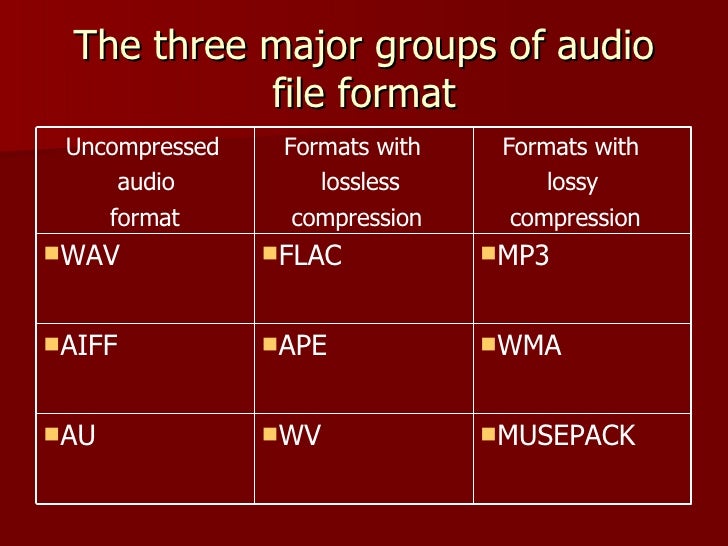
Uncompressed lossless audio formats:

CDDA is an audio CD standard;
WAV: Microsoft Wave;
IFF-8SVX;
IFF-16SV;
AIFF;
Compressed formats:

FLAC;
APE – Monkey’s Audio;
M4A – Apple Lossless – Apple’s high-quality music format;
WV – WavPack;
WMA: Windows Media Audio 9;
TTA – True Audio.

FLAC format
The most common format is the. It differs from lossy audio codecs in that no data is removed from the audio stream when it is used. This makes it possible to use it successfully to play music on Hi-Fi and Hi-End equipment, as well as to create an archive from a collection of audio recordings.

The great advantage of the format is its free distribution. This is important for musicians who record music on their own. The format has gained a lot of popularity recently, thanks to which its support is included in the vast majority of multimedia players.

APE format
Unlike FLAC, for the APE format there are only codecs and plugins for the Windows platform. For other platforms, there are expensive third-party software solutions. The algorithm is capable of achieving lossless compression of audio information between 1.5 and 2 times. It includes three main stages of encoding, of which only one is based on the use of inherent properties of sound for compression. The rest are similar to conventional filing cabinets. Even though the compression algorithm is distributed free of charge, the licensing restrictions are such that it is practically inaccessible to amateur musicians.

Apple Lossless Format
You can listen to high-quality lossless music using the audio compression codec without sacrificing Apple quality. This format was developed by Apple for use on its own devices. The format is compatible with iPods with special dock connectors and the latest firmware. The format does not use specific rights management (DRM) tools, but the container format contains such capabilities. It also supports QuickTime and is included as a feature in iTunes.

The format is part of the free access libraries, which allows you to organize listening to files in Windows applications. In 2011, Apple released the source codes for the format, opening up broad prospects for the codec. In the future, it can seriously compete with other formats. The tests yielded good results. Compressed files vary in size between 40-60% of the originals. The decoding speed is also impressive, which justifies its use for mobile devices, whose performance is not high.

One of the disadvantages of the codec is that the extension of the audio files matches the audio codec, leading to confusion because AAC is not a high-quality music format. Therefore, it was decided to store the data in an MP4 container with the extension .m4a.

Lossless audio formats

Lossless audio formats

Lossless audio

Audio files can be converted in a more or less space saving way using lossless or lossy codecs. While the data reduction is absolutely true to the original with lossless codecs, a difference can be heard from the original material, especially with heavy compression with lossy codecs.

Lossless compressed audio files lose approximately 25% to 50% of their original file size. Typical representatives are Monkey’s Audio, FLAC, or WavPack. Modern lossy codecs like AAC, Ogg Vorbis, or MP3, on the other hand, reduce source material by 90% without sounding noticeably worse.

Lossless audio compression

Unlike documents or images, for example, audio files are very difficult to compress, since identical repetitions are very rare in music. But it is precisely on such occurrences that the Huffmann or Lempel-Ziv algorithms depend, which are used in ZIP or RAR, for example. Therefore, most non-clustered compressors employ predictive coding. The signal is divided into a music component and a noise component. Depending on how well this prediction has been made, the noise component should ideally be Gaussian white noise that can be easily compressed using conventional methods.
In the ideal case, the result is 50% compression, which is highly dependent on the piece of music.

Monkey’s Audio, FLAC and WavPack are popular formats for lossless compression of WAV (PCM) files, for example digitized original recordings from the recording studio (for archiving or later processing) or archiving copies of music CDs. The sound quality is always the same as the original and the checksums reveal corrupted files. Increasing hard drive capacity at affordable prices makes “Lossless Codecs” interesting for everyday use.

Uncompressed: WAV (PCM)

WAV is the largest common denominator of Windows audio formats. The Macintosh equivalent is called AIFF. WAV is actually the collective term for various subformats, of which PCM is the most common and is generally equated with WAV.

WAV (PCM) is an uncompressed recording of sound samples: the time signal of a noise is sampled, quantized, digitized, and saved at discrete points in time. The more often and finer you record these values, the better the sound. With CD quality music, this instantaneous value is recorded 44,100 times per second and recorded with 16-bit “precision”, that is, 2 ^ 16 = 65536 possible values.

With the help of special programs (eg CDex, EAC, Audiograbber), Audio CDs can be transferred to the hard disk as WAV (PCM) files. Viewed in this way, WAV (PCM) files are copies of the original, provided the CD-ROM drive is not read incorrectly or the CD is damaged. One minute at CD quality requires roughly 10MB of storage space, which is not as happy to give away even in the age of ever-larger hard drives.

On the PC, WAV (PCM) and CD-quality (44.1 kHz, 16-bit, stereo) audio files are often the starting material for creating space-saving audio files in formats such as MP3. However, for sound processing on the home PC, WAV (PCM) is the first choice.

Monkey’s Audio

Monkey’s Audio is a lossless audio codec for PCM wave files. Monkey’s Audio comes with a convenient program interface (in English), over which files can be compressed, decompressed, verified or tagged. PCM wave files (any sample rate, 8/16/24 bit, mono or stereo) or corresponding Shorten or WavPack files are accepted as source files. Monkey’s Audio does not support multiple channels.

The APE tags that are used to store the title information can be supplemented with their own fields and are therefore very flexible. They are now used in conjunction with other audio formats as well.

The included command line encoder allows integration into other programs. Various audio players support the format through plugins. A plug-in for Winamp can be installed at the same time as installation. Monkey’s Audio is a Windows program by default. However, there is a platform independent version of Java.

FLAC

FLAC stands for “Free Lossless Audio Codec”. There are several lossless audio codecs available. FLAC is suitable here for several reasons: FLAC follows the open source philosophy (free open source code, available for many operating systems), works very fast, has a good and secure framework structure.

Guide to fully understand lossless formats

Guide to fully understand lossless formats

They end with a period followed by three or four letters. This is what happens with absolutely all the files on a computer or smartphone. Those last letters represent the format in which this file is. Today we are going to focus on one type of format, the lossless format.

lossless

ogg

What is a lossless format?

Any element in a computer has to have some type of format, or so to speak, some type of structure that is known by that computer so that it can work with the file. In a parallelism with the world of physical objects, the format would be something like the material with which said object is constructed.

Just as there are different materials with different properties, there are also different formats with different characteristics. Most of the files we use today have a compressed format, so they take up less space on our computer and are easier to send via the Internet, or to upload to any social network. However, these formats are not the highest quality, since this position would be occupied by formats without loss. These formats retain the original quality of the file, and offer the best results.

If we talk about images, the lossless formats are RAW, BMP and PNG, among others. Meanwhile, the compressed formats are JPG and GIF. However, there are certain differences with some of them. RAW, for example, stores all the light data captured by the camera’s sensor. It is a perfect format for photographers. But it would not even be for photographers who want to share a certain photograph on a social network. A RAW photo can easily take up to 25 MB, depending on the resolution of the camera. A high-quality JPG photo would be a photograph that would take two or three megabytes, although it would have less quality.

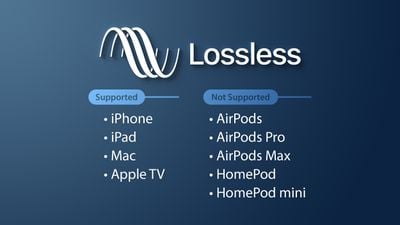
If we talk about audio, there are three main lossless formats: WAV, FLAC and ALAC. The latter is the one used by Apple in iTunes. They are formats that do not lose anything of quality with respect to the original audio. Yes we would be losing quality with the MP3 and the OGG.

And if we talk about video, there are few lossless formats that we can talk about. In fact, there is a problem, and that is that storing videos without loss would be an impossible task for anyone without a storage server nearby. That is why we usually opt for MKV, WMV, and H.264 formats. Of course, the latter is much better, since the compression process it carries is much more intelligent.

Compression, how does it work?

Now, what is this about compressed formats? As its name suggests, we are talking about formats that reduce files, and we can rely on it to fully understand how these formats work. Surely we have all been in the situation of having to pack a suitcase with just enough space, finish choosing all the clothes that we are going to take on a trip, and finally having to decide what we can do without in order to close the suitcase, because we had too many clothes. Well, that is the compression of each of the formats. They remove elements from that file, and thus make it weigh or occupy less.

Why are there different formats? Returning to the case of the suitcase, each person will make different decisions regarding those things that they can do without for their trip. It will vary from person to person. The same goes for formats. The developers of these reduce the space occupied by a file, but each of the formats removes data in a different way, so that a file compressed to JPG, can be different from one GIF, even if both are compressed. Each of them has followed a different procedure to delete the data, and that the song, image, or video, continues to play practically the same as the original version.

When to convert from compression to lossless?

The question at the top of this paragraph is especially important to anyone who has ever converted a file from a compressed format to a lossless format. And it is that, in reality, it is cheating, because you should never convert a file from a compressed format to a lossless file. Actually, nothing happens if we do, but we will not improve the quality of that file, even if it will now be available in a format in which the files are not compressed.

Of course, it is also not a good idea to convert a file in a compressed format to a different compressed format. Keep in mind that each compression process is different depending on the chosen format. In other words, each format eliminates the data it considers appropriate to maintain the quality of the image. If we have a file in a compressed format, this will mean that it no longer preserves all the original data. If we now convert it to a different compressed format, the compression process will remove new data from the file, and chances are we have a much more corrupted file.

Lossless audio formats

Lossless audio formats

We will show you the formats that maintain all the quality of the audio files, compressing just enough. Lossless formats tend to maintain the original quality almost totally, suffering a minimum loss of quality. In summary, they are slightly compressed so that the audio remains intact and the size on disk is smaller.

Among the Lossless formats we have:

FLAC, is a format whose algorithm is similar to ZIP or GZip, but specially designed for audio compression. While ZIP would compress a CD quality audio file from 10% to 20% of its original size, FLAC would compress it from 30% to 50% while maintaining the full quality of the source.

Monkey’s Audio (APE), like FLAC allows lossless compression, but the greatness of Monkey’s is that it compresses bit by bit, reaching data rates of up to 700kbps without any loss of quality.

Apple Lossless (ALAC) uses an MP4 container (with a .M4A extension) for its files just like the MPEG-4 AAC and is specially created for use on the iPod.

Shorten is another Lossless format with characteristics similar to Monkey’s Audio or FLAC, but using the .SHN extension and requires fewer resources for its reproduction.

WavPack uses a hybrid mode, unlike the other Lossless formats, since it uses a Lossy file, which creates a relatively small file at high quality, and a corrector file that recovers the remaining quality of the original file, resulting in an audio file at averages between Lossless and Lossy, but with the same quality as a compressed file with any other Lossless algorithm.

TTA (True Audio) is a free and free LossLess format that reduces by 30% the original size of the source audio file and uses compression / decompression in real time.

What are the advantages of listening to music in FLAC format?

The FLAC format allows us to save audio without loss of quality. This codec encodes the file with the same information that the original CD would have (which would be the WAV file).

Flac

It is an open source format (Free Lossless Audio Codec) that could be improved, thanks to its registration as an open source license.

Higher quality, especially for HiFi equipment: this format allows us to enjoy a bitrate between 900 and 1100 kbps that does not delete information as it does in the MP3, even if it is of high quality. You will notice a warmer, fuller and cleaner sound.
The information is continuous between tracks: just like on the original CD, you can listen to music without interruptions between tracks.
The music is not altered: and that is the main reason why FLAC is ideal. Well, the file you use is the same one that you would download from the CD.
The FLAC format supports unlimited sampling rates – a FLAC can reproduce frequencies of 192,000 Hz without problem.
However, all that it reduces is not gold. There are also some problems with FLACs that you should be aware of, although they are not serious at all.

Disadvantages of listening to music in FLAC format

They take up more: as a FLAC file usually takes up a little more than half of the original CD file. It is easy for an album to go to 300 MB.
Many players do not support FLAC – this is changing in a beastly way. But the industry has fought for the MP3 to the last breath and many players, radios, etc. do not yet support this standard.
That is, the disadvantages are or rather were. In the future we will have a new cleaner format, which will surely take up less space and be an evolution of FLAC. Currently, however, it is the format par excellence and the one that we should all use, although I am not sure that a new, closed format will not come out, that can cope with it before it reaches its peak.

What audio and video formats exist?

When we talk about the quality of videos or audio, many doubts arise in people’s minds, as there are many terms that are very confusing for the user. For example, people talk about kbs, people talk about bitrate, the sample rate and many other terms that are not clear in people’s mentality are mentioned.

But in the end the question is always the same, what is it that is truly decisive to have a better video quality or better audio quality? The answer can be simple if we summarize it: because the difference in quality will depend on the amount of information that is stored, because the more we will have more detail.

When we talk about video formats within the different types that are applied to digital video and that there are three important parts to distinguish in them on the Internet or on a DVD:

The video and its codec (When the video is so heavy, it must always be encoded and subsequently decoded). They are simply mathematical algorithms to compress and decompress the video file.
The audio and its different formats or containers.
The file that contains the audio and video. The container
Let’s see which are the most popular and try to explain them:

Digital Video Formats

MPEG: Moving Pictures Expert Group (Mpeg1, Mpeg2, Mp4 or Mpeg4)
AVI: It is the standard format but the one with the most weight. (Xvid or Divx)
WINDOWS MEDIA: Format developed by Microsoft. (. Mp4 or .asf)
MOV: Format developed by Apple. Quicktime needed to read it. Low weight.Ideal for Web (.m4v or .mov)
FLV: Adobe Flash format. Use Sorensen Spark codec. (.flv)
Digital Audio Formats

Mp3 or MPEG-1 Audio Layer 3: Tablet with imperceptible signal loss for humans. (1Mb / Min)
Aiff: Audio Interchange File Format. It has no compression and uses PCM modulation so they are very heavy (10 Mb / Min.)
AAC: Advanced Audio Coding. Mpeg-2 compression. Suitable for surround or surround sounds
Windows Media Audio: The worst quality of all the above, is the Windows format.
Formats of Digital Audio and Video Containers

.mp4
.mov
.avi
.mkv
.flv
.swf
.m4v
The truth is that it is a world and more when the big companies live thinking only of leading their own markets and not from the point of view of the user they have had abandoned for years. Obviously these are not all there are but if I wanted to include the best known.

But if we are talking about a file or files that any DVD or download from the Internet can have in any format or container type Mp4, mkv, avi with greater quality, we must remember that the important thing is the amount of information that they carry inside, it is say the Mbs to which this video is exported.

It is as if we have a 16-ton truck and we put a box of oranges inside when it can carry 1000 boxes of oranges. What we are going to see is oranges but with a very low quality.

I hope I have shed some light on this world of digital video and how the next time you face a file of this type you will be able to understand what each of the things that are attached to it means. I must admit that it is not easy but that with that global vision and knowing what each one means you feel better when facing him.

And you know some kind of format that you are using and do you think it is missing here? This is a live article to be developed among all and thus clarify all more.