The Advantages of Lossless Audio Formats: FLAC and ALAC


Free Download Mp4Gain
picture

The Advantages of Lossless Audio Formats: FLAC and ALAC

FLAC and ALAC
FLAC and ALAC
FLAC and ALAC
FLAC and ALAC

As an expert in audio optimization, I am always on the lookout for formats that deliver exceptional sound quality without compromising on file size. In this article, I will delve into the world of lossless audio formats, with a specific focus on two popular options: FLAC and ALAC. These formats have gained significant popularity among audiophiles and music enthusiasts for their ability to preserve the original audio quality while offering efficient compression. Join me as we explore the advantages of these lossless audio formats and why they should be your top choice.

Superior Sound Quality

When it comes to lossless audio formats, the primary concern is maintaining the utmost sound quality. FLAC and ALAC excel in this regard, as they employ compression algorithms that preserve every detail of the original audio recording. Whether it’s the rich harmonies of a symphony orchestra or the subtle nuances in a vocalist’s performance, these formats ensure an immersive and authentic listening experience. With FLAC and ALAC, you can indulge in music the way it was intended to be heard, without any compromise on audio fidelity.

Efficient Compression

Efficient compression is another remarkable advantage of lossless audio formats like FLAC and ALAC. These formats utilize sophisticated compression techniques that significantly reduce file sizes while retaining all the audio data. This means you can store more music on your devices without sacrificing quality or resorting to lower-bitrate alternatives. Whether you have a vast music library or limited storage space, FLAC and ALAC offer a practical solution to keep your favorite tracks accessible at all times.

Wide Compatibility

One of the key considerations when choosing an audio format is its compatibility with different devices and platforms. FLAC and ALAC have gained widespread support across various software and hardware ecosystems. Many popular media players, portable devices, and operating systems are compatible with these formats, ensuring seamless playback without the need for additional conversions or transcoding. Whether you’re using a Mac, Windows, or mobile device, FLAC and ALAC guarantee a hassle-free listening experience.

Versatility and Metadata Support

Versatility is an essential aspect of lossless audio formats, and FLAC and ALAC don’t disappoint. Apart from delivering exceptional audio quality, these formats also support a range of metadata. You can embed album art, track information, lyrics, and other relevant details within the audio files themselves. This ensures that your music collection remains organized and easily searchable across different platforms and media players. With FLAC and ALAC, it’s not just about the audio; it’s about creating a comprehensive and immersive musical experience.

Archival and Future-Proofing

For audiophiles and music collectors, archival is a crucial consideration. FLAC and ALAC are ideal for archiving purposes as they provide a reliable and future-proof solution. By choosing these formats, you can preserve your music collection in its original quality for years to come, ensuring that your favorite albums and tracks withstand the test of time. Moreover, since FLAC and ALAC have gained widespread acceptance, it’s highly likely that they will continue to be supported by future audio systems and technologies.

Smooth Integration with Existing Libraries

If you already have an extensive collection of audio files in other formats, the transition to FLAC or ALAC can be seamless. Both formats support transcoding, allowing you to convert your existing audio files into lossless formats without any loss of quality. This ensures that you can integrate FLAC and ALAC files seamlessly with your existing music library, avoiding any disruptions in your listening experience. With their wide compatibility and transcoding capabilities, FLAC and ALAC offer a convenient pathway to upgrade your audio collection.

Community and Support

FLAC and ALAC have garnered a passionate and dedicated community of supporters, comprising audio enthusiasts, music professionals, and developers. This active community ensures ongoing support, updates, and development for the formats, assuring users that they are investing in a long-term and reliable audio solution. Whether you seek advice, troubleshooting, or simply want to connect with like-minded individuals, the FLAC and ALAC community is always there to assist and share their expertise.

Streaming and Online Distribution

With the rise of music streaming platforms and online distribution, the demand for lossless audio formats has also increased. Many streaming services and online stores now offer FLAC as a preferred option for audiophiles, ensuring that you can enjoy your favorite music in its original quality, streamed directly to your devices. This development not only reinforces the advantages of lossless formats but also opens up new avenues for artists, allowing them to deliver their music to fans with uncompromised fidelity.

Preservation of Music History

Lossless audio formats like FLAC and ALAC play a crucial role in the preservation of music history. They allow us to digitize and archive classic recordings, ensuring that future generations can enjoy the same musical experiences as previous ones. By opting for FLAC and ALAC, you contribute to the preservation of cultural heritage and ensure that the legacy of iconic musicians and compositions lives on.

Audiophile-Grade Experience

Lastly, but certainly not least, FLAC and ALAC offer an unparalleled audiophile-grade experience. These formats cater to the discerning ears of audiophiles who crave the utmost audio quality. Whether you’re using high-end headphones, a dedicated audio setup, or a premium sound system, FLAC and ALAC provide the fidelity and richness necessary to truly appreciate the intricacies of the music. With their lossless nature and superior sound reproduction, these formats elevate your listening experience to new heights.

In conclusion, FLAC and ALAC stand out as the go-to choices for anyone seeking lossless audio formats. With their superior sound quality, efficient compression, wide compatibility, and versatile features, they offer an unmatched audio experience. Whether you’re an audiophile, music collector, or simply someone who values exceptional sound, FLAC and ALAC provide the perfect combination of fidelity and convenience. Embrace the advantages of lossless audio formats and let your music shine in its full glory.


Free Download Mp4Gain
picture


Mp4Gain Main Window
picture


Mp4Gain Features
picture


Free Download Mp4Gain
picture

Dissecting Audio Lossy Formats

Dissecting Audio Lossy Formats: Technical Mechanisms and Trade-offs

Audio Lossy Formats
Audio Lossy Formats
Audio Lossy Formats
Audio Lossy Formats

Understanding Audio Compression

As an audio enthusiast, I have always been fascinated by the technology behind audio compression. Audio compression is the process of reducing the size of an audio file by removing or reducing redundant or irrelevant information. This is done to make the file smaller and more manageable, especially for streaming and other bandwidth-limited applications.
There are two types of audio compression: lossless and lossy. Lossless compression preserves all of the original audio data, while lossy compression removes some of the data to achieve a smaller file size. Lossy compression is the most common type of audio compression used today, and it is used in a wide range of applications, from music streaming services to podcasting.

Audio Compression Techniques

There are many different techniques used in audio compression, each designed to optimize audio quality and reduce file size. One of the most important techniques is perceptual coding, which involves analyzing the human perception of sound and using that information to remove or reduce irrelevant information.
Another important technique is psychoacoustic modeling, which is used to identify and remove sounds that are not perceptible to the human ear. As the book “The Art of Digital Audio” explains, “Psychoacoustic modeling is a technique that takes advantage of the limitations of human hearing to remove sounds that are not perceptible to the listener.”
In my experience, understanding these techniques and how they work together is essential for optimizing audio quality and reducing file size. By using the right combination of techniques, you can achieve excellent audio quality while minimizing file size.

Audio Compression Trade-offs

One of the key trade-offs of audio compression is the balance between audio quality and file size. As the book “The Audio Programming Book” explains, “The more you compress an audio file, the smaller it becomes, but the more audio quality you lose.”
In my experience, this trade-off is particularly important for musicians and sound engineers. By understanding the trade-offs between audio quality and file size, you can make informed decisions about how to compress your audio files for different applications.
Overall, dissecting audio lossy formats is essential for anyone working with audio. By understanding the technical mechanisms and trade-offs of audio compression, you can optimize your audio quality and file size, making it ideal for a wide range of applications.
Final words:
In conclusion, audio compression is a powerful technology that offers excellent audio quality at reduced file sizes. By understanding the techniques and technologies behind audio compression, you can optimize your audio quality and file size, making it ideal for streaming and other bandwidth-limited applications. And if you’re looking for a powerful tool to help you normalize and convert your audio and video files, be sure to check out mp4gain.

The Benefits of Lossless Audio Formats

The Benefits of Lossless Audio Formats

Lossless Audio Formats

Lossless Audio Formats Explained

As an audiophile, I always strive to achieve the highest possible quality of sound. Lossless audio formats such as FLAC, ALAC, and WAV are my go-to choices when it comes to digital music. These formats use audio compression algorithms that preserve all the original audio data while reducing the file size. This means that the music you listen to sounds exactly as the artist intended it, without any loss of quality.
When I first discovered lossless audio formats, I was blown away by the difference in sound quality compared to lossy formats like MP3. The music was clearer, more detailed, and had a wider dynamic range. The benefits of lossless audio formats are not just limited to the listening experience, they also have practical benefits. Lossless files take up less storage space on your device than uncompressed audio files like WAV, and can be easily streamed over the internet without compromising quality.

As the famous musician David Byrne once said, “Lossless audio formats offer an uncompromising listening experience that allows you to hear every nuance of a recording. It’s like hearing the music for the first time.”

The Advantages of FLAC and ALAC

FLAC and ALAC are two of the most popular lossless audio formats. They are both open-source and free to use, which means they have a wide range of support across different devices and software. FLAC has become the de facto standard for lossless audio on the internet, while ALAC is the preferred format for Apple devices.
One of the biggest advantages of FLAC and ALAC is their ability to handle high-resolution audio. These formats can handle audio at up to 24-bit/192kHz, which is significantly higher than the 16-bit/44.1kHz standard of CD-quality audio. This means that you can listen to your favorite music with even greater detail and clarity.

In addition, FLAC and ALAC both have robust error correction capabilities. This means that if a file is corrupted during download or transfer, the audio data can still be recovered without any loss of quality. This is a major advantage over lossy formats like MP3, which cannot recover from data errors.

The Benefits of WAV

WAV is a lossless audio format that has been around since the early days of digital audio. It is the standard format for audio CDs, and is widely used in professional audio production. One of the main benefits of WAV is its compatibility with a wide range of hardware and software.
WAV files are uncompressed, which means that they retain all the original audio data. This makes them ideal for situations where maximum audio quality is required, such as mastering and archiving. In addition, WAV files can be edited without any loss of quality, making them the preferred format for audio engineers and producers.

As the great music producer Rick Rubin once said, “WAV files are the gold standard for audio quality. They offer the most accurate representation of the original recording, and are essential for anyone serious about music production.”

Final Words

In conclusion, lossless audio formats offer a superior listening experience compared to lossy formats like MP3. Whether you choose FLAC, ALAC, or WAV, you can be sure that you are getting the best possible sound quality. As an audiophile, I highly recommend using lossless audio formats for your music collection. And if you’re looking for a reliable and efficient way to normalize and convert your audio files, MP4Gain is the perfect solution.

What are the advantages of the lossless audio format?

What are the advantages of the lossless audio format?

Lossless and Lossy Audio Files

The advantage of lossless for storing an audio collection is that the quality of the recordings is much higher than that of lossy codecs and they take up less space than uncompressed audio. It is true that lossy files are smaller than lossless music files. Most modern playback programs understand the lossless format. Programs that cannot play it can easily learn it using the lossless plugin. What are lossless audio formats?

Lossless audio

Lossless audio formats
A true music lover is unlikely to be satisfied with the sound of music recorded in Ogg Vorbis or MP3 compression formats. Of course, if you listen to audio recordings on home audio equipment, sound defects cannot be heard with your ear, but if you try to play a compressed file on high-quality Hi-Fi equipment, you will immediately find the sound defects. . Of course, creating a collection of quality music on CD or vinyl is not easy. There is a reasonable alternative to this path for lovers of high-quality sound – lossless music. It can be stored on a PC in a way that allows you to keep your music’s original settings unchanged, even if compression is applied. In this way it simultaneously solves the problems of high-quality music and its compact storage, since audio equipment for listening (headphones, speakers, amplifiers) is quite affordable.

Uncompressed lossless audio formats:

CDDA is an audio CD standard;
WAV: Microsoft Wave;
IFF-8SVX;
IFF-16SV;
AIFF;
Compressed formats:

FLAC;
APE – Monkey’s Audio;
M4A – Apple Lossless – Apple’s high-quality music format;
WV – WavPack;
WMA: Windows Media Audio 9;
TTA – True Audio.

FLAC format
The most common format is the. It differs from lossy audio codecs in that no data is removed from the audio stream when it is used. This makes it possible to use it successfully to play music on Hi-Fi and Hi-End equipment, as well as to create an archive from a collection of audio recordings.

The great advantage of the format is its free distribution. This is important for musicians who record music on their own. The format has gained a lot of popularity recently, thanks to which its support is included in the vast majority of multimedia players.

APE format
Unlike FLAC, for the APE format there are only codecs and plugins for the Windows platform. For other platforms, there are expensive third-party software solutions. The algorithm is capable of achieving lossless compression of audio information between 1.5 and 2 times. It includes three main stages of encoding, of which only one is based on the use of inherent properties of sound for compression. The rest are similar to conventional filing cabinets. Even though the compression algorithm is distributed free of charge, the licensing restrictions are such that it is practically inaccessible to amateur musicians.

Apple Lossless Format
You can listen to high-quality lossless music using the audio compression codec without sacrificing Apple quality. This format was developed by Apple for use on its own devices. The format is compatible with iPods with special dock connectors and the latest firmware. The format does not use specific rights management (DRM) tools, but the container format contains such capabilities. It also supports QuickTime and is included as a feature in iTunes.

The format is part of the free access libraries, which allows you to organize listening to files in Windows applications. In 2011, Apple released the source codes for the format, opening up broad prospects for the codec. In the future, it can seriously compete with other formats. The tests yielded good results. Compressed files vary in size between 40-60% of the originals. The decoding speed is also impressive, which justifies its use for mobile devices, whose performance is not high.

One of the disadvantages of the codec is that the extension of the audio files matches the audio codec, leading to confusion because AAC is not a high-quality music format. Therefore, it was decided to store the data in an MP4 container with the extension .m4a.

Lossy Audio File Types: How It Is Different From Lossless

Lossy Audio File Types: How It Is Different From Lossless

Lossy Compression vs Lossless Compression

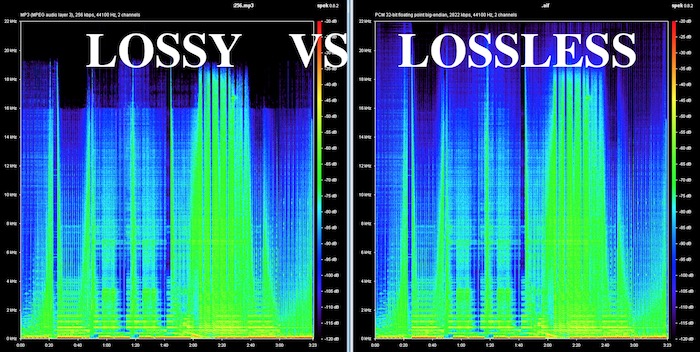
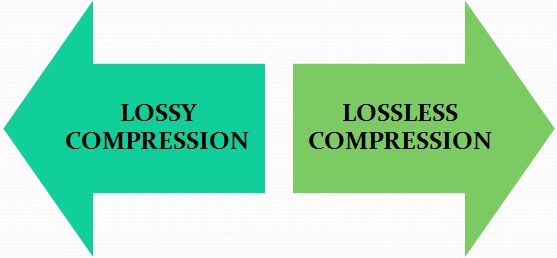
Lossy is a word used in digital audio to describe the type of compression used to store audio data. The algorithm used in the lossy audio format compresses the audio data in such a way that it discards certain information. This loss of signal means that the encoded sound is not identical to the original.

lossy vs lossless

Lossy audio produces lower quality audio and has a smaller file size.

Lossy compression is also called irreversible compression because data that has been deleted is impossible to recover.

What is the difference between Lossy and Lossless?
When you create MP3 files by ripping one of your music CDs, some details of the original recording are lost, making it a lossy format. This type of compression isn’t just limited to audio; for example, JPEG image files are also lossy compressed.

Sheets of colored paper compressed into a ball

This method is the opposite of lossless audio compression used for formats like FLAC, ALAC, and others. In this case, the audio is compressed in such a way that the data is not deleted. The sound is identical to the original source.

Lossy archives take priority when it comes to compatibility. While lossless files are only supported by some devices and apps, a lossy audio format like MP3 will work on almost any device.

How Lossy Audio Compression Works
Lossy compression makes certain assumptions about frequencies that the human ear is unlikely to detect.

When a song is converted to a lossy audio format such as AAC, the algorithm analyzes all frequencies and then discards the frequencies that the ear should not be able to detect. These low frequencies are filtered or converted into mono signals that take up less disk space.

Another technique eliminates very quiet sounds that the listener is unlikely to notice, especially in the loudest part of the song. This approach reduces the size of the audio file while maintaining the highest possible audio quality.

What happens to the audio when it is compressed?
Lossy compression introduces artifacts. These artifacts are unwanted sounds that are not in the original recording but are a by-product of compression. This noise degrades sound quality and is noticeable when music files are converted using low bit rates.

Various types of artifacts affect the quality of the recording. Distortion is one of the most common artifacts. For example, distortion makes the drums feel weak, without any real beat. Song voices can also be affected, resulting in harsh vocals and lack of detail.

In many cases, casual listeners can’t tell the difference between lossy and lossless encoding, although some audiophiles using very expensive equipment claim to hear the difference. The difference in quality is only noticeable when very low data rates or aggressive compression algorithms come into play.

Why compress audio files?
Most digital audio formats use some form of compression to efficiently store sound. Without compression, the file sizes would be very large.

For example, a typical 3-minute song stored as an MP3 file is between 4MB and 5MB. Using the WAV format to store the same song, but without compression, results in a file size of approximately 30MB, at least six times that size. Fewer songs fit on your smartphone or hard drive when you choose uncompressed audio formats

Files without compression, lossless and lossy formats

Files without compression, with compression but without loss and with compression and with loss … what does that mean?

There is currently a huge confusion in most people about audio formats and that is why we are going to give an explanation that is as simple and clear as possible so that most of the people who read can understand enough to be able to make decisions about it. .

We will not try to get into technicalities or knowledge What are for specialists or connoisseurs or programmers, such as those who developed the mp4gain, but rather we will talk about general concepts at the beginner level but that can allow a correct understanding of the matter.

So the first thing we must understand is that the quality of an audio file depends on the amount of details it contains and for it to contain many details, it takes up a lot of space on the hard disk.

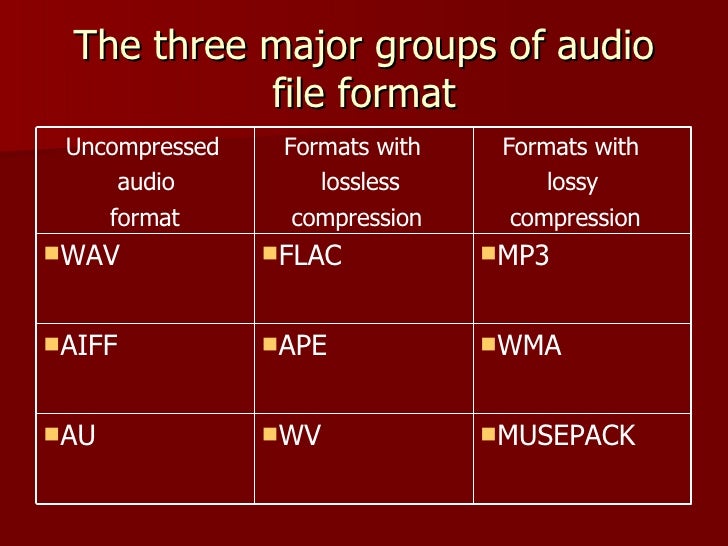
We could say that there are three groups of audio file formats:

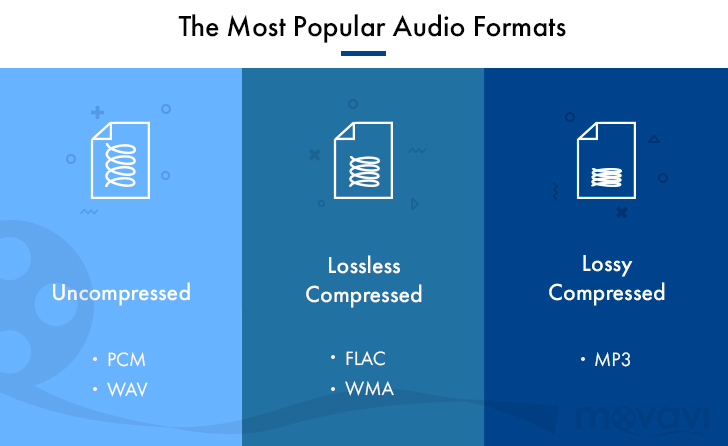
– audio formats that do not have compression such as WAV, AIFF, etc.

– formats that compress audio but do not have a loss of information. FLAC, MPEG-4 SSL, WAV PACK, etc.

– There are also the formats that the audio compresses but that do have a loss of information, for example MP3, Ogg, HERE, ETCÉTERA

Now let’s clarify what it means that some formats do have compression but do not have loss of information while others also have compression but do have loss of information.

The formats that are compressed but have no loss of information what they do is something very similar to zip the file. In other words, they simply compress.

The original information but they do not discard anything, therefore when unzipping the file the original file is obtained again that had all the details and therefore is of very high quality.

On the other hand there are files such as MP3 that are compressed but also to achieve greater compression what they do is that they get rid of some part of the information. For example, those frequencies that are not audible to the human ear also get rid of that information that is redundant and they also use the method called masking which part of the idea that a sound that is very loud and is very forward It will be able to mask other sounds and the human brain will not perceive those other sounds. Therefore, according to this theory, they can get rid of these sounds that have been masked and the file will sound more or less the same to the human ear.

This concept of sound masking was one of the great milestones that made MP3 become so popular because it could compress files a lot, at a time when disk space was not superfluous, and yet they sounded pretty good to that ear. era and those people.

Also the programs that made the normalization of the audio volume, achieved results that at that time sounded good, but at this time the listening ear as a has become much more demanding and sophisticated. And so we need much more modern normalizers with much more algorithms. more powerful like mp4gain.

Encoding digital audio with a loseless format?

Compressing a digital audio with loss is to reduce the size of an audio file.

Codecs are used to reduce the size of the files. Some of the operations that codecs can perform to reduce file sizes are as follows:

Reduce the bit rate of the original sound so that the audio takes up less space.
Remove sounds at frequencies that are not noticeable by the human ear.
Elimination of redundancies of the audio signal.
They can reduce the number of existing channels by transforming a surround sound to Stereo.
Reduce the number of bits per sample.
Etc.
Note: The compression process of an audio is extremely complex. In addition, each codec applies different methodologies to compress the size of an audio.

Obviously during the compression process there will be a loss in audio quality. The higher the weight reduction of the compressed file, the higher the loss of quality.

UTILITIES THAT YOU HAVE TO COMPRESS AN AUDIO

Obviously compressing an audio has certain utilities. Some of them are as detailed below:

The space needed to store the songs on our hard drive will be much smaller. Although hard drives are cheap and their storage capacity is large, it is not feasible and / or practical to store all of our songs without loss.
We can pass the audio files to third parties in a much more convenient and fast way. After compressing a music song we can pass it by email or other means without any problem.
It seems that the trend in the very near future will be to consume video and audio via streaming. Therefore the compression of video and audio is very important. If we offer a web service in which we provide streaming audio, it is essential to compress the audio to save bandwidth and so that customers can play it at home without problems.

Select the compressed audio file format

There are numerous types of compressed file format with loss. Some of the most popular are the following:

.mp3
.ogg
.wma
.m4a
.aac
Depending on the needs, it may be useful to select one format or another.

However in my case I recommend using the mp3 or ogg file format. The reasons are as follows:

The .mp3 files do not stand out for providing the best audio quality. However, the .mp3 format is the most universally extended.
Any music player is capable of playing the .mp3 file format. You cannot say the same of the other file formats.
Everyone is able to play audio in .mp3 format. Even people with little knowledge technologically speaking.
If someone does not want to use the .mp3 format because they think the quality is not enough, or because it is a proprietary format, I recommend using .ogg. In the following link you can find the advantages and disadvantages of the .ogg files with respect to the .mp3 files.
Select the audio compression codec (encoder)

Once the file format is selected we must be aware of the codec that we will use to perform the audio compression.

In the case that we want to compress in the .mp3 file format there are the following codecs:

FHC: It’s the first codec that existed. At present this codec has become obsolete. Its compression time is very high and does not support variable bit rate.

Xing: It is the fastest encoder and allows you to obtain files with a variable bit rate (VBR). However, the quality level offered by this type of encoder is lower than Blade and Lame.

Blade: Until Lame’s appearance was the best option. It is slightly slower than Xing, but the quality levels obtained are much better. Currently this host has a problem and it does not support variable bit rates.

Lame: It is available under the GNU license and is also the best host available today. It supports variable bit rates, is fast and the quality obtained is better than in the rest of the encoders.