Dynamic Range Compression in MP3


Free Download Mp4Gain
picture

Dynamic Range Compression in MP3
Dynamic Range Compression in MP3

Let’s Talk About Dynamic Range Compression in MP3

Dynamic range compression (DRC) is a concept that often comes up in audio discussions, especially when we talk about MP3s and audio quality. It’s a process that affects how we hear quiet and loud sounds in a recording by balancing their volumes. Think of it like adjusting the volume knob automatically so the quieter sounds are more noticeable and the louder sounds don’t overwhelm. I have years of experience in audio processing and understand how DRC impacts everything from music streaming to the soundtracks we hear in movies. In this article, I’ll dive into how dynamic range compression works, how it affects MP3 files, and share insights on making the most of it in digital audio.

What is Dynamic Range Compression?

Dynamic range compression is all about controlling the difference between the quietest and loudest parts of an audio track. If you’ve ever listened to a song where the vocals get drowned out by the instruments, you’re experiencing a wide dynamic range. Compression tackles this by “squeezing” the audio into a more consistent volume range, making the quieter parts louder and the loudest parts softer. Think of it as balancing a book on a seesaw, where the compressor acts as the steadying force, preventing extreme highs or lows.

Why Dynamic Range Matters in MP3 Compression

MP3s are a compressed file format designed to reduce file size without significantly compromising sound quality. However, achieving this compression means some audio data is discarded, typically by cutting out sounds that are less likely to be noticed by human ears. This process, called lossy compression, already affects the dynamic range. DRC, when applied to an MP3, can both help and harm, depending on how it’s used. While it can bring out quieter details, it may also reduce the natural contrast between loud and soft sounds. For example, in classical music, which relies on these contrasts, heavy compression could strip away its depth.

How Dynamic Range Compression Works in MP3 Encoding

Dynamic range compression in MP3 encoding uses algorithms to measure the volume of the audio content and then applies compression settings accordingly. This includes parameters like threshold, which defines the volume level where compression starts, and ratio, which determines how much compression is applied. For instance, if I’m encoding an MP3 of a rock song, I might use a higher ratio to ensure that vocals don’t get buried under guitars, but with a softer threshold to keep the percussive energy intact.

  • Threshold: The volume level at which compression begins.
  • Ratio: The intensity of compression applied to sounds above the threshold.
  • Attack Time: How quickly the compressor reacts to loud sounds.
  • Release Time: How quickly the compression effect stops when the sound decreases.

How Human Hearing Influences Dynamic Range Compression

Our ears are sensitive to certain frequencies and less so to others. Dynamic range compression takes advantage of these natural listening preferences, particularly when applied to MP3s. MP3 compression removes “unnecessary” sounds based on psychoacoustic models, making dynamic range compression more noticeable. For example, in a jazz recording, the soft whisper of a saxophone might be drowned out by louder instruments. Compression can bring out this subtlety by amplifying the saxophone’s volume relative to louder sounds, providing a fuller listening experience.

The Role of Psychoacoustic Models in MP3 Compression

Psychoacoustic models consider what our brains are likely to ignore when processing sounds. MP3 encoders use these models to selectively discard sounds during compression, aiming to retain only the most essential elements. In my experience, understanding psychoacoustics helps make smart decisions in audio processing, especially in MP3s where balancing quality with file size is key. When applying dynamic range compression, these models guide what frequencies and volumes to boost or soften without degrading perceived quality.

Benefits of Dynamic Range Compression in MP3 Files

Dynamic range compression in MP3 files offers several benefits. For one, it creates a more uniform listening experience, especially in environments with ambient noise, like a car or train. I’ve found that DRC can make a podcast or an audiobook clearer and more enjoyable since it brings voices to a more consistent level.

  • Enhanced clarity in noisy settings.
  • Improved intelligibility for speech audio, like podcasts.
  • Balanced volume across different listening environments.
  • Preserved details in quiet audio passages.

Challenges of Using Dynamic Range Compression in MP3 Files

Applying too much compression in an MP3 file can lead to a “flattened” sound where the subtle dynamics that make music expressive get lost. This is sometimes called the “loudness war” effect. For instance, rock and pop tracks are often heavily compressed to make them sound louder, but at the cost of depth and dynamics. In classical or jazz, over-compression can erase the subtlety that’s crucial to the genre.

Different Types of Compression in MP3 Audio Processing

Several types of compression can be applied to MP3s, each with its own effects:

  • Peak Compression:

    Reduces only the peaks, preserving most of the dynamics.

  • Average Compression:

    Balances the average loudness of the track, ideal for dialogue-heavy audio.

  • Multiband Compression:

    Separates the audio into frequency bands and applies different compression settings to each.

How Much Compression is Too Much in an MP3 File?

Over-compressing an MP3 can make it sound unnatural and “boxy.” I always suggest a subtle approach to maintain a balance between loudness and audio fidelity. For most music genres, especially those that rely on dynamic contrast, over-compression can be detrimental.

Examples of Dynamic Range Compression in Real-Life Audio

Think of TV commercials that sound louder than the show you’re watching. That’s compression in action, used to grab your attention. In MP3s, compression is used similarly to make certain sounds “pop,” though with more nuance. Another example is in phone calls, where DRC is used to ensure the voice remains clear despite background noise.

Using DRC with MP4Gain for Optimal Results

If you want precise control over dynamic range compression, especially for MP3s, MP4Gain offers customizable settings that allow you to adjust compression levels based on your needs. Whether it’s enhancing vocals or ensuring a consistent playback volume, it’s a tool that brings out the best in compressed audio.

Latest Words on Dynamic Range Compression in MP3

Dynamic range compression, when used wisely, can enhance the listening experience of MP3s by bringing clarity and balance to the audio. While it’s a powerful tool, overuse can strip audio of its character and depth. My advice: start with minimal compression and adjust gradually to find the best balance. Understanding the effects of compression and using tools like MP4Gain can make a significant difference in your audio projects, ensuring the quality you want without sacrificing the nuances that make audio truly enjoyable.

Comments:

This was super helpful! I always wondered why MP3s sounded different. Great breakdown on compression.

Really good explanation. But I would like more info on how psychoacoustic models actually work in compression.

I’ve struggled with audio sounding “flat” after compressing—didn’t realize it could be the DRC settings!

Man, compression in MP3s is wild. Thanks for explaining it in simple terms, never knew about all these types of compression.

Can someone help me understand why compression is necessary at all? Why not just leave the audio alone?

This article cleared up so much for me. Now I know why some music feels “boxed in”!

Great article. I wish you’d talk about how MP3 compares to other formats in terms of compression.

Thanks for breaking it down! Didn’t know compression affects different genres in such specific ways.

Reading this made me realize why my podcasts sometimes sound different on my phone. Good info!

I never understood why my music sounded “muffled” on high volume. This helped a lot!

Interesting stuff. Might have to try out that MP4Gain tool you mentioned for my recordings.

Wow, very thorough. Really makes me appreciate the work that goes into audio processing.

I learned so much from this. Wish I knew about compression when I was starting with audio editing.

Nice article! You should add a video tutorial for those of us who want a visual guide.

This answered a lot of questions but left me wondering how compression affects live recordings. Anyone?


Free Download Mp4Gain
picture


Mp4Gain Main Window
picture


Mp4Gain Features
picture


Free Download Mp4Gain
picture

What are lossy and lossless audio formats, and what are common audio formats? Part 2

What are lossy and lossless audio formats, and what are common audio formats? Part 2

lossy and lossless audio formats

Audio Formats:

lossy and lossless audio formats

2. WAVE is a sound file format developed by Microsoft, it is used to save the audio information resources of the WINDOWS platform, and is compatible with the WINDOWS platform and its applications.

3. AIFF format (Audio Interchange File Format) and AU format, AIFF is the English abbreviation for Audio Interchange File Format. It is an audio file format developed by APPLE and supported by the MACINTOSH platform and its applications. Many compression techniques are supported.

4.MPEG is the English abbreviation for Motion Picture Experts Group Currently, MP3 is the most common music format on the Internet. Although it is lossy compression, its biggest advantage is a higher compression ratio in exchange for very little sound distortion.

5. MP3 MPEG audio file compression is lossy compression. MPEG3 audio encoding has a high compression ratio of 10:1~12:1, while basically keeping the low audio part undistorted, but at the expense of the high 12KHz to 16KHz. in the sound file. The quality of the audio part is changed by the size of the file. Music files of the same length are stored in *.mp3 format, usually only 1/10 of *.wav file, so the sound quality is lower than CD or WAV format.


6. MPEG-4 Adopts object-based compression coding technology. Before encoding, the video stream is first analyzed, and each video object is segmented from the original image, and then the shape information, motion information, texture information is encoded separately, and temporal redundancy between consecutive frames is eliminated thanks to better motion prediction and compensation than MPEG-2. Its core is content-based scalability, which can assign priorities to each object in the image, express the most important objects with high spatial and temporal resolution, and express the less important objects (such as surveillance systems, background) are rendered. with a lower resolution. or even not displayed. Therefore, it has the ability to adaptively allocate resources and can perform low-speed, high-quality video transmission and image communications. It occupies less resources, has great flexibility, good network performance, and has a wider range of applications.

7. The MIDI (Musical Instrument Digital Interface) format is used by people who often play music, MIDI allows digital synthesizers and other devices to exchange data.

8. WMA (Windows Media Audio) format is a heavyweight player from Microsoft. The background is harsh, the sound quality is stronger than MP3 format, and it is much better than RA format. It is the same as the VQF format. developed by the Japanese company YAMAHA. However, the method to maintain sound quality can achieve higher compression ratio than MP3. The compression ratio of WMA can generally reach around 1:18. Another advantage of WMA is that content providers can use DRM (Digital Rights Management) like Windows Media. Rights Manager 7 adds copy protection.

What are lossy and lossless audio formats, and what are common audio formats?

What are lossy and lossless audio formats, and what are common audio formats?

lossy and lossless audio formats

We often hear some terms like MP3, lossless, CD sound quality, and even come into contact with them. So what are lossy and lossless audio formats? What are their differences? Apart from the ones I heard above, what other common audio formats exist? Next, I will share with you the relevant knowledge of audio formats and answer your questions.

lossy and lossless audio formats


First, let’s briefly popularize the audio format:

The audio format is the music format. Audio format refers to the process of digital and analog conversion of audio files for playback or processing on a computer. At present, music file playback formats are divided into two types: lossy compression and lossless compression. When using different music file formats, there is a big difference in sound quality performance.

Difference Between Lossy and Lossless Compression:

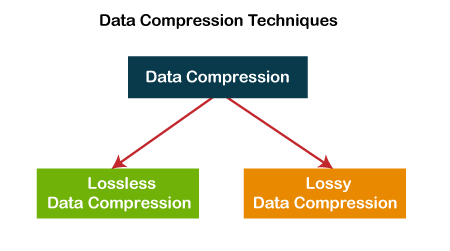
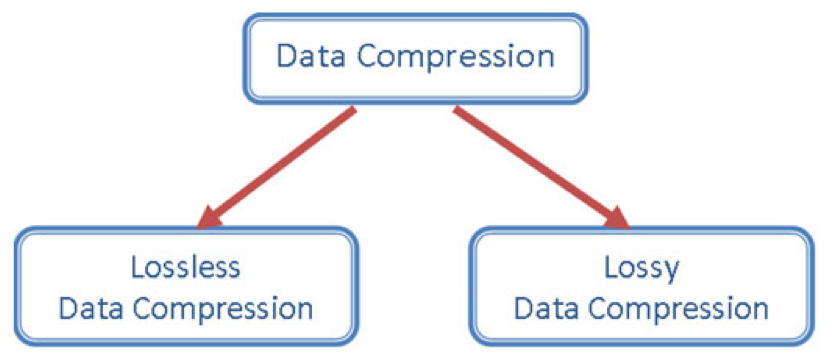
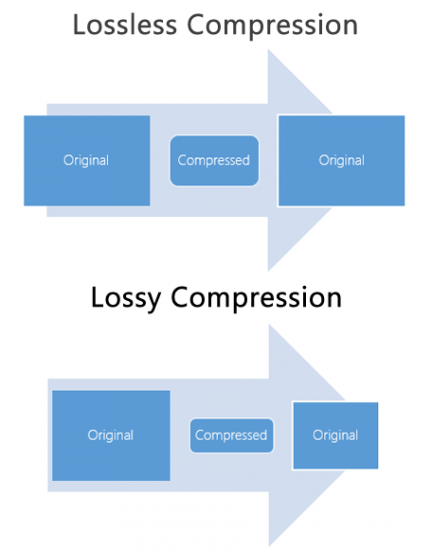
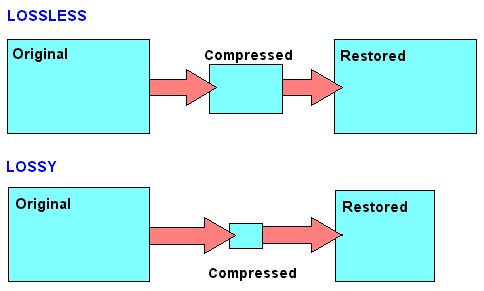
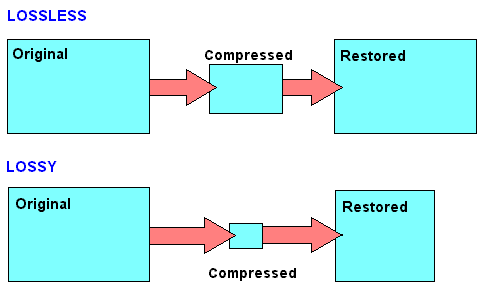
Lossy compression is to reduce the audio sample rate and bit rate, and the output audio file will be smaller than the original file. Lossless compression, on the premise of saving 100% of all the data in the original file, can compress the audio file to a smaller size, and after restoring the compressed audio file, it can achieve the same size and code. than the source file. Speed.

Here are the common audio formats:

1. CD The standard CD format is the sampling frequency of 44.1K, the rate is 1411K/second, and the quantization number is 16 bits. Since the CD track can be said to be approximately lossless, its sound is basically faithful to the original sound.

Lossy vs Lossless, Audio Quality

Lossy vs Lossless, Audio Quality

Lossy vs Lossless
Lossy vs Lossless

Much is said and has been said about the difference between the formats that generate a loss of information (lossy) versus those that do not generate any loss (lossless).

Lossy vs Lossless
Lossy vs Lossless

What is Lossy?

To compress a file, so that it occupies less space on the disk, we must necessarily use two techniques, the first is pure compression, which does not lose quality and which we will explain later PLUS compression by discarding information.

It is omitting information that we know, after studies, that the human ear will hardly perceive. At least the average human ear.
Younger people listen to more frequencies than from the age of 30, when we listen to fewer frequencies.

But not only does age count, but other phenomena also enter, for example what is called masking and which could be summarized by saying that if two frequencies occur with similar frequencies, and one occurs an instant before the other, in general the second that masked… that is, it is not audible to the human ear, so we could discard it and save space.

There are also all the frequencies that the human ear does not perceive, there we have more information that we can discard without damaging the quality or at least maintaining a very similar quality of perception.

LossLess

There are other formats that do not lose quality because they only use mathematical methods to save space. Imagine the following line:

1111111000001110000000

This consumes a space, but this information could be summarized, for example as follows:

1(7)0(5)1(3)0(7)

This second way of storing information takes up much less space WITHOUT discarding anything. It simply explains that from the number 1 there are 7, followed by 5 zero numbers, then 3 from the number 1 and finally 7 zeros.

It’s the same, we just tried to save space by finding a compressed way to write it, but we didn’t rule anything out.

This is exactly how the zip and lossless music methods work.

Is there a difference in the human ear when listening to one and the other?
We will answer that in another article.

Lossy Audio File Types: How It Is Different From Lossless

Lossy Audio File Types: How It Is Different From Lossless

Lossy Compression vs Lossless Compression

Lossy is a word used in digital audio to describe the type of compression used to store audio data. The algorithm used in the lossy audio format compresses the audio data in such a way that it discards certain information. This loss of signal means that the encoded sound is not identical to the original.

lossy vs lossless

Lossy audio produces lower quality audio and has a smaller file size.

Lossy compression is also called irreversible compression because data that has been deleted is impossible to recover.

What is the difference between Lossy and Lossless?
When you create MP3 files by ripping one of your music CDs, some details of the original recording are lost, making it a lossy format. This type of compression isn’t just limited to audio; for example, JPEG image files are also lossy compressed.

Sheets of colored paper compressed into a ball

This method is the opposite of lossless audio compression used for formats like FLAC, ALAC, and others. In this case, the audio is compressed in such a way that the data is not deleted. The sound is identical to the original source.

Lossy archives take priority when it comes to compatibility. While lossless files are only supported by some devices and apps, a lossy audio format like MP3 will work on almost any device.

How Lossy Audio Compression Works
Lossy compression makes certain assumptions about frequencies that the human ear is unlikely to detect.

When a song is converted to a lossy audio format such as AAC, the algorithm analyzes all frequencies and then discards the frequencies that the ear should not be able to detect. These low frequencies are filtered or converted into mono signals that take up less disk space.

Another technique eliminates very quiet sounds that the listener is unlikely to notice, especially in the loudest part of the song. This approach reduces the size of the audio file while maintaining the highest possible audio quality.

What happens to the audio when it is compressed?
Lossy compression introduces artifacts. These artifacts are unwanted sounds that are not in the original recording but are a by-product of compression. This noise degrades sound quality and is noticeable when music files are converted using low bit rates.

Various types of artifacts affect the quality of the recording. Distortion is one of the most common artifacts. For example, distortion makes the drums feel weak, without any real beat. Song voices can also be affected, resulting in harsh vocals and lack of detail.

In many cases, casual listeners can’t tell the difference between lossy and lossless encoding, although some audiophiles using very expensive equipment claim to hear the difference. The difference in quality is only noticeable when very low data rates or aggressive compression algorithms come into play.

Why compress audio files?
Most digital audio formats use some form of compression to efficiently store sound. Without compression, the file sizes would be very large.

For example, a typical 3-minute song stored as an MP3 file is between 4MB and 5MB. Using the WAV format to store the same song, but without compression, results in a file size of approximately 30MB, at least six times that size. Fewer songs fit on your smartphone or hard drive when you choose uncompressed audio formats

Data compression: lossless or lossy

To be able to store large amounts of data, a huge amount of storage space is required. When the space is at some point full, a new storage space is usually made available. Mainly in the form of new hard drives, server systems or the like. But there is another way to store more data: data compression.

Lossless vs Lossy

Data compression works like a pillow you squeeze
Figuratively speaking, data compression works the same way as when you squeeze a pillow. Not all air is required between the pillowcase and the feathers. By squeezing the pillow, you compress it by removing the air (as much as you can); the pillow becomes smaller, that is, more compressed than before.

It is similar with data compression. Here also items that are not absolutely necessary, in this case data, are removed and the storage space still required by the remaining data is reduced.

Lossy vs Lossless Compression

Different lossless compression encoding methods.

When it comes to data compression, a distinction is made between lossless compression and lossy compression, so it can be further subdivided into different types of compression.
Lossless compression is generally only done with text files. If the text is saved as a character string and not as an image or the like, the storage space can be saved using the dictionary method, for example. Recurring parts of the string are simply replaced by abbreviations.

Text: Hello world. Hello user
Encoding: world X5. X5 users.

With the help of Run Length Encoding (RLE), identical text components that are placed one after the other are only saved once. This can also save storage space.

Text: Today was beautiful, beautiful, beautiful and tomorrow will be more beautiful.
Coding: Today was / 3 / beautiful, / and tomorrow will be more beautiful.

In entropy encoding, as is the case with Huffman code or arithmetic encoding, for example, text elements are sorted in binary and encoded according to their frequency, and the most frequently occurring element is given the binary number smaller.

With these numbers, the text elements are stored in a separate dictionary.

Text: IF YOU FLY BACK, FLY, FLY, FLY, FLY AFTER.
Coding: 10100 1 1 1101 1 1 1 11

Difference between lossless and lossy compression

The benefit of lossless encoding is clear: it ensures that all “compressed” data in the compressed data packet can be accessed and restored.

In addition to lossless compression, there is also lossy compression. Irrelevant information is not encoded here, but is directly removed. Therefore, we speak of a reduction in irrelevance.

Lossy compression: the MP3 format

Of course, this procedure can lead to extremely high compression rates. However, this irrelevant information is irrevocably deleted. This means that the original state cannot be restored after compression.

Lossy compressions are often used for image, audio, and video files, as they often have to handle large volumes. The MP3 format is a classic example in this context. Here, frequency patterns are removed from an audio file that are almost inaudible to the human ear. This saves storage space.

If you compress data packets, you can use your own data storage capacity better than uncompressed data packets. However, you should always consider the type of compression you are using. Because lossy compression is not always desirable.

Uncompressed and compressed formats

Popular audio formats

Uncompressed formats

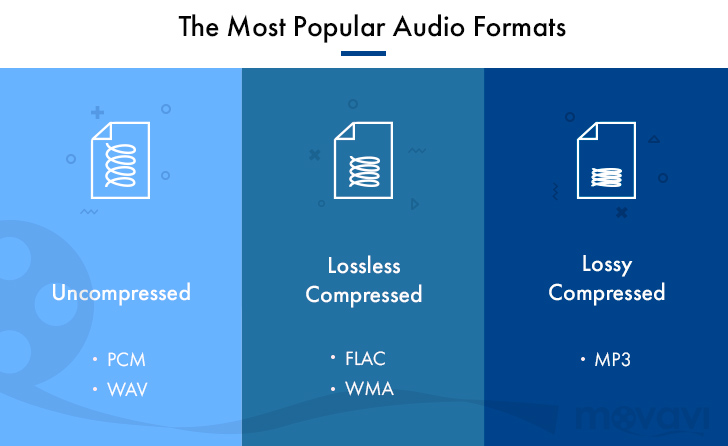
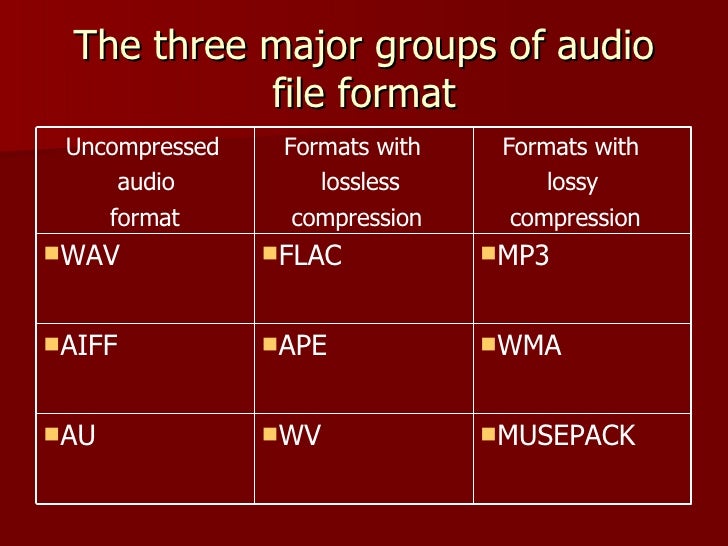
There are audio formats that do not have compression and are the best in terms of sound quality. On the other hand, they take up much more memory space and a lower transmission speed than compressed formats. With professional software such as Pro Tools, SuperCollider or Max, you generally work with files of this type. The two main formats are:

WAV (wave). Audio format developed by Microsoft and IBM for compatible IBM PCs. In this format, musical instruments feel the same regardless of the PC on which the file is played (with the same acoustic quality of the hardware components, of course).

AIFF (Audio Interchange File Format). The format developed by Apple is also called the Apple Interchange File Format.

Audio formats

Lossy compression

It allows for more compression, but at the expense of sound quality. Lossy compression methods generally tend to discard information considered useless, keeping only the essential ones and arise from the idea that not all frequencies contained in a sound spectrum are perceived by the human ear. Then the high frequencies are cut off, which are believed to be the least distinct in our hearing. Obviously, the more frequencies you cut, the more the space occupied by the audio track decreases and with this also the quality of the result as a reconversion process. It does not allow the complete restoration of the cut-off frequencies. Let’s see what are the main audio formats of this type:

MP3 (MPEG-1/2 Audio Layer 3). Audio compression algorithm capable of drastically reducing the amount of data required to reproduce a sound, compromising obtaining an almost faithful reproduction of the original uncompressed file. The best codec for compression is Lame. maximum achievable bit rate 320 Kbps.

WMA (Windows Media Audio). Audio file standard invented by Microsoft. Audio compression format very similar to an MP3.

OGG (Vorbis). It is an open source algorithm and with the same perceived quality, it allows greater compression than the MP3 format, obtained through advanced psychoacoustic research.

AAC (advanced audio coding). It is an audio compression format officially included in MPEG-4. Provides superior audio quality to MP3 format with more compact encoding. Currently it is used mainly by Apple, which in the variant that manages copyright has a compression of 128 Kbps (the standard of the iTunes Store) and corresponds to that of an MP3 at 192 Kbps at constant bitrate. Conversion times are a bit slower than other formats.

AC3 (Dolby Digital). Dolby Digital is a multi-channel audio coding system developed by Dolby Laboratories Inc and used in film, digital TV, laser discs, DVDs, and other digital audio streaming or playback media. It works from a minimum of 96 kbps to a maximum of 640 kbps. In cinema, Dolby Digital is used with only 320 kbps of bandwidth, as it prints in the limited space available between the slide holes of the films. Generally, in DVD it is used with a bit rate of 192 kbps to encode stereo signals (2.0, 2.1) or stereo surrounds, and with a bit rate between 384 and 448 kbps for 5.1 signals.

Lossless compression

These compression methods try to reduce the space occupied by the track without going to touch the sound. The compression rate is much lower than with lossy methods, but there is no loss of quality and the sound is identical to the original when converting. Let’s see what are the main audio formats of this type:

FLAC (Free Lossless Audio Codec). The widespread open source audio codec is currently well supported by various audio software. Unlike most lossless compression algorithms (like ZIP and gzip, for example) that only achieve 10-20% compression, it achieves significant compressions, on the order of 30-50%.

APE (Monkey’s Audio). No lossy format that allows us to reduce the space our music occupies by approximately 50% (in some cases even more). Currently it is no longer developed.

ALAC (AApple Lossless Audio Codec). The format developed by Apple stores data in an MPEG-4 container with the extension .m4a. It does not have Digital Rights Management (DRM) and is now deprecated.

MP3 audio files and lossless files, which one is the best?

For your music collection, is an mp3 audio file or a lossless file better? Let’s see together the differences and which format to choose

Lossy Compression vs Lossless Compression

In the transition from analog music (vinyl records, cassette tapes and other similar media) to digital music (audio CDs, mp3 audio files, etc.) a few decades ago, compression algorithms have played a fundamental role. to say the least. To avoid taking up too much space on the data storage media (when the transition was launched, every available byte of space was worth as much as gold) it was necessary to develop algorithms that would help compress the size of the files without affecting the quality of the file too much. Audio .

Lossless vs Lossy compression

It was during these years that names like mp3 audio files, WMA files, WaV files, and OGG files began to circulate quite frequently in musical (and non-musical) circles around the world.

Losseless vs Lossy

Over the years, the panorama of audio formats expanded dramatically and we witness the curious formation of two opposing blocks. On one side, in fact, so-called lossless files were ‘stacked’ (literally lossless), while on the other side of the musical ‘iron curtain’ were lossy files (literally lossy). As the names suggest, the distinction between one format and another is given by the possible loss of musical information.

Lossless files guarantee (and guarantee) the same depth of sound and quality of an audio CD, while lossy files (like mp3 audio files) allow you to reduce the size of a music track in the order of 10 times in partial detriment of audio quality. For example, if a lossless file takes up 40 megabytes of space, an mp3 audio file of the same song will take up just over 4 megabytes.

The bitrate

What makes the difference between the two audio file formats is the bit rate used in the analog-to-digital conversion process. When we speak of bit rate (sometimes also written bit rate) we refer to the number of bits that we can process in the unit of time. In music, the bit rate measures the amount of data contained in each second of the audio track: the higher the value of the bit rate, the better the quality of the music.

For an mp3 audio file, this value can range from 32 kbps (kilobits per second) to 320 kbps. In a lossless file, however, there is no compression, and with a bit rate of around 1,411 kbps, the audio quality is comparable to that of an audio CD. According to the numbers, therefore, lossless files are better than mp3 audio files, ensuring deeper sound that is true to the original. However, as experience teaches us, numbers are not always everything.

Diluted differences

The reality of the events seems to be quite different. The human ear, in fact, would not be so sensitive as to be able to notice differences between an mp3 audio file of excellent quality (with a 320 kbps bit rate) and a lossless file.

To understand this, simply run one or more ABX tests. One such test consists of cross-comparing two known files (named A and B) and two unknown files (X and Y, which are the same as A and B but with different bit rates). At the end of the test, two pairs of files should be formed, matching the originals with their modified files. If you use an mp3 audio file with a high bit rate (320 kbps or slightly lower), even the most musically trained ear will not be able to tell the difference.

Despite this, a music file made up of lossless files still guarantees a substantial advantage over a file made up of mp3 audio files. The first, in fact, can be converted to other audio formats without losing quality; Any conversion of a lossy file, on the other hand, will cause further loss of music information and deterioration in audio quality.