What are lossy and lossless audio formats, and what are common audio formats? Part 2


Free Download Mp4Gain
picture

What are lossy and lossless audio formats, and what are common audio formats? Part 2
lossy and lossless audio formats

Audio Formats:

lossy and lossless audio formats

2. WAVE is a sound file format developed by Microsoft, it is used to save the audio information resources of the WINDOWS platform, and is compatible with the WINDOWS platform and its applications.

3. AIFF format (Audio Interchange File Format) and AU format, AIFF is the English abbreviation for Audio Interchange File Format. It is an audio file format developed by APPLE and supported by the MACINTOSH platform and its applications. Many compression techniques are supported.

4.MPEG is the English abbreviation for Motion Picture Experts Group Currently, MP3 is the most common music format on the Internet. Although it is lossy compression, its biggest advantage is a higher compression ratio in exchange for very little sound distortion.

5. MP3 MPEG audio file compression is lossy compression. MPEG3 audio encoding has a high compression ratio of 10:1~12:1, while basically keeping the low audio part undistorted, but at the expense of the high 12KHz to 16KHz. in the sound file. The quality of the audio part is changed by the size of the file. Music files of the same length are stored in *.mp3 format, usually only 1/10 of *.wav file, so the sound quality is lower than CD or WAV format.


6. MPEG-4 Adopts object-based compression coding technology. Before encoding, the video stream is first analyzed, and each video object is segmented from the original image, and then the shape information, motion information, texture information is encoded separately, and temporal redundancy between consecutive frames is eliminated thanks to better motion prediction and compensation than MPEG-2. Its core is content-based scalability, which can assign priorities to each object in the image, express the most important objects with high spatial and temporal resolution, and express the less important objects (such as surveillance systems, background) are rendered. with a lower resolution. or even not displayed. Therefore, it has the ability to adaptively allocate resources and can perform low-speed, high-quality video transmission and image communications. It occupies less resources, has great flexibility, good network performance, and has a wider range of applications.

7. The MIDI (Musical Instrument Digital Interface) format is used by people who often play music, MIDI allows digital synthesizers and other devices to exchange data.

8. WMA (Windows Media Audio) format is a heavyweight player from Microsoft. The background is harsh, the sound quality is stronger than MP3 format, and it is much better than RA format. It is the same as the VQF format. developed by the Japanese company YAMAHA. However, the method to maintain sound quality can achieve higher compression ratio than MP3. The compression ratio of WMA can generally reach around 1:18. Another advantage of WMA is that content providers can use DRM (Digital Rights Management) like Windows Media. Rights Manager 7 adds copy protection.


Free Download Mp4Gain
picture


Mp4Gain Main Window
picture


Mp4Gain Features
picture


Free Download Mp4Gain
picture

What are lossy and lossless audio formats, and what are common audio formats?

What are lossy and lossless audio formats, and what are common audio formats?

lossy and lossless audio formats

We often hear some terms like MP3, lossless, CD sound quality, and even come into contact with them. So what are lossy and lossless audio formats? What are their differences? Apart from the ones I heard above, what other common audio formats exist? Next, I will share with you the relevant knowledge of audio formats and answer your questions.

lossy and lossless audio formats


First, let’s briefly popularize the audio format:

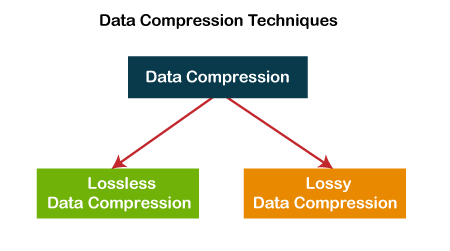
The audio format is the music format. Audio format refers to the process of digital and analog conversion of audio files for playback or processing on a computer. At present, music file playback formats are divided into two types: lossy compression and lossless compression. When using different music file formats, there is a big difference in sound quality performance.

Difference Between Lossy and Lossless Compression:

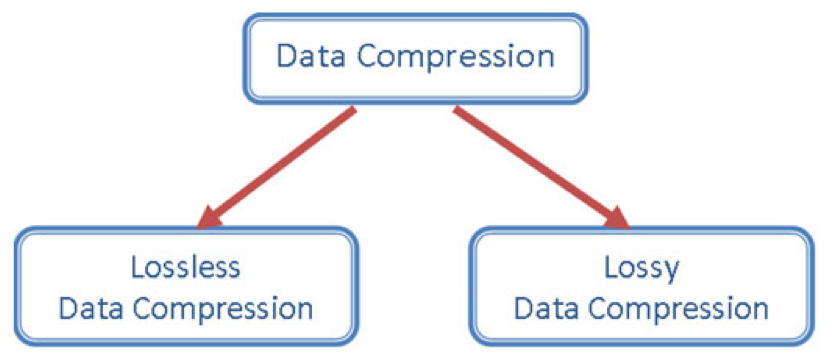
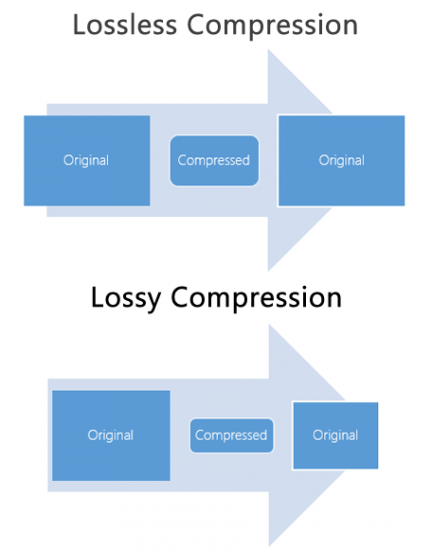
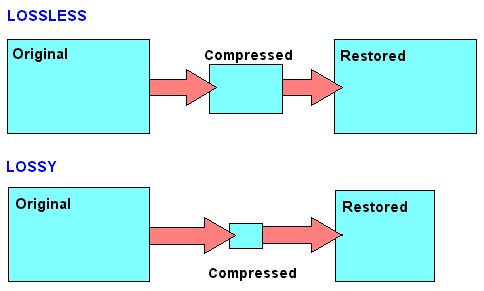
Lossy compression is to reduce the audio sample rate and bit rate, and the output audio file will be smaller than the original file. Lossless compression, on the premise of saving 100% of all the data in the original file, can compress the audio file to a smaller size, and after restoring the compressed audio file, it can achieve the same size and code. than the source file. Speed.

Here are the common audio formats:

1. CD The standard CD format is the sampling frequency of 44.1K, the rate is 1411K/second, and the quantization number is 16 bits. Since the CD track can be said to be approximately lossless, its sound is basically faithful to the original sound.

Lossy vs Lossless, Audio Quality

Lossy vs Lossless, Audio Quality

Lossy vs Lossless
Lossy vs Lossless

Much is said and has been said about the difference between the formats that generate a loss of information (lossy) versus those that do not generate any loss (lossless).

Lossy vs Lossless
Lossy vs Lossless

What is Lossy?

To compress a file, so that it occupies less space on the disk, we must necessarily use two techniques, the first is pure compression, which does not lose quality and which we will explain later PLUS compression by discarding information.

It is omitting information that we know, after studies, that the human ear will hardly perceive. At least the average human ear.
Younger people listen to more frequencies than from the age of 30, when we listen to fewer frequencies.

But not only does age count, but other phenomena also enter, for example what is called masking and which could be summarized by saying that if two frequencies occur with similar frequencies, and one occurs an instant before the other, in general the second that masked… that is, it is not audible to the human ear, so we could discard it and save space.

There are also all the frequencies that the human ear does not perceive, there we have more information that we can discard without damaging the quality or at least maintaining a very similar quality of perception.

LossLess

There are other formats that do not lose quality because they only use mathematical methods to save space. Imagine the following line:

1111111000001110000000

This consumes a space, but this information could be summarized, for example as follows:

1(7)0(5)1(3)0(7)

This second way of storing information takes up much less space WITHOUT discarding anything. It simply explains that from the number 1 there are 7, followed by 5 zero numbers, then 3 from the number 1 and finally 7 zeros.

It’s the same, we just tried to save space by finding a compressed way to write it, but we didn’t rule anything out.

This is exactly how the zip and lossless music methods work.

Is there a difference in the human ear when listening to one and the other?
We will answer that in another article.

What is the difference between MKV and MP4? Why is there a difference in MKV MP4 even though the content is the same?

What is the difference between MKV and MP4? Why is there a difference in MKV MP4 even though the content is the same?

MKV MP4

“What is the difference between mp4 and mkv? Mkv is bigger even if it has the same quality, isn’t it?”

MKV vs MP4

If you are in doubt whether to convert to MKV or MP4 if it converts the video and makes the file size as small as possible, I would like to know the difference between MKV MP4. But before comparing MKV MP4, let’s understand these two video formats.

Both MP4 and MKV are in video format and store audio and video information. It is the video format that determines which video and audio codec can be stored in which format. MKV MP4 The difference is also in the audio and video codecs or the storage methods. MP4 is one of the file formats for storing compressed video data in MPEG-4 format and is specified in Part 14 of the ISO / IEC 14496 standard. Alternatively, it is a format derived from ISO / IEC 14496 Part 12 formulated based on the Apple’s QuickTime media technology file format, and has a structure that follows many of the conventional QuickTime formats. MKV is an abbreviation for Matroska, a multimedia container format for storing data such as video, audio, and subtitles. It uses a data warehousing technology called EBML for backward compatibility and expandability.

Since there are many technical terms and it is difficult to understand, I will introduce MKV and MP4 in detail and explain the difference between MKV MP4. Decide whether you want to convert to MKV MP4 or not and what output format to use after viewing this MKV MP4 comparison explanation.

Let’s compare MKV MP4 with all

compatibility
MP4 is considered the most compatible video format. Compared to MKV MP4 due to compatibility, MKV has no chance of winning. Therefore, the output format is often set to MP4 when converting a video for playback. MP4 is compatible with Mac and Windows environment, and popular devices like iPhone 6s, iPad Pro 9.7 inch, Xperia X, Galaxy 6s can play MP4 videos. Also, MP4 compatibility is good when posting videos to websites. MKV MP4 due to MP4 compatibility seems to be better with the difference.

File size and quality
Comparing MKV and MP4, MP4 has a smaller file size if the video has the same quality and content. Also, MP4 has better quality for videos with similar content and file size. The cause is the storage method and the amount of information stored which tends not to tell the difference between MKV MP4.

Amount of information stored
It is said that information is always lost when converting from MKV to MP4. MKV MP4 is much larger than MKV MP4 depending on the amount of information stored. MP4 can store only one audio and video, but MKV can store multiple audio codecs. Of course, MKV can have only one audio. It is also possible to have multiple subtitles in MKV. Sometimes there are videos where you can choose the language. Shaving is a video like MKV. Now when converting from MKV to MP4, only one audio codec and one subtitle will be saved, so the information will be lost and of course the file size will be smaller. Also, since MKV has information to distinguish and select different audio codecs and play them separately, MKV MP4 with just one audio and subtitles is saved in a different file size.

Which one to use, MKV or MP4 when downloading or converting videos
Now there is software that allows you to select the output profile for both video download and video conversion. So when choosing an output profile, compare MKV MP4 and which one? Of course, compatibility is the best. The size and quality are meaningless if the format is not supported by the device or the system. So what if both MP4 and MKV are supported? Right now, decide by considering the difference between the conversion destination and MKV MP4.

MP4 is best for saving on devices with limited space, such as smartphones. The quality loss is as small as possible and the file size is also small. Also, there are few players that can select the language of the video on a smartphone, and if the player you are using does not have that function, it can only play an audio and a subtitle even if you convert it to MKV.

After all, MKV is best when played on a personal computer. There are many players who can choose the language without worrying about space on the computer. At this time, MKV, which stores all the information in the original quality, is better.

MKV MP4 What is the difference?

MKV MP4 What is the difference?

MP4 vs MKV

MKV MP4 What is the best image quality?

MKV VS MP4

If you want to save the video, which one should you choose, MKV vs. MP4? Many people wonder what the difference is in that MKV MP4. Certainly the MKV MP4 video files you see often have different uses based on their characteristics. However, the difference between MP4 and MKV is a bit difficult for an amateur. Also, even if you search for it on the Internet, the information about the difference between MKV MP4 is quite scattered and difficult to read. So, let’s compare MKV and MP4 in the text and explain in detail the difference between MKV and MP4 for those who are wondering where is the difference between MP4 and MKV.

MKV MP4 Difference Overview
MKV is one of the file formats that can record video and accompanying audio and subtitles, and it is one of the container formats that defines how to store data in the file. Various compression methods (codecs) can be used for video data and audio data. The most important feature of MKV is its ability to support different types of encoded video, audio, and subtitle streams.
Related Article: Introducing the Acclaimed MKV Playback Player Recommendations!

MP4 is one of the file formats for storing video data compressed in MPEG-4 format. It is specified in Part 14 of ISO / IEC 14496. MP4 is a format derived from ISO / IEC 14496 Part 12 developed based on Apple’s QuickTime media technology file format, and has a structure that follows many of conventional QuickTime formats. The feature is that even if the compression rate is high, the image quality and sound quality remain high, and it is highly compatible with devices such as smartphones.

Point: What is MP4? MP4 Tips: Summary of Definitions, Functions, Extensions, etc.

MKV MP4 Difference
Compare MKV and MP4: Detailed Explanation of MKV MP4 Difference
Difference between MP4 and MKV: Compatibility
As mentioned above, MKV vs. MP4 is characterized by being compatible with any codec even if the basic codec is the same MPEG-4 / H264. Therefore, when playing MKV as a fairly multi-functional container, a dedicated codec is required, so it is often limited to some playback and player software and cannot be played. Many people complain and complain about the poor compatibility of the MKV format. On the other hand, MP4 is highly compatible with various operating systems. Currently it can be used in most terminals and multimedia players. So if you compare MKV and MP4, MP4 will win in terms of compatibility.

Difference between MP4 and MKV: Quality of
image The image quality of MKV MP4 is not determined by the quality of the video, but depends on the compression format of the data contained in it, so the difference between MKV MP4 cannot be easily said. Both MKV and MP4 support AVC MPEG-4 and H.264 video codec, which have high compression ratios and can support HD image quality, so it cannot be said which is better for MKV MP4 image quality. Speaking of strength, in general MKV is cleaner than MP4 if you use the same codec. Also, since MKV can support most video codecs and audio codecs, today’s super-resolution videos use MKV more often than MP4.

Difference between MP4 and MKV: File size
file The file size is also different due to the difference in video bit rate (bps) and time. In fact, both MKV and MP4 feature a highly compressible format because they produce the smallest file size and high-quality video. However, when comparing MKV and MP4, the file size of MKV compressed under the same conditions is slightly larger than that of MP4.

Difference Between MP4 and MKV: Versatility
Speaking of versatility, which one is most commonly used, MKV vs. MP4? MP4, which uses H.264 with a high compression rate for the video section and combines high-quality AAC for audio, can be used in various terminals, so it can be said to be the most versatile. MKV is used less than MP4 due to the playback environment. However, as the demand for video quality increases, it has several advantages, such as being able to compress long-length videos into small parts, maintain video and audio quality, and add chapters or subtitles. The existing MKV will have a great effect in the future.

What are the advantages of the MKV format?

What are the advantages of the MKV format?

MKV

The Matroska format is a multimedia container envelope for video, audio, and subtitle files.

MKV

You can put the entire CD or DVD into one file. Matroska files that contain videos have an MKV extension. MKA only for audio, MKS only for subtitles. The MKV format has many advantages over competing containers, such as Microsoft® Audio Video Interleave (AVI), Apple® Quicktime® MOV, and Moving Pictures Experts Group (MPEG).

Each container format currently in use meets some or many of the characteristics required for a container format, but Matroska aims for a standard that meets all of them, and is virtually different from everything else. Built on EBML (Extensible Binary Metalanguage), it is extremely flexible to meet future needs.

The first advantage of the MKV format is that it is open source and the code is freely available to developers and the general public around the world. Most other container formats contain most of their own code and are only developed by the original company and the licensee. Open source programs have possibly high potential for more creative solutions and broader implementations.

The MKV format supports menus like DVD, chapters, and multiple audio streams to include audio tracks in different languages. As with DVDs, you can choose the language of your choice if the creator has multiple options.

Soft subtitles are also supported in MKV format. Soft captions are individual subtitle tracks in a container that you can turn on or off. If you have downloaded AVI files with unwanted subtitles and cannot turn them off, thank you for this feature.

MKV can include variable bit rate audio and variable frame rate video, and B-frame compression. However, unlike most other containers, almost everything, such as MPEG-1, MPEG-2, MPEG- 4, MPEG-4 Part 2 (H.263), MPEG-4 Part 10 / Advanced Video Coding (AVC), etc. Supports video formats. /H.264, Windows® Media Video (WMV), RealVideo, etc.

The MKV format is also compatible with virtually any audio format, including lossless audio like FLAC and audio container formats like Ogg. It also supports Speex, a lossy format for compressing audio. The Matroska design team is confident that future video and audio formats will also be supported, thanks to the EBML base in MKV format.

Not all audio players support MKV files. VLC Player is a free and open source cross-platform audio and video player that supports MKV format without the need for special plugins or codecs. Mastroska’s own Core Player Pro and Mobile are also optional. DirectShow® based Microsoft® players can play MKV files with the Combined Community Codec Pack (CCCP) installed. A full list of players, codecs, and plugins that support MKV is available on the Matroska website at the download link.

MKV support is also expanding offline. Manufacturers such as Samsung® and LG® already make certain models of HDTVs and Bluray® players that support MKV content streaming.

What is an MKV file?

What is an MKV file?

MKV

When playing a video, the image and sound quality during playback are usually conscious.

MKV

Also, due to the lightness of the file, you can enjoy it smoothly and stress-free when playing videos. There are several types of video playback files. See a typical video playback file.

Video file type
The AVI file (.avi) is a standard Windows file format and is a video playback file that is often used when playing videos on a Windows computer. It is characterized by its high versatility, and various compressed videos and audio are archived.

QuickTime files (.mov) are a standard Mac file format, but you can use them on a Windows computer as long as “QuickTime Player” is installed.

WMV files (.wmv) are a Microsoft-created file format developed for streaming video distribution. It is based on MPEG-4 and has a high compression rate.

FLV files (.flv) are a file format created by Adobe Systems. It has the feature that it can be played in a browser using “Adobe Flash Player” and is used on video sites like YouTube and Nico Nico Douga.

MPEG-1 (.mpg) files are a file format used for Video CDs, etc., but are characterized by low image quality and large file size. You can play it on any type of computer.

MPEG-2 files (.mpg) are a compatible digital format used on televisions. Image quality is superior to MPEG-1 and is close to DVD level.

MPEG-4 (.mp4) files are generally popular video files. It features high image quality and a high compression rate, and is supported as standard on both Windows and Mac.

Various MKV files can be used for video data, audio data compression, and codecs. The feature of MKV is that it can handle different types of converted video, audio, and subtitle streams.

The most popular video playback file in terms of image quality and file size is MP4. Compared to this MP4, MKV file is attracting attention recently in terms of image quality. Let’s see the difference between MP4 and MKV video playback files.

What is the difference between MKV and MP4?
Comparing the differences between MP4 and MKV, which have been popular so far, in terms of device, image quality and file size, there are the following differences. Understanding the difference will help you understand which files are useful for playing videos.

MKV comparison image
Differences in the devices that can play videos
The differences between the devices that can use MP4 and MKV are as follows. From a versatility point of view, MP4 uses H.264, which has a high compression rate, for videos. The feature is that the audio is combined with high-quality AAC and can be used on various devices. It can be said that MP4 is available for many devices.

MKV also appears to be less versatile than MP4 in terms of video and audio compression. However, it is attracting attention for its features, such as improving video quality, compression ratio, maintaining video / audio quality, and the ability to add chapters and subtitles. This file is useful when you want to edit the video such as chapters and subtitles.