What are lossy and lossless audio formats, and what are common audio formats? Part 2


Free Download Mp4Gain
picture

What are lossy and lossless audio formats, and what are common audio formats? Part 2
lossy and lossless audio formats

Audio Formats:

lossy and lossless audio formats

2. WAVE is a sound file format developed by Microsoft, it is used to save the audio information resources of the WINDOWS platform, and is compatible with the WINDOWS platform and its applications.

3. AIFF format (Audio Interchange File Format) and AU format, AIFF is the English abbreviation for Audio Interchange File Format. It is an audio file format developed by APPLE and supported by the MACINTOSH platform and its applications. Many compression techniques are supported.

4.MPEG is the English abbreviation for Motion Picture Experts Group Currently, MP3 is the most common music format on the Internet. Although it is lossy compression, its biggest advantage is a higher compression ratio in exchange for very little sound distortion.

5. MP3 MPEG audio file compression is lossy compression. MPEG3 audio encoding has a high compression ratio of 10:1~12:1, while basically keeping the low audio part undistorted, but at the expense of the high 12KHz to 16KHz. in the sound file. The quality of the audio part is changed by the size of the file. Music files of the same length are stored in *.mp3 format, usually only 1/10 of *.wav file, so the sound quality is lower than CD or WAV format.


6. MPEG-4 Adopts object-based compression coding technology. Before encoding, the video stream is first analyzed, and each video object is segmented from the original image, and then the shape information, motion information, texture information is encoded separately, and temporal redundancy between consecutive frames is eliminated thanks to better motion prediction and compensation than MPEG-2. Its core is content-based scalability, which can assign priorities to each object in the image, express the most important objects with high spatial and temporal resolution, and express the less important objects (such as surveillance systems, background) are rendered. with a lower resolution. or even not displayed. Therefore, it has the ability to adaptively allocate resources and can perform low-speed, high-quality video transmission and image communications. It occupies less resources, has great flexibility, good network performance, and has a wider range of applications.

7. The MIDI (Musical Instrument Digital Interface) format is used by people who often play music, MIDI allows digital synthesizers and other devices to exchange data.

8. WMA (Windows Media Audio) format is a heavyweight player from Microsoft. The background is harsh, the sound quality is stronger than MP3 format, and it is much better than RA format. It is the same as the VQF format. developed by the Japanese company YAMAHA. However, the method to maintain sound quality can achieve higher compression ratio than MP3. The compression ratio of WMA can generally reach around 1:18. Another advantage of WMA is that content providers can use DRM (Digital Rights Management) like Windows Media. Rights Manager 7 adds copy protection.


Free Download Mp4Gain
picture


Mp4Gain Main Window
picture


Mp4Gain Features
picture


Free Download Mp4Gain
picture

What are lossy and lossless audio formats, and what are common audio formats?

What are lossy and lossless audio formats, and what are common audio formats?

lossy and lossless audio formats

We often hear some terms like MP3, lossless, CD sound quality, and even come into contact with them. So what are lossy and lossless audio formats? What are their differences? Apart from the ones I heard above, what other common audio formats exist? Next, I will share with you the relevant knowledge of audio formats and answer your questions.

lossy and lossless audio formats


First, let’s briefly popularize the audio format:

The audio format is the music format. Audio format refers to the process of digital and analog conversion of audio files for playback or processing on a computer. At present, music file playback formats are divided into two types: lossy compression and lossless compression. When using different music file formats, there is a big difference in sound quality performance.

Difference Between Lossy and Lossless Compression:

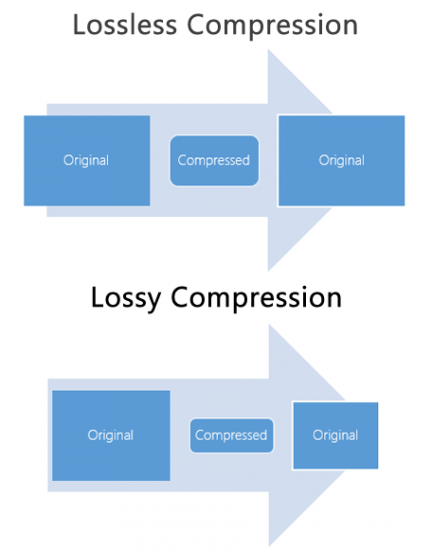
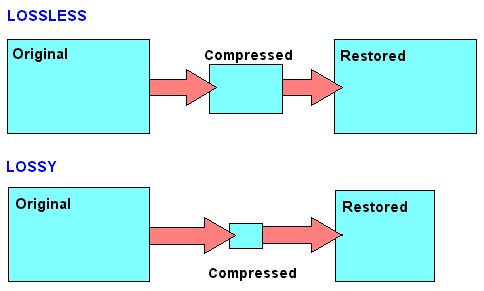
Lossy compression is to reduce the audio sample rate and bit rate, and the output audio file will be smaller than the original file. Lossless compression, on the premise of saving 100% of all the data in the original file, can compress the audio file to a smaller size, and after restoring the compressed audio file, it can achieve the same size and code. than the source file. Speed.

Here are the common audio formats:

1. CD The standard CD format is the sampling frequency of 44.1K, the rate is 1411K/second, and the quantization number is 16 bits. Since the CD track can be said to be approximately lossless, its sound is basically faithful to the original sound.

Lossy vs Lossless, Audio Quality

Lossy vs Lossless, Audio Quality

Lossy vs Lossless
Lossy vs Lossless

Much is said and has been said about the difference between the formats that generate a loss of information (lossy) versus those that do not generate any loss (lossless).

Lossy vs Lossless
Lossy vs Lossless

What is Lossy?

To compress a file, so that it occupies less space on the disk, we must necessarily use two techniques, the first is pure compression, which does not lose quality and which we will explain later PLUS compression by discarding information.

It is omitting information that we know, after studies, that the human ear will hardly perceive. At least the average human ear.
Younger people listen to more frequencies than from the age of 30, when we listen to fewer frequencies.

But not only does age count, but other phenomena also enter, for example what is called masking and which could be summarized by saying that if two frequencies occur with similar frequencies, and one occurs an instant before the other, in general the second that masked… that is, it is not audible to the human ear, so we could discard it and save space.

There are also all the frequencies that the human ear does not perceive, there we have more information that we can discard without damaging the quality or at least maintaining a very similar quality of perception.

LossLess

There are other formats that do not lose quality because they only use mathematical methods to save space. Imagine the following line:

1111111000001110000000

This consumes a space, but this information could be summarized, for example as follows:

1(7)0(5)1(3)0(7)

This second way of storing information takes up much less space WITHOUT discarding anything. It simply explains that from the number 1 there are 7, followed by 5 zero numbers, then 3 from the number 1 and finally 7 zeros.

It’s the same, we just tried to save space by finding a compressed way to write it, but we didn’t rule anything out.

This is exactly how the zip and lossless music methods work.

Is there a difference in the human ear when listening to one and the other?
We will answer that in another article.

MP3 audio files and lossless files, which one is the best?

For your music collection, is an mp3 audio file or a lossless file better? Let’s see together the differences and which format to choose

Lossy Compression vs Lossless Compression

In the transition from analog music (vinyl records, cassette tapes and other similar media) to digital music (audio CDs, mp3 audio files, etc.) a few decades ago, compression algorithms have played a fundamental role. to say the least. To avoid taking up too much space on the data storage media (when the transition was launched, every available byte of space was worth as much as gold) it was necessary to develop algorithms that would help compress the size of the files without affecting the quality of the file too much. Audio .

Lossless vs Lossy compression

It was during these years that names like mp3 audio files, WMA files, WaV files, and OGG files began to circulate quite frequently in musical (and non-musical) circles around the world.

Losseless vs Lossy

Over the years, the panorama of audio formats expanded dramatically and we witness the curious formation of two opposing blocks. On one side, in fact, so-called lossless files were ‘stacked’ (literally lossless), while on the other side of the musical ‘iron curtain’ were lossy files (literally lossy). As the names suggest, the distinction between one format and another is given by the possible loss of musical information.

Lossless files guarantee (and guarantee) the same depth of sound and quality of an audio CD, while lossy files (like mp3 audio files) allow you to reduce the size of a music track in the order of 10 times in partial detriment of audio quality. For example, if a lossless file takes up 40 megabytes of space, an mp3 audio file of the same song will take up just over 4 megabytes.

The bitrate

What makes the difference between the two audio file formats is the bit rate used in the analog-to-digital conversion process. When we speak of bit rate (sometimes also written bit rate) we refer to the number of bits that we can process in the unit of time. In music, the bit rate measures the amount of data contained in each second of the audio track: the higher the value of the bit rate, the better the quality of the music.

For an mp3 audio file, this value can range from 32 kbps (kilobits per second) to 320 kbps. In a lossless file, however, there is no compression, and with a bit rate of around 1,411 kbps, the audio quality is comparable to that of an audio CD. According to the numbers, therefore, lossless files are better than mp3 audio files, ensuring deeper sound that is true to the original. However, as experience teaches us, numbers are not always everything.

Diluted differences

The reality of the events seems to be quite different. The human ear, in fact, would not be so sensitive as to be able to notice differences between an mp3 audio file of excellent quality (with a 320 kbps bit rate) and a lossless file.

To understand this, simply run one or more ABX tests. One such test consists of cross-comparing two known files (named A and B) and two unknown files (X and Y, which are the same as A and B but with different bit rates). At the end of the test, two pairs of files should be formed, matching the originals with their modified files. If you use an mp3 audio file with a high bit rate (320 kbps or slightly lower), even the most musically trained ear will not be able to tell the difference.

Despite this, a music file made up of lossless files still guarantees a substantial advantage over a file made up of mp3 audio files. The first, in fact, can be converted to other audio formats without losing quality; Any conversion of a lossy file, on the other hand, will cause further loss of music information and deterioration in audio quality.

Data compression: lossless and lossy

Data compression: lossless and lossy

In computer science and telecommunications, the term data compression (data compression) will indicate the data processing techniques that allow the reduction of the quantity of bits necessary for the representation of the information in digital form. In practice, for example, data compression makes it possible to reduce the number of bits required for the transmission of a video transmission, allowing it to be viewed on the Internet even in the presence of a connection that is not fast enough.

losseless compression

For files, data compression allows you to reduce the size (number of bits) of the file – this is advantageous because it reduces the space occupied by the file on disk and allows you to transfer the file more quickly (for example, by email).

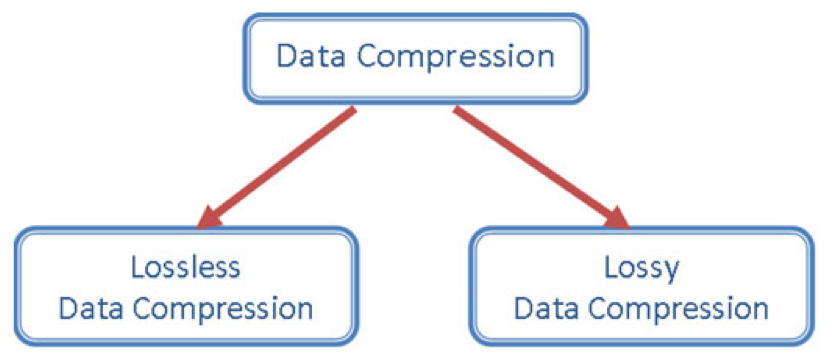
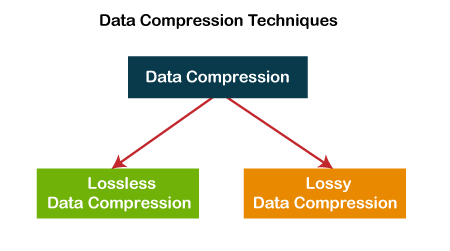
Compression techniques fall into two main categories:

lossless compression (lossless):

in this case it is possible to rebuild the file from the compressed without loss of information;

lossy compression (loss)

compression occurs to the detriment of information quality, for example, through loss of image definition or sound quality of an audio file; in this case it is not possible to rebuild the file from the compressed file before compression.

how mp3 workslosseless compression

The two techniques are used in different areas. As already mentioned, lossy compression is often applied to images, sounds and videos as it enables significant reductions to be made from the original data, at the price of an often negligible loss in quality. In addition, lossy techniques can be applied during data transmission (runtime), that is, it is not necessary to know all the data to be compressed to apply them: this is obviously an advantage in the transmission of transmissions over the Internet . Among the best known lossless algorithms, we mention jpeg for images and mp3 for audio and mpeg for videos.

In contrast, lossless compression is used when you want to compress text documents, programs, databases, circuit diagrams, etc. and in any case where the loss of the original data is not accepted. The lossless compression category includes .zip and .rar formats, often used to compress files and file folders.

Later we will discuss lossy compression techniques, talking about multimedia formats. Here, instead, we want to deepen the understanding of lossless compression.

Lossless compression algorithms

Lossless compression techniques (algorithms) can be divided into two main categories:

statistical compression;

replacement compression

.
Statistical compression is based on the input study to be compressed. Statistical studies are carried out on the input format to obtain a good compression. For example, in a text file to compress, the relative frequency of each character is studied and then the shortest code is associated with the character present several times in the text; vice versa, characters present with low frequency are associated with a longer code. Codes like Huffman’s are part of this class, which we will discuss in the next lesson.

As for substitution compression, this is based on the idea of ​​replacing, in a file, all occurrences of repeated strings with pointers to previous copies of the same string. Compression is due to the fact that the length of a pointer is usually less than the length of the string being replaced. As a result, the higher the repetitions of string occurrences in the file to be compressed, the greater the degree of compression achieved.