Music quality of files (lossless and lossy)


Free Download Mp4Gain
picture

Music files can be the product of the perfect extraction of the music contained in CDs, called bit by bit. With this phrase we immediately clear the field of feeding unjustified prejudices towards the archives. The files are not of the same quality as CDs when using lossy formats: MP3, AAC, M4A. Besides these, there are formats that do not use any type of compression: WAV and AIF, which are the exact copy of the songs stored on CDs or even the original master recording format used to create CDs. Or there are formats that even using compression are “lossless”, called lossless: the most widespread of them is the FLAC format, not surprisingly adopted as a standard in the distribution of content in CD quality or higher. The FLAC format uses a type of compression that does not remove the original data. When unzipped, FLAC files have exactly the same bits that were present before compression.
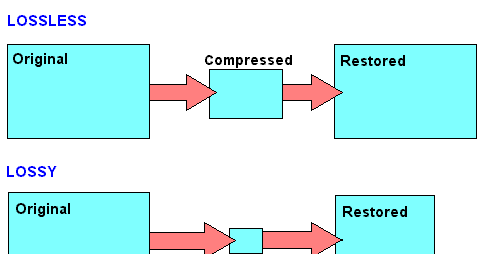
Lossy - Lossless

Before there are misunderstandings about the relationship between lossy and lossless files, we specified that if you have an MP3 file and convert it to FLAC, the data removed from MP3 transformation will not magically appear again. No conversion can regenerate the lost data into a lossy file. You can convert FLAC files to WAV or AIF because the compression used was lossless.

Lossy and lOOSLESS

The FLAC format also has advantages over WAV and AIF, the applied compression reduces its size and saves storage space and data bandwidth in reception / transmission when transmitting over the network. Besides this function, FLAC has another advantage over WAV, the information describing the tracks and the cover image can be inserted into the files. The information inserted in the files is called TAGs, the FLAC format provides for the insertion of this information that software applications and APPs read to recognize the content of the audio tracks. This simplifies the management of music collections, which without TAGs would present indistinguishable lists of audio files. Unfortunately, the standard WAV format does not allow the inclusion of TAGS in files.

Let’s continue the discussion on the playback chain of a portable Hi-Fi system. The technical quality of the content to be reproduced affects the final quality of the reproduction.

After adopting quality headphones, it would be wise to switch to lossless audio formats, to at least benefit from the original quality found on CDs.

Lossless music

Most of the sites that sell music online offer it in lossy formats, so the problem is how to get music without loss. Anyone with a CD can start by ripping them. Ripping is the term used to describe the transformation of the tracks contained in a CD into files. Anyone who wants to delve into the subject can read the writings dedicated to Ripping and the creation and management of music collections: What software for ripping and Creation and management of music files luquida.

In addition to CD ripping, there are websites that sell lossless music online in CD quality and Master Quality (Hi-Res), the latter is superior to CD and in many cases coincides with the original recording made in the Recording Studio.

High Resolution Music (HRA) has higher technical specifications than expected for CDs. Resolution ranges from 16 bit to 20/24 bit and sampling from 44.1 kHz to 48 / 88.2 / 96 / 176.4 / 192 kHz. For a description of the processes and characteristics of digitization, read the following text: The digitization of sound. With respect to these specifications we believe that the determining factor is the 24-bit resolution combined with sampling performed at least at 48 kHz.

Speaking of MP3 files, we usually refer to the bit rate, which with this format does not exceed 320 Kbps. The bit rate indicates the bits per second transmitted in a music stream. It is quite evident that a music stream consisting of more bits will contain more audio data. To orient yourself between these parameters, it is good to bear in mind that an uncompressed CD quality audio stream (16 bit 44.1 kHz) is 1,411 Kbps, converted to FLAC the stream will decrease between 30 and 50% of the format’s bit rate. uncompressed. Therefore, the CD quality stream generated by a FLAC will vary approximately between 705 and 988 Kbps. Obviously for high resolution formats the data stream will be proportionally higher depending on the specifications offered by the individual files.

The technical quality of the content to be reproduced as well as the reproduction devices are essential complements to obtain the best sound result.


Free Download Mp4Gain
picture


Mp4Gain Main Window
picture


Mp4Gain Features
picture


Free Download Mp4Gain
picture

MP3 audio files and lossless files, which one is the best?

For your music collection, is an mp3 audio file or a lossless file better? Let’s see together the differences and which format to choose

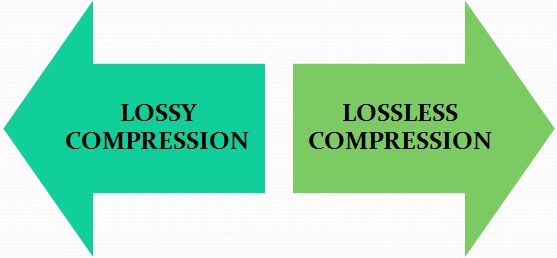
Lossy Compression vs Lossless Compression

In the transition from analog music (vinyl records, cassette tapes and other similar media) to digital music (audio CDs, mp3 audio files, etc.) a few decades ago, compression algorithms have played a fundamental role. to say the least. To avoid taking up too much space on the data storage media (when the transition was launched, every available byte of space was worth as much as gold) it was necessary to develop algorithms that would help compress the size of the files without affecting the quality of the file too much. Audio .

Lossless vs Lossy compression

It was during these years that names like mp3 audio files, WMA files, WaV files, and OGG files began to circulate quite frequently in musical (and non-musical) circles around the world.

Losseless vs Lossy

Over the years, the panorama of audio formats expanded dramatically and we witness the curious formation of two opposing blocks. On one side, in fact, so-called lossless files were ‘stacked’ (literally lossless), while on the other side of the musical ‘iron curtain’ were lossy files (literally lossy). As the names suggest, the distinction between one format and another is given by the possible loss of musical information.

Lossless files guarantee (and guarantee) the same depth of sound and quality of an audio CD, while lossy files (like mp3 audio files) allow you to reduce the size of a music track in the order of 10 times in partial detriment of audio quality. For example, if a lossless file takes up 40 megabytes of space, an mp3 audio file of the same song will take up just over 4 megabytes.

The bitrate

What makes the difference between the two audio file formats is the bit rate used in the analog-to-digital conversion process. When we speak of bit rate (sometimes also written bit rate) we refer to the number of bits that we can process in the unit of time. In music, the bit rate measures the amount of data contained in each second of the audio track: the higher the value of the bit rate, the better the quality of the music.

For an mp3 audio file, this value can range from 32 kbps (kilobits per second) to 320 kbps. In a lossless file, however, there is no compression, and with a bit rate of around 1,411 kbps, the audio quality is comparable to that of an audio CD. According to the numbers, therefore, lossless files are better than mp3 audio files, ensuring deeper sound that is true to the original. However, as experience teaches us, numbers are not always everything.

Diluted differences

The reality of the events seems to be quite different. The human ear, in fact, would not be so sensitive as to be able to notice differences between an mp3 audio file of excellent quality (with a 320 kbps bit rate) and a lossless file.

To understand this, simply run one or more ABX tests. One such test consists of cross-comparing two known files (named A and B) and two unknown files (X and Y, which are the same as A and B but with different bit rates). At the end of the test, two pairs of files should be formed, matching the originals with their modified files. If you use an mp3 audio file with a high bit rate (320 kbps or slightly lower), even the most musically trained ear will not be able to tell the difference.

Despite this, a music file made up of lossless files still guarantees a substantial advantage over a file made up of mp3 audio files. The first, in fact, can be converted to other audio formats without losing quality; Any conversion of a lossy file, on the other hand, will cause further loss of music information and deterioration in audio quality.

Guide to fully understand lossless formats

Guide to fully understand lossless formats

They end with a period followed by three or four letters. This is what happens with absolutely all the files on a computer or smartphone. Those last letters represent the format in which this file is. Today we are going to focus on one type of format, the lossless format.

lossless

ogg

What is a lossless format?

Any element in a computer has to have some type of format, or so to speak, some type of structure that is known by that computer so that it can work with the file. In a parallelism with the world of physical objects, the format would be something like the material with which said object is constructed.

Just as there are different materials with different properties, there are also different formats with different characteristics. Most of the files we use today have a compressed format, so they take up less space on our computer and are easier to send via the Internet, or to upload to any social network. However, these formats are not the highest quality, since this position would be occupied by formats without loss. These formats retain the original quality of the file, and offer the best results.

If we talk about images, the lossless formats are RAW, BMP and PNG, among others. Meanwhile, the compressed formats are JPG and GIF. However, there are certain differences with some of them. RAW, for example, stores all the light data captured by the camera’s sensor. It is a perfect format for photographers. But it would not even be for photographers who want to share a certain photograph on a social network. A RAW photo can easily take up to 25 MB, depending on the resolution of the camera. A high-quality JPG photo would be a photograph that would take two or three megabytes, although it would have less quality.

If we talk about audio, there are three main lossless formats: WAV, FLAC and ALAC. The latter is the one used by Apple in iTunes. They are formats that do not lose anything of quality with respect to the original audio. Yes we would be losing quality with the MP3 and the OGG.

And if we talk about video, there are few lossless formats that we can talk about. In fact, there is a problem, and that is that storing videos without loss would be an impossible task for anyone without a storage server nearby. That is why we usually opt for MKV, WMV, and H.264 formats. Of course, the latter is much better, since the compression process it carries is much more intelligent.

Compression, how does it work?

Now, what is this about compressed formats? As its name suggests, we are talking about formats that reduce files, and we can rely on it to fully understand how these formats work. Surely we have all been in the situation of having to pack a suitcase with just enough space, finish choosing all the clothes that we are going to take on a trip, and finally having to decide what we can do without in order to close the suitcase, because we had too many clothes. Well, that is the compression of each of the formats. They remove elements from that file, and thus make it weigh or occupy less.

Why are there different formats? Returning to the case of the suitcase, each person will make different decisions regarding those things that they can do without for their trip. It will vary from person to person. The same goes for formats. The developers of these reduce the space occupied by a file, but each of the formats removes data in a different way, so that a file compressed to JPG, can be different from one GIF, even if both are compressed. Each of them has followed a different procedure to delete the data, and that the song, image, or video, continues to play practically the same as the original version.

When to convert from compression to lossless?

The question at the top of this paragraph is especially important to anyone who has ever converted a file from a compressed format to a lossless format. And it is that, in reality, it is cheating, because you should never convert a file from a compressed format to a lossless file. Actually, nothing happens if we do, but we will not improve the quality of that file, even if it will now be available in a format in which the files are not compressed.

Of course, it is also not a good idea to convert a file in a compressed format to a different compressed format. Keep in mind that each compression process is different depending on the chosen format. In other words, each format eliminates the data it considers appropriate to maintain the quality of the image. If we have a file in a compressed format, this will mean that it no longer preserves all the original data. If we now convert it to a different compressed format, the compression process will remove new data from the file, and chances are we have a much more corrupted file.

Guide to fully understand lossless formats

They end with a period followed by three or four letters. It is what happens with absolutely all the files of a computer or a smartphone. These last letters represent the format in which said file is. Today we are going to focus on one type of format, the lossless format.

loseless formats

What is a lossless format?

Any element in a computer has to have some kind of format, or so to speak, some kind of structure that is known by that computer so that it can work with the file. In a parallel with the world of physical objects, the format would be something like the material with which the object is constructed.

Just as there are different materials with different properties, there are also different formats with different characteristics. Most of the files we use today have a compressed format, so they take up less space on our computer and are easier to send via the Internet, or upload to a social network. However, these formats are not the highest quality, since this position would be occupied by lossless formats. These formats retain the original quality of the file, and are the ones that offer the best results.

If we talk about images, the lossless formats are RAW, BMP and PNG, among others. Meanwhile, the compressed formats are JPG and GIF. However, there are certain differences with some of them. RAW, for example, stores all the light data captured by the camera’s sensor. It is a perfect format for photographers. But it would not even be for photographers who want to share a particular photograph on a social network. A RAW photo can easily occupy 25 MB, depending on the resolution of the camera. A high quality JPG photo would be a photograph that would occupy two or three megabytes, although it would have less quality.

loseless codecs

If we talk about audio, there are three main formats without loss: WAV, FLAC and ALAC. The latter is the one used by Apple in iTunes. They are formats that do not lose any quality with respect to the original audio. Yes we would be losing quality with MP3 and OGG.

And if we talk about video, there are few lossless formats that we can talk about. In fact, there is a problem, and storing videos without loss would be an impossible task for anyone who did not have a storage server nearby. That is why we usually opt for the MKV, WMV, and H.264 formats. Of course, the latter is much better, because the compression process is much more intelligent.

Compression, how does it work?

Now, what is this about compressed formats? As the name implies, we are talking about formats that reduce files, and we can rely on it to perfectly understand how these formats work. Surely we have all seen ourselves in the situation of having to pack a suitcase with just the right space, finish choosing all the clothes we are going to take on a trip, and finally have to decide what we can do without being able to close the suitcase, because we had too many clothes. For that is the compression of each of the formats. They remove items from that file, and thus make them weigh or occupy less.

Why are there different formats? Returning to the case of the suitcase, each person will make different decisions regarding those things that he can do without for his trip. It will vary from one person to another. The same goes for formats. The developers of these reduce the space occupied by a file, but each of the formats deletes data in a different way, so that a file compressed to JPG, can be different from one GIF, even if the two are compressed. Each of them has followed a different procedure to delete the data, and that the song, image, or video, continue to play almost the same as the original version.

When to convert from compression to lossless?

The question that heads this paragraph is especially important for all those who at some point have converted a file from a compressed format to a lossless format. And, in fact, it goes with a trap, because you should never convert a file from a compressed format to a file without loss. In reality, nothing happens if we do, but we will not improve the quality of that file, although it will now be available in a format in which the files are not compressed.

Of course, it is also not a good idea to convert a file into a compressed format, to a different compressed format. Let’s keep in mind that each compression process is different depending on the format chosen. That is, each format eliminates the data it deems appropriate to maintain image quality. If we have a file in a compressed format, that will mean that it no longer retains all data.