The “good sound” experience of Apple Music will change! Part 2


Free Download Mp4Gain
picture

The “good sound” experience of Apple Music will change! Part 2

Lossless

How to Enjoy Lossless Audio on Your iPhone or Mac
Learn how to create an environment to enjoy “good sound” with lossless audio from Apple Music.

First, the staples of player playback are the iPhone, iPad, Mac, and Apple TV. When listening with HomePod, high-quality sound reproduction in compressed AAC format will be performed at the beginning of the service, but it appears that lossless support via software update is planned in the future.

You can also enjoy lossless audio with the Android version of “Apple Music App”. The browser version of Apple Music does not support either of the two new services as of June.

The first way to enjoy Apple Music lossless audio on your iPhone, iPad, or Mac is to “listen to the built-in speakers.” In particular, the new iMac has an integrated sound system consisting of six speaker units and an amplifier, which should make Apple Music’s lossless audio sound powerful.

With a powerful sound system, the iMac pairs well with Apple Music’s lossless surround audio services.

While it seems that you can enjoy powerful sound even with iPhone and iPad speakers, it is not suitable for listening while moving when you go out. I would like to listen using the AirPods series which is more compatible with each one, but since the Bluetooth audio codec compatible with the iPhone and AirPods series cannot transmit while maintaining the quality equivalent to lossless playback, compression will be applied. In that case, it would be more efficient to listen to the original AAC format distribution.

If you want to enjoy lossless audio on your iPhone or iPad, you can use headphones that can be connected to Lightning, such as the wired “EarPods with Lightning connector” headphones that are currently sold as an option. Alternatively, you can listen with analog-connected wired headphones or with headphones through an adapter with a built-in DAC, such as the Lightning / 3.5mm Headphone Jack Adapter. Also, if you use a headphone amplifier with a built-in USB-DAC function released by audio manufacturers, including Mac, you can enjoy richer lossless audio reproduction.

It is convenient to have a DAC-equipped headset that can be connected directly to the Lightning terminal.

For Apple TV, you can enjoy lossless audio by connecting it to a sound bar or surround sound amplifier with an HDMI cable. Ideal when you want to listen to music slowly in a home theater or audio room.

Many Android devices are equipped with a 3.5mm headphone jack, so you can create a lossless audio playback environment more easily.

Also began the distribution of “high resolution” beyond the losses without losses.
The lossless distribution of Apple Music includes files provided at 44.1 kHz / 16-bit, which has the same sound quality as a CD, and 48 kHz / 24-bit, which Apple calls “lossless with a sound quality greater than that of a CD “. The latter appears to have more than 7 million titles. You can check the detailed information of the song by touching the “Lossless” badge displayed on the music app’s playback screen.


Free Download Mp4Gain
picture


Mp4Gain Main Window
picture


Mp4Gain Features
picture


Free Download Mp4Gain
picture

The “good sound” experience of Apple Music will change!

The “good sound” experience of Apple Music will change!

lossless audio

Explaining the charm of the lossless environment

Lossless

Hear studio-produced sounds with more luxurious sound quality
How to Enjoy Lossless Audio on Your iPhone or Mac
Also began the distribution of “high resolution” beyond the losses without losses.
Enjoy immersive playback with Apple Music
Compatible with various headphones / earphones and sound bars
“Good sound” is the standard for Apple Music sounds you hear on your iPhone.
Starting in June, two new “good sound experiences” will be added to Apple Music, Apple’s flat-rate music distribution service. “Lossless Audio” and “Dolby Atmos Spatial Audio”. I would like to explain the contents of the service and the environment necessary to enjoy it.

We’ll explain the new “lossless audio” and “Dolby Atmos spatial audio” added to Apple Music.

Hear studio-produced sounds with more luxurious sound quality
Currently, the sound quality of Apple Music can be listened to while reducing the consumption of data capacity by using mobile communication transmission by iPhone / iPad while maintaining the quality of the sound source produced by the creator in the studio. to the user’s hand as It is. It is balanced and distributed as a 256 kbps AAC format file.

Newly added lossless audio is a technology for enjoying music playback in true-to-original sound quality, without loss due to compression processing. Apple Music uses “ALAC” (Apple Lossless Audio Codec), a lossless compression codec system that can be compressed and then decompressed while ensuring the quality of the original sound source.

As of the end of May 2021, Apple Music has more than 75 million songs distributed, but all songs in the catalog will be available in lossless audio, except for radio audio and music video. This Apple Music update will be available to subscribers in all 167 countries and territories around the world for the same monthly fee.

Apple Music is currently deployed in 167 countries and regions around the world. You can enjoy it at the same price even after adding a new service.

Enjoying lossless audio is very easy. For iPhone / iPad, you will be able to select lossless sound quality for mobile communication transmission, Wi-Fi and download in “Music” of the settings application. The default setting is “Off”, so you must set the necessary parts for each of the three listening methods to lossless.

Even if the lossless audio service starts, you can still choose to deliver in the traditional AAC format. This is because if you select lossless audio, especially in a mobile communication streaming environment, the bit rate will reach 1.4 Mbps or more during playback, and it will “gig down” at a faster speed than before. .

You can also download the songs you want to listen to on a device like an iPhone with lossless quality and listen to them offline. However, even in this case, the size of the lossless data will be larger than the distribution file in normal AAC format, so it seems necessary to adjust it according to the storage capacity of the iPhone or iPad.

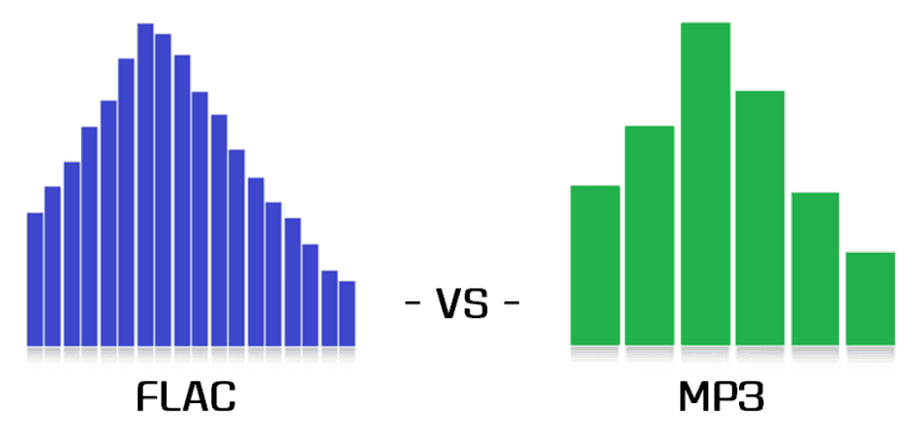
Flac compared to Mp3

Flac compared to Mp3

FLAC vs MP3

Lossy vs lossless

Flac or MP3

For an introduction to the topic, let’s start with a simple reference that connoisseurs of audio formats can safely skip … Most of us today listen to music in a car in MP3 format. It is convenient: a huge music library fits in a fist, it is not afraid of scratches, bumps, dirt, it can be easily replenished and edited on a home computer, etc. The MP3 format suits almost everyone except those who are “boosted” due to its internal nature …

And the gist is that when the music stream is compressed, those sounds and frequencies are cut off according to a special algorithm, which, according to the algorithm’s creators, ALMOST does not affect the listener’s perception of the music. This “almost” is the reason for the compromise of the MP3 format … In the music of the club genres, the difference is barely perceptible, but in the good quality rock, instrumental, serious vocals and classics reproduced through a system of decent speakers, the Many may experience the difference between the “cut” MP3 format and the “uncut” WAV source.

MP3 does not convey the depth and fullness of the sound of music, it is perceived as a “poor relative” compared to uncompressed audio formats. All these are, of course, subjective characteristics, and not everyone, due to the physiological characteristics of hearing, is able to “taste” them at all, but the truth is that MP3 and other codecs that compress sound at a loss ( WMA, AAC, and others) degrade the quality of music for the sake of ease of use.

original-3.jpg20151019-2336-1k348sb.jpg
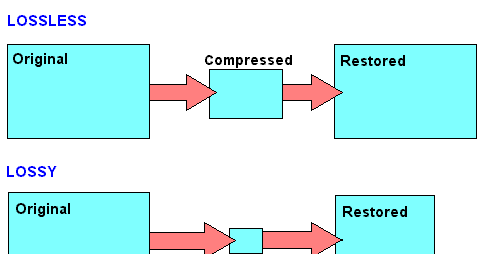
An alternative is “lossless” formats, which are commonly referred to as lossless. Codecs like FLAC and APE also compress music, but during playback the original data is fully restored from the compressed state, unlike MP3, from which compression algorithms remove “extra notes” at their discretion and without your knowledge …

FLAC in cars
Until recently, it was possible to listen without loss in the car mainly only in multimedia centers on Android, since for Android it is natural to install various playback programs that read all formats. But the sound quality was questionable, because most of the Android-based recorder manufacturers, with dubious Chinese ancestry and a blank space in the brand’s history place … Also, the serious restrictions on the distribution of these devices are the high price and two … din format, which also does not suit all.

And now, a year and a half ago, the first FLAC models started to appear in the segment of cheap radio tape recorders from famous brands, with good quality, one-din design and the usual “radio” design. Today, this market segment has taken place: a variety of inexpensive FLAC devices from all well-known brands such as Sony, Pioneer, Kenwood, etc. already strong. Consequently, you can try to draw some conclusions.

The main one will be the answer to the question: was the introduction of FLAC support in low-cost massive devices a breakthrough in the evolution of car audio, or is lossless relevant only to serious and expensive car audio systems, and a simple user in an inexpensive car with standard acoustics does not have different advantages of FLAC will not receive?

What are we testing
Today, the cost of the most affordable car radios with FLAC support is extremely democratic, and these devices are available to everyone: in the initial segment, their prices start at 3,000 rubles. Thus, such equipment leads many budget car owners to the idea that in a budget car, with consumer standard acoustics, you can significantly improve the sound quality simply by replacing the radio recorder and using a music source from high quality: FLAC. instead of MP3.

Advantages of the FLAC audio format

Advantages of the FLAC audio format

FLAC vs MP3

Wave is uncompressed or lossless format, while MP3 is compressed or lossy.

MP3 VS WAV

Technically .wav is just a container format and can contain various types of compressed or uncompressed audio, but you will usually find that it contains uncompressed LPCM audio (same as on audio CDs). With .waves files you essentially end up with a raw digital representation of the audio bitstream. Analog sound produced in the real world contains essentially an infinite amount of information because it is a constantly changing wave (see below). To digitize these sounds, you must sample the signal at different intervals to get an approximate sound. For .wav, the audio signal is typically sampled at 44,100 times per second or more, and each sampled value is recorded so that the audio wave can be played:

MP3s are compressed to compress the same audio information into a smaller file size. The .wav format is great for representing an analog signal very accurately, but generally at the expense of large files, as you probably know. Compressed audio (and video similarly) is designed to reduce file size while maintaining an acceptable level of fidelity. In simple terms, compression tries to remove unnecessary data from the stream and reduce the signal to its most necessary components. In MP3, the encoding and compression algorithms use a model of how we listen to analyze the sound in the frequency domain and remove any unnecessary information. For example, due to hearing disguise, if there are two sounds at close frequencies, we will often only hear a loud sound if the difference in volume between them is significant. Therefore, for MP3s, the lower volume sound may be lost and the sound will sound essentially the same as it does to our ears. Find out more about the technical aspect of MP3 encoding here.

In practice, both .wav and MP3 have their uses. For production, .wav is the standard because it will almost always be a 100% accurate, bit-level reproduction of the source material. MP3 can be a decent alternative at high enough bit rates. Bitrate is a measure of how many bits per second the MP3 encoding will use. This means that the higher the bit rate, the closer the MP3 will be to the original uncompressed stream. Bit rate is generally measured in kilobits per second (kbps). I like high-quality sound for my digital music collection, so when I get the chance, I usually encode MP3 at a constant 256 or 320 kbps. This is the upper limit of what MP3 can do, and unfortunately most digital music isn’t encoded that high there. When the bit rate drops, it is usually heard first in the high frequencies, like the cymbals of a drum set. 160 kbps is tolerable, but anything below and you’ll really start to notice. But again, with a fairly high bitrate, the differences between MP3 and .wav subtle, especially for an inexperienced listener (most listeners).

For .wav files, we mainly look at the bit depth and the frequency or sample rate. Bit depth is the number of bits used to encode each sample value. The sample rate indicates how many times per second the audio is sampled. CD (.wav) and MP3 are encoded at a sample rate of 44100 Hz (Hertz stands for “cycles per second”). Newer computers and audio hardware / software now support higher sample rates, including 48 kHz or 96 kHz. For .wav the bit depth is usually 16 or 24 bit on newer systems. For most purposes, 16-bit and 44.1 kHz is sufficient when using .wav, but if you have this capability, it’s generally worth switching to 24-bit, 48 kHz.

Some examples of file sizes for 5 minute stereo recording:

.wav, 16-bit, 44.1 kHz: 50 MB
.wav 24 bit 48 kHz: 82 MB
.wav 24 bit 96 kHz: 164 MB
MP3, 128 kbps, 44.1 kHz: 4.5 MB
MP3, 192 kbps, 44.1 kHz: 7 MB
MP3, 320 kbps, 44.1 kHz: 11 MB
FLAC, 24-bit, 44.1 kHz: 28 MB
FLAC, 24-bit, 48 kHz: 31 MB
24-bit 96 kHz FLAC: 61 MB
There is also a variable bitrate option for MP3 encoding, which should have a slightly smaller file size for the same quality. It uses an encoding scheme that changes (alters) the bit rate for different parts of the song, depending on the complexity and how many samples are needed to accurately recreate the section.

[FLAC] There is a third category: lossless compression. FLAC is a good example of this, and has the quality and fidelity of a .wav file, but with smaller file sizes

Differences between FLAC and MP3?

Differences between FLAC and MP3?

FLAC vs MP3

Lossless vs lossy

FLAC vs. MP3

“Here, of course, the question is not about the difference between MP3 and FLAC, it is broader: that lossy compression formats (MP3, AAC, WMA, Ogg Vorbis and others; that is, lossy) are They differ from “lossless.” ”(FLAC, ALAC, APE, WavPack and others; that is, no losses). Actually, with such wording, it becomes clear that in the first group of formats, the original data is not completely saved, and the second can be restored to the original format (for example, Wav or Aiff extracted from CD) without loss. What exactly is lost and in what proportions depends on the specific type of lossy files and their bit rate, that is, the degree of compression. But to say that all MP3s sound bad and that “flacks” are perfect is the height of arrogance and incompetence. Lossy audio formats have been developing for more than twenty years, and serious research laboratories (Fraunhofer Institute, for example, in addition to working on MP3, is also famous for the invention of the most efficient solar battery) and a group of enthusiasts. Mathematical encoding is constantly improving, and nowadays it is no longer so easy to distinguish files produced by different codecs by ear.

I would immediately make a reservation that not only the files themselves are important, but also the equipment they are to be tested on, the listening environment, and the examiner’s listening experience. In MP3 of any low bitrate, Ariel Pink will sing with the voice of Ariel Pink, of that there is no doubt. It is quite possible that a person listening to music as a melody through white headphones in a subway car will be enough for the eye, and the difference in codecs will come down to a file size comparison. A disc jockey who is embarrassed to buy or search without losses will also think that everything is in order with his MP3, as he prepares a set on the “Tractor” on the laptop’s built-in speakers. It is true that during a party in a big, loud and clear audio system of the club (sometimes they meet, believe me), it suddenly turns out that the guy who speaks immediately after for some reason, the music became big, clear and great . Lossy formats are developed for the convenience of transferring files over the Internet, for storage on portable audio players, and finally for personal playback. Okay, it’s silly to watch a gigabyte AVI movie on a big screen. Even in a home theater, this is not entirely decent. The same goes for MP3. On your iPod: listen to your health (although AAC from iTunes sounds better for sure), but if you go clubbing, don’t miss out, even if you start Skrillex. And when you’re listening to Christmas jazz with his girlfriend’s parents on their big lacquered speakers, buy FLAC or ALAC too. With MP3, you risk getting into an awkward situation. In theory, after a bit rate of 256 kbps, it will be quite difficult for your future audiophile father-in-law to know if he is lossy or not.

Usually when viewing an MP3 file, he isn’t paying attention to anything other than the bit rate. If he already considers himself a person with a taste for music and sound, he should look in the properties of the file for the data of the codec that was used during the conversion. Suppose you see “Lame 3.99” there, it means the latest MP3 codec was used and you’re in luck. But next to it is “Joint Stereo”, which is no longer great. This means that to save a couple of percent of the file size, the codec was allowed to add something to mono, although the recording is stereophonic and the sound image is slightly lost in depth and clarity. There are also fully botanical CBR or VBR, ABR and UBR, but if you’re ready to dig that seriously, do it yourself. Well, you figured out the properties of the file, everything is simple there. The difficulty is this: you hardly ever know what your 320 CBR Stereo is made of.
Scammed out of Internet radio? Made from an unremastered original Japanese CD? Recoded from 192? There is a lot of music on torrents or Soulseek, but there are few guarantees. Another complication is that lossy formats slightly increase the peak values ​​of the audio signal. The so-called overshoot: thousands of micro-overloads along the entire length of the file. Again, you won’t notice this on a train with an iPod. And the future father-in-law can hear ”. The so-called overshoot: thousands of micro-overloads along the entire length of the file. Again, you won’t notice this on a train with an iPod. And the future father-in-law can hear ”. The so-called overshoot: thousands of micro-overloads along the entire length of the file. Again, you won’t notice this on a train with an iPod. And the future father-in-law can hear. “

Music quality of files (lossless and lossy)

Music files can be the product of the perfect extraction of the music contained in CDs, called bit by bit. With this phrase we immediately clear the field of feeding unjustified prejudices towards the archives. The files are not of the same quality as CDs when using lossy formats: MP3, AAC, M4A. Besides these, there are formats that do not use any type of compression: WAV and AIF, which are the exact copy of the songs stored on CDs or even the original master recording format used to create CDs. Or there are formats that even using compression are “lossless”, called lossless: the most widespread of them is the FLAC format, not surprisingly adopted as a standard in the distribution of content in CD quality or higher. The FLAC format uses a type of compression that does not remove the original data. When unzipped, FLAC files have exactly the same bits that were present before compression.

Lossy - Lossless

Before there are misunderstandings about the relationship between lossy and lossless files, we specified that if you have an MP3 file and convert it to FLAC, the data removed from MP3 transformation will not magically appear again. No conversion can regenerate the lost data into a lossy file. You can convert FLAC files to WAV or AIF because the compression used was lossless.

Lossy and lOOSLESS

The FLAC format also has advantages over WAV and AIF, the applied compression reduces its size and saves storage space and data bandwidth in reception / transmission when transmitting over the network. Besides this function, FLAC has another advantage over WAV, the information describing the tracks and the cover image can be inserted into the files. The information inserted in the files is called TAGs, the FLAC format provides for the insertion of this information that software applications and APPs read to recognize the content of the audio tracks. This simplifies the management of music collections, which without TAGs would present indistinguishable lists of audio files. Unfortunately, the standard WAV format does not allow the inclusion of TAGS in files.

Let’s continue the discussion on the playback chain of a portable Hi-Fi system. The technical quality of the content to be reproduced affects the final quality of the reproduction.

After adopting quality headphones, it would be wise to switch to lossless audio formats, to at least benefit from the original quality found on CDs.

Lossless music

Most of the sites that sell music online offer it in lossy formats, so the problem is how to get music without loss. Anyone with a CD can start by ripping them. Ripping is the term used to describe the transformation of the tracks contained in a CD into files. Anyone who wants to delve into the subject can read the writings dedicated to Ripping and the creation and management of music collections: What software for ripping and Creation and management of music files luquida.

In addition to CD ripping, there are websites that sell lossless music online in CD quality and Master Quality (Hi-Res), the latter is superior to CD and in many cases coincides with the original recording made in the Recording Studio.

High Resolution Music (HRA) has higher technical specifications than expected for CDs. Resolution ranges from 16 bit to 20/24 bit and sampling from 44.1 kHz to 48 / 88.2 / 96 / 176.4 / 192 kHz. For a description of the processes and characteristics of digitization, read the following text: The digitization of sound. With respect to these specifications we believe that the determining factor is the 24-bit resolution combined with sampling performed at least at 48 kHz.

Speaking of MP3 files, we usually refer to the bit rate, which with this format does not exceed 320 Kbps. The bit rate indicates the bits per second transmitted in a music stream. It is quite evident that a music stream consisting of more bits will contain more audio data. To orient yourself between these parameters, it is good to bear in mind that an uncompressed CD quality audio stream (16 bit 44.1 kHz) is 1,411 Kbps, converted to FLAC the stream will decrease between 30 and 50% of the format’s bit rate. uncompressed. Therefore, the CD quality stream generated by a FLAC will vary approximately between 705 and 988 Kbps. Obviously for high resolution formats the data stream will be proportionally higher depending on the specifications offered by the individual files.

The technical quality of the content to be reproduced as well as the reproduction devices are essential complements to obtain the best sound result.