The Advantages of Lossless Audio Formats: FLAC and ALAC


Free Download Mp4Gain
picture

The Advantages of Lossless Audio Formats: FLAC and ALAC

FLAC and ALAC
FLAC and ALAC
FLAC and ALAC
FLAC and ALAC

As an expert in audio optimization, I am always on the lookout for formats that deliver exceptional sound quality without compromising on file size. In this article, I will delve into the world of lossless audio formats, with a specific focus on two popular options: FLAC and ALAC. These formats have gained significant popularity among audiophiles and music enthusiasts for their ability to preserve the original audio quality while offering efficient compression. Join me as we explore the advantages of these lossless audio formats and why they should be your top choice.

Superior Sound Quality

When it comes to lossless audio formats, the primary concern is maintaining the utmost sound quality. FLAC and ALAC excel in this regard, as they employ compression algorithms that preserve every detail of the original audio recording. Whether it’s the rich harmonies of a symphony orchestra or the subtle nuances in a vocalist’s performance, these formats ensure an immersive and authentic listening experience. With FLAC and ALAC, you can indulge in music the way it was intended to be heard, without any compromise on audio fidelity.

Efficient Compression

Efficient compression is another remarkable advantage of lossless audio formats like FLAC and ALAC. These formats utilize sophisticated compression techniques that significantly reduce file sizes while retaining all the audio data. This means you can store more music on your devices without sacrificing quality or resorting to lower-bitrate alternatives. Whether you have a vast music library or limited storage space, FLAC and ALAC offer a practical solution to keep your favorite tracks accessible at all times.

Wide Compatibility

One of the key considerations when choosing an audio format is its compatibility with different devices and platforms. FLAC and ALAC have gained widespread support across various software and hardware ecosystems. Many popular media players, portable devices, and operating systems are compatible with these formats, ensuring seamless playback without the need for additional conversions or transcoding. Whether you’re using a Mac, Windows, or mobile device, FLAC and ALAC guarantee a hassle-free listening experience.

Versatility and Metadata Support

Versatility is an essential aspect of lossless audio formats, and FLAC and ALAC don’t disappoint. Apart from delivering exceptional audio quality, these formats also support a range of metadata. You can embed album art, track information, lyrics, and other relevant details within the audio files themselves. This ensures that your music collection remains organized and easily searchable across different platforms and media players. With FLAC and ALAC, it’s not just about the audio; it’s about creating a comprehensive and immersive musical experience.

Archival and Future-Proofing

For audiophiles and music collectors, archival is a crucial consideration. FLAC and ALAC are ideal for archiving purposes as they provide a reliable and future-proof solution. By choosing these formats, you can preserve your music collection in its original quality for years to come, ensuring that your favorite albums and tracks withstand the test of time. Moreover, since FLAC and ALAC have gained widespread acceptance, it’s highly likely that they will continue to be supported by future audio systems and technologies.

Smooth Integration with Existing Libraries

If you already have an extensive collection of audio files in other formats, the transition to FLAC or ALAC can be seamless. Both formats support transcoding, allowing you to convert your existing audio files into lossless formats without any loss of quality. This ensures that you can integrate FLAC and ALAC files seamlessly with your existing music library, avoiding any disruptions in your listening experience. With their wide compatibility and transcoding capabilities, FLAC and ALAC offer a convenient pathway to upgrade your audio collection.

Community and Support

FLAC and ALAC have garnered a passionate and dedicated community of supporters, comprising audio enthusiasts, music professionals, and developers. This active community ensures ongoing support, updates, and development for the formats, assuring users that they are investing in a long-term and reliable audio solution. Whether you seek advice, troubleshooting, or simply want to connect with like-minded individuals, the FLAC and ALAC community is always there to assist and share their expertise.

Streaming and Online Distribution

With the rise of music streaming platforms and online distribution, the demand for lossless audio formats has also increased. Many streaming services and online stores now offer FLAC as a preferred option for audiophiles, ensuring that you can enjoy your favorite music in its original quality, streamed directly to your devices. This development not only reinforces the advantages of lossless formats but also opens up new avenues for artists, allowing them to deliver their music to fans with uncompromised fidelity.

Preservation of Music History

Lossless audio formats like FLAC and ALAC play a crucial role in the preservation of music history. They allow us to digitize and archive classic recordings, ensuring that future generations can enjoy the same musical experiences as previous ones. By opting for FLAC and ALAC, you contribute to the preservation of cultural heritage and ensure that the legacy of iconic musicians and compositions lives on.

Audiophile-Grade Experience

Lastly, but certainly not least, FLAC and ALAC offer an unparalleled audiophile-grade experience. These formats cater to the discerning ears of audiophiles who crave the utmost audio quality. Whether you’re using high-end headphones, a dedicated audio setup, or a premium sound system, FLAC and ALAC provide the fidelity and richness necessary to truly appreciate the intricacies of the music. With their lossless nature and superior sound reproduction, these formats elevate your listening experience to new heights.

In conclusion, FLAC and ALAC stand out as the go-to choices for anyone seeking lossless audio formats. With their superior sound quality, efficient compression, wide compatibility, and versatile features, they offer an unmatched audio experience. Whether you’re an audiophile, music collector, or simply someone who values exceptional sound, FLAC and ALAC provide the perfect combination of fidelity and convenience. Embrace the advantages of lossless audio formats and let your music shine in its full glory.


Free Download Mp4Gain
picture


Mp4Gain Main Window
picture


Mp4Gain Features
picture


Free Download Mp4Gain
picture

The difference between lossy and lossless Part 2

The difference between lossy and lossless Part 2

lossy and lossless
lossy and lossless

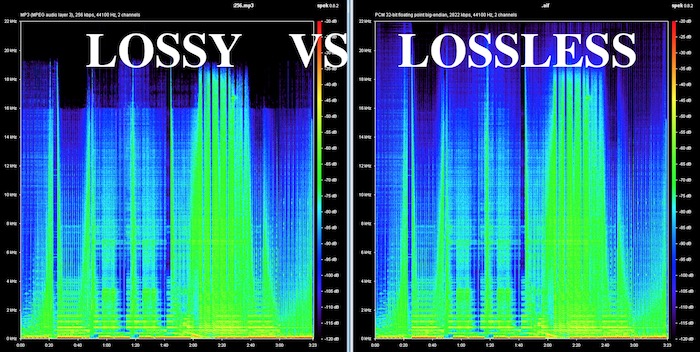
What is the difference between lossless and lossy music? Spectral comparison of lossy and lossless compression

Lossless and Lossy
Lossless and Lossy

Let’s not talk about the difference between the two music formats, let’s talk about the intuitive feel. For example, when you are in KTV, you always click various kinds of music to sing. What is the difference between lossless music and lossy music? Lossy Compression and Lossy Music Spectral Comparison of Lossless Compression

Is WAV a lossy or lossless format? – to understand

Is WAV a lossy or lossless format? 159***1368 WAV is a lossless format, with a maximum bitrate of 1.4M at 44100Hz. I hope to take likes and comments to report that Chocopa is good and WAV love is bad.

What is the difference between lossless and lossy compressed music?

At present, what online home music can really achieve lossless? What is the difference between lossless and lossless listening to online music platforms? Can ordinary people perceive that there is no loss…

What is the difference between lossy compression and lossless compression?

Differences: 1. Lossless compression can be fully restored, lossy compression cannot be the same as the original file after restoration, and there is a certain loss. 2. The compression ratio of lossless compression is generally from “2:1” to “5:1”, while the compression ratio of lossy compression

Know: Lossless and Lossy

It is said that the difference between lossy limit and lossless is obvious when listening to a classic or big weave… But unfortunately… I listen to less classic, don’t be intimidated… Then mention the tears of the times in my mind wma format …now

According to the difference between the images before and after compression, they can be divided into: lossless encoding and lossy encoding.

According to the difference between the images before and after compression, they can be divided into: lossless encoding and lossy encoding. A. Huffman coding B. Run-length coding C. Arithmetic coding D. Predictive coding Popular test College entrance exam First-tier constructor

Does anyone have a rigorous comparison between lossy and lossless image quality? -α|Sony/KM/M SLR/DSLM

Most of the difference between lossy and lossless is not seen in the static images, but in the latitude of the post adjustment. The difference between RAW and jpeg is like the difference between a book and a piece of paper. Lossy compression is sometimes just

The main difference between lossless predictive coding system and lossy predictive coding system is ( ). – Go to school

The main difference between lossless predictive coding system and lossy predictive coding system is ( ). A. The lossless predictive coding system has more quantizer parts than the lossy predictive coding system B. The lossy predictive coding system has more quantizer parts than the lossless predictive coding system

Difference Between Lossless and Lossy Music

1. Lossless music WMP can only play WAVE, if it is APE, please convert it to WAVE first. Qianqianjing can listen to any music format, recommended~~~ 2. The difference between lossless music and lossy music is hard to tell. Because there is also loss

[Double Blind Test] Can you hear the difference between lossy and lossless?

As an academic HiFier, I want to know how big is the difference between lossy and lossless. Feel free to follow the vote. Now I don’t know if the loss is A or B. I named it after a friend of mine to pass the double blind test.

Comparison of lossless and lossy image compression

Lossy Compression vs. Lossless Compression A Closer Look at Various Image Formats In general, there are two different types of image formats: lossy compression and lossless compression. 1. Lossy Compression Lossy compression can reduce images in memory and on disk

What is the difference between lossy and lossless music in game music?

Many friends will ask, some lossy and lossless music sounds no different to me. This is because human hearing is limited, generally 20 Hz to 20 kHz, and the sampling rate of game music production will use 44.1 KHz or 48 KHz.


The difference between lossy and lossless

The difference between lossy and lossless

LOSSY VS LOSSLESS
LOSSY VS LOSSLESS

What is the difference between lossy and lossless?

LOSSY VS LOSSLESS
LOSSY VS LOSSLESS

What is the difference between lossy and lossless?:1 Contents Introduction Lossy and lossless sampling frequency and rate PCM encoding MP3 encoding MPC encoding WMA format APE format 4 Characteristics of MP3MPCmp3PRO APE5 sound format?

Briefly describe the difference between lossy compression and lossless compression. _Examination information network

Briefly describe the difference between lossy compression and lossless compression. Click to see the answers and enter the question bank to practice questions that may interest you. Questions that may interest you. 1 Briefly describe the reasons for image compression. Click to see the answer to enter the question bank Exercise 2 illustrates the bitmap and

Sound is also divided into unique recognition of the advantages and disadvantages of various lossy and lossless audio formats.

Features: The sound quality is average, the compression rate is relatively high, it is compatible with a large number of software and hardware, and it is widely used. It is definitely the current mainstream. OGG encoding Ogg is an advanced lossy audio compression technology, the official name is OggVorbis, it is

What is the difference between lossy and lossless headlight modification?_Ant Car Accessories

The so-called non-destructive installation is to install the lens directly on the original car headlight bulb interface without destroying the original lamp container, and tighten the lens to fix the lens with screws. The so-called lossy installation consists of drilling holes in the original lamp pot and comparing the four screw holes in the lens.

Difference between lossless compression and lossy compression?

Lossless compression is the first step without the above. Therefore, lossless compression can restore data equivalent to what it was before compression, while lossy compression cannot. The scale of “loss” in lossy compression is controllable and algorithms are used to extract information before removing it.

Can you hear the difference between lossy and lossless audio at different sample rates?

Although it is said that the human ear can only hear the sound up to 20 kHz, the 48 kHz sampling rate and the 44.1 kHz sampling rate are actually different. . . It is recommended to use the highest quality to view this video to ensure the bitrate is high enough to reduce suppression.

What is the difference between lossy compression and lossless compression?

Differences: 1. Lossless compression can be fully restored, lossy compression cannot be the same as the original file after restoration, and there is a certain loss. 2. The compression ratio of lossless compression is generally from “2:1” to “5:1”, while the compression ratio of lossy compression


What makes an audio format lossless?

What makes an audio format lossless?

Lossless Audio

The best audio formats for your music library

Apple Music lossless

You might think of the word “lossless” as being used for audio formats that don’t use any kind of compression. However, even lossless audio formats use compression to reduce file sizes to reasonable levels.

Lossless formats use compression algorithms to save audio data so that the audio is exactly the same as the original source. This contrasts sharply with lossy audio formats like AAC, MP3, and WMA, which use algorithms that discard data to compress the audio. Audio files consist of sounds and silences. Lossless formats can compress silence to almost zero space while preserving all sound data, making them smaller than uncompressed files.

What lossless format is commonly used for digital music?
Popular lossless formats for storing music include:

FLAC
WAV
A THE C
lossless WMA
The effect of lossless formats on music quality
If you are downloading lossless music tracks from an HD music service, you would expect the sound quality to be really high. On the other hand, if you digitize a low-quality music box using a lossless audio format, the audio quality will not improve.

Is it possible to convert lossy songs to lossless?
Going from lossy to lossless is never a good idea. This is because a song that has been compressed using a lossy format always does. If you convert it to a lossless format, all you do is waste storage space on your hard drive or mobile device. There is no way to improve the quality of lossy songs using this method.

Advantages of using lossless audio formats for your music library
Using a lossy format like MP3 is still the most common method people use to store their music collection. However, there are clear advantages when it comes to building a lossless music library.

Perfect Music CD Backup: Lossless Copy to Audio Files gives you an exact bit-level copy of the original music CD. This means that no matter what audio format comes out in the future, you’ll know you have a perfect copy of the original.
Recover from lost or damaged: After playing music in lossless format, you can recover a damaged original CD or any CD that has been lost to a blank CD.
Convert to any format: Since your music is in a lossless format, you can convert it to any format and achieve the highest quality the format supports.
Disadvantages of Storing Music in a Lossless Format
Incompatible – Unlike formats like MP3, hardware devices like smartphones and tablets do not support lossless formats.
Requires more storage space: Lossless audio files generally require more storage space than lossy encoded files.

What equipment do you need to enjoy lossless audio? Part 2

What equipment do you need to enjoy lossless audio? Part 2

Apple Music Lossless Audio

digital to analog converter

Apple Lossless

Sound is an analog signal. Vibrations from objects generate it and air molecules spread it, so we can hear it. For this reason, there is no sound in space because there is no air to transmit it.

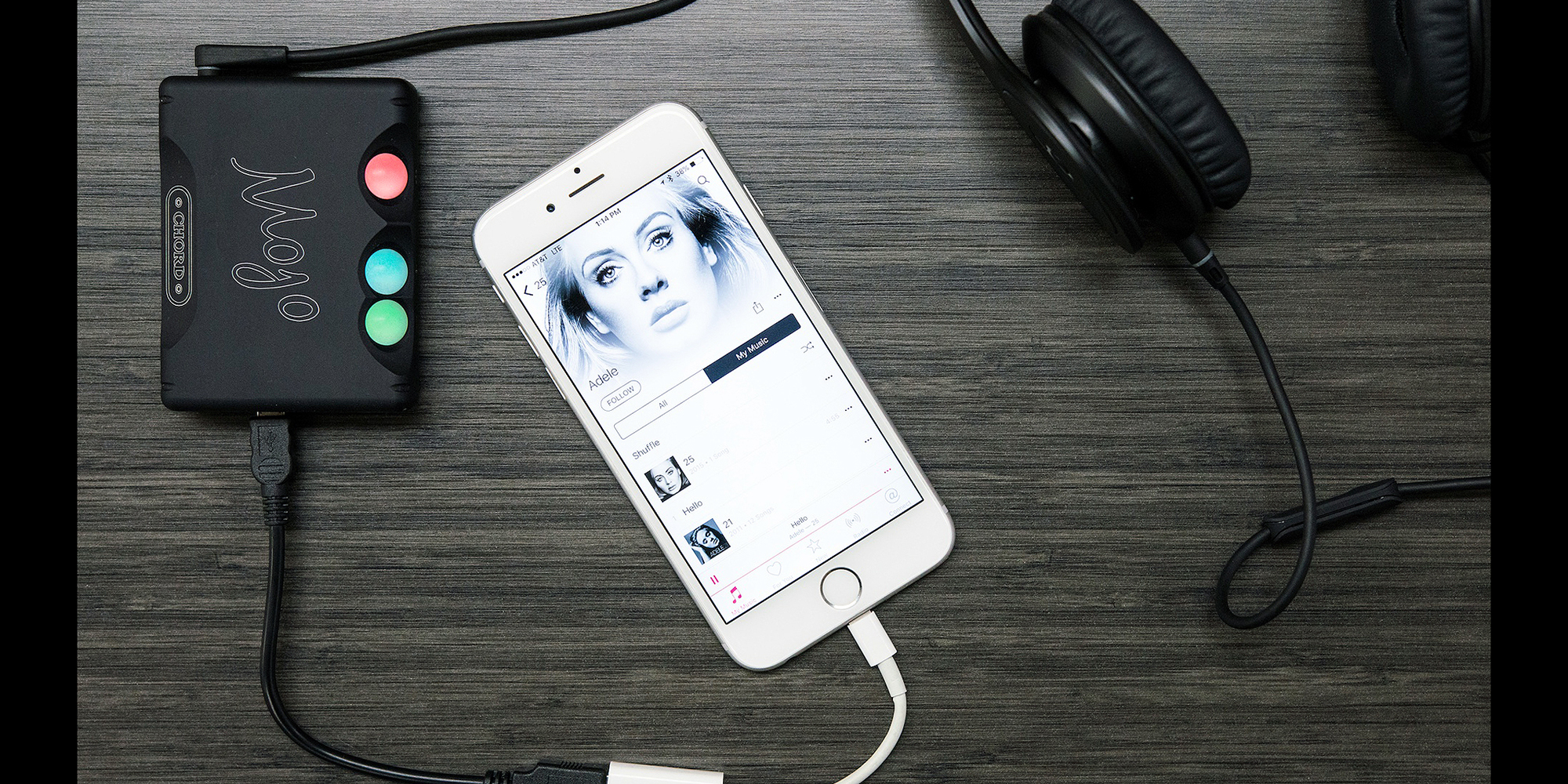
This is why you need a dedicated digital-to-analog converter (DAC). These devices are designed to convert digital signals to analog signals. While computers, smartphones, and other devices have built-in DACs, they’re often not optimized for music.

Also, analog signals are susceptible to interference. The DAC inside the device may receive interference from other components, such as the computer’s power supply or the smartphone’s 5G antenna. If you find that your audio output is too low, you definitely need a DAC with an integrated amplifier.

2.4 GHz wireless or wired speakers, headphones or earphones

If you want to take full advantage of lossless files, you need earphones or headphones capable of outputting high-fidelity audio. Unfortunately, even the best Bluetooth headphones cannot transmit uncompressed sound data.

While recent Bluetooth technology can transmit high-resolution sound, it’s still not enough for lossless audio. If you want to listen wirelessly, you must use a 2.4 GHz USB wireless connection. This is the only wireless audio technology that offers lossless transmission. Some alternatives, like Sony’s LDAC or Qualcomm’s aptX HD, come close, but it’s not “true lossless” audio.

However, if you need high-quality audio, it’s best to stick with the wired audio output. Since wired headphones are physically connected to your DAC, they receive analog audio signals directly. So your music will no longer go through conversion, compression or any other process. This ensures that you can enjoy the audio output of the DAC as it is.

High fidelity audio output

Of course, the most critical part of any listening experience is the speakers or headphones. Whether you’re playing lossy or lossless audio, if your audio equipment isn’t up to the task, you won’t be able to enjoy your music.

You need to look at various audio specifications, such as driver type, impedance, etc., to understand what makes a good speaker or headphone. Still, having impressive specs on paper doesn’t equate to great sound quality.

The only way to find the best speakers or headphones for your ears is to try them out in real life. You can also trust product reviews and comparisons from trusted sites; this way you can see other options that you haven’t considered before.

But if you have the budget, you can go ahead and invest in Bang & Olufsen. and Harman International. These speaker and headphone brands cost more than their competitors. But it is almost guaranteed that you will get the best audio quality from them.

The products of such companies are made of high-quality materials. They also have R&D facilities to ensure their speakers, headphones and earphones deliver the best sound quality possible.

What equipment do you need to enjoy lossless audio?

What equipment do you need to enjoy lossless audio?

Lossless

If you like high-fidelity audio, you’ve probably heard of lossless audio. You have probably read some articles about it and now you want to enjoy it for yourself.

Apple Music Lossless

But what hardware do you need to access high-quality audio? Can you use an existing device or do you need specialized drivers? Here’s a quick introduction to the hardware you need to enjoy lossless audio.

What is lossless audio?

Lossless recordings take up a lot of space: about 30 MB per song. But in the past, storage space was at a premium. The internet connection is also slow and unreliable. Therefore, the first iPod’s 5GB of storage could only hold about 166 lossless audio files.

That is why lossy file formats like MP3 were introduced. About 3-5 MB per song, you can store more than a thousand songs on the first generation Apple iPod. But as the Internet has gotten faster and storage space has become more affordable, the need for highly compressed audio has diminished.

File compression reduces file size by sacrificing quality. So if you’re listening to music with lossless audio, that means you’re listening to what was recorded. Lossless audio uses a compression format that does not cause any data loss or does not compress the audio at all.

Related: What’s the difference between lossless and hi-res audio?

Lossless device for lossless audio
Now that you have a lossless audio file, it’s no good if you plan to play it on an audio device that compresses the data. After all, if data is lost between the computer and the speakers, you won’t be able to enjoy the best audio quality.

So this is what you need to get the best audio out of your lossless music files.

Lossless Audio vs. Hi-Res Audio: What’s the Difference? Part 4

Lossless Audio vs. Hi-Res Audio: What’s the Difference? Part 4

Apple Music

Difference Between Lossless and Hi-Res Audio
As we explained earlier, lossless audio is an audio sample without any downstream compression on top of it. Such samples are in raw form.

Apple Music

So lossless audio does not mean higher quality audio. Any audio, hi-res or not, can be lossless.

Hi-Res Audio, on the other hand, is better quality audio with higher bit depth and high sample rate. High-Resolution Audio can be lossless or lossy.

Hi-Res Audio Format

With the rise of Hi-Res Audio, streaming services have started to introduce some proprietary audio formats. Some of the more popular formats include FLAC, AIFF, WAV, and ALAC. All of these formats support High-Resolution Audio with lossy or lossless compression.

For example, Apple uses ALAC for high resolution streaming on Apple Music. ALAC is a lossless format, which means that its compression does not degrade sound quality. It is also very space efficient. Compared to WAV without applying compression, ALAC takes up half the storage space.

Related: The Most Common Audio Formats: Which One Should You Use?

Like Apple, Tidal uses its own audio format, MQA. MQA has lossless compression and offers almost the same sound quality and storage space advantages as ALAC.

Audio without loss against high resolution audio: What is the difference? Part 3

Audio without loss against high resolution audio: What is the difference? Part 3

Apple Music lossless

What is the sampling frequency and the depth of bits?

Lossless Audio

Computers are digital machines that handle 1 and 0. Therefore, any information that a computer needs to store, including audio, should be stored as a chain of some and zeros.

On the other hand, the sound is not digital. It is analog and continuous nature. Then, if we want to store the sound in the computer storage unit, we must convert it to 1 and 0.

There are many ways to make this conversion. The simplest is the pulse code modulation (PCM).

The representation of the pulse code modulation is shown below.

In PCM, we take analog audio, reproduce it and sample it at a predetermined speed in the form of some and zeros. This data is then stored in audio format.

To better understand the process, imagine a photo of you playing baseball with the children. If you take 30 photos per second in an hour, you will have enough data to make an hour of video clips of 30 fps.

The same happens when you show an audio signal. It is taking a pictorial snapshot of the audio signal at an established speed. Codify all those snapshots and you will have an audio file.

To play an audio file, your computer only needs to play the snapshot at the same speed that was captured. This frequency is called sampling frequency.

We measure the sampling frequency in KHz. The standard sampling frequency for audio CDs is 44.1 kHz.

Now, since any audio consists of multiple sounds of different frequencies, we need to store multiple 1 or 0 to store all the necessary information. Therefore, we must strive to obtain the largest possible sample size, because the greater the sample, the better the sound quality will be.

The sample size, which is the number of bits in each sample, is called depth of bits. The depth of standard bits on the audio CDs is 16 bits.

High resolution audio

In spite of all the uproar over high resolution audio music transmission services, surprisingly there is no standard definition. There is no consensus on what is high resolution audio.

That said, the consensus is that the audio samples with high sampling and high-depth bits are called high resolution.

As you can see, the previous definitions change constantly. For example, when the 8-bit audio is the standard, 16 bits / 44.1 kHz is high resolution. Nowadays, when 16 bits / 44.1 kHz is the standard, 24 bits / 96 kHz is located in the field of high resolution.

In theory, high resolution audio sounds clearer and better. It has a greater dynamic range, better separation of instruments and low noise level.

Audio without loss against high resolution audio: What is the difference? Part 2

Audio without loss against high resolution audio: What is the difference? Part 2

Apple Music

While files with loss save storage space, they sacrifice the quality of the audio to be highly compressed. However, the industry adopts audio files with loss such as the de facto standard to deliver music to listeners.

Apple Music lossless

Related: How does file compression work?

The loss audio files are everywhere these days. All transmission sites, from YouTube to Spotify, reproduce compressed music. Fortunately, with the use of modernized coders and audio formats, these files sound good. Then, most people will not complain.

That is, the music we play is different from the study version. It is of less quality. Part of the reason are the compression techniques that use musical production in addition to the original recording.

The loss audio files are completely decompressed or use compression techniques that do not cause any data loss. Then, if it is transmitting audio without losses, it is transmitting music without compression artifacts. This can improve audio quality.

However, lossless files do not always produce a better quality sound. If the compressed file itself is of poor quality, decompress it will not help. Therefore, try to see if lossless audio makes a significant difference.