The Advantages of Lossless Audio Formats: FLAC and ALAC


Free Download Mp4Gain
picture

The Advantages of Lossless Audio Formats: FLAC and ALAC


FLAC and ALAC
FLAC and ALAC
FLAC and ALAC
FLAC and ALAC

As an expert in audio optimization, I am always on the lookout for formats that deliver exceptional sound quality without compromising on file size. In this article, I will delve into the world of lossless audio formats, with a specific focus on two popular options: FLAC and ALAC. These formats have gained significant popularity among audiophiles and music enthusiasts for their ability to preserve the original audio quality while offering efficient compression. Join me as we explore the advantages of these lossless audio formats and why they should be your top choice.

Superior Sound Quality

When it comes to lossless audio formats, the primary concern is maintaining the utmost sound quality. FLAC and ALAC excel in this regard, as they employ compression algorithms that preserve every detail of the original audio recording. Whether it’s the rich harmonies of a symphony orchestra or the subtle nuances in a vocalist’s performance, these formats ensure an immersive and authentic listening experience. With FLAC and ALAC, you can indulge in music the way it was intended to be heard, without any compromise on audio fidelity.

Efficient Compression

Efficient compression is another remarkable advantage of lossless audio formats like FLAC and ALAC. These formats utilize sophisticated compression techniques that significantly reduce file sizes while retaining all the audio data. This means you can store more music on your devices without sacrificing quality or resorting to lower-bitrate alternatives. Whether you have a vast music library or limited storage space, FLAC and ALAC offer a practical solution to keep your favorite tracks accessible at all times.

Wide Compatibility

One of the key considerations when choosing an audio format is its compatibility with different devices and platforms. FLAC and ALAC have gained widespread support across various software and hardware ecosystems. Many popular media players, portable devices, and operating systems are compatible with these formats, ensuring seamless playback without the need for additional conversions or transcoding. Whether you’re using a Mac, Windows, or mobile device, FLAC and ALAC guarantee a hassle-free listening experience.

Versatility and Metadata Support

Versatility is an essential aspect of lossless audio formats, and FLAC and ALAC don’t disappoint. Apart from delivering exceptional audio quality, these formats also support a range of metadata. You can embed album art, track information, lyrics, and other relevant details within the audio files themselves. This ensures that your music collection remains organized and easily searchable across different platforms and media players. With FLAC and ALAC, it’s not just about the audio; it’s about creating a comprehensive and immersive musical experience.

Archival and Future-Proofing

For audiophiles and music collectors, archival is a crucial consideration. FLAC and ALAC are ideal for archiving purposes as they provide a reliable and future-proof solution. By choosing these formats, you can preserve your music collection in its original quality for years to come, ensuring that your favorite albums and tracks withstand the test of time. Moreover, since FLAC and ALAC have gained widespread acceptance, it’s highly likely that they will continue to be supported by future audio systems and technologies.

Smooth Integration with Existing Libraries

If you already have an extensive collection of audio files in other formats, the transition to FLAC or ALAC can be seamless. Both formats support transcoding, allowing you to convert your existing audio files into lossless formats without any loss of quality. This ensures that you can integrate FLAC and ALAC files seamlessly with your existing music library, avoiding any disruptions in your listening experience. With their wide compatibility and transcoding capabilities, FLAC and ALAC offer a convenient pathway to upgrade your audio collection.

Community and Support

FLAC and ALAC have garnered a passionate and dedicated community of supporters, comprising audio enthusiasts, music professionals, and developers. This active community ensures ongoing support, updates, and development for the formats, assuring users that they are investing in a long-term and reliable audio solution. Whether you seek advice, troubleshooting, or simply want to connect with like-minded individuals, the FLAC and ALAC community is always there to assist and share their expertise.

Streaming and Online Distribution

With the rise of music streaming platforms and online distribution, the demand for lossless audio formats has also increased. Many streaming services and online stores now offer FLAC as a preferred option for audiophiles, ensuring that you can enjoy your favorite music in its original quality, streamed directly to your devices. This development not only reinforces the advantages of lossless formats but also opens up new avenues for artists, allowing them to deliver their music to fans with uncompromised fidelity.

Preservation of Music History

Lossless audio formats like FLAC and ALAC play a crucial role in the preservation of music history. They allow us to digitize and archive classic recordings, ensuring that future generations can enjoy the same musical experiences as previous ones. By opting for FLAC and ALAC, you contribute to the preservation of cultural heritage and ensure that the legacy of iconic musicians and compositions lives on.

Audiophile-Grade Experience

Lastly, but certainly not least, FLAC and ALAC offer an unparalleled audiophile-grade experience. These formats cater to the discerning ears of audiophiles who crave the utmost audio quality. Whether you’re using high-end headphones, a dedicated audio setup, or a premium sound system, FLAC and ALAC provide the fidelity and richness necessary to truly appreciate the intricacies of the music. With their lossless nature and superior sound reproduction, these formats elevate your listening experience to new heights.

In conclusion, FLAC and ALAC stand out as the go-to choices for anyone seeking lossless audio formats. With their superior sound quality, efficient compression, wide compatibility, and versatile features, they offer an unmatched audio experience. Whether you’re an audiophile, music collector, or simply someone who values exceptional sound, FLAC and ALAC provide the perfect combination of fidelity and convenience. Embrace the advantages of lossless audio formats and let your music shine in its full glory.


Free Download Mp4Gain
picture


Mp4Gain Main Window
picture


Mp4Gain Features
picture


Free Download Mp4Gain
picture

The difference between lossy and lossless Part 2

The difference between lossy and lossless Part 2

lossy and lossless
lossy and lossless

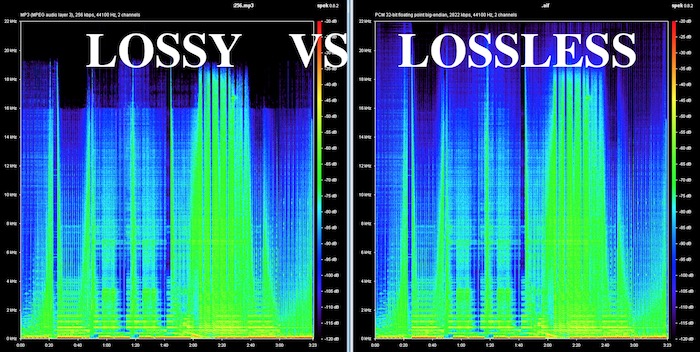
What is the difference between lossless and lossy music? Spectral comparison of lossy and lossless compression

Lossless and Lossy
Lossless and Lossy

Let’s not talk about the difference between the two music formats, let’s talk about the intuitive feel. For example, when you are in KTV, you always click various kinds of music to sing. What is the difference between lossless music and lossy music? Lossy Compression and Lossy Music Spectral Comparison of Lossless Compression

Is WAV a lossy or lossless format? – to understand

Is WAV a lossy or lossless format? 159***1368 WAV is a lossless format, with a maximum bitrate of 1.4M at 44100Hz. I hope to take likes and comments to report that Chocopa is good and WAV love is bad.

What is the difference between lossless and lossy compressed music?

At present, what online home music can really achieve lossless? What is the difference between lossless and lossless listening to online music platforms? Can ordinary people perceive that there is no loss…

What is the difference between lossy compression and lossless compression?

Differences: 1. Lossless compression can be fully restored, lossy compression cannot be the same as the original file after restoration, and there is a certain loss. 2. The compression ratio of lossless compression is generally from “2:1” to “5:1”, while the compression ratio of lossy compression

Know: Lossless and Lossy

It is said that the difference between lossy limit and lossless is obvious when listening to a classic or big weave… But unfortunately… I listen to less classic, don’t be intimidated… Then mention the tears of the times in my mind wma format …now

According to the difference between the images before and after compression, they can be divided into: lossless encoding and lossy encoding.

According to the difference between the images before and after compression, they can be divided into: lossless encoding and lossy encoding. A. Huffman coding B. Run-length coding C. Arithmetic coding D. Predictive coding Popular test College entrance exam First-tier constructor

Does anyone have a rigorous comparison between lossy and lossless image quality? -α|Sony/KM/M SLR/DSLM

Most of the difference between lossy and lossless is not seen in the static images, but in the latitude of the post adjustment. The difference between RAW and jpeg is like the difference between a book and a piece of paper. Lossy compression is sometimes just

The main difference between lossless predictive coding system and lossy predictive coding system is ( ). – Go to school

The main difference between lossless predictive coding system and lossy predictive coding system is ( ). A. The lossless predictive coding system has more quantizer parts than the lossy predictive coding system B. The lossy predictive coding system has more quantizer parts than the lossless predictive coding system

Difference Between Lossless and Lossy Music

1. Lossless music WMP can only play WAVE, if it is APE, please convert it to WAVE first. Qianqianjing can listen to any music format, recommended~~~ 2. The difference between lossless music and lossy music is hard to tell. Because there is also loss

[Double Blind Test] Can you hear the difference between lossy and lossless?

As an academic HiFier, I want to know how big is the difference between lossy and lossless. Feel free to follow the vote. Now I don’t know if the loss is A or B. I named it after a friend of mine to pass the double blind test.

Comparison of lossless and lossy image compression

Lossy Compression vs. Lossless Compression A Closer Look at Various Image Formats In general, there are two different types of image formats: lossy compression and lossless compression. 1. Lossy Compression Lossy compression can reduce images in memory and on disk

What is the difference between lossy and lossless music in game music?

Many friends will ask, some lossy and lossless music sounds no different to me. This is because human hearing is limited, generally 20 Hz to 20 kHz, and the sampling rate of game music production will use 44.1 KHz or 48 KHz.


The difference between lossy and lossless

The difference between lossy and lossless

LOSSY VS LOSSLESS
LOSSY VS LOSSLESS

What is the difference between lossy and lossless?

LOSSY VS LOSSLESS
LOSSY VS LOSSLESS

What is the difference between lossy and lossless?:1 Contents Introduction Lossy and lossless sampling frequency and rate PCM encoding MP3 encoding MPC encoding WMA format APE format 4 Characteristics of MP3MPCmp3PRO APE5 sound format?

Briefly describe the difference between lossy compression and lossless compression. _Examination information network

Briefly describe the difference between lossy compression and lossless compression. Click to see the answers and enter the question bank to practice questions that may interest you. Questions that may interest you. 1 Briefly describe the reasons for image compression. Click to see the answer to enter the question bank Exercise 2 illustrates the bitmap and

Sound is also divided into unique recognition of the advantages and disadvantages of various lossy and lossless audio formats.

Features: The sound quality is average, the compression rate is relatively high, it is compatible with a large number of software and hardware, and it is widely used. It is definitely the current mainstream. OGG encoding Ogg is an advanced lossy audio compression technology, the official name is OggVorbis, it is

What is the difference between lossy and lossless headlight modification?_Ant Car Accessories

The so-called non-destructive installation is to install the lens directly on the original car headlight bulb interface without destroying the original lamp container, and tighten the lens to fix the lens with screws. The so-called lossy installation consists of drilling holes in the original lamp pot and comparing the four screw holes in the lens.

Difference between lossless compression and lossy compression?

Lossless compression is the first step without the above. Therefore, lossless compression can restore data equivalent to what it was before compression, while lossy compression cannot. The scale of “loss” in lossy compression is controllable and algorithms are used to extract information before removing it.

Can you hear the difference between lossy and lossless audio at different sample rates?

Although it is said that the human ear can only hear the sound up to 20 kHz, the 48 kHz sampling rate and the 44.1 kHz sampling rate are actually different. . . It is recommended to use the highest quality to view this video to ensure the bitrate is high enough to reduce suppression.

What is the difference between lossy compression and lossless compression?

Differences: 1. Lossless compression can be fully restored, lossy compression cannot be the same as the original file after restoration, and there is a certain loss. 2. The compression ratio of lossless compression is generally from “2:1” to “5:1”, while the compression ratio of lossy compression


lossless music

lossless music

Lossless Music

Lossless music is a kind of music file playback format, which is divided into two types: lossy compression and lossless compression.

Lossless Music

However, due to data loss in the audio digitizing process, it is actually impossible to achieve true lossless.
chinese nameintact musicexplainMusic file playback formatApplication fieldmusicClassificationLossy and lossless compressionaudio compression codeFLAC
content

type of sound
Commonly seen MP3, WMA, and OGG are called lossy compression. As the name implies, lossy compression reduces the audio sample rate and bitrate, and the output audio file will be smaller than the original file. . Another audio compression is called lossless compression, which can compress the volume of the audio file to a smaller size on the premise of saving 100% of all the data in the original file. Same size, same bitrate. Lossless compression formats include APE, FLAC, WavPack, LPAC, WMALossless, AppleLossless, TTA, Tak, TAC, La, OptimFROG, Shorten, and common and conventional lossless compression formats include APE, FLAC, TTA, TAK.
General WAV CD can capture this music format. However, due to the high volume and uncompressed original audio, it can usually be compressed and converted to FLAC or APE at a lower volume. Note: wav is still a lossless format, and the last two are lossless compression formats
encoding format
BOW
APE is one of the popular digital music file formats. APE is a lossless audio compression technology, that is, after compressing the audio data file read from the audio CD in APE format, you can restore the file in APE format, and the restored audio file is the same as the original. compressed audio file. Exactly the same as before, nothing to lose. [one]
FLAC
FLAC is short for Free Lossless Audio Codec [2] , which can be interpreted as Chinese lossless audio compression coding. FLAC is a well-known free audio compression codec, which is characterized by lossless compression. Unlike other lossy compression codes such as MP3 and AAC, it does not destroy any original audio information, so it can restore the sound quality of music discs. It has been supported by many software and hardware audio products since 2012.
FLAC is similar to MP3, but it has lossless compression, which means that the audio is compressed in FLAC without losing any information. This compression is similar to Zip, but FLAC will give you a higher compression ratio, because FLAC is a compression method specially designed for the characteristics of audio, and you can use the player to play FLAC compressed files like you normally play MP3 files (many Car players and home audio devices already support FLAC, and you can find links to the manufacturers of these devices on the FLAC website).
FLAC is free and is supported by most operating systems, including Windows, “unix” (Linux, BSD, Solaris, OSX, IRIX), BeOS, OS/2, and Amiga. And FLAC provides a build system in autotools, MSVC, Watcom C and ProjectBuilder development tools.
WAV

The WAV format is a sound file format developed by Microsoft, also known as a wave sound file. It is the first digital audio format and is widely supported by the Windows platform and its applications. The WAV format supports many compression algorithms, supports a variety of audio bits, sample rates, and channels. It adopts a sampling frequency of 44.1 kHz and a quantization number of 16 bits. Therefore, the sound quality of WAV is almost the same as that of CD, but WAV format requires too much storage space, it is very inconvenient to communicate and broadcast.
WAV’s full name is Wave Audio Files, and WAV is derived from sampling analog waveforms of sound. Sampling the analog waveform of sound with different sampling rates can obtain a series of discrete sample points, convert the values ​​of these sample points into binary numbers with different quantization bits (8 bits or 16 bits), and then store them in the disc, this produces a WAV file of the sound, a wave file . Microsoft Sound System Sound Finder software can convert AIF , SND and VOD files to WAV format.
This format records the waveform of the sound, so as long as the sample rate sample rate

Digital Music: A Quick Guide to Having the Best Lossless Files

Digital Music: A Quick Guide to Having the Best Lossless Files

Digital Music

Surely changing our music from one side to the other, from an analog format to a digital one or even music already stored in digital format on a compact disc towards one for use on mobile devices, would result in a loss of sound quality that would exceed convenience and comfort.

This has been the main vision of people who care about sound quality, since the concept of digital music files was born. A reference generated by the common use of highly compressed lossy formats such as MP3.

wHowever, it is an opinion that simply “cannot take any more water.” Yes, popular formats like MP3 and AAC sacrifice some quality to keep file sizes small, but the emergence of lossless digital audio formats that are capable of preserving every piece of information from a CD recording means that a ripped file It may sound indistinguishable from the original.

You may still be wondering why you should spend precious time ripping up your CD collection. It’s all about convenience: a lossless digital music collection saves shelf space, is easy to move and to back up; for larger collections, it also makes locating individual songs and albums much easier and faster. You can also access a digital music library from multiple sources simultaneously, for example, from multiple network music players located in different rooms in your home.

Additionally, thanks to higher quality file acquisitions with popular streaming and download sites like B&W Society of Sound, higher quality music files can now be accessed as part of a subscription-based model without taking up space valuable on shelves – or even the attic – with physical means.

On the hardware side, storage devices like NAS and external hard drives offer huge amounts of space at ever lower prices. And with increasingly better and less expensive, widely available high-quality DACs, computers now offer excellent reproduction and can be easily connected to your existing hi-fi system, either wired or wireless.

When streaming or ripping discs, the file format option may seem complicated by too many options. This is what we think of the main formats that can be the salvation of true audio enthusiasts:

FLAC

Free Lossless Audio Codec is a popular choice for many audiophiles. Like MP3 and AAC, FLAC is compressed to keep file sizes relatively small, but unlike those formats, it is lossless and therefore – in theory – indistinguishable from the quality of a CD. In theory. Audio from CD converted to FLAC will typically shrink about 50 percent from its original size; a typical three-minute song on a CD will take up 30-40MB of space, while a ripped FLAC version of that song results in 15-20MB.

FLAC supports metadata (artist and song information can be embedded in the file and artwork can be referenced by the file) and will be played on a wide variety of software and hardware. Crucially for many, it is currently not compatible with Apple products like iTunes or the iPhone.

However, there are downsides to FLAC from an audiophile perspective and a lot of that comes during encoding and decompressing the file for playback. Because FLAC is unzipped on the fly, the sound quality is highly dependent on the software you are using to do that. Therefore, although it is theoretically lossless, there are still barriers to overcome when listening to the music contained in FLAC.

Apple Lossless

As you might guess from the name, Apple Lossless Audio Codec (or ALAC) was developed by Apple and works with company products like iTunes, iPod and iPhone (as well as supported by a number of other computers and players on software); If you are an avid user of the Apple team, it will be very attractive to you. However, like FLAC, this format is compressed, and files ripped from a CD are typically around 40-60 percent of their original size. Furthermore, ALAC suffers from the same decoding problems as FLAC.

AIFF

AIFF is a lossless format, but also without compression. While this means that it takes up as much space as the source file when ripping from a CD, it also avoids any compression issues, making it the ideal file for people who are concerned about sound quality.