What is the difference between MP3 and lossless sound quality?


Free Download Mp4Gain
picture

What is the difference between MP3 and lossless sound quality?

Mp3 Lossless
Mp3 Lossless

Now, many people think that it is impossible to listen to MP3, so they search for lossless music everywhere on the Internet.

Mp3 Lossless
Mp3 Lossless

So what is the difference between lossless music and MP3? What about the various lossless music formats?

A few days ago, a friend of mine bought a Porsche sports car and then came to ask me for lossless sound quality music. I told him there was no need to play MP3s, but people weren’t happy. The sound in the car was fine. Playing MP3 is a loss of audio.

Now there are many music websites that give lossless to the myth, but do you know what lossless is? What is the difference between lossless music and ordinary MP3? Today I come to talk to you about those things that have no losses.

I remember when Apple held the Iphone4 conference, it came up with a definition: retina display. In short, it has been replaced by a high resolution screen with pixels that exceed the recognition limit of the human eye since the Iphone4. I must say that Mr. Qiao’s trick is very good, he defines a word that everyone can accept and makes Apple mobile phones sell all over the world.

However, the same concept is much older in the world of acoustics. Sound is a type of energy wave. After the experimental research of countless generations of ancestors, it is believed that 40 kHz is a value that can well restore the sound heard by the human ear. Later, for various commercial reasons, some record companies defined the sample rate of CDs at 44.1 kHz, which they considered to be the “retina display” that the ears could hear. Later, 44.1 kHz brought innumerable problems to subsequent generations, because it is not an integer and cannot be divided and multiplied simply by performing SRC sampling, so early Inter defined the output sample rate of the sound card as 48 kHz to save problem. , which creates a sample rate conversion problem that all sound engineers hate


Free Download Mp4Gain
picture


Mp4Gain Main Window
picture


Mp4Gain Features
picture


Free Download Mp4Gain
picture

YOUTUBE SOUND QUALITY AND PICTURE QUALITY (AS OF JUNE 2021) Part 2

YOUTUBE SOUND QUALITY AND PICTURE QUALITY (AS OF JUNE 2021) Part 2

YouTube Audio

Video format: VP9
DASH value Video size Video bitrate Comments
278 144p (256 × 144) 100K-300 Kbps Validated in Firefox
330 144p (256 × 144) (Only HDR compatible terminals can be selected) Validated with Google Pixel 4
242 240p (426 × 240) 100K-500 Kbps Validated in Firefox
331 240p (426 × 240) (Only HDR-compatible terminals can be selected) Validated with Google Pixel 4
243 360p (640 × 360) 200K-950 Kbps Validated in Firefox
332 360p (640 × 360) (Only HDR-compatible terminals can be selected) Validated with Google Pixel 4
244 480p (854 x 480) 300K-2 Mbps Validated in Firefox
333 480p (854 x 480) (Only HDR-compatible terminals can be selected) Validated with Google Pixel 4
247 720p (1280 x 720) 30 fps 600K-4.3 Mbps Validated in Firefox
302 720p (1280 x 720) 60 fps 600K-4.3 Mbps Validated in Firefox
334 720p (1280 x 720) (Only HDR compatible terminals can be selected) Validated with Google Pixel 4
248 1080p (1920 × 1080) 30 fps 700K-7 Mbps Validated in Firefox
303 1080p (1920 × 1080) 60 fps 700K-7 Mbps Validated in Firefox
335 1080p (1920 x 1080) (Only HDR compatible terminals can be selected) Validated with Google Pixel 4
271 1440p (2560 × 1440) 30 fps 3.5 M-13 Mbps Validated in Firefox
308 1440p (2560 × 1440) 60 fps 3.5 M-13 Mbps Validated in Firefox
336 1440p (2560 x 1440) (Only HDR compatible terminals can be selected) Validated with Google Pixel 4
313 2160p (3840 × 2160) 30 fps 5.7 M-37 Mbps Validated in Firefox
315 2160p (3840 × 2160) 60 fps 5.7 M-37 Mbps Validated in Firefox
337 2160p (3840 x 2160) (Only HDR compatible terminals can be selected) Validated with Google Pixel 4
272 4320p (7680 × 4320) 10 M-50 Mbps Validated in Firefox
Video format: AV1
AV1 is an open source video compression format called AOMedia Video 1. Since it is a codec in development as a successor standard to VP9, ​​it seems that VP9 videos will eventually be replaced by AV1, but it will take time to replace them because the only supported browsers currently are Chrome and Firefox. .

Postscript 2020/4/23: Confirmed to apply to some videos.
When applied, the DASH value will be as follows
av01.0.05M.08 (398) / opus (251)

DASH value Video size Video bitrate Comments
394 144p (256 × 144) is not clear Validated in Firefox
395 240p (426 × 240) is not clear Validated in Firefox
396 360p (640 × 360) is not clear Validated in Firefox
397 480p (854 x 480) is not clear Validated in Firefox
398 720p (1280 x 720) is not clear Validated in Firefox
399 1080p (1920 x 1080) is not clear Validated in Firefox
571 4320p (7680 × 4320) is not clear Validated in Firefox
Audio
Audio format: AAC-LC
DASH value Audio bit rate Cutoff frequency Comments
36 not clear not clear Can’t verify because iPhone 7 has no headphone output
18 96 Kbps 15 kHz Validated with Internet Explorer 11 on Windows 10
Twenty-two 128 Kbps 15.8 kHz Validated with Internet Explorer 11 on Windows 10
139 96 Kbps 15 kHz Validated with Internet Explorer 11 on Windows 10
140 128 Kbps 15.8 kHz Validated with Internet Explorer 11 on Windows 10
Same for AAC = 139 (96 Kbps) 18

Same for AAC = 140 (128 Kbps) 22

Audio format: Opus
Since the Opus audio bit rate is a variable bit rate (VBR), the average value is displayed. It will increase up to about 2 times.

DASH value Audio bit rate Cutoff frequency Comments
249 48 Kbps (VBR) 20 kHz Validated in Firefox
250 64 Kbps (VBR) 20 kHz Validated in Firefox
251 128 Kbps (VBR) 20 kHz Validated in Firefox
Opus = 249 (48 Kbps)

Opus = 250 (64 Kbps)

Opus = 251 (128 Kbps)

Postscript 2020/2/11: It looks like Opus audio was finally created for all users’ videos.

Please refer to the article linked above for how to upload in high quality.

To check after upload, right click on the video about a day after upload, click “Detailed Statistics” and check the value of “Codecs”.
At this time, be sure to use a browser other than “Safari”. Safari is not compatible with Opus.

Success story: Codecs vp09.00.51.08.01.01.01.01 (243) / opus (251)
Failure example: Codecs avc1.4d401e (134) /mp4a.40.2 (140)
The video / audio codecs are listed in order. (In this case, the video is vp9 (243), so it is 360p in WebM format, and the audio is Opus (251), so it is 128Kbps video in Opus format.)

Depending on the video, more than 30 videos can be generated in one video.

● YouTube app
Click here to download the app
ANDROID IOS

Version “15.20.33” or later updated on May 14,
2020 (strictly speaking, it will apply approximately from May 23, 2020)

Now it is compatible with Opus audio. (Android compatible devices only)

YOUTUBE SOUND QUALITY AND PICTURE QUALITY (AS OF JUNE 2021)

YOUTUBE SOUND QUALITY AND PICTURE QUALITY (AS OF JUNE 2021)

YouTube Audio

This time, I investigated the sound quality and image quality of “YouTube”.

youtube audio

HOW TO UPLOAD TO YOUTUBE WITH HIGH QUALITY SOUND

Basically YouTube uses “H.264 AAC-LC” or “Opus” as the audio codec.
The video codec used is “H.264” (MP4) or “VP9” (WebM). “AV1” is also used in some videos.

Verification method
(Video) Download the official video of “3D Youtube Downloader”, upload the video to “VLC Media Player” and refer to Media Information → Input Bit Rate in Statistics.
(Audio) Check the audio of the video downloaded by the above method using “foobar2000” for the bit rate. The cutoff frequency is converted to .wav format by “XMedia Recode”, and the file is imported into “WaveSpectra” and verified.

● PC
The PC version of YouTube ranges from 144p (320 x 180) to 4K (3860 x 2160), but there are differences in the image quality that can be selected and the audio that can be played depending on the browser.
You can check if your browser supports it on the next page.
YOUTUBE SUPPORT BROWSER

The following is the support status for each browser (browsers that support both VP9 and MP4 have the highest picture and sound quality).

Browser name PIN
Internet Explorer (Windows7) Not supported (not visible)
Incompatible iOS Safari
Internet Explorer (Windows 8.1 / 10) Only compatible with MP4 (not viewable)
Safari on Macintosh Only compatible with MP4
Microsoft Edge (EdgeHTML) Correspondence (depending on model)
Microsoft Edge (Chrome) Correspondence
Firefox Correspondence
Google Chrome (recommended browser) Correspondence
Correspondence table by DASH browser
* We are looking for information. Provide information in the comment section.

Recommended browser
YouTube Help from
> YouTube video is available to view in a variety of formats and resolutions. However, some browsers do not support the new video format. Depending on your browser, you may only have one or two video formats to choose from. We recommend that you update your browser or operating system to enjoy watching the video comfortably.

The following is an example of a browser and operating system combination that supports the video format for high-quality YouTube videos.

Google Chrome (all operating systems)
MS Edge
Safari (Mac OS X 10.10 or later)
Firefox (Windows 7 or later and Mac OS X 10.10 or later)
* Internet Explorer is no longer supported.

Video and Audio DASH Correspondence Table
[Caution] In the following table, only those whose use is currently confirmed are listed. Therefore, not all configurations are listed.

Photography
Since the video bit rate is a variable bit rate (VBR), the upper and lower limits are listed. The mean value is somewhere in the middle.

Image format: MP4
DASH value Video size Video bitrate Comments
36 240p (426 × 240) is not clear Validated with Safari on iOS14 (mp4v.20.3, mp4a.40.2)
18 360p (640 × 360) 500K-1 Mbps Validated with Safari on iOS14 (avc1.42001E, mp4a.40.2)
22 720p (1280 × 720) 1-3 Mbps Validated with Safari on iOS14 (avc1.64001F, mp4a.40.2)
160 144p (256 × 144) 50K-90 Kbps Validated with Internet Explorer 11 on Windows 10
133 240p (426 × 240) 150K-580 Kbps Validated with Internet Explorer 11 on Windows 10
134 360p (640 × 360) 200K-1 Mbps Validated with Internet Explorer 11 on Windows 10
135 480p (854 × 480) 250K-2.3 Mbps Validated with Internet Explorer 11 on Windows 10
136 720p (1280 × 720) 30 fps 300K-4.4 Mbps Validated with Internet Explorer 11 on Windows 10
298 720p (1280 × 720) 60 fps 300K-4.4 Mbps Validated with Internet Explorer 11 on Windows 10
137 1080p (1920 × 1080) 30 fps 500K-6.2Mbps Validated with Internet Explorer 11 on Windows 10
299 1080p (1920 × 1080) 60 fps 500K-6.2Mbps Validated with Internet Explorer 11 on Windows 10
Image form: VP9
DASH value Video size Video bitrate Comments
278 144p (256 × 144) 100K-300 Kbps Validated in Firefox
330 144p (256 × 144) (Only HDR compatible terminals can be selected) Validated with Google Pixel 4
242 240p (426 × 240) 100K-500 Kbps Validated in Firefox
331 240p (426 × 240) (Only HDR-compatible terminals can be selected) Validated with Google Pixel 4
243 360p (640 × 360) 200K-950 Kbps Validated in Firefox
332 360p (640 × 360) (Only HDR-compatible terminals can be selected) Validated with Google Pixel 4
244 480p (854 × 480) 300K-2 Mbps Validated in Firefox
333 480p (854 × 480) (Only HDR-compatible terminals can be selected) Validated with Google Pixel 4
247 720p (1280 × 720) 30 fps 600K-4.3

Some of the most popular digital audio formats.

Main audio formats without loss of quality.


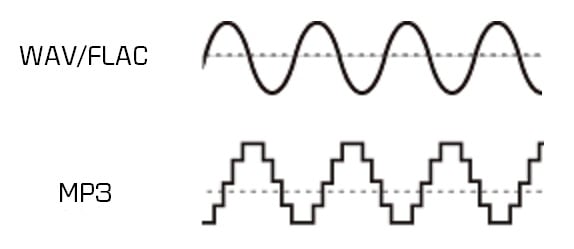
WAVE (.wav) – This is the most common uncompressed audio file format. When you rip audio from a music CD on your computer, this will be the format you get. It takes up a lot of space (1411 KB of information per second on 4400 Hz / 16 bits of stereo music), but reproduces the sounds in a quiet way. In terms of quality and amount of information, it resembles the AIFF (.aif) format, which is mainly part of the Mac world. Suitable for audio files and those that record music.

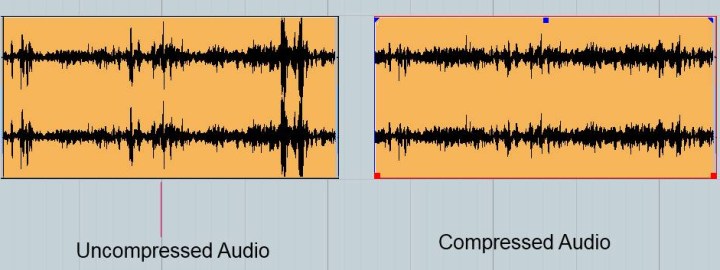
FLAC (.flac) – Free Lossless Audio Codec: It is an open source codec that is often used to store music CDs on the computer without loss of quality. While .wav offers uncompressed audio, .flacs are called “lossless c compressed”. However, compression is minimal and the vast majority of people do not notice differences between a Wave file and a FLAC file. However, they take up less space than WAV files. This is possible because they use a variable amount of compression as needed. This means that, in the case of very complex and rich music parts, it uses encodings that are equal to WAV files (1411 Kb / s data). However, in the case of the “simpler” parts, the number of bits used to represent them will be smaller. It is suitable for demanding ears who also want to save some space on their hard drives.

APE Monkey’s Audio is one of the most powerful and popular lossless multimedia compression algorithms for audio files.
The lossless format, that is without data loss, ensures that the original sound quality is maintained in smaller files than compressed sample formats (such as WAV).
The format used is “.ape”, Monkey’s Audio allows compression of a WAVin mono source and also the opposite procedure, ie mono decoding for other formats such as WAV or MP3

ALAC Apple Lossless Audio Codec: Similar to FLAC, which always uses maximum compression. The quality is good on average, but the format is not as effective as FLAC in terms of weight. Not all players support it, so if your life is not exclusively dedicated to Apple and its products, it’s not a recommended format. Other important but less popular lossless audio formats are Monkey’s Audio (.ape) and OptimFROG (.ofr).

AIFF Audio Interchange File Format is a standard file format used to store audio recordings on a personal computer. The format was developed by the Apple computer based on Electronic Arts electronic exchange format and is often used on Apple Macintosh systems, which is why it is also called Apple Interchange File Format.
The audio data in the AIFF file is not compressed, so the file tends to be much larger than other formats, both lost and lost, such as ALE or MP3. One minute sound records approx. 10 MB of data, this is because it is a format created for sharing, although it is also used for editing.
However, there are compressed formats, called AIFFC (AIFF compressed), that can reduce the file size by a third (AIFF3) or a sixth (AIFF6), but this results in a great loss of quality, so there is virtually no use.

The most important sound quality formats in loss quality.

MP3 (.mp3) or MPEG-1 or MPEG-2 Audio Layer III – is the best known compressed audio standard. It was the forerunner of the category (it was published as an international standard in 1998) and is still the most widely used. Minifying a WAV file to MP3 makes it up to 90% easier for MB. The quality varies depending on the bit rate, ranging from 32 to 320 Kbit information for every second of music. The default is 128 Kb / s. At 320 the performance is pretty good.

AAC (.aac) – Advanced audio coding. It’s an Apple standard that iTunes uses by default when importing music. It works like MP3, and with the same bit rate, it takes the same space. The difference is in the way compression is handled. In simple words, “music” sums up another way. According to many people it sounds better than MP3. Especially suitable for those who use iPhone and iPod to listen to music.

WMA (.wma) – This is a proprietary format from Microsoft and is considered Redmund’s response to MP3. Its incompatibility with the iPod makes it very uncomfortable. Incidentally, although most players support MP3, WMA does not. Basically, unless your music world starts and ends with Windows Media Player, it’s a generally discouraged format. It is not compatible with Mac and iTunes.


OGG VORBIS: It is an open source or free format, which means that it does not require any license to be implemented in an audio player (the details are irrelevant for us users). The quality is comparable to MP3, perhaps a little higher. A noble and well-made creation, but not widespread enough to justify its massive use. In light of all this, therefore, recording music in WAV and broadcasting it in MP3 or AAC is the most reasonable option. In this way, you will have quality when you need it and the guarantee of usability of music wherever you are.

Digital Music: A Quick Guide to Having the Best Lossless Files

Digital Music: A Quick Guide to Having the Best Lossless Files

Digital Music

Surely changing our music from one side to the other, from an analog format to a digital one or even music already stored in digital format on a compact disc towards one for use on mobile devices, would result in a loss of sound quality that would exceed convenience and comfort.

This has been the main vision of people who care about sound quality, since the concept of digital music files was born. A reference generated by the common use of highly compressed lossy formats such as MP3.

wHowever, it is an opinion that simply “cannot take any more water.” Yes, popular formats like MP3 and AAC sacrifice some quality to keep file sizes small, but the emergence of lossless digital audio formats that are capable of preserving every piece of information from a CD recording means that a ripped file It may sound indistinguishable from the original.

You may still be wondering why you should spend precious time ripping up your CD collection. It’s all about convenience: a lossless digital music collection saves shelf space, is easy to move and to back up; for larger collections, it also makes locating individual songs and albums much easier and faster. You can also access a digital music library from multiple sources simultaneously, for example, from multiple network music players located in different rooms in your home.

Additionally, thanks to higher quality file acquisitions with popular streaming and download sites like B&W Society of Sound, higher quality music files can now be accessed as part of a subscription-based model without taking up space valuable on shelves – or even the attic – with physical means.

On the hardware side, storage devices like NAS and external hard drives offer huge amounts of space at ever lower prices. And with increasingly better and less expensive, widely available high-quality DACs, computers now offer excellent reproduction and can be easily connected to your existing hi-fi system, either wired or wireless.

When streaming or ripping discs, the file format option may seem complicated by too many options. This is what we think of the main formats that can be the salvation of true audio enthusiasts:

FLAC

Free Lossless Audio Codec is a popular choice for many audiophiles. Like MP3 and AAC, FLAC is compressed to keep file sizes relatively small, but unlike those formats, it is lossless and therefore – in theory – indistinguishable from the quality of a CD. In theory. Audio from CD converted to FLAC will typically shrink about 50 percent from its original size; a typical three-minute song on a CD will take up 30-40MB of space, while a ripped FLAC version of that song results in 15-20MB.

FLAC supports metadata (artist and song information can be embedded in the file and artwork can be referenced by the file) and will be played on a wide variety of software and hardware. Crucially for many, it is currently not compatible with Apple products like iTunes or the iPhone.

However, there are downsides to FLAC from an audiophile perspective and a lot of that comes during encoding and decompressing the file for playback. Because FLAC is unzipped on the fly, the sound quality is highly dependent on the software you are using to do that. Therefore, although it is theoretically lossless, there are still barriers to overcome when listening to the music contained in FLAC.

Apple Lossless

As you might guess from the name, Apple Lossless Audio Codec (or ALAC) was developed by Apple and works with company products like iTunes, iPod and iPhone (as well as supported by a number of other computers and players on software); If you are an avid user of the Apple team, it will be very attractive to you. However, like FLAC, this format is compressed, and files ripped from a CD are typically around 40-60 percent of their original size. Furthermore, ALAC suffers from the same decoding problems as FLAC.

AIFF

AIFF is a lossless format, but also without compression. While this means that it takes up as much space as the source file when ripping from a CD, it also avoids any compression issues, making it the ideal file for people who are concerned about sound quality.