MP3 Normalizer


Free Download Mp4Gain
picture

MP3 Normalizer

MP3 Normalizer
MP3 Normalizer
MP3 Normalizer
MP3 Normalizer

MP3 Normalizer is an advanced tool designed to optimize and enhance the audio quality of your MP3 files. With this powerful software, you can easily adjust and balance the volume levels of your MP3 tracks, ensuring a consistent and enjoyable listening experience. Whether you have a music collection, podcasts, or audio recordings, MP3 Normalizer provides the perfect solution for achieving optimal audio levels.

Volume Equalizer

Improve the audio quality of your MP3 files with our advanced volume equalizer. This feature allows you to adjust and normalize the volume levels across all your MP3 tracks, eliminating any discrepancies and ensuring a smooth and pleasant listening experience.

Sound Level Normalization

Bring uniformity to your MP3 collection by normalizing the sound levels. Our MP3 Normalizer analyzes each audio file and adjusts the volume to achieve consistent levels, eliminating the need to constantly adjust the volume while listening to your favorite tracks.

Audio Quality Enhancement

Elevate the audio quality of your MP3 files with our advanced normalization techniques. MP3 Normalizer enhances the overall sound clarity and richness, allowing you to enjoy your music or podcasts with improved dynamics and balanced volume levels.

Device-Specific Volume Optimization

MP3 Normalizer provides the flexibility to optimize the volume levels of your MP3 files for different playback devices. Whether you’re using headphones, speakers, or car stereo systems, our software ensures that the volume is optimized for each specific device, delivering an optimal audio experience.

Volume Fluctuation Correction

Eliminate annoying volume fluctuations in your MP3 tracks. MP3 Normalizer detects and corrects any sudden changes in volume, ensuring a smooth and consistent playback experience without any unexpected loud or soft sections within your audio files.

Preserving Audio Quality

Our MP3 Normalizer employs advanced algorithms to normalize the volume levels while preserving the original audio quality. You can confidently normalize your MP3 files without worrying about any degradation in sound or loss of fidelity.

Professional-Grade Audio Output

If you’re a content creator or podcaster, MP3 Normalizer helps you achieve professional-grade audio quality. By normalizing your MP3 files, you can ensure that your recordings have consistent volume levels that meet industry standards.

Batch Processing Efficiency

Save time and effort with the batch processing feature of MP3 Normalizer. This allows you to normalize multiple MP3 files simultaneously, streamlining the optimization process for your entire audio library.

User-Friendly Interface

MP3 Normalizer features a user-friendly interface, making it easy for both novice and advanced users to navigate and utilize its functionalities. The software provides clear instructions and options, ensuring a hassle-free experience in normalizing your MP3 files.

Customizable Normalization Settings

Customize the normalization settings according to your preferences. Adjust the target volume, set desired loudness levels, and fine-tune the normalization process to achieve the perfect balance for your MP3 files.

Compatibility with Various Audio Formats

In addition to MP3 files, MP3 Normalizer supports a wide range of audio formats, including WAV, FLAC, AAC, and more. You can confidently normalize the volume levels of different audio file types, allowing for a unified and harmonious audio experience.

Efficient Performance and Reliable Results

MP3 Normalizer is built to deliver efficient performance. The software operates seamlessly, swiftly processing your MP3 files and providing accurate volume normalization results, ensuring that your audio library is optimized effectively.

Enhanced Music Listening Experience

By normalizing your MP3 files, you can enhance your music listening experience. Say goodbye to constantly adjusting the volume and enjoy a seamless playback with consistent volume levels, allowing you to fully immerse yourself in the music.

Optimal Sound Balance

MP3 Normalizer ensures optimal sound balance in your MP3 files. It intelligently analyzes and adjusts the volume levels, preventing any parts of the audio from being too loud or too soft. This results in a well-balanced audio output that is pleasing to the ears.

Distraction-Free Audio Recordings

If you have audio recordings with inconsistent volume levels, MP3 Normalizer is the solution. By normalizing the volume, you can eliminate distractions caused by sudden changes in volume, ensuring that your focus remains on the content of the recording.

Compatibility with Different Operating Systems

MP3 Normalizer is compatible with various operating systems, including Windows, macOS, and Linux. Regardless of the platform you use, you can easily access and utilize the software to optimize the volume levels of your MP3 files.

Data Integrity and Lossless Normalization

During the normalization process, MP3 Normalizer ensures the integrity of your data. The software performs lossless normalization, meaning it preserves the original audio data without any degradation or loss of quality.



Free Download Mp4Gain
picture


Mp4Gain Main Window
picture


Mp4Gain Features
picture


Free Download Mp4Gain
picture

MP3 Normalizer: How to Select the Best Software for Audio Quality Improvement

MP3 Normalizer: How to Select the Best Software for Audio Quality Improvement

Mp3 Normalizer
Mp3 Normalizer
Mp3 Normalizer
Mp3 Normalizer

MP3 audio files are a popular format for music and other audio recordings, but they can vary widely in volume levels and quality. To improve the listening experience, many people turn to MP3 normalizer software. But with so many options available, what features should you look for when selecting the best software for audio quality improvement? In this article, we’ll explore the top features to consider and answer some common questions about MP3 normalizer software.

Features to Look for in MP3 Normalizer Software

When selecting MP3 normalizer software, there are several key features to consider:

Batch Processing

If you have a large collection of MP3 files, you’ll want software that can process multiple files at once. Batch processing allows you to select a folder or group of files to be normalized, saving you time and effort.

Preserve Audio Quality

The primary goal of MP3 normalizer software is to improve audio quality. Look for software that can normalize volume levels without causing any distortion or loss of quality to the audio file.

Customizable Settings

Different audio files may require different normalization settings. Look for software that allows you to adjust the normalization settings, such as target volume level, peak normalization, and RMS normalization.

File Format Support

While MP3 is a popular audio format, it’s not the only one. Look for software that supports a wide range of audio file formats, such as WAV, FLAC, and AAC.

Simple User Interface

MP3 normalizer software should be user-friendly and easy to use. Look for software with a simple and intuitive interface that allows you to quickly select and normalize your audio files.

How MP3 Normalizer Software Works

MP3 normalizer software works by analyzing the volume levels of an audio file and adjusting them to a target level. The software scans the entire audio file, identifies the loudest and quietest parts, and then adjusts the volume levels to create a more consistent listening experience. This can improve the overall audio quality and prevent the need to constantly adjust the volume levels during playback.

Free vs. Premium MP3 Normalizer Software

There are both free and premium options available for MP3 normalizer software. Free software can be a great option for those on a budget, but it may not offer the same level of features or customization options as premium software. Premium software typically offers more advanced features and better performance.

Potential Loss of Quality or Distortion

While MP3 normalizer software is designed to improve audio quality, it is possible for the software to cause loss of quality or distortion during the normalization process. To avoid this, select software that uses advanced algorithms to preserve audio quality and avoid any unnecessary adjustments that could cause distortion.

Normalization Time

The amount of time it takes to normalize an MP3 file can vary depending on the size of the file and the processing power of your computer. In general, however, most files can be normalized within a few minutes.

Advantages of MP3 Normalizer Software

Using MP3 normalizer software can offer several advantages over adjusting the volume levels manually. For one, it can save you time and effort, as you won’t need to manually adjust the volume levels for each file. Additionally, MP3 normalizer software can improve the overall listening experience by creating a more consistent volume level across multiple files.

Best Software for Different Audio Files

Certain MP3 normalizer software programs may be better suited for certain types of audio files. For example, some software may be better suited for music files, while others may be better suited for speech recordings. Look for software that offers customizable settings and options to ensure optimal results for the specific type of audio file you’re working with.

File Size and Normalization

The normalization process can affect the overall file size of an MP3 audio file. When normalizing, the software may need to make adjustments to the audio file, which can result in a larger file size. However, this increase in file size is usually minimal and shouldn’t be a significant concern.

Cost of MP3 Normalizer Software

The cost of MP3 normalizer software can vary widely, depending on the features and level of performance offered. Some software may be available for free, while others may cost several hundred dollars. Additionally, some software may require ongoing subscription fees or additional costs for updates or advanced features. When selecting MP3 normalizer software, consider your budget and the features you require to find the best option for your needs.

Recommended Settings and Best Practices

To ensure optimal results when using MP3 normalizer software, there are some recommended settings and best practices to follow. For example, it’s important to choose the correct normalization settings for the specific type of audio file you’re working with. Additionally, it’s a good idea to make a backup copy of your original audio files before normalizing them, in case of any unexpected issues or changes.

Conclusion

Selecting the best MP3 normalizer software for your needs can help improve the overall audio quality of your files and provide a more consistent listening experience. When selecting software, consider features such as batch processing, customizable settings, and file format support, and be sure to choose software that can preserve audio quality and avoid distortion. With the right software and best practices, you can easily normalize your MP3 files and enjoy a better listening experience.

MP3 vs Lossless

MP3 vs Lossless

MP3 vs Lossless
MP3 vs Lossless
MP3 vs Lossless
MP3 vs Lossless

Meta Description: Discover the difference between MP3 and lossless audio formats and understand which one suits your listening preferences.

Introduction

Music is an essential part of our lives. It can evoke emotions, motivate us, and even help us relax. The format we listen to music in can have a significant impact on our listening experience. Two of the most popular audio formats are MP3 and lossless. While MP3 is widely used, lossless audio formats are gaining popularity. This article will explore the differences between MP3 and lossless audio formats and help you understand which one is best for your listening preferences.

MP3 vs Lossless: What’s the Difference?

MP3 is a compressed audio format that reduces the file size of audio recordings while maintaining reasonable sound quality. Lossless audio formats, on the other hand, preserve the audio quality of the original recording. Let’s delve deeper into the differences between MP3 and lossless audio formats.

Compression

MP3 audio files are compressed to reduce the file size. This compression results in some data loss, which affects the audio quality. Lossless audio formats, such as FLAC or ALAC, compress audio files without losing any data. This compression is possible due to the fact that these audio formats eliminate redundancy in audio data.

Audio Quality

MP3 audio files have a lower audio quality than lossless audio formats. The audio quality is reduced due to data compression. Lossless audio formats maintain the audio quality of the original recording, making them a better choice for audiophiles and music enthusiasts who want the best possible sound quality.

File Size

MP3 files are significantly smaller in size than lossless audio formats. This small size makes MP3 files easy to share and store, making them a popular choice for digital music distribution. Lossless audio formats, on the other hand, are larger in size, which makes them more challenging to share and store.

Compatibility

MP3 audio files are compatible with a wide range of devices and media players, making them an accessible audio format. Lossless audio formats, on the other hand, have limited compatibility and require specialized software or hardware to play them.

Head-to-Head Comparison: MP3 vs Lossless

Let’s compare MP3 and lossless audio formats head-to-head based on the following factors:

Audio Quality: MP3 compresses audio data, which results in reduced audio quality. Lossless audio formats preserve the audio quality of the original recording.

File Size: MP3 files are significantly smaller in size than lossless audio formats.

Compatibility: MP3 files are compatible with a wide range of devices and media players. Lossless audio formats have limited compatibility and require specialized software or hardware to play them.

Portability: MP3 files are easy to share and store due to their small size. Lossless audio formats are larger in size, making them more challenging to share and store.

Ease of Use: MP3 files are easy to use and require no specialized software or hardware. Lossless audio formats require specialized software or hardware to play them.

Based on the above comparison, MP3 audio files are an excellent choice for those who value portability and ease of use, while lossless audio formats are a better choice for audiophiles who value audio quality over file size.

FAQs

Q: Is MP3 audio quality good enough? A: MP3 audio quality is good enough for most casual listeners. However, audiophiles and music enthusiasts may prefer lossless audio formats for their superior audio quality.

Q: Are lossless audio formats worth the larger file size? A: Lossless audio formats are worth the larger file size for audiophiles and music enthusiasts who value audio quality over file size.

Q: Converting MP3 to Lossless Audio Formats

It is possible to convert MP3 files to lossless audio formats like FLAC or ALAC. However, this conversion does not improve the audio quality of the original MP3 file. The converted file will have the same audio quality as the original MP3 file. Converting an MP3 file to a lossless format only increases the file size and does not improve the audio quality.

Choosing the Right Audio Format for You

When choosing between MP3 and lossless audio formats, it is essential to consider your listening preferences. If you value portability and ease of use, MP3 is the way to go. MP3 files are compatible with a wide range of devices and media players and have a small file size, making them easy to share and store. However, if you are an audiophile or music enthusiast who values audio quality over file size, lossless audio formats like FLAC or ALAC are the way to go. These formats preserve the audio quality of the original recording and provide a superior listening experience.

Conclusion

In conclusion, the choice between MP3 and lossless audio formats ultimately depends on your listening preferences. MP3 files are excellent for those who value portability and ease of use, while lossless audio formats are the better choice for those who prioritize audio quality over file size. Regardless of which format you choose, music is a universal language that brings people together and enhances our lives in countless ways.

What is the difference between MP3 and lossless sound quality?

What is the difference between MP3 and lossless sound quality?

MP3 LOSSLESS
MP3 LOSSLESS


Is it possible to distinguish Mp3 quality from CD Quality?


mp3 lossless
mp3 lossless


Although the sound quality of a CD does not reach the true hearing limit of the human ear, it is impossible for most people to tell the difference between a CD and a higher sampling rate, so everyone assumes that the CD sound quality is 44.1 kHz can be converted to lossless sound quality.

In the past, the capacity of storage media was not large. To store more music and make it easier to stream, we used to compress large CD audio files. High frequency and low volume sounds are removed to achieve the purpose of reducing file size. Similar formats include 3GP, M4A, AA3, WMA, etc.

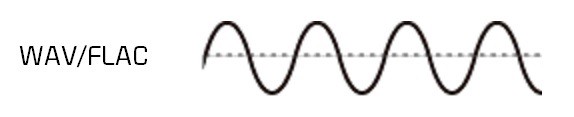
With the development of the Internet and storage media, the size of audio files is no longer important, so lossless compression has gradually become popular. Common formats are APE, FLAC, etc., which are similar to the beginning of ZIP compressed files, compress audio files AND packed, the final file size is basically only half of the original CD file. Here it is emphasized that the WAV format we often say is a waveform record file, which uses uncompressed PCM encoding, which is also a relatively large WAV file. 44.1 kHz 16-bit WAV audio can also be considered uncompressed. Lossless sound quality.

Since different devices support different audio compression formats, we often need to transcode, and each transcode will cause some loss in audio. For example: If you convert MP3 to lossless format, you can only achieve the sound quality of the original MP3 file. This lossless can also be called false lossless. This is the case for most lossless music provided by music portals.

I have been recording for many years and have used speakers ranging from tens of thousands to millions of dollars. Why do I rarely use speakers under 10,000 yuan? Because speakers under 10,000 yuan cannot be used as monitors. I advise everyone not to charge money for listening to music on music portals for lossless sound quality. Untrained ears will not be able to hear the difference between true and false without loss. For normal ears, MP3 with a bit rate of 320 kbps is already the best.

What is the difference between MP3 and lossless sound quality?

What is the difference between MP3 and lossless sound quality?

Mp3 Lossless
Mp3 Lossless

Now, many people think that it is impossible to listen to MP3, so they search for lossless music everywhere on the Internet.

Mp3 Lossless
Mp3 Lossless

So what is the difference between lossless music and MP3? What about the various lossless music formats?

A few days ago, a friend of mine bought a Porsche sports car and then came to ask me for lossless sound quality music. I told him there was no need to play MP3s, but people weren’t happy. The sound in the car was fine. Playing MP3 is a loss of audio.

Now there are many music websites that give lossless to the myth, but do you know what lossless is? What is the difference between lossless music and ordinary MP3? Today I come to talk to you about those things that have no losses.

I remember when Apple held the Iphone4 conference, it came up with a definition: retina display. In short, it has been replaced by a high resolution screen with pixels that exceed the recognition limit of the human eye since the Iphone4. I must say that Mr. Qiao’s trick is very good, he defines a word that everyone can accept and makes Apple mobile phones sell all over the world.

However, the same concept is much older in the world of acoustics. Sound is a type of energy wave. After the experimental research of countless generations of ancestors, it is believed that 40 kHz is a value that can well restore the sound heard by the human ear. Later, for various commercial reasons, some record companies defined the sample rate of CDs at 44.1 kHz, which they considered to be the “retina display” that the ears could hear. Later, 44.1 kHz brought innumerable problems to subsequent generations, because it is not an integer and cannot be divided and multiplied simply by performing SRC sampling, so early Inter defined the output sample rate of the sound card as 48 kHz to save problem. , which creates a sample rate conversion problem that all sound engineers hate

MP3 audio files and lossless files, which is the best?

For your music collection, better an mp3 audio file or a lossless file? Let’s see the differences together and what format to choose
In the transition from analog music (vinyl records, cassettes, and other similar media) to digital music (audio CDs, mp3 audio files, etc.) experienced a few decades ago, compression algorithms have played a critical role. To avoid taking up too much space on the data storage media (when the transition hit the core, each byte of available space was worth so much gold) it was necessary to develop algorithms that would help compress the file size without overly affecting the audio quality. .

Lossless Audio

It was during these years that names such as mp3 audio files, WMA files, WaV files, and OGG files began to circulate with some frequency in musical environments (and not) around the world.

Lossless vs. at a loss

Over the years, the panorama of audio formats expanded dramatically and there was the curious formation of two opposite blocks. On the one hand, in fact, the so-called lossless files (literally lossless) were to be ‘concentrated’, while on the other side of the musical ‘Iron Curtain’ were the lossy files (literally lossy). As the names suggest, the difference between one format and another is due to the possible loss of musical information.

comparision mp3 vs lossless

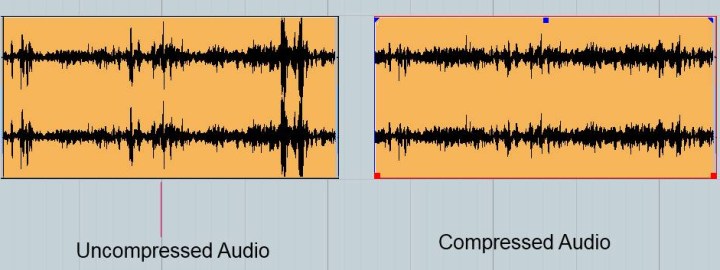
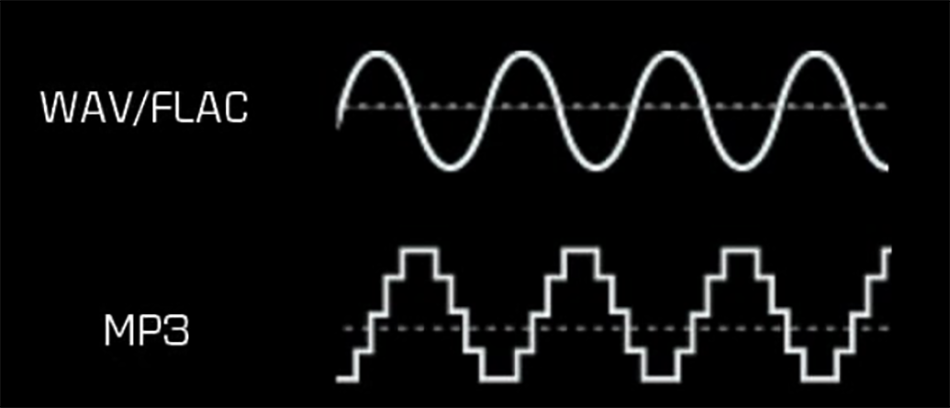
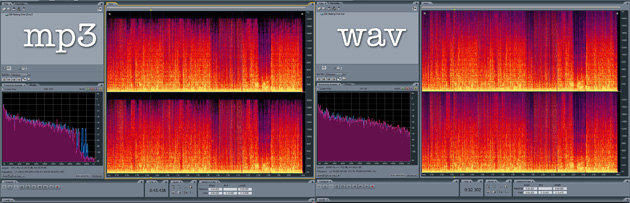
Phonometric comparison between lossless files and mp3 audio files

Lossless files guarantee (and guarantee) the same sound depth and quality as an audio CD, while lossy files (such as mp3 audio files) reduce the size of a music track in the order 10 times at a partial cost sound quality. For example, if a lossless file takes up 40 megabytes, an mp3 audio file of the same song will be just over 4 megabytes.

Bitrate issue

What makes the difference between the two audio file formats is the bit rate used in the analog to digital conversion process. When we talk about bit rate (sometimes also written bit rate) we mean the number of bits that can process in the unit of time. In music, the bit rate measures the amount of data contained in each second of the audio track: the higher the value of the bit rate, the better the quality of the music.

In an mp3 audio file, this value can range from 32 kbps (kilobits per second) to 320 kbps. However, in a lossless file, there is no compression, and with a bit rate of around 1,411 kbps, the audio quality is comparable to that of an audio CD. According to the numbers, therefore, lossless files are better than mp3 audio files, ensuring deeper, true-to-original sound. However, as experience teaches us, numbers are not always everything.

Slimming differences

The reality of events appears to be quite different. The human ear, in fact, would not be so sensitive as to notice differences between an excellent quality mp3 audio file (with 320kbps bit rates) of a lossless file.

To understand this, just run one or more ABX tests. Such a test consists of cross-comparing two known files (called A and B) and two unknown files (X and Y, which are the same as A and B but with a different bit rate). At the end of the test, two pairs of files must be formed, matching the originals with the relative modified files. If you are using an mp3 audio file with a high bit rate (320 kbps or slightly lower), even the ear with the most musical training will not be able to distinguish the differences.

Despite this, a music file made up of lossless files still guarantees a substantial advantage over a file made up of mp3 audio files. The first, in fact, can be converted to other audio formats without this leading to a loss of quality; Conversions of a lossy file, on the other hand, will cause further loss of music information and deterioration of audio quality.