MP3 vs Lossless


Free Download Mp4Gain
picture

MP3 vs Lossless

MP3 vs Lossless
MP3 vs Lossless
MP3 vs Lossless
MP3 vs Lossless

Meta Description: Discover the difference between MP3 and lossless audio formats and understand which one suits your listening preferences.

Introduction

Music is an essential part of our lives. It can evoke emotions, motivate us, and even help us relax. The format we listen to music in can have a significant impact on our listening experience. Two of the most popular audio formats are MP3 and lossless. While MP3 is widely used, lossless audio formats are gaining popularity. This article will explore the differences between MP3 and lossless audio formats and help you understand which one is best for your listening preferences.

MP3 vs Lossless: What’s the Difference?

MP3 is a compressed audio format that reduces the file size of audio recordings while maintaining reasonable sound quality. Lossless audio formats, on the other hand, preserve the audio quality of the original recording. Let’s delve deeper into the differences between MP3 and lossless audio formats.

Compression

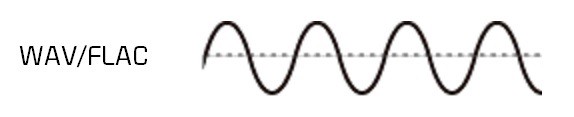
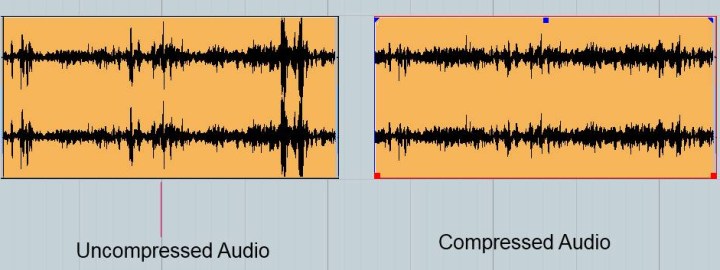
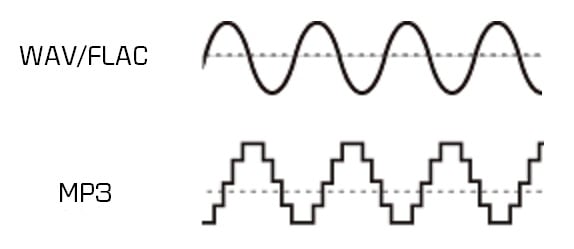
MP3 audio files are compressed to reduce the file size. This compression results in some data loss, which affects the audio quality. Lossless audio formats, such as FLAC or ALAC, compress audio files without losing any data. This compression is possible due to the fact that these audio formats eliminate redundancy in audio data.

Audio Quality

MP3 audio files have a lower audio quality than lossless audio formats. The audio quality is reduced due to data compression. Lossless audio formats maintain the audio quality of the original recording, making them a better choice for audiophiles and music enthusiasts who want the best possible sound quality.

File Size

MP3 files are significantly smaller in size than lossless audio formats. This small size makes MP3 files easy to share and store, making them a popular choice for digital music distribution. Lossless audio formats, on the other hand, are larger in size, which makes them more challenging to share and store.

Compatibility

MP3 audio files are compatible with a wide range of devices and media players, making them an accessible audio format. Lossless audio formats, on the other hand, have limited compatibility and require specialized software or hardware to play them.

Head-to-Head Comparison: MP3 vs Lossless

Let’s compare MP3 and lossless audio formats head-to-head based on the following factors:

Audio Quality: MP3 compresses audio data, which results in reduced audio quality. Lossless audio formats preserve the audio quality of the original recording.

File Size: MP3 files are significantly smaller in size than lossless audio formats.

Compatibility: MP3 files are compatible with a wide range of devices and media players. Lossless audio formats have limited compatibility and require specialized software or hardware to play them.

Portability: MP3 files are easy to share and store due to their small size. Lossless audio formats are larger in size, making them more challenging to share and store.

Ease of Use: MP3 files are easy to use and require no specialized software or hardware. Lossless audio formats require specialized software or hardware to play them.

Based on the above comparison, MP3 audio files are an excellent choice for those who value portability and ease of use, while lossless audio formats are a better choice for audiophiles who value audio quality over file size.

FAQs

Q: Is MP3 audio quality good enough? A: MP3 audio quality is good enough for most casual listeners. However, audiophiles and music enthusiasts may prefer lossless audio formats for their superior audio quality.

Q: Are lossless audio formats worth the larger file size? A: Lossless audio formats are worth the larger file size for audiophiles and music enthusiasts who value audio quality over file size.

Q: Converting MP3 to Lossless Audio Formats

It is possible to convert MP3 files to lossless audio formats like FLAC or ALAC. However, this conversion does not improve the audio quality of the original MP3 file. The converted file will have the same audio quality as the original MP3 file. Converting an MP3 file to a lossless format only increases the file size and does not improve the audio quality.

Choosing the Right Audio Format for You

When choosing between MP3 and lossless audio formats, it is essential to consider your listening preferences. If you value portability and ease of use, MP3 is the way to go. MP3 files are compatible with a wide range of devices and media players and have a small file size, making them easy to share and store. However, if you are an audiophile or music enthusiast who values audio quality over file size, lossless audio formats like FLAC or ALAC are the way to go. These formats preserve the audio quality of the original recording and provide a superior listening experience.

Conclusion

In conclusion, the choice between MP3 and lossless audio formats ultimately depends on your listening preferences. MP3 files are excellent for those who value portability and ease of use, while lossless audio formats are the better choice for those who prioritize audio quality over file size. Regardless of which format you choose, music is a universal language that brings people together and enhances our lives in countless ways.


Free Download Mp4Gain
picture


Mp4Gain Main Window
picture


Mp4Gain Features
picture


Free Download Mp4Gain
picture

MP3 encoder

MP3 encoder

Mp3 Encoder
Mp3 Encoder

1. MP3 Encoder FAQ

Mp3 Encoder
Mp3 Encoder

: what is an MP3 encoder?
An MP3 encoder is a piece of software that uses the MP3 codec algorithm (compression/decompression) to create mp3 files. Most encoders only convert
a WAV file to an MP3 file, although many can convert other formats such as WMA, Real Audio, Ogg, etc.

There are only a few standalone encoders, and a lot of software also only uses 4 main encoding engines, largely due to
to Fraunhofer Gesellschaft patents and various companies helping with ISO sources. Although no company owns the license, the
Developers must pay expensive license fees no matter what proprietary MP3 encoder they use. Major MP3 encoding engines include: LAME (
non-ISO source), BladeEnc, Fraunhofer, and Real Networks’ Xing encoder.

– How does the MP3 encoder work?
The core technology under MPEG-Layer 3 is included in the MP3 encoder. The decoding process uses a series of algorithms and rules to compress audio.
The encoder also detect sounds that occur at the same time
and they try to rule out any that might be “masked” or “inaudible” by other sounds.

– What is a good MP3 encoder?
Xing is the fastest encoder in terms of speed, but the worst in quality. For smaller file sizes, Fraunhofer FastEnc
offers the best quality. LAME is a very good encoder, and one version is faster than the previous one, BladeEnc
it is the best quality for large files, but very slow.

2. Dissection of MP3 files
In addition to proficiency in using the basic features of the MP3 encoder, ordinary users do not need to know how the internal structure of the MP3 file is encoded, just like the situation when
face JPEG or DOC files. Out of morbid curiosity, here’s an X-ray view of an MP3 file:

– Box header
As mentioned above, MP3 files are made up of thousands of “frame frames”, each frame containing a part (second part) of valuable audio data.
for the decoder to reconstruct the audio data. The first part above is the box header. (Frame Header), which consists of 32-bit metadata related to the
later data, see the figure below. The MP3 header begins with an 11-bit “sync timing” block, which allows the player to seek and lock the first
legal framework available, which is useful in MP3 streaming, which can quickly move or jump ID3 from the playback source block to a normal one.
position . However, simply detecting synchronized blocks is theoretically not enough, so it is necessary to check the header.

– transmission lock
MP3 was originally designed for broadcast, and as a result it became important that the MP3 receiver could be synchronized with the signal at any part of the broadcast,
so the frame header is placed at the beginning of any frame transmission, so when an MP3 receiver “tunes” to a data stream, it picks up the
signal instantly and you can play it immediately. Interestingly, this fact makes it possible to cut MPEG files into small segments, each of which can be played independently. But unfortunately
not possible in 3-layer (MP3) files, where frames often depend on other frames, so you can’t just
Edit .

– Frames per second
Just as the movie industry has a standard for the number of frames per second in film to ensure proper viewing on any projector,
A similar standard is used in the MP3 standard, regardless of the file’s bitrate, MPEG-1 A frame in the file is 26 ms, approximately 38 fps frames per second. If the bit rate
is , the frame size is correspondingly larger, and vice versa. Also, the number of samples contained in an MP3 frame is constant, 1152 samples per frame.

The total size of any given frame can be calculated with the following formula:

FrameSize = 144 * BitRate / (SampleRate + Padding).

What is the difference between MP3 and lossless sound quality?

What is the difference between MP3 and lossless sound quality?

MP3 LOSSLESS
MP3 LOSSLESS


Is it possible to distinguish Mp3 quality from CD Quality?


mp3 lossless
mp3 lossless


Although the sound quality of a CD does not reach the true hearing limit of the human ear, it is impossible for most people to tell the difference between a CD and a higher sampling rate, so everyone assumes that the CD sound quality is 44.1 kHz can be converted to lossless sound quality.

In the past, the capacity of storage media was not large. To store more music and make it easier to stream, we used to compress large CD audio files. High frequency and low volume sounds are removed to achieve the purpose of reducing file size. Similar formats include 3GP, M4A, AA3, WMA, etc.

With the development of the Internet and storage media, the size of audio files is no longer important, so lossless compression has gradually become popular. Common formats are APE, FLAC, etc., which are similar to the beginning of ZIP compressed files, compress audio files AND packed, the final file size is basically only half of the original CD file. Here it is emphasized that the WAV format we often say is a waveform record file, which uses uncompressed PCM encoding, which is also a relatively large WAV file. 44.1 kHz 16-bit WAV audio can also be considered uncompressed. Lossless sound quality.

Since different devices support different audio compression formats, we often need to transcode, and each transcode will cause some loss in audio. For example: If you convert MP3 to lossless format, you can only achieve the sound quality of the original MP3 file. This lossless can also be called false lossless. This is the case for most lossless music provided by music portals.

I have been recording for many years and have used speakers ranging from tens of thousands to millions of dollars. Why do I rarely use speakers under 10,000 yuan? Because speakers under 10,000 yuan cannot be used as monitors. I advise everyone not to charge money for listening to music on music portals for lossless sound quality. Untrained ears will not be able to hear the difference between true and false without loss. For normal ears, MP3 with a bit rate of 320 kbps is already the best.

What is the difference between MP3 and lossless sound quality?

What is the difference between MP3 and lossless sound quality?

Mp3 Lossless
Mp3 Lossless

Now, many people think that it is impossible to listen to MP3, so they search for lossless music everywhere on the Internet.

Mp3 Lossless
Mp3 Lossless

So what is the difference between lossless music and MP3? What about the various lossless music formats?

A few days ago, a friend of mine bought a Porsche sports car and then came to ask me for lossless sound quality music. I told him there was no need to play MP3s, but people weren’t happy. The sound in the car was fine. Playing MP3 is a loss of audio.

Now there are many music websites that give lossless to the myth, but do you know what lossless is? What is the difference between lossless music and ordinary MP3? Today I come to talk to you about those things that have no losses.

I remember when Apple held the Iphone4 conference, it came up with a definition: retina display. In short, it has been replaced by a high resolution screen with pixels that exceed the recognition limit of the human eye since the Iphone4. I must say that Mr. Qiao’s trick is very good, he defines a word that everyone can accept and makes Apple mobile phones sell all over the world.

However, the same concept is much older in the world of acoustics. Sound is a type of energy wave. After the experimental research of countless generations of ancestors, it is believed that 40 kHz is a value that can well restore the sound heard by the human ear. Later, for various commercial reasons, some record companies defined the sample rate of CDs at 44.1 kHz, which they considered to be the “retina display” that the ears could hear. Later, 44.1 kHz brought innumerable problems to subsequent generations, because it is not an integer and cannot be divided and multiplied simply by performing SRC sampling, so early Inter defined the output sample rate of the sound card as 48 kHz to save problem. , which creates a sample rate conversion problem that all sound engineers hate