What is the difference between MP3 and lossless sound quality?


Free Download Mp4Gain
picture

What is the difference between MP3 and lossless sound quality?

MP3 LOSSLESS
MP3 LOSSLESS


Is it possible to distinguish Mp3 quality from CD Quality?
 

mp3 lossless
mp3 lossless


Although the sound quality of a CD does not reach the true hearing limit of the human ear, it is impossible for most people to tell the difference between a CD and a higher sampling rate, so everyone assumes that the CD sound quality is 44.1 kHz can be converted to lossless sound quality.

In the past, the capacity of storage media was not large. To store more music and make it easier to stream, we used to compress large CD audio files. High frequency and low volume sounds are removed to achieve the purpose of reducing file size. Similar formats include 3GP, M4A, AA3, WMA, etc.

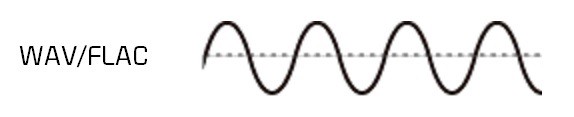
With the development of the Internet and storage media, the size of audio files is no longer important, so lossless compression has gradually become popular. Common formats are APE, FLAC, etc., which are similar to the beginning of ZIP compressed files, compress audio files AND packed, the final file size is basically only half of the original CD file. Here it is emphasized that the WAV format we often say is a waveform record file, which uses uncompressed PCM encoding, which is also a relatively large WAV file. 44.1 kHz 16-bit WAV audio can also be considered uncompressed. Lossless sound quality.

Since different devices support different audio compression formats, we often need to transcode, and each transcode will cause some loss in audio. For example: If you convert MP3 to lossless format, you can only achieve the sound quality of the original MP3 file. This lossless can also be called false lossless. This is the case for most lossless music provided by music portals.

I have been recording for many years and have used speakers ranging from tens of thousands to millions of dollars. Why do I rarely use speakers under 10,000 yuan? Because speakers under 10,000 yuan cannot be used as monitors. I advise everyone not to charge money for listening to music on music portals for lossless sound quality. Untrained ears will not be able to hear the difference between true and false without loss. For normal ears, MP3 with a bit rate of 320 kbps is already the best.


Free Download Mp4Gain
picture


Mp4Gain Main Window
picture


Mp4Gain Features
picture


Free Download Mp4Gain
picture

What is the difference between MP3 and lossless sound quality?

What is the difference between MP3 and lossless sound quality?

Mp3 Lossless
Mp3 Lossless

Now, many people think that it is impossible to listen to MP3, so they search for lossless music everywhere on the Internet.

Mp3 Lossless
Mp3 Lossless

So what is the difference between lossless music and MP3? What about the various lossless music formats?

A few days ago, a friend of mine bought a Porsche sports car and then came to ask me for lossless sound quality music. I told him there was no need to play MP3s, but people weren’t happy. The sound in the car was fine. Playing MP3 is a loss of audio.

Now there are many music websites that give lossless to the myth, but do you know what lossless is? What is the difference between lossless music and ordinary MP3? Today I come to talk to you about those things that have no losses.

I remember when Apple held the Iphone4 conference, it came up with a definition: retina display. In short, it has been replaced by a high resolution screen with pixels that exceed the recognition limit of the human eye since the Iphone4. I must say that Mr. Qiao’s trick is very good, he defines a word that everyone can accept and makes Apple mobile phones sell all over the world.

However, the same concept is much older in the world of acoustics. Sound is a type of energy wave. After the experimental research of countless generations of ancestors, it is believed that 40 kHz is a value that can well restore the sound heard by the human ear. Later, for various commercial reasons, some record companies defined the sample rate of CDs at 44.1 kHz, which they considered to be the “retina display” that the ears could hear. Later, 44.1 kHz brought innumerable problems to subsequent generations, because it is not an integer and cannot be divided and multiplied simply by performing SRC sampling, so early Inter defined the output sample rate of the sound card as 48 kHz to save problem. , which creates a sample rate conversion problem that all sound engineers hate

What differentiates MP3 from AAC? Part 3

What differentiates MP3 from AAC? Part 3

AAC or MP3

WAV audio file

M4A vs MP3

WAV is a waveform audio format. This is a high-quality audio file that is often used like a CD. WAV files are not compressed and therefore take up more disk space than MP3 or AAC.

Because WAV files are not compressed (called a “lossless” format), they contain more data, resulting in a better, more subtle, and more detailed sound. A WAV file typically requires 10MB of audio per minute. By comparison, MP3 takes up about 1 MB per minute.

WAV files are supported by Apple devices, but are not commonly used except by audiophiles.

WMA audio file
WMA stands for Windows Media Audio. This is a file type popularized by Microsoft Corporation who invented it. It is the default format used by Windows Media Player on Mac and PC. It competes with MP3 and AAC formats and offers compression and file sizes similar to those formats. Not compatible with iPhone and iPad.

AIFF audio file
AIFF stands for Audio Interchange File Format. Another uncompressed audio format, AIFF, was invented by Apple in the late 1980s. Like WAV, it takes up about 10MB of storage space per minute of music. Because it does not compress audio, AIFF is a higher quality format preferred by audiophiles and musicians. Because it was invented by Apple, it is compatible with Apple devices.

Apple Lossless Audio File
Another Apple invention, the Apple Lossless Audio Codec (ALAC), is the successor to AIFF. Released in 2004, it was originally a proprietary format. Apple made it open source in 2011. Apple Lossless balances smaller file sizes with better sound quality. Its files are typically about 50% smaller than uncompressed files, but with less sound quality loss than MP3 or AAC.

FLAC audio file
Free Lossless Audio Codec) is an open source audio format popular with audiophiles. You can reduce the file size by 50-60% without degrading the audio quality too much. FLAC is not supported on iTunes or iOS devices, but will work with other software installed on your device.

What differentiates MP3 from AAC? Part 2

What differentiates MP3 from AAC? Part 2

AAC vs MP3

How MP3 works with Apple Music and iTunes

AAC Vs. MP3

MP3 is probably the most popular digital audio format on the web, but it’s not available on Apple Music’s iTunes store or in this format (more on that in the next section). Still, mp3 is compatible with Apple Music, iTunes, and all iOS devices like iPhone and iPad. You can get MP3 files from:

Digital download store.
Rip songs from CDs, depending on the music conversion settings.
Many music file sharing services.​
All about AAC audio files
AAC stands for Advanced Audio Coding. It is a type of digital audio file that has been promoted as the successor to MP3. AAC generally provides higher quality sound than MP3 while using the same amount of disk space (or less).

Many people think that AAC is Apple’s proprietary format, but this is incorrect. AAC was developed by a group of companies that includes AT&T Bell Labs, Dolby, Nokia, and Sony. While Apple has embraced AAC music, AAC files can actually be played on many non-Apple devices, including phones running Google’s Android operating system, game consoles, and more.

How does the CAA work?
AAC is a lossy file format, just like MP3. To compress CD-quality audio into a file that takes up less storage space, data that will no longer affect the listening experience is typically removed at the high and low end. So AAC files don’t sound exactly the same as CD-quality files, but they generally sound good enough that most people won’t know the difference.

Like MP3, the quality of AAC files is measured by their bit rate. Common AAC bit rates include 128 kbps, 192 kbps, and 256 kbps.

How AAC works with Apple Music and iTunes
Apple has adopted AAC as its preferred audio file format. All songs streamed or downloaded from Apple Music, or sold on the iTunes store, are in AAC format. All AAC files provided by Apple are encoded at 256 kbps.

Other types of audio files supported by iPhone, iPad and Mac
While MP3 and AAC are the most popular audio files on iPhone, iPad, Mac, and other Apple products, they’re not the only ones that work. Let’s take a look at other widely used Apple supported audio formats.

What differentiates MP3 from AAC?

What differentiates MP3 from AAC?

AAC Vs. MP3

People often call any music file “MP3”, but that’s not accurate.

AAC vs MP3 320

MP3 is a specific type of audio file and not all digital audio files are MP3s. If you use an iPhone or other Apple device, chances are most of your music isn’t MP3.

So what kind of files are your digital songs? This article details the MP3 file type, the more advanced AAC format used by Apple, and some other common audio file types that can be used with or without iPhone and iPod.

What is mp3 and how does mp3 work?
MP3 is an acronym for MPEG-2 Audio Layer 3. It is a digital media standard devised by the Moving Picture Experts Group (MPEG), an industry group that creates technical standards.

Songs saved in MP3 format take up less space than songs saved in CD-quality audio formats like WAV (more on that later). They do this by compressing the data in the song. Compressing a song to MP3 requires removing parts of the file that don’t affect the listening experience, usually the loudest and quietest end of the audio. Because some data has been removed, and because the sound of MP3 is not the same as the CD-quality version, MP3 is called a “lossy” compression format. has led some audiophiles to criticize mp3 for impairing the listening experience, even though many can’t tell the difference.

Because mp3s are compressed, more mp3 files can be stored in the same amount of space than files using a lossless compression format. In general, MP3s take up 10% of the space of a CD-quality audio file. So if the CD quality version of a song is 10MB, the MP3 version is about 1MB (this can vary depending on your taste) Audio Encoding Settings

).​
Understanding bitrate and MP3
The audio quality of MP3s (and all digital music files) is measured by their bitrate. A higher bitrate means the file has more data and MP3s sound better. The most common bit rates are 128 kps, 192 kbps, and 256 kbps.

MP3 comes in two bit rates: constant bit rate (CBR) and variable bit rate (VBR). Many modern mp3s use VBR, which works by encoding parts of the song at a lower bit rate and at a higher bit rate. . smaller file. For example, a song with only one instrument is simpler and can be encoded at a lower bit rate. Parts of a song with more complex instruments require less compression to capture the full range. By changing the bitrate, the overall sound quality of the MP3 can be kept at a high level, while the file size can be further reduced.

Mp3: Audio Bitrate Calculator

Mp3: Audio Bitrate Calculator

bit rate mp3

Audio File Size Calculator Streaming Bitrate Calculator.

mp3 bit rate

Get the recommended high and low bitrate settings related to your network setup Audio Bitrate and File Size Calculator If the size of that audio file seems like a mystery, this is the tool you need to calculate the audio file size. The first part of the calculator calculates the bitrate of the uncompressed audio (for example, the size of the WAVE or BWF file). The second part calculates the file size for a given bit rate.
Audio Bitrate and File Size Calculator The Bitrate Calculator allows you to calculate the exact bitrate used to encode audio and video to achieve your desired file size. 3ivx MPEG-4 5.0 is the estimated audio size! Uncompressed audio bit rate. Per second: 48,000 24-bit samples; uncompressed bitrate for 1 channel:

Audio Bitrate and File Size Calculator, Audio Bitrate and File Size Calculator If the size of your audio files seems like a mystery, here are the tools you need to calculate your audio file size .

The first part of the calculator calculates the bitrate of the uncompressed audio (for example, the size of the WAVE or BWF file). The second part calculates the file size for a given bit rate. The Bitrate Calculator allows you to calculate the exact bitrate used to encode audio and video to achieve your desired file size. 3ivx MPEG-4 5.0 is a

Bitrate calculator estimates audio size! Uncompressed audio bit rate. Per second: 48,000 24-bit samples; 1-Channel Uncompressed Bitrate: In a simplified way, bitrate refers to the number of bits that can be transmitted or received per second. Bitrate is used to encode the number of bits into.
Bitrate Calculator The Bitrate Calculator allows you to calculate the exact bitrate used to encode audio and video to achieve the desired file size. 3ivx MPEG-4 5.0 is the estimated audio size! Uncompressed audio bit rate.

Per second: 48,000 24-bit samples; uncompressed bitrate for 1 channel:
Get the bitrate or bit depth of an audio wav file In simple terms, bitrate is the number of bits per second that can be transmitted or received. The bit rate is used to encode the number of bits. If the size of the audio file seems like a mystery, this is the tool you need to calculate the size of the audio file. The first part of the calculator counts bits.

Get the bitrate or bit depth of an audio wav file to estimate the size of the audio! Uncompressed audio bit rate. Per second: 48,000 24-bit samples; 1-Channel Uncompressed Bitrate: In a simplified way, bitrate refers to the number of bits that can be transmitted or received per second. Bitrate is used to encode the number of bits into.
Audio Bitrate Calculator – Inaudible Discussion If audio file size seems like a mystery, this is the tool you need to calculate audio file size.

The first part of the calculator calculates the bit rate for the DVB-S2, DVB-S2X and DVB-S standards, calculates the bit rate and bandwidth, the net bit rate, up to 32 APSK.

Audio Bitrate Calculator – Inaudible Discussion Put simply, bitrate refers to the number of bits per second that can be transmitted or received. The bit rate is used to encode the number of bits.

If the size of the audio file seems like a mystery, this is the tool you need to calculate the size of the audio file. The first part of the calculator counts bits.

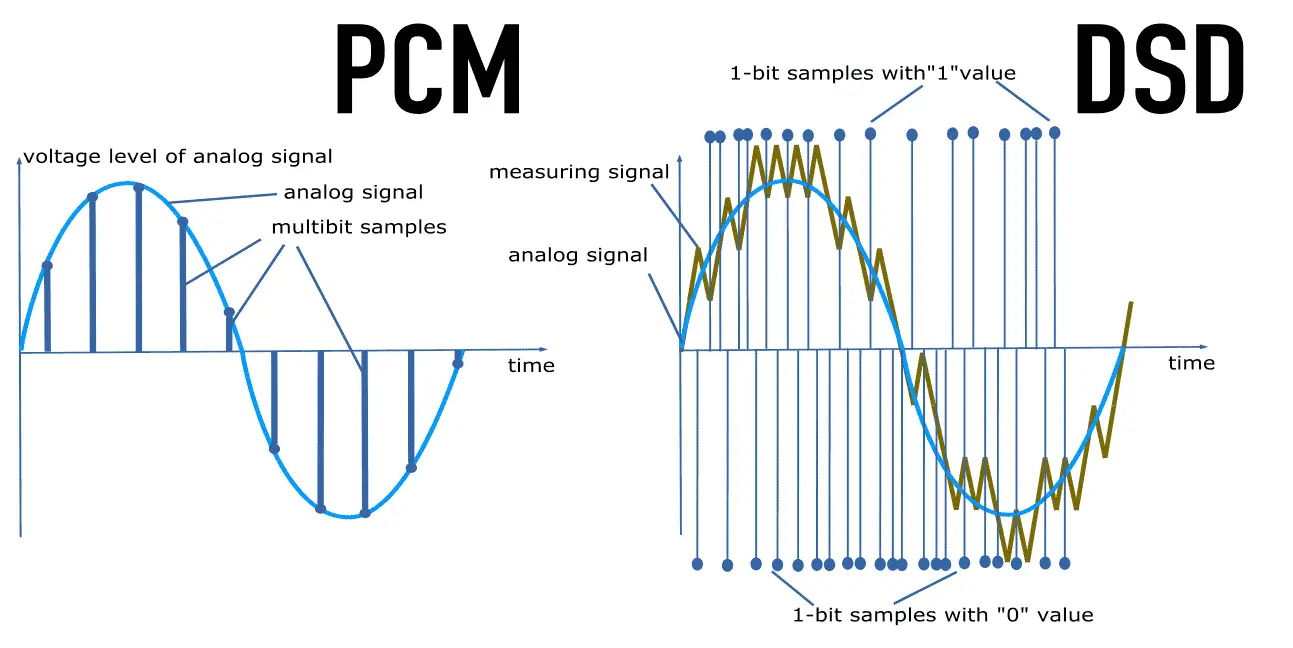
44.1kHz PCM

44.1kHz PCM

PCM

In our experience, 16-bit and 44.1 kHz provide the best audio quality you can experience.

PCM

Anything beyond that format tends to waste disk capacity, since the 44.1 kHz HD sample rate originated with PCM adapters in the late 1970s that recorded digital audio onto video tape, especially the Sony PCM-1600 introduced in 1979 and introduced in this series It has flourished in later models. This became the basis for Compact Disc Digital Audio (CD-DA) as defined in the 1980 Red Book standard. In other words, the digital audio standard for CD audio is 44.1 kHz/16 bits. PCM Audio and Home Theater PCM is used for CD, DVD, Blu-ray and other digital audio applications. When used in surround sound applications, it is often called Linear Pulse Code Modulation (LPCM). The reason for this is that in the past, computer sound cards could only handle 48kHz PCM data, so the 44.1kHz PCM data had to be resampled, which would consume processing power. So the CD-ROM drive has an audio cable that feeds the analog audio to the sound card for playback, avoiding the need for resampling.

The 44.1 kHz sample rate originated with PCM adapters in the late 1970s that recorded digital audio to videotape, notably the Sony PCM-1600 introduced in 1979, and carried over to later models of the Serie. This became the basis for Compact Disc Digital Audio (CD-DA) as defined in the 1980 Red Book standard. In other words, the digital audio standard for CD audio is 44.1 kHz/16 bits. PCM Audio and Home Theater PCM is used for CD, DVD, Blu-ray and other digital audio applications. When used in surround sound applications, it is often called Linear Pulse Code Modulation (LPCM). The reason for this is that, in the past, computer sound cards could only handle 48kHz PCM data, so the 44.1kHz PCM data had to be resampled, which would consume processing power. . So the CD-ROM drive has an audio cable that feeds the analog audio to the sound card for playback, avoiding the need for resampling. Pulse Code Modulation (PCM) or 44.1 kHz used on CD. Some devices may use a 96kHz or 192kHz sample rate, but the advantage is that

In other words, the digital audio standard for CD audio is 44.1 kHz/16 bits. PCM Audio and Home Theater PCM is used for CD, DVD, Blu-ray and other digital audio applications. When used in surround sound applications, it is often called Linear Pulse Code Modulation (LPCM). The reason for this is that, in the past, computer sound cards could only handle 48kHz PCM data, so the 44.1kHz PCM data had to be resampled, which would consume processing power. . So the CD-ROM drive has an audio cable that feeds the analog audio to the sound card for playback, avoiding the need for resampling.

What is bit rate? Knowledge of the MP3 audio format.

What is bit rate? Knowledge of the MP3 audio format.

MP3 Bitrate

Digital audio formats are audio signals that are recorded, processed, and reproduced in digital form.

mp3 bit rate


The emergence of digital audio formats is to meet the needs of high-fidelity playback, storage and transmission. Simply put, early analog audio formats had issues with playback distortion and glitches due to media wear. Since the advent of the CD, digital format audio files have become popular, but another problem has arisen: the limitation of the storage volume, and the CD still has the phenomenon of wear. Saving to hard drive (relatively longer storage time) is not a good solution when storage media (mainly hard drives) are still expensive at the time. The rise of the Internet has created a requirement for long-distance file transmission. Under the restriction of bandwidth, the demand to reduce file size has become more intense. All this has led to the generation of lossy compressed digital audio formats from external factors!

In terms of internal factors, with the improvement of computer operation and coding capabilities, the progress of various acoustic psychological models has promoted the emergence of various lossy compressed digital audio formats. Some of the most commonly used audio formats in MP3 players are briefly introduced below: MP3 (CBR, VBR, ABR), WMA, WAV, ADPCM, and the emerging audio formats AAC, ASF, and OGG.

Before introducing various digital audio formats, let’s first clarify a concept: bitrate.

In the field of computing, all information is digitized. Bit is the smallest unit of data in a computer, it refers to a number of 0 or 1, which is a mathematical binary number, a “0” or “1” , is a bit. For example, when we say a 2-digit number, it means that it is a two-digit binary number, and there are 4 combinations of “00”, “01”, “10” and “11”, which represent 0, “11” in decimal respectively. 1, 2 and 3 are four numbers.

Bit rate, let’s see this, you don’t need radio quality to compare MP3 quality

Bit rate, let’s see this, you don’t need radio quality to compare MP3 quality

MP3 Quality

Bit rate refers to the number of bits transmitted per second, and the unit is bps (Bit per second). The higher the bit rate, the higher the data transmission.

MP3 Quality

The bit rate in sound refers to the sampling rate of the conversion of digital sound from analog to digital format. The higher the sampling rate, the better the quality of the restored sound. The bit rate (bit rate) principle in video is the same as in sound, which refers to the sample rate converted from analog signal to digital signal.

Bitrate refers to the sampling precision (quantization precision) of converting digital sound from analog to digital format, that is, the number of bits per sample of sound. The higher the sampling precision (quantization precision), the better the quality of the restored sound.
Bit rate is a benchmark indicator of the compression efficiency of digital music. Bit rate indicates the rate of bps (bit per second, bits per second) transmitted per unit of time (1 second). The unit is usually kbps (1000 bits per second in colloquial terms). The bit rate of digital music on CD is 1411.2 kbps (that is, to burn 1 second of CD music, 1411.2 × 1000 data bits are required), the high BIT RATE of the digital music file music means that it should be processed in a unit of time (1 second) The amount of data (BIT) is large, which means that the sound quality of the music file is good. However, when the BITRATE is high, the file size increases, which will occupy a large amount of memory capacity. they are 32-256 Kbps. Of course, the wider the rate, the better, but 320 Kbps is the highest level at the moment.

What is a good bitrate guide for mp3 files? Part 2

What is a good bitrate guide for mp3 files? Part 2

mp3 bitrate

For voice recordings such as lectures or language lessons saved to waveforms, a bit rate of 32 kilobits per second (kbps) is acceptable, although 64 kbps may offer better quality, depending on the source.

MP3 BITRATE

At 32 kbps, the sound may sound “flat”, but that’s understandable. A 64 kbps MP3 file created from a voice recording should sound nearly identical to the original.

Desaturated acoustic music with simple arrangements should work fine at 192kbps bitrate. You can choose 256 kbps if the music will be played on a high quality device. Music that falls into this category includes folk, boy band songs, easy listening, and folk music. There are also works by many classic artists such as James Taylor, Linda Longstadt, Jonny Mitchell, and Simon Garfunkel.

To produce high-quality MP3 files of classical and jazz music, the optimal bitrate depends on the characteristics of the song. Smooth jazz can usually be copied at 192kbps to create a good balance between file size and diminishing returns, although 256kbps may sound better in a home entertainment center. A classical orchestra should be 256 kbps for a portable player, but if you want to burn a CD at home or in your car, a 320 kbps file might be a better option.

For saturated music such as hard rock, metal, arena, pop, electronic and house music, 320 kbps will provide the best results. The higher the number of bits per second, the more complex acoustic envelope will be preserved.

If possible, it’s best to create MP3 files with variable bit rates. This allows the encoding program to determine if a particular frame of music requires the full bit rate. Otherwise, the program will reduce data retention for that frame, resulting in a smaller file without sacrificing quality. Forcing the program to “oversample” frames can produce artifacts.

While this article is intended as a general guide, he or she may be equally satisfied with a lower bitrate for a particular song or songs in general. Many factors affect our ability to judge the quality of music, not only the devices we use but also our activities while listening to it. For example, for those who listen to MP3 files while exercising or taking a walk, external noise can make it more difficult to tell the difference in quality. In contrast, audiophiles may prefer to sample at 320 kbps, regardless of their equipment, type of music, or listening habits.

If you create your own MP3 files, there are other settings that affect quality. LAME is an excellent MP3 encoder that is free and has many graphical interfaces as the interface for this popular command line program. LAME allows users to adjust many settings to generate high-quality MP3 files in seconds. You can also experiment with various bitrates in your source file to find the best subjective balance between quality and file size.