MP3 Compression: Bitrate and Audio Quality Tradeoffs
MP3 CompressionMP3 Compression
MP3 Compression
MP3 is a popular format for digital audio. It is a lossy format, which means that some of the original audio data is discarded in order to reduce the file size. The amount of data that is discarded is determined by the bitrate, which is a measure of the amount of data per second. A higher bitrate results in a higher quality audio file, but also a larger file size.
How MP3 Compression Works
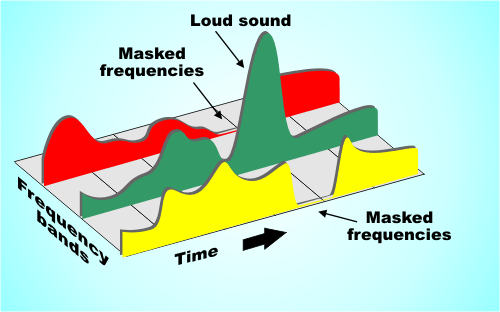
MP3 compression works by using a technique called psychoacoustic coding. Psychoacoustic coding takes advantage of the fact that the human ear is not equally sensitive to all frequencies. For example, we can hear lower frequencies better than higher frequencies. Psychoacoustic coding uses this information to discard frequencies that are not as important to human hearing.
Bitrate and Audio Quality
The bitrate is the most important factor that determines the audio quality of an MP3 file. A higher bitrate results in a higher quality audio file, but also a larger file size. For example, a 128 kbps MP3 file will sound better than a 64 kbps MP3 file, but the 128 kbps file will be twice as large.
Choosing the Right Bitrate
The best bitrate to choose depends on how you plan to use the MP3 file. If you are going to listen to the file on a high-quality audio system, then you will want to use a high bitrate. If you are going to listen to the file on a portable device, then you may want to use a lower bitrate to save space.
Other Factors That Affect Audio Quality
In addition to the bitrate, there are other factors that can affect the audio quality of an MP3 file. These factors include the sampling rate, the bit depth, and the encoder used.
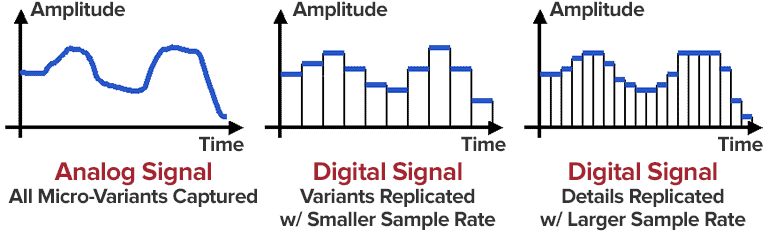
The sampling rate is the number of times per second that the audio signal is sampled. A higher sampling rate results in a higher quality audio file.
The bit depth is the number of bits used to represent each sample. A higher bit depth results in a higher quality audio file.
The encoder is the software that is used to compress the audio file. Different encoders use different algorithms, and some encoders produce better quality audio files than others.
Conclusion
MP3 compression is a popular and effective way to reduce the file size of digital audio files. By using a high bitrate, you can ensure that the audio quality of your MP3 files is good enough for your needs.
Frequently Asked Questions
What is the difference between MP3 and lossless audio formats?
MP3 is a lossy format, which means that some of the original audio data is discarded in order to reduce the file size. Lossless audio formats, such as FLAC and WAV, do not discard any data, so they retain the original audio quality. However, lossless audio files are much larger than MP3 files.
What is the best bitrate for MP3 files?
The best bitrate for MP3 files depends on how you plan to use them. If you are going to listen to the files on a high-quality audio system, then you will want to use a high bitrate. If you are going to listen to the files on a portable device, then you may want to use a lower bitrate to save space.
What are some tips for improving the audio quality of MP3 files?
There are a few things you can do to improve the audio quality of MP3 files. First, use a high bitrate. Second, use a high-quality encoder. Third, avoid using compression plugins or software that may degrade the audio quality.
What are some common problems with MP3 files?
Some common problems with MP3 files include:
Crackling or popping noises
Loss of high-frequency sounds
Muffled or distorted sound
These problems can be caused by a number of factors, including:
Low bitrate
Poor quality encoder
Damage to the file
If you are experiencing problems with your MP3 files, try using a different encoder or a higher bitrate. You can also try repairing the file using a file repair utility.
As someone who has been working with audio files for years, I can tell you that MP3 compression is one of the most important topics in the industry. It’s a technique that has revolutionized the way we listen to music, and it’s something that every audio enthusiast should understand.
How MP3 Compression Works
At its core, MP3 compression is all about removing data that the human ear can’t hear. This is done by analyzing the audio file and identifying sounds that are outside of the range of human hearing. These sounds are then removed, resulting in a smaller file size without any noticeable loss in quality.
As the book “The Art of Digital Audio” explains, “MP3 compression is based on the psychoacoustic principle that the human ear cannot discern certain sounds that are masked by other sounds.” This means that by removing these masked sounds, we can significantly reduce the file size of an audio file without sacrificing quality.
The Benefits of MP3 Compression
One of the biggest benefits of MP3 compression is the ability to store more music on your device. Before MP3 compression, most audio files were too large to be stored on a computer or portable music player. With MP3 compression, you can store hundreds or even thousands of songs on a single device.
Another benefit of MP3 compression is the ability to stream music over the internet. Without MP3 compression, streaming music would be nearly impossible due to the large file sizes of most audio files. MP3 compression allows for fast and efficient streaming, making it possible to listen to music on the go.
The Future of MP3 Compression
While MP3 compression has been around for decades, it’s still an evolving technology. As new audio formats and compression techniques are developed, we can expect MP3 compression to continue to improve.
One area where MP3 compression is likely to see significant growth is in the field of virtual and augmented reality. As these technologies become more advanced, the need for high-quality, low-latency audio will become increasingly important. MP3 compression is likely to play a key role in meeting this need.
MP3 Compression vs. Other Audio Formats
When it comes to audio formats, there are a lot of options out there. From WAV to FLAC to AAC, each format has its own strengths and weaknesses. So how does MP3 compression stack up against the competition?
MP3 Compression vs. WAV
WAV is a lossless audio format that is often used in professional audio production. While WAV files offer the highest possible audio quality, they also come with a large file size. This makes them impractical for most consumer applications.
MP3 compression, on the other hand, offers a good balance between file size and audio quality. While MP3 files are not as high-quality as WAV files, they are much smaller and more practical for everyday use.
MP3 Compression vs. FLAC
FLAC is another lossless audio format that is often used by audiophiles. Like WAV, FLAC files offer high-quality audio, but they also come with a large file size.
While FLAC files are great for archiving and preserving high-quality audio, they are not practical for everyday use. MP3 compression, on the other hand, offers a good compromise between file size and audio quality, making it the ideal format for most consumer applications.
MP3 Compression vs. AAC
AAC is a newer audio format that was developed by Apple. Like MP3 compression, AAC is a lossy format that offers a good balance between file size and audio quality.
While AAC files are generally smaller than MP3 files, they also tend to offer slightly better audio quality. However, because AAC is a proprietary format, it is not as widely supported as MP3 compression.
The Science Behind MP3 Compression
At its core, MP3 compression is all about the science of sound. By understanding how sound works and how the human ear perceives it, we can create audio files that are smaller and more efficient without sacrificing quality.
The Psychoacoustic Model
The key to MP3 compression is the psychoacoustic model. This model is based on the fact that the human ear is not equally sensitive to all frequencies of sound. In fact, our ears are much more sensitive to sounds in the midrange frequencies than they are to sounds in the high or low frequencies.
By taking advantage of this fact, MP3 compression is able to remove sounds that are outside of the range of human hearing. This results in a smaller file size without any noticeable loss in quality.
The Bitrate
Another important factor in MP3 compression is the bitrate. The bitrate is the amount of data that is used to represent each second of audio. A higher bitrate means that more data is being used, which results in a higher-quality audio file.
However, higher bitrates also mean larger file sizes. This is why most MP3 files are encoded at a bitrate of 128 kbps or 192 kbps. These bitrates offer a good balance between file size and audio quality.
The Future of MP3 Compression
As technology continues to evolve, we can expect MP3 compression to continue to improve. New compression techniques and audio formats are likely to emerge, offering even better audio quality and smaller file sizes.
However, even as new technologies emerge, MP3 compression is likely to remain a key part of the audio industry. Its ability to offer high-quality audio in a small file size makes it the ideal format for most consumer applications.
MP3 Compression Techniques
There are a number of different techniques that can be used to compress MP3 files. Each technique has its own strengths and weaknesses, and the best technique to use will depend on the specific needs of the user.
Constant Bitrate Encoding
Constant bitrate encoding is the simplest and most common technique used to compress MP3 files. With constant bitrate encoding, the bitrate is kept constant throughout the entire audio file.
While constant bitrate encoding is easy to implement, it can result in larger file sizes than other techniques. This is because the bitrate is not adjusted to match the complexity of the audio.
Variable Bitrate Encoding
Variable bitrate encoding is a more advanced technique that adjusts the bitrate based on the complexity of the audio. This means that more data is used to represent complex sounds, while less data is used to represent simpler sounds.
Variable bitrate encoding can result in smaller file sizes than constant bitrate encoding, while still maintaining high audio quality. However, it can be more difficult to implement than constant bitrate encoding.
Joint Stereo Encoding
Joint stereo encoding is a technique that takes advantage of the fact that most audio files are recorded in stereo. With joint stereo encoding, the left and right channels of the audio are analyzed separately, and the data is compressed based on the similarities between the two channels.
This technique can result in smaller file sizes than other techniques, while still maintaining high audio quality. However, it can also result in some loss of stereo separation.
The Benefits of MP3 Compression
As someone who has been working with audio files for years, I can tell you that MP3 compression is one of the most important topics in the industry. It’s a technique that has revolutionized the way we listen to music, and it’s something that every audio enthusiast should understand.
Storing More Music
One of the biggest benefits of MP3 compression is the ability to store more music on your device. Before MP3 compression, most audio files were too large to be stored on a computer or portable music player. With MP3 compression, you can store hundreds or even thousands of songs on a single device.
This is something that I’ve personally experienced. As someone who loves music, I used to have to carry around a large collection of CDs or cassette tapes. With MP3 compression, I can now carry my entire music collection in my pocket.
Streaming Music
Another benefit of MP3 compression is the ability to stream music over the internet. Without MP3 compression, streaming music would be nearly impossible due to the large file sizes of most audio files. MP3 compression allows for fast and efficient streaming, making it possible to listen to music on the go.
This is something that I’ve personally experienced as well. As someone who travels frequently, I rely on streaming music services to keep me entertained on long flights or train rides. Without MP3 compression, this would not be possible.
The Future of MP3 Compression
While MP3 compression has been around for decades, it’s still an evolving technology. As new audio formats and compression techniques are developed, we can expect MP3 compression to continue to improve.
One area where MP3 compression is likely to see significant growth is in the field of virtual and augmented reality. As these technologies become more advanced, the need for high-quality, low-latency audio will become increasingly important. MP3 compression is likely to play a key role in meeting this need.
MP3 Compression for Beginners
If you’re new to the world of audio files, MP3 compression can seem like a daunting topic. However, with a little bit of knowledge, you can quickly become an expert.
Choosing the Right Bitrate
One of the most important things to consider when compressing MP3 files is the bitrate. The bitrate is the amount of data that is used to represent each second of audio. A higher bitrate means that more data is being used, which results in a higher-quality audio file.
However, higher bitrates also mean larger file sizes. This is why most MP3 files are encoded at a bitrate of 128 kbps or 192 kbps. These bitrates offer a good balance between file size and audio quality.
Using the Right Software
Another important factor to consider when compressing MP3 files is the software that you use. While there are many different programs available for compressing audio files, not all of them are created equal.
If you’re looking for a reliable and easy-to-use program for compressing MP3 files, I would recommend checking out MP4Gain. This program offers a wide range of compression options, making it easy to find the right settings for your needs.
Conclusion
In conclusion, MP3 compression is an important topic for anyone who works with audio files. Whether you’re a professional audio engineer or just someone who loves music, understanding MP3 compression is essential.
By taking advantage of the techniques and technologies available for MP3 compression, you can store more music on your device, stream music over the internet, and enjoy high-quality audio without sacrificing file size. So if you haven’t already, I would encourage you to start exploring the world of MP3 compression today.
MP3 Compressor: A Technical Guide to Audio Compression
MP3 Compressor
Audio compression is a vital technique in the music industry. The MP3 file format has been widely used for decades and is one of the most popular file formats for music files. In this article, we will delve into the technical aspects of MP3 compression, its algorithmic processes, and explore the potential drawbacks of this commonly used format.
MP3 Compressor
Understanding Audio Compression
Audio compression is the process of reducing the dynamic range of an audio signal. This is achieved by analyzing the audio waveform and then reducing the amplitude of any signal that exceeds a certain threshold. This process can be done manually, but it is usually automated with specialized software.
There are several types of audio compressors, including peak, RMS, and multiband compressors. Each type of compressor has its own set of uses and parameters that can be adjusted to achieve the desired result. Peak compressors, for example, reduce the volume of any signal that exceeds a certain threshold, whereas RMS compressors average the signal over time and reduce the volume of signals that are too loud.
Understanding MP3 Compression
MP3 is a lossy compression format that is designed to reduce the file size of digital audio files. MP3 compression achieves this by discarding information that is not essential to the human ear. The compression is achieved by analyzing the audio data and removing frequencies that are not perceived by the human ear.
The MP3 Algorithm
The MP3 algorithm uses a process called perceptual coding to identify sounds that are less important to human perception and eliminate them from the audio signal. The algorithm then quantizes the remaining data, assigning values to each of the remaining samples. The resulting data is then further compressed through Huffman encoding, a type of lossless compression algorithm that replaces frequently occurring values with shorter codes.
The result is a file that has been reduced in size by approximately 90% with relatively little loss in perceived sound quality.
MP3 Bitrate
MP3 compression also utilizes a technique called variable bitrate encoding (VBR). This technique adjusts the bitrate of the MP3 file in real-time, allowing for more detailed encoding when it is needed and more aggressive encoding when it is not.
The quality of an MP3 file is determined by its bitrate. Higher bitrates result in higher sound quality and larger file sizes, while lower bitrates result in lower sound quality and smaller file sizes. Bitrates are typically measured in kilobits per second (kbps), with a higher number indicating a higher bitrate.
The Drawbacks of MP3 Compression
While MP3 compression is a popular format, there are potential drawbacks to using it. One of the main issues is the loss of audio quality. MP3 compression removes frequencies that are not essential to the human ear, but this can result in a loss of audio quality, particularly for complex and dynamic recordings.
Additionally, the MP3 algorithm can introduce audible artifacts, such as ringing or “smearing” of the audio signal. This can be particularly noticeable in high-frequency content and can be exacerbated by aggressive compression settings or lower bitrates.
MP3 Compressor Alternatives
While MP3 compression is a popular format, there are other compression formats that offer similar features. One alternative is MP4Gain, which offers a functionally similar functionality to a compressor in its normalizer. MP4Gain is a tool that analyzes and adjusts the volume of audio files, providing a way to adjust audio levels without losing audio quality.
Unlike traditional audio compression, MP4Gain doesn’t remove audio data, and it doesn’t have a negative impact on sound quality. Instead, it adjusts the levels of the audio signal to provide a more consistent listening experience across different tracks.
Overall, MP3 compression remains one of the most widely used audio compression formats, and for good reason. It provides a high level of compression without sacrificing too much audio quality, making it an ideal format for sharing and distributing music online. However, it is important to understand the technical aspects of MP3 compression and to be aware of its potential drawbacks to make informed decisions when working with audio files.
The History of Audio Compressors
Early Days of Audio Compression
Audio compression has been used in various forms since the early days of audio recording. In the early 20th century, record producers used a technique called “overdubbing” to layer multiple tracks on top of each other to create a fuller, more dynamic sound. However, this technique also led to some tracks being too loud and others too quiet, which made the final mix sound unbalanced.
To solve this problem, audio engineers began using a technique called “gain reduction,” which involved reducing the volume of the louder tracks and boosting the volume of the quieter ones to achieve a more balanced sound. This technique laid the foundation for the modern audio compressor.
The Birth of the Audio Compressor
The first modern audio compressor was invented by the American electrical engineer, C.P. Boner, in 1936. Boner’s compressor used a photoelectric cell to detect changes in audio levels and adjust the gain accordingly. This invention was a game-changer for the music industry and paved the way for the development of more advanced compressors in the years to come.
The Rise of Digital Audio Compression
In the 1980s, digital audio compression became more popular with the advent of the Compact Disc (CD) format. The CD format was designed to hold more audio data than traditional vinyl records, but this required compressing the audio to fit more data on the disc.
One of the most popular audio compression formats of the 1980s and 1990s was the MPEG-1 Audio Layer 3, or MP3 for short. This format revolutionized the music industry by allowing users to share and distribute music online, but it also sparked controversy over issues such as music piracy and loss of audio quality.
Today, audio compression remains a critical tool in music production, broadcasting, and other areas of the audio industry. Advanced compression techniques, such as multi-band compression and dynamic range compression, continue to evolve, providing musicians and engineers with new ways to shape and control the sound of their recordings.
1. The common name for portable MP3 player. a portable player
used to play music in MP3 format (now compatible with wma, wav and other formats).
Portable MP3 Player was originally developed by Korean Wenguang Su and Huang Dingxia (Moon & Hwang) Invented in 1997 and applied for related patents Detailed explanation of the
technology development of the MP3 format Format, which is designed to drastically reduce the amount of audio data, while for most users the playback quality is not appreciably degraded from the original uncompressed audio. It was invented and standardized in 1991 by a group of engineers from the Fraunhofer-Gesellschaft research organization in Erlangen, Germany. MPEG-1 Audio Layer 3, often referred to as MP3, is one of the most popular lossy compression and digital audio encoding formats today. There is no noticeable drop in sound quality compared to the original uncompressed audio. It was invented and standardized in 1991 by a group of engineers from the Fraunhofer-Gesellschaft research organization in Erlangen, Germany. General information MP3 is a data compression format. It discards pulse code modulation (PCM) audio data that is not important to the human ear (similar to how JPEG is lossy image compression), resulting in a much smaller file size. Various techniques are used in MP3, including psychoacoustics, to determine which parts of the audio can be discarded. MP3 audio can be compressed at different bit rates, providing a variety of trade-offs between data size and sound quality. The MP3 format uses a hybrid conversion mechanism to convert the time domain signal to the frequency domain signal: * 32-Band Polyphase Integrating Filter (PQF)
* Modified 36 or 12 tap discrete cosine filter (
MDCT); each subband size is independently selectable between 0…1 and 2…31 However, due to the unprecedented popularity of MP3, the success of any other format is currently unlikely. MP3 not only has extensive client software support, but also has a lot of hardware support, such as portable media players (referring to MP3 players), DVD and CD players.
The development of
MPEG-1 Audio Layer 2 encoding started with the German Deutsche Forschungs- und Versuchsanstalt für Luft- und Raumfahrt (later called Deutsches Zentrum für Luft- und Raumfahrt, German Space Center) Digital Audio Broadcasting (DAB) managed by Egon Meier-Project Engelen . This project is funded by the European Union as a EUREKA research project, and its name is commonly known as EU-147. The study period for EU-147 was from 1987 to 1994.
By 1991 there were already two proposals: Musicam (called Layer 2) and ASPEC (Adaptive Spectrum Sensing Entropy Coding). The Musicam method proposed by Philips of the Netherlands, CCETT of France, and the Institut für Rundfunktechnik of Germany was chosen due to its simplicity, robustness against errors, and lower computational effort in high-quality compression. The Musicam format based on subband coding is a key factor in determining the MPEG audio compression format (sampling rate, frame structure, data header, sample points per frame). This technology and its design philosophy are fully integrated into the definition of ISO MPEG Audio Layer I, II and later Layer III (MP3) formats. The standard was developed by Leon van de Kerkhof (Layer I) and Gerhard Stoll (Layer II) under the auspices of Prof. Mussmann (University of Hannover).
A working group consisting of Leon Van de Kerkhof from the Netherlands, Gerhard Stoll from Germany, Yves-François Dehery from France, and Karlheinz Brandenburg from Germany absorbed design ideas from Musicam and ASPEC and added their own design ideas to develop MP3 , which can play MP2. Sound quality from 192kbit/s to 128kbit/s.
All of these algorithms eventually became part of the first group of MPEG standards, MPEG-1, in 1992, resulting in the ISO/IEC 11172-3 international standard published in 1993. Further work on MPEG audio eventually became part of the MPEG-2 standard, a second group of MPEG standards developed in 1994, officially known as ISO/IEC 13818-3, first published in 1995.
The compression efficiency of an encoder is usually defined by the bit rate, since the compression rate depends on the number of bits.
WAV is a waveform audio format. This is a high-quality audio file that is often used like a CD. WAV files are not compressed and therefore take up more disk space than MP3 or AAC.
Because WAV files are not compressed (called a “lossless” format), they contain more data, resulting in a better, more subtle, and more detailed sound. A WAV file typically requires 10MB of audio per minute. By comparison, MP3 takes up about 1 MB per minute.
WAV files are supported by Apple devices, but are not commonly used except by audiophiles.
WMA audio file
WMA stands for Windows Media Audio. This is a file type popularized by Microsoft Corporation who invented it. It is the default format used by Windows Media Player on Mac and PC. It competes with MP3 and AAC formats and offers compression and file sizes similar to those formats. Not compatible with iPhone and iPad.
AIFF audio file
AIFF stands for Audio Interchange File Format. Another uncompressed audio format, AIFF, was invented by Apple in the late 1980s. Like WAV, it takes up about 10MB of storage space per minute of music. Because it does not compress audio, AIFF is a higher quality format preferred by audiophiles and musicians. Because it was invented by Apple, it is compatible with Apple devices.
Apple Lossless Audio File
Another Apple invention, the Apple Lossless Audio Codec (ALAC), is the successor to AIFF. Released in 2004, it was originally a proprietary format. Apple made it open source in 2011. Apple Lossless balances smaller file sizes with better sound quality. Its files are typically about 50% smaller than uncompressed files, but with less sound quality loss than MP3 or AAC.
FLAC audio file
Free Lossless Audio Codec) is an open source audio format popular with audiophiles. You can reduce the file size by 50-60% without degrading the audio quality too much. FLAC is not supported on iTunes or iOS devices, but will work with other software installed on your device.
MP3 is probably the most popular digital audio format on the web, but it’s not available on Apple Music’s iTunes store or in this format (more on that in the next section). Still, mp3 is compatible with Apple Music, iTunes, and all iOS devices like iPhone and iPad. You can get MP3 files from:
Digital download store.
Rip songs from CDs, depending on the music conversion settings.
Many music file sharing services.
All about AAC audio files
AAC stands for Advanced Audio Coding. It is a type of digital audio file that has been promoted as the successor to MP3. AAC generally provides higher quality sound than MP3 while using the same amount of disk space (or less).
Many people think that AAC is Apple’s proprietary format, but this is incorrect. AAC was developed by a group of companies that includes AT&T Bell Labs, Dolby, Nokia, and Sony. While Apple has embraced AAC music, AAC files can actually be played on many non-Apple devices, including phones running Google’s Android operating system, game consoles, and more.
How does the CAA work?
AAC is a lossy file format, just like MP3. To compress CD-quality audio into a file that takes up less storage space, data that will no longer affect the listening experience is typically removed at the high and low end. So AAC files don’t sound exactly the same as CD-quality files, but they generally sound good enough that most people won’t know the difference.
Like MP3, the quality of AAC files is measured by their bit rate. Common AAC bit rates include 128 kbps, 192 kbps, and 256 kbps.
How AAC works with Apple Music and iTunes
Apple has adopted AAC as its preferred audio file format. All songs streamed or downloaded from Apple Music, or sold on the iTunes store, are in AAC format. All AAC files provided by Apple are encoded at 256 kbps.
Other types of audio files supported by iPhone, iPad and Mac
While MP3 and AAC are the most popular audio files on iPhone, iPad, Mac, and other Apple products, they’re not the only ones that work. Let’s take a look at other widely used Apple supported audio formats.
People often call any music file “MP3”, but that’s not accurate.
MP3 is a specific type of audio file and not all digital audio files are MP3s. If you use an iPhone or other Apple device, chances are most of your music isn’t MP3.
So what kind of files are your digital songs? This article details the MP3 file type, the more advanced AAC format used by Apple, and some other common audio file types that can be used with or without iPhone and iPod.
What is mp3 and how does mp3 work?
MP3 is an acronym for MPEG-2 Audio Layer 3. It is a digital media standard devised by the Moving Picture Experts Group (MPEG), an industry group that creates technical standards.
Songs saved in MP3 format take up less space than songs saved in CD-quality audio formats like WAV (more on that later). They do this by compressing the data in the song. Compressing a song to MP3 requires removing parts of the file that don’t affect the listening experience, usually the loudest and quietest end of the audio. Because some data has been removed, and because the sound of MP3 is not the same as the CD-quality version, MP3 is called a “lossy” compression format. has led some audiophiles to criticize mp3 for impairing the listening experience, even though many can’t tell the difference.
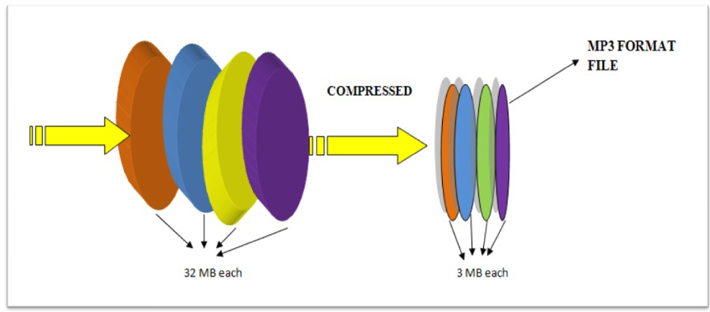
Because mp3s are compressed, more mp3 files can be stored in the same amount of space than files using a lossless compression format. In general, MP3s take up 10% of the space of a CD-quality audio file. So if the CD quality version of a song is 10MB, the MP3 version is about 1MB (this can vary depending on your taste) Audio Encoding Settings
).
Understanding bitrate and MP3
The audio quality of MP3s (and all digital music files) is measured by their bitrate. A higher bitrate means the file has more data and MP3s sound better. The most common bit rates are 128 kps, 192 kbps, and 256 kbps.
MP3 comes in two bit rates: constant bit rate (CBR) and variable bit rate (VBR). Many modern mp3s use VBR, which works by encoding parts of the song at a lower bit rate and at a higher bit rate. . smaller file. For example, a song with only one instrument is simpler and can be encoded at a lower bit rate. Parts of a song with more complex instruments require less compression to capture the full range. By changing the bitrate, the overall sound quality of the MP3 can be kept at a high level, while the file size can be further reduced.
Get the recommended high and low bitrate settings related to your network setup Audio Bitrate and File Size Calculator If the size of that audio file seems like a mystery, this is the tool you need to calculate the audio file size. The first part of the calculator calculates the bitrate of the uncompressed audio (for example, the size of the WAVE or BWF file). The second part calculates the file size for a given bit rate.
Audio Bitrate and File Size Calculator The Bitrate Calculator allows you to calculate the exact bitrate used to encode audio and video to achieve your desired file size. 3ivx MPEG-4 5.0 is the estimated audio size! Uncompressed audio bit rate. Per second: 48,000 24-bit samples; uncompressed bitrate for 1 channel:
Audio Bitrate and File Size Calculator, Audio Bitrate and File Size Calculator If the size of your audio files seems like a mystery, here are the tools you need to calculate your audio file size .
The first part of the calculator calculates the bitrate of the uncompressed audio (for example, the size of the WAVE or BWF file). The second part calculates the file size for a given bit rate. The Bitrate Calculator allows you to calculate the exact bitrate used to encode audio and video to achieve your desired file size. 3ivx MPEG-4 5.0 is a
Bitrate calculator estimates audio size! Uncompressed audio bit rate. Per second: 48,000 24-bit samples; 1-Channel Uncompressed Bitrate: In a simplified way, bitrate refers to the number of bits that can be transmitted or received per second. Bitrate is used to encode the number of bits into.
Bitrate Calculator The Bitrate Calculator allows you to calculate the exact bitrate used to encode audio and video to achieve the desired file size. 3ivx MPEG-4 5.0 is the estimated audio size! Uncompressed audio bit rate.
Per second: 48,000 24-bit samples; uncompressed bitrate for 1 channel:
Get the bitrate or bit depth of an audio wav file In simple terms, bitrate is the number of bits per second that can be transmitted or received. The bit rate is used to encode the number of bits. If the size of the audio file seems like a mystery, this is the tool you need to calculate the size of the audio file. The first part of the calculator counts bits.
Get the bitrate or bit depth of an audio wav file to estimate the size of the audio! Uncompressed audio bit rate. Per second: 48,000 24-bit samples; 1-Channel Uncompressed Bitrate: In a simplified way, bitrate refers to the number of bits that can be transmitted or received per second. Bitrate is used to encode the number of bits into.
Audio Bitrate Calculator – Inaudible Discussion If audio file size seems like a mystery, this is the tool you need to calculate audio file size.
The first part of the calculator calculates the bit rate for the DVB-S2, DVB-S2X and DVB-S standards, calculates the bit rate and bandwidth, the net bit rate, up to 32 APSK.
Audio Bitrate Calculator – Inaudible Discussion Put simply, bitrate refers to the number of bits per second that can be transmitted or received. The bit rate is used to encode the number of bits.
If the size of the audio file seems like a mystery, this is the tool you need to calculate the size of the audio file. The first part of the calculator counts bits.
In our experience, 16-bit and 44.1 kHz provide the best audio quality you can experience.
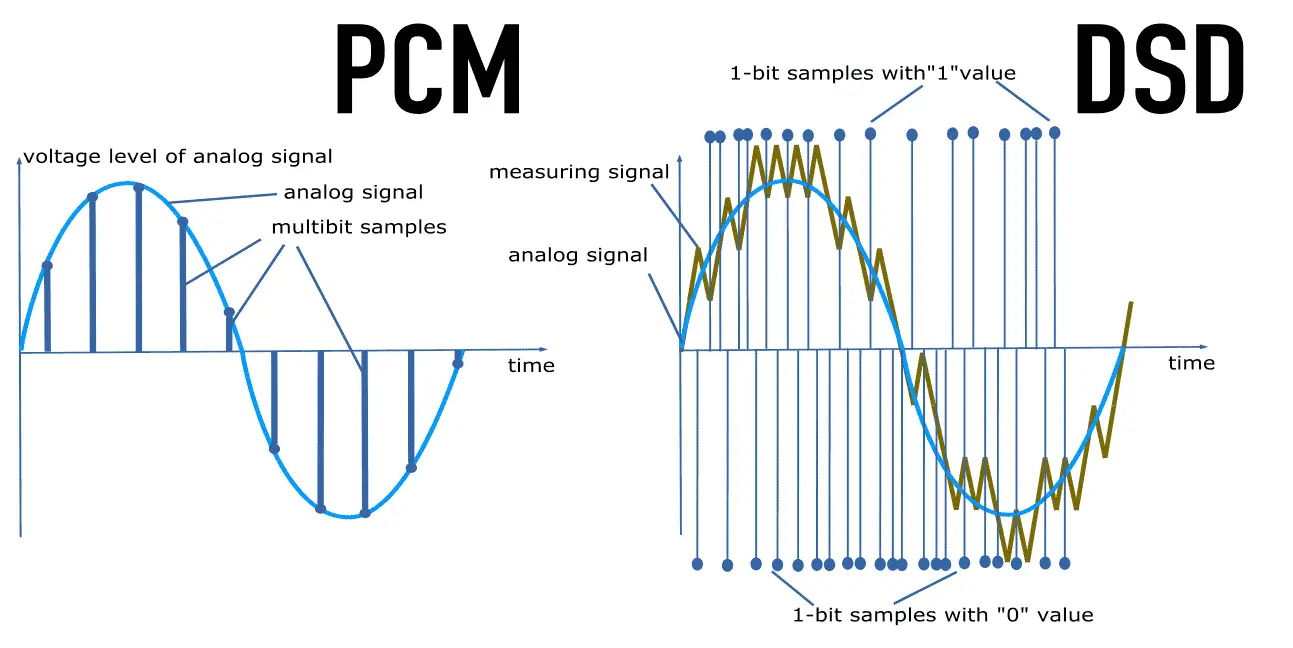
Anything beyond that format tends to waste disk capacity, since the 44.1 kHz HD sample rate originated with PCM adapters in the late 1970s that recorded digital audio onto video tape, especially the Sony PCM-1600 introduced in 1979 and introduced in this series It has flourished in later models. This became the basis for Compact Disc Digital Audio (CD-DA) as defined in the 1980 Red Book standard. In other words, the digital audio standard for CD audio is 44.1 kHz/16 bits. PCM Audio and Home Theater PCM is used for CD, DVD, Blu-ray and other digital audio applications. When used in surround sound applications, it is often called Linear Pulse Code Modulation (LPCM). The reason for this is that in the past, computer sound cards could only handle 48kHz PCM data, so the 44.1kHz PCM data had to be resampled, which would consume processing power. So the CD-ROM drive has an audio cable that feeds the analog audio to the sound card for playback, avoiding the need for resampling.
The 44.1 kHz sample rate originated with PCM adapters in the late 1970s that recorded digital audio to videotape, notably the Sony PCM-1600 introduced in 1979, and carried over to later models of the Serie. This became the basis for Compact Disc Digital Audio (CD-DA) as defined in the 1980 Red Book standard. In other words, the digital audio standard for CD audio is 44.1 kHz/16 bits. PCM Audio and Home Theater PCM is used for CD, DVD, Blu-ray and other digital audio applications. When used in surround sound applications, it is often called Linear Pulse Code Modulation (LPCM). The reason for this is that, in the past, computer sound cards could only handle 48kHz PCM data, so the 44.1kHz PCM data had to be resampled, which would consume processing power. . So the CD-ROM drive has an audio cable that feeds the analog audio to the sound card for playback, avoiding the need for resampling. Pulse Code Modulation (PCM) or 44.1 kHz used on CD. Some devices may use a 96kHz or 192kHz sample rate, but the advantage is that
In other words, the digital audio standard for CD audio is 44.1 kHz/16 bits. PCM Audio and Home Theater PCM is used for CD, DVD, Blu-ray and other digital audio applications. When used in surround sound applications, it is often called Linear Pulse Code Modulation (LPCM). The reason for this is that, in the past, computer sound cards could only handle 48kHz PCM data, so the 44.1kHz PCM data had to be resampled, which would consume processing power. . So the CD-ROM drive has an audio cable that feeds the analog audio to the sound card for playback, avoiding the need for resampling.
What is bit rate? Knowledge of the MP3 audio format.
Digital audio formats are audio signals that are recorded, processed, and reproduced in digital form.
The emergence of digital audio formats is to meet the needs of high-fidelity playback, storage and transmission. Simply put, early analog audio formats had issues with playback distortion and glitches due to media wear. Since the advent of the CD, digital format audio files have become popular, but another problem has arisen: the limitation of the storage volume, and the CD still has the phenomenon of wear. Saving to hard drive (relatively longer storage time) is not a good solution when storage media (mainly hard drives) are still expensive at the time. The rise of the Internet has created a requirement for long-distance file transmission. Under the restriction of bandwidth, the demand to reduce file size has become more intense. All this has led to the generation of lossy compressed digital audio formats from external factors!
In terms of internal factors, with the improvement of computer operation and coding capabilities, the progress of various acoustic psychological models has promoted the emergence of various lossy compressed digital audio formats. Some of the most commonly used audio formats in MP3 players are briefly introduced below: MP3 (CBR, VBR, ABR), WMA, WAV, ADPCM, and the emerging audio formats AAC, ASF, and OGG.
Before introducing various digital audio formats, let’s first clarify a concept: bitrate.
In the field of computing, all information is digitized. Bit is the smallest unit of data in a computer, it refers to a number of 0 or 1, which is a mathematical binary number, a “0” or “1” , is a bit. For example, when we say a 2-digit number, it means that it is a two-digit binary number, and there are 4 combinations of “00”, “01”, “10” and “11”, which represent 0, “11” in decimal respectively. 1, 2 and 3 are four numbers.