MP3 Compression: Bitrate and Audio Quality Tradeoffs
MP3 CompressionMP3 Compression
MP3 Compression
MP3 is a popular format for digital audio. It is a lossy format, which means that some of the original audio data is discarded in order to reduce the file size. The amount of data that is discarded is determined by the bitrate, which is a measure of the amount of data per second. A higher bitrate results in a higher quality audio file, but also a larger file size.
How MP3 Compression Works
MP3 compression works by using a technique called psychoacoustic coding. Psychoacoustic coding takes advantage of the fact that the human ear is not equally sensitive to all frequencies. For example, we can hear lower frequencies better than higher frequencies. Psychoacoustic coding uses this information to discard frequencies that are not as important to human hearing.
Bitrate and Audio Quality
The bitrate is the most important factor that determines the audio quality of an MP3 file. A higher bitrate results in a higher quality audio file, but also a larger file size. For example, a 128 kbps MP3 file will sound better than a 64 kbps MP3 file, but the 128 kbps file will be twice as large.
Choosing the Right Bitrate
The best bitrate to choose depends on how you plan to use the MP3 file. If you are going to listen to the file on a high-quality audio system, then you will want to use a high bitrate. If you are going to listen to the file on a portable device, then you may want to use a lower bitrate to save space.
Other Factors That Affect Audio Quality
In addition to the bitrate, there are other factors that can affect the audio quality of an MP3 file. These factors include the sampling rate, the bit depth, and the encoder used.
The sampling rate is the number of times per second that the audio signal is sampled. A higher sampling rate results in a higher quality audio file.
The bit depth is the number of bits used to represent each sample. A higher bit depth results in a higher quality audio file.
The encoder is the software that is used to compress the audio file. Different encoders use different algorithms, and some encoders produce better quality audio files than others.
Conclusion
MP3 compression is a popular and effective way to reduce the file size of digital audio files. By using a high bitrate, you can ensure that the audio quality of your MP3 files is good enough for your needs.
Frequently Asked Questions
What is the difference between MP3 and lossless audio formats?
MP3 is a lossy format, which means that some of the original audio data is discarded in order to reduce the file size. Lossless audio formats, such as FLAC and WAV, do not discard any data, so they retain the original audio quality. However, lossless audio files are much larger than MP3 files.
What is the best bitrate for MP3 files?
The best bitrate for MP3 files depends on how you plan to use them. If you are going to listen to the files on a high-quality audio system, then you will want to use a high bitrate. If you are going to listen to the files on a portable device, then you may want to use a lower bitrate to save space.
What are some tips for improving the audio quality of MP3 files?
There are a few things you can do to improve the audio quality of MP3 files. First, use a high bitrate. Second, use a high-quality encoder. Third, avoid using compression plugins or software that may degrade the audio quality.
What are some common problems with MP3 files?
Some common problems with MP3 files include:
Crackling or popping noises
Loss of high-frequency sounds
Muffled or distorted sound
These problems can be caused by a number of factors, including:
Low bitrate
Poor quality encoder
Damage to the file
If you are experiencing problems with your MP3 files, try using a different encoder or a higher bitrate. You can also try repairing the file using a file repair utility.
As someone who has been working with audio files for years, I can tell you that MP3 compression is one of the most important topics in the industry. It’s a technique that has revolutionized the way we listen to music, and it’s something that every audio enthusiast should understand.
How MP3 Compression Works
At its core, MP3 compression is all about removing data that the human ear can’t hear. This is done by analyzing the audio file and identifying sounds that are outside of the range of human hearing. These sounds are then removed, resulting in a smaller file size without any noticeable loss in quality.
As the book “The Art of Digital Audio” explains, “MP3 compression is based on the psychoacoustic principle that the human ear cannot discern certain sounds that are masked by other sounds.” This means that by removing these masked sounds, we can significantly reduce the file size of an audio file without sacrificing quality.
The Benefits of MP3 Compression
One of the biggest benefits of MP3 compression is the ability to store more music on your device. Before MP3 compression, most audio files were too large to be stored on a computer or portable music player. With MP3 compression, you can store hundreds or even thousands of songs on a single device.
Another benefit of MP3 compression is the ability to stream music over the internet. Without MP3 compression, streaming music would be nearly impossible due to the large file sizes of most audio files. MP3 compression allows for fast and efficient streaming, making it possible to listen to music on the go.
The Future of MP3 Compression
While MP3 compression has been around for decades, it’s still an evolving technology. As new audio formats and compression techniques are developed, we can expect MP3 compression to continue to improve.
One area where MP3 compression is likely to see significant growth is in the field of virtual and augmented reality. As these technologies become more advanced, the need for high-quality, low-latency audio will become increasingly important. MP3 compression is likely to play a key role in meeting this need.
MP3 Compression vs. Other Audio Formats
When it comes to audio formats, there are a lot of options out there. From WAV to FLAC to AAC, each format has its own strengths and weaknesses. So how does MP3 compression stack up against the competition?
MP3 Compression vs. WAV
WAV is a lossless audio format that is often used in professional audio production. While WAV files offer the highest possible audio quality, they also come with a large file size. This makes them impractical for most consumer applications.
MP3 compression, on the other hand, offers a good balance between file size and audio quality. While MP3 files are not as high-quality as WAV files, they are much smaller and more practical for everyday use.
MP3 Compression vs. FLAC
FLAC is another lossless audio format that is often used by audiophiles. Like WAV, FLAC files offer high-quality audio, but they also come with a large file size.
While FLAC files are great for archiving and preserving high-quality audio, they are not practical for everyday use. MP3 compression, on the other hand, offers a good compromise between file size and audio quality, making it the ideal format for most consumer applications.
MP3 Compression vs. AAC
AAC is a newer audio format that was developed by Apple. Like MP3 compression, AAC is a lossy format that offers a good balance between file size and audio quality.
While AAC files are generally smaller than MP3 files, they also tend to offer slightly better audio quality. However, because AAC is a proprietary format, it is not as widely supported as MP3 compression.
The Science Behind MP3 Compression
At its core, MP3 compression is all about the science of sound. By understanding how sound works and how the human ear perceives it, we can create audio files that are smaller and more efficient without sacrificing quality.
The Psychoacoustic Model
The key to MP3 compression is the psychoacoustic model. This model is based on the fact that the human ear is not equally sensitive to all frequencies of sound. In fact, our ears are much more sensitive to sounds in the midrange frequencies than they are to sounds in the high or low frequencies.
By taking advantage of this fact, MP3 compression is able to remove sounds that are outside of the range of human hearing. This results in a smaller file size without any noticeable loss in quality.
The Bitrate
Another important factor in MP3 compression is the bitrate. The bitrate is the amount of data that is used to represent each second of audio. A higher bitrate means that more data is being used, which results in a higher-quality audio file.
However, higher bitrates also mean larger file sizes. This is why most MP3 files are encoded at a bitrate of 128 kbps or 192 kbps. These bitrates offer a good balance between file size and audio quality.
The Future of MP3 Compression
As technology continues to evolve, we can expect MP3 compression to continue to improve. New compression techniques and audio formats are likely to emerge, offering even better audio quality and smaller file sizes.
However, even as new technologies emerge, MP3 compression is likely to remain a key part of the audio industry. Its ability to offer high-quality audio in a small file size makes it the ideal format for most consumer applications.
MP3 Compression Techniques
There are a number of different techniques that can be used to compress MP3 files. Each technique has its own strengths and weaknesses, and the best technique to use will depend on the specific needs of the user.
Constant Bitrate Encoding
Constant bitrate encoding is the simplest and most common technique used to compress MP3 files. With constant bitrate encoding, the bitrate is kept constant throughout the entire audio file.
While constant bitrate encoding is easy to implement, it can result in larger file sizes than other techniques. This is because the bitrate is not adjusted to match the complexity of the audio.
Variable Bitrate Encoding
Variable bitrate encoding is a more advanced technique that adjusts the bitrate based on the complexity of the audio. This means that more data is used to represent complex sounds, while less data is used to represent simpler sounds.
Variable bitrate encoding can result in smaller file sizes than constant bitrate encoding, while still maintaining high audio quality. However, it can be more difficult to implement than constant bitrate encoding.
Joint Stereo Encoding
Joint stereo encoding is a technique that takes advantage of the fact that most audio files are recorded in stereo. With joint stereo encoding, the left and right channels of the audio are analyzed separately, and the data is compressed based on the similarities between the two channels.
This technique can result in smaller file sizes than other techniques, while still maintaining high audio quality. However, it can also result in some loss of stereo separation.
The Benefits of MP3 Compression
As someone who has been working with audio files for years, I can tell you that MP3 compression is one of the most important topics in the industry. It’s a technique that has revolutionized the way we listen to music, and it’s something that every audio enthusiast should understand.
Storing More Music
One of the biggest benefits of MP3 compression is the ability to store more music on your device. Before MP3 compression, most audio files were too large to be stored on a computer or portable music player. With MP3 compression, you can store hundreds or even thousands of songs on a single device.
This is something that I’ve personally experienced. As someone who loves music, I used to have to carry around a large collection of CDs or cassette tapes. With MP3 compression, I can now carry my entire music collection in my pocket.
Streaming Music
Another benefit of MP3 compression is the ability to stream music over the internet. Without MP3 compression, streaming music would be nearly impossible due to the large file sizes of most audio files. MP3 compression allows for fast and efficient streaming, making it possible to listen to music on the go.
This is something that I’ve personally experienced as well. As someone who travels frequently, I rely on streaming music services to keep me entertained on long flights or train rides. Without MP3 compression, this would not be possible.
The Future of MP3 Compression
While MP3 compression has been around for decades, it’s still an evolving technology. As new audio formats and compression techniques are developed, we can expect MP3 compression to continue to improve.
One area where MP3 compression is likely to see significant growth is in the field of virtual and augmented reality. As these technologies become more advanced, the need for high-quality, low-latency audio will become increasingly important. MP3 compression is likely to play a key role in meeting this need.
MP3 Compression for Beginners
If you’re new to the world of audio files, MP3 compression can seem like a daunting topic. However, with a little bit of knowledge, you can quickly become an expert.
Choosing the Right Bitrate
One of the most important things to consider when compressing MP3 files is the bitrate. The bitrate is the amount of data that is used to represent each second of audio. A higher bitrate means that more data is being used, which results in a higher-quality audio file.
However, higher bitrates also mean larger file sizes. This is why most MP3 files are encoded at a bitrate of 128 kbps or 192 kbps. These bitrates offer a good balance between file size and audio quality.
Using the Right Software
Another important factor to consider when compressing MP3 files is the software that you use. While there are many different programs available for compressing audio files, not all of them are created equal.
If you’re looking for a reliable and easy-to-use program for compressing MP3 files, I would recommend checking out MP4Gain. This program offers a wide range of compression options, making it easy to find the right settings for your needs.
Conclusion
In conclusion, MP3 compression is an important topic for anyone who works with audio files. Whether you’re a professional audio engineer or just someone who loves music, understanding MP3 compression is essential.
By taking advantage of the techniques and technologies available for MP3 compression, you can store more music on your device, stream music over the internet, and enjoy high-quality audio without sacrificing file size. So if you haven’t already, I would encourage you to start exploring the world of MP3 compression today.
MP3 Compressor: A Technical Guide to Audio Compression
MP3 Compressor
Audio compression is a vital technique in the music industry. The MP3 file format has been widely used for decades and is one of the most popular file formats for music files. In this article, we will delve into the technical aspects of MP3 compression, its algorithmic processes, and explore the potential drawbacks of this commonly used format.
MP3 Compressor
Understanding Audio Compression
Audio compression is the process of reducing the dynamic range of an audio signal. This is achieved by analyzing the audio waveform and then reducing the amplitude of any signal that exceeds a certain threshold. This process can be done manually, but it is usually automated with specialized software.
There are several types of audio compressors, including peak, RMS, and multiband compressors. Each type of compressor has its own set of uses and parameters that can be adjusted to achieve the desired result. Peak compressors, for example, reduce the volume of any signal that exceeds a certain threshold, whereas RMS compressors average the signal over time and reduce the volume of signals that are too loud.
Understanding MP3 Compression
MP3 is a lossy compression format that is designed to reduce the file size of digital audio files. MP3 compression achieves this by discarding information that is not essential to the human ear. The compression is achieved by analyzing the audio data and removing frequencies that are not perceived by the human ear.
The MP3 Algorithm
The MP3 algorithm uses a process called perceptual coding to identify sounds that are less important to human perception and eliminate them from the audio signal. The algorithm then quantizes the remaining data, assigning values to each of the remaining samples. The resulting data is then further compressed through Huffman encoding, a type of lossless compression algorithm that replaces frequently occurring values with shorter codes.
The result is a file that has been reduced in size by approximately 90% with relatively little loss in perceived sound quality.
MP3 Bitrate
MP3 compression also utilizes a technique called variable bitrate encoding (VBR). This technique adjusts the bitrate of the MP3 file in real-time, allowing for more detailed encoding when it is needed and more aggressive encoding when it is not.
The quality of an MP3 file is determined by its bitrate. Higher bitrates result in higher sound quality and larger file sizes, while lower bitrates result in lower sound quality and smaller file sizes. Bitrates are typically measured in kilobits per second (kbps), with a higher number indicating a higher bitrate.
The Drawbacks of MP3 Compression
While MP3 compression is a popular format, there are potential drawbacks to using it. One of the main issues is the loss of audio quality. MP3 compression removes frequencies that are not essential to the human ear, but this can result in a loss of audio quality, particularly for complex and dynamic recordings.
Additionally, the MP3 algorithm can introduce audible artifacts, such as ringing or “smearing” of the audio signal. This can be particularly noticeable in high-frequency content and can be exacerbated by aggressive compression settings or lower bitrates.
MP3 Compressor Alternatives
While MP3 compression is a popular format, there are other compression formats that offer similar features. One alternative is MP4Gain, which offers a functionally similar functionality to a compressor in its normalizer. MP4Gain is a tool that analyzes and adjusts the volume of audio files, providing a way to adjust audio levels without losing audio quality.
Unlike traditional audio compression, MP4Gain doesn’t remove audio data, and it doesn’t have a negative impact on sound quality. Instead, it adjusts the levels of the audio signal to provide a more consistent listening experience across different tracks.
Overall, MP3 compression remains one of the most widely used audio compression formats, and for good reason. It provides a high level of compression without sacrificing too much audio quality, making it an ideal format for sharing and distributing music online. However, it is important to understand the technical aspects of MP3 compression and to be aware of its potential drawbacks to make informed decisions when working with audio files.
The History of Audio Compressors
Early Days of Audio Compression
Audio compression has been used in various forms since the early days of audio recording. In the early 20th century, record producers used a technique called “overdubbing” to layer multiple tracks on top of each other to create a fuller, more dynamic sound. However, this technique also led to some tracks being too loud and others too quiet, which made the final mix sound unbalanced.
To solve this problem, audio engineers began using a technique called “gain reduction,” which involved reducing the volume of the louder tracks and boosting the volume of the quieter ones to achieve a more balanced sound. This technique laid the foundation for the modern audio compressor.
The Birth of the Audio Compressor
The first modern audio compressor was invented by the American electrical engineer, C.P. Boner, in 1936. Boner’s compressor used a photoelectric cell to detect changes in audio levels and adjust the gain accordingly. This invention was a game-changer for the music industry and paved the way for the development of more advanced compressors in the years to come.
The Rise of Digital Audio Compression
In the 1980s, digital audio compression became more popular with the advent of the Compact Disc (CD) format. The CD format was designed to hold more audio data than traditional vinyl records, but this required compressing the audio to fit more data on the disc.
One of the most popular audio compression formats of the 1980s and 1990s was the MPEG-1 Audio Layer 3, or MP3 for short. This format revolutionized the music industry by allowing users to share and distribute music online, but it also sparked controversy over issues such as music piracy and loss of audio quality.
Today, audio compression remains a critical tool in music production, broadcasting, and other areas of the audio industry. Advanced compression techniques, such as multi-band compression and dynamic range compression, continue to evolve, providing musicians and engineers with new ways to shape and control the sound of their recordings.
The Moving Picture Expert Group 1/2 Audio Layer 3, the audio compression format that has changed the music world forever, has officially disappeared, at least for the Fraunhofer Institute for Integrated Circuits.
The German institution that was working on the format and that funded its development in the late 1980s recently announced his death at the end of the licensing program for some registered patents related to the MP3 format. According to the official statement, the reason is: “More efficient audio codecs are available today.”
Despite the enormous popularity that was gained in about 30 years, the MP3 format was surpassed by the formats of the Aac family used by modern multimedia services such as streaming or TV and radio broadcasts, and soon also by the extraordinary Mpeg-H .
The new formats guarantee better audio quality and a lower bit rate, hence a heavier audio file with the same quality compared to MP3 and offer greater functionality. According to Bernhard Grill, director of the institute, AAC is today the de facto standard for downloading music and videos on smartphones. If MP3 was the symbol of a revolution, today nobody cares about the name of the institute format in which an audio file is encoded, only “sounds” good.
Let’s return to the history of MP3 thanks to these 10 “Maybe not everyone knows”:
1) An idea from the late 19th century. Studies of an algorithm that reduced the weight of audio files in order to transmit them more easily through very slow networks in the late 1980s relate to the concept of “auditory masking” or the phenomenon by which the perception of a Presence of another sound masked.
The first observations on this phenomenon were made in 1894 by the American physicist Alfred M. Mayer.
2) Hello, I’m MP3 The father of MP3 can be seen as a codec for the psychoacoustic masking introduced in 1979. The aim was to create an audio format for telephone messages that does not “weigh” the lines. The basic idea that was later taken up when creating the MP3 format is that the human ear cannot perceive some audio frequencies.
For this reason, it is sufficient to eliminate these frequencies in order to reduce the weight of an audio file while maintaining an apparent quality. In fact, the basic assumption has proven to be wrong in recent years. Read also: The virtual reality changes the music and fights the secondary ticket sales. And Keith Richards teaches you how to play
3) An Italian is listening Leonardo Chiariglione Mp3 seen at “The Visible City” at the Turin International Book Fair 2012. Valerio Pennicino / Getty Images Leonar do Chiariglione, an engineer from Almese, Turin, is considered one of the fathers of the MP3 format as the founder of the working group MPEG (Moving Pictures Expert Group) in 1988, which developed several audio / video compression formats in world standards.
In December 1988, the MPEG group launched a public request to develop an audio compression algorithm. Because of their similarity, the 14 algorithms obtained were divided into four main categories.
4. Brandenburg uses it. Suzanne Vega. Carlos Alvarez / Getty Images It is the thesis of the doctoral student Karlheinz Brandenburg that was discussed in 1989 at the German University of Erlangen-Nuremberg to illustrate the specifications of the MP3 format in detail.
The first song encoded in the new format was Tom’s Diner by singer Suzanne Vega. Brandenburg coded it countless times to understand whether the omitted frequencies had affected the sound of Vegas’ voice. Also Read: 10 Songs To Keep Fit: Here’s The Spotify Playlist
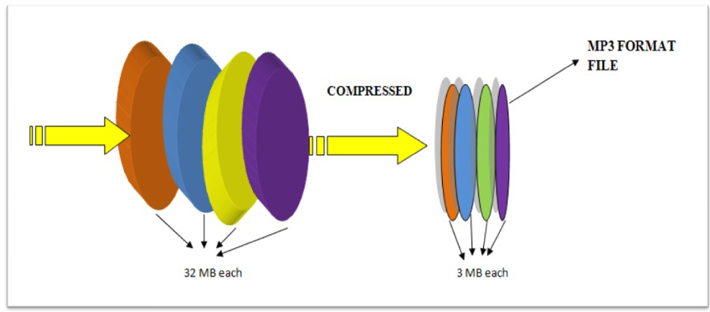
5. Light weights With the introduction of the MP3 format, the weight of a song was reduced to approximately 4 MB compared to ten MB of an audio file on a CD. It was a revolution because it was finally possible to transmit the songs over the Internet, although the transmission speed was still tied to the limits of the 56 kbit / s modems or even to a lower download speed.
6. The hacker in a coat In the summer of 1996, the NetFrack user published a message in the Affinity online fanzine that he had found a way to reduce the size of audio files thanks to a new compression format and thus hard drives. from that time on they could have contained many more songs. Subsequently, NetFrack founded the online group Compress Da Audio, which only distributed music files, and made Metallica’s song Doesi It Sleeps available in MP3 format.
August 10, 1996 is the official date of birth of music piracy.
7. The beginning of the revolution. In 1997 NullSoft created Winamp, the first software to encode audio files in MP3 format. The following year, Diamond Multimedia introduced the first portable MP3 player, the Rio PMPm300, which could hardly hold the contents of an album, used a pencil battery, and cost around $ 200. In 1999 it was Shawn Fanning and Sean Parker. Years later, when Mark Zuckerberg advised to remove “The” from the Facebook name, Napster founded it.
8. A useful service. Despite about $ 35 million in claims and considered utterly evil, Radioheads Kid A wouldn’t have had the success it had had without Napster. The group was not yet known worldwide and the record company had not planned to advertise the new album, release or video clips. In October 2000, the album was Radiohead’s first to top the billboard charts, also thanks to the fact that it was released three months before Napster’s official release.
And Thom Yorke said unlike Madonna, Metallica and Dr. Dre, who had filed million dollar lawsuits: “The best thing about Napster is that it instills enthusiasm for music in a way that the music industry has stopped. Hour”.
9. Apple, thank you In 2001, Apple introduced the iPod, the MP3 file player that played a key role in tracking china down to the Cupertino home. Almost 400 million units were sold in around 13 years of life. In 2003, Apple always invented the first paid and legal music download service. Today, 70% of online music is purchased on iTunes, which is an average of approximately 20,000 songs per minute.
10. An announced death. The development of the AAC format, which is now the de facto standard for digital audio, began in 1990, but only understood in 2007 when Apple decided to only make audio files in Aac format with 256 Kbit / s available in iTunes Plus Experts the end. MP3 was close.
To perform such compression, the MP3 format is based on a simple concept: filter a digital piece of music and eliminate all unnecessary information, thus reducing space.
The human ear is an almost perfect instrument but it also has its limits. The human ear pass band extends from 20 Hz to 20,000 Hz, but is much more sensitive to those in the midrange, 700 to 6,000 Hz, where most of the information is concentrated.
The study of auditory perception is a matter of psychoacoustics that mainly analyzes 2 factors that are later used in MP3 encoding:
Mp3 – Auditory perception
In the area of sounds, only a few can be heard by the human ear. The following figure shows these areas that represent the different sound frequencies. Only those in the white area are audible from our ear.
The sounds that the ear perceives are only those of the white areas
Masking
Masking is nothing more than the superposition of weak sounds with loud sounds. It almost always happens that the sounds of different instruments overlap each other. In cases where the loudest sound completely covers the lowest, there is a so-called masking. In MP3 files, masking allows you to remove the information from the weakest sounds, which, however, because they are not perceived by the ear, are virtually irrelevant.
MP3 – The Name
The name MP3 comes from the MPEG standard, which means Moving Picture Experts Group. This group was created specifically for the development of systems and standards used in video compression. DVD movies and satellite broadcasts (DBS) use the MPEG standard to efficiently compress video information.
MPEG compression includes a subsystem for sound compression with three different compression levels (layers) depending on the quality of the information. Layer-3 is the one used for the MP3 standard, which stands for MPEG Layer-3.
MP3 – Step by step compression
The MP3 Encoder is that program that analyzes the uncompressed digital file (for example, a Wav file) and transforms it into an MP3 file.
The audio signal is filtered and divided into 576 areas (called subbands) through a process that uses DCT (Discrete Cosine Transformation) and manages to eliminate all unnecessary frequencies. The human ear, as already said, perceives sounds only beyond a certain threshold so that all the audio below is not encoded.
At this point, the resulting signal is passed through the psychoacoustic model in which the masking thresholds of which we spoke earlier are identified. This is done using Discrete Fourier Transformation (DFT).
During the masking of the 576 subbands, the frequencies to be masked are determined and therefore can be removed.
After masking, the defined Stereo Ensemble process is applied. Below a certain frequency, the ear cannot perceive the spatial position of the sounds, so they can be recorded on a single channel (therefore, in mono format) with significant space savings.
Once the file is ready, the data is re-analyzed and compressed using Hufmann encoding which enables a data reduction (without loss of information) of approximately 20%.
At this point, after all the data has been collected, the encoder proceeds to create the bit stream that will form the final MP3 file.
Sound is a continuous wave that propagates through air or other media, formed by pressure differences, so that it can be detected by measuring the pressure level at a point. Sound waves have the proper and studyable characteristics of waves in general, such as reflection, refraction and diffraction.
To the Being a continuous wave, a digitization process is required to represent it as a series of numbers. Currently, most of the operations performed on sound signals are digital, since both storage and
Processing and transmitting the signal in digital form offers very significant advantages over analog methods. Digital technology is more advanced and offers greater possibilities, less sensitivity to transmission noise and the ability to include error protection codes, as well as encryption. With the appropriate decoding mechanisms, moreover, they can be processed simultaneously signals of different types transmitted by the same channel. The main disadvantage of the digital signal is that it requires a much greater bandwidth than that of the analog signal, hence an exhaustive study is carried out regarding data compression, some of whose techniques will be the center of our study.
Digitalization of the audio
The digitization process consists of two phases: sampling and quantization. At sampling divides the time axis into segments
discrete: the sampling frequency will be the inverse
the time between a measurement and the
following. At this time the
quantization, which, in its simplest form,
it simply consists of measuring the value of the signal
in breadth and save it.
Nyquist’s theorem
Nyquist’s theorem ensures that the frequency required to sample a signal that has its highest components at a given frequency f is at least 2f. Therefore, being the upper range of human hearing around 20 Khz, the frequency that guarantees adequate sampling for any audible sound will be around 40 Khz.
Specifically, to obtain high quality sound, frequencies of 44’1 Khz are used,
in the case of CD, for example, and up to 48 Khz, in the case of DAT. Other typical values are submultiples of the first, 22 and 11 Khz.
Depending on the nature of the application, of course, the appropriate frequencies can be much lower, such that the voice process is usually performed at a frequency between 6 and
20 Khz. or even less. Regarding quantization, it is evident that the more bits used for the division of the amplitude axis, the “finer” the partition will be and therefore the less error when attributing a specific amplitude to the sound at each moment.
For example, 8 bits offer 256 levels of quantization and 16,65536. The dynamic range of human hearing is about 100 dB. The axis division can be carried out at equal intervals or according to a specific density function, seeking more resolution in certain sections if the signal in question has more components in
certain zone of intensity, as we will see in the coding techniques.
The complete process is usually called PCM (Pulse Code Modulation) and we will refer to it hereinafter. It has been described in a very simplistic way, mainly because it is widely treated and is well known, being
another the field of study of this work. However, we will go into detail at any time that is necessary for the development of the exhibition.
Coding and Compression.
Before describing coding and compression systems, we must pause in a brief analysis of human auditory perception, to understand why a significant amount of the information provided by PCM can be discarded.
The heart of the matter, as far as we are concerned, is based on a phenomenon known as masking.
The human ear perceives a frequency range between 20 Hz. And 20 Khz.
Firstly, the sensitivity is greater in the area around 2-4 Khz., So that the sound is more difficult to hear the closer to the ends of the scale.
Second is masking, the properties of which are used extensively by the most interesting algorithms: when the component at a certain frequency of a signal has high energy, the ear cannot perceive lower energy components at close frequencies, both lower and higher.
At a certain distance from the masking frequency, the effect is reduced so much that it is negligible; the range of frequencies in which the phenomenon occurs is called the critical band.
The components that belong to the same critical band influence each other and do not affect nor are affected by those that appear outside it. The width of the critical band is different according to the
frequency in which we are located and is given by certain data that shows that it is greater with frequency.
It should be noted that these data are obtained by psychoacoustic experiments, which are carried out with experts trained in
sound perception, giving rise to psychoacoustic models with their impressions.
This we have described is the so-called simultaneous or frequency masking.
There is also the so-called asynchronous or time masking, as well as other phenomena of hearing that are not relevant in this point. For now, let’s focus on the idea that certain signal frequency components support higher noise than we would generally consider to be tolerable, and therefore require fewer bits to be encoded if the encoder is endowed.
of the right algorithms to solve masks.
Digitizing the signal using PCM is the simplest form of signal encoding, and is used by both CDs and DAT systems. Like still digitizing, it adds noise to the signal, generally undesirable. As we have seen, the fewer bits used in sampling and quantization, the greater the error in
accept discrete values for the continuous signal, that is, the higher the noise.
To avoid that the noise reaches an excessive level, it is necessary to use a large number of bits, so that at 44.1 Khz. and using 16 bits to quantize the signal, one of the two channels on a CD produces more than 700 kilobits per second (kbps). As we will see,
Much of this information is unnecessary and takes up bandwidth that could be freed, at the cost of increasing the complexity of the decoder system and incurring some loss of quality.
The compromise between bandwidth, complexity and quality
it is the one that produces the different market standards and will form the essential part of our study.
MP3 is a data format that gets its name from an algorithm
encoding called MPEG 1 Layer 3, which, in turn, is an audio compression system that allows you to store sound with a quality similar to that of a CD and with a very high compression ratio, on the order of 1:11
In practice, this means that about 11 audio CDs can be recorded on a CD-Rom, that is, approximately 150 songs.
The encoding system that MP3 uses is a loss algorithm. That is, the original sound and the one that we obtain later are not identical.
This is because MP3 takes advantage of the deficiencies of the human ear and eliminates all the information that we are not able to perceive. A multitude of studies of acoustic perception have been carried out, discovering that there are a series of effects that can aid the coding of sound with the aim of reducing as much as possible the amount of useless or redundant information. The most important are: The limits of hearing. Our ear only works with frequencies that go between 20 Hz and 20 Khz
approximately, so the remaining frequencies are disposable.
Masking effect.
It is one that occurs when two signals of similar frequency are
overlap. So we can only perceive the one that
it has more volume and, therefore, the one with a smaller volume is
liable to be removed
Stereo redundancy.
There are redundancies between the tonal and non-tonal components of the sound on the two stereo channels, and furthermore
below a certain frequency the human ear is not capable of
perceive the directionality of the sound, so below these
frequencies it is even possible to encode a single channel together with
complementary information to restore the spatial feeling for the other channel.
To carry out this “loss of information” action, a system called Subband Coding is used, a process by which the signal is broken down into subbands through a filter bank.
These subbands are then compared to the original using a psychoacoustic model that is responsible for determining which bands can be removed and which cannot.
Depending on the quality we want to obtain, more or less will be eliminated
bands. To end the process, the resulting subbands are quantized and encoded, and the final result is compressed using a standard algorithm, thus obtaining the resulting MP3 file. The encoding process is much more complicated than the decoding process, so it takes much longer to encode an MP3 file than to play it.
This perceptual coding algorithm was developed by the company MPEG (Moving Picture Expert Group) in conjunction with the Franunhofer Institute of Technology, and has been standardized as an ISO standard.
MP3 compression was an engineering response to the problem of digital storage and its large memory resource requirements. A conventional digital signal called PCM (Pulse Code Modulation) could easily require up to 10 Megabytes of memory per minute. This would represent about 30 Mb for a three minute song.
That requirement for storage memory could be handled by any computer if it were a few files, but when talking about three thousand songs the numbers become worrying. As if this were not enough, there is the problem of the Internet and its current transmission speeds. In the case of telephone lines, they have a limitation on their transmission bandwidth, so very large or heavy files represent a problem for conventional network traffic.
MPEG3 compression is considered the sound part of the original MPEG1 format that was intended for cinematography. Its abbreviations, Moving Picture Experts Group come from the committee that was created by the ISO Organization (international Standards Organization) and IEC ((International Electrotechnical Commission) to develop this format. Its principle is based on the Psychoacoustic model.
The human ear is known to discriminate sound according to its limitations. According to subject matter expert Paul Sellars, “If you hear solitary applause in a room, it will surely sound loud, but if it is preceded by the sound of a gunshot, it will sound fainter. The same thing happens in a room when you record a rock band, at a certain moment the strongest sound guitar in the mix, until the moment the drummer plays a certain cymbal, at which point the guitar will seem to attenuate “This phenomenon is used by the MP3 algorithm to perform its compression . I once explained it in the article that talked about ATRAC compression of the Minidisc.
The MP3 format divides the sound into 32 sub-bands, which allows it, according to the Psychoacoustic model on which it is based, to give priority to one element over another. At a certain moment in the material we can have a predominant low frequency sound of the kick drum, a high frequency of the cymbal and the vocalist at the same time. The algorithm is not that it eliminates two of them, but that it dedicates less storage space to them.
The mathematical part used with MP3 compression goes through the Shannon-Nyquist theorem, which states that for a wave to be properly reproduced in PCM digital format, its frequency of takes (Sampléo) must be twice the highest that is want to reproduce. In this case if we want to reproduce the frequency of 22.5KHz, (The auditory range oscillates between 20Hz-20KHz), our sampling frequency should be 44.1KHz.
The Fast Fourier Transform (FFT) is also used, which as we know can decompose a complex wave (PCM material) into a fundamental wave with its harmonics, all from its amplitude. The Discrete Cosine Transform is also used, which is based on the FFT but only using the real numbers
UNTIL IT IS RECOMMENDED
These formats will continue to be perfected and emerge, but it should be understood that despite being disseminated there may be details that will not be perceived. In other words, for serious Audio work this format should not be used.
Some improvements can be made by looking for compressors that have a better ratio, such as 224, 256 and 320 Kbps. You can also consider using VBR (Variable Bit Rate) encoding where musical passages with greater dynamic complexity are treated with a higher rate. storage in contrast to the simplest. However, this will bring other complications because not all the reproducers can handle them.
We all know that MP3 was the audio format that quickly became popular and the main reason is because it took up much less space than the WAV format that has no compression and therefore was very difficult to transfer via internet from one computer to another.
And then it was when the MP3 made its appearance because it had a very good sound and yet it took between 7 and 10 times less space than the original file.
We all know that this caused people to easily exchange music files online and this changed even the way the music industry works thereafter.
But although we all know that MP3 takes up less space, it is very few people who understand that in the first place in MP3 what it does is compress the music. But it also uses some other procedures to make music take up less disk space, Today we will briefly explain how this mp3 performs this compression.
Remove inaudible sounds
One of the first things MP3 does is to analyze the music file and eliminate all those frequencies that are not audible to the human ear but nevertheless occupy a space in the original file. Then the MP3 saves a lot of space without losing quality by eliminating sound frequencies that the human ear cannot hear.
Eliminate redundancy
Another of the mechanics that is used for an mp3 saves space is to eliminate redundant sounds. And with that we understand sounds that sound very similar and basically occupy the same Soundtracks. Therefore, the ear will only perceive some. And then the MP3 eliminates those redundant sounds that will not be heard by the human ear.
Sound masking
Acoustics and audio specialists have long discovered that when the human ear perceives more than one sound simultaneously it is very likely that one of them masks the others.
The Sound perception produces that when a person perceives 2 sounds of different intensity at the same time the weakest sound, with less volume, is inaudible to the one who is listening. This, as we indicated earlier, is what is called the sound perception and the MP3 is based a lot on the sound perception to be able to eliminate sounds under this principle of sound masking.
In other words, in MP3 you decide which sound will mask others and then eliminate these others.
It should be noted that when one decides if the MP3 encodes at 128 kilo bytes per second or at 320 kbs it is modifying the amount of sounds that will be eliminated in the masking. Well, at 320 to eliminate very few sounds and as I lowered the number of kbs it will eliminate more sounds which the person can produce if he can distinguish a difference between the original audio file and the encoded file.
The MP3 file takes up less space but loses information from the original recording, so it is a lossy compression. The question is, what is the algorithm for scrapping those details of music? How are they removed from the recording? Don’t they really matter and we don’t perceive those losses?
MP3 and auditory masking
The algorithm for MP3 compression eliminates details of the original music based on the phenomenon of the sound masking of our sense of hearing, a psychoacoustic phenomenon so daily that surely many will not have paid attention before, and that it is necessary to know to understand the MP3 .
Imagine that we are talking to someone on the street, a car passes by and suddenly we stop hearing our interlocutor. Why have we stopped hearing the other person? If we had recorded this situation with a microphone we would see that both sounds, the voice and the car, would have been perfectly recorded …
This phenomenon occurs because there are situations in which our sense of hearing gives prominence to one sound and ignores another if both are simultaneous, what is called sound masking, and that depends on well-defined causes that can be summarized as follows.
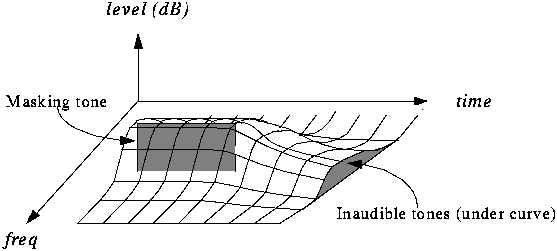
A sound can mask another when they reach the ear simultaneously depending on their relative frequencies and volumes. As seen in the figure, at the loudest sound our ear creates a new limit of hearing or masking at that time. If another simultaneous sound is under that frequency environment, we will not perceive it.
Temporary masking
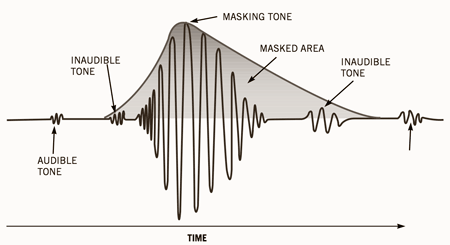
When there is a sound of sufficient power to be masking, there are moments before and after that we will not perceive other sounds, depending on how closely they are in time and their relative volume, with the behavior represented in the figure. As you can see, a sound can be masked whether it occurs immediately after the masking, or if it occurs before!
The MP3 compression algorithm
When we perform an MP3 compression, the coding algorithm divides the music into a multitude of short-lived fragments. Each of these fragments are analyzed individually in many frequency bands, to be able to detect if in any of them there is any masking sound that is masking sounds of the other bands of the fragment, and therefore are inaudible or expendable. In that case, what you will do is encode that fragment with fewer bits than the original fragment, so resolution of the more subtle details (those details that have been dispensable) will be lost and the background noise of the fragment will increase.
The amount of bit reduction for that fragment will depend on the quality sought in the encoding. If we set it to high quality, it will reduce the resolution of the fragment only just enough so that the new background noise is still masked by the masking sound that was detected in that fragment.
Therefore, and according to the masking theory, no change will be perceived after the resolution reduction: neither by the loss of the details that were already originally masked, nor by the new background noise, which will remain imperceptible by also maintaining below that masking sound detected.
After this process, the fragment could have been encoded with fewer bits, occupying less information than the original. Once this attempt at bit reduction has been repeated with all the multitude of fragments into which the original file had been divided, the song is reconstructed and a compressed file is obtained that will now take up less space.
In addition to this masking-based coding, finally an “Huffman” arithmetic coding is applied to the resulting bits, similar to that performed in a “.zip” compression. This process will not entail additional quality losses.
Sound quality in MP3 files
The sound quality of the compression depends on the size that we want the compressed song to occupy, therefore the bitrate we indicate when performing the compression. If we choose a high bitrate, the algorithm will not be forced to eliminate much information, so it will eliminate really inaudible details according to the masking curves. But if we want the file to take up less space and choose a lower bitrate, the algorithm will have to be more drastic overcoming the most imperceptible masking curves, and it will be inevitable that the loss of information will be noticed.
For example, in the most common 128 kbps MP3s a few years ago, the quality is significantly lower than the original for most people, if a direct comparison is made. On the other hand, an MP3 file with the maximum bitrate of 320 kbps hardly loses information, and is practically indistinguishable from the original in most cases.