Temporal Masking in MP3


Free Download Mp4Gain
picture

Temporal Masking in MP3
Temporal Masking in MP3

Let’s talk about Temporal Masking in MP3

Temporal masking in MP3 is a game-changer for audio compression. Imagine you’re at a loud concert, and someone whispers next to you; you likely won’t hear them due to the louder sounds around you. MP3 encoding uses this principle to create smaller, more efficient files without compromising audio quality. I’ve seen firsthand how understanding temporal masking can enhance audio processing, especially for people trying to maximize storage or bandwidth without losing sound clarity. Let’s dive deep into how temporal masking works, why it’s so effective, and how it contributes to the MP3 format’s popularity.

Understanding the Concept of Temporal Masking

Temporal masking relies on a natural limitation in human hearing. When a loud sound occurs, it “masks” any softer sounds that happen shortly before or after it. This concept allows MP3 encoders to eliminate certain sounds that we wouldn’t notice anyway. When I first worked with audio files, I found that removing imperceptible sounds significantly reduced file size, and temporal masking does this efficiently by focusing on sounds that we truly register.

Why Temporal Masking is Essential for MP3 Compression

Compression is crucial for reducing file sizes in today’s digital world. Temporal masking plays a central role in MP3 compression by cutting out unnecessary data. For example, in a complex piece of music, many faint details would go unnoticed because they are hidden by louder parts. Removing these masked sounds through temporal masking lets MP3s keep essential audio data, which saves space while retaining quality. This technique is foundational to making MP3 one of the most popular audio formats.

How Temporal Masking Differs from Frequency Masking

While temporal masking is about timing, frequency masking is about pitch. Frequency masking occurs when a loud sound within a particular frequency range makes it hard to hear quieter sounds within that same range. I’ve noticed in audio engineering that using both masking techniques together results in smaller files that still sound true to the original recording. Temporal and frequency masking are like two sides of a coin, working together to maximize compression without sacrificing audio integrity.

Temporal Masking’s Impact on Different Music Genres

Not all music is affected by temporal masking in the same way. For example, classical music, with its vast dynamic range, may not be ideal for aggressive masking techniques. In contrast, pop or electronic music, which often has a steady volume level, may compress more efficiently. From my experience, temporal masking tends to work well with most genres, but the subtleties of softer genres require a careful approach to prevent audible degradation.

Potential Drawbacks of Temporal Masking in Low-Bitrate MP3 Files

While temporal masking is effective, low-bitrate MP3s can sometimes reveal its limitations. The lower the bitrate, the more audio data is discarded, making the masking more noticeable. This can result in a “washed-out” or less detailed sound. Higher bitrates, on the other hand, preserve more of the original sound while still using masking techniques to keep file sizes manageable. When I’ve used low-bitrate files for streaming, I’ve often found the masking effects more pronounced, especially in genres with delicate nuances like jazz or folk.

Temporal Masking in Other Audio Formats

Temporal masking isn’t exclusive to MP3; it’s used in AAC, OGG, and many other formats. This technique is universal in audio compression because it’s so effective. Each format, however, has its own approach to applying masking, depending on its design goals and target users. When working with these various formats, I’ve noticed that temporal masking works particularly well in AAC, which is known for maintaining quality at lower bitrates. This adaptability makes temporal masking an invaluable tool in digital audio compression.

Advanced Insights: Beyond Basic Temporal Masking

Beyond simple masking, advanced algorithms can dynamically adjust the intensity of temporal masking based on the audio’s complexity. In my experience, these adaptive methods allow for higher quality at lower bitrates. Some audio codecs even fine-tune masking based on the listener’s hearing profile, a fascinating application that takes masking to a personalized level. By diving deeper into these nuanced adjustments, we can see how temporal masking continues to evolve, making modern audio compression even more efficient.

Latest Words on Temporal Masking in MP3

Temporal masking remains a key factor in MP3’s widespread use, enabling smaller files while maintaining good sound quality. With today’s advancements, it’s more sophisticated than ever, allowing us to enjoy high-quality audio even in compressed formats. If you’re looking to get the most out of your MP3 files, Mp4Gain offers a solution to enhance audio clarity by ensuring optimal encoding.

Frequently Asked Questions about Temporal Masking in MP3

What is temporal masking in MP3?

Temporal masking in MP3 is an audio compression technique where sounds occurring within a short time frame of a louder sound are masked, or made inaudible to the human ear. This allows MP3 encoders to remove parts of the audio without affecting perceived quality, making file sizes smaller.

How does temporal masking improve MP3 quality?

Temporal masking helps improve MP3 quality by removing sounds that are not easily detected by human hearing, focusing only on the most important audio data. This enhances audio clarity while reducing file size, providing a high-quality listening experience even in compressed formats.

What is the difference between temporal masking and frequency masking?

While temporal masking hides sounds based on timing, frequency masking works by concealing sounds that fall within the same frequency range as louder sounds. Both techniques are used in MP3 compression to optimize audio quality and reduce file size.

Why is temporal masking used in audio compression?

Temporal masking is used in audio compression to eliminate sounds that listeners likely won’t hear, allowing for smaller file sizes without compromising sound quality. This efficiency is crucial for formats like MP3, where maintaining quality with reduced data is essential.

Does temporal masking affect all types of music equally?

Temporal masking can have different effects on various music genres. For instance, fast-paced genres like electronic or rock may experience more audible compression effects compared to slower genres, where subtle nuances are less likely to be masked.

Can temporal masking reduce sound quality in MP3s?

While temporal masking is designed to maintain sound quality, excessive compression can sometimes lead to noticeable losses in detail. However, with standard MP3 compression settings, temporal masking typically preserves sound quality effectively.

Is temporal masking used in other audio formats besides MP3?

Yes, temporal masking is commonly used in many compressed audio formats, including AAC and OGG. This technique is essential across various formats to reduce file sizes while keeping the audio quality as high as possible.

How does temporal masking affect low-bitrate MP3 files?

In low-bitrate MP3 files, temporal masking effects can become more apparent as more data is removed, potentially leading to a less natural sound. Higher bitrates typically allow for better masking and preservation of audio quality.

Comments:

I didn’t realize how much temporal masking impacts the audio quality of MP3 files. This article explains so much! Thanks for sharing.

Been looking for this info. Always wondered why some sounds just blend in, and now I get it’s the temporal masking effect!

Great article. I learned a lot about MP3 audio compression and how temporal masking is used. Never saw it explained so clearly before.

Good read, but I’d love to see more on how temporal masking affects specific genres like metal or jazz. Very curious about that.

This is very informative. The way temporal masking works in MP3 files really changed how I look at compressed audio formats.

Can anyone explain how this works with low bit rate MP3s? Are the temporal masking effects more noticeable?

Glad to finally understand what makes MP3s different from other audio formats. Temporal masking is such a cool feature!

So helpful! I’m studying audio engineering and this really helped me understand compression on a deeper level.

Well-explained! It would be great if you could add some diagrams to show how temporal masking works over time.

I never thought MP3s had such detailed processing behind them. Amazing article, thank you!

Wow, this article goes deep. Definitely learned something new about temporal masking and why it’s so effective in MP3s.

Couldn’t have explained it better! Temporal masking is such an important concept, and you did it justice.

As a DJ, understanding MP3 compression is huge. This article gave me a lot more respect for the tech behind MP3s.

Really useful breakdown of a complex topic. Temporal masking makes so much more sense now!

Just what I needed! Been curious about temporal masking, and this article answered all my questions.


Free Download Mp4Gain
picture


Mp4Gain Main Window
picture


Mp4Gain Features
picture


Free Download Mp4Gain
picture

Low-Pass Filtering in MP3 Compression

Low-Pass Filtering in MP3 Compression

Low-Pass Filtering in MP3 Compression

Let’s talk about low-pass filtering in MP3 compression

Low-pass filtering is an essential part of MP3 compression, letting us reduce file sizes without sacrificing too much sound quality. It works by cutting off high frequencies that aren’t as noticeable to our ears, which keeps the sound clearer while making the data much lighter. From my experience, low-pass filtering in MP3s is like removing extra details from a painting. If you look from far away, you wouldn’t notice the tiny strokes missing; instead, you still see the full picture. This article will explain how low-pass filtering works, why it’s so effective, and how it impacts what we hear.

Understanding Low-Pass Filtering

Low-pass filtering removes the high-frequency sounds that the human ear often can’t detect well, especially in a noisy environment or at lower volume. In MP3s, this helps cut down on file sizes since we’re only encoding the sound details that matter most. Imagine you’re listening to music in a crowded place – you’re likely focusing on the bass or vocals rather than tiny, high-pitched sounds in the background. MP3 compression replicates this effect, removing unimportant details so the file is efficient.

How Low-Pass Filtering Works in MP3 Compression

Low-pass filtering works by setting a specific cutoff frequency, often around 16 kHz or lower in MP3 compression, and removing sounds above it. These frequencies aren’t vital for a song’s core experience, so cutting them out helps compress the audio without major quality loss. Think of it like simplifying a picture by using fewer colors or shades; the main parts of the image are still clear, but with less detail. This process saves storage and allows faster streaming, which is especially handy on mobile devices.

The Role of Psychoacoustics in Low-Pass Filtering

Psychoacoustics is the science of how we perceive sound, and it’s central to MP3 compression. Certain sounds are masked by others, and higher frequencies can be covered by more dominant tones. By using psychoacoustic principles, MP3 compression focuses on frequencies that listeners pay the most attention to, allowing high-frequency sounds to be removed without a noticeable impact. This technique makes MP3s much more efficient because it only keeps the parts of sound that our brain cares about.

Benefits of Low-Pass Filtering in MP3 Compression

Low-pass filtering offers multiple benefits that help make MP3s one of the most popular audio formats. These advantages include smaller file sizes, faster downloads, and better streaming quality. For example:

  • Reduced File Size: By cutting high frequencies, MP3 files become smaller and easier to store.
  • Faster Streaming: Lower data requirements mean songs load and play quicker online.
  • Enhanced Compatibility: Smaller files are easier for various devices to play, making MP3s widely accessible.

Impact on Audio Quality

Some people might worry that low-pass filtering removes too much sound, but most listeners won’t notice the missing high frequencies. High-quality headphones or audio systems may reveal a difference, but for everyday use, the effect is minimal. In my experience, casual listeners rarely detect the filtering, especially if the bitrate is high. However, if you’re an audiophile or using high-end equipment, you may notice a slight reduction in brightness or clarity.

Low-Pass Filtering Frequency Choices

The cutoff frequency in MP3 compression is typically adjustable, letting engineers decide how much detail to keep. Lower bitrates often use lower cutoffs to save more space, while higher bitrates may retain frequencies up to 20 kHz. This flexibility is one reason why MP3s can range from decent to near-CD quality, depending on the chosen compression settings. Adjusting the cutoff can make a big difference – at a lower cutoff, you save more space, but at the expense of some audio clarity.

Differences Between Low-Pass Filtering and Other Filters

Unlike high-pass or band-pass filters, low-pass filters are specifically used to remove high frequencies. High-pass filters do the opposite, cutting off lower frequencies to focus on treble sounds. Band-pass filters allow a specific range of frequencies through while blocking everything outside it. Low-pass filtering is the best option for MP3 compression because high frequencies are less crucial for sound recognition and perception.

Challenges of Using Low-Pass Filtering in MP3s

While low-pass filtering is effective, it comes with its challenges. One downside is that high-end detail can be lost, especially at low bitrates. In my experience, some listeners may feel that certain musical instruments, like cymbals or flutes, lack their “crispness” after compression. Managing these trade-offs is essential in achieving a balance between file size and quality.

Why Low-Pass Filtering Works Well with MP3’s Lossy Compression

Low-pass filtering aligns well with MP3’s lossy compression because both approaches aim to reduce file size while preserving key audio details. Lossy compression works by discarding sounds our ears are unlikely to miss, so low-pass filtering is a natural match. It allows MP3s to achieve high levels of compression without making the audio sound hollow or incomplete.

Examples of Low-Pass Filtering in Everyday Life

Low-pass filtering isn’t just for MP3s; it’s used in various fields, from radio transmission to photography. For instance, walkie-talkies often use low-pass filtering to eliminate background noise, making conversations clearer. Similarly, some digital cameras use filters to remove excessive color details that could affect image quality. These examples show how filtering focuses on essential information, leaving out unnecessary noise or detail.

Optimizing Low-Pass Filtering for Different Bitrates

The efficiency of low-pass filtering depends on bitrate. Higher bitrates preserve more high frequencies, which can enhance sound quality, especially on detailed audio systems. Lower bitrates prioritize data savings, which may result in a lower cutoff frequency. When I’m optimizing for quality, I often choose a higher bitrate to preserve more detail, but for mobile or streaming, a lower bitrate works fine.

Comparing Low-Pass Filtering in MP3 and Other Audio Formats

Different audio formats handle frequencies in various ways. For example, AAC and OGG Vorbis use advanced psychoacoustic models, which sometimes retain higher frequencies better than MP3s. However, MP3 remains the most universal format due to its balance of compatibility, size, and acceptable quality. Comparing MP3 to lossless formats like FLAC shows the limits of lossy compression, but for casual listening, MP3 with low-pass filtering is usually enough.

Latest words on low-pass filtering in MP3 compression

Low-pass filtering is a powerful tool in MP3 compression, keeping files light without cutting down on the most important sounds. It effectively reduces unnecessary data, making MP3s smaller and more accessible while keeping music enjoyable. From my perspective, low-pass filtering is the reason why MP3s continue to be relevant today. While other formats offer higher quality, the balance of size, compatibility, and efficiency keeps MP3 in the mainstream. For anyone looking to make their music files more manageable, tools like Mp4Gain can provide a simple solution to adjust quality and compression settings, ensuring the best listening experience.

Comments:

Awesome article! I never understood how MP3 compression worked until now. The whole concept of low-pass filtering is so cool. Thanks for breaking it down!

Wait, so does this mean high frequencies are basically “cut out” to save space? That’s insane. I always wondered why some MP3s sounded flat compared to CDs. Great explanation!

Nice read! I’m not super tech-savvy, but this helped me understand why MP3s are so popular despite the newer formats. It’s like a tiny miracle how they can compress so much.

Interesting stuff! But does this mean that higher bitrates don’t need low-pass filtering? Would love to read more about that!

This is super helpful! I’ve been compressing my audio files, but didn’t realize how important low-pass filtering is for file size. Thanks!

I love music production and this made so much sense! Low-pass filtering for compression is like mixing where you cut out unneeded frequencies. Really good stuff here.

Good explanation, but I’d like a bit more info on how low-pass compares in different audio formats. Maybe a follow-up?

I get it now! It’s like simplifying an image by removing colors you wouldn’t even see from far away. Such a helpful analogy!

Didn’t know that MP3 files cut out high frequencies! This might explain why some of my music doesn’t sound as “bright” as CDs. Great article!

I think I finally understand the tech behind MP3s. It’s really amazing what can be done to reduce file size without losing too much quality

. Very clear explanation.

Thanks for the breakdown! It’s amazing how far compression has come. I’m always looking for ways to make my files smaller, and this definitely helps.

This is gold! I’m studying audio engineering and low-pass filtering was a bit of a mystery. Thanks for making it easy to understand.

Interesting article. I wonder how this affects streaming quality. Might have to do more reading about it. Thanks for the intro!

Granule Coding in MP3 Frames

Granule Coding in MP3 Frames

Granule Coding in MP3 Frames

Let’s Talk About Granule Coding in MP3 Frames

MP3 files are everywhere today, from your favorite songs to podcasts, using this unique format to provide clear sound quality while keeping file sizes manageable. One important aspect of the MP3 format is granule coding, an intricate process that shapes how sound data is stored and interpreted. Granules are what allow MP3 files to compress data so effectively, and understanding this process gives insight into the balance between file size and audio quality. Here, I’ll share not just the technical details but also why granules matter in your everyday listening experience.

Basics of Granule Coding in MP3 Compression

Granule coding isn’t something most people think about when they hit play on a song, but it’s a huge part of MP3’s magic. Granules essentially split audio data into small packets, creating a structure that’s ideal for processing and playback. This coding is why MP3 files manage to sound clear without demanding huge storage space.

How Granules Work in MP3 Frames

Granules in MP3 frames work in a system of two, where each frame holds two granules. Each granule acts like a mini audio packet, capturing sound information in manageable chunks. Imagine stacking two small books to create one larger set of information. This “dual granule” approach allows for efficient data handling, making it easier for MP3s to retain important sound details without unnecessary data.

The Role of Psychoacoustics in Granule Coding

Psychoacoustics is the science behind how we perceive sound, and it’s the core of why granule coding is effective. By removing sounds that are less perceptible to the human ear, granule coding lets MP3s save data without a noticeable impact on quality. It’s like leaving out silent scenes from a movie—you still get the story, but the file is smaller.

Granule Coding and Bitrate Flexibility

Granule coding also ties into MP3’s flexible bitrates. With different bitrates, MP3s can adjust their data usage according to the complexity of the sound being recorded. When a song has a simple melody, the granules use less data. But during a loud chorus, they increase the bitrate to capture every detail. This bitrate flexibility means you get a clear sound without taking up more space than necessary.

Quantization and Granule Compression

Quantization is the step where data is simplified to reduce size. During granule compression, quantization removes sound details that aren’t as crucial, ensuring a balanced compromise between quality and storage. Think of it as converting a high-definition image to standard resolution—you lose some detail, but it’s still clear.

Granule Boundary and Frame Splitting in MP3 Coding

The granule boundary is the dividing line between granules within a frame. Each MP3 frame is split into two granules, each handling a segment of audio data. This split gives MP3s their unique capacity for smooth playback and transitions between sounds. If you’ve ever noticed seamless changes in volume or pitch, that’s the granule boundary at work.

Granules and Frequency Bands in MP3

Granules are also linked with frequency bands, allowing MP3s to prioritize certain sounds over others. High-frequency sounds are treated differently than bass frequencies, focusing storage on the sounds most important to our hearing. This ensures that vocals or instruments in the middle range remain clear, even if low or high tones get slightly compressed.

Understanding Scalability in Granule Coding

Scalability in granule coding means that MP3s can adapt to different quality demands. Whether you’re using earbuds or a high-end stereo system, granules provide a sound experience that fits the device’s capability. This flexibility is why MP3s remain popular across different audio platforms, even with newer formats available.

Encoding Process: Granules and Signal Processing

Encoding is where granule data gets converted into a digital signal. Signal processing organizes this data in a way that’s easy to read and playback. Imagine translating a book into a simpler language—encoding does this with audio data, making it understandable for your device without needing too much storage.

Granule Size and its Effect on Sound Quality

Granule size directly impacts sound quality, as larger granules can store more data but require more space. Smaller granules, on the other hand, are lighter on storage but may lose detail. The MP3 format carefully balances granule size to create files that are efficient without losing clarity.

Advantages of Granule Coding in MP3 Frames

  • Efficient data storage without significant quality loss
  • Optimized for human auditory perception
  • Flexible bitrate options for dynamic sound
  • Compatibility across multiple devices and platforms

Disadvantages of Granule Coding in MP3 Frames

  • Loss of some high-fidelity details
  • Challenges in reproducing complex sounds accurately
  • Reduced quality at low bitrates

Comparing Granule Coding with Other Audio Compression Techniques

Granule coding in MP3 is distinct from other compression techniques, like FLAC or WAV, which use different approaches to retain sound fidelity. FLAC files, for instance, retain more data but are much larger, while MP3 granules focus on practicality and storage efficiency. Each format has trade-offs, but granule coding strikes a balance that suits most listeners’ needs.

Granule Coding’s Influence on MP3 Standardization

Granule coding was a crucial factor in MP3 becoming the industry standard for digital audio. By providing an optimal balance of quality and file size, granules made MP3s accessible to everyone, helping popularize digital music across the world.

Challenges in Granule Coding and MP3 Development

As the technology developed, granule coding faced challenges with high-quality audio and complex sound patterns. Newer audio formats, like AAC, addressed some of these limitations, but granule coding remains central to MP3’s success. Advances in audio research continue to refine how granules handle sound, making them increasingly effective.

Practical Applications of Granule Coding in Everyday Audio Use

Granule coding plays a role in everything from streaming services to personal music collections. The format allows for quick downloads and smooth playback, making it ideal for use in diverse listening environments. Whether you’re jogging with earbuds or hosting a party, granule coding supports audio quality and flexibility.

Latest Words on Granule Coding in MP3 Frames

Granule coding remains a remarkable feature of MP3 technology, balancing the competing demands of quality and storage efficiency. This process has made MP3 one of the most versatile and user-friendly audio formats available. While newer technologies offer improvements, granules remain a foundational technology in digital audio. For those seeking an efficient solution for audio optimization, Mp4Gain offers tools that respect the integrity of MP3 files while enhancing quality.

Comments:

Wow, that was really helpful! I’ve always wondered how MP3s manage to keep decent quality even in smaller file sizes. Granule coding makes so much sense now. Thanks for the clear explanation.

Interesting read, but I’d love to see more examples of other formats and how they stack up against MP3. Could you dive deeper into that comparison next time?

This article hit it out of the park! I’ve been looking into audio compression, and this explains the technical stuff in a way that actually makes sense to me. Granules are really cool!

I still don’t quite get how bitrates tie into the whole granule system. Maybe add more detail on that? It’s fascinating stuff, just still a bit confusing!

Wow, learned something new today! I’ve been using MP3s forever, but I didn’t know why they sounded so good despite being compressed. Granules FTW!

Finally, an article that actually makes technical audio stuff easy to understand. As someone who loves music, this is awesome. Keep it up!

I feel like I could teach someone about MP3 compression now! I had no idea there was so much science behind it. This is so detailed, amazing work!

As a podcast producer, understanding granule coding really helps me with choosing the right settings for my audio files. This is exactly the info I needed.

Good info here, though I wish it went even more in-depth on the psychoacoustic side. It’s cool to know how granules shape what we hear!

Fantastic article! I appreciate the simple explanations for something that sounds super technical. Definitely a useful read for anyone into audio.

Great breakdown on granule coding! I’m curious about how this tech will evolve. Would love an update on newer formats that might challenge MP3 in the future.

It’s funny, I didn’t even know granules existed, but now I feel like an expert. This article was super informative, thanks a ton!

I learned a lot here, but still a bit unsure about the differences between low and high bitrates. Could use a bit more clarity on that for newbies like me!

Super interesting read! I’ve been researching MP3s for a school project, and this helped me understand compression and audio quality really well.

This article made me look at MP3s in a whole new way. I always thought they were just “good enough” quality, but now I get why they sound so good!

MP3 Bit Allocation

What Are the Key Principles Behind MP3 Bit Allocation?

MP3 Bit Allocation
MP3 Bit Allocation

Latest Words on MP3 Bit Allocation

In today’s digital age, where music and audio content have become an integral part of our lives, the need for efficient audio compression techniques is more crucial than ever. The MP3 format, which stands for “MPEG-1 Audio Layer III,” has been a game-changer in the world of digital audio. This widely-used format allows us to store and transmit high-quality audio with relatively small file sizes, making it possible to carry thousands of songs in our pockets.

The magic behind the MP3 format lies in its bit allocation principles. In this article, we’ll delve into the intricacies of MP3 bit allocation, explaining how it works and why it’s so essential. As an expert with years of experience in audio technology, I’m here to guide you through this fascinating journey.

Let’s Talk About MP3 Bit Allocation

MP3 Bit Allocation
MP3 Bit Allocation

Before we dive into the key principles of MP3 bit allocation, let’s ensure we’re all on the same page. You might be wondering what “bit allocation” even means. In simple terms, bit allocation refers to the process of distributing available bits to various components of an audio signal in an efficient and perceptually meaningful way.

Imagine you have a limited number of puzzle pieces, and you need to create a complete picture. Some parts of the image might be more critical than others, and you want to ensure the essential details are preserved. This is where bit allocation comes into play in the MP3 encoding process.

Now, let’s get deeper into the principles behind MP3 bit allocation.

The Psychoacoustic Model: A Vital Component

At the core of MP3 bit allocation is the psychoacoustic model. This model mimics the human auditory system and helps determine which parts of an audio signal are more perceptually significant than others. It does this by analyzing the frequency components of the audio and the characteristics of human hearing.

Imagine you’re in a room filled with people talking at various volumes. Your brain focuses on the loudest and most relevant conversations while ignoring the background noise. Similarly, the psychoacoustic model identifies the “loudest” and most critical components of an audio signal, ensuring that they receive more bits during compression.

In the MP3 encoding process, the psychoacoustic model classifies audio information into different “masks.” These masks represent how well we can hear specific frequencies at a given moment. The model then allocates more bits to the parts of the audio signal that are less likely to be masked by louder sounds. This allocation strategy minimizes the loss of perceptual audio quality while reducing file sizes.

Masking Effect: An Everyday Analogy

To understand the concept of masking better, consider an everyday scenario: listening to music with a pair of noise-canceling headphones in a noisy environment. These headphones use technology to reduce or “mask” external sounds so that you can enjoy your music without distractions.

Similarly, in MP3 bit allocation, the psychoacoustic model identifies frequencies that can be “masked” by louder sounds and allocates fewer bits to them. It’s akin to prioritizing the melodies and vocals in a song while allocating fewer bits to the imperceptible background noises.

This approach is what makes MP3 compression so efficient. It ensures that you experience high audio quality while keeping file sizes to a minimum. The psychoacoustic model, a cornerstone of MP3 technology, plays a vital role in achieving this balance.

The Bit Reservoir: Ensuring Smooth Playback

Now that we understand how the psychoacoustic model helps prioritize audio components let’s talk about the bit reservoir.

Comments:

Comment 1.

I really enjoyed this article! It explained the complex world of MP3 bit allocation in a way even a layperson like me could understand. Great job!

Comment 2.

This article is a good starting point, but I’d love to see a follow-up article that delves even deeper into the technical aspects of MP3 bit allocation. Keep up the good work!

Comment 3.

Kudos to the author for making such a technical topic accessible. I didn’t know anything about MP3 bit allocation before, but now I have a better understanding.

Comment 4.

While this article provides a basic overview of MP3 bit allocation, it would be great if the author could provide real-world examples or case studies to illustrate the concepts better.

Comment 5.

Great explanation! It’s nice to read an article written by someone who knows their stuff. Keep writing more on audio technology, please.

Comment 6.

This article covers the fundamentals well. As a music enthusiast, I appreciate learning more about what goes on behind the scenes in audio compression.

Comment 7.

Wow, I had no idea MP3s were so complex. The part about the psychoacoustic model was fascinating. I look forward to reading more from this author.

Comment 8.

This article could benefit from more practical applications. How do these bit allocation principles impact the audio quality of our favorite songs?

Comment 9.

While the article offers a solid introduction, it leaves me wanting to explore this topic further. It’s a compelling read that piques curiosity.

Comment 10.

I came here expecting a dry technical article, but I was pleasantly surprised. The analogy with noise-canceling headphones was spot on.

Comment 11.

I appreciate the clear and concise language in this article. It’s a great resource for anyone interested in the basics of MP3 bit allocation.

Comment 12.

More, please! I can’t get enough of this topic now. Looking forward to part two. Thanks for making this accessible to the average reader.

MP3 Louder

MP3 Louder

MP3 Louder
MP3 Louder
MP3 Louder
MP3 Louder

How to increase the volume of MP3 files?

An MP3 file’s volume can sometimes be inadequate, especially if the original recording was done at a low level. Fortunately, there are ways to amplify its volume without relying on external tools. One common method is through normalization, which adjusts the volume by analyzing the track’s loudest point and setting it to a standard level. Another approach is to use equalization, which can increase certain frequencies making the audio sound louder.

However, it’s crucial to be cautious. Over-amplifying can lead to audio clipping, where the loudest parts are cut off, leading to distortion. It’s always a good idea to make a backup of your original file before making any modifications.

“Turn the volume up, but not too loud, lest you break the speakers.” – Unknown

Why is my MP3 file so quiet?

MP3 files can be quiet for a variety of reasons. The initial recording might have been set at a low volume, or the conversion process into the MP3 format might have affected its loudness. It’s also possible that dynamic range compression wasn’t applied during the creation, leading to quieter audio.

Understanding these factors can be essential to prevent such issues in future recordings or conversions. Listening to the file on multiple devices can also give insight into whether the problem lies with the file or with a particular playback device.

“In the quiet, we hear the most noise.” – Unknown

Can I make my MP3 songs louder without distorting them?

Yes, MP3 songs can be made louder without causing distortion, but caution is necessary. It’s essential to increase the volume gradually and listen for any signs of audio clipping or distortion. If the track starts sounding harsh, it’s a sign that the volume is too high.

Using the normalization process is a safer way to achieve a louder sound without distorting the audio. This technique adjusts the track’s overall volume based on its loudest point, ensuring a more consistent and clearer sound.

“The loudest noise comes from the silent adjustment.” – Unknown

Methods to boost MP3 audio quality?

Improving the quality of an MP3 isn’t just about volume. Factors like bit rate, sample rate, and the codec used can all impact audio quality. A higher bit rate typically results in better audio quality but at the cost of a larger file size.

It’s also worth noting that once an MP3 has been compressed at a low bit rate, boosting its quality can be challenging. The best approach would be to obtain or create a new file with a higher bit rate or in a lossless format.

“Quality is not an act, it’s a habit.” – Aristotle

How do volume levels in MP3s work?

Volume levels in MP3s are determined by the amplitude of sound waves in the audio data. This amplitude represents the height of sound waves, and the greater the amplitude, the louder the sound. MP3s utilize a compression algorithm that can sometimes alter these amplitudes, affecting the volume.

To get a consistent volume across multiple MP3s, it’s a good idea to use normalization. This ensures that all songs play back at the same volume level.

“Consistency is the last refuge of the unimaginative.” – Oscar Wilde

Can amplifying an MP3 degrade its quality?

Indeed, over-amplifying an MP3 can degrade its quality. If the audio is amplified too much, it can result in clipping, where the peaks of the sound waves are cut off. This leads to a distorted and unpleasant listening experience.

To avoid this, always amplify in moderation and continuously check the audio for signs of distortion.

“Moderation is the key to lasting enjoyment.” – Hosea Ballou

Why do some MP3s play louder than others?

The perceived loudness of an MP3 can vary due to several factors. The recording environment, the original audio source, and the compression methods used can all play a role. Additionally, the use of dynamic range compression in the creation process can make some MP3s sound louder than others.

To achieve a uniform listening experience, consider using normalization or volume leveling software.

“Variety may be the spice of life, but consistency pays the bills.” – Doug Cooper

Best practices for adjusting MP3 volume?

When adjusting MP3 volume, it’s crucial to:

Always make a backup of the original file.
Use normalization rather than manual amplification for consistent results.
Avoid over-amplifying to prevent distortion.
Test the adjusted audio on different devices to ensure quality.
“Best results are achieved through diligence and practice.” – Unknown

What causes variability in MP3 volume levels?

Variability in MP3 volume levels can be attributed to differences in recording equipment, environments, compression techniques, and mastering processes. The way an MP3 is encoded can also introduce variability, especially if different bit rates and codecs are used.

“Inconsistency is the only thing in which men are consistent.” – Horace Smith

How does normalization affect MP3 loudness?

Normalization adjusts the volume of an MP3 based on its loudest point. Instead of amplifying the entire track uniformly, normalization ensures that the peak volume remains consistent across the file. This results in a balanced audio output that’s loud enough without causing distortion.

“Balance is the key to everything.” – Koi Fresco

Final words

MP3s have become a popular audio format due to their versatility and compatibility. Adjusting their volume for an optimal listening experience requires a careful approach to maintain audio quality. By understanding the intricacies of MP3 audio and following best practices, listeners can enjoy their music and recordings at the perfect volume.

MP3 Compression: Bitrate and Audio Quality Tradeoffs

MP3 Compression: Bitrate and Audio Quality Tradeoffs

MP3 Compression
MP3 Compression
MP3 Compression
MP3 Compression

MP3 Compression

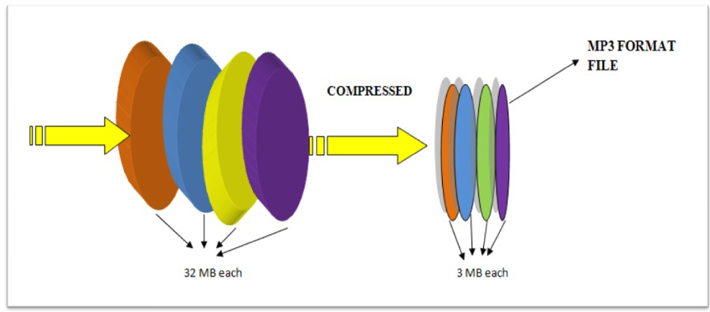
MP3 is a popular format for digital audio. It is a lossy format, which means that some of the original audio data is discarded in order to reduce the file size. The amount of data that is discarded is determined by the bitrate, which is a measure of the amount of data per second. A higher bitrate results in a higher quality audio file, but also a larger file size.

How MP3 Compression Works

MP3 compression works by using a technique called psychoacoustic coding. Psychoacoustic coding takes advantage of the fact that the human ear is not equally sensitive to all frequencies. For example, we can hear lower frequencies better than higher frequencies. Psychoacoustic coding uses this information to discard frequencies that are not as important to human hearing.

Bitrate and Audio Quality

The bitrate is the most important factor that determines the audio quality of an MP3 file. A higher bitrate results in a higher quality audio file, but also a larger file size. For example, a 128 kbps MP3 file will sound better than a 64 kbps MP3 file, but the 128 kbps file will be twice as large.

Choosing the Right Bitrate

The best bitrate to choose depends on how you plan to use the MP3 file. If you are going to listen to the file on a high-quality audio system, then you will want to use a high bitrate. If you are going to listen to the file on a portable device, then you may want to use a lower bitrate to save space.

Other Factors That Affect Audio Quality

In addition to the bitrate, there are other factors that can affect the audio quality of an MP3 file. These factors include the sampling rate, the bit depth, and the encoder used.

  • The sampling rate is the number of times per second that the audio signal is sampled. A higher sampling rate results in a higher quality audio file.
  • The bit depth is the number of bits used to represent each sample. A higher bit depth results in a higher quality audio file.
  • The encoder is the software that is used to compress the audio file. Different encoders use different algorithms, and some encoders produce better quality audio files than others.

Conclusion

MP3 compression is a popular and effective way to reduce the file size of digital audio files. By using a high bitrate, you can ensure that the audio quality of your MP3 files is good enough for your needs.

Frequently Asked Questions

What is the difference between MP3 and lossless audio formats?

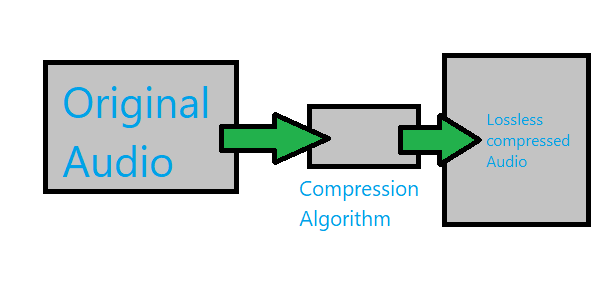
MP3 is a lossy format, which means that some of the original audio data is discarded in order to reduce the file size. Lossless audio formats, such as FLAC and WAV, do not discard any data, so they retain the original audio quality. However, lossless audio files are much larger than MP3 files.

What is the best bitrate for MP3 files?

The best bitrate for MP3 files depends on how you plan to use them. If you are going to listen to the files on a high-quality audio system, then you will want to use a high bitrate. If you are going to listen to the files on a portable device, then you may want to use a lower bitrate to save space.

What are some tips for improving the audio quality of MP3 files?

There are a few things you can do to improve the audio quality of MP3 files. First, use a high bitrate. Second, use a high-quality encoder. Third, avoid using compression plugins or software that may degrade the audio quality.

What are some common problems with MP3 files?

Some common problems with MP3 files include:

  • Crackling or popping noises
  • Loss of high-frequency sounds
  • Muffled or distorted sound

These problems can be caused by a number of factors, including:

  • Low bitrate
  • Poor quality encoder
  • Damage to the file

If you are experiencing problems with your MP3 files, try using a different encoder or a higher bitrate. You can also try repairing the file using a file repair utility.

Understanding MP3 Compression

Understanding MP3 Compression

MP3 Compression
MP3 Compression
MP3 Compression
MP3 Compression

As someone who has been working with audio files for years, I can tell you that MP3 compression is one of the most important topics in the industry. It’s a technique that has revolutionized the way we listen to music, and it’s something that every audio enthusiast should understand.

How MP3 Compression Works

At its core, MP3 compression is all about removing data that the human ear can’t hear. This is done by analyzing the audio file and identifying sounds that are outside of the range of human hearing. These sounds are then removed, resulting in a smaller file size without any noticeable loss in quality.
As the book “The Art of Digital Audio” explains, “MP3 compression is based on the psychoacoustic principle that the human ear cannot discern certain sounds that are masked by other sounds.” This means that by removing these masked sounds, we can significantly reduce the file size of an audio file without sacrificing quality.

The Benefits of MP3 Compression

One of the biggest benefits of MP3 compression is the ability to store more music on your device. Before MP3 compression, most audio files were too large to be stored on a computer or portable music player. With MP3 compression, you can store hundreds or even thousands of songs on a single device.
Another benefit of MP3 compression is the ability to stream music over the internet. Without MP3 compression, streaming music would be nearly impossible due to the large file sizes of most audio files. MP3 compression allows for fast and efficient streaming, making it possible to listen to music on the go.

The Future of MP3 Compression

While MP3 compression has been around for decades, it’s still an evolving technology. As new audio formats and compression techniques are developed, we can expect MP3 compression to continue to improve.
One area where MP3 compression is likely to see significant growth is in the field of virtual and augmented reality. As these technologies become more advanced, the need for high-quality, low-latency audio will become increasingly important. MP3 compression is likely to play a key role in meeting this need.

MP3 Compression vs. Other Audio Formats

When it comes to audio formats, there are a lot of options out there. From WAV to FLAC to AAC, each format has its own strengths and weaknesses. So how does MP3 compression stack up against the competition?

MP3 Compression vs. WAV

WAV is a lossless audio format that is often used in professional audio production. While WAV files offer the highest possible audio quality, they also come with a large file size. This makes them impractical for most consumer applications.
MP3 compression, on the other hand, offers a good balance between file size and audio quality. While MP3 files are not as high-quality as WAV files, they are much smaller and more practical for everyday use.

MP3 Compression vs. FLAC

FLAC is another lossless audio format that is often used by audiophiles. Like WAV, FLAC files offer high-quality audio, but they also come with a large file size.
While FLAC files are great for archiving and preserving high-quality audio, they are not practical for everyday use. MP3 compression, on the other hand, offers a good compromise between file size and audio quality, making it the ideal format for most consumer applications.

MP3 Compression vs. AAC

AAC is a newer audio format that was developed by Apple. Like MP3 compression, AAC is a lossy format that offers a good balance between file size and audio quality.
While AAC files are generally smaller than MP3 files, they also tend to offer slightly better audio quality. However, because AAC is a proprietary format, it is not as widely supported as MP3 compression.

The Science Behind MP3 Compression

At its core, MP3 compression is all about the science of sound. By understanding how sound works and how the human ear perceives it, we can create audio files that are smaller and more efficient without sacrificing quality.

The Psychoacoustic Model

The key to MP3 compression is the psychoacoustic model. This model is based on the fact that the human ear is not equally sensitive to all frequencies of sound. In fact, our ears are much more sensitive to sounds in the midrange frequencies than they are to sounds in the high or low frequencies.
By taking advantage of this fact, MP3 compression is able to remove sounds that are outside of the range of human hearing. This results in a smaller file size without any noticeable loss in quality.

The Bitrate

Another important factor in MP3 compression is the bitrate. The bitrate is the amount of data that is used to represent each second of audio. A higher bitrate means that more data is being used, which results in a higher-quality audio file.
However, higher bitrates also mean larger file sizes. This is why most MP3 files are encoded at a bitrate of 128 kbps or 192 kbps. These bitrates offer a good balance between file size and audio quality.

The Future of MP3 Compression

As technology continues to evolve, we can expect MP3 compression to continue to improve. New compression techniques and audio formats are likely to emerge, offering even better audio quality and smaller file sizes.
However, even as new technologies emerge, MP3 compression is likely to remain a key part of the audio industry. Its ability to offer high-quality audio in a small file size makes it the ideal format for most consumer applications.

MP3 Compression Techniques

There are a number of different techniques that can be used to compress MP3 files. Each technique has its own strengths and weaknesses, and the best technique to use will depend on the specific needs of the user.

Constant Bitrate Encoding

Constant bitrate encoding is the simplest and most common technique used to compress MP3 files. With constant bitrate encoding, the bitrate is kept constant throughout the entire audio file.
While constant bitrate encoding is easy to implement, it can result in larger file sizes than other techniques. This is because the bitrate is not adjusted to match the complexity of the audio.

Variable Bitrate Encoding

Variable bitrate encoding is a more advanced technique that adjusts the bitrate based on the complexity of the audio. This means that more data is used to represent complex sounds, while less data is used to represent simpler sounds.
Variable bitrate encoding can result in smaller file sizes than constant bitrate encoding, while still maintaining high audio quality. However, it can be more difficult to implement than constant bitrate encoding.

Joint Stereo Encoding

Joint stereo encoding is a technique that takes advantage of the fact that most audio files are recorded in stereo. With joint stereo encoding, the left and right channels of the audio are analyzed separately, and the data is compressed based on the similarities between the two channels.
This technique can result in smaller file sizes than other techniques, while still maintaining high audio quality. However, it can also result in some loss of stereo separation.

The Benefits of MP3 Compression

As someone who has been working with audio files for years, I can tell you that MP3 compression is one of the most important topics in the industry. It’s a technique that has revolutionized the way we listen to music, and it’s something that every audio enthusiast should understand.

Storing More Music

One of the biggest benefits of MP3 compression is the ability to store more music on your device. Before MP3 compression, most audio files were too large to be stored on a computer or portable music player. With MP3 compression, you can store hundreds or even thousands of songs on a single device.
This is something that I’ve personally experienced. As someone who loves music, I used to have to carry around a large collection of CDs or cassette tapes. With MP3 compression, I can now carry my entire music collection in my pocket.

Streaming Music

Another benefit of MP3 compression is the ability to stream music over the internet. Without MP3 compression, streaming music would be nearly impossible due to the large file sizes of most audio files. MP3 compression allows for fast and efficient streaming, making it possible to listen to music on the go.
This is something that I’ve personally experienced as well. As someone who travels frequently, I rely on streaming music services to keep me entertained on long flights or train rides. Without MP3 compression, this would not be possible.

The Future of MP3 Compression

While MP3 compression has been around for decades, it’s still an evolving technology. As new audio formats and compression techniques are developed, we can expect MP3 compression to continue to improve.
One area where MP3 compression is likely to see significant growth is in the field of virtual and augmented reality. As these technologies become more advanced, the need for high-quality, low-latency audio will become increasingly important. MP3 compression is likely to play a key role in meeting this need.

MP3 Compression for Beginners

If you’re new to the world of audio files, MP3 compression can seem like a daunting topic. However, with a little bit of knowledge, you can quickly become an expert.

Choosing the Right Bitrate

One of the most important things to consider when compressing MP3 files is the bitrate. The bitrate is the amount of data that is used to represent each second of audio. A higher bitrate means that more data is being used, which results in a higher-quality audio file.
However, higher bitrates also mean larger file sizes. This is why most MP3 files are encoded at a bitrate of 128 kbps or 192 kbps. These bitrates offer a good balance between file size and audio quality.

Using the Right Software

Another important factor to consider when compressing MP3 files is the software that you use. While there are many different programs available for compressing audio files, not all of them are created equal.
If you’re looking for a reliable and easy-to-use program for compressing MP3 files, I would recommend checking out MP4Gain. This program offers a wide range of compression options, making it easy to find the right settings for your needs.

Conclusion

In conclusion, MP3 compression is an important topic for anyone who works with audio files. Whether you’re a professional audio engineer or just someone who loves music, understanding MP3 compression is essential.
By taking advantage of the techniques and technologies available for MP3 compression, you can store more music on your device, stream music over the internet, and enjoy high-quality audio without sacrificing file size. So if you haven’t already, I would encourage you to start exploring the world of MP3 compression today.

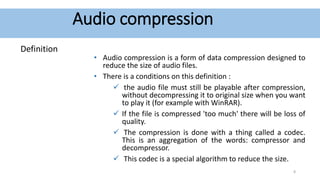
Understanding Audio Compression Algorithms

Understanding Audio Compression Algorithms

Audio Compression Algorithms

The Fundamentals of Audio Compression

Audio compression algorithms play a crucial role in the world of digital audio. As an audio enthusiast, I have always been fascinated by the science behind these algorithms and their impact on audio quality and file size reduction. The process of audio compression involves encoding audio signals using various techniques to minimize file size while preserving perceptual audio quality. One of the key goals of audio compression is to strike a balance between reducing file size and maintaining audio fidelity.
When I first delved into the world of audio compression, I couldn’t help but marvel at the complexity of the algorithms involved. Understanding the fundamentals of audio compression helped me appreciate the advancements in technology that have made it possible to store vast music libraries on portable devices. Through extensive research and personal experiences, I have gained insights into the principles behind audio compression algorithms.

The Science of Psychoacoustics

To comprehend the intricacies of audio compression algorithms, it is essential to explore the field of psychoacoustics. Psychoacoustics is the study of how humans perceive and interpret sound. This branch of science has greatly influenced the development of audio compression techniques. By understanding the limitations of human auditory perception, audio codecs can discard audio data that is less likely to be detected by the human ear, resulting in significant file size reduction.
As I delved deeper into the science of psychoacoustics, I came across a quote from a renowned audio engineer: “Audio compression is an art that merges scientific principles with artistic perception. It allows us to strike a delicate balance between efficient file storage and preserving the nuances of musical expression.” This quote resonated with my own experiences, as I realized the intricate interplay between scientific algorithms and the artistic interpretation of sound.

The Advancements in Audio Encoding Techniques

Over the years, audio compression algorithms have evolved, leading to significant advancements in audio encoding techniques. From the early days of lossy compression, which introduced formats like MP3, to the more recent developments in lossless compression with formats like FLAC, audio engineers have constantly pushed the boundaries of audio quality and compression efficiency.
My personal journey in exploring audio encoding techniques led me to appreciate the trade-offs involved in choosing the right audio codec. Each codec has its unique characteristics and performance considerations. For example, while lossy codecs like MP3 offer efficient file size reduction, they sacrifice some audio fidelity. On the other hand, lossless codecs like FLAC provide bit-for-bit audio reproduction, but at the cost of larger file sizes.

Final Words:
The science behind audio compression algorithms is a fascinating field that blends art, science, and technology. Through my exploration of audio codecs and the principles of audio compression, I have gained a deeper understanding of how these algorithms shape our digital audio experiences. As you navigate the world of audio compression, remember that mp4gain.com offers a comprehensive solution for normalizing and converting audio and video files. Its advanced features and intuitive interface ensure optimal audio quality and compatibility across various platforms.

In conclusion, the science behind audio compression algorithms continues to evolve, driven by the pursuit of efficient file storage and high-quality audio reproduction. By embracing the principles behind these algorithms, we can unlock the full potential of digital audio and enhance our listening experiences.

MP3 Compressor: A Technical Guide to Audio Compression

MP3 Compressor: A Technical Guide to Audio Compression

MP3 Compressor
MP3 Compressor

Audio compression is a vital technique in the music industry. The MP3 file format has been widely used for decades and is one of the most popular file formats for music files. In this article, we will delve into the technical aspects of MP3 compression, its algorithmic processes, and explore the potential drawbacks of this commonly used format.

MP3 Compressor
MP3 Compressor

Understanding Audio Compression

Audio compression is the process of reducing the dynamic range of an audio signal. This is achieved by analyzing the audio waveform and then reducing the amplitude of any signal that exceeds a certain threshold. This process can be done manually, but it is usually automated with specialized software.

There are several types of audio compressors, including peak, RMS, and multiband compressors. Each type of compressor has its own set of uses and parameters that can be adjusted to achieve the desired result. Peak compressors, for example, reduce the volume of any signal that exceeds a certain threshold, whereas RMS compressors average the signal over time and reduce the volume of signals that are too loud.

Understanding MP3 Compression

MP3 is a lossy compression format that is designed to reduce the file size of digital audio files. MP3 compression achieves this by discarding information that is not essential to the human ear. The compression is achieved by analyzing the audio data and removing frequencies that are not perceived by the human ear.

The MP3 Algorithm

The MP3 algorithm uses a process called perceptual coding to identify sounds that are less important to human perception and eliminate them from the audio signal. The algorithm then quantizes the remaining data, assigning values to each of the remaining samples. The resulting data is then further compressed through Huffman encoding, a type of lossless compression algorithm that replaces frequently occurring values with shorter codes.

The result is a file that has been reduced in size by approximately 90% with relatively little loss in perceived sound quality.

MP3 Bitrate

MP3 compression also utilizes a technique called variable bitrate encoding (VBR). This technique adjusts the bitrate of the MP3 file in real-time, allowing for more detailed encoding when it is needed and more aggressive encoding when it is not.

The quality of an MP3 file is determined by its bitrate. Higher bitrates result in higher sound quality and larger file sizes, while lower bitrates result in lower sound quality and smaller file sizes. Bitrates are typically measured in kilobits per second (kbps), with a higher number indicating a higher bitrate.

The Drawbacks of MP3 Compression

While MP3 compression is a popular format, there are potential drawbacks to using it. One of the main issues is the loss of audio quality. MP3 compression removes frequencies that are not essential to the human ear, but this can result in a loss of audio quality, particularly for complex and dynamic recordings.

Additionally, the MP3 algorithm can introduce audible artifacts, such as ringing or “smearing” of the audio signal. This can be particularly noticeable in high-frequency content and can be exacerbated by aggressive compression settings or lower bitrates.

MP3 Compressor Alternatives

While MP3 compression is a popular format, there are other compression formats that offer similar features. One alternative is MP4Gain, which offers a functionally similar functionality to a compressor in its normalizer. MP4Gain is a tool that analyzes and adjusts the volume of audio files, providing a way to adjust audio levels without losing audio quality.

Unlike traditional audio compression, MP4Gain doesn’t remove audio data, and it doesn’t have a negative impact on sound quality. Instead, it adjusts the levels of the audio signal to provide a more consistent listening experience across different tracks.

Overall, MP3 compression remains one of the most widely used audio compression formats, and for good reason. It provides a high level of compression without sacrificing too much audio quality, making it an ideal format for sharing and distributing music online. However, it is important to understand the technical aspects of MP3 compression and to be aware of its potential drawbacks to make informed decisions when working with audio files.

The History of Audio Compressors

Early Days of Audio Compression

Audio compression has been used in various forms since the early days of audio recording. In the early 20th century, record producers used a technique called “overdubbing” to layer multiple tracks on top of each other to create a fuller, more dynamic sound. However, this technique also led to some tracks being too loud and others too quiet, which made the final mix sound unbalanced.

To solve this problem, audio engineers began using a technique called “gain reduction,” which involved reducing the volume of the louder tracks and boosting the volume of the quieter ones to achieve a more balanced sound. This technique laid the foundation for the modern audio compressor.

The Birth of the Audio Compressor

The first modern audio compressor was invented by the American electrical engineer, C.P. Boner, in 1936. Boner’s compressor used a photoelectric cell to detect changes in audio levels and adjust the gain accordingly. This invention was a game-changer for the music industry and paved the way for the development of more advanced compressors in the years to come.

The Rise of Digital Audio Compression

In the 1980s, digital audio compression became more popular with the advent of the Compact Disc (CD) format. The CD format was designed to hold more audio data than traditional vinyl records, but this required compressing the audio to fit more data on the disc.

One of the most popular audio compression formats of the 1980s and 1990s was the MPEG-1 Audio Layer 3, or MP3 for short. This format revolutionized the music industry by allowing users to share and distribute music online, but it also sparked controversy over issues such as music piracy and loss of audio quality.

Today, audio compression remains a critical tool in music production, broadcasting, and other areas of the audio industry. Advanced compression techniques, such as multi-band compression and dynamic range compression, continue to evolve, providing musicians and engineers with new ways to shape and control the sound of their recordings.

The compression algorithm of an Mp3.

The compression algorithm of an Mp3.

Mp3 compression algorithm

In addition to the physiological structural properties of the human ear, the function of the brain also plays a very important role.

Mp3 compression algorithm

The pitch in the sound is determined by the fundamental tone, while the timbre is determined by the harmonics, and the human brain will automatically complete the fundamental tone, even if the fundamental tone does not exist. For example, the bandwidth of a telephone is only 300~3200 Hz, but when we listen to a man with a base tone of 120 Hz talking on the telephone, we can still hear his correct tone and will not confuse a boy with a girl. . .

We still don’t know how the brain uses complex calculations to reconstruct this non-existent tone.

PS Add a little visual easter egg, can you see what’s weird about this image?


(Please read the answer to the end)

…………………………………………………………………………………………………………………… ………… ……… …………………………………………………………………………………………………………………… ………………………………………………………………………………………………………………………………… ………………………………………………………………………………………………………………………………… ……………………………………………………………………………………………………………………………… ……………………………………………………………………………………………………………………………… ……………………………
_ Your vision~ amazing! The human body still has too many unknown magic eggs waiting to be excavated~~